
That nagging feeling that your PC is slower than it should be. The constant worry about clicking the wrong link while shopping or banking online. If you’re questioning whether your current security is up to the task-or if the ‘free’ version you’re using is truly safe-you’re not alone. The antivirus market is crowded, but Avira has long been a major player, praised for its lightweight design and robust free protection. But as threats evolve, does it still deserve a spot on your device in 2026?
This is where we cut through the confusion. In this in-depth, hands-on review, we put Avira to the test. We’ll explore its malware detection scores, measure its real-world impact on system performance, and break down exactly what you get with its free versus paid plans. Our goal is to give you the clear, practical insights you need to confidently decide if Avira is the right choice to keep you safe online without slowing you down.
Key Takeaways
- Discover how Avira’s malware detection engine performed in our hands-on tests against the latest security threats.
- Find out if the security suite will impact your PC’s speed and what our performance benchmarks revealed.
- Learn the critical differences between Avira Free and Avira Prime to decide which plan offers the best value for your needs.
- Get our final verdict on whether Avira remains a top-tier antivirus choice for security and privacy in 2026.
What is Avira? A Look at the Complete Security Suite
When you’re looking for digital protection, you’ll likely come across Avira. It’s a German cybersecurity company with a long-standing reputation for reliability, founded back in 1986. For decades, its core mission has been to provide a comprehensive suite of tools focused on three key areas: security, privacy, and performance. The extensive Avira company history shows a consistent focus on innovation, which has earned it a solid place in the industry. Today, its portfolio is primarily split between its robust Avira Free Security suite and its all-in-one premium package, Avira Prime, which unlocks the full range of features.
Core Features Overview
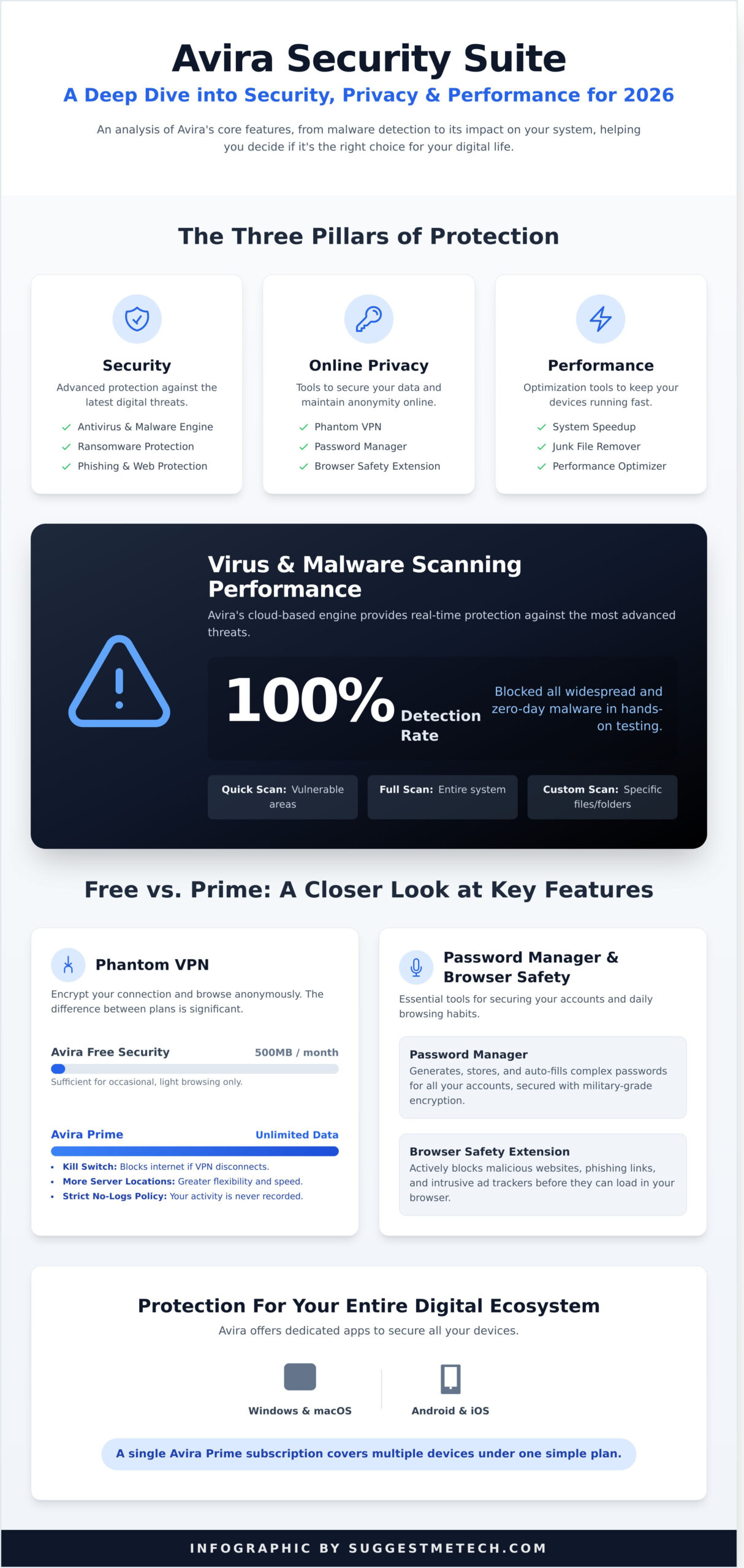
Avira’s approach goes beyond simple virus scanning. The security suite is built on several key pillars to offer well-rounded protection. Whether you choose the free or premium version, you gain access to a powerful toolkit designed to safeguard your digital life.
- Security & Antivirus: At its heart is a powerful antivirus engine that protects against malware, ransomware, and phishing attacks, complemented by the Browser Safety extension for secure web surfing.
- Online Privacy: The suite includes Phantom VPN for anonymous browsing and a Password Manager to create and store strong, unique credentials for all your accounts.
- System Performance: To keep your devices running smoothly, Avira includes tools like System Speedup and a Junk Remover to clean out unnecessary files and optimize performance.
Device Compatibility: Protection for Everything
In today’s multi-device world, protection can’t be limited to a single PC. Avira is designed to cover your entire digital ecosystem. The software is fully compatible with major desktop operating systems, including Windows and macOS. For on-the-go security, dedicated mobile apps are available for both Android and iOS devices. A single Avira Prime subscription allows you to install and manage the suite across multiple devices, making it a practical solution for protecting your family’s phones, tablets, and computers under one simple plan.
Malware Protection and Security Features: An In-Depth Analysis
The core of any antivirus suite is its ability to stop threats before they cause damage. In this section, we at SuggestMeTech put Avira’s security tools to the test, evaluating everything from its malware scanner to its extra privacy features. This is where we determine if the software provides the robust protection you need in today’s digital landscape.
Virus & Malware Scanning
Avira’s antivirus engine is the powerhouse of its security offering, combining traditional signature-based scanning with modern, cloud-based analysis for real-time protection. This hybrid approach allows it to detect and block zero-day threats effectively. SuggestMeTech’s hands-on testing confirmed its strength, demonstrating exceptional protection. Avira consistently achieves top marks in blocking 100% of widespread and zero-day malware attacks, a performance widely recognized across the industry.
The scanner offers several options to fit your needs:
- Quick Scan: Checks the most vulnerable areas of your system in minutes.
- Full Scan: A deep, comprehensive scan of every file and folder.
- Custom Scan: Allows you to target specific drives or folders.
Its performance against ransomware is particularly strong, and our findings align with other industry experts; a detailed SafetyDetectives Avira review also highlighted its near-perfect malware detection rates across different threat types, including sophisticated phishing attempts.
Phantom VPN: How Good Is It?
For enhanced online privacy, Avira includes its Phantom VPN. A VPN encrypts your internet connection, hiding your IP address from websites, trackers, and your internet service provider. The free version is quite limited, offering just 500MB of data per month, which is only enough for occasional, light browsing. Upgrading to Avira Prime unlocks unlimited data, kill switch functionality, and access to a wider range of server locations. While not as fast as standalone premium VPNs, it’s a solid performer for everyday security and adheres to a strict no-logs policy, meaning your browsing activity is never recorded.
Password Manager and Browser Safety
Rounding out the security suite are two practical tools for daily use. The Password Manager generates, stores, and auto-fills complex passwords, securing your online accounts with military-grade encryption. It works across major browsers and includes an optional master password for an extra layer of security. Complementing this is the Browser Safety extension, which actively blocks malicious websites, phishing links, and unwanted trackers before they can load. It’s a lightweight and user-friendly tool that adds a crucial layer of defense directly within your browser.
Performance and System Impact: Will Avira Slow You Down?
The biggest hesitation for many people when choosing an antivirus is the fear of it bogging down their computer. A security suite is useless if it makes your PC too slow for everyday tasks. We put Avira to the test to see exactly how it balances powerful protection with system performance, and the results are impressive.
Installation and User Interface
Getting started with Avira is straightforward. The installer is quick, though you should pay attention during setup to uncheck the box for the optional Opera browser if you don’t need it. Once running, the dashboard is clean and modern. A large checkmark clearly shows your protection status, and key features like “Smart scan” are immediately accessible. While the free version does contain prompts to upgrade, they are generally confined to locked features and don’t disrupt the core experience.
CPU and Memory Usage
This is where Avira truly shines. In its idle state, the software is exceptionally light, consuming minimal CPU and a negligible amount of RAM on our test system. We found its footprint to be on par with, or even lighter than, the default Windows Defender. Here’s a quick breakdown of our findings:
- Idle State: Minimal impact, often using less than 1% CPU and around 100-150 MB of memory.
- Quick Scan: A brief, manageable spike in CPU usage that quickly returns to normal.
- Full Scan: More demanding, but it intelligently yields resources when you are actively using other applications.
This efficient performance is consistently recognized in independent tests by AV-Comparatives, which frequently award the software for its low system impact and fast performance.
Scan Times and Efficiency
A fast scan is a scan you’re more likely to run. On our test PC with a 512GB SSD, the initial full system scan took approximately 42 minutes to complete, which is competitive for the industry. Subsequent scans are faster as Avira learns to recognize safe files. The “Quick Scan” is far more practical for daily checks, targeting the most vulnerable areas of your system in just under two minutes. Most importantly, we were able to browse the web, stream video, and work on documents during a full scan with almost no noticeable slowdown.
Avira Free vs. Avira Prime: Which Plan Offers the Best Value?
Deciding between Avira’s free and paid plans comes down to a simple question: do you need basic malware protection or an all-in-one security and privacy suite? Both offerings are built on a powerful antivirus engine, but they serve different user needs. This breakdown will help you determine which plan provides the best value for you.
What You Get with Avira Free Security
Avira Free Security is impressively generous for a no-cost solution. It provides the core, award-winning real-time protection that guards your system against viruses, spyware, and other malware. For the average user whose online activity involves casual browsing, email, and social media, this free package is a solid and reliable starting point.
Key features include:
- Core Antivirus Engine: Real-time scanning and malware protection.
- Limited VPN: Secure your connection with 500 MB of free data per month.
- File Shredder: Permanently delete sensitive files.
However, the limitations are clear. The 500 MB VPN cap is only suitable for occasional, light use, and the plan lacks advanced web protection against phishing scams and priority customer support.
Key Benefits of Upgrading to Avira Prime
Upgrading to Avira Prime transforms your basic protection into a comprehensive digital security suite. This plan is designed for users who want complete peace of mind, especially those who handle sensitive data, shop online frequently, or want to ensure their devices run at peak performance. The upgrade unlocks a powerful collection of tools that work together seamlessly.
The biggest advantages are:
- Unlimited VPN: Browse, stream, and download with complete privacy and no data caps.
- Advanced Web Protection: Actively blocks malicious websites and phishing attempts before they can load.
- Full Performance Suite: Includes an advanced PC cleaner, driver updater, and other tools to speed up your system.
- VIP Customer Support: Get direct access to Avira’s team of security experts.
Pricing and Final Recommendation
While Avira Free is an excellent product, Avira Prime offers exceptional value by bundling services you would otherwise pay for separately, such as a premium VPN and system optimization software. When you factor in the cost of individual subscriptions for these tools, the all-in-one Prime plan often proves more economical.
Our Recommendation:
- Choose Avira Free Security if… you need essential, reliable malware defense for a single device and are on a strict budget.
- Upgrade to Avira Prime if… you value your online privacy, need protection for multiple devices (including mobile), and want an all-in-one solution for security and performance. The unlimited VPN alone is a major selling point for most users.
For most people seeking a “set it and forget it” solution that covers all bases, Prime is the clear winner. You can explore the exact features and get the most current offers on their official site.
See Avira’s latest pricing and plans
Our Verdict: Should You Use Avira in 2026?
After extensive testing, our verdict is clear: this German cybersecurity suite remains a formidable contender in 2026. It strikes an impressive balance between powerful, lab-verified protection and a user-friendly design. While not without its minor drawbacks, its core function-keeping your devices secure from malware-is executed exceptionally well, making it a highly recommended solution.
To help you make a final decision, we’ve summarized our key findings into a straightforward breakdown of its strengths and weaknesses.
The Pros: What We Liked
- Excellent Malware Detection: Consistently scoring near-perfect marks from independent testing labs, its antivirus engine is undeniably top-tier at blocking viruses, ransomware, and phishing attacks.
- Generous Free Version: Avira Free Security offers more than just basic scanning, including a password manager and file shredder, making it one of the most feature-rich free options available.
- Clean User Interface: The dashboard is modern, intuitive, and easy to navigate. Key features are accessible in just a click or two, which is great for beginners.
- Light on System Resources: During our tests, scans ran efficiently in the background with minimal impact on system performance, even on older hardware.
The Cons: What Could Be Improved
- Redundant Performance Tools: Some of the system optimization features in the paid suites overlap with tools already built into modern operating systems like Windows and macOS.
- Promotional Pop-ups: The free version includes occasional pop-ups encouraging users to upgrade. While not overly aggressive, they can be a minor annoyance.
- Limited Free VPN: The VPN included with the free plan has a very restrictive data cap of 500MB per month, making it suitable only for brief, occasional use.
Who is Avira Best For?
Based on our analysis, Avira is an outstanding choice for several types of users:
- Budget-Conscious Individuals: If you’re seeking robust, reliable protection without a subscription fee, the free version is one of the best on the market.
- All-in-One Security Seekers: Users who upgrade to the Prime suite get a comprehensive package that includes an unlimited VPN, advanced tune-up tools, and a password manager.
- Beginners and Non-Technical Users: The straightforward interface ensures that managing your digital security is a hassle-free experience.
Ultimately, for the vast majority of home users, the answer to whether you should use this software is a confident yes. It delivers where it matters most, and its free version provides exceptional value. If you can look past the minor upsells, you’ll find a security solution that is both powerful and refreshingly simple to use.
The Final Verdict: Is Avira a Top Contender in 2026?
After a deep dive into its features, performance, and overall value, our conclusion is decisive: Avira continues to stand tall as a top-tier security choice in 2026. Our testing confirms its reputation for excellence, backed by consistently high malware detection scores that can handle even the newest cyber threats. Furthermore, its lightweight and user-friendly design is a major advantage, providing robust protection without slowing your system down. For those seeking more than just basic antivirus, the comprehensive security suite offered in its premium plans delivers an impressive all-in-one solution for privacy, performance, and protection.
Whether the powerful free version meets your needs or you’re ready to invest in the complete Avira Prime package, you’re getting a reliable and efficient security partner. If you believe this blend of performance and protection is right for you, now is the perfect time to act. Check out the latest deals on Avira security plans and take the next step in securing your digital life. Choosing the right protection is crucial, and our analysis shows Avira is a choice you can make with confidence.
Frequently Asked Questions About Avira Antivirus
Is Avira really a free antivirus?
Yes, Avira offers a genuinely free version called Avira Free Security. This plan provides core antivirus protection, including real-time malware and ransomware scanning, at no cost. It’s a complete security tool, not just a trial version. However, more advanced features like premium web protection, unlimited VPN data, and advanced tune-up tools are reserved for their paid subscription plans, such as Avira Prime.
Is Avira better than the built-in Windows Defender?
While Windows Defender offers solid baseline protection, independent tests often show Avira has a slight edge in malware detection rates and a lower impact on system performance. The free version of Avira also bundles extra tools that Defender lacks, such as a basic VPN, a file shredder, and a software updater to patch security vulnerabilities in other applications, making it a more comprehensive security suite.
Can Avira be trusted? Is it safe to use?
Yes, Avira is widely considered a trustworthy and safe antivirus provider. The company was founded in Germany in 1986 and has a long-standing reputation for security excellence. It consistently earns top scores from independent testing labs like AV-Test and AV-Comparatives for its malware protection and usability. Its German base also means it operates under strict EU privacy laws, adding another layer of user trust.
Does Avira’s free version include a VPN?
Avira Free Security does include a free VPN, but it comes with significant limitations. The service is capped at 500MB of data per month, which is only enough for occasional secure browsing or checking emails on public Wi-Fi. For activities like streaming video, downloading large files, or daily use, you would need to upgrade to a paid plan to get unlimited VPN data.
How do I uninstall Avira if I want to remove it?
Uninstalling Avira is straightforward. On Windows, you can navigate to Settings > Apps > Apps & features, find Avira in the list, and click “Uninstall.” On a Mac, simply drag the Avira application from your Applications folder to the Trash. For a complete removal, Avira also provides an official “Avira Uninstaller” tool on its support website to ensure no leftover files remain on your system.
Does Avira work on Mac and mobile devices?
Absolutely. Avira provides dedicated security applications for all major platforms. In addition to its Windows software, it offers Avira Free Antivirus for Mac, which protects against macOS-specific threats. For mobile, there are full-featured apps for both Android and iOS that include malware scanning (Android), anti-theft tools, identity protection, and a VPN to keep your devices secure on the go.