
Choosing a web host can feel like navigating a minefield. You’re worried about sluggish speeds hurting your business, confused by low introductory prices that skyrocket on renewal, and anxious about finding reliable support when you need it most. For years, Bluehost has been a top recommendation for WordPress users, but in the fast-evolving world of web hosting, is it still the undisputed champion in 2026?
We decided to cut through the marketing hype and get you a real, data-driven answer. We signed up, built a test site, and put Bluehost’s performance, pricing, customer support, and unique WordPress features under the microscope. We’ve tracked the uptime, measured the page load speeds, and dealt with their support team so you don’t have to guess whether their service lives up to the promises.
This comprehensive review will give you a clear understanding of what you’re really paying for. By the end, you’ll have the confidence to choose the right plan and a final, trustworthy verdict on whether Bluehost is still the best choice for your WordPress website.
Key Takeaways
- Understand the difference between Bluehost’s low introductory cost and its standard renewal rates to accurately budget for your website.
- Discover how its custom dashboard and seamless WordPress integration create a beginner-friendly experience for launching your first site.
- Learn how the official WordPress.org recommendation for Bluehost translates to real-world performance and site reliability based on our tests.
- Identify if you’re the ideal user for this host or if a different provider would better suit your specific project needs and budget.
Performance and Reliability: Can Bluehost Keep Your Site Fast?
When WordPress.org officially recommends a hosting provider, it sets a high bar for expectations. Performance isn’t just a technical metric; it directly impacts your site’s user experience and search engine rankings. A slow or unavailable website can turn visitors away for good. That’s why we’re putting Bluehost to the test, analyzing everything from its server infrastructure and uptime guarantees to real-world speed test results to see if it delivers the performance your WordPress site needs.
Uptime Analysis: How Reliable Is Bluehost?
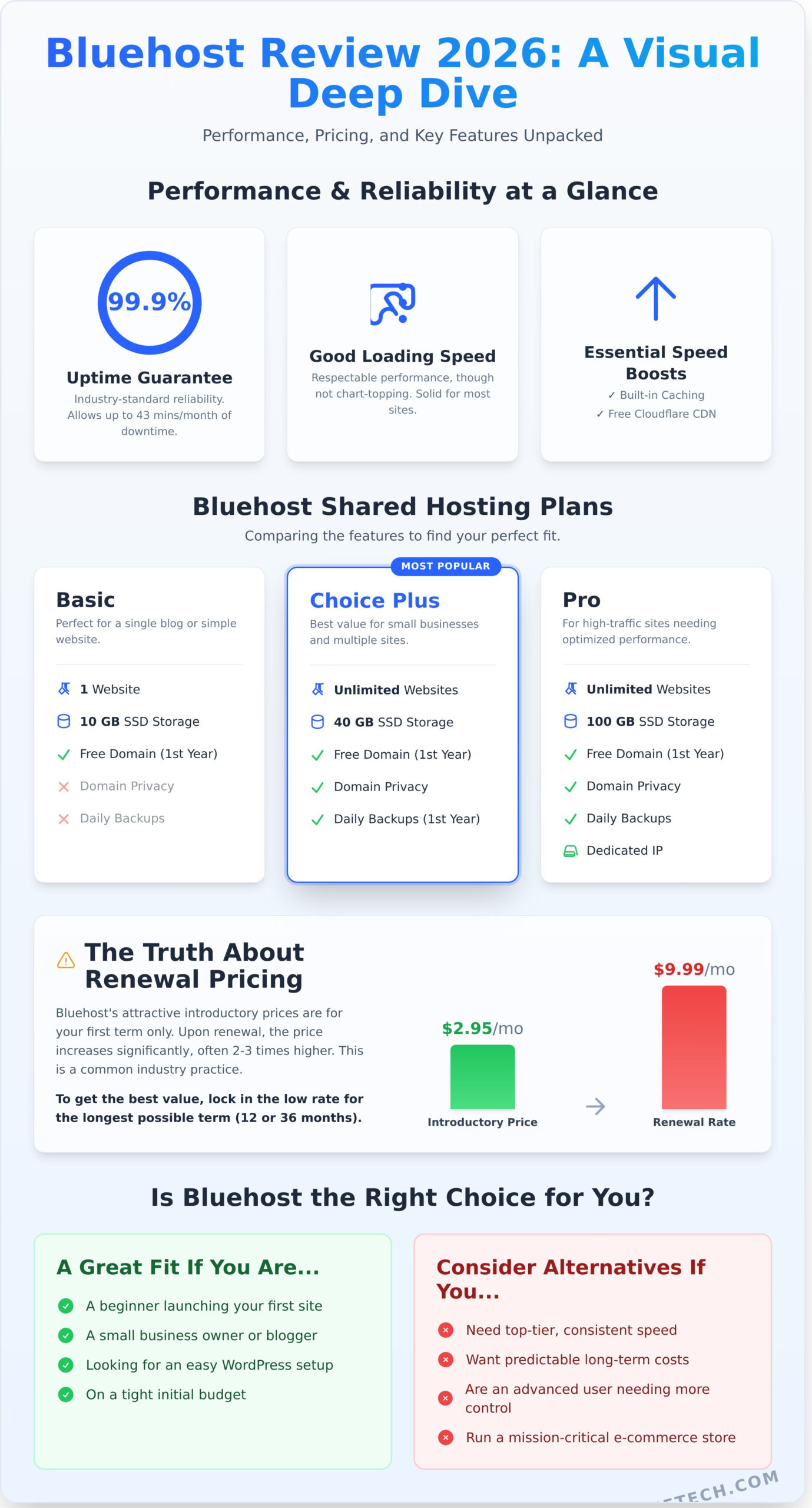
Bluehost offers the industry-standard 99.9% uptime guarantee. While this sounds nearly perfect, it still allows for up to 43 minutes of downtime per month. Our analysis of third-party monitoring data shows they generally meet this promise, making them a reliable choice for most websites. However, as a shared host, uptime can be affected by server load from other sites. As part of Newfold Digital, a look into the Bluehost company history reveals a massive infrastructure, which supports millions of websites and allows for significant investment in reliability.
Speed and Load Time Tests
Reliability is only half the battle; speed is what keeps users engaged. In our tests using tools like GTmetrix, a basic WordPress site on Bluehost’s shared hosting delivers respectable, though not chart-topping, load times. A key metric, Time to First Byte (TTFB), which measures server responsiveness, is often average compared to performance-focused competitors like SiteGround. To combat this, Bluehost provides essential speed-boosting tools, including:
- Built-in Caching: A server-level caching layer helps deliver your content faster without requiring a plugin.
- Free Cloudflare CDN: Integrating a Content Delivery Network (CDN) brings your site’s files closer to visitors globally, significantly cutting down load times.
With these features enabled, performance improves dramatically. While it may not be the absolute fastest host on the market, Bluehost provides the necessary tools to build a quick and responsive website, especially for beginners and small businesses.
Bluehost Plans and Pricing: What’s the Real Cost?
One of the biggest draws for Bluehost is its eye-catching low prices, often advertised for just a few dollars per month. While these introductory offers are a fantastic entry point for new website owners, the key to making a smart investment is understanding the full picture: renewal rates and which features you actually need. Let’s break down the real cost so you can choose the right plan without overpaying.
Shared Hosting Plans Explained
For most users, one of the shared hosting plans is the perfect starting point. These plans place your website on a server with other sites, which keeps costs down while providing all the essential resources. Here’s a quick look at the main tiers:
- Basic Plan: Ideal for a single, simple website or a personal blog. You get one website, 10 GB of storage, and a free domain for the first year. It’s a no-frills, get-it-online package.
- Choice Plus Plan: This is the most popular plan and our recommended starting point for small businesses. It includes everything in Basic, plus hosting for unlimited websites, 40 GB of storage, and crucial extras like free Domain Privacy and daily website backups for the first year.
- Pro Plan: Built for growing sites with higher traffic. The Pro plan adds more server resources for optimized performance, a dedicated IP address, and increased 100 GB storage.
The Truth About Renewal Pricing
This is where you need to pay close attention. The advertised low price requires a 12-month or 36-month upfront commitment. When your initial term ends, the plan renews at the “regular” rate, which is often two to three times higher. This pricing model isn’t unique; it’s a common strategy that has become more prevalent with ongoing web hosting industry consolidation. To get the best long-term value, lock in the lowest introductory rate for the longest term you’re comfortable with. Also, be mindful during checkout-uncheck optional add-ons like SiteLock Security unless you are certain you need them.
Beyond Shared Hosting: VPS and Dedicated Options
As your website grows, you may need more power. Virtual Private Server (VPS) hosting gives you guaranteed resources on a shared server, offering more control and performance for sites with increasing traffic. For high-traffic, mission-critical websites, Dedicated hosting provides an entire server just for you, ensuring maximum power and security. However, for nearly all beginners, starting with a shared plan is the most practical and cost-effective choice.
The WordPress Experience: A Beginner’s Dream?
Bluehost has built its reputation on being one of the best hosting platforms for WordPress, officially recommended by WordPress.org since 2005. But does the experience live up to the hype, especially for beginners? We tested the entire process, from signing up to launching a site, to see if it’s truly the simplified solution it claims to be.
Onboarding and 1-Click WordPress Installation
The moment you complete your purchase, Bluehost guides you through a streamlined setup wizard. It asks practical questions about your goals-are you building a blog, a store, or a portfolio? Based on your answers, it automatically installs WordPress for you. There’s no need to manually download files or create databases. You’re also given a temporary domain, allowing you to build and test your entire website privately before pointing your actual domain to it and going live.
Navigating the Bluehost Dashboard
Instead of a traditional, and often intimidating, cPanel, you’re greeted with a custom dashboard designed for clarity. A helpful checklist guides new users through essential launch tasks like creating a post, setting up a contact page, and customizing their design. Key management tasks are organized into a simple side menu:
- My Sites: Manage all your WordPress installations.
- Email & Office: Create and manage professional email accounts.
- Marketing Tools: Access SEO tools and Google Ads credits.
This simplified approach is a major advantage for beginners who just want to build their site. However, advanced users might miss the granular control of a full cPanel, though it is still accessible if needed.
Built-in WordPress Tools and Features
The integration goes beyond just the dashboard. Every WordPress site comes with the Bluehost plugin pre-installed, which centralizes performance, security, and update settings. One of its standout features is the free staging environment. This lets you create a clone of your site to safely test new plugins or design changes without risking your live website-a professional-grade feature made incredibly simple.
The dashboard also features a marketplace for premium themes and plugins. While convenient for browsing, we always recommend you conduct your own market research to find tools that best fit your specific business niche. Overall, the built-in toolset provides a powerful, yet accessible, foundation for any WordPress project. See Bluehost’s WordPress plans for yourself.
Customer Support and Ease of Use: Help When You Need It?
Even the most feature-rich hosting is worthless if you can’t get help when your site goes down. For beginners especially, responsive and knowledgeable support is non-negotiable. Bluehost promises 24/7 assistance through live chat and phone, a critical safety net for anyone managing a website. But does the quality match the availability? We put it to the test.
Testing Bluehost’s Support Channels
In our direct tests, we found the support channels to be highly accessible. The user experience is straightforward, guiding you to the help you need without unnecessary friction. Our key findings include:
- Live Chat: We consistently connected with an agent in under five minutes. The representatives were polite and proficient at handling common issues, like WordPress installation questions and billing inquiries.
- Phone Support: Similar to chat, phone support was readily available. It’s a great option for those who prefer talking through a problem over typing.
- Knowledge Base: The self-help section is extensive and well-organized. For common tasks and troubleshooting, their library of articles and guides is a genuinely useful first stop.
The Impact of Newfold Digital (EIG)
It’s important to note that Bluehost is owned by Newfold Digital (formerly EIG), one of the largest web hosting conglomerates. This large-scale operation allows for resources like 24/7 support, but it can also lead to a more standardized, tiered support system. While some long-time users report a decline in expert-level support over the years, our tests for typical user problems were resolved efficiently on the first contact, suggesting the system is effective for its target audience.
Ultimately, the combination of a clean, intuitive control panel and readily available support makes the overall user experience a strong point. While power users with complex technical needs might occasionally hit the limits of first-tier support, beginners and small business owners will find the system more than capable of providing the help they need, when they need it. Have your own experience with their support? Let us know at suggestmetech.com!
The Verdict: Who Should Use Bluehost (And Who Shouldn’t)?
After a deep dive into its performance, pricing, features, and support, our final verdict is in. The truth is, no single web host is the perfect solution for every user. The right choice depends entirely on your goals, technical skill, and budget. Here, we break down exactly who will get the most value from Bluehost-and who might be better served by an alternative.
Bluehost Is a Great Choice For…
Bluehost excels for a specific, and very large, group of users. It’s an ideal starting point if you are:
- Beginners and First-Timers: If you’re launching your first WordPress website or blog, the guided setup and intuitive dashboard remove much of the initial technical friction.
- Small Business Owners: The all-in-one packages, which include a free domain, SSL certificate, and professional email, provide everything a new business needs to get online quickly.
- Users Who Value Simplicity: If you prioritize ease of use and a straightforward interface over advanced, customizable features, Bluehost’s platform is designed for you.
- Budget-Conscious Starters: It offers one of the most affordable and reputable entry points into web hosting, backed by a 30-day money-back guarantee.
You Should Look Elsewhere If…
However, this host isn’t a one-size-fits-all provider. We suggest you consider other options if:
- You Need Elite Performance: For high-traffic websites or growing e-commerce stores, a host offering more robust scaling features and faster speeds might be a better fit.
- Your Budget is Rock-Bottom: If the absolute lowest possible price (including renewals) is your top priority, you might find more budget-focused alternatives available.
- You’re an Experienced Developer: If you prefer a clean, traditional cPanel experience without integrated upselling or custom dashboard layers, you might find Bluehost’s interface restrictive.
- You Require Monthly Billing: Bluehost’s best pricing requires at least a 12-month commitment, so it’s not a fit if you need to pay month-to-month from the start.
Final Score and Recommendation
Ultimately, Bluehost earns its official recommendation from WordPress.org by being one of the most accessible platforms available. It provides a fantastic balance of features, affordability, and simplicity that is perfect for getting a new project off the ground.
- Performance: 4/5
- Features: 4.5/5
- Ease of Use: 5/5
- Customer Support: 3.5/5
- Value for Money: 4.5/5
If you’re a beginner, blogger, or small business owner ready to build your online presence without a steep learning curve, Bluehost is an excellent and reliable choice. Ready to start your WordPress site? Get started with Bluehost today.
The Verdict: Is Bluehost the Right Choice in 2026?
After a deep dive into its performance, pricing, and user experience, our 2026 review finds that bluehost continues to be a formidable choice, particularly for WordPress beginners and small businesses. Its commitment to simplicity, combined with reliable uptime, makes it an accessible entry point into the world of web hosting. While developers or high-traffic sites might eventually outgrow its shared plans, the value proposition for new users is undeniable.
It’s no surprise that Bluehost has been officially recommended by WordPress.org since 2005. With a free domain for the first year and 24/7 expert support ready to help, you have a trusted and supportive foundation to build upon. If you’re looking for a dependable, budget-friendly host to launch your WordPress site, Bluehost remains a top-tier option.
Ready to get started? Check out Bluehost’s latest deals and start your website today. Your online journey begins with a single click.
Frequently Asked Questions About Bluehost
Does Bluehost offer a free domain name?
Yes, most Bluehost shared hosting plans include a free domain name for the first year. This is a valuable perk for anyone starting a new website, saving you the initial registration fee of around $15-$20. To qualify for this offer, you typically need to sign up for a 12-month plan or longer. After the first year, standard renewal rates will apply for the domain name.
What is Bluehost’s money-back guarantee policy?
Bluehost provides a 30-day money-back guarantee for its web hosting services. If you are not satisfied and cancel your plan within the first 30 days, you will receive a full refund on your hosting fees. It’s important to note that this guarantee does not cover add-on products, such as domain names. If you received a free domain, its cost will be deducted from your refund amount.
Can Bluehost handle e-commerce websites like WooCommerce?
Absolutely. Bluehost is well-suited for e-commerce and offers specialized WooCommerce hosting plans designed for online stores. These plans come with WooCommerce pre-installed, a dedicated IP address, and security features to protect transactions. While you can run WooCommerce on a standard shared plan, the dedicated e-commerce packages provide better performance and resources to support a growing online business, ensuring a smooth experience for your customers.
Is it difficult to migrate an existing WordPress site to Bluehost?
Migrating a WordPress site to Bluehost is generally a straightforward process. They offer a free, automated WordPress migration plugin that simplifies the transfer for you. For new customers, Bluehost often provides a free professional site migration for one WordPress website when you purchase a hosting plan. This service makes the switch seamless, even if you don’t have technical experience. Always check their site for the most current migration offers.
Does Bluehost include a free SSL certificate?
Yes, every hosting plan from Bluehost includes a free SSL certificate powered by Let’s Encrypt. The SSL is automatically installed and renewed on your domain, enabling the secure “https://” protocol. This is crucial for protecting visitor data, building trust with your audience, and improving your website’s SEO rankings. You don’t need to purchase a separate SSL certificate to get started, as this essential security feature is included from day one.
What is the difference between Bluehost and HostGator?
While both are popular hosting providers, the key difference lies in their user experience and focus. Bluehost is officially recommended by WordPress.org and provides a more streamlined, beginner-friendly dashboard specifically optimized for WordPress users. HostGator offers a more traditional cPanel experience and is known for its flexible plans that appeal to a broad range of users. Bluehost is often the top choice for those prioritizing ease of use with WordPress.
Does Bluehost offer monthly billing plans?
Bluehost primarily structures its pricing around long-term plans (12, 24, or 36 months) to offer the lowest introductory rates. Monthly billing is generally not available for their basic shared hosting plans. To secure the advertised low price and benefits like the free domain name, you must commit to an annual term. For services like VPS or Dedicated hosting, monthly options may be available but at a higher price point.