Have you ever hit ‘send’ on an important message and immediately felt a wave of anxiety? Or stared at your screen, wondering why your carefully worded emails are being misinterpreted or, worse, completely ignored? In today’s digital-first workplace, these small moments of uncertainty can impact your professional reputation. This is precisely why mastering professional email etiquette is no longer just a soft skill-it’s an essential tool for success.
Think of this guide as your practical roadmap to confident communication. We’ll demystify the unwritten rules of the inbox, providing actionable advice on everything from crafting the perfect subject line to confidently handling sensitive topics. You’ll learn the crucial differences between CC and BCC, structure messages for clarity, and develop the skills to ensure every email you send is professional, effective, and gets the positive response it deserves. It’s time to build your reputation and make every message count.
Key Takeaways
- Structure every message for clarity and impact by mastering the four critical components of a professional email.
- Avoid common misunderstandings by learning how to control your tone and maintain a professional voice in writing.
- Master professional email etiquette by understanding the distinct roles of To, CC, and BCC to ensure the right people see your message.
- Confidently handle difficult conversations and large attachments with practical strategies for advanced email scenarios.
The Anatomy of a Perfect Professional Email
Before we dive into the advanced strategies of digital correspondence, it’s crucial to master the fundamentals. Proper email etiquette starts with structure. Every effective professional email is built on four key components that work together to ensure your message is received clearly and respectfully. Getting these right builds a foundation for successful communication, preventing misunderstandings and establishing your credibility from the very first word.
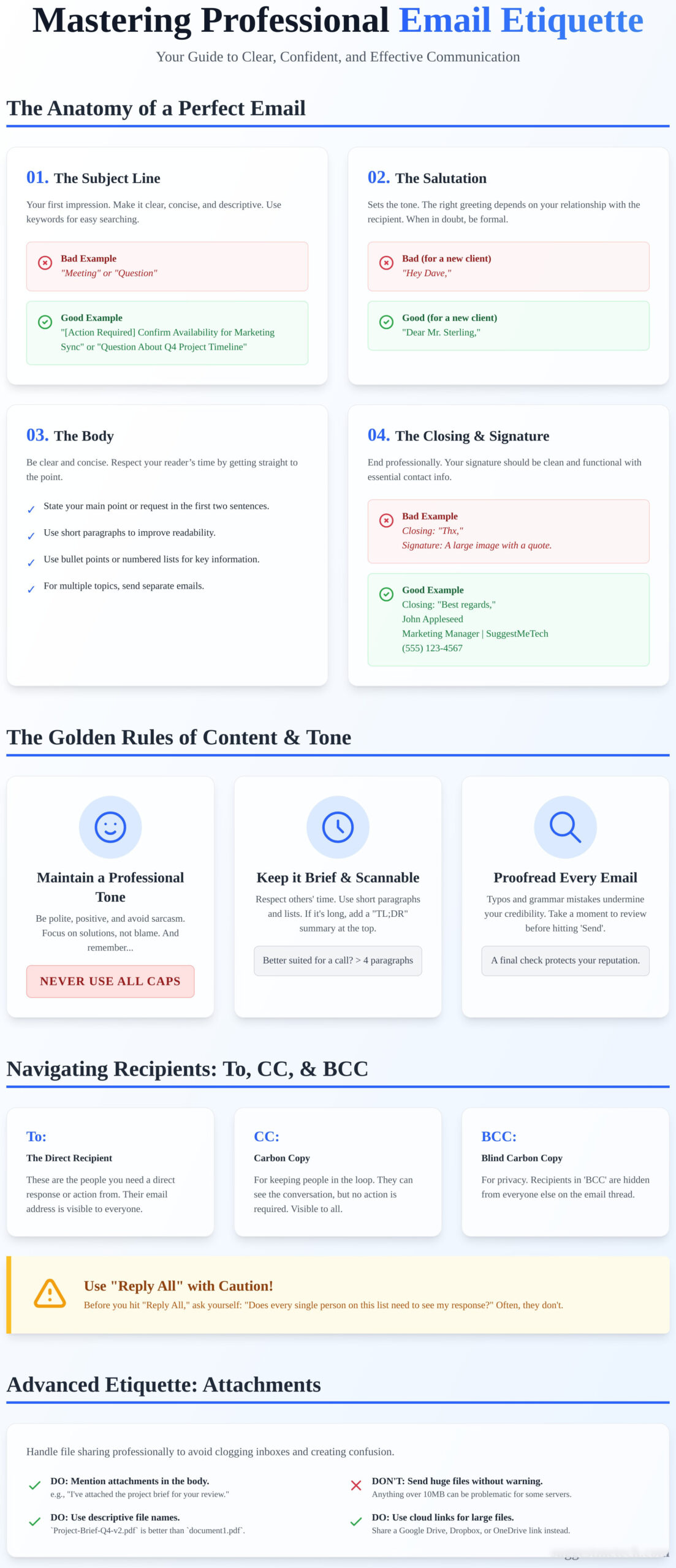
1. The Subject Line: Your First Impression
The subject line is the most critical part of your email; it determines whether your message gets opened, ignored, or sent straight to trash. A strong subject line is clear, concise, and descriptive, giving the recipient all the context they need. Use keywords for easy searching and prefixes like [Action Required] for urgency.
- Bad: Question
- Good: Question About Q4 Project Timeline
- Bad: Meeting
- Good: [Action Required] Confirm Availability for Marketing Sync on Friday
2. The Salutation: Start with Respect
How you greet someone sets the tone for the entire message. The right salutation depends on your relationship with the recipient. If you’re contacting someone for the first time or in a formal context, use a classic greeting. For colleagues you know well, a more casual approach is fine. When in doubt, always err on the side of formality.
- Bad (for a new client): Hey Dave,
- Good (for a new client): Dear Mr. Sterling,
- Bad (for a teammate): To Whom It May Concern,
- Good (for a teammate): Hi Sarah,
3. The Body: Clarity and Conciseness
Respect your reader’s time by getting straight to the point. State your primary message or request in the first sentence or two. To improve readability, break up long blocks of text with short paragraphs and use bullet points or numbered lists for key information. This practice of clarity is a cornerstone of the broader rules of netiquette that govern online communication. If you need to discuss multiple unrelated topics, send separate emails to keep conversations focused.
4. The Closing and Signature: End Professionally
A professional closing provides a polite transition to your signature. Stick to standard, neutral options. Your email signature should be clean and functional, providing essential contact information without unnecessary clutter. Include your full name, title, company, and a phone number. Avoid inspirational quotes, excessive logos, or multiple colors that can distract from your message.
- Bad Closing: Thx,
- Good Closing: Best regards, or Sincerely,
- Bad Signature: A large image with a motivational quote.
- Good Signature:
John Appleseed
Marketing Manager | SuggestMeTech
(555) 123-4567
The Golden Rules of Email Content and Tone
An email’s success isn’t just about the information it contains; it’s about how that information is delivered. Without the benefit of facial expressions or vocal tone, your words carry all the weight. A hastily written message can easily be misinterpreted as abrupt, angry, or dismissive, even when that’s not your intent. Mastering the content and tone of your messages is a fundamental part of good email etiquette that separates amateur communication from professional correspondence.
Maintain a Professional and Positive Tone
Your tone sets the stage for how your message is received. Sarcasm and complex jokes often fall flat in writing and can come across as confusing or offensive. Instead, aim for a consistently positive and respectful tone. This is especially important when discussing sensitive topics or disagreements.
- Be Polite: Simple words like “please” and “thank you” go a long way.
- Avoid Negativity: Focus on collaborative solutions and objective facts rather than placing blame.
- NEVER USE ALL CAPS: It’s the digital equivalent of shouting and is universally perceived as aggressive or angry.
Keep it Brief and to the Point
Everyone’s inbox is crowded. Respect your recipient’s time by getting straight to the point. State your purpose in the first sentence or two and use short paragraphs, bullet points, or numbered lists to make your key points scannable. As a general guideline, if your message requires more than three or four paragraphs to explain, it might be better suited for a quick call or meeting. For long but necessary emails, consider adding a “TL;DR” (Too Long; Didn’t Read) summary at the top with the main takeaways.
Proofread Every Single Email
A single typo can undermine your credibility and distract from your message. Before you hit “Send,” take a moment to review your work. This final check is a cornerstone of professional email etiquette, reinforcing your attention to detail. Read your email aloud to catch awkward phrasing, and always double-check that recipient names, dates, and attachments are correct. While tools like Grammarly are helpful assistants, your own review is the best final defense against mistakes.
Navigating Recipients: The Art of To, CC, BCC, and Reply All
Misusing the To, CC, and BCC fields is one of the fastest ways to cause confusion or frustration in a professional setting. Understanding who should receive your message-and why-is a fundamental skill in modern email etiquette. Get it right, and you streamline communication; get it wrong, and you create unnecessary digital noise and clutter for your colleagues.
Understanding the ‘To’ and ‘CC’ Fields
Think of your recipient fields as a way to assign clear roles and expectations. Directing your message to the right people is the first step in writing effective and efficient emails, ensuring your request is seen by those who need to act. Here’s a simple breakdown:
- To: These are the primary recipients. They are the people you are directly addressing and from whom you expect a response or action. If you need someone to do something, their address belongs here.
- CC (Carbon Copy): These recipients are included for informational purposes only. They need to be aware of the conversation but are not expected to reply or take any direct action. It’s a way of saying, “Just keeping you in the loop.”
A word of caution: avoid the temptation to CC someone’s manager to pressure them. This passive-aggressive tactic rarely works and can damage professional relationships. Keep your communication direct and transparent.
Using ‘BCC’ for Privacy and Mass Emails
The ‘BCC’ (Blind Carbon Copy) field is a powerful tool for protecting privacy. When you place email addresses in the BCC field, those recipients are hidden from everyone else on the email, including those in the To and CC fields. This makes it perfect for sending out a company newsletter, an event invitation to a large external group, or any message where recipients have not consented to sharing their contact information with each other. However, you should never use BCC to secretly loop a third party into a sensitive or private conversation. This practice is a serious breach of trust and poor email etiquette.
The Dangers of ‘Reply All’
The “Reply All” button is responsible for some of the most infamous email blunders. Before you click it, pause and ask yourself one simple question: “Does every single person on this list need to see my response?”
Most of the time, the answer is no. A direct ‘Reply’ to the sender is often sufficient. Use ‘Reply All’ only when your response is critical information for every original recipient, such as a project team confirming a final decision. If a long thread is no longer relevant to certain individuals, do them a favor and remove them from the conversation on your next reply.
Advanced Etiquette: Handling Attachments and Difficult Conversations
Mastering the basics of professional email is a great start, but true proficiency comes from navigating more complex situations with confidence. Advanced email etiquette is about managing attachments seamlessly, following up effectively, and handling difficult conversations with grace. These skills demonstrate respect for your recipient’s time and inbox.
Best Practices for Email Attachments
Sending a file shouldn’t be an afterthought. To avoid confusion and technical issues, follow these simple but critical steps:
- Mention the attachment: Always refer to the attachment in the body of your email (e.g., “I’ve attached the Q3 report for your review.”). This prevents you from forgetting the file and informs the recipient what to look for.
- Use a descriptive file name: Name your file clearly before sending it. “Project_Alpha_Marketing_Plan_v2.pdf” is much more helpful than “Document1.pdf”.
- Mind the file size: For large files, use a compression tool to create a .zip file or, even better, upload it to a cloud service like Google Drive or Dropbox and share the link.
- Confirm the format: If you’re sending a file in an uncommon format, it’s courteous to ask if the recipient can open it. A simple, “Let me know if you have any trouble opening the .pages file,” can save time.
Following Up Without Being Annoying
Waiting for a response can be frustrating, but your follow-up email should remain professional. After waiting a reasonable time (2-3 business days is a good rule of thumb), forward your original message and add a brief, polite note at the top. Clearly restate your request and provide context. Avoid vague, passive-aggressive phrases like “Just checking in” or “Thought I’d bubble this up.” Instead, be direct and helpful: “Following up on my previous email to see if you have any questions about the proposal.”
Communicating Bad News or Apologies
Delivering bad news or a sincere apology via email requires a direct and empathetic approach. The best email etiquette for these situations involves taking clear ownership and providing a path forward. Avoid making excuses and focus on a solution.
For example:
“Hi [Name],
I’m writing to apologize for the delay in delivering the project assets. I misjudged the time needed for final revisions and take full responsibility. To resolve this, I have allocated my entire afternoon to it and will have everything sent to you by 5 PM today.”
For very serious matters, a phone or video call is always better. The email should then serve as a written follow-up to that conversation.
Context is King: Adapting Your Etiquette to the Situation
Mastering professional email etiquette means understanding that there is no single, rigid set of rules. The most effective communicators know how to adapt their style based on their audience, their relationship with the recipient, and the overall context. What works for a quick message to a teammate won’t be appropriate for a first contact with a potential client. Your ability to gauge the situation and adjust your tone is the hallmark of a true professional.
Formal vs. Informal Emails
The level of formality you use can make or break your message. As a general rule, opt for a more formal tone when communicating with new contacts, senior leadership, or external parties like clients. This includes a proper salutation (e.g., “Dear Ms. Evans”), a clear closing (e.g., “Sincerely”), and full sentences. An informal style, with casual greetings like “Hi Tom,” is perfectly acceptable for close colleagues you work with daily. When in doubt, start formal-it’s always easier to become more casual later. A great tip is to mirror the tone of the person you’re corresponding with.
Internal vs. External Communication
How you write to someone inside your company can be very different from how you write to someone outside of it. External emails are an extension of your company’s brand, while internal messages are focused on operational efficiency.
- Internal Emails: These can often be more concise. Using company-specific acronyms or jargon is generally fine, as your colleagues will understand the context. The focus is on getting the point across quickly.
- External Emails: Always treat these as official documents. They should be polished, proofread, and free of internal slang. Remember that your email could be forwarded to anyone, so maintain a professional tone that represents your organization well.
Cultural Considerations in Global Emails
In a globalized business world, it’s crucial to recognize that communication styles vary significantly across cultures. What is considered direct and efficient in one country may be perceived as abrupt or rude in another. Proper email etiquette requires a global mindset. Before hitting send on an international email, consider these points:
- Formality: Many cultures prefer a much more formal tone in business communication than is common in North America. Using titles and last names is often a sign of respect.
- Directness: Some cultures value indirect communication, building rapport before getting to the main point. Avoid being overly blunt.
- Language: Steer clear of slang, complex idioms, and humor. They rarely translate well and can cause confusion. Stick to clear, simple English.
- Time Zones: Be mindful of the recipient’s working hours. Acknowledge the time difference if you need a response, and don’t expect an immediate reply outside of their business day.
Elevate Your Inbox: Putting Your Email Skills into Practice
Mastering the art of the email is a powerful step toward enhancing your professional reputation. As we’ve covered, the key isn’t a secret formula but a commitment to a few core principles: ensuring every message is clear and concise, adopting a professional and empathetic tone, and understanding the strategic use of To, CC, and BCC. This guide was designed to be your go-to resource, packed with actionable tips used by professionals daily and clear examples of what to do-and what to avoid-in both basic and advanced, real-world scenarios.
By consistently applying these standards, you’ll find that strong email etiquette does more than prevent misunderstandings; it builds trust, strengthens relationships, and streamlines your workflow. You now have the framework to handle everything from simple follow-ups to difficult conversations with confidence and skill.
The importance of these professional habits highlights why foundational communication skills are so valuable. For younger generations preparing for the future, specialized enrichment centers like SuperMinds focus on developing these exact types of essential soft skills from an early age.
Ready to master more essential digital tools? Explore more of our Practical Tech How-To Guides to continue sharpening your skills for the modern workplace. You’re well on your way to becoming a communication pro.
Frequently Asked Questions
How quickly should I respond to a professional email?
A good rule of thumb is to respond within 24 business hours. For urgent matters, a much faster response is expected. If you need more time to provide a complete answer, send a quick acknowledgment. For example, a simple reply like, “Thanks for your message. I’m looking into this and will get back to you by tomorrow afternoon,” manages expectations and shows you’ve received their email, which is a key part of professional communication.
Is it okay to use emojis or GIFs in a work email?
This depends heavily on your company culture and relationship with the recipient. For internal emails with close colleagues who use them, a simple emoji may be acceptable. However, for formal communication, new contacts, or external clients, it’s best to avoid them entirely. Emojis and GIFs can appear unprofessional and may not render correctly across all email clients. When in doubt, always opt for professional language to convey your tone.
What should I do if I make an email etiquette mistake?
For a minor typo, it’s often best to let it go. However, if the mistake is significant-like sending to the wrong person or forgetting a crucial attachment-send a brief correction email promptly. A simple, “Apologies, please find the correct document attached,” is sufficient. Owning the mistake quickly and professionally is a key aspect of good email etiquette. Don’t over-apologize; just correct the error and move on.
When should I pick up the phone instead of sending an email?
Pick up the phone for urgent, sensitive, or complex issues. A call is better for nuanced discussions, giving difficult feedback, or brainstorming, as tone of voice is crucial. Email is ideal for documentation, non-urgent updates, or when you need to send files. If an email chain goes beyond three replies without a clear resolution, it’s a strong signal that a quick phone call would be more efficient and prevent misinterpretation.
How can I politely signal that a long email thread should end?
To gracefully end a long thread, provide a clear, concluding statement in your final reply. Phrases like, “Thank you, this is all the information I need,” or “Great, no further action is needed on my end,” work well. If you are leading the conversation, you can summarize the outcome and state the next steps are complete. For example: “Thanks, everyone. We’ve decided on the next course of action.” This provides a definitive closing point.
Is it necessary to reply to an email that says ‘Thank you’?
Generally, no. A reply to a simple “Thank you” email can create unnecessary inbox clutter. However, context matters. If the sender is a superior or a client, a brief “You’re welcome” or “My pleasure” can be a polite way to acknowledge their message and formally close the loop. For most peer-to-peer interactions, you can consider the conversation concluded once you receive the “thank you” message and no reply is needed.
Can I use an email auto-reply when I’m busy, not just on vacation?
Absolutely. Using an auto-reply during periods of intense focus is an excellent productivity strategy and demonstrates strong email etiquette. You can set a message like, “Thank you for your email. I am currently focused on a project deadline and will respond to messages after 3 PM.” This manages sender expectations effectively, letting them know their message was received and when they can anticipate a response without interrupting your workflow.