
Choosing a web host can feel like a high-stakes gamble. You’re worried that slow page speeds will cost you customers, that confusing technical jargon will leave you overwhelmed, and that a surprise renewal bill will wreck your budget. Worse yet is the fear of your site going down at a critical moment with no expert support in sight. For years, SiteGround has been a leading recommendation precisely because it promised to solve these problems with stellar performance and legendary support. But in the fast-evolving tech landscape of 2026, does it still hold the crown?
We’re here to give you the definitive answer. In this in-depth, hands-on review, we cut through the marketing hype to deliver the facts. We’ve put SiteGround’s servers to the test for speed and reliability, explored its custom Site Tools dashboard for ease of use, and demystified its entire pricing structure-including those all-important renewal rates. We also put their 24/7 support team on the spot. By the end, you’ll have everything you need to confidently decide if SiteGround is the right host for your website.
Key Takeaways
- Learn why SiteGround’s infrastructure, built on the Google Cloud Platform, delivers elite website speed and what that means for your visitors.
- Break down the real cost of the StartUp, GrowBig, and GoGeek plans to determine if the premium features justify the price for your specific needs.
- Discover how the custom Site Tools control panel compares to the traditional cPanel and whether it simplifies website management for beginners.
- Understand the proactive security measures and expert support that set this host apart and how they protect your website around the clock.
Performance & Speed: What Makes SiteGround So Fast?
In the world of web hosting, speed is a critical currency. A slow website leads to high bounce rates, poor user experience, and lower search engine rankings. SiteGround has built its reputation on delivering premium speed and reliability, and this isn’t just marketing hype. Their entire infrastructure is engineered for top-tier performance, directly translating to a faster, more responsive website for your visitors. Let’s break down the specific technologies that power these speed claims and how they give you a competitive edge.
Google Cloud Platform Infrastructure
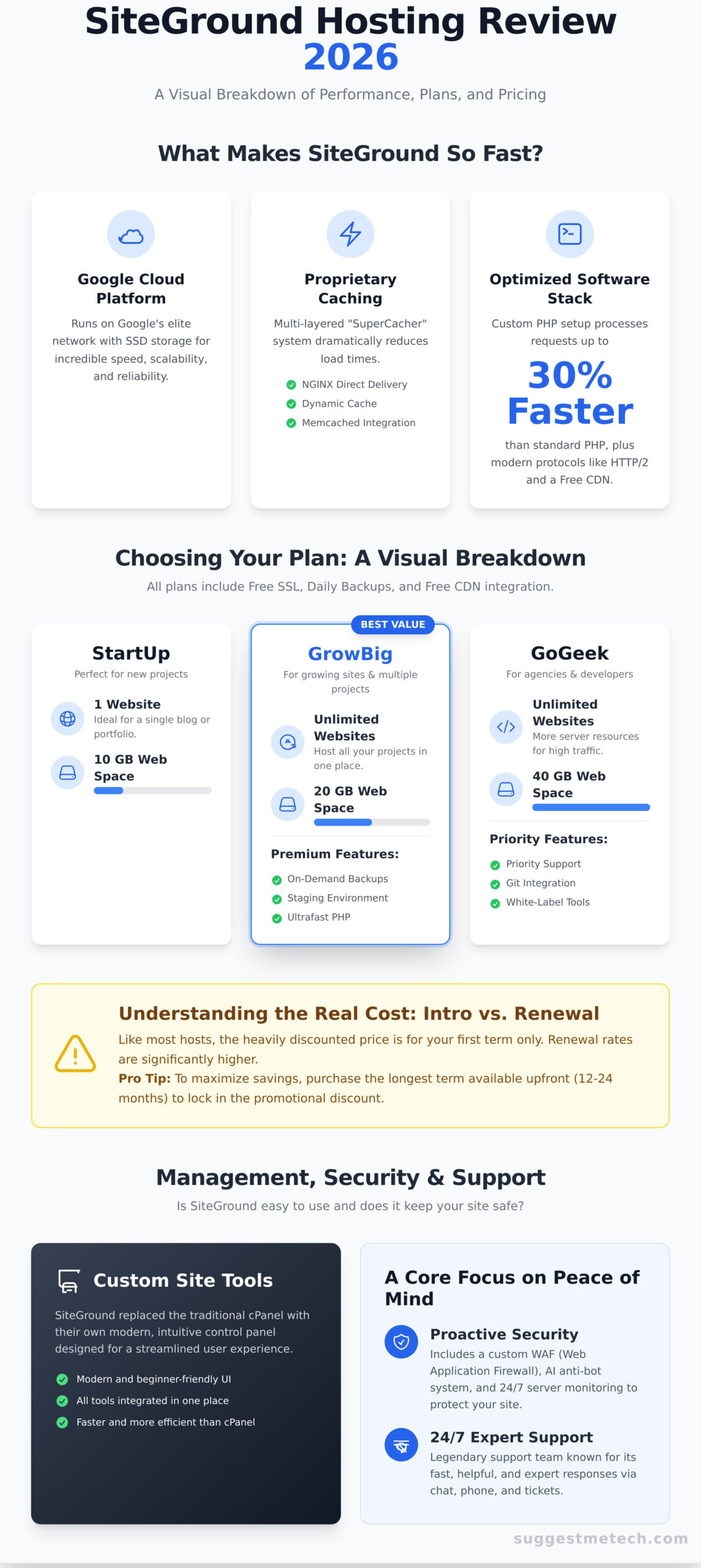
At the core of SiteGround’s performance is its foundation on the Google Cloud Platform (GCP). Unlike traditional hosts that may rely on single dedicated servers, all plans run on Google’s cutting-edge network with SSD persistent storage. This move, a key milestone in the SiteGround company history, provides incredible redundancy and lightning-fast data processing. The distributed nature of GCP means your site benefits from a robust, scalable, and resilient network, ensuring both speed and stability.
SuperCacher and Dynamic Caching
One of the most powerful tools in the SiteGround arsenal is its proprietary caching system, SuperCacher. This multi-layered solution is designed to dramatically reduce load times, especially for returning visitors. It’s a key feature often missing from cheaper hosting plans and includes:
- NGINX Direct Delivery: Serves static content like images and CSS directly from memory, which is incredibly fast.
- Dynamic Cache: Caches the HTML output of your pages, so they don’t have to be generated from scratch for every visitor.
- Memcached: Speeds up database queries and API calls for an even snappier backend experience.
Ultrafast PHP and Software Stack
Beyond the hardware and caching, SiteGround fine-tunes its software for maximum efficiency. They implement a custom Ultrafast PHP setup that can process requests up to 30% faster than standard PHP configurations. This is combined with modern protocols like HTTP/2 and QUIC for quicker data transfer and a free Content Delivery Network (CDN) integration that ensures your site loads quickly for users anywhere in the world by serving assets from a server close to them.
SiteGround Plans & Pricing: What’s the Real Cost?
SiteGround positions itself as a premium hosting provider, and its pricing reflects that. While you won’t find bargain-bin prices here, the cost is directly tied to a suite of high-performance features, expert support, and robust security. This section breaks down the plans, clarifies the introductory vs. renewal pricing, and helps you decide if the investment is right for you.
Breaking Down the Shared Hosting Plans
SiteGround offers three core shared hosting plans, each tailored to different needs. All plans include a free SSL certificate, daily backups, and free CDN integration.
- StartUp: Perfect for beginners launching a single project. It’s ideal for a personal blog, portfolio, or a small business website with moderate traffic. You get 10 GB of web space and all the essential features to get started.
- GrowBig: This is the best value for most users. It allows you to host unlimited websites and includes 20 GB of space. You also unlock premium features like on-demand backups, a staging environment for testing changes, and faster PHP for improved performance.
- GoGeek: Built for developers, agencies, and high-traffic sites. This plan provides 40 GB of space, even more server resources, priority support, Git integration, and white-label tools for reselling hosting to clients.
The Truth About Renewal Pricing
One of the biggest “gotchas” in the web hosting industry is the difference between the low introductory price and the much higher renewal rate. SiteGround is no different. The heavily discounted price you see advertised is for your first term only.
To avoid bill shock, our advice is straightforward: if you are confident this is the host for you, purchase the longest term available upfront (typically 12 or 24 months). This locks in the promotional discount for the entire period, maximizing your savings before you move to the standard rate.
Is It Worth the Price?
For users who prioritize speed, reliability, and peace of mind, the answer is a resounding yes. You’re paying for a managed service that handles technical headaches for you. The investment covers superior server architecture, proactive security monitoring that meets high website security standards, and access to one of the best support teams in the business. If performance is critical to your website’s success, the premium cost is a justifiable expense.
Still on the fence? Every shared hosting plan comes with a 30-day money-back guarantee, giving you a risk-free window to test the platform. Ready to see the current deals?
See SiteGround’s latest introductory offers.
Ease of Use & Management: The Site Tools Control Panel
One of the most significant decisions SiteGround made in recent years was ditching the industry-standard cPanel in favor of its own custom-built control panel: Site Tools. While a bold move, our testing reveals it was the right one. This proprietary interface is designed from the ground up to be faster, more intuitive, and better integrated with SiteGround’s specific features, making website management a refreshingly straightforward process, especially for beginners.
First Impressions and Onboarding
Getting a new website live is exceptionally simple. The moment you log in, a setup wizard guides you through the entire process, whether you’re starting a new site or migrating an existing one. The automated WordPress installation takes just a few clicks, and the free SiteGround Migrator plugin handles existing site transfers with remarkable ease. The user interface itself is clean, modern, and logically organized, a stark contrast to the often cluttered and intimidating layout of traditional cPanel.
Site Tools vs. cPanel: Which is Better?
For the target audience of bloggers, small businesses, and agencies, Site Tools is the clear winner. Here’s a quick comparison:
- Speed & Simplicity: Site Tools is built specifically for SiteGround’s infrastructure, making it significantly faster and more streamlined for everyday tasks like creating email accounts, managing domains, and accessing the file manager.
- User Experience: The interface is focused on the most commonly used features, removing the bloat and confusing icons that plague cPanel.
- Learning Curve: While cPanel veterans might miss a few obscure, rarely used functions, new users will find Site Tools far easier to learn and navigate.
Ultimately, Site Tools prioritizes efficiency for the 95% of tasks you’ll actually perform, making it a superior choice for modern web management.
Developer-Friendly Features
Beyond its beginner-friendly surface, Site Tools packs a serious punch for developers and agencies. On GrowBig and higher plans, you gain access to a powerful staging environment. This allows you to create a clone of your live site to safely test updates, plugins, or code changes before pushing them live. For teams focused on deep Web performance optimization, this is an essential, non-negotiable feature. The platform also includes on-demand backups, Git integration for version control, and collaboration tools to add team members or clients with specific permissions.
Security and Customer Support: A Core Focus
While blazing-fast speed gets the headlines, it’s the robust security and legendary customer support that truly define the SiteGround experience. These two pillars are not afterthoughts; they are core to the service and a key justification for its premium price point. This is where you see your investment pay off, providing peace of mind that your website is protected and that expert help is always available.
Proactive Security Measures
SiteGround takes a multi-layered approach to protect your website. Instead of relying solely on standard solutions, they’ve developed powerful, in-house systems to stay ahead of threats. Key features include:
- Custom Web Application Firewall (WAF): Their security team writes and maintains custom WAF rules to protect against emerging application vulnerabilities.
- AI Anti-Bot System: This intelligent system effectively blocks millions of malicious requests and brute-force attacks every single day before they can even reach your site.
- Essential Inclusions: Every plan comes standard with a free Let’s Encrypt SSL certificate and automated daily backups, ensuring your data is always encrypted and easily recoverable.
Testing SiteGround’s 24/7 Support
Arguably their most famous feature, the customer support is consistently rated among the best in the hosting industry. Our tests confirm this reputation. Available 24/7 through live chat, phone, and helpdesk tickets, their team is remarkably fast-we typically connected with a live chat agent in under a minute. More importantly, the support is handled by knowledgeable, in-house experts who can solve complex problems, not just link to a help article.
Knowledge Base and Tutorials
For those who prefer to solve issues themselves, the company provides an impressive collection of self-help resources. Their Knowledge Base is packed with hundreds of detailed guides, step-by-step tutorials, and how-to articles covering everything from WordPress setup to advanced server configurations. This well-organized library empowers users to find answers quickly, saving time and fostering independence.
Final Verdict: Is SiteGround the Right Host for You?
After extensive testing, our verdict is clear: SiteGround is a premium web host that delivers exceptional value for users who prioritize performance above all else. It consistently excels in the three areas that matter most for a professional website: blazing-fast speed, expert-level customer support, and robust, multi-layered security.
However, this top-tier service comes at a premium price, particularly when your introductory plan ends. The key question isn’t whether it’s a good host-it is-but whether it’s the right investment for your specific needs and budget.
Who We Recommend SiteGround For
We confidently recommend SiteGround for users who depend on their website for professional success. It’s an ideal fit for:
- Business owners and entrepreneurs who need a reliable, high-performance website where uptime and speed directly impact their revenue and reputation.
- Serious WordPress users who will benefit from managed features like automatic updates, daily backups, server-level caching, and expert support that understands the platform inside and out.
- Agencies and freelancers managing multiple client sites, thanks to its excellent collaboration tools and a dashboard built for efficient multi-site management.
Who Should Look Elsewhere
While powerful, SiteGround isn’t a universal fit. You might be better served by another provider if you are:
- A hobbyist or user on a very tight budget. The renewal rates can be a significant jump from the low introductory price, making it less sustainable for personal projects.
- Someone who needs large amounts of storage. Plans come with specific SSD storage limits, which may not be suitable for sites with large media libraries or extensive backup archives.
- A developer who strongly prefers the traditional cPanel interface. SiteGround uses its own proprietary control panel, Site Tools, which is powerful but different from the industry standard.
Top SiteGround Alternatives
If SiteGround doesn’t sound like the perfect match, there are excellent alternatives to consider. For those prioritizing budget, some providers offer a compelling, low-cost entry point without sacrificing essential features. If you’re a beginner building your first WordPress site, other options provide an incredibly user-friendly onboarding experience and are specifically geared towards new users.
To find the best fit for your unique needs, we recommend exploring further reviews and comparisons on SuggestMeTech.
The Bottom Line on SiteGround in 2026
After our in-depth 2026 analysis, the verdict is clear: SiteGround maintains its position as a top-tier hosting provider. Its standout feature remains its incredible performance, built on the premium Google Cloud Platform, ensuring your website loads at lightning speed. This raw power is matched by an equally impressive commitment to user experience, from the intuitive Site Tools control panel that simplifies site management to the award-winning 24/7 customer support team that’s always ready to help.
While SiteGround’s plans aren’t the cheapest on the market, the price reflects a premium, all-in-one solution. For website owners who refuse to compromise on speed, security, and reliable support, siteground delivers exceptional value. This commitment to quality is why it’s officially recommended by WordPress.org and trusted by a global community of over 3 million domain owners. Investing in this platform isn’t just buying hosting; it’s securing a powerful foundation for your online success.
Ready to try the best in performance? Check out SiteGround now.
Frequently Asked Questions About SiteGround
Is SiteGround good for beginners?
Absolutely. SiteGround is an excellent choice for beginners due to its user-friendly interface and streamlined setup process. Instead of the traditional cPanel, it uses a custom dashboard called Site Tools, which is more intuitive and modern. Features like the WordPress Starter plugin guide you through launching a new site with essential tools and themes, making the initial setup incredibly simple. The process is designed to get you online quickly without a steep learning curve.
Why is SiteGround more expensive than other hosting providers?
SiteGround’s pricing reflects its investment in premium performance and security. It runs on the Google Cloud Platform, which provides exceptional speed and stability. All plans include advanced features like a custom caching system (SuperCacher), proactive security monitoring, and daily backups. You’re paying for a managed hosting experience that prioritizes reliability and expert 24/7 customer support, which many budget hosts simply cannot match. It’s a value-focused investment rather than a low-cost option.
Does SiteGround offer a free domain name?
No, SiteGround does not include a free domain name with any of its hosting plans. While many other providers offer a free domain for the first year as an incentive, SiteGround separates domain registration costs from hosting fees. You will need to purchase a domain during the signup process or transfer an existing one from another registrar. This approach is more transparent, as you avoid surprise renewal fees for the “free” domain after the first year.
Can I switch from my current host to SiteGround?
Yes, switching to SiteGround is a straightforward process. They offer a free, automated WordPress Migrator plugin that allows you to transfer your site with just a few clicks by entering a token into your existing WordPress installation. For those who prefer a hands-off approach or have more complex websites, SiteGround also provides a professional migration service handled by their team of experts. This makes the transition smooth and worry-free, regardless of your technical skill level.
What is the difference between SiteGround’s GrowBig and GoGeek plans?
The main difference comes down to resources and advanced features. The GrowBig plan is ideal for users who need to host multiple websites, offering more storage and on-demand backups. The GoGeek plan is built for more demanding sites, such as large e-commerce stores or high-traffic blogs. It includes even more server resources, priority support, Git integration for developers, and white-label hosting capabilities, making it a powerful solution for agencies and tech-savvy users.
Is SiteGround’s uptime guarantee reliable?
Yes, SiteGround’s 99.9% annual uptime guarantee is highly reliable and backed by powerful infrastructure. By leveraging the Google Cloud Platform and implementing proactive server monitoring, they actively prevent downtime before it occurs. This robust system ensures that your website remains consistently accessible to visitors. In our tests and based on user feedback, SiteGround consistently meets or exceeds this promise, making it a dependable choice for businesses and serious projects where uptime is critical.
Does SiteGround use cPanel?
No, SiteGround no longer uses the industry-standard cPanel. In 2019, they replaced it with their own custom-built control panel called Site Tools. This proprietary dashboard was designed to be more modern, faster, and more intuitive for users of all skill levels. Site Tools offers a streamlined interface for managing your websites, emails, databases, and security settings, providing a user experience that is fully integrated with SiteGround’s hosting environment and features.