Trying to build an online presence can feel like learning a new language. You’re hit with terms like hosting, DNS, and TLD, and it’s easy to get lost before you’ve even started. Many people get stuck wondering: is a domain the same as a website? What’s the difference between that and a URL? If this sounds familiar, you’re in the right place. Getting these fundamentals right is the first, most important step, and it all starts with understanding your domain name.
This guide is designed to cut through the confusion. We’ll provide a simple, clear definition of a domain name and explain exactly how it functions as the unique address for your corner of the internet. You’ll learn how it connects to web hosting to make your site visible to the world and why securing the right one is essential for your brand. By the end, you won’t just understand the terminology-you’ll feel confident and ready to take the next step in launching your project.
Key Takeaways
- Understand how a simple, memorable address connects visitors to your website through the internet’s “phonebook” system.
- Clearly distinguish between your domain name, web hosting, and a URL to avoid common and costly mistakes.
- Decode any web address by understanding its core components, from the “.com” to subdomains like “blog.”
- Discover why choosing the right domain is the most critical first step for building your brand’s long-term credibility and online presence.
What is a Domain Name, Really? (The Simple Analogy)
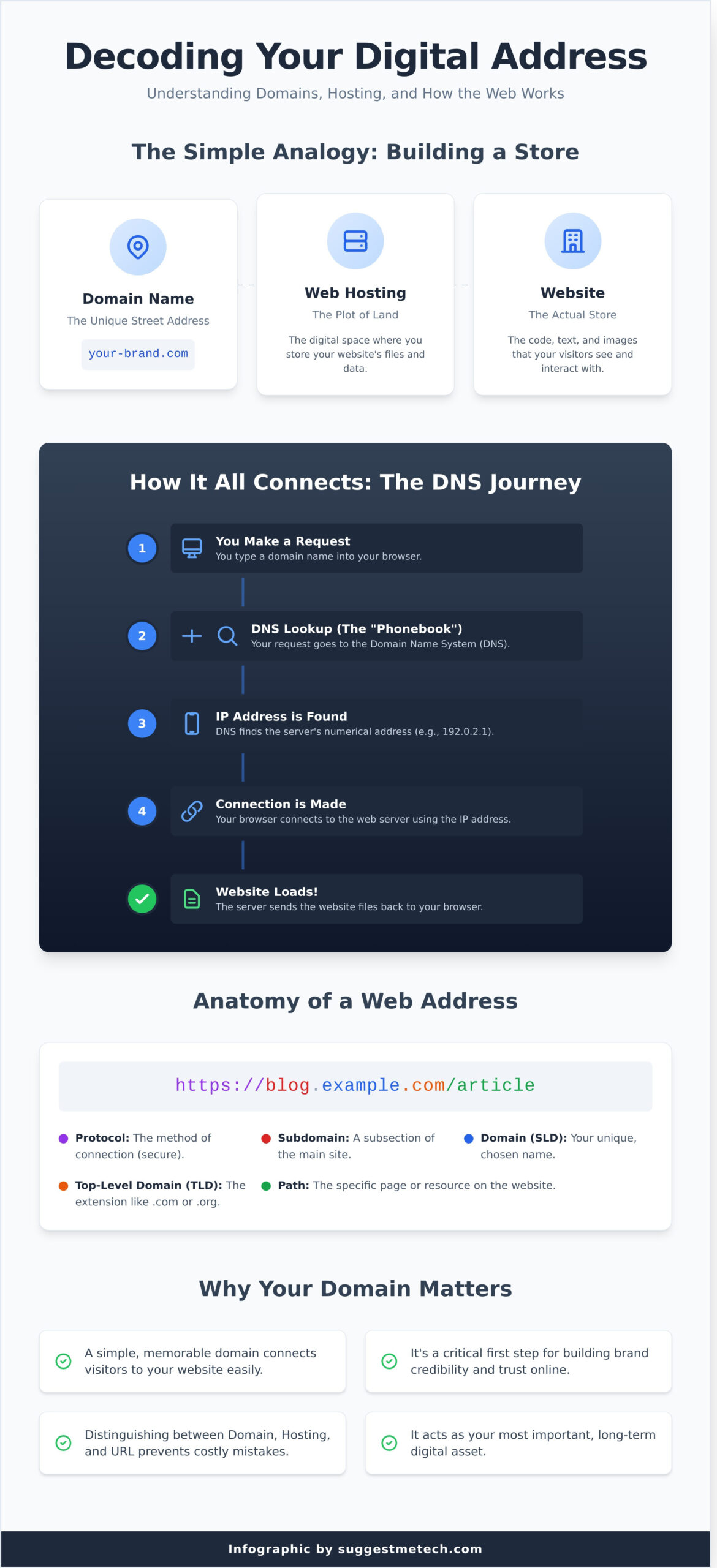
At its core, a domain name is your website’s memorable address on the internet. It’s the name people type into their browser to find you, like google.com or suggestmetech.com. The easiest way to understand this is with a simple real-world analogy. Imagine you’re building a physical store:
- Web Hosting: This is the plot of land you purchase. It’s the digital space where you’ll build.
- Your Website: These are the building materials, the structure, and the products inside. It’s the actual store itself, made of code, text, and images.
- Your Domain Name: This is the unique street address (e.g., 123 Main Street) that you put on your business cards so customers can find your store.
Just as you can’t invite customers to a store without an address, you can’t have a functional website without a domain to lead people to it.
Your Digital Street Address
A domain name’s primary job is to make technology human-friendly. Computers on the internet find each other using long strings of numbers called IP addresses (e.g., 192.0.2.1). While a server can remember that number perfectly, it’s not practical for your customers. A domain name acts as a memorable, easy-to-type nickname for that complex IP address.
This simple translation is the foundation of the web’s usability. A well-chosen Domain name is a crucial part of your brand, serving as a human-readable label that points to your corner of the internet. When it’s short, relevant, and easy to spell, it removes friction and helps people find you without a second thought.
Domain vs. Website: What’s the Difference?
It’s a common point of confusion, but it’s vital to understand that your domain and your website are two separate components that work together. You need both to have a live presence online.
Think of it this way: the domain is the address on the envelope, while the website is the letter inside. One is useless without the other. The website is the actual collection of files-code, text, images, and videos-that people see. The domain is simply the pointer that tells web browsers where on the internet those files are stored (on your web hosting server). When you purchase a domain, you are essentially reserving a unique name and the right to direct it wherever you choose.
How Do Domain Names Work? From Your Browser to the Website
Ever wonder what happens in the split second after you type a website address and hit Enter? It seems like magic, but it’s actually a highly efficient global system called the Domain Name System (DNS) that makes it all possible. This system is the invisible engine that connects you to your favorite sites.
The Role of the DNS (Internet’s Phonebook)
The easiest way to understand the DNS is to think of it as the internet’s phonebook. While we remember names like suggestmetech.com, computers find each other on the network using numerical addresses called IP addresses (e.g., 192.0.2.1). The DNS is the crucial translator that looks up the human-friendly domain name and finds its corresponding machine-readable IP address. This entire lookup process happens in milliseconds, connecting you to your destination without you ever seeing the numbers.
The journey from your keyboard to the website is a rapid, four-step process:
- 1. You Make a Request: You type a domain name into your browser’s address bar. It’s important to note that the domain is the core part of a full web address (or URL). For a deeper dive into the technical differences, Mozilla’s guide on Domain Names vs. URLs offers a clear explanation.
- 2. DNS Lookup: Your browser sends the domain to a DNS resolver, which acts like an operator, searching the vast “phonebook” for the correct IP address.
- 3. IP Address is Found: The DNS resolver locates the IP address associated with the domain and sends it back to your browser.
- 4. Connection is Made: Your browser now has the correct numerical address and uses it to connect directly to the website’s server, which then sends the webpage back for you to view.
Visualizing the DNS Process
[Simple flowchart showing: User -> Browser -> DNS Resolver -> IP Address -> Web Server -> Website Loads]
Who is ICANN?
This massive global system doesn’t run itself. It’s coordinated by a non-profit organization called the Internet Corporation for Assigned Names and Numbers (ICANN). Their mission is to help ensure the stable and secure operation of the internet. ICANN doesn’t sell domains directly to the public; instead, they accredit companies known as domain registrars (like GoDaddy or Namecheap), who then manage the sales and registration for consumers and businesses.
Decoding a Domain: TLDs, SLDs, and Subdomains Explained
At first glance, a web address like blog.example.com might seem like a single piece of text, but it’s actually built from distinct parts working together. Understanding these components is key to grasping how the web is organized. Every part of a domain has a specific purpose, from establishing credibility to organizing content.
Let’s break down the structure into its three core components.
Top-Level Domain (TLD): The .com, .org, .net Part
The Top-Level Domain is the final segment of a domain name, located after the last dot. It provides the first clue about a website’s purpose or geographical location. While hundreds exist, you’ll most commonly encounter a few classics:
- .com: Originally for commercial businesses, now the most popular and recognized TLD.
- .org: Intended for organizations, especially non-profits.
- .net: Originally for network infrastructures, like internet service providers.
- .gov: Restricted to U.S. government entities.
In recent years, the internet has seen an explosion of new TLDs like .tech, .store, and .ai, allowing for more creative and industry-specific addresses.
Second-Level Domain (SLD): Your Unique Identity
The Second-Level Domain is the part you choose and register-the ‘example’ in example.com. This is the heart of your website’s identity. It’s what customers will type, share, and remember. A strong SLD should be unique, memorable, and directly related to your brand or business name. Choosing the right SLD is one of the most critical branding decisions you’ll make for your online presence.
Subdomains: Organizing Your Website
A subdomain is a prefix added to your main domain, like the ‘blog’ in blog.example.com. Think of it as creating a separate section or “room” on your website. Subdomains are incredibly useful for organizing content that is distinct from your main site but still connected to your brand. Common practical uses include:
- shop.yourstore.com: To host a separate e-commerce platform.
- support.yourcompany.com: For a dedicated customer help desk or knowledge base.
- app.yourservice.com: To run a web-based application.
By using subdomains, you can manage large, complex sites more effectively without needing to purchase an entirely new domain name.
Domain Names vs. URLs vs. Web Hosting: Clearing the Confusion
When you’re building a website, the terms ‘domain name,’ ‘URL,’ and ‘web hosting’ can sound interchangeable. While they all work together to get your site online, they each have a very distinct job. Using our house analogy, think of them as your street address, the specific directions to a room inside, and the actual land your house is built on.
Here’s a simple breakdown to clear things up:
- Domain Name: This is your website’s memorable address, like
suggestmetech.com. It’s the unique name people type into their browser to find you. - Web Hosting: This is the physical space where your website lives. It’s a powerful server where all your site’s files-text, code, and images-are stored and made accessible to visitors.
- URL (Uniform Resource Locator): This is the full, specific path to a single page on your website, such as
https://suggestmetech.com/reviews/. It contains the domain but also points to a particular ‘room’ in your ‘house’.
Domain Name vs. URL: The Full Address
Your domain is the core of your web address, but a URL is the complete string that directs a browser to a specific page. In short, the domain name is just one piece of a much longer URL.
Look at this example URL: https://www.example.com/blog/latest-post
https://is the protocol.www.example.comis the full domain name (including subdomain)./blog/latest-postis the specific path to a page on that site.
Domain Name vs. Web Hosting: Name vs. Home
A domain is just an address, but web hosting is the actual home where your website’s content is stored. You can’t have a live website with just the name; it would be like having a street address with no house built on the land. Your domain’s settings (called DNS) act as the bridge, pointing visitors from your address to the correct hosting server where your website files are located.
For maximum convenience, most people purchase their web hosting and domain from the same provider. This streamlines the setup process, as the company automatically connects your new address to your new web space, helping you get online much faster.
Why Your Domain Is Your Most Important Digital Asset
So far, we’ve covered the technical side of what a domain is. But the real value isn’t in the definition-it’s in what owning one does for your brand. A custom domain is far more than a web address; it’s the foundation of your digital identity and a critical investment in your long-term success.
Credibility and Brand Identity
First impressions matter. Consider the difference between yourbrand.com and a free alternative like yourbrand.wordpress.com. A custom domain instantly communicates professionalism and legitimacy. It tells potential customers, clients, or readers that you are serious about your project and have invested in your brand’s future. This small detail is a powerful trust signal that sets you apart from less established competitors.
The Power of a Professional Email Address
Owning a domain unlocks one of the most effective and simple branding tools: a professional email address. Instead of using a generic address like yourbusiness88@gmail.com, you can create memorable emails like contact@yourbrand.com. Every time you send an email, you are reinforcing your brand name and building credibility. It’s a subtle but consistent way to show that you are an established, professional entity.
Portability and Long-Term Control
Your website might be built on a platform like Shopify or powered by a service like HostGator, but your domain name belongs to you. If you become unhappy with your web host or want to move to a new platform, your domain comes with you. This gives you ultimate freedom and control over your online presence. Your audience, brand equity, and search engine rankings are tied to that name, ensuring you never have to start from scratch. It is the one digital asset you truly own.
Ready to start your search? See our guide to the best web hosts and registrars.
Your Domain Name: The Cornerstone of Your Online Presence
We’ve demystified the world of domain names, showing how they function as both a user-friendly address and the foundation of your online brand. You now understand the crucial difference between a domain, a URL, and web hosting-and why securing the right domain is the first essential step in building a memorable digital identity.
Now that you’re ready to build, the next step is finding a reliable place for your website to live. Our tech experts have done the heavy lifting, creating in-depth reviews and practical guides perfect for beginners. With Editor’s Picks for every budget, we make the decision simple. Find the perfect home for your new domain. Explore our top-rated web hosting providers.
Your digital journey starts now. Go build something great!
Frequently Asked Questions About Domain Names
Can I get a domain name for free?
While you can’t register a domain for free on its own, many web hosting providers offer a free domain for the first year when you purchase a hosting plan. This is a great way to lower initial costs for your website. However, be aware that you will have to pay for the renewal after the first year, and that price might be higher than standard rates. Always check the long-term cost before committing to a plan.
What’s the difference between a domain registrar and a web host?
Think of it like building a house. A domain registrar is where you register your street address (your domain name). A web host is the plot of land and the house itself where you store all your belongings (your website files). While many companies offer both services together for convenience, they are two separate and essential functions. You need both to have a live website that people can visit online.
How long does a domain registration last, and do I have to renew it?
Domain registrations are not a one-time purchase; you are essentially leasing the name. The standard registration period is one year, but most registrars allow you to register for up to 10 years at a time. To keep your website live, you must renew your registration before it expires. We highly recommend enabling auto-renewal to avoid accidentally losing your domain. It’s a simple setting that can save you a major headache.
Can I change my domain name after I’ve registered it?
Unfortunately, you cannot edit a domain name once it has been registered. If you made a typo or want to rebrand, your only option is to register a completely new domain. You can then point your hosting service to the new name and set up redirects from the old one to guide visitors and search engines to your new address. Think carefully before you register, as the name you choose is permanent for that registration period.
What happens if I forget to renew my domain name?
If you miss the renewal date, your website and any associated email addresses will stop working. Most registrars provide a “grace period” (often 30 days) where you can renew at the normal price. After that, it enters a “redemption period” where you can still get it back, but for a much higher fee. If you don’t act, the domain is eventually released and can be purchased by anyone. This is why setting up auto-renewal is so crucial.
How much should I expect to pay for a domain name?
For a standard extension like .com, .net, or .org, you should expect to pay between $10 and $20 per year. Prices can vary based on the registrar and any initial promotional deals they offer. Newer or more specialized extensions like .io or .ai can be more expensive, sometimes costing $40 or more annually. Be cautious of very cheap introductory offers, as the renewal rates are often significantly higher, so always check the full-term cost.