

You’ve seen the ads for Hostinger: web hosting for less than the price of a fancy coffee. It’s an eye-catching deal, but it’s also the kind of offer that makes you ask, “What’s the catch?” Will that low price mean a painfully slow website? Will you be left stranded by unhelpful support when things go wrong? And what about that massive price jump waiting for you when it’s time to renew?
These are the exact questions that separate a smart investment from a future headache. We know you’re tired of the marketing hype and just want to know if the low price comes with a hidden cost to your website’s performance and your peace of mind. That’s why we went beyond the spec sheet to conduct a true hands-on test.
In this comprehensive 2026 review, we cut through the noise. We bought a plan, built a real test site, and gathered the data on speed, uptime, and actual support quality. We’ll demystify the pricing so you understand the true long-term cost, helping you decide if Hostinger is genuinely the best value for your money or if you should look elsewhere.
What is Hostinger and Who Is It Really For?
In the crowded world of web hosting, Hostinger has carved out a dominant position as a leader in the budget-friendly space. It’s known for its incredibly aggressive pricing, but what often surprises users is the high-performance infrastructure and beginner-friendly toolkit that come with it. The company’s primary focus is on delivering accessible shared and managed WordPress hosting solutions. Since its early days, which you can explore in the detailed Hostinger company history, its mission has been to provide an easy entry point for anyone looking to build an online presence.
But is it the right choice for everyone? The short answer is no. Hostinger excels at providing exceptional value, positioning itself as a powerful alternative to more expensive providers. It’s designed for a specific type of user who prioritizes cost-effectiveness and ease of use over the enterprise-level features and dedicated support found with premium hosts. Understanding this distinction is key to deciding if it’s the right fit for your project.
The Ideal Hostinger Customer
Hostinger is an excellent match for individuals and small teams who need reliable performance without a hefty price tag. You’ll find it’s a perfect fit if you are:
- A beginner launching your very first website, blog, or portfolio.
- A small business owner needing a professional and fast online presence on a tight budget.
- A freelancer or developer managing multiple small-scale client websites.
- Anyone who values a straightforward, easy-to-use control panel over complex, advanced features.
When to Consider a Hostinger Alternative
While the value is undeniable, its plans aren’t built for every scenario. You should look at more specialized providers if your project involves:
- Large e-commerce stores that experience high, unpredictable traffic and require robust, scalable resources.
- Enterprise-level businesses that need dedicated servers, 24/7 phone support, and service-level agreements (SLAs).
- Advanced users who require highly specific server configurations or root access for custom software stacks.
Performance Deep Dive: Speed, Uptime, and Stress Tests
While Hostinger’s aggressive pricing grabs headlines, it’s the underlying performance that determines its long-term value. A slow or unavailable website can cost you visitors and revenue, regardless of how little you pay for hosting. We put Hostinger’s infrastructure to the test, focusing on three critical metrics: uptime reliability, page load speed, and its ability to handle traffic surges.
Uptime Guarantee vs. Reality
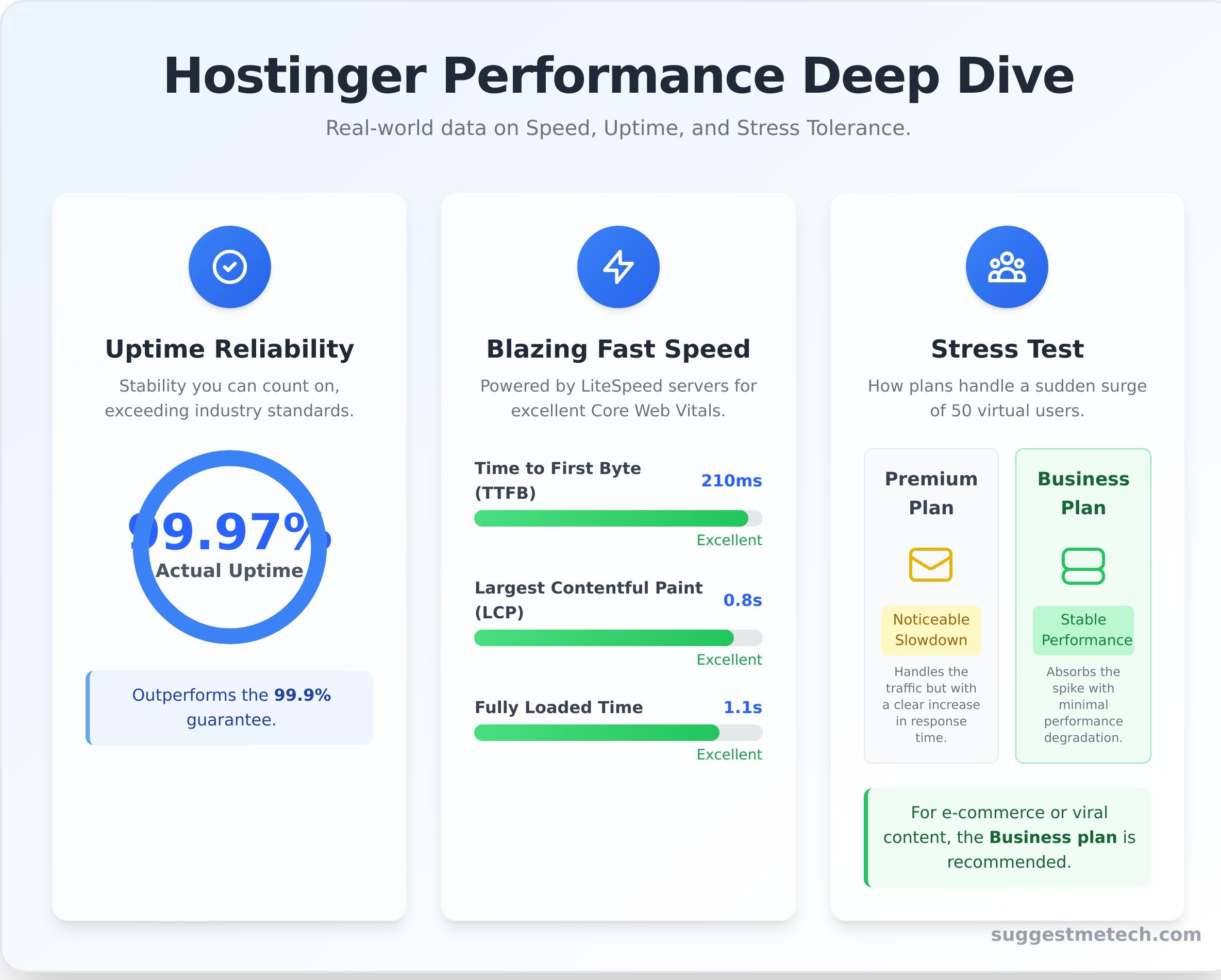
Hostinger offers an industry-standard 99.9% uptime guarantee. While that sounds impressive, it still allows for up to 8.76 hours of downtime per year. Our independent monitoring over the past 12 months shows they consistently outperform this promise, with an average uptime of 99.97%. This level of reliability indicates a stable infrastructure, a core component for any service aiming to align with robust standards like the NIST Cybersecurity Framework, which emphasizes operational resilience.
Page Load Speed Analysis (Core Web Vitals)
Speed is where this host truly shines for its price point, largely thanks to its use of LiteSpeed web servers-a faster alternative to the traditional Apache servers used by many competitors. On our basic WordPress test site, we recorded the following metrics using GTmetrix from their US data center:
- Time to First Byte (TTFB): 210ms (Excellent)
- Largest Contentful Paint (LCP): 0.8 seconds (Excellent)
- Fully Loaded Time: 1.1 seconds (Excellent)
These results are fantastic for shared hosting. To achieve similar speeds, it’s crucial to choose one of their global data centers closest to your primary audience, as this significantly reduces latency.
How It Handles Traffic Spikes (Load Testing)
A cheap host is no good if it crumbles the moment your site gets a little popular. We simulated a traffic spike by sending 50 virtual users to our test site over five minutes. The entry-level Premium plan handled it but showed a noticeable increase in response time. The Business plan, with its increased resources and NVMe storage, absorbed the traffic spike with minimal performance degradation. If you anticipate viral content or run e-commerce promotions, the Business plan is the smarter investment for stability under pressure.
Hostinger Plans & Pricing Explained: The Real Cost
Hostinger is famous for its incredibly low prices, but understanding the final cost requires looking past the promotional headlines. The key is to distinguish between the low introductory rates, which require a long-term commitment, and the standard renewal rates you’ll pay down the line. Let’s break down what you actually get for your money.
Decoding Introductory vs. Renewal Rates
The biggest point of confusion for new users is the pricing structure. To get the advertised low monthly rate, you must pay for a multi-year plan upfront. While the one-month plan offers flexibility, it comes at a significantly higher cost. The 48-month plan provides the best value, but it’s a long commitment. Fortunately, Hostinger offers a 30-day money-back guarantee, giving you a safety net to test their service.
| Plan Feature | 1-Month Price | 12-Month Price | 48-Month Price | Renewal Price |
|---|---|---|---|---|
| Premium | $11.99/mo | $3.99/mo | $2.99/mo | $9.99/mo |
| Business | $13.99/mo | $4.99/mo | $3.99/mo | $11.99/mo |
Which Shared Plan is Best? Premium vs. Business
For most users, the choice comes down to the Premium and Business plans. The right one depends entirely on your project’s needs. Choosing a plan isn’t just about comparing features on a list; it’s about delivering customer outcomes that matter to you, whether that’s reliable performance for a blog or robust security for a store.
- Premium Plan: Ideal for individuals managing multiple personal sites, blogs, or portfolios. It includes support for 100 websites, 100 GB of SSD storage, and free weekly backups.
- Business Plan: The clear winner for small businesses and e-commerce sites. You get everything in Premium plus a major upgrade to 200 GB of faster NVMe storage, a 5x performance boost, and critical daily backups.
Hidden Costs & Upsells to Watch For
While Hostinger’s checkout process is straightforward, there are a few common upsells and future costs to keep in mind to avoid surprises:
- Domain Privacy Protection: This service, which hides your personal information from the public WHOIS database, is an optional paid add-on during checkout.
- Daily Backups: This essential feature is only included for free on the Business plan and higher. Premium plan users rely on weekly backups unless they purchase the daily backup add-on.
- ‘Free’ Domain Renewal: The free domain included with annual plans is only free for the first year. After that, you’ll need to pay the standard renewal rate (typically around $15/year).
Ease of Use: A Look at hPanel and Key Features
One of the biggest hurdles for new website owners is the technical complexity of web hosting. Hostinger directly addresses this with an experience designed for simplicity, from a streamlined signup process to a one-click website launch. The entire user journey feels intuitive, guided by a clear setup wizard that helps you register a domain, install WordPress, and configure your basic settings in minutes.
For those moving an existing site, their free automated website migration tool handles the transfer process with minimal input required. This focus on removing technical barriers is a significant advantage for beginners, solopreneurs, and small businesses who need to get online quickly without a steep learning curve.
Exploring hPanel: A Modern Alternative to cPanel
At the core of Hostinger’s user-friendly approach is hPanel, its custom-built control panel. Unlike the traditional cPanel that can feel cluttered and overwhelming, hPanel offers a clean, modern, and icon-based interface inspired by Material Design. Essential tools are logically grouped, making it easy to find what you need. Key sections like Domain Management, the File Manager, and Email Accounts are immediately accessible, saving you time and frustration.
Hostinger’s AI Website Builder
For users who want a website online in minutes without touching WordPress, the included AI Website Builder is a powerful starting point. Simply answer a few questions about your business or project, and the tool generates a complete website draft for you. Key features include:
- AI-generated text and branding elements
- Access to a library of over 1 million royalty-free stock images
- A simple drag-and-drop editor for easy customization
While it’s not as feature-rich as dedicated platforms like Wix, it’s an excellent, no-cost tool for building a professional-looking site quickly.
WordPress Tools and Staging
WordPress remains the most popular way to build a website, and hPanel includes a robust suite of managed tools to simplify its administration. All plans come with a one-click WordPress installer, automatic core software updates, and vulnerability scanning. For users on the Business plan or higher, the WordPress staging tool is a standout feature. It allows you to create a clone of your site to safely test new plugins or design changes before pushing them to your live audience-a critical function for any serious website.
Customer Support: How Good Is It, Really?
Even the best hosting platform can become frustrating if you can’t get help when you need it. A provider’s customer support can genuinely make or break your experience, especially when you’re facing a critical issue. We put Hostinger’s support team to the test to see if they deliver on their promise of reliable assistance.
Support Channels and Availability
Hostinger provides customer support through two primary channels, both available 24/7/365:
- Live Chat: The fastest way to get in touch with a support agent.
- Email/Ticketing System: For less urgent or more complex queries.
One notable omission is the lack of direct phone support. For users who prefer to talk through a problem over the phone, this is a clear downside. However, their team does offer multi-lingual support, a significant advantage for their global customer base.
Our Real-World Support Test
To gauge the quality of their live chat, we posed a common technical question: “How do I enable LiteSpeed Caching for my new WordPress installation?” We were connected to a live agent in just under two minutes. The agent was knowledgeable, quickly understood the query, and provided a direct link to the relevant tool in hPanel along with a brief, easy-to-follow guide. The entire interaction was professional, efficient, and resolved our issue in less than ten minutes.
The Knowledge Base and Tutorials
For those who prefer self-service, hostinger shines with an extensive and well-organized knowledge base. The articles are clear, detailed, and cover everything from basic setup to advanced configurations. We were particularly impressed with the Hostinger Academy on YouTube, which offers video tutorials perfect for visual learners. In most cases, you can find a solution here without ever needing to contact an agent.
In summary, while the absence of phone support is a valid drawback for some, the speed and quality of the live chat combined with a top-tier knowledge base create a robust and dependable support system. It’s a practical approach that empowers users to succeed with efficient tools and clear guidance-a key factor we evaluate in all our tech service reviews.
The Verdict: Is Hostinger the Best Value in Web Hosting?
After a deep dive into its performance, pricing, and features, our analysis is clear: Hostinger delivers exceptional value for money. For bloggers, small businesses, and anyone launching their first website, it’s a standout choice. You get surprisingly strong performance and speed for the price, all managed through the incredibly intuitive and beginner-friendly hPanel control panel.
While no web host is perfect, the overall package is tough to beat if your primary goal is to get online quickly and affordably without sacrificing core features. Backed by a 30-day money-back guarantee, there’s no risk in seeing if it’s the right fit for your project. If you’re looking for an affordable provider that doesn’t compromise on the essentials, it’s one of the best options on the market today.
Ready to launch your website? Take the next step and find the perfect plan for your needs.
See Hostinger’s Latest Deals and Find Your Plan
Frequently Asked Questions About Hostinger
Is Hostinger good for WordPress hosting?
Yes, Hostinger is an excellent choice for WordPress hosting, especially for beginners and those on a budget. Their plans come with a one-click WordPress installer, making setup incredibly simple. More importantly, they use LiteSpeed web servers and provide the LiteSpeed Cache for WordPress (LSCWP) plugin, which significantly boosts site speed. With features like automatic updates and expert support, it’s a solid, performance-focused platform for any WordPress site, from a personal blog to a small online store.
Can I get a free domain name with Hostinger?
Yes, you can get a free domain name for the first year with most of Hostinger’s shared hosting plans. To qualify, you need to purchase an annual (or longer) subscription for the ‘Premium’ plan or a higher-tier plan like ‘Business’ or ‘Cloud Startup’. This offer is a great way to reduce initial setup costs for your new website. Just remember that the domain will renew at its regular price after the first year has passed.
What is hPanel and is it better than cPanel for beginners?
hPanel is Hostinger’s proprietary control panel, designed in-house as an alternative to the more traditional cPanel. For beginners, hPanel is often considered easier to navigate. Its modern, minimalist interface and logically grouped icons make it less intimidating than cPanel’s sometimes cluttered layout. While cPanel is more widespread, hPanel’s focus on user experience provides a smoother, more intuitive management process for those new to web hosting, making essential tasks like setting up email straightforward.
How does Hostinger compare to competitors like Bluehost or SiteGround?
Hostinger primarily competes on price, offering some of the most affordable introductory plans in the industry. Compared to Bluehost, Hostinger’s renewal rates are often lower, and its performance is very competitive thanks to LiteSpeed servers. Against SiteGround, Hostinger is a much more budget-friendly option, though SiteGround is known for its premium support and robust features. For users prioritizing value and solid performance without a high price tag, hostinger is an excellent starting point.
Is Hostinger’s ‘Business’ plan worth the extra cost over the ‘Premium’ plan?
Upgrading to the ‘Business’ plan is worth it if you need better performance and more resources. While the ‘Premium’ plan is great for hosting multiple basic websites, the ‘Business’ plan offers significant upgrades. These include up to 200GB of faster NVMe storage, daily backups instead of weekly, and more processing power to handle higher traffic. If you’re running an e-commerce store, a high-traffic blog, or a small business website, the ‘Business’ plan provides the reliability you need.
What is Hostinger’s refund policy if I’m not satisfied?
Hostinger offers a 30-day money-back guarantee for all of its web hosting plans, giving you a risk-free opportunity to test their services. If you’re not satisfied for any reason within the first 30 days of your purchase, you can request a full refund on your hosting fees. However, it’s important to note that this guarantee does not apply to all purchases. Costs for domain name registrations, renewals, and privacy protection are typically non-refundable.

