

Trying to choose a web host can feel like learning a new language. You’re bombarded with terms like RAM and bandwidth, all while a nagging question looms: is the cheapest option a trap? For many new website owners, this confusion leads directly to shared hosting, the most common and affordable starting point. But what does that really mean, and are you sacrificing critical performance for that low price tag? It’s a valid concern that can stop you from making a decision and getting your project online.
We’re here to cut through the noise. This guide breaks down shared hosting in simple, practical terms, helping you confidently decide if this popular option is the perfect start for your new website. We’ll cover what it is, who it’s for, the key limitations to watch out for, and exactly when you’ll know it’s time to upgrade. By the end, you’ll have a clear, jargon-free understanding and the tools to make the right choice for your goals.
What is Shared Hosting? The Ultimate Beginner’s Analogy
At its core, shared hosting is the most popular and affordable type of web hosting available, making it the go-to choice for new websites, blogs, and small businesses. The concept is simple: your website lives on a powerful computer (a server) alongside hundreds, or even thousands, of other websites. All of these sites share the server’s resources, which is precisely what drives the cost down. Think of it as the most budget-friendly way to get your website online. This model, technically defined as a Shared web hosting service, is designed for ease of use and low maintenance, perfect for those just starting their online journey.
The Apartment Building Analogy Explained
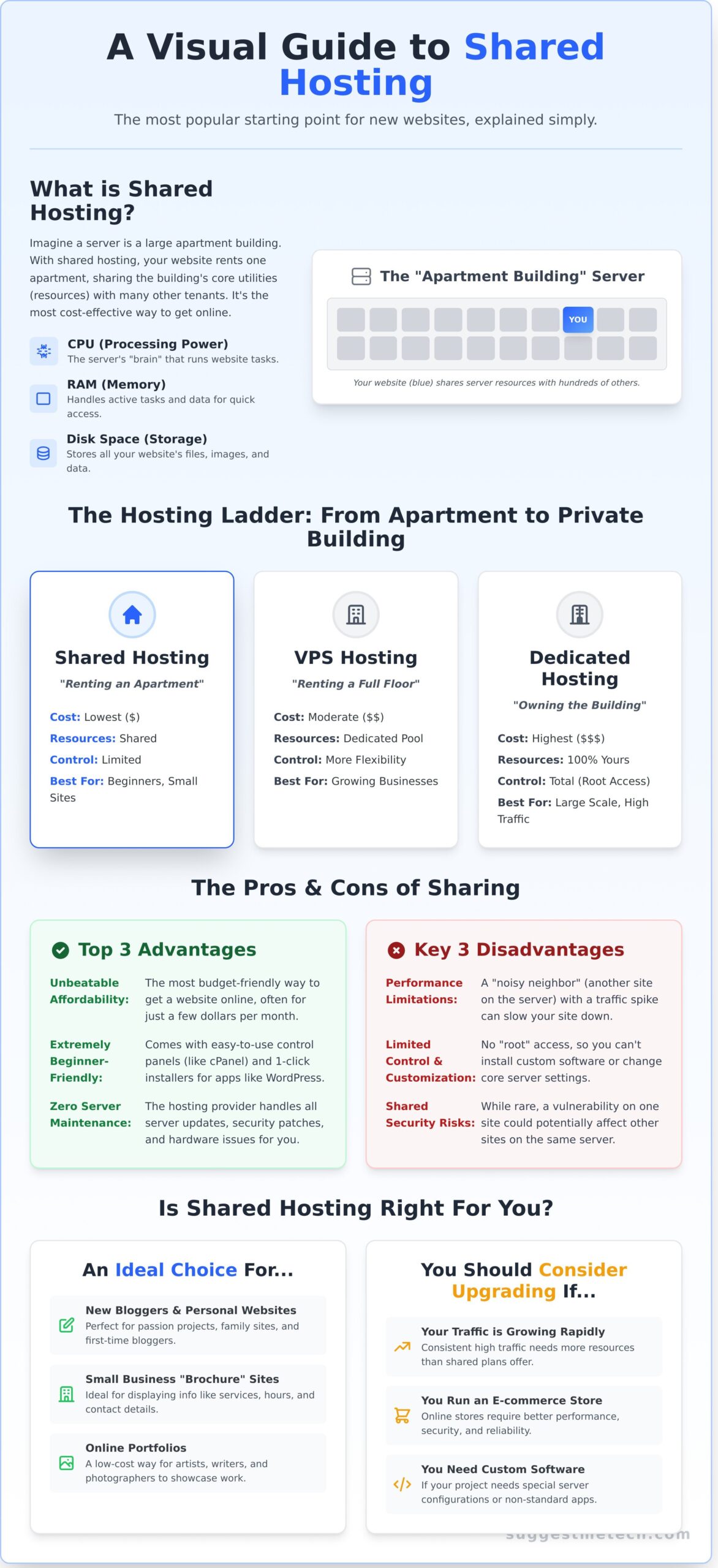
Imagine a web server is a large apartment building. When you sign up for shared hosting, you are essentially renting a single apartment (your website) inside that building. You get your own secure space, but you share the building’s core infrastructure-like water, electricity, and maintenance-with all the other tenants. This is incredibly cost-effective, but it also means you might occasionally be affected by a “noisy neighbor” if another website on your server suddenly uses a lot of resources.
How Server Resources Are Shared
In the world of web hosting, “utilities” are the server’s computational resources. With a shared plan, your website shares a pool of these critical components, all managed for you by the hosting provider. The main resources include:
- CPU (Central Processing Unit): The server’s brain, responsible for processing requests and running your website’s software.
- RAM (Random Access Memory): The server’s short-term memory, used to handle active processes and deliver content quickly.
- Disk Space: The physical storage where your website’s files, images, and databases are kept.
Shared Hosting vs. Other Hosting Types at a Glance
To continue our analogy, if shared hosting is like renting an apartment, other hosting types offer more space and control. VPS (Virtual Private Server) hosting is like renting an entire floor of the building-you get more dedicated resources and privacy. Dedicated Hosting is the ultimate step up, equivalent to owning the entire building yourself, giving you total control and all the resources, but at a much higher cost. We’ll explore these differences in more detail later.
The Pros and Cons of Shared Hosting: Is It a Good Deal?
Choosing your first web host can feel overwhelming, especially when you’re focused on budget and ease of use. Shared hosting is the most common starting point, but is it the right one for you? The answer lies in understanding the trade-offs. It offers incredible value for beginners but comes with specific limitations that are important to know upfront. Let’s break down the core pros and cons to see if it’s a good deal for your new website.
Top 3 Advantages of Shared Hosting
For new website owners, the benefits of shared hosting directly address the biggest initial hurdles: cost and complexity. Here’s where it truly shines:
- Unbeatable Affordability: This is the most budget-friendly way to get your website online. Because you are splitting the cost of a single server with many other users, you can often get started for just a few dollars per month, leaving more of your budget for other parts of your project.
- Extremely Beginner-Friendly: Forget command lines and complex configurations. Most plans include an intuitive control panel (like cPanel) that simplifies tasks. You can manage files, set up professional email accounts, and use 1-click installers for software like WordPress without any technical background.
- Zero Server Maintenance: The hosting provider handles all the technical heavy lifting. They manage the server hardware, software updates, and security patches, freeing you up to focus entirely on what matters most: building and growing your website content.
Key 3 Disadvantages to Consider
The same cost-saving “sharing” model that makes it so affordable is also the source of its main drawbacks. Before you commit, be aware of these potential issues:
- Performance Limitations: You are sharing server resources like CPU power and RAM. If another website on your server gets a huge, unexpected traffic spike-known as the “noisy neighbor” effect-it can consume more than its fair share and temporarily slow your site down.
- Limited Control and Customization: You don’t get administrative or “root” access to the server. This means you can’t change core server settings or install non-standard software, which can be a roadblock for advanced users or projects with unique technical needs.
- Shared Security Risks: While reputable hosts have strong security measures in place, a vulnerability on one website could theoretically create an opening for attackers to affect other sites on the same server. The risk is low but not zero.
Who is Shared Hosting Perfect For? (And Who Should Avoid It)
Choosing the right hosting plan comes down to understanding your website’s current needs and future goals. To make it simple, we’ve created clear profiles to help you determine if shared hosting is the right launchpad for your project or if you should look at more powerful alternatives from the start.
Shared Hosting is an Ideal Choice For…
This entry-level option is designed for projects that are just getting off the ground, don’t require massive server resources, and need to be budget-friendly. If you see yourself in any of the following categories, a shared plan is likely a perfect fit.
- New Bloggers and Personal Websites: If you’re launching a passion project, a family photo site, or your first blog, you don’t need the power or cost of a dedicated server. Shared hosting provides everything required to get online quickly and affordably.
- Small Business “Brochure” Sites: For local businesses like restaurants, contractors, or consultants who need a professional online presence to display contact information, services, and hours, a shared plan is more than sufficient.
- Online Portfolios: Artists, writers, photographers, and other freelancers can easily build a beautiful site to showcase their work without breaking the bank. These sites are typically low-traffic and don’t need complex server-side features.
- Budget-Conscious Starters: When your primary goal is to launch an idea with minimal upfront investment, the low cost of shared hosting is its biggest advantage. It allows you to test a concept without a significant financial commitment.
You Should Consider a Different Option If…
While it’s a fantastic starting point, shared hosting has its limits. As your website grows in traffic, complexity, or security needs, you’ll eventually need to upgrade to a more robust solution like a VPS or dedicated hosting. It’s better to plan ahead if you fall into one of these groups.
- You Run a High-Traffic Website: If your site consistently receives more than 30,000 monthly visitors, the limited resources of a shared server can lead to slow loading times and potential crashes, creating a poor user experience.
- Your Site is a Large E-commerce Store: Processing payments and managing a large product inventory requires significant server resources and enhanced security. A shared environment can become a bottleneck during peak shopping times.
- You Need Custom Server Configurations: Shared plans offer limited control. If you need to install specialized software or modify the server environment for a specific application, you’ll need the root access that comes with a VPS or dedicated server.
- You Handle Highly Sensitive Data: Websites that store sensitive user information-such as medical records or financial data-require a higher level of security and compliance than a shared environment can reliably guarantee.
Essential Features to Look For in a Shared Hosting Plan
Now that you understand the basics, how do you choose the right provider? Not all shared hosting plans are created equal. Beyond the price tag, several key features determine the speed, security, and reliability of your website. Use this practical checklist to compare plans intelligently and find a host that supports your goals from day one.
Performance and Reliability
These features directly impact your website’s speed and availability-two critical factors for keeping visitors engaged.
- SSD Storage: Insist on plans that use Solid-State Drives (SSDs). Unlike older, mechanical Hard Disk Drives (HDDs), SSDs have no moving parts and can read data significantly faster. The direct benefit to you is a quicker-loading website, which improves user experience and search engine rankings.
- Uptime Guarantee: Uptime is the percentage of time your website is online and accessible. Look for a guarantee of 99.9% or higher. Anything less means your site could be down for several hours a month, which can damage your reputation and lose potential customers.
- Bandwidth/Traffic: This is the amount of data your site can transfer to visitors. Many hosts offer “unmetered” bandwidth, which is great for new sites. Just be aware this always comes with a fair use policy. It simply means you won’t hit a hard limit unless your traffic becomes exceptionally high.
Ease of Use and Security
A good host makes managing your site simple and keeps it safe from threats. Don’t overlook these essentials.
- Control Panel (cPanel): A user-friendly control panel is your mission control for managing your hosting account. cPanel is the industry standard, offering a clear graphical interface to handle everything from creating email accounts to managing databases without needing to code.
- Free SSL Certificate: This is non-negotiable. An SSL certificate enables HTTPS (the padlock in the address bar), encrypting data between your site and its visitors. It’s essential for security, building trust, and is a confirmed Google ranking factor.
- Automatic Backups: Mistakes happen. A plugin might crash your site, or you might accidentally delete something important. Regular, automatic backups are your safety net, allowing you to restore a working version of your site with minimal stress.
Support and Growth
Your needs will change over time. Choose a host that can help you when you’re stuck and grow with you when you succeed.
- 24/7 Customer Support: When your website goes down at 2 AM, you need help immediately. Prioritize hosts that offer 24/7 support through live chat or phone, not just email tickets.
- 1-Click Installers: Tools like Softaculous, often included in cPanel, let you install popular applications like WordPress, Joomla, or Magento in a single click. This saves a huge amount of time and technical hassle for beginners.
- Scalability: The best shared hosting providers make it easy to upgrade your plan as your website traffic grows. Check that there is a clear path to a more powerful solution, like VPS hosting, so you aren’t forced into a complicated migration later.
Armed with this checklist, you’re ready to evaluate your options and make an informed decision. Ready to compare providers? See our guide to the Best Web Hosting.
When to Upgrade From Shared Hosting: 5 Telltale Signs
Outgrowing your first hosting plan is a milestone, not a problem-it means your website is succeeding. While shared hosting is the perfect launchpad, your needs will inevitably evolve as your audience grows. Don’t wait for your site to break. Instead, watch for these telltale signs that it’s time to plan your upgrade.
Recognizing these indicators early ensures a smooth transition and keeps your user experience a top priority. If you notice one or more of the following, it’s time to start exploring more powerful options.
1. Your Website is Getting Slower
Slow load times are the number one symptom of a site straining against its resource limits. As your traffic increases, your site has to compete more aggressively for the server’s shared CPU and RAM. Use a free tool like Google PageSpeed Insights to benchmark your performance. If you’ve already optimized your images and plugins but the site still feels sluggish, your hosting plan is the likely bottleneck.
2. You’re Hitting Resource Limits
Are your visitors seeing frequent error messages like 503 Service Unavailable or Internal Server Error? These aren’t random glitches; they often mean your website has exhausted its allocated server resources for the moment. You can confirm this by checking the “Resource Usage” or “Metrics” section in your cPanel. If you are consistently hitting your CPU or RAM limits, an upgrade is essential for stability.
3. You Need Better Security or More Control
As your website becomes more critical to your business, your technical needs expand. You might require a dedicated IP address for an e-commerce application or need to install a specific piece of software that isn’t supported in a shared environment. These tasks require a level of server control and isolation that a shared hosting plan cannot provide.
When you reach this point, the logical next step is a Virtual Private Server (VPS). A VPS gives you dedicated resources and the “root access” needed for custom configurations, offering a significant boost in performance and security. For in-depth reviews of top VPS providers, explore the hosting guides on our site.
Is Shared Hosting the Right First Step for You?
Ultimately, shared hosting stands out as an excellent and cost-effective launchpad for new websites, personal blogs, and small businesses just starting out. It demystifies the process of getting online by offering essential tools without a steep learning curve or a major financial commitment. Remember, its affordability comes from sharing resources, which means you’ll eventually need to watch for the signs that your growing traffic and performance needs require an upgrade.
Now that you’re armed with the knowledge to decide if it’s the right fit, the next crucial step is selecting a provider you can trust. Ready to find the perfect host? Check out our complete guide to the Best Web Hosting Providers. We’ve done the heavy lifting by comparing critical performance and support data across the industry. Our expert-vetted recommendations feature top picks for every budget and business size, so you can find a reliable partner for your project.
Making an informed hosting decision is your first major step toward building a successful online presence. You’re now equipped to make that choice with confidence!
Frequently Asked Questions About Shared Hosting
Is shared hosting secure enough for a small business?
For most small businesses, yes, provided you take an active role. Reputable hosts manage server-level security with firewalls, monitoring, and malware scans. However, your site’s security is a shared responsibility. You must use strong passwords, keep your software (like WordPress and plugins) updated, and consider a security plugin. This combination of provider security and your own best practices creates a secure environment for a typical business website.
How much traffic can a typical shared hosting plan handle?
While many plans advertise “unlimited” traffic, a standard shared hosting plan generally performs well for sites receiving up to 10,000-20,000 monthly visits. Performance depends heavily on your site’s optimization-a simple blog uses far fewer resources than an image-heavy portfolio. If your site consistently gets more than 30,000 monthly visitors or slows down during traffic spikes, it’s a strong signal that you’ve outgrown your plan and should consider an upgrade.
Can I host multiple websites on one shared hosting account?
Yes, but this feature is typically reserved for mid-tier and higher-level plans. Most basic, entry-level plans are limited to a single domain. To host multiple sites, look for a plan that offers “addon domains” or lists support for unlimited websites. This is a cost-effective solution for managing several small projects, but remember that all sites will be sharing the same pool of server resources, including processing power and memory.
Will shared hosting affect my website’s SEO?
It can, but the issue is performance, not the hosting type itself. Search engines like Google reward sites with fast load times and high uptime. A low-quality provider that overloads its servers can cause slow speeds, hurting your SEO rankings. However, a quality shared hosting plan from a reputable company provides enough speed and reliability for strong SEO performance. The key is to choose a good provider and optimize your site’s speed.
What is the real difference between shared hosting and WordPress hosting?
Think of managed WordPress hosting as a specialized, premium version of shared hosting. While both often use a shared server infrastructure, WordPress hosting is specifically optimized for the platform. It usually includes benefits like automatic WordPress core and plugin updates, server-level caching for enhanced speed, specialized security rules, and access to expert WordPress support. It’s a more hands-off, performance-focused option for those who only use WordPress.
How hard is it to move my website from shared hosting to a VPS later?
The difficulty varies, but you have options to make it easier. A VPS (Virtual Private Server) is more powerful but requires more technical management. Many hosting providers offer free or paid migration services where their expert team will move your entire site for you. If you use WordPress, plugins like Duplicator or All-in-One WP Migration can bundle your site into a simple package, making the transfer much more straightforward for a DIY approach.

