

Trying to build your first website can feel like learning a new language. You’re hit with technical terms like ‘servers,’ ‘bandwidth,’ and ‘DNS,’ and the simple goal of getting online suddenly feels overwhelming. It’s a common hurdle, but we’re here to clear it up. At the heart of every single website on the internet is a service called web hosting. Think of it as the plot of land you rent to build your online home; it’s the essential foundation that makes your site visible to the world.
This guide breaks it all down in simple, easy-to-understand terms. We’ll explain exactly how hosting works, the key differences between the main types, and what features actually matter for a beginner. By the end, you’ll understand the crucial difference between a domain and a hosting plan and feel confident choosing the right provider for your project and budget, ensuring you don’t waste a dime on the wrong plan.
Key Takeaways
- Think of hosting as the plot of land where your website “lives” online, making it accessible to everyone on the internet.
- Learn the crucial difference between a domain name (your address) and hosting (your house) to avoid common setup mistakes.
- Discover the main types of web hosting to find the right fit for your website’s traffic needs and your budget.
- Pinpoint the essential features to look for in a provider to ensure your website is fast, reliable, and well-supported.
What is Web Hosting in Simple Terms?
Imagine the internet is a massive, digital city. To build a presence there-a store, a blog, or a portfolio-you need a plot of land to build on. In the simplest terms, that’s exactly what web hosting is: renting a piece of digital real estate where your website can live and be accessible to everyone.
Every website you visit is just a collection of files. These include text, images, videos, and the code that tells a browser how to display it all. For anyone in the world to see your site, these files need to be stored on a special, high-powered computer that’s always connected to the internet. This computer is called a server.
The act of renting space on one of these servers is the core of the service. Companies that provide this are essentially landlords for your website’s files. This Web hosting service ensures your site is secure, fast, and available 24/7 to visitors. Without it, your website would just be a folder of files on your personal computer, invisible to the world.
The ‘Renting a Home’ Analogy
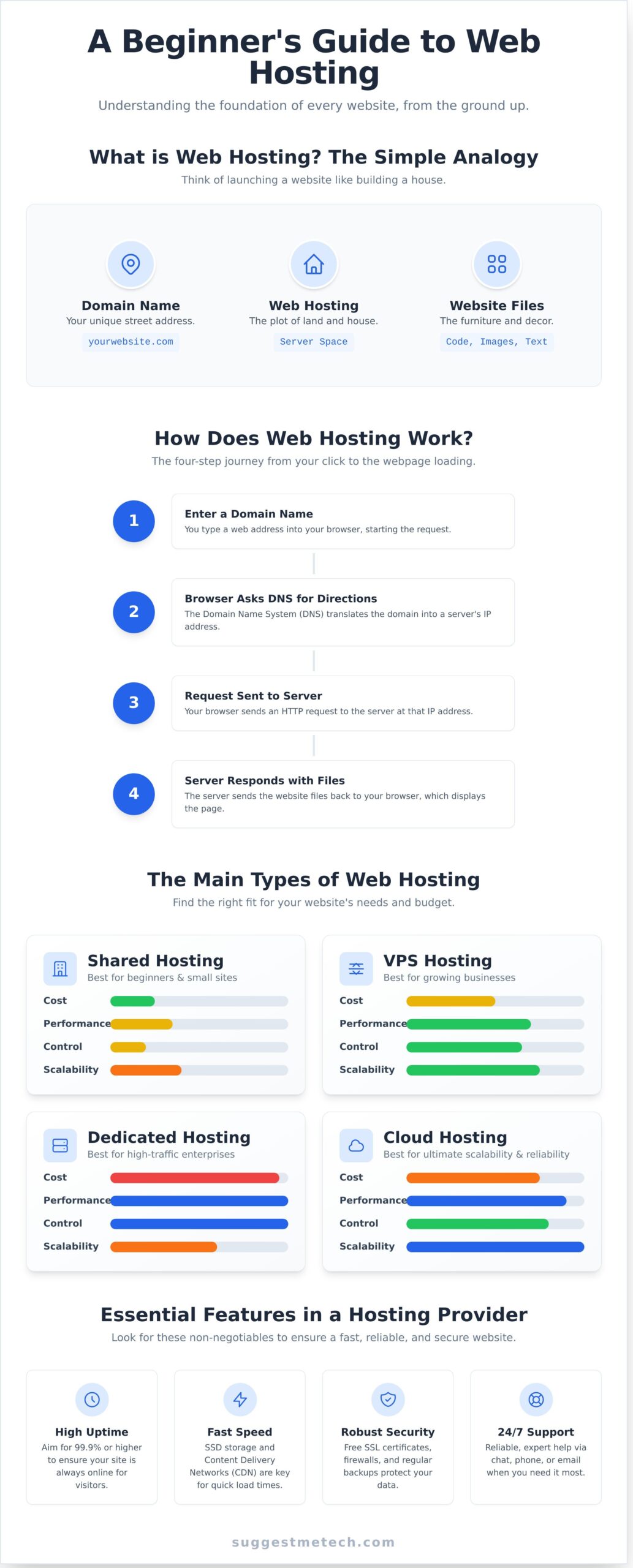
To make this concept even clearer, let’s compare launching a website to building a physical house. This simple analogy breaks down the key components:
- Your Domain Name (e.g., yourwebsite.com) is your unique street address. It’s how people find you online.
- Web Hosting is the plot of land and the house built at that address. It’s the actual space where everything is stored.
- Your Website Files (text, images, etc.) are the furniture and decorations inside the house. They are the content that makes your site useful and unique.
Why Can’t I Just Use My Own Computer?
It’s a fair question. While it’s technically possible to run a server from your home computer, it’s highly impractical and risky for a real website. Professional hosting providers use enterprise-grade servers for reasons your home PC can’t match:
- 24/7 Reliability: Hosting servers are designed to run without ever shutting down. Your home computer needs to sleep, update, and can be affected by power outages.
- Speed and Traffic: Servers have powerful, dedicated internet connections built to handle hundreds or thousands of visitors at once. A typical home connection would grind to a halt.
- Security & Maintenance: Hosting companies employ experts to manage security, run backups, and handle technical updates. Managing this yourself is complex and time-consuming.
How Does Web Hosting Actually Work?
When you visit a website, the process seems instant, almost like magic. But behind the scenes, a rapid and reliable four-step communication happens between your browser and a server. Understanding this process demystifies how web hosting makes your site accessible to anyone, anywhere.
Here’s a simple breakdown of what happens in the seconds after you type a URL and hit Enter:
- Step 1: You Enter a Domain Name. You type a web address (like YourAwesomeSite.com) into your browser. This is your request to see a specific website.
- Step 2: The Browser Asks for Directions. Your browser uses the Domain Name System (DNS) to look up that domain and find the unique IP address of the server where the site’s files are stored.
- Step 3: A Request is Sent. With the IP address located, your browser sends a formal request to that server, asking it to send over the website’s content.
- Step 4: The Server Responds. The server receives the request, gathers the necessary files (code, images, text), and sends them back to your browser, which then assembles and displays the complete webpage on your screen.
Domain Names and DNS: The Internet’s Phonebook
Think of the Domain Name System (DNS) as the internet’s giant, public phonebook. It’s far easier for us to remember a name like “google.com” than a numerical IP address like “142.250.191.78”. DNS does the critical job of translating the easy-to-remember domain name into the server’s machine-readable IP address. When you get a hosting plan, you simply “point” your domain to your hosting provider to make this connection.
The Role of the Server
A server is a powerful, specialized computer that is always on and connected to the internet. Its main job is to store all the files, databases, and assets that make up your website. When a browser requests your site, the server’s job is to “serve” those files quickly and efficiently. As a guide from IBM explains web hosting, these physical machines are managed by hosting companies in secure facilities called data centers, ensuring they have constant power and connectivity.
The Main Types of Web Hosting Explained
Once you decide you need a home for your website, the next question is: which type of web hosting is right for you? Not all plans are created equal. The key difference lies in how a server’s resources-like processing power, memory (RAM), and storage-are shared among users. Think of it like real estate: you need a plot of land (hosting) for your house (website files), which is separate from your street address. To learn more about that address, Mozilla offers a great explainer on what is a domain name.
To simplify your choice, here’s a quick comparison of the four main hosting types.
| Feature | Shared Hosting | VPS Hosting | Dedicated Hosting | Cloud Hosting |
|---|---|---|---|---|
| Cost | Lowest | Medium | Highest | Variable |
| Performance | Basic | Good | Excellent | Scalable |
| Control | Low | Medium | Full | High |
| Best For | Beginners | Growing Sites | Enterprises | High-Traffic Apps |
Shared Hosting: The Beginner’s Choice
The analogy here is renting a room in a large apartment building. You share the server and all its resources with hundreds of other websites. It’s the most common and affordable entry point into the world of web hosting.
- Best for: New websites, personal blogs, and small businesses with low traffic.
- Pros: The most affordable option, very easy to manage, and perfect for beginners.
- Cons: Shared resources can lead to slower performance if another site on the server gets a lot of traffic. You have very little control over the server’s configuration.
VPS Hosting: More Power and Control
A Virtual Private Server (VPS) is like owning a condo. While you still share the main building (physical server), you have a private, partitioned space with your own guaranteed resources. Your neighbors can’t impact your performance.
- Best for: Growing websites, online stores, and businesses that have outgrown shared hosting.
- Pros: Dedicated resources mean better and more consistent performance. You get more control and can customize your server environment.
- Cons: More expensive than shared hosting and requires more technical knowledge to manage.
Dedicated Hosting: Your Own Private Server
This is the equivalent of owning a detached house. The entire physical server and all its resources belong exclusively to you. You have ultimate control over every aspect, from the operating system to security protocols.
- Best for: High-traffic websites, large corporations, and complex applications requiring maximum performance.
- Pros: Unmatched power and speed, full administrative control, and the highest level of security.
- Cons: It is very expensive and requires expert technical skills to manage and maintain.
Cloud Hosting: Flexible and Scalable
Think of cloud hosting as a modern, modular home you can expand instantly. Your website runs on a network of virtual servers. If one server is busy or fails, another seamlessly takes over, ensuring high uptime and reliability.
- Best for: Websites with unpredictable traffic spikes, large-scale applications, and businesses that need high availability.
- Pros: Pay-for-what-you-use model, extremely scalable to handle traffic surges, and very reliable.
- Cons: Costs can be unpredictable, and the setup can be more complex than traditional options.
Key Features to Look for in a Hosting Provider
Now that you understand what web hosting is, the next step is choosing a provider. With hundreds of options available, it’s easy to get overwhelmed. The key is to remember that not all hosting plans are created equal, and the “best” one depends entirely on your website’s needs. A simple blog has very different requirements than a high-traffic e-commerce store. Let’s break down the essential features to compare.
Performance and Reliability
Your website’s performance directly impacts user experience and search engine rankings. A slow or inaccessible site will drive visitors away. Look for these core metrics:
- Uptime: This is the percentage of time your website is online and accessible. The industry standard is an uptime guarantee of 99.9%-anything less is a major red flag.
- Storage (Disk Space): Prioritize hosts that use fast Solid-State Drives (SSDs) over older, slower Hard-Disk Drives (HDDs). An SSD helps your site load significantly faster. A new blog might only need 10 GB of space, while a site with many images or videos will need more.
- Bandwidth: This is the amount of data your site can transfer to visitors each month. More traffic consumes more bandwidth. If your plan’s limit is too low, your site may slow down or go offline during busy periods.
Essential Tools and Security
A good host does more than just store your files; it should provide tools that make managing and securing your site simple. Make sure your plan includes:
- A Control Panel: This is your website’s command center. Industry-standard options like cPanel or Plesk provide an intuitive graphical interface to manage your files, databases, domains, and email accounts without needing to code.
- Free SSL Certificate: An SSL certificate enables the
https://padlock in browsers, encrypting data between your site and its visitors. It’s non-negotiable for building trust, protecting user data, and boosting your SEO. - Automatic Backups: Mistakes happen. A provider that performs regular, automatic backups of your site is a lifesaver. It gives you a safety net to restore your site quickly if it gets hacked or you accidentally break something.
Customer Support
When a problem arises, you need reliable help-fast. Don’t overlook the quality of a host’s customer support. Key indicators of great service include 24/7 availability through multiple channels like live chat, phone, and email tickets. A comprehensive knowledge base with tutorials and guides is also a valuable resource for solving common issues on your own.
Ultimately, the right web hosting provider for you will offer a balanced package of performance, tools, and support that fits your budget. For in-depth comparisons and our top recommendations, be sure to explore the reviews here at SuggestMeTech.
Hosting vs. Domain Name: What’s the Difference?
It’s one of the most common points of confusion for anyone starting a website: “Aren’t hosting and a domain name the same thing?” While they are deeply connected, they are two separate services that are both essential for getting your site online. The easiest way to grasp the concept is with a simple analogy: your domain is your website’s address, and your hosting is the actual house that sits at that address.
Let’s break down what each part does and why you need both.
What a Domain Name Is
A domain name is the unique, human-friendly address that people type into their browser to find you. Think of examples like google.com or our own suggestmetech.com. It’s the memorable signpost that directs visitors to your website’s specific location on the internet. You don’t own a domain name permanently; instead, you register it through a domain registrar and pay a recurring yearly fee to maintain the rights to use it.
What Web Hosting Is
If the domain is the address, then web hosting is the physical plot of land and the house where your website lives. It’s the dedicated space on a powerful computer (called a server) where all your website’s files-images, text, code, and videos-are stored and kept safe. You rent this digital real estate from a hosting provider, which ensures your site is connected to the internet and accessible 24/7 to anyone who visits your address.
Why You Need Both
A website simply cannot function without both of these components working in perfect harmony. They are two sides of the same coin.
- Without a domain, your website is like a house with no street address. It might be beautifully built, but no one will ever be able to find it.
- Without hosting, your domain name is just an address pointing to an empty lot. Visitors can find the location, but there’s nothing there for them to see.
For simplicity, many providers offer bundled packages where you can register your domain and purchase your hosting plan at the same time. While convenient, it’s important to remember they are distinct services, and you always have the option to buy them from different companies.
Now that you understand how these crucial pieces fit together, the next step is choosing the right foundation for your site. See our complete breakdown and recommendations in our list of the Best Web Hosting Providers.
From Beginner to Builder: Your Web Hosting Journey Starts Now
You’ve successfully demystified the world of web hosting. At its core, it’s simply the service that gives your website a place to live online. You now understand that your domain name is the address while hosting is the actual plot of land, and you’re familiar with the key features that separate a good provider from a great one. Just as digital projects require the right foundation, physical projects often rely on powerful tools to hold things together; for those who also build in the physical world, you can check out Supreme Magnets.
Ready to take the next step? Choosing the right provider is the most important decision you’ll make. Feeling confident? See our expert picks for the Best Web Hosting Providers to find the perfect fit. We provide expert-led reviews and comparisons tailored to your budget and needs, giving you practical advice to make a smart tech decision.
Your online journey is just beginning, and you’re now perfectly prepared to build something great. Welcome to the web!
Frequently Asked Questions About Web Hosting
How much does web hosting typically cost?
Shared hosting, the most popular choice for beginners, typically costs between $2 and $15 per month. These plans often include a free domain name for your first year. For growing sites, Virtual Private Server (VPS) hosting ranges from $20 to $80 per month. High-traffic websites may need a dedicated server, which can cost $100 or more. Always check the renewal rates, as introductory prices are usually lower than the standard price.
Can I host my own website from my home computer?
While it’s technically possible, it is not a practical or reliable solution. Hosting from home requires a static IP address, a powerful computer that runs 24/7, and a very fast internet connection. Home networks are also more vulnerable to security threats and power outages. Using a professional hosting provider ensures your website remains fast, secure, and consistently online for your visitors, which is essential for any serious project.
What’s the difference between web hosting and a website builder?
Think of web hosting as renting a plot of land where you have the freedom to build whatever you want. You get the server space and resources, but you must supply the website files. A website builder, like Wix or Squarespace, is like renting a fully furnished apartment. It includes the hosting, design tools, and templates in one package, offering simplicity in exchange for less technical flexibility.
Do I need special hosting for a WordPress website?
While WordPress can run on almost any standard hosting plan, “Managed WordPress Hosting” is specifically optimized for it. These plans offer significant benefits like faster loading speeds, automatic WordPress updates, enhanced security features, and access to expert support. If your website is important for your business, the slightly higher cost is often a worthwhile investment for superior performance and peace of mind.
What happens if my website gets more traffic than my plan allows?
This depends on your provider. Some hosts may automatically charge you overage fees for the extra resources consumed. Others might temporarily suspend your website until you upgrade your plan or the traffic surge ends. A good hosting company will send you a notification when you are approaching your plan’s limits, giving you the chance to upgrade to a more suitable plan and avoid any service interruptions.
How do I move my website to a new hosting provider?
Moving a website is called a migration. The process involves copying your website’s files and database to your new host and then updating your domain’s DNS settings to point to the new server. To make this easy, many hosting providers offer a free or low-cost migration service to handle the entire transfer for you. For WordPress users, plugins like Duplicator can also simplify the process significantly.

