
You have the perfect idea for your business or project, but then comes the frustrating part: every great domain name you think of is already taken. That initial excitement can quickly fade when your domain name search hits a wall of “unavailable” messages, leaving you confused by a sea of different extensions like .com, .net, or .io. What even makes a domain name “good” anyway? And how can you be sure you aren’t signing up for hidden fees or a complicated technical process?
We’re here to cut through the noise. This practical guide provides the actionable strategies you need to brainstorm, find, and register the perfect domain name for your brand. We’ll show you how to discover memorable and available options, understand the entire process from start to finish, and make a smart choice for your online presence. By the end, you’ll feel confident and ready to claim your corner of the internet, without the common regrets.
Before You Search: How to Brainstorm a Winning Domain Name
Before you dive into the technical side of a domain name search, the most critical work happens with a pen and paper-or a blank document. A great domain is your digital address, your brand’s first impression, and a key marketing asset all in one. It should clearly communicate your core message while being memorable and easy to share. At its most basic, you need to understand what a domain name is and how its structure represents your unique space online. The goal is to find a name that is not just available, but one that will serve your brand for years to come.
Key Characteristics of a Strong Domain
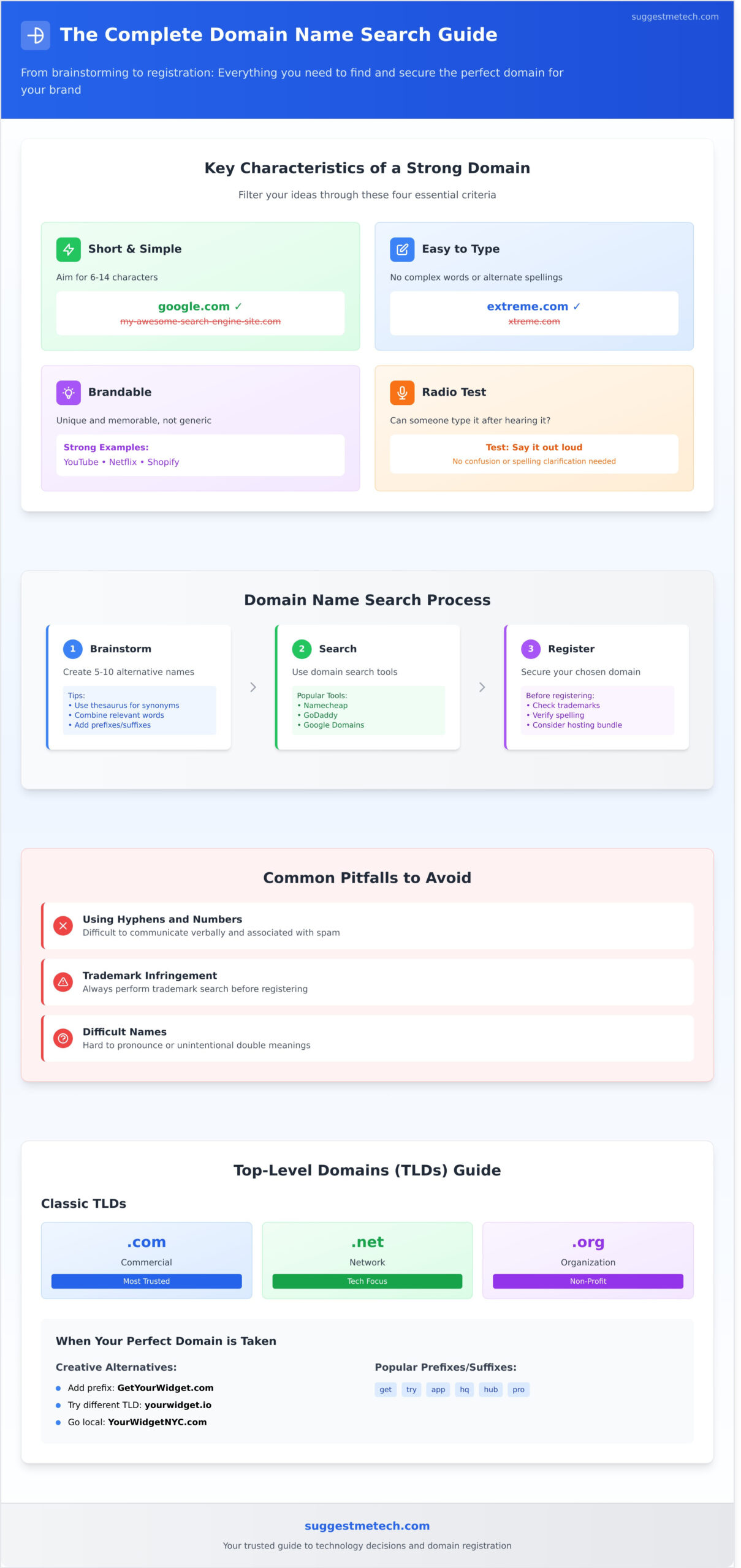
As you brainstorm, filter your ideas through these four essential criteria. A winning domain name is:
- Short and Simple: Aim for 6-14 characters. Shorter names are easier to remember and less prone to typos. Think google.com, not my-awesome-search-engine-site.com.
- Easy to Type and Spell: Avoid using slang, complex words, or alternate spellings (like “xtreme” instead of “extreme”). If you have to spell it out for someone, it’s too complicated.
- Brandable: Your domain should be unique and not easily confused with competitors. It should sound like a brand, not a generic string of keywords.
- Passes the ‘Radio Test’: If someone heard your domain name on a podcast or radio ad, could they type it into their browser without confusion? This is a great test for memorability and clarity.
Creative Brainstorming Techniques
Feeling stuck? Kickstart your creativity with these practical methods. Use a thesaurus to find synonyms for your main keywords, or try combining two relevant words to create a unique name, like YouTube (You + Tube) or Netflix (Net + Flicks). While domain name generators can be a helpful starting point for inspiration, use them to spark ideas rather than relying on them for the final answer. You can also try adding a verb or a descriptive word to your primary keyword to make it more brandable, such as Shopify or Evernote.
Common Pitfalls to Avoid
When you begin your domain name search, steer clear of these common mistakes that can hurt your brand’s credibility and accessibility:
- Using Hyphens and Numbers: These are difficult to communicate verbally (“the dash symbol”) and are often associated with spammy websites. Stick to letters only.
- Infringing on Trademarks: Always perform a quick trademark search before registering a name. Using a trademarked term can lead to serious legal issues down the road.
- Choosing a Difficult Name: Avoid names that are hard to pronounce or have unintentional double meanings when words are pushed together (e.g., therapistfinder.com).
Using a Domain Name Search Tool: A Practical Guide
Once you have a list of potential names, it’s time to see what’s available. A domain name search tool is your first stop. These tools don’t just guess; they instantly check your desired name against a global, centralized database of registered domains. The results are immediate, so you’ll know right away if your top choice is available or already taken.
To make this process efficient, don’t pin all your hopes on one name. We recommend preparing a list of 5-10 alternatives before you begin. This preparation is a key part of the process, much like the steps outlined by the U.S. Small Business Administration on how to choose a business name, ensuring you have solid backups ready to go. Many tools will also suggest creative alternatives if your first choice is gone, helping you discover great options you hadn’t considered.
Where to Perform Your Domain Name Search
You can perform a domain search at any ICANN-accredited domain registrar. These are the companies authorized to sell and manage domain names. Popular options include Namecheap, GoDaddy, and Google Domains. Additionally, most web hosting providers offer a free domain search tool, often allowing you to register a domain and set up hosting in one seamless process. This bundled approach is perfect for beginners looking to get online quickly. See our guide to the Best Web Hosting Providers who can help with both domains and hosting.
What to Do When Your Perfect Domain is Taken
It’s a common problem: your first choice is unavailable. Don’t worry-this is where creativity comes in. Instead of starting over, try one of these proven tactics to find a great alternative:
- Add a prefix or suffix: Simple, action-oriented words can make a name unique. Try adding words like “get,” “try,” “app,” or “hq” to your original idea (e.g., GetYourWidget.com).
- Try a different extension (TLD): While .com is the most popular, other Top-Level Domains (TLDs) like .co, .io, or .net are excellent alternatives, especially for tech companies and startups.
- Go local: If your business serves a specific geographic area, adding your city or region can open up new possibilities and improve local SEO (e.g., YourWidgetNYC.com).
- Check the WHOIS info: For advanced users, you can look up the domain’s registration data. Sometimes, a domain is listed for sale or is set to expire soon, giving you a chance to acquire it.
Decoding Domain Extensions (TLDs): More Than Just .com
The Top-Level Domain, or TLD, is the part of your domain name that comes after the final dot. While .com is by far the most recognized extension on the web, it’s no longer the only path to success. The TLD you select is a powerful signal, instantly telling visitors about your business’s purpose, industry, or geographic location before they even see your homepage. With hundreds of options now available, your choice of extension has become a key part of your branding strategy.
The Classic TLDs: .com, .net, .org
These three extensions are the most established and widely trusted. While their original meanings have blurred over time, they still carry strong associations that can influence user perception. A smart domain name search often starts here, but it’s crucial to pick the one that best fits your mission.
- .com: The undisputed king, short for “commercial.” It is the default choice for most businesses and for-profit ventures. Its universal recognition makes it highly memorable and credible for a broad audience.
- .net: Originally intended for “network” and tech infrastructure companies,
.netis now a common and respected alternative to.com. It’s a solid backup if your first choice is taken. - .org: Primarily for “organizations,” this TLD is the standard for non-profits, charities, educational platforms, and open-source projects. It immediately signals a mission-driven or community-focused purpose.
Country-Code TLDs (ccTLDs)
If your audience is located in a specific country, a ccTLD is your best bet. These two-letter extensions, like .co.uk (United Kingdom), .ca (Canada), or .de (Germany), clearly signal to users and search engines that your site is tailored for them. Using a ccTLD can provide a significant boost to your local SEO rankings and build trust with a regional customer base that prefers to shop and engage locally.
New Generic TLDs (gTLDs)
In recent years, a wave of new, descriptive TLDs has entered the market, offering creative and industry-specific options. These extensions allow you to create a more brandable and memorable URL. For example:
.shopor.storefor e-commerce sites.io,.ai, or.techfor technology startups.appfor software and mobile applications.blogfor content creators
These modern gTLDs can make your domain name shorter and more descriptive, opening up new possibilities when your ideal .com is unavailable.
From Search to Ownership: How to Register Your Domain
You’ve completed the creative part of your domain name search and found the perfect available address for your brand. Now, it’s time to make it officially yours. The final step is registration, a straightforward process that secures your domain for a set period-typically from one to ten years. This establishes you as the legal owner and requires you to provide contact information for the official WHOIS record.
The Registration Process Step-by-Step
Navigating the checkout process at a domain registrar is simple once you know what to expect. While the interface varies between providers, the core steps are nearly identical:
- Add to Cart: Once your domain name search confirms your choice is available, add it to your shopping cart.
- Select a Term Length: You can register a domain for as little as one year or up to ten. While a one-year term is standard, longer terms often come with a discount and save you the hassle of frequent renewals.
- Review Upsells: Registrars will offer add-ons like email hosting, website builders, and SSL certificates. You can safely decline most of these for now, with one key exception: domain privacy.
- Complete Checkout: Fill in your contact and payment information to finalize the purchase. Your domain is now registered to you.
What is WHOIS Domain Privacy and Why You Need It
When you register a domain, your contact information (name, address, email, and phone number) is added to a public database called WHOIS. Without privacy protection, this information is accessible to anyone, including spammers, data miners, and potential fraudsters.
WHOIS Domain Privacy acts as a shield. It replaces your personal details in the public directory with the registrar’s generic information, protecting you from unwanted contact. Most reputable registrars now offer this essential service for free or for a small annual fee, and we highly recommend enabling it.
Next Steps: Connecting Your Domain to a Website
Think of your newly registered domain as a street address for an empty plot of land. It tells people where to find you, but there’s nothing there yet. To build a website, you also need web hosting-the ‘house’ where your website’s files, images, and content will live.
Once you have a hosting plan, you’ll connect the two by updating your domain’s nameservers to point to your web host. This final step makes your website live on the internet at your custom address. Ready to build your site? Choose the right web host with our guide.
From Search to Launch: Your Domain Is Ready
Navigating the world of domains can feel complex, but it boils down to a few key principles. As we’ve shown, a successful domain name search is a blend of creative brainstorming and practical strategy. By thinking about your brand first, exploring extensions beyond .com, and using trusted registrars, you have secured a name that truly represents your vision. Our goal was to provide actionable advice for beginners, focusing on the “why” behind the search, not just the tools you use.
Now that you own your piece of digital real estate, it’s time to build on it. Your domain name needs a reliable web host to power your website, handle traffic, and keep your data secure. Making the right choice here is critical for your future growth. Ready for the next step? Find the perfect home for your new domain with our review of the Best Web Hosting Providers.
You’ve done the foundational work. The perfect domain is yours, and a world of possibility awaits. Congratulations on taking this exciting step forward!
Frequently Asked Questions About Domain Names
What’s the difference between a domain name and web hosting?
Think of a domain name as your website’s street address (e.g., YourBusiness.com) and web hosting as the physical house at that address. The domain is the unique name people use to find you online, while hosting is the server space where all your website’s files, images, and content are stored. You need both for a functioning website; the domain name simply points visitors to the correct server where your site lives.
How much does a domain name typically cost per year?
A typical domain name with a common extension like .com, .net, or .org usually costs between $10 and $20 per year. Be aware of introductory offers, as the renewal price is often higher than the first-year fee. Premium or highly sought-after domains can cost hundreds or even thousands of dollars. Always check the annual renewal rate before committing to a registrar to understand the long-term cost of your domain.
Can I buy a domain name forever?
No, you can’t buy a domain name forever. Domain registration works like a lease, not a one-time purchase. The maximum period you can register or renew a domain for at one time is typically 10 years. To avoid losing your domain, we strongly recommend enabling the auto-renewal feature with your registrar. This ensures your ownership continues without interruption as long as your payment method is current and valid.
Should I register my name with multiple extensions like .com, .net, and .org?
Yes, if your budget allows, it’s a smart brand protection strategy. Registering your name with multiple popular extensions prevents competitors or squatters from using them. This protects your brand identity and avoids customer confusion. You can easily forward these additional domains to your primary .com website, so all traffic lands in one place. This simple step strengthens your online presence and secures your brand for the future.
What happens if I forget to renew my domain name?
If you forget to renew, your domain enters a grace period, typically around 30 days, where you can still renew it at the standard price. After that, it enters a more expensive “redemption period.” If you still don’t renew it, the domain is eventually released and becomes available for public registration. This means someone else could buy it, and you would lose your website traffic, brand identity, and any associated email addresses.
Can I move my domain to a different company after I register it?
Absolutely. You can move your domain from one registrar (the company you bought it from) to another at any time. This process is called a domain transfer. Most registrars impose a 60-day lock after a new registration or a previous transfer, during which you cannot move it. To start a transfer, you will need to unlock your domain and get an authorization code from your current registrar to provide to the new one.
Does my domain name affect my website’s SEO?
Yes, your domain name can influence your website’s SEO. A good domain name search should lead you to a name that is relevant, memorable, and easy to spell. Including a target keyword (e.g., “atlantaroofing.com”) can provide a slight ranking advantage and clearly signals your site’s purpose. However, a unique, brandable name is often more valuable for building long-term authority and trust with both users and search engines.