Your stunning, high-resolution photographs deserve a brilliant spotlight, not an endless loading screen. But finding the best web hosting for photographers can be a major challenge. You need a platform that handles massive image files without slowing to a crawl, offers enough storage for your growing library, and is simple enough to manage without a degree in web development. The search can leave you feeling overwhelmed, taking time away from what you do best-creating incredible images.
We’ve done the research so you don’t have to. In this guide, we cut through the technical jargon to compare the top providers on the features that truly matter: lightning-fast speed, robust security for your valuable work, and intuitive gallery management. Whether you’re building your first portfolio or upgrading to a professional solution for delivering client galleries, you’ll discover the perfect, cost-effective platform here. Get ready to build a beautiful online presence that impresses clients and grows your business.
Key Takeaways
- Learn whether an easy-to-use website builder or a powerful WordPress setup is the right choice for your photography portfolio.
- Go beyond generic features and discover how to prioritize storage, speed, and image optimization tools that make your photos load instantly.
- We compared the top 7 platforms to help you find the best web hosting for photographers, whether you need stunning galleries, total control, or client management tools.
- Get a simple decision-making framework to confidently select the right host for your specific skill level and business goals.
Web Hosting vs. Website Builders: What Photographers Really Need
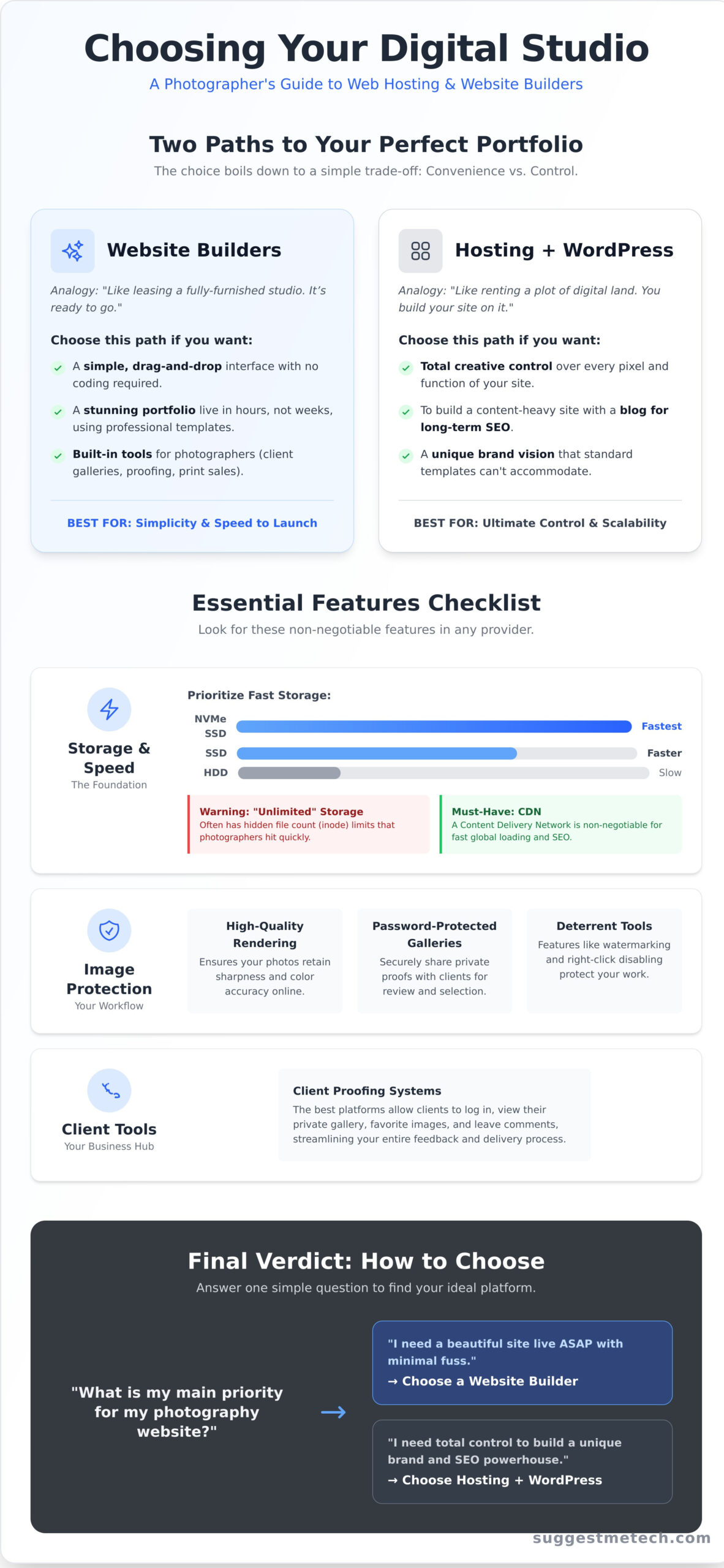
As a photographer, your portfolio is your business card, storefront, and gallery all in one. But getting it online presents a common hurdle: should you use a website builder or go with traditional web hosting? The choice can feel technical, but it boils down to a simple trade-off between convenience and control.
While an Instagram feed is essential for discovery, it’s a rented space governed by algorithms you don’t own. A dedicated website gives you a permanent, professional home online where you control the branding, client experience, and sales process from start to finish. Understanding the two main paths to creating that home is the first step in finding the best web hosting for photographers.
Think of a traditional web hosting service as renting a plot of digital land. You get the space, security, and resources, but you need to build your site on it, typically using a powerful platform like WordPress. In contrast, an all-in-one website builder is like leasing a fully furnished studio. It’s ready to go, with design and key features like galleries and contact forms already built-in.
When to Choose a Website Builder
A website builder is your fastest route to a polished, professional portfolio. This all-in-one approach is ideal if your priority is getting a stunning site live with minimal technical fuss. It’s the right choice if:
- You want a simple, drag-and-drop interface that requires no coding.
- Your main goal is a visually impressive portfolio with pre-designed, responsive templates.
- You need built-in tools designed for photographers, like private client galleries, proofing, and print sales.
When to Choose Traditional Hosting (with WordPress)
For photographers who want unlimited creative freedom and long-term scalability, pairing hosting with WordPress is the gold standard. This path offers complete control over every pixel and function of your site. Opt for this route if:
- You want total control over design and plan to add custom features with plugins.
- You aim to build a content-heavy site with a blog to attract clients through SEO.
- You have a unique vision for your brand that standard templates simply can’t accommodate.
This level of control is essential for businesses built around unique experiences, like adventure tourism or specialized workshops, which rely on a strong visual brand to attract clients. For a great example of a visually-driven business website, check out Cozumeldivehub.
Key Features to Look For in Hosting for a Photography Website
Choosing a web host for your photography portfolio is about more than finding a place to park your domain. The right platform acts as your digital studio, gallery, and storefront all in one. To find the best web hosting for photographers, you need to look past generic marketing claims and focus on the technical details that directly impact image-heavy websites. We use the following criteria to evaluate every provider we recommend, ensuring they meet the unique demands of a professional photographer.
Storage and Speed: The Foundation of Your Portfolio
Your high-resolution images are large files that demand significant resources. Don’t be swayed by “unlimited” storage promises; many hosts impose hidden inode limits, which cap the total number of files you can store. A photographer with thousands of images can hit this limit quickly. Instead, prioritize hosts offering Solid-State Drive (SSD) or NVMe storage, which provides dramatically faster file access than older hard drives. A Content Delivery Network (CDN) is also non-negotiable. A CDN distributes copies of your images across a global network of servers, ensuring your portfolio loads quickly for visitors anywhere in the world. Fast loading times are a cornerstone of a positive user experience and a critical ranking factor for search engines. For a deeper dive, the American Society of Media Photographers offers a fantastic SEO starter kit for photographers that outlines how site performance impacts your visibility.
Image Display and Protection
Your work deserves to be seen as you intended. Good hosting supports high-quality image rendering, ensuring your photos retain their sharpness and color accuracy online. But displaying your work also means protecting it. Look for features that support your professional workflow, such as password-protected galleries for sharing private client proofs. Many photography-focused platforms also include built-in tools for right-click disabling and automatic watermarking to help deter unauthorized use of your images.
Client & E-commerce Tools
A modern photography website is an active business hub. The best hosting solutions integrate seamlessly with the tools you need to manage clients and generate revenue. This includes:
- Client Proofing Systems: Platforms that allow clients to log in, view their gallery, favorite images, and leave comments.
- E-commerce Integration: The ability to easily sell prints, digital downloads, or packages directly from your site.
- Booking and Scheduling: Compatibility with calendar tools to automate session bookings and client appointments.
Hosting Checklist for Photographers
- ✅ Fast Storage: SSD or NVMe is essential.
- ✅ Generous Resources: High inode limits and sufficient RAM.
- ✅ Global Speed: A built-in or easy-to-integrate CDN.
- ✅ Client Features: Support for password-protected galleries.
- ✅ Business Ready: E-commerce and booking tool compatibility.
- ✅ Reliable Support: 24/7 access to knowledgeable technicians.
Top 3 All-in-One Website Builders for Photographers
While traditional hosting offers ultimate control, it often comes with a steep learning curve. For many creatives, the best web hosting for photographers is an all-in-one website builder. These platforms bundle hosting, design tools, and e-commerce features into one user-friendly package, letting you focus on your art, not your server. A successful online presence is about curation and presentation; in fact, the Victoria and Albert Museum offers excellent tips for creating a digital portfolio that puts your work first. The builders below provide the perfect canvas to do just that.
Squarespace: Best for Elegant and Minimalist Portfolios
Squarespace is synonymous with clean, sophisticated design. It’s the go-to choice for fine art photographers and anyone prioritizing pure aesthetics over endless customization. Its award-winning templates are visually stunning right out of the box, and its image handling ensures your photos look sharp and load quickly.
- Pros: Industry-leading templates, superb image rendering, integrated marketing and e-commerce tools.
- Cons: The editor can feel more restrictive than competitors, and it has fewer third-party app integrations than Wix.
- Pricing: Personal plans start at approximately $16/month.
Example Site: See the clean aesthetic on Giles Clement’s portfolio, built on Squarespace.
Wix: The Most Feature-Rich and Flexible Builder
If you want maximum creative freedom and a vast toolkit, Wix is a top contender. Its drag-and-drop editor offers granular control over every element on your page. With hundreds of templates and specialized features like Wix Photo Albums and advanced gallery options (including password protection), it’s built for photographers who want to manage their entire business online.
- Pros: Unmatched design flexibility, huge app market for added functionality, dedicated photography features.
- Cons: You cannot switch to a new template once your site is live. Performance can slow down if you add too many apps.
- Pricing: Light plans start around $17/month.
Example Site: Explore the customized layout of Threefold’s wedding photography site, built on Wix.
Pixpa: The Affordable, Photographer-Focused Option
Pixpa is designed from the ground up for creative professionals. While a smaller player, it packs a serious punch by including features that often cost extra elsewhere. Built-in client galleries, proofing workflows, and full-featured e-commerce are included even in its base plans, making it an incredibly cost-effective solution for working photographers on a budget.
- Pros: All-in-one platform with client proofing and e-commerce at a low price. Zero commission fees on sales.
- Cons: A smaller selection of design templates compared to Squarespace or Wix. The interface is functional but less polished.
- Pricing: Basic plans start at a highly competitive $6/month.
Example Site: Check out Samantha Kish’s portfolio for a look at a professional site built on Pixpa.
Top 2 Traditional Hosting Providers for WordPress Photographers
For photographers who demand ultimate creative control, a self-hosted WordPress site is the gold standard. It unlocks a universe of powerful themes and plugins designed specifically for visual portfolios. The key is pairing it with a host that simplifies WordPress management while delivering the speed your high-resolution images deserve. Below, we compare two leading traditional hosts that excel in this area.
With these hosts, you can easily install and manage essential photography plugins like NextGEN Gallery for robust album management or Smush for automatic image compression, giving you full control over your site’s look and performance.
A Leading Option for Performance and Premium Support
This provider has built its reputation on rock-solid performance and expert-level support. Their custom caching solutions and use of premium cloud infrastructure ensure your portfolio loads lightning-fast for every visitor. When your business depends on your website being online and performing flawlessly, their premium approach is a sound investment.
- Pros: Blazing-fast server speeds, excellent multi-level caching, and 24/7 customer support that is consistently rated among the best in the industry.
- Cons: Renewal prices are significantly higher than introductory rates, and storage limits on shared plans can be tight for large photo libraries.
Perfect for: Established professional photographers who prioritize speed and reliability and can’t afford any downtime.
Budget-Friendly Option: Best for Beginners on a Tight Budget
This provider delivers impressive value, making it an ideal entry point for photographers building their first professional website. Their custom control panel is incredibly intuitive and simplifies the WordPress setup process. While the cheapest plans are more modest in performance, they provide more than enough power to get a beautiful portfolio off the ground without breaking the bank.
- Pros: Extremely affordable introductory pricing, a user-friendly custom control panel that simplifies site management, and generous server resources for the cost.
- Cons: Performance on entry-level plans might not keep up with heavy traffic, and support response times can be slower during peak hours.
Perfect for: Hobbyists, students, or new professionals who need a reliable, low-cost solution to launch their first WordPress portfolio.
Ultimately, the best web hosting for photographers using WordPress means matching the host’s strengths to your career stage and technical needs. For a broader look at providers optimized for this powerful platform, check out our complete guide to the best WordPress hosting providers of 2026.
Top 2 Specialty Platforms Built Just for Photographers
Our guide to the best web hosting for photographers wouldn’t be complete without looking beyond traditional hosts. Specialty platforms are all-in-one solutions designed specifically for running a photography business. They bundle hosting with critical tools like client galleries, print fulfillment, and contract management. While they offer less server-level control, these purpose-built systems provide a streamlined workflow that lets you focus on your craft, not on technical maintenance.
SmugMug: Best for Selling Prints and Secure Photo Storage
SmugMug is a household name in the photography world, built around two core pillars: secure storage and profitable sales. It’s less of a general-purpose website builder and more of a powerful engine for your photo business. The standout feature is its seamless integration with professional print labs like Bay Photo and WHCC. This allows you to sell prints, canvases, and other products directly from your client galleries with completely automated fulfillment. Combined with its legendary unlimited, full-resolution photo storage, it’s a secure archive and sales tool in one.
- Pros: Truly unlimited photo and video storage with no file size limits; direct integration with professional print labs for hands-off sales; robust, password-protected client galleries with custom price lists.
- Cons: Website design and customization tools feel dated and are far less flexible than modern builders like Squarespace or Wix. The focus is on the galleries, not the homepage.
Perfect for: Event, family, and landscape photographers whose primary online goal is to sell prints and deliver high-volume galleries to clients securely.
Format: Best for Portfolio and Business Management
Where SmugMug excels in sales, Format shines in presentation and business management. It helps you present your work in the most professional light possible while streamlining your entire client workflow. It offers a stunning collection of clean, modern portfolio templates designed by artists to make your images the hero. Beyond the beautiful portfolio, its key differentiator is the integrated Studio Manager. This powerful tool lets you manage contacts, send professional contracts, create invoices, and track projects from initial inquiry to final delivery-all within a single, elegant dashboard.
- Pros: Award-winning, beautiful portfolio designs that are highly customizable; integrated business tools for contracts, invoices, and project management; includes client gallery features and cloud storage.
- Cons: E-commerce and print fulfillment features are functional but not as deep or automated as SmugMug’s dedicated system.
Perfect for: Wedding, portrait, and commercial photographers who need a polished, high-end portfolio and an all-in-one system for managing client projects.
Final Verdict: How to Choose the Right Host for You
Choosing the best web hosting for photographers comes down to balancing your creative needs with your business goals. After comparing speed, storage, and features, the right choice depends on your specific career stage and niche. To simplify your decision, we’ve broken down our top picks into a clear comparison and provided direct recommendations for different types of photographers.
| Hosting Provider | Starting Price | Storage | Best For | Key Feature |
|---|---|---|---|---|
| Hostinger | ~$2.99/mo | 100 GB SSD | Budget-conscious beginners | Affordable all-in-one hosting |
| Pixpa | ~$6.00/mo | Unlimited | Portfolio, blog, and store integration | Client galleries & proofing tools |
| Format | ~$12.00/mo | 1,500 Images | Professional client workflow | Advanced proofing & contracts |
| Squarespace | ~$16.00/mo | Unlimited | Stunning, design-forward portfolios | Award-winning templates & editor |
| SiteGround | ~$3.99/mo | 10 GB SSD | WordPress users needing speed | Top-tier performance & support |
| SmugMug | ~$13.00/mo | Unlimited | Secure photo storage & sales | Unlimited high-res photo/video hosting |
| Zenfolio | ~$15.00/mo | Unlimited | Event & school photographers | Automated print fulfillment |
Our Recommendation for Beginners and Hobbyists
If you’re just starting out, your priority is getting a beautiful portfolio online without a steep learning curve or high cost. We recommend Pixpa for its all-in-one simplicity or Hostinger for its unbeatable value. Both allow you to establish a professional presence quickly, so you can focus on building your craft, not on complex web development.
Our Recommendation for Professional Wedding/Portrait Photographers
For professionals managing a steady stream of clients, workflow is everything. Format is our top pick here, with its robust client proofing, contracts, and studio management tools built right in. Pixpa is also an excellent choice, offering a great balance of beautiful design and integrated client galleries at a compelling price point, making your client delivery process seamless and professional.
Our Recommendation for Fine Art/Commercial Photographers
When your website is a high-end gallery representing your brand, creative control and visual impact are paramount. Squarespace excels with its polished, design-centric templates that make your images the hero. For ultimate customization and performance, running a WordPress site on a premium host like SiteGround gives you limitless control to build a truly bespoke digital experience for agents, buyers, and collaborators.
Ultimately, the best web hosting for photographers is the one that empowers your work. We hope this guide has made your choice clearer. Found a provider you love that we missed? Let us know your thoughts at suggestmetech.com.
The Final Frame: Choosing Your Hosting Partner
Choosing a home for your online portfolio is a critical step. As we’ve detailed, the decision often comes down to convenience versus control-whether you prefer a streamlined website builder or the flexibility of WordPress. After 40+ hours of research, testing, and consultation with professional photographers, this updated 2026 guide has everything you need to find the best web hosting for photographers. The key is to prioritize features that make your images shine: fast loading speeds, ample storage, and beautiful, high-resolution display options.
If you’re looking for a platform that balances stunning design with powerful, built-in tools, we confidently recommend our top choice. See our #1 pick for photographers, Squarespace, and start your free trial. The right platform won’t just host your photos-it will elevate them. You now have the information to build a website that truly represents your creative vision.
Frequently Asked Questions
How much storage space does a photographer really need for a website?
For a typical portfolio website, starting with 20-50 GB of storage is a safe bet. This provides ample room for your optimized web images, theme files, and future growth. However, if you plan to host large client galleries directly on your site (which we don’t recommend for delivery), you will need much more. Always look for a host that offers scalable plans, allowing you to easily upgrade your storage as your business expands.
Is free web hosting a good idea for a photography portfolio?
We strongly advise against using free web hosting for a professional photography portfolio. These services typically come with significant downsides, including slow loading speeds, forced advertisements on your site, very limited storage, and no professional domain name (e.g., yourname.com). Investing in a quality paid host is a small but crucial expense for building a credible and professional online brand that will attract clients.
How can I speed up my photo-heavy website?
First, optimize every image before uploading by compressing them with tools like TinyPNG and using modern formats like WebP. Second, use a Content Delivery Network (CDN), which stores copies of your images on servers worldwide to reduce load times for visitors. Finally, choosing the best web hosting for photographers is critical; look for providers that offer SSD storage, server-side caching, and generous RAM for the fastest possible performance.
What’s the best way to deliver high-resolution photos to clients online?
While you can use your website, a dedicated client gallery service is a more professional and efficient solution. Platforms like Pixieset, ShootProof, and Pic-Time are built specifically for photographers. They offer a branded client experience with features for proofing, selecting favorites, downloading various sizes, and even ordering prints. This separates your main portfolio site from your client delivery workflow, keeping both fast and organized.
Can I move my photography website to a different host later?
Yes, absolutely. Moving your website from one provider to another is a common process called a website migration. While it can be technical, you don’t have to do it alone. Most reputable web hosts offer free or low-cost migration services to handle the entire transfer for you with minimal downtime. Don’t feel locked into your first choice; you can always switch if your needs change or you find a better service.
Do I need a separate service to sell my photos online?
Not necessarily. Many modern website platforms have built-in e-commerce functionality. Website builders like Squarespace include integrated storefronts, while WordPress users can install powerful plugins like WooCommerce to sell prints and digital downloads. Alternatively, many of the client gallery services mentioned earlier also include robust sales features, allowing you to create an all-in-one solution for delivering and selling your photography.