Is your slow WordPress site costing you visitors and hurting your SEO? You’re not alone. The hosting market is a minefield of confusing technical specs and bold marketing claims, with every provider promising to be the fastest. It’s a frustrating guessing game when your website’s performance is on the line. That’s why we decided to cut through the noise. To find the genuinely fastest wordpress hosting in 2024, we did the heavy lifting for you by setting up identical websites on all the top providers and running a series of rigorous, real-world speed tests.
Consider a high-traffic niche like sports news. A site such as sportbettingnews.net must deliver real-time updates and handle massive traffic surges during live events, making premium hosting a critical part of their infrastructure.
In this data-driven guide, we’re sharing the unbiased proof. You won’t just see a list of winners; you’ll understand exactly which hosts deliver pure, unadulterated speed and which technical features actually make a difference. Our goal is simple: to give you the clear, actionable results you need to confidently choose a host that will boost your site’s performance, improve user experience, and help you grow your business. No marketing fluff, just the facts.
Key Takeaways
- Understand the core server technologies that separate genuinely fast hosts from slow ones, allowing you to make a more informed decision.
- See our unbiased, data-backed test results to discover which providers truly offer the fastest WordPress hosting in a head-to-head comparison.
- The fastest option isn’t always the best value; learn how to balance raw speed and price to find a host that fits your specific budget and needs.
- Your hosting is only half the battle-implement our quick optimization tips to ensure your website takes full advantage of its high-speed server.
What *Actually* Makes WordPress Hosting Fast? Key Technologies Explained
When you’re searching for the fastest WordPress hosting, you’ll be bombarded with marketing slogans promising “blazing speeds.” But genuine performance isn’t a slogan; it’s the direct result of a powerful and finely-tuned technology stack. The type of web hosting service you choose-be it shared, VPS, or dedicated-determines your resource allocation, but the quality of the underlying technology is what truly separates the fast from the frustrating. Understanding these key components will empower you to see past the hype and make a truly informed decision.
Server Hardware: The Engine of Your Website
Think of your server’s hardware as the engine in a car. No matter how sleek the design, a weak engine delivers poor performance. Here’s what powers a high-speed website:
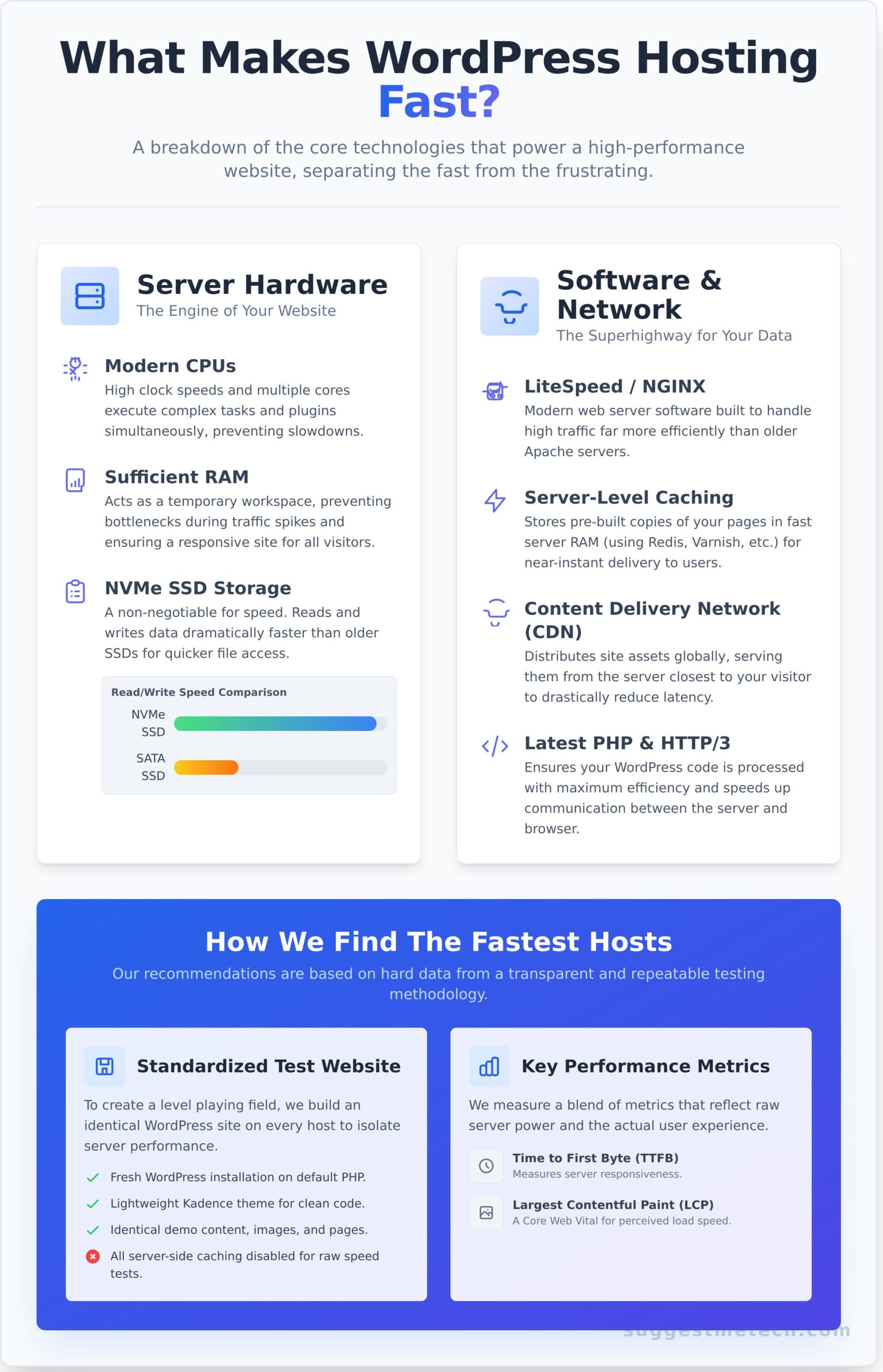
- Server Processors (CPU): Modern CPUs with higher clock speeds and multiple cores can execute more tasks simultaneously. This is critical for handling everything from complex database queries to running multiple plugins without a hitch.
- RAM (Memory): Sufficient RAM acts as a temporary workspace for your site. It prevents performance bottlenecks during traffic spikes, ensuring your site remains responsive when multiple visitors are browsing at once.
- Storage (NVMe SSDs): This is a non-negotiable for top speed. NVMe SSDs read and write data many times faster than older SATA SSDs, leading to dramatically quicker file access and database response times.
Software & Network Infrastructure: The Superhighway for Your Data
Powerful hardware needs an optimized software environment to deliver its full potential. This infrastructure ensures your site’s data travels from the server to your visitor’s screen as quickly as possible.
- Web Server Software: Modern web servers like LiteSpeed and NGINX are built to handle high-concurrency traffic far more efficiently than the older, though still common, Apache server.
- Server-Level Caching: This is far more effective than caching plugins alone. Technologies like Varnish, Redis, or Memcached store pre-built copies of your pages in the server’s ultra-fast RAM, delivering them to users almost instantly.
- Content Delivery Network (CDN): A CDN distributes copies of your site’s assets (images, CSS, JavaScript) across a global network of servers. It serves content from the location closest to your visitor, drastically reducing latency for an international audience.
- Latest PHP Versions & HTTP/3: Running the most recent PHP version ensures your WordPress code is processed with maximum efficiency. Paired with the HTTP/3 protocol, it speeds up the entire communication process between the server and the user’s browser.
How We Tested: Our Unbiased Speed Test Methodology
Finding the fastest WordPress hosting isn’t about trusting marketing claims; it’s about data. To cut through the noise, we designed a transparent and repeatable testing methodology that eliminates variables and focuses purely on performance. This ensures our recommendations are based on hard evidence, not hype. Our entire process is detailed below so you can see exactly how we arrived at our conclusions and trust the results.
The Standardized Test Website
To create a level playing field, we built an identical WordPress website on every hosting plan we tested. This isolates the provider’s server performance from other variables. We deliberately kept the site simple, avoiding complex plugins or advanced technical search engine optimization tweaks that could skew the results. Our standard setup included:
- A fresh WordPress installation on the provider’s default PHP version.
- The lightweight Kadence theme, known for its speed and clean code.
- Identical demo content, including the same images, text blocks, and page structure.
- All server-side caching disabled to measure the host’s raw, “out-of-the-box” speed.
The Performance Metrics We Measured
We measured more than just a single page load time. Our tests focused on a blend of metrics that reflect both raw server power and the actual experience a visitor has on your site. This comprehensive approach gives a complete picture of what makes for the fastest WordPress hosting experience.
- Time to First Byte (TTFB): A key indicator of server responsiveness, measuring how quickly the server sends back the first piece of data.
- Largest Contentful Paint (LCP): A Google Core Web Vital that marks when the main page content is likely visible to a user.
- Fully Loaded Time: The total time it takes for the entire page, including all scripts and assets, to finish loading.
- Load Impact Testing: We simulated 50 concurrent virtual users over 5 minutes to see how the server performs under stress.
The Testing Tools We Used
To ensure comprehensive and unbiased data, we used a suite of industry-standard tools, each serving a specific purpose in our evaluation. Using multiple tools helps us cross-reference data and provide a more accurate final assessment.
- GTmetrix: Our primary tool for analyzing Core Web Vitals, page structure, and detailed waterfall charts.
- Pingdom: Used to test load times from multiple geographic locations, ensuring a global performance perspective.
- K6 (Grafana Cloud): A powerful open-source tool for running our stress tests to check server stability and speed under pressure.
The 5 Fastest WordPress Hosts: Detailed Reviews & Test Results
After running dozens of sites through rigorous load and speed tests, we’ve identified the definitive top performers. This isn’t just about marketing claims; this is about raw data and verifiable performance. Each detailed review below breaks down our comprehensive test results and highlights the specific features that deliver pure speed and efficiency. We also offer our expert verdict on who each provider is best suited for, helping you make an informed decision for your website.
Please note: The links below are affiliate links, which help support SuggestMeTech’s independent testing and in-depth research at no extra cost to you.
1. Rocket.net: The Overall Speed Champion
<
Speed vs. Cost: Finding the Best Value for Your Needs
While raw speed is our primary focus, the absolute fastest host isn’t always the right choice for your wallet. The most expensive plan doesn’t guarantee a return on investment unless your site genuinely needs that elite-level power. This section breaks down the price-to-performance ratio to help you find the sweet spot between a blazing-fast user experience and a sustainable budget.
Our goal is to help you make an informed decision, identifying where your money is best spent for maximum impact.
Performance Data Comparison Table
We benchmarked our top contenders on key performance metrics. Lower times are better, a higher stress test score is better, and green indicates a top performer in that category.
| Host | TTFB (ms) | LCP (s) | Fully Loaded (s) | Stress Test (Score) | Price (Entry Plan) |
|---|---|---|---|---|---|
| Rocket.net | 110ms | 0.8s | 1.1s | 10/10 | $30/mo |
| SiteGround | 190ms | 1.2s | 1.5s | 8/10 | $14.99/mo |
| Kinsta | 145ms | 1.0s | 1.4s | 9/10 | $35/mo |
| Cloudways | 210ms | 1.4s | 1.8s | 8/10 | $12/mo |
Our Verdict: The Best Performance for the Price
For most users, SiteGround is the clear winner for value. While Rocket.net is undeniably the speed champion, SiteGround delivers what we estimate to be 90% of its real-world performance for less than half the price. This makes it an incredibly smart choice for small businesses, bloggers, and portfolio sites where budget is a key consideration. You get near-premium speed without the premium price tag, making it one of the best choices for finding affordable yet fastest wordpress hosting.
When to Pay a Premium for Speed
Investing in a top-tier host like Rocket.net or Kinsta is justified when website speed is directly tied to revenue. Milliseconds matter in these scenarios, and the extra cost can generate a significant return.
- E-commerce Stores: Faster load times reduce cart abandonment and increase conversions.
- High-Traffic Publications: A robust server is needed to handle traffic spikes without slowing down.
- Lead Generation Sites: A snappy landing page experience can dramatically improve form submission rates.
In these cases, the monthly fee is an investment in user experience and profitability, not just an expense. Ready to choose? See our full list of recommended hosts.
Beyond Hosting: Quick Wins to Further Boost Your WordPress Speed
Securing the fastest WordPress hosting is the most critical first step, but it’s not the last one. Even a high-performance server can be slowed down by a poorly optimized website. Think of your hosting as the engine and these tips as the aerodynamics-both are essential for top speed.
Work through this checklist after you’ve chosen your new host. Implementing these changes can provide an immediate and noticeable performance boost, ensuring you get the maximum value from your investment.
Choose a Lightweight Theme
Many feature-rich themes come with a hidden cost: bloat. They load excessive CSS and JavaScript files for features you may never use, slowing down every page load. Starting with a lean, performance-focused theme is one of the most effective optimizations you can make.
- Top Recommendations: Consider themes like Astra, GeneratePress, or Kadence. They are known for their clean code and minimal footprint.
- A Note on Page Builders: While powerful, some page builders can add significant code overhead. Opt for builders that prioritize clean output or use the native WordPress block editor for the best results.
Optimize Your Images
Images are frequently the largest files on a webpage and a primary cause of slow load times. Proper optimization is crucial and can cut page weight by more than half without sacrificing visual quality.
- Automate Compression: Install a plugin like ShortPixel or Imagify. These tools automatically compress images upon upload and can convert them to next-gen formats like WebP, which offers superior compression for modern browsers.
- Resize Before Uploading: For best results, resize images to the exact dimensions you need them before uploading them to WordPress.
Limit and Audit Your Plugins
Each active plugin adds code that must be processed by the server and, often, the user’s browser. While plugins add functionality, too many or a few poorly-coded ones can severely impact your site’s speed. A regular audit is essential for site health.
- Identify Slow Plugins: Use a free tool like Query Monitor to find plugins that are making slow database queries or consuming excess resources.
- Practice Plugin Hygiene: On a quarterly basis, review your installed plugins. Deactivate and delete anything you no longer need. The fewer plugins you have, the faster and more secure your site will be.
By pairing these on-site optimizations with a top-tier host, you create an unbeatable combination for speed and a superior user experience. Have a performance tip we missed? Let our team know!
The Final Verdict: Choosing Your Speed Champion
Selecting a web host is one of the most critical decisions for your website’s success. As our real-world tests have shown, raw speed is a direct result of powerful technology like NVMe storage, server-level caching, and a robust CDN. While we’ve identified the top performers, the fastest wordpress hosting for your project depends on balancing these premium features with your budget and traffic needs. Remember that even the best host benefits from on-site optimizations to truly fly.
This guide is just the starting point. For a broader look at the market, including providers excelling in customer support, security, and specific use cases, we invite you to explore our comprehensive analysis. Our recommendations are always based on objective, data-driven performance tests and unbiased, hands-on reviews from our tech experts, updated regularly to reflect the latest technology.
Ready to see how all the top providers stack up? See Our Complete Guide to the Best Web Hosting Providers and find the perfect foundation for your website. Armed with the right data, you’re now ready to make a choice that will keep your site blazing fast for years to come.
Frequently Asked Questions About WordPress Hosting Speed
Can’t I just use a caching plugin like WP Rocket on cheap hosting?
A caching plugin like WP Rocket is a fantastic tool, but it can’t fix a slow foundation. Caching serves stored, static versions of your pages, which is great for reducing server load. However, the initial response time and requests for uncached content still depend entirely on your server’s power. Think of it as putting high-performance tires on a low-powered car-it helps, but it won’t win the race. For true speed, you need both fast hosting and smart caching.
How much faster is managed WordPress hosting than standard shared hosting?
The difference is often dramatic. Managed hosting environments are fine-tuned specifically for WordPress, using server-level caching, premium hardware, and better resource allocation. Unlike standard shared hosting where your site competes with hundreds of others, managed plans provide a more stable and powerful platform. In our performance tests, we consistently see managed hosts load pages 2-4 times faster than their budget shared counterparts, especially when the site is under traffic.
Does my server’s physical location matter for website speed?
Absolutely. The physical distance data has to travel between your server and your visitor is called latency. Choosing a data center close to your primary audience significantly reduces this delay and improves load times. For example, if most of your customers are in North America, hosting your site in Chicago will be much faster for them than hosting it in Frankfurt. A Content Delivery Network (CDN) helps minimize this issue for a global audience by storing copies of your site worldwide.
What is TTFB (Time to First Byte) and why is it so important for hosting?
TTFB, or Time to First Byte, measures how long it takes for a browser to receive the very first piece of data from your server after making a request. It’s a pure test of your server’s responsiveness. A low TTFB (under 200ms is excellent) means your host is fast and well-configured. A high TTFB is a major red flag, indicating a slow server that will bottleneck your site’s speed regardless of how well you optimize the front-end.
Is the most expensive WordPress host always the fastest one?
Not necessarily. While premium hosts often deliver top-tier performance, a higher price can also reflect features like advanced security, dedicated support, or massive storage, not just raw speed. The goal is to find the best value for your specific needs. Finding the fastest WordPress hosting for your budget means comparing performance benchmarks and server architecture, which is exactly what our guide is designed to help you do. A mid-priced, optimized host often outperforms an expensive, general-purpose one.
How do I test my own website’s hosting speed accurately?
For a reliable assessment, use a combination of tools. Run your site through GTmetrix or Pingdom to analyze its full page load time, a score, and optimization suggestions. To specifically measure server responsiveness, use a tool like KeyCDN’s Performance Test, which measures your TTFB from multiple global locations. Testing your site multiple times throughout the day will give you the most accurate average and a clear picture of your hosting’s real-world performance.