
Feeling lost in a sea of hosting options? If terms like ‘caching,’ ‘staging,’ and ‘CDN’ sound more like a foreign language than a solution for your website, you’re not alone. The fear of picking a slow or insecure provider is real, especially when the success of your online presence is on the line. That’s why selecting the right wordpress hosting is one of the most critical decisions you’ll make, directly impacting your site’s speed, security, and potential for growth.
This guide is designed to cut through the noise. We’re here to be your friendly expert, demystifying the technical jargon and giving you a clear, practical roadmap for 2026. You’ll learn exactly what makes WordPress-specific hosting unique and gain the confidence to choose the perfect plan for your budget and goals. By the end, you’ll be ready to find a reliable host and launch a fast, secure website without the technical headaches.
What Is WordPress Hosting (And Is It Really Different)?
In simple terms, WordPress hosting is a type of web hosting specifically configured and optimized to meet the technical needs of the WordPress platform. While you can install WordPress on almost any server, this specialized service is fine-tuned to make your site faster, more secure, and easier to manage from day one.
Think of it like building a garage for your car. A generic garage can fit any vehicle, but a custom-built one for a specific model will have the perfect dimensions, the right tools, and specialized charging ports. A quality wordpress hosting plan is that custom-built garage for your website-everything is designed to fit perfectly.
This contrasts with standard plans, which are designed as a one-size-fits-all solution. A general Web hosting service provides the necessary space and resources, but the optimization for WordPress-specific functions-like its database queries and PHP structure-is left up to you.
So, is it just a marketing term? Not entirely. While the label is certainly a marketing tool, legitimate providers back it up with a distinct set of features and a server environment built from the ground up to enhance WordPress. The difference lies in the tangible benefits you receive.
The Core Benefits of Specialized WordPress Hosting
Opting for a specialized host gives you a significant advantage. The key benefits are built directly into the service:
- Enhanced Performance: Servers are configured with optimal PHP and MySQL versions, plus server-level caching to deliver your content at top speed.
- Improved Security: Includes proactive measures like firewalls and malware scanning tailored to block common WordPress vulnerabilities.
- Ease of Use: Features like one-click WordPress installation, automatic updates, and staging environments simplify site management.
- Expert Support: The technical support team is trained specifically in the WordPress ecosystem and can troubleshoot issues far beyond a typical server problem.
Key Differences from Standard Shared Hosting
When you compare it directly to a generic shared hosting plan, the practical differences become clear:
- Pre-configured Caching: High-performance caching is often enabled at the server level, so you don’t need to configure complex caching plugins yourself.
- Managed Updates: The host can automatically handle WordPress core updates, and sometimes even theme and plugin updates, keeping your site secure.
- Proactive Security: Instead of you having to install security plugins, the host actively scans for WordPress-specific malware and threats.
- Smarter Support: When you call for help, the support team understands concepts like plugin conflicts, the WordPress Dashboard, and theme errors.
Types of WordPress Hosting: Shared vs. Managed vs. VPS
Choosing the right home for your website is one of the most critical decisions you’ll make. At its core, web hosting is the service that makes your site accessible on the internet. As IBM’s guide explains web hosting, this involves storing your website’s files on a powerful server. For WordPress users, this service is often packaged into three main tiers: Shared, Managed, and VPS. The best option for you boils down to a simple trade-off between your budget, expected traffic, and technical comfort level.
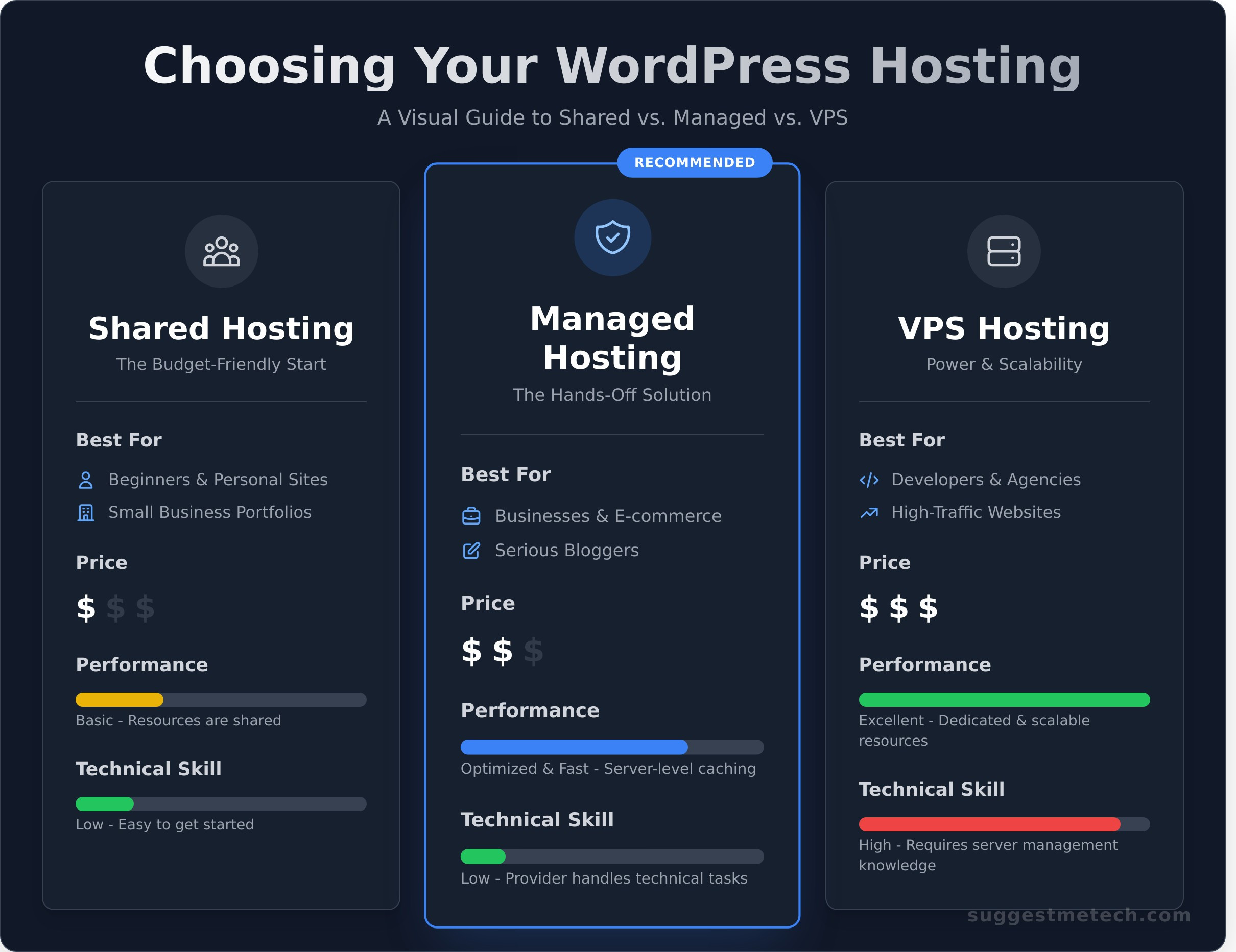
To help you decide, here’s a quick comparison of the most popular types of wordpress hosting:
| Feature | Shared Hosting | Managed Hosting | VPS Hosting |
|---|---|---|---|
| Best For | Beginners, Small Sites | Businesses, Serious Bloggers | Developers, Agencies |
| Price | $ | $$$ | $$ |
| Performance | Basic | Optimized & Fast | Excellent & Scalable |
| Technical Skill | Low | Low | High |
Shared WordPress Hosting: The Budget-Friendly Start
Shared hosting is the most common entry point for new websites. Your site lives on a server alongside hundreds of others, sharing resources like CPU and RAM. It’s perfect for new blogs, personal portfolios, and small businesses just getting started. While it’s incredibly affordable and easy to use-often featuring one-click WordPress installers-the shared environment means a traffic spike on another site can slow yours down.
Managed WordPress Hosting: The Hands-Off Solution
Think of Managed hosting as a concierge service for your WordPress site. The provider handles all the technical heavy lifting: security, speed optimization, daily backups, and core updates. This frees you up to focus on creating content and growing your business. It’s the ideal choice for serious bloggers and businesses who value time and peace of mind. The trade-off is a higher price tag, but the expert support and premium performance are often worth the investment.
VPS WordPress Hosting: For Control and Scalability
A Virtual Private Server (VPS) offers a powerful middle ground. While you still share a physical server, you get your own dedicated slice of its resources. This provides the control and customizability of a dedicated server without the high cost. It’s built for developers, agencies, and high-traffic websites that have outgrown shared hosting. However, this power comes with responsibility-you’ll need the technical know-how to manage your server environment.
For enterprise-level sites with massive traffic and custom security needs, a fully Dedicated Server is the ultimate tier, offering an entire physical server just for your website.
10 Key Features to Look For in a WordPress Host
Not all hosting is created equal. When evaluating providers, treat this list as your essential checklist. These ten features directly impact your site’s speed, security, and ease of management. The quality and implementation of these features can vary dramatically, so it’s crucial to know what to look for when choosing your wordpress hosting solution.
Performance & Speed Essentials
A slow website frustrates visitors and hurts your search engine rankings. These performance features are the engine of a successful WordPress site.
- Server Location & CDN: The closer your server is to your audience, the faster your site loads. A Content Delivery Network (CDN) turbocharges this by storing copies of your site on servers worldwide, ensuring fast delivery for every visitor.
- SSD Storage: Solid-State Drives (SSDs) are the modern standard. Unlike older Hard-Disk Drives (HDDs), SSDs access data instantly, leading to significantly faster page loads and a more responsive WordPress admin area.
- Server-Side Caching: Great hosts handle caching at the server level. This means your site’s pages are pre-built and ready to serve, dramatically reducing load times without you needing to configure complex caching plugins.
- PHP Version: WordPress runs on PHP, and the latest versions are always faster and more secure. A quality host makes it easy to run a recent PHP version and update it with a single click.
Security & Backup Must-Haves
In 2026, website security isn’t optional-it’s a fundamental requirement. These features form a protective shield around your digital asset.
- Free SSL Certificate: An SSL certificate enables the
https://protocol, encrypting data and displaying the padlock icon in browsers. It’s essential for visitor trust, SEO, and e-commerce and should always be included for free. - Automatic Daily Backups: Think of this as your ultimate safety net. If anything goes wrong, you can restore your site with a single click. Look for daily, automated backups that are stored securely off-site.
- Malware Scanning & Removal: Proactive protection is key. The best hosts automatically scan your files for malware and will help you clean it up if anything malicious is found, preventing long-term damage to your reputation.
- Web Application Firewall (WAF): A WAF acts as a digital bodyguard, filtering out malicious traffic and blocking common attacks before they can ever reach your WordPress installation.
WordPress-Specific Tools & Support
Beyond speed and security, the right wordpress hosting provider offers tools and support that make your life easier and save you time.
- One-Click Staging Environment: A staging site is a private clone of your live website. It allows you to safely test new plugins, themes, or custom code without any risk of breaking what your visitors see. This is a game-changer for development.
- 24/7 Expert WordPress Support: When you run into trouble, you need help from people who understand WordPress, not just general server issues. Look for support teams that can troubleshoot plugin conflicts and theme errors anytime.
How to Choose the Right WordPress Hosting Plan for You
Choosing a hosting plan isn’t about finding the single “best” option-it’s about finding the right one for your specific project. The features and specs on a provider’s website only tell half the story. This practical, three-step framework will help you translate those features into a confident decision that supports your website today and as it grows in 2026 and beyond.
Step 1: Assess Your Website’s Needs
Before you compare plans, you need a clear picture of what you’re building. A simple personal blog has vastly different requirements than a high-traffic e-commerce store. Think about your goals for the next 12-24 months, not just for launch day. Ask yourself:
- What is the primary purpose of my website? Is it a portfolio, an online store processing payments, a business site, or a content-heavy blog?
- How much traffic do I realistically expect? Be honest-are you aiming for 1,000 visitors a month or 100,000? Your traffic level is a key factor in resource needs.
- Will I need to host more than one website? If you plan to run multiple projects, look for plans that support more than one domain.
Step 2: Consider Your Budget and Long-Term Costs
A cheap introductory offer can be misleading. The real cost of your wordpress hosting is what you pay over the long term, both in money and time. Look beyond the sticker price to understand the total investment.
- Check the Renewal Rate: That amazing $2.95/month deal often jumps to $9.99/month or more after the first year. Always know the long-term price.
- Factor in Your Time: Is a slightly more expensive managed plan a better value if it saves you hours of technical troubleshooting each month?
- Look for Included Essentials: Does the plan include a free SSL certificate, daily backups, and a CDN, or are those expensive add-ons?
Step 3: Evaluate Your Technical Skill Level
Your comfort level with server management is a critical factor. A plan is only as good as your ability to use it effectively. Be realistic about the time and expertise you can dedicate to the backend of your site.
If you’re a beginner or simply want to focus on your content, a Managed WordPress plan offers a hands-off, optimized environment. If you’re comfortable with cPanel and basic troubleshooting, Shared hosting is a great starting point. For those with server administration experience, a VPS offers more power and control.
By balancing these three areas-needs, budget, and skill-you can confidently select the right wordpress hosting plan that serves as a solid foundation for your website’s success.
Top WordPress Hosting Providers: A Quick Overview
Choosing a provider is one of the most critical decisions you’ll make for your website. While there are hundreds of options, a few consistently rise to the top for their reliability, performance, and user-focused features. The providers below are recommended by industry experts and even WordPress.org itself.
This is not an exhaustive review but a starting point to help you narrow down your search. We’ve conducted in-depth, hands-on tests for each one. Think of this as the highlight reel; for the full story, check out our detailed reviews to find the perfect fit for your project.
Bluehost: Best for Beginners
If you’re just starting, Bluehost offers one of the smoothest entry points into the world of wordpress hosting. Their guided setup and intuitive dashboard remove the technical guesswork, letting you focus on building your site. They have been officially recommended by WordPress.org since 2005, a testament to their commitment to the platform.
- Official WordPress.org Partner: A long-standing recommendation you can trust.
- User-Friendly Interface: A simple, clean control panel perfect for new users.
- Free Domain & SSL: Get your site online with a professional domain name and essential security at no extra cost for the first year.
For a complete breakdown of their plans and performance, read our full <a href="”>Bluehost Review.
SiteGround: Known for Performance & Support
For users who prioritize speed and top-tier customer service, SiteGround is a clear winner. They are famous for their knowledgeable and incredibly fast support team, available 24/7. Beyond support, they invest heavily in performance technology, offering powerful in-house caching and optimization tools that make a real difference in site speed.
- Exceptional Customer Support: Get expert help quickly, whenever you need it.
- Powerful Performance Tools: Includes their SuperCacher technology and Ultrafast PHP for blazing-fast load times.
- Excellent Uptime & Reliability: Built on premium Google Cloud infrastructure for stability.
Check out our complete <a href="”>SiteGround Review to see our speed test results.
Hostinger: Top Value for Money
Hostinger has made a name for itself by delivering impressive performance at an extremely competitive price point. They prove that affordable wordpress hosting doesn’t have to mean slow or unreliable. Their custom-built control panel, hPanel, is modern, fast, and easy to navigate, making site management straightforward for users of all skill levels.
- Highly Competitive Pricing: Get premium-level features without the premium price tag.
- Modern hPanel: An intuitive and powerful alternative to the traditional cPanel.
- Strong Performance: Utilizes LiteSpeed web servers and caching for excellent speed.
See the details and our value analysis in our <a href="”>Hostinger Review.
Choosing the Right WordPress Host for Your Future
Navigating the world of web hosting doesn’t have to be complicated. By now, you understand the crucial differences between shared, managed, and VPS plans and know which key features-like speed, security, and reliable support-are non-negotiable. The most important lesson is that the best wordpress hosting isn’t a one-size-fits-all solution; it’s the one that perfectly matches your website’s goals, technical needs, and budget for 2026 and beyond.
When you’re ready to compare the top options, we’ve done the heavy lifting for you. Our definitive list of top providers is based on extensive hands-on testing and performance data. These unbiased reviews are updated for 2026 to ensure you’re getting the most current information to help you choose confidently. Ready to find your perfect host? See our full list of the Best Web Hosting Providers.
Armed with the right information, you can make a decision that will power your site’s success for years to come. Happy building!
Frequently Asked Questions About WordPress Hosting
Do I really need special hosting for WordPress?
While WordPress can run on most standard web hosting, specialized WordPress hosting offers significant advantages. These plans are optimized for speed and security specifically for the WordPress platform. They often include features like automatic updates, daily backups, and expert support from technicians who know WordPress inside and out. This saves you time and prevents common technical headaches, making it a highly recommended choice for any serious website owner looking for reliability and performance.
How much does WordPress hosting cost per month?
The cost varies widely based on your needs. Entry-level shared hosting can start as low as $3-$5 per month, which is ideal for new blogs or small business sites. Managed WordPress hosting, offering better performance and support, typically ranges from $20-$50 per month. For high-traffic e-commerce stores or large corporate sites, dedicated or VPS hosting can cost $100 or more. Always check for introductory offers, but be sure to pay attention to the renewal rates.
What’s the difference between hosting from WordPress.com vs. WordPress.org?
This is a key distinction. WordPress.com is a for-profit service that provides an all-in-one platform, which includes hosting. It’s simpler to start but offers less flexibility and control over customization and monetization. WordPress.org, on the other hand, is the open-source software you download and install on your own hosting account from a provider like SiteGround or Kinsta. This self-hosted option gives you complete freedom to customize your site with any theme or plugin.
Can I use any web host for my WordPress site?
Technically, yes. As long as a host meets the minimum requirements (like current versions of PHP and MySQL), you can install WordPress. However, we strongly advise choosing a provider that specializes in or has strong support for WordPress hosting. These hosts configure their servers for optimal performance and security, offer one-click installations, and have support teams trained to handle WordPress-specific issues, ensuring a much smoother experience for you and your visitors.
How do I migrate my existing WordPress site to a new host?
Migrating your site can seem daunting, but many hosts simplify the process. Most top-tier managed WordPress hosting providers offer a free migration service where their experts handle the entire transfer for you. Alternatively, you can use a trusted migration plugin like All-in-One WP Migration or Duplicator. These tools package your entire site-files, database, themes, and plugins-into a single file that you can easily upload to your new server environment.
What happens if my website gets more traffic?
A traffic spike is great news! Your hosting plan determines how it’s handled. On a basic shared plan, a sudden surge might slow your site down or even cause temporary outages due to shared resource limits. This is why choosing a scalable host is crucial. Most providers make it easy to upgrade your plan (e.g., from Shared to a VPS or Cloud plan) with minimal downtime, ensuring your site stays fast and responsive as your audience grows.