

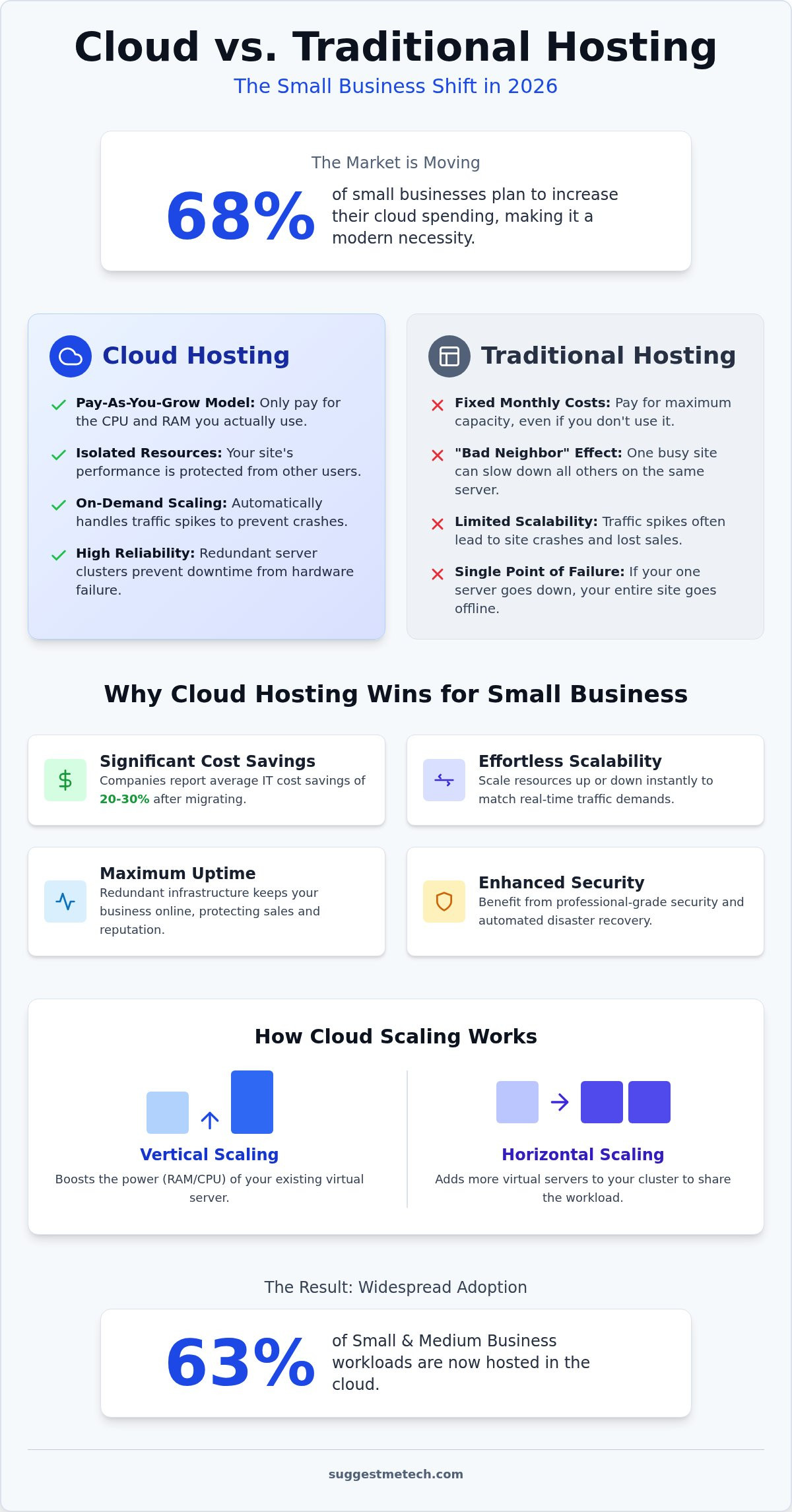
Did you know that 68% of small businesses plan to increase their cloud spending in 2026? It’s a massive shift, yet many owners still worry that making the jump will drain their budget. You’ve likely felt the frustration of a website that crashes during a flash sale or the anxiety of wondering if your customer data is actually backed up. It’s common to feel that traditional shared hosting is ‘good enough,’ but the hidden benefits of cloud hosting for small business have become the ultimate insurance policy for modern growth.
At SuggestMeTech, we’ve analyzed the latest testing data and 2026 market trends to show you why this technology is now a practical necessity rather than a luxury. Discover how cloud hosting can reduce your long-term IT costs, eliminate the threat of downtime, and provide the instant scalability your business needs to thrive. We’ll walk through seven key advantages, from zero-trust security models to significant cost-saving discounts, so you can stop worrying about your server and start focusing on your customers.
Key Takeaways
- Move away from fixed hosting costs and only pay for the RAM and CPU your website actually uses with a flexible “pay-as-you-grow” model.
- Protect your sales from technical failures by utilizing redundant server clusters that keep your site live even if one machine goes down.
- Understand how the benefits of cloud hosting for small business include automated disaster recovery and professional-grade security once reserved for tech giants.
- Determine the best path forward for your team by comparing the pros and cons of managed versus unmanaged cloud environments based on your internal expertise.
What is Cloud Hosting for Small Business?
Cloud hosting is a modern infrastructure model where your website doesn’t live on a single, physical server in a basement somewhere. Instead, it runs on a cluster of interconnected servers that work together as one cohesive unit. This setup means your data is spread across multiple machines, ensuring that if one hardware component fails, another instantly picks up the slack. Before you dive into these technical choices, you’ll need to understand domain names to ensure your brand has a proper address on the web.
The primary distinction between traditional and cloud hosting lies in physical limits. In a traditional setup, your site is restricted by the RAM and CPU of a specific machine. If that machine hits its limit, your site goes down. Cloud hosting uses virtualization to break these barriers. By creating a virtual version of a server that draws from a massive pool of hardware resources, it offers a more resilient environment. To get a broader perspective on the underlying technology, you can explore the formal definition of What is Cloud Computing? to see how these service models have changed the way we store data.
How Cloud Hosting Differs from Shared Hosting
For many years, shared hosting was the default choice for budget-conscious owners. However, the benefits of cloud hosting for small business have become more apparent as the “bad neighbor” effect becomes a bigger risk for modern websites. Shared hosting environments often suffer from the ‘bad neighbor effect,’ which occurs when a single website on a server consumes excessive resources and causes every other site on that same machine to slow down or crash. Cloud hosting solves this through resource isolation. Your site gets its own dedicated slice of the virtual pie, leading to consistent performance and faster load times for your visitors regardless of what other sites are doing.
The Evolution of Cloud Services in 2026
In 2026, the technology has matured to the point where complex manual configurations are a thing of the past. One-click cloud deployments are now the standard, making these powerful systems as easy to manage as a basic blog. We’ve seen a massive shift toward AI-driven server optimization, where the system automatically adjusts resources based on real-time traffic patterns. Since 63% of SMB workloads are now hosted in the cloud, providers have prioritized user-friendly interfaces. You no longer need a computer science degree to enjoy the benefits of cloud hosting for small business; you just need the right guide to help you choose a plan that fits your current growth trajectory.
Scaling on Demand: Why Cloud Beats Traditional Hosting Costs
Traditional hosting often forces you to pay for resources you don’t use “just in case.” Cloud hosting flips this script with a “pay-as-you-grow” model. You only pay for the specific RAM and CPU your site consumes at any given moment. This efficiency is one of the primary benefits of cloud hosting for small business, as companies migrating to the cloud report an average IT cost savings of 20-30% according to verified industry data.
Think about a viral social media post or a sudden promotion. On a traditional server, a traffic spike usually leads to a 503 error and lost sales. Cloud hosting prevents these crashes by pulling resources from the server cluster we discussed earlier. You don’t need to purchase and install expensive hardware upgrades every time your traffic grows; the system scales with you automatically. This eliminates the need for large capital expenditures on physical equipment that eventually becomes obsolete.
Automated server management also slashes long-term IT overhead. Instead of hiring an expensive specialist to manually patch software or swap out failing drives, the cloud provider handles the entire infrastructure layer. If you’re feeling overwhelmed by the technical choices, you can check our web hosting reviews and guides to find a plan that fits your specific growth trajectory without overspending.
Vertical vs. Horizontal Scaling Explained
You have two main ways to grow in the cloud. Vertical scaling involves boosting the power of your existing virtual machine, like adding more “brainpower” to a single worker. Horizontal scaling adds more virtual machines to your cluster, effectively hiring an entire team to share the workload. This flexibility is vital for seasonal businesses. For instance, during a Black Friday surge, you can scale up horizontally for 24 hours and then scale back down the moment the sale ends, ensuring you never pay for idle power.
The ROI of Cloud Hosting for Startups
Startups often struggle with the high upfront costs of dedicated servers. Cloud subscriptions eliminate these hurdles, allowing you to reinvest that cash into marketing or product development. Instant resource allocation saves money during low-traffic periods because you aren’t paying for idle server power while your customers are asleep. Beyond the monthly bill, the performance boost directly impacts your bottom line. Faster response times from cloud infrastructure improve your site’s Core Web Vitals, which is a significant factor in Google’s ranking algorithm. By choosing a cloud-based approach, you’re investing in better SEO and a smoother user experience that keeps customers coming back.
Reliability and Uptime: Protecting Your Business from Technical Failure
A single hour of website downtime can cost a small business thousands in lost sales and long-term customer trust. While traditional hosting relies on a single point of failure, one of the most critical benefits of cloud hosting for small business is built-in redundancy. Because your data lives on a cluster of interconnected servers, the system doesn’t stop if one machine fails. Another node in the cluster takes over the workload instantly, often without your visitors ever noticing a glitch.
Modern cloud infrastructure in 2026 utilizes self-healing architecture to maintain this stability. These systems use automated logic to detect hardware errors or software hangs in real-time. Instead of waiting for a human technician to intervene, the cloud platform can isolate the faulty server and reboot it or migrate your site to a healthy node automatically. This proactive approach is why 2026 uptime Service Level Agreements (SLAs) have become more aggressive. You should expect nothing less than a 99.9% uptime guarantee, with many top-tier providers now pushing toward 99.99% to ensure your digital doors never close.
Geographic Redundancy and Speed
Reliability isn’t just about staying online; it’s about staying online everywhere. Geographic redundancy involves storing copies of your data in multiple physical data centers across the globe. If a regional power outage occurs in one area, your site remains accessible from another. By 2026, Edge Computing has refined this process by placing “mini-servers” closer to your local customers. This reduces latency and ensures that a user in London experiences the same snappy performance as someone in New York, building a level of professional trust that cheap, localized hosting can’t match.
Managed Monitoring Services
Small business owners don’t have time to watch server logs 24/7. Cloud platforms solve this with managed monitoring services that act as a digital security guard. These tools provide proactive alerts and automated load balancing, which distributes incoming traffic evenly across your server cluster. This prevents any single server from becoming overwhelmed during a sudden rush of visitors. For the busy entrepreneur, this “set it and forget it” reliability means you can focus on scaling your operations while the cloud handles the technical heavy lifting. To further streamline your operations, you can explore Managed IT Services from SpaceCenter Systems to ensure every part of your technology stack is optimized for performance.
Security and Disaster Recovery: Keeping Your Data Safe in 2026
Security was once the most expensive barrier for growing companies. In 2026, one of the most impactful benefits of cloud hosting for small business is the democratization of enterprise-grade protection. You no longer need a million-dollar IT budget to access the same infrastructure used by global banks. Most top-tier providers now include Zero-trust security models as a baseline expectation, treating every access request as a potential threat until verified. This shift has moved the industry away from simple firewalls toward a more comprehensive “shared responsibility model” where the provider secures the hardware while you manage your data access.
Manual backups have officially become a relic of the past. Modern cloud environments handle this through automated, real-time data replication. If your site is compromised or a database becomes corrupted, you can perform a rapid disaster recovery. Instead of waiting days for a technician to restore old files, you can often bring your entire site back online in minutes. This speed is critical for maintaining compliance with modern regulations like the updated ISO/IEC 27001 standards, which now specifically address cloud-native infrastructure and AI integration. By choosing the right provider, you ensure your business meets these strict data privacy requirements without hiring a full-time compliance officer.
If you aren’t sure which platforms offer the strongest protection for your specific industry, you can read our expert hosting reviews to compare the security features of the top 2026 providers.
Advanced Threat Protection
Malicious traffic is a constant reality. Cloud clusters are uniquely equipped to handle this through massive-scale DDoS protection. Because your site is part of a larger network, the infrastructure can absorb and neutralize traffic spikes that would instantly crash a traditional server. You also benefit from strict resource isolation. Even though you’re in a shared virtual environment, a security breach on another user’s site won’t compromise your server. Providers now use AI-driven monitoring to detect unusual login patterns or unauthorized file changes the moment they occur, stopping hackers before they can do damage.
The Peace of Mind Factor
Managing your digital safety shouldn’t be a second job. Centralized security dashboards allow you to control SSL certificates, user permissions, and firewall rules from a single screen. One of the most valuable tools in this dashboard is the ability to create “snapshots.” A server snapshot is a point-in-time digital image of your entire server environment that allows you to roll back all changes instantly if a site update goes wrong. This version control means you can experiment with new plugins or site designs with total confidence. If something breaks, you simply go back in time to a working version with a single click.
Practical Steps: Moving Your Small Business to the Cloud
Ready to make the switch? Start by auditing your current performance. If you’re seeing frequent 500-series errors or load times over three seconds, your current host is likely costing you sales. Transitioning to a new environment might feel daunting, but the infrastructure in 2026 is designed for seamless transitions. To fully realize the benefits of cloud hosting for small business, you must first choose the right management level based on your team’s technical comfort.
You’ll need to decide between Managed and Unmanaged Cloud hosting. Unmanaged hosting gives you a blank slate, which is great for developers but a nightmare for busy business owners who don’t want to handle security patches and OS updates manually. Managed Cloud is the gold standard for most SMBs. With a managed plan, the provider takes care of the technical maintenance, allowing you to treat your server like a utility that just works. Once you’ve decided on the management level, you can select a provider using our tested and reviewed web hosting guide to see which companies offer the best value for your specific niche.
The final step is execution. We recommend a phased migration rather than a “cold turkey” switch. While some experts suggest hiring expensive consultants, most 2026 cloud providers offer automated migration tools that handle the heavy lifting for free. By moving your data in stages and testing each component, you ensure zero downtime for your customers and a smooth transition for your staff.
Choosing the Right Cloud Provider
Don’t get distracted by flashy marketing. Focus on three key criteria: support quality, scaling ease, and transparent pricing. The “Big Three” (AWS, Google Cloud, and Azure) offer incredible power, but their pricing models can be complex and intimidating for beginners. Many small businesses find better success with user-friendly business clouds that offer “one-click” scaling and flat monthly fees. These platforms provide the same redundancy we discussed earlier without the steep learning curve of enterprise-level consoles.
Next Steps for Your Online Presence
After your migration is complete, focus on integration. Most modern cloud hosts offer deep integration with CMS platforms like WordPress, allowing you to manage your site’s speed and security directly from your dashboard. Use this opportunity to optimize your site’s performance by enabling server-level caching and connecting to a Content Delivery Network (CDN). If you’re just starting your journey and haven’t built a site yet, check our guide on how to start a blog in 2026 for a step-by-step roadmap to building a cloud-native brand from day one.
Future-Proof Your Business Infrastructure
The transition to the cloud is no longer a trend for the tech-savvy few; it’s the foundation for any growing company in 2026. By moving away from the physical constraints of traditional servers, you gain the power to scale instantly and the peace of mind that comes with automated disaster recovery. We’ve explored how these systems provide enterprise-grade security and self-healing reliability that keeps your digital doors open around the clock.
Understanding the benefits of cloud hosting for small business is the first step toward reducing technical anxiety and lowering your long-term IT overhead. Whether you choose a fully managed environment or a flexible hybrid model, the goal is to create a website that grows as fast as your ambition. Don’t let outdated hardware hold your sales back or leave your data vulnerable to avoidable crashes.
Beyond infrastructure, scaling effectively also requires a strong digital presence. To help your business reach its full potential, Be Kind Local provides full-service marketing solutions designed to enhance visibility and drive leads for local companies.
If you’re ready to make the switch but don’t know where to start, we’ve done the heavy lifting for you. Our team has performed 24/7 support availability checks and verified uptime SLAs to find the most reliable partners for your journey. Compare the Best Cloud Hosting Providers of 2026 based on our expert speed tests and budget-friendly recommendations. You’ve got the vision; let the cloud provide the power to achieve it.
Frequently Asked Questions
Is cloud hosting more expensive than shared hosting?
Cloud hosting generally has a higher starting price than shared hosting, but it offers better long-term value. Shared hosting is cheaper because you share resources with hundreds of other sites, which leads to slow speeds. Cloud hosting uses a pay-as-you-go model where you only pay for the resources you actually consume. This efficiency is one of the key benefits of cloud hosting for small business, often leading to lower IT overhead over time.
Do I need technical skills to manage a cloud server?
You don’t need advanced technical skills if you opt for a managed cloud hosting plan. In this setup, the provider handles all the server maintenance, security updates, and software patches for you. If you choose an unmanaged plan, you’ll need experience with command-line interfaces and server administration. Most small business owners prefer managed services because they provide a user-friendly dashboard that makes site management simple.
Can I move my existing WordPress site to the cloud?
Yes, moving your existing WordPress site to the cloud is a standard process that most providers make very easy. Many hosts offer free automated migration tools or specialized plugins that transfer your database and files with zero downtime. Because WordPress requires significant resources to run quickly, moving to a cloud environment usually results in a noticeable performance boost and better stability during traffic spikes.
What is the difference between Cloud Hosting and a VPS?
A traditional VPS lives on one physical machine, while cloud hosting is spread across a cluster of multiple servers. If the physical hardware under a VPS fails, your website goes down. Cloud hosting uses redundancy to ensure that if one server in the cluster has an issue, another takes over instantly. This architecture makes the cloud much more reliable and easier to scale than a standard VPS.
How does cloud hosting help with my website’s SEO?
Cloud hosting boosts your SEO by significantly improving your page load speeds and uptime. Google’s ranking algorithms prioritize the user experience, so a fast-loading site is more likely to rank higher in search results. The benefits of cloud hosting for small business also include better crawl efficiency. When your site is always online and responsive, search engine bots can index your content more frequently without hitting errors.
What happens to my data if the cloud provider goes out of business?
Your data remains portable as long as you choose a provider that uses standard backup and export protocols. Most reputable cloud platforms allow you to download full “snapshots” or backups of your entire environment at any time. You can then restore these files to a different provider. We always recommend keeping an independent, off-site backup of your most critical business data for absolute peace of mind.
Is cloud hosting secure enough for an e-commerce store?
Cloud hosting is actually the superior choice for e-commerce because it provides enterprise-grade security features like isolated environments and built-in DDoS protection. It easily meets the strict requirements for PCI compliance, which is necessary for processing credit card payments safely. With automated backups and real-time monitoring, your customer data is much safer in the cloud than it would be on a basic shared hosting account.
Can I host multiple small business websites on one cloud account?
You can host as many websites as your resource plan allows on a single cloud account. Most providers let you create separate containers or virtual instances for each site to keep them isolated from one another. This organization ensures that a technical issue or security threat on one site won’t affect the others. It’s a very cost-effective way to manage your entire online presence from one central dashboard.

