
Feeling lost in a sea of technical specs like CPU, RAM, and SSD? The fear of making an expensive mistake is real, but choosing a new computer shouldn’t be a stressful chore. We’ve put in the hours-testing, comparing, and reviewing dozens of new releases-to help you navigate the noise and find the best laptops of 2026. Our goal is to replace confusion with confidence, ensuring you find a device that truly fits your life and your work.
In this practical guide, we cut through the marketing hype to bring you clear, straightforward recommendations. We’ll break down our top picks for every specific need and budget, whether you’re a student looking for a reliable workhorse, a creative professional needing powerhouse performance, or simply seeking great value. You’ll understand which features actually matter for you, feel certain about your choice, and walk away ready to invest in a laptop you’ll love for years to come.
How to Choose the Right Laptop in 2026: A Simple Guide
Finding the perfect laptop in 2026 doesn’t have to be complicated. Before you get lost in model numbers and marketing jargon, start with two simple questions: What will you use it for, and what is your budget? Whether you need a machine for work, school, gaming, or just browsing, defining your primary use is the first step toward finding the best laptops for your needs. The modern portable computer has come a long way, and a quick look at the History of the laptop shows just how much power is now packed into these slim devices. This guide will help you decode the most important features in plain English so you can shop with confidence.
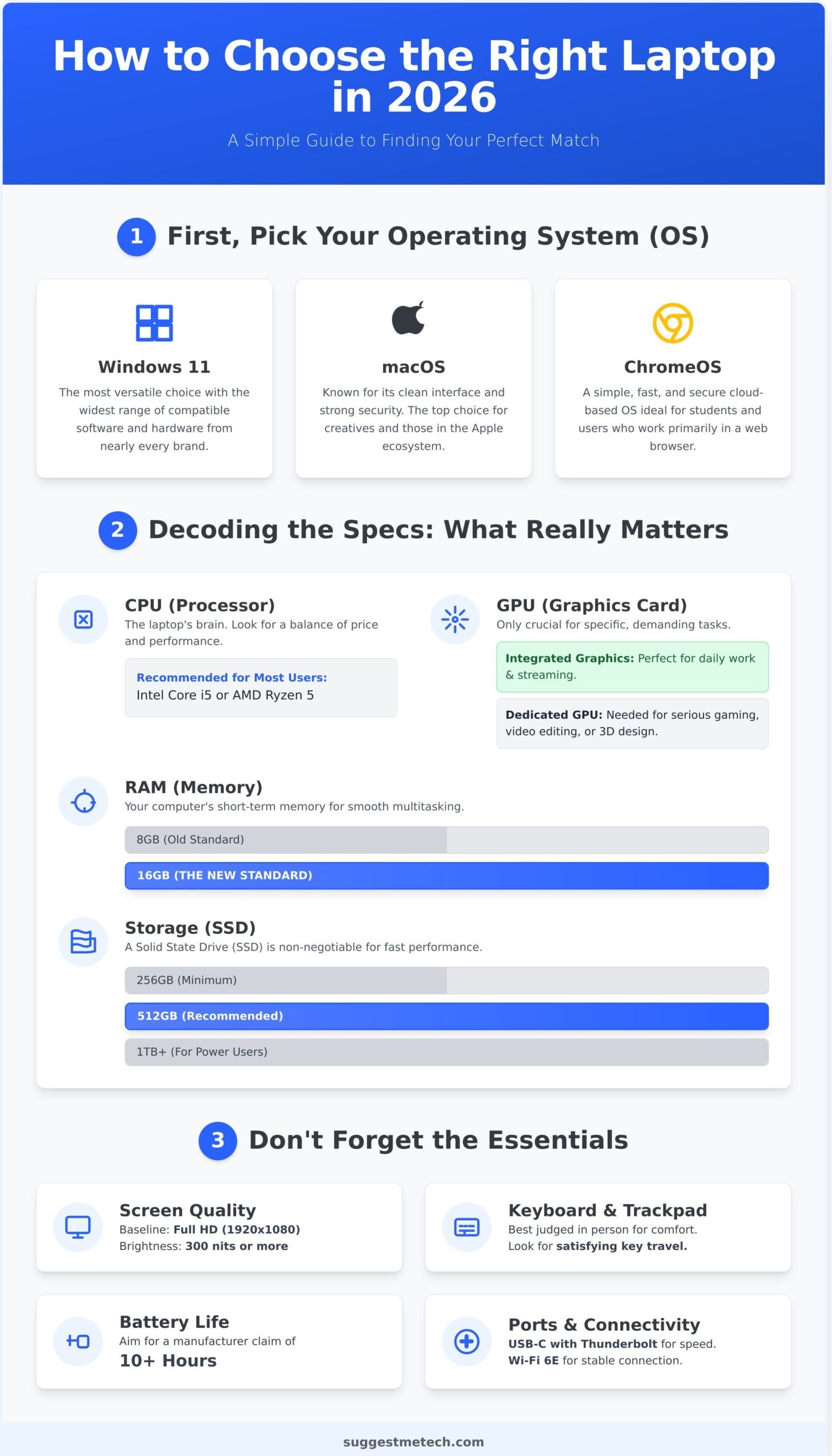
First, Pick Your Operating System (OS)
The OS is the soul of your machine, defining its look, feel, and capabilities. Most people already have a preference, but here’s a quick breakdown:
- Windows 11: The most popular and versatile choice, offering the widest range of compatible software and hardware from nearly every brand.
- macOS: Known for its clean interface and strong security, macOS is the top choice for creative professionals and those already invested in Apple’s ecosystem.
- ChromeOS: A simple, cloud-based OS ideal for students and users whose work happens primarily in a web browser. It’s fast, secure, and powers many budget-friendly devices.
Decoding the Specs: What Really Matters for Performance?
This is where the jargon lives, but it’s simpler than it looks. Focus on these four components:
- CPU (Processor): The laptop’s brain. For most users, an Intel Core i5 or AMD Ryzen 5 offers a great balance of performance and price for everyday tasks.
- RAM (Memory): Think of this as your computer’s short-term memory. In 2026, 16GB is the new standard for smooth multitasking without slowdowns.
- Storage (SSD): A Solid State Drive (SSD) is non-negotiable for fast boot times and snappy performance. Aim for at least 512GB to comfortably store your files and applications.
- GPU (Graphics Card): Most laptops have integrated graphics, which are fine for streaming and daily work. You only need a powerful, dedicated GPU if you’re a serious gamer, video editor, or 3D designer.
Don’t Forget the Essentials: Display, Keyboard, and Battery
Performance specs are only half the story. The parts you interact with every day are just as crucial:
- Screen Quality: A Full HD (1920×1080) display is the baseline. Pay attention to brightness, measured in nits-look for 300 nits or more for comfortable viewing in most environments.
- Keyboard & Trackpad: The best way to judge comfort is to try them in person. A good keyboard should have satisfying travel, and a trackpad should be responsive and smooth.
- Battery Life: Look for manufacturer claims of 10+ hours to ensure your laptop can survive a full day away from the charger.
- Ports & Connectivity: USB-C with Thunderbolt support offers the fastest data transfer and charging. Wi-Fi 6E is the latest standard for a more stable and speedy wireless connection.
Best Laptops for Work & Business Professionals
For business professionals, the search for the best laptops goes beyond raw processing power. This category prioritizes day-in, day-out reliability, robust security features, and practical portability for the modern hybrid workflow. We’ve selected models that excel in productivity, offering a superior user experience from the first login to the final shutdown.
Key considerations for this category include:
- Excellent Keyboards: For hours of comfortable and accurate typing.
- All-Day Battery Life: Long-lasting performance is non-negotiable. Many of our top picks are also ENERGY STAR certified laptops, ensuring they meet strict energy efficiency guidelines set by the EPA.
- Premium Build Quality: Durability to withstand the rigors of travel and daily use.
- Superior Conferencing Tools: High-quality webcams and microphones are essential.
Finally, we considered docking station compatibility, a crucial factor for professionals who need a seamless transition between a mobile setup and a full-featured office workstation.
Best Overall Business Laptop: Dell XPS 15
The Dell XPS 15 is a powerhouse for professionals who need top-tier performance without sacrificing style. Its potent processor options handle demanding applications with ease, while the optional 4K OLED display is a dream for content creation. Encased in a premium CNC-machined aluminum and carbon fiber chassis, the XPS 15 feels as good as it performs. The comfortable keyboard and massive, precise trackpad round out a truly exceptional package.
Best for Portability & Travel: Apple MacBook Air (M-series)
When your office is wherever you happen to be, the MacBook Air is an unbeatable companion. Its incredibly thin and lightweight design makes it a breeze to carry, but the real star is the M-series chip. It delivers phenomenal performance and efficiency, providing battery life that genuinely lasts all day. The fanless design ensures silent operation in quiet settings, and for those in the Apple ecosystem, the seamless integration with iPhone and iPad is a massive productivity booster.
Best Value for Business: Lenovo ThinkPad E14
The ThinkPad line is legendary in the business world, and the E14 brings that pedigree to an accessible price point. It features the iconic ThinkPad keyboard, widely considered the gold standard for typing comfort and accuracy. Built to be durable and secure, it includes robust features often found on more expensive models. With solid performance for everyday productivity and a generous selection of ports for peripherals, the ThinkPad E14 offers outstanding professional-grade value.
Best Laptops for Students & School
Navigating the demands of student life requires a laptop that can keep up. The focus here shifts to a practical blend of affordability, portability, and all-day battery life. These machines are built to survive being tossed in a backpack and carried across campus, offering the durability needed for a busy academic year. Versatility is also crucial; the best laptops for students can seamlessly transition from a research tool for writing essays to a note-taking tablet in a lecture hall, and finally to an entertainment hub for downtime. We’ve selected top-tier options that deliver exceptional value at every price point.
Best All-Rounder for College: HP Spectre x360 14
For the student who needs one device to do it all, the HP Spectre x360 14 is a standout choice. Its flexible 2-in-1 design allows for effortless switching between typing reports and using it as a tablet for digital notes. The vibrant, high-quality touchscreen offers excellent stylus support, making it perfect for marking up PDFs or sketching diagrams. It combines a premium look and feel with a fantastic keyboard and solid performance that easily handles multitasking between research tabs, streaming lectures, and writing assignments.
- Design: Flexible 2-in-1 with a premium aluminum chassis.
- Display: High-resolution touchscreen with stylus compatibility.
- Performance: Capable of handling demanding academic software and multitasking.
Best Budget Laptop for Students: Acer Aspire 5
The Acer Aspire 5 has long been the go-to recommendation for students on a tight budget, and for good reason. It consistently delivers reliable performance for everyday school tasks without breaking the bank. More importantly, it offers a level of future-proofing rarely seen at this price. When you’re ready to upgrade from an older machine, you can responsibly recycle your old laptop and invest confidently in the Aspire 5, knowing its user-upgradeable RAM and storage will extend its lifespan for years to come.
- Value: Excellent performance for the price.
- Upgradability: Easy access to upgrade RAM and storage.
- Features: Often includes a full HD display and a decent port selection.
Best Chromebook for Simplicity: Lenovo IdeaPad Duet 5 Chromebook
If your coursework is primarily web-based, a Chromebook is an incredibly smart and affordable option. The Lenovo IdeaPad Duet 5 excels with its versatile detachable 2-in-1 design, allowing it to function as both a lightweight laptop and a spacious tablet. Its stunning OLED display makes everything from research articles to Netflix shows look vibrant, and its exceptional battery life will easily get you through a full day of classes and study sessions. Running the simple and secure ChromeOS, it’s one of the best laptops for hassle-free productivity.
- Display: Gorgeous 13.3-inch OLED screen.
- Battery Life: Lasts over 12 hours on a single charge.
- OS: Lightweight and secure ChromeOS for web-based work.
Best Laptops for Creatives & Gaming
When your work or hobby involves pushing a computer to its limits, you enter a different class of machine. This category is all about maximum performance and visual fidelity, tailored for tasks like 4K video rendering, 3D modeling, and high-frame-rate gaming. These are not just laptops; they are portable powerhouses designed for professionals and serious enthusiasts who cannot compromise on speed or quality.
Finding the best laptops in this tier means prioritizing a few key components. A powerful dedicated graphics card (GPU) from a series like NVIDIA’s GeForce RTX or Apple’s integrated M-series Pro/Max chips is non-negotiable. You should also look for brilliant displays with high color accuracy (covering the DCI-P3 or Adobe RGB gamut), fast refresh rates for smooth motion, and an effective cooling system to prevent performance throttling under sustained load. Think of these machines as a long-term investment in your craft or passion.
Best for Video Editing & Design: Apple MacBook Pro 16
For creative professionals, the MacBook Pro 16 remains the undisputed champion. Powered by Apple’s incredibly efficient M-series Pro or Max chips, it chews through complex video timelines and high-resolution design files without breaking a sweat. Its Liquid Retina XDR display is arguably the best on any laptop, offering stunning brightness, contrast, and color accuracy. Combined with its studio-quality microphones, immersive speaker system, and exceptional battery life, it’s a complete, reliable package for creators.
- Unmatched performance from Apple Silicon
- Industry-leading mini-LED display
- Excellent battery life for demanding workflows
Best Gaming Laptop: Razer Blade 15
The Razer Blade 15 masterfully blends top-tier gaming performance with a sleek, premium design. Equipped with the latest NVIDIA GeForce RTX graphics, it delivers the raw power needed for high frame rates in the most demanding AAA titles. Its high-refresh-rate display options (up to QHD 240Hz) ensure gameplay is buttery smooth and responsive. The unibody aluminum chassis feels incredibly solid, while the advanced vapor chamber cooling system keeps temperatures in check during intense gaming sessions.
- Powerful NVIDIA RTX graphics
- Fast and fluid high-refresh-rate screen
- Premium CNC-milled aluminum build
Best for Power on a Budget: Dell G15 Gaming Laptop
Proving that serious gaming doesn’t have to cost a fortune, the Dell G15 offers incredible performance for its price. It packs capable NVIDIA graphics and a modern processor into a durable chassis with a thermal system inspired by Dell’s high-end Alienware line. This robust cooling ensures you get consistent performance without throttling. While it may not have the premium finish of a Razer Blade, the G15 is a fantastic and reliable entry point for anyone looking to get into serious PC gaming.
- Excellent performance-to-price ratio
- Robust cooling inspired by Alienware
- Durable, practical design
Have a different powerhouse laptop you think belongs on this list? Let us know your picks at suggestmetech.com!
How We Test and Choose the Best Laptops
Finding the right laptop can be overwhelming. That’s why our review process is built on a foundation of transparency and trust. We believe the only way to identify the truly best laptops is by combining rigorous, objective benchmarks with extensive real-world use. We spend hours with every machine, using it the way you would-for work, creativity, and entertainment-to deliver recommendations you can count on.
Our Performance Benchmarking Process
To create a level playing field, we run every laptop through a suite of synthetic benchmarks. We measure raw processing power using industry-standard tools like Geekbench for CPU performance and Cinebench for rendering tasks. Graphics capabilities are pushed to their limits with 3DMark and real-world gaming frame rate tests. Finally, we measure storage speed with large file transfer tests to see how quickly the SSD can read and write data.
Real-World Usability Testing
Numbers don’t tell the whole story. We live with each laptop to understand its everyday performance. Our battery rundown test involves continuously streaming video over Wi-Fi until the power runs out. We type thousands of words to evaluate keyboard comfort and accuracy. We also hop on video calls to test webcam and microphone quality, and we push the system by juggling dozens of browser tabs to check for slowdowns.
Our Key Evaluation Criteria
Every laptop that makes our list is graded against four core principles. This ensures that our final recommendations for the best laptops are balanced, practical, and provide genuine value to you, the user.
- Performance: Is the laptop fast and responsive enough for its intended user and price point?
- Value: Does the price fairly reflect the features, build quality, and overall experience?
- Design & Build: Is the device durable, portable, and pleasant to use, with a quality screen, keyboard, and trackpad?
- Battery Life: Can it reliably last through a typical workday or a full day of classes on a single charge?
This comprehensive process ensures our suggestions are more than just a spec sheet comparison. If you have a device you think we should test, we’re always open to suggestions from our community.
Finding Your Perfect Laptop in 2026
Navigating the crowded market of 2026 laptops doesn’t have to be complicated. The key takeaway is that the ideal machine is the one that seamlessly fits your specific needs and budget. From powerhouse devices for business professionals to versatile options for students and high-performance rigs for gamers, there’s a perfect match for everyone. Our mission is to cut through the marketing noise with clear, practical guidance. Through rigorous, independent, and hands-on testing on every device, we help you identify the best laptops that deliver real-world value, not just impressive spec sheets.
The technology landscape is constantly shifting, and our commitment to testing the latest and greatest devices never stops. That’s where our community comes in. Your insights and suggestions help us decide what to review next, ensuring our content stays sharp and genuinely helpful. Have a suggestion? Let us know what to test next! Armed with this knowledge, you’re now ready to make a confident choice. We’re excited for you to find the perfect laptop that will power your work, studies, and creativity for years to come.
Frequently Asked Questions
How much RAM do I really need in a laptop in 2026?
For most users in 2026, 16GB of RAM is the new standard, providing smooth performance for everyday multitasking like web browsing, streaming, and using office software. If you’re on a strict budget and your tasks are very light, 8GB can suffice. However, for creative professionals, programmers, or serious gamers, we strongly recommend 32GB or more to ensure your system runs demanding applications without any performance bottlenecks or slowdowns.
Is a 4K screen worth the extra cost and battery drain on a laptop?
A 4K screen is a premium feature best suited for specific users. Video editors, photographers, and digital artists will appreciate the incredible detail and color accuracy for their work. For everyone else, a Full HD (1080p) or QHD display offers excellent sharpness without the significant impact on battery life. The biggest trade-off with a 4K panel is its power consumption, which can often reduce your unplugged usage time by several hours.
What’s the difference between an Intel Core i5, i7, and i9 processor?
Think of this as a good, better, and best lineup. A Core i5 is the workhorse, perfect for general productivity, web browsing, and streaming. A Core i7 offers a noticeable performance jump, making it ideal for heavy multitasking, moderate gaming, and more demanding applications. The Core i9 is the top-tier processor designed for enthusiasts and professionals who need maximum power for tasks like 4K video editing, 3D rendering, and high-end gaming.
How long should a modern laptop battery last?
In 2026, you should look for a laptop that provides at least 8 to 10 hours of real-world use for light tasks like web browsing and video playback. While manufacturers often advertise longer durations, our testing shows this is a realistic benchmark for a full day of work or school. Keep in mind that intensive tasks like gaming or running complex software will drain the battery much faster, often in just 2 to 4 hours.
Are Chromebooks powerful enough to be a primary computer?
For many people, absolutely. If your workflow is primarily based in a web browser-using tools like Google Docs, streaming media, and managing email-a modern Chromebook offers a fast, secure, and cost-effective experience. However, if you depend on specialized desktop software for professional video editing, graphic design, or complex coding, a more powerful Windows or macOS laptop will be a better fit for your needs.
When is the best time of year to buy a laptop to get a good deal?
The two best times to find a great deal are the back-to-school season (July-August) and the holiday shopping period around Black Friday and Cyber Monday (November). Retailers offer deep discounts on a wide range of models during these events. You can also find excellent clearance deals in the spring as brands release new models, which is a great time to find some of the best laptops from the previous year at a significantly lower price.
Should I buy a 2-in-1 laptop or a traditional clamshell?
This decision comes down to versatility versus stability. A 2-in-1 convertible is excellent if you value a touchscreen for drawing, taking notes with a stylus, or using it as a tablet for media consumption. However, traditional clamshell laptops often provide a more rigid and comfortable typing experience and may offer slightly better performance for the same price. Consider how frequently you would actually use the tablet or tent modes before you decide.

