

Stuck in hosting limbo? On one side, you have restrictive shared hosting that won’t let you install a single package or even grant you SSH access. On the other, the sprawling universe of cloud giants like AWS, with a steep learning curve and billing that requires its own manual to decipher. Finding the right web hosting for developers isn’t about finding the cheapest plan; it’s about finding a platform that respects your workflow, supports your tech stack, and gives you the control you need without getting in the way.
In this coder’s guide for 2026, we cut through the noise. We’ll compare the best developer-focused hosting solutions, from flexible Virtual Private Servers (VPS) that offer full root access to elegant Platform-as-a-Service (PaaS) options with seamless Git integration. You’ll discover how to choose the perfect environment for your code, understand the differences between IaaS and PaaS, and find a service with a clear, scalable pricing structure. Let’s get your project deployed on a platform that was built for it.
Key Takeaways
- Developer-friendly hosting prioritizes command-line access, Git integration, and environment flexibility over the limitations of standard cPanel.
- Understand the critical differences between VPS, PaaS, and Jamstack hosting to match the platform’s control and complexity to your project’s needs.
- Our guide breaks down the top web hosting for developers, comparing leading services based on performance, specific use cases, and developer experience.
- Learn a simple framework for selecting the right host by evaluating your project’s language, scalability requirements, and personal workflow.
What Makes Hosting ‘Developer-Friendly’? Key Features to Demand
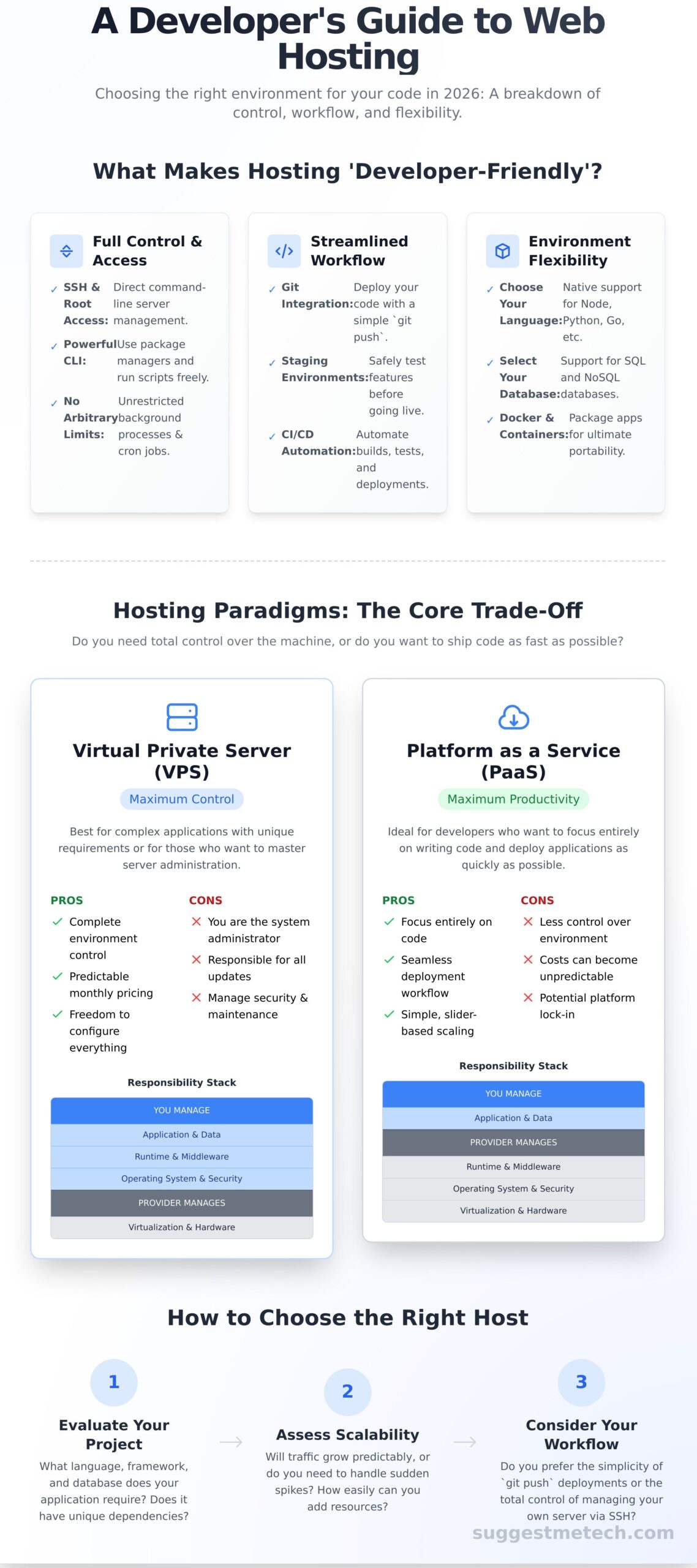
When you’re building a modern application, standard shared hosting often feels like trying to work with one hand tied behind your back. The simplified dashboards and cPanel interfaces are great for basic websites, but they lack the power and flexibility serious development requires. While the basic answer to “What is web hosting?” involves server space for your files, true web hosting for developers is built on three core pillars: complete control, automated workflows, and environment flexibility. These features aren’t just conveniences-they are non-negotiable tools that support your entire development process, not just the final product.
Full Control and Access
Developer-friendly hosting starts with unrestricted access to the server environment. This means moving beyond graphical interfaces and getting your hands on the command line. Key features include:
- SSH Access & Root Privileges: The ability to securely log into your server’s terminal to install software, manage files, and configure services directly.
- Command Line Interface (CLI): Essential for running scripts, using package managers like npm or Composer, and interacting with frameworks.
- No Arbitrary Limits: Freedom to run background processes and set up as many cron jobs as your application requires for task scheduling and automation.
Streamlined Development Workflow
The best hosting for developers integrates directly into your coding process, saving you time and reducing errors. Instead of manual FTP uploads, you get tools that automate deployment and testing. Look for native support for:
- Git Integration: Deploy your latest code with a simple
git pushcommand, connecting your repository directly to your live or staging server. - Staging Environments: Create a safe, isolated clone of your production site to test new features, updates, or bug fixes before pushing them to the public.
- Automated Builds & CI/CD: Connect to services like GitHub or GitLab to automatically build, test, and deploy your application whenever you commit new code.
Environment and Stack Flexibility
Your hosting platform should adapt to your project’s needs, not the other way around. Modern applications are rarely built with a single technology, so flexibility is crucial. A great developer host allows you to:
- Choose Your Language: Get native support for modern languages like Node.js, Python, Ruby, Go, and PHP without complicated workarounds.
- Select Your Database: Easily spin up and manage different types of databases, from relational (PostgreSQL, MySQL) to NoSQL (MongoDB, Redis).
- Use Docker & Containerization: The ultimate in flexibility, allowing you to package your application and all its dependencies into a portable container that can run anywhere.
Hosting Paradigms for Developers: VPS vs. PaaS vs. Jamstack
Not all hosting is created equal. Choosing the right web hosting for developers depends entirely on your project’s goals, your technical comfort level, and how you want to spend your time. It’s a fundamental trade-off: do you want total control over the machine, or do you want to ship code as fast as possible? Understanding this distinction will help you narrow your search from dozens of providers to the one or two that fit your needs perfectly. Let’s compare the three main hosting paradigms you’ll encounter.
Virtual Private Servers (VPS): Maximum Control
A VPS gives you your own dedicated slice of a server-a virtual machine in the cloud that is entirely yours to command. Providers like DigitalOcean and Linode give you a blank slate with full root access, allowing you to install any operating system and build a completely custom software stack from the ground up.
Of course, before deploying to a virtual server, developers need a reliable local machine to build on. Having the right hardware is the foundation of any project, and for those looking to upgrade their setup, retailers specializing in computer components and electronics like Tunewtec can be a great resource.
- Pros: Complete control over your environment, predictable monthly pricing, and the freedom to configure everything exactly as you need it.
- Cons: You are the system administrator. You’re responsible for all server setup, security patches, software updates, and maintenance.
Best for developers building complex applications with unique requirements, or those who want to master server administration.
Platform as a Service (PaaS): Maximum Productivity
A PaaS provider like Heroku or Render handles the underlying infrastructure for you. Instead of managing servers, you simply push your code via Git, and the platform builds, deploys, and runs your application. It’s an abstraction layer designed to maximize development speed.
- Pros: Focus entirely on writing code, not managing servers. Scaling is often as simple as moving a slider, and the deployment workflow is seamless.
- Cons: You sacrifice control over the environment (e.g., specific OS packages). Costs can become less predictable and more expensive at scale.
Best for teams building web apps and APIs who prioritize rapid iteration and want to outsource infrastructure management.
Jamstack & Static Hosting: Maximum Speed
This modern approach is built for speed and security by serving pre-built, static frontend files from a global Content Delivery Network (CDN). Platforms like Vercel and Netlify offer an exceptional developer experience, integrating directly with frontend frameworks like React and Vue.
- Pros: Blazing-fast load times, enhanced security, automated Git-based workflows, and often very generous free tiers.
- Cons: Not suitable for traditional monolithic backends. Dynamic functionality is handled through APIs and serverless functions, requiring a different architectural approach.
Best for portfolios, blogs, marketing sites, and any project built with a modern frontend framework.
Top Web Hosting Providers for Developers in 2025
Choosing the right hosting platform can make or break your workflow. We’ve gone beyond marketing claims to test dozens of services on performance, developer experience, and quality of support. The result is this curated list of the best web hosting for developers, categorized to help you find the perfect fit for your project, whether you’re a seasoned pro or just starting out.
Our recommendations are tailored to specific use cases, ensuring you get the right tools for the job without overpaying for features you don’t need.
Best for Control & Customization (VPS)
For developers who need root access and full control over their server environment, a Virtual Private Server (VPS) is the ultimate solution. These providers offer raw power and flexibility.
- DigitalOcean: A developer-favorite for a reason. DigitalOcean’s “Droplets” are simple to spin up, backed by excellent documentation and a clean UI, making it easy to manage powerful cloud infrastructure.
- Linode (Akamai): A strong competitor offering fantastic performance-to-price value. Linode is known for its reliability, straightforward pricing, and excellent customer support, now with the backing of Akamai’s global network.
- Vultr: If raw performance is your top priority, Vultr delivers. It offers some of the highest-performance CPU and NVMe SSD options on the market, with a massive global footprint of data centers.
Best for Modern Applications & APIs (PaaS)
Platform as a Service (PaaS) providers handle the infrastructure so you can focus on code. They are ideal for deploying and scaling web apps, microservices, and APIs with minimal DevOps overhead.
- Render: A modern, cost-effective alternative to Heroku. Render offers a seamless Git-based workflow, free tiers for web services and databases, and native support for Docker containers, making it incredibly versatile.
- Heroku: The original PaaS, Heroku’s strength lies in its simplicity and vast ecosystem of add-ons. It remains a fantastic choice for rapid prototyping and deploying apps built with Node.js, Ruby, Python, and more.
- Railway: An innovative platform that connects directly to your GitHub repo and deploys automatically. Its usage-based pricing and “bring your own infrastructure” model offer a unique and flexible approach.
Best for Frontend Frameworks & Portfolios (Jamstack)
For static sites, single-page applications (SPAs), and frontend projects, these platforms provide unmatched speed, security, and developer experience through a Git-centric workflow.
- Vercel: Created by the team behind Next.js, Vercel is the ultimate platform for modern frontend development. It offers instantaneous deployments, automatic HTTPS, and a globally distributed edge network for incredible performance.
- Netlify: A pioneer in the Jamstack space, Netlify offers a robust all-in-one platform. Its powerful features like serverless functions, form handling, and identity management make it easy to build dynamic experiences on a static architecture.
- Cloudflare Pages: Leveraging Cloudflare’s massive global network, Pages delivers unparalleled speed and security. It offers generous free tiers and seamless integration with Cloudflare Workers for adding serverless logic.
How to Choose the Right Hosting for Your Project
The most popular hosting service isn’t always the best one for your specific needs. Making a confident choice means matching the platform to your project, skills, and budget. This simple three-step framework will help you find the perfect fit without the guesswork, ensuring you select a service that empowers your work instead of complicating it.
Step 1: Analyze Your Project’s Tech Stack
Before you can choose a host, you need to know exactly what your application requires to run. A traditional monolithic app has very different needs than a modern Jamstack site. Ask yourself a few key questions:
- Application Type: Is it a backend-heavy framework like Django or Rails, or a static/SSR frontend built with React or Next.js?
- Data and Storage: Do you need a specific database like PostgreSQL or MySQL? Does your app require a persistent filesystem for user uploads?
- System Dependencies: Will you need to install specific system-level packages or tools via a package manager like
aptoryum?
Step 2: Assess Your DevOps Skill Level
Be honest about how much time you want to spend on infrastructure. If you’re comfortable with the command line, setting up firewalls, and patching security vulnerabilities, a VPS gives you total freedom. However, if you’d rather just git push and have the platform handle deployments, scaling, and security for you, then a PaaS (Platform as a Service) is a much better fit that lets you focus purely on your code.
Step 3: Consider Your Budget and Scaling Needs
Your budget will guide your initial choice, but don’t forget to plan for the future. For portfolio projects, a free or hobby-tier plan is a great starting point. For production apps, compare the predictable monthly pricing of a VPS against the usage-based pricing of a PaaS. The right web hosting for developers should offer a clear path to scale, so consider how costs will change if your traffic suddenly spikes.
By evaluating your project’s technology, your own skills, and your financial plan, you can move beyond marketing hype and select a host that truly works for you. Ready to decide? See our top hosting picks for developers.
Deploy with Confidence: Finding Your Perfect Developer Host
Choosing a host is a critical step in any development project. Remember that the best platform goes beyond simple metrics; it’s about securing essential developer-friendly features like SSH access, Git integration, and a powerful CLI. Whether you opt for the control of a VPS, the streamlined workflow of a PaaS, or the raw speed of a Jamstack provider, your choice should directly support your project’s architecture and your personal workflow.
Ultimately, the right web hosting for developers is a platform that accelerates your work, not one that gets in your way. Our comprehensive reviews, updated for the 2025 developer landscape, are based on extensive hands-on testing and real-world performance data. Trusted by thousands of developers and businesses, we’ve done the heavy lifting so you can make an informed decision with confidence.
Ready to see the top contenders? Explore our full list of the best web hosting providers. Armed with this guide, you’re now equipped to select a hosting partner that empowers you to focus on what you do best: building amazing things. Happy coding!
Frequently Asked Questions About Web Hosting for Developers
Can I use shared hosting as a developer?
While you technically can, it’s not recommended for serious development. Shared hosting is cheap but lacks essential developer tools like SSH access, Git integration, and control over your server environment (e.g., specific Node.js or PHP versions). It’s suitable for a simple static portfolio or a basic WordPress site, but you’ll quickly encounter limitations when building custom applications. For real flexibility and power, a VPS or a PaaS is a much better investment.
What’s the best free web hosting for developers?
For free hosting, look to the generous free tiers from modern platforms. Vercel and Netlify are fantastic for static sites and serverless functions (Jamstack projects). For full-stack applications and databases, services like Render, Fly.io, and Heroku offer free plans that are perfect for hobby projects and testing. Be aware these free tiers often have limitations, like servers “sleeping” during inactivity, so they aren’t ideal for production traffic but are excellent for building your portfolio.
Do I need a VPS, or is a PaaS like Render or Heroku better?
This depends on your priority: control or convenience. A Platform-as-a-Service (PaaS) like Render is built for speed and ease of use-you simply push your code, and the platform handles deployment, servers, and scaling. A Virtual Private Server (VPS) from a provider like DigitalOcean or Vultr gives you complete root access and full control over the server stack. Choose a PaaS for faster deployment and less maintenance; choose a VPS for custom configurations and total control.
How do I host my database for a developer project?
The easiest method is using a managed database service. Many PaaS providers like Render and Heroku offer integrated database add-ons (e.g., PostgreSQL, Redis). Alternatively, you can use a dedicated Database-as-a-Service (DBaaS) provider like PlanetScale (MySQL), Neon (Postgres), or MongoDB Atlas. These services handle backups, security, and scaling for you. Hosting a database yourself on a VPS is possible but requires significant server administration knowledge.
Is it better to use a dedicated developer host or learn AWS/GCP?
For most individual developers and small projects, a dedicated developer host (like a PaaS or a user-friendly VPS) is more efficient. These platforms are designed to get your application live quickly with minimal configuration. Learning a major cloud provider like AWS or GCP is a highly valuable career skill, but it comes with a steep learning curve and complex pricing models. We suggest starting with a simpler host and moving to a major cloud provider when your project requires their massive scale.
What is the best hosting for a Node.js application?
The best hosting for Node.js depends on your needs. PaaS providers like Render and Heroku are excellent because they are optimized for modern application stacks and handle the environment setup for you. For more control, a VPS from DigitalOcean or Linode is a very popular choice. This allows you to configure your Node.js version, use a process manager like PM2, and set up a reverse proxy (like NGINX) exactly to your specifications. The best web hosting for developers using Node.js balances ease of use with necessary control.

