
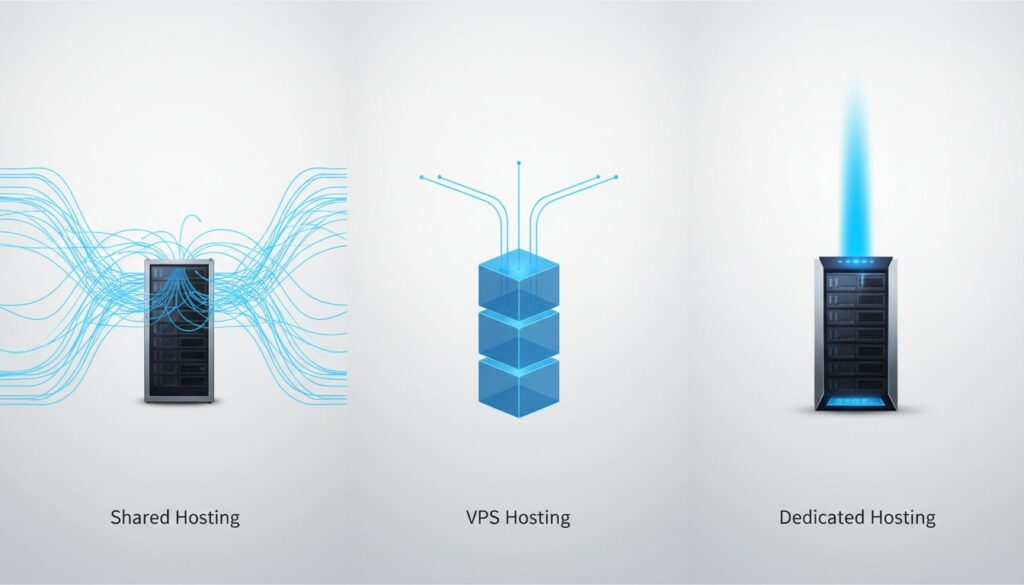
Choosing a hosting plan often feels like a balancing act between overpaying for resources you will never use and the constant anxiety that your site might crash during a traffic spike. When you are met with technical jargon like “virtualization” or “bare metal”-which simply refers to a physical server dedicated to a single user-it is easy to feel overwhelmed. Having shared vs vps vs dedicated hosting explained in plain English is the first step toward securing a fast, reliable home for your website while keeping your budget in check.
In this editorial guide, we break down these three core server architectures to help you identify exactly what you are paying for and which tier matches your specific performance needs. You will find a clear roadmap for when to move from one level to the next, ensuring your site remains secure and responsive as it grows. Whether you are launching a new project or scaling a high-traffic business in 2026, this comparison provides the practical clarity needed to choose your best fit with confidence.
Key Takeaways
- Understand how CPU, RAM, and bandwidth act as the physical foundation for your site’s performance and stability.
- Learn the core differences between shared vs vps vs dedicated hosting explained through practical analogies like apartments and private estates.
- Discover how virtualization technology provides guaranteed resources and private control without the high cost of a dedicated server.
- Identify why “bare metal” architecture is the superior choice for high-traffic projects requiring maximum speed and security.
- Utilize a decision matrix to match your current traffic and budget to the right hosting tier while planning a clear migration path for growth.
Understanding the Web Hosting Spectrum for Modern Sites
Every website requires a physical foundation to remain accessible to the public. A web hosting service provides the server space and technical infrastructure necessary for your files to be viewed on the internet. Without this foundation, your site has no place to live.
When selecting a plan, it is vital to view “Server Resources” as finite assets. Central Processing Units (CPU), Random Access Memory (RAM), and Bandwidth are the engines that power your site. Just as a physical office has limited square footage, a server has limited capacity to process data and serve visitors simultaneously.
To find the right fit, you must navigate three primary tiers: Shared (entry-level), VPS (mid-range), and Dedicated (high-end). Having these options for shared vs vps vs dedicated hosting explained allows you to scale your infrastructure as your traffic grows. Your choice will directly influence your Core Web Vitals, as server response times are a critical factor in SEO rankings and user retention.
The Role of Server Architecture in Performance
The underlying hardware of a server translates directly into page load speed. In a shared environment, you may experience the “Neighbor Effect.” This occurs when another website on the same server consumes excessive resources, causing your site to slow down or become unresponsive.
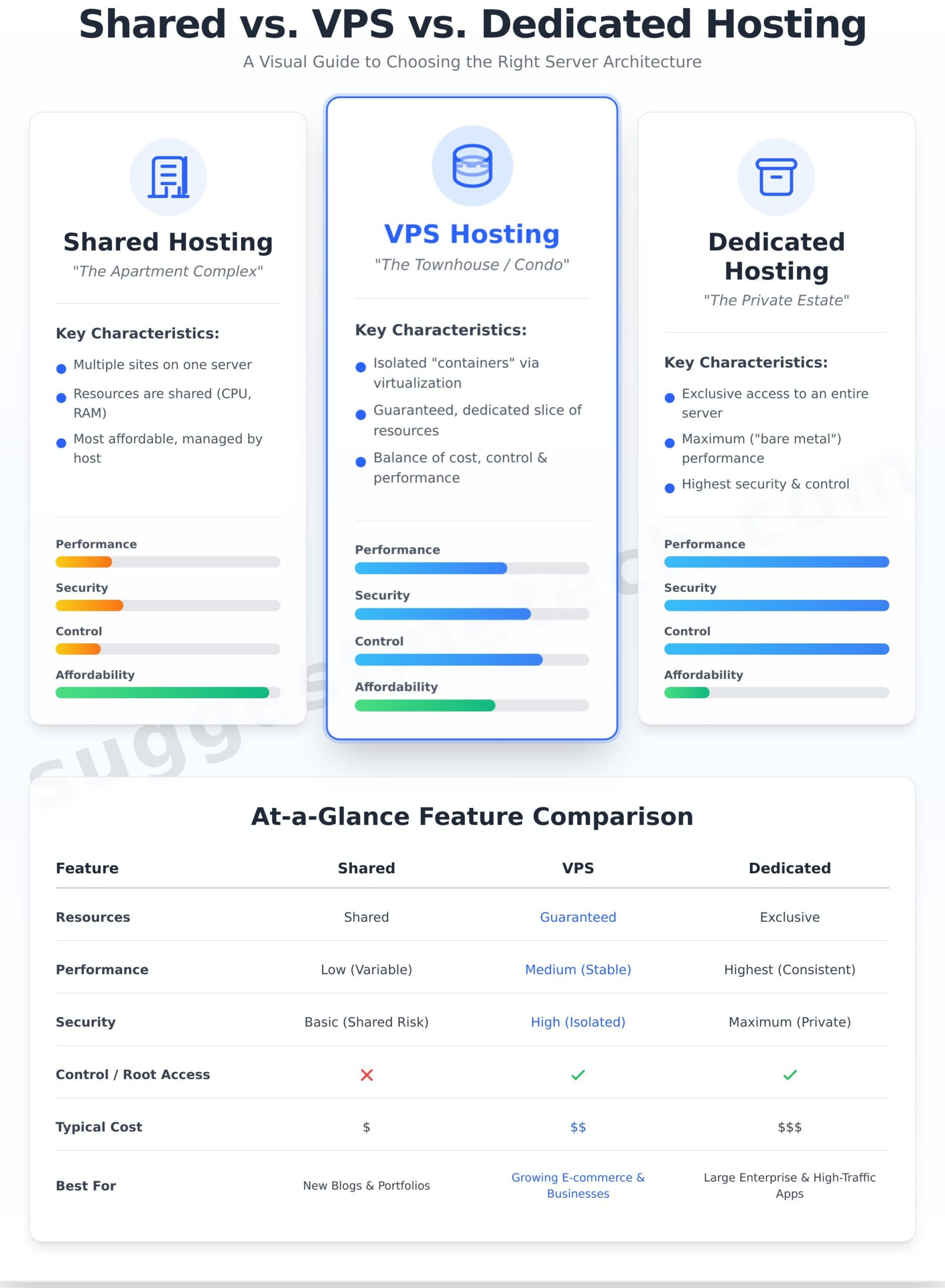
- Shared Hosting: Multiple sites share the same physical hardware and software resources.
- Virtual Private Server (VPS): Uses virtualization to create isolated “containers,” ensuring your site has its own dedicated slice of resources.
- Dedicated Hosting: You have exclusive access to the entire physical machine, offering the highest performance ceiling.
Why Your Choice Impacts Security and Compliance
Data isolation is a primary concern for businesses handling sensitive customer information. In a multi-tenant environment, like shared hosting, you are logically separated from others but share the same IP address. If a “neighbor” site is flagged for spam or malware, your IP reputation can suffer, leading to blocked emails or security warnings.
Single-tenancy, found in dedicated environments, offers the highest level of security and compliance. Because you are the only user on the hardware, you have total control over firewall configurations and security protocols. For sites processing credit card payments or medical data, the isolation provided by VPS or Dedicated hosting is often a regulatory necessity rather than a luxury.
Shared Hosting: The Entry-Level Solution for New Projects
Shared hosting is often described as the “apartment complex” of the web. In this environment, your website lives on a single physical server alongside hundreds of other users. You have your own private space, but you share the building’s core infrastructure, such as the central processing unit (CPU), RAM, and disk space, with your neighbors.
When evaluating shared vs vps vs dedicated hosting explained for a new project, the primary draw of the shared model is its extreme cost-efficiency. Because the provider splits the operating costs across many customers, it is the most affordable way to establish an online presence. It is a “hands-off” solution where the host manages all server maintenance and security updates.
This hosting type is best suited for specific use cases:
- New bloggers and personal portfolios with low traffic.
- Local small businesses that need a simple “brochure” website.
- Development environments for testing code before a live launch.
How Resource Sharing Works in Practice
On a shared server, resources are distributed dynamically. Most providers allow for “bursting,” which lets your site briefly consume extra power to handle a sudden, minor spike in visitors. However, because the environment is communal, a “bad neighbor” who consumes excessive resources can cause a performance ceiling, slowing down every other site on that server.
Marketing for shared plans often highlights “unlimited” storage or bandwidth. It is important to read the fine print; these claims are subject to Fair Usage Policies. If your site grows too large, the host will likely request an upgrade. By 2026, standard hardware expectations for a quality shared plan include NVMe SSD storage and at least 1GB of RAM to ensure basic stability. For a deeper look at the technical architecture, you can explore this resource on Types of Web Hosting.
The Security Realities of Shared Environments
The shared nature of this hosting introduces a risk known as “cross-site contamination.” If one website on the server is compromised due to poor coding or outdated plugins, the vulnerability can sometimes be used to target other sites on the same IP address. While modern hosts use account isolation technology to prevent this, the risk is inherently higher than on a private server.
The hosting provider is responsible for maintaining the primary server firewall and patching the operating system. However, the user remains responsible for securing their individual application. If your project handles sensitive financial data or requires custom security configurations, the cost savings of shared hosting may not justify the potential risks.
Virtual Private Servers (VPS): The Middle Ground of Control
Think of a VPS as the “condo” of the web. While you still share a physical building (the server), you have your own private walls and guaranteed utilities. Unlike shared hosting, where a neighbor’s high traffic can drain your resources, a VPS ensures your site has its own dedicated slice of CPU and RAM.
This isolation is achieved through virtualization. A piece of software called a hypervisor creates distinct virtual compartments on a single physical machine. This setup is a core part of What Is Web Hosting? and how it has evolved to offer professional-grade reliability. For those looking for shared vs vps vs dedicated hosting explained, the VPS represents the sweet spot of scalability-you get more power than shared hosting without the high cost of a dedicated machine.
A VPS is typically the right choice for:
- Growing blogs that have outgrown their initial shared plans.
- Small e-commerce stores requiring better security and faster checkouts.
- App developers who need a sandbox environment for testing.
- Websites with moderate, consistent traffic spikes.
Guaranteed Resources vs. Shared Bursts
Performance on a VPS is significantly more consistent because your resources are “fenced off.” Your site won’t slow down just because another user on the same hardware is experiencing a traffic surge. Modern providers typically use NVMe storage, which offers much faster data transfer speeds than traditional SSDs, further boosting your site’s responsiveness.
A major draw for technical users is “Root Access.” This gives you administrative control to install custom software stacks like Node.js, Python, or Ruby on Rails. This flexibility is essential for developers who need more than just a standard configuration to run their applications efficiently.
Managed vs. Unmanaged VPS: Which Do You Need?
Unmanaged VPS hosting is a “do-it-yourself” approach. You are responsible for security patches, server configuration, and software updates. It requires strong command-line skills and a deep understanding of server administration to keep the environment secure and functional.
Managed VPS hosting includes a team of experts who handle the backend maintenance, monitoring, and security. This allows business owners to focus on growth and content rather than server uptime. While more expensive, it provides peace of mind for those without a dedicated IT department.
Rule of thumb: If you aren’t comfortable using a Linux terminal to manage your server, always choose a managed VPS plan.
Dedicated Hosting: Maximum Performance and Bare Metal Security
Dedicated hosting represents the “Private Estate” of the web hosting world. While shared hosting is like an apartment and a VPS is a townhouse, a dedicated server gives you the entire physical building and the land it sits on. You are the sole tenant of the hardware, meaning every megabyte of RAM and every CPU cycle is reserved exclusively for your applications.
This setup is often referred to as “Bare Metal” hosting. Because there is no virtualization layer or hypervisor sitting between your operating system and the physical components, the server operates with significantly higher efficiency. When looking at shared vs vps vs dedicated hosting explained, the dedicated model is the gold standard for organizations that cannot afford even a millisecond of latency.
The primary benefits of this environment include:
- Total Control: You have full root access to the server, allowing for deep-level software customizations and kernel-level optimizations.
- Maximum Security: Since no other users share the hardware, the risk of “cross-site” infections or side-channel attacks is virtually eliminated.
- High-Volume Handling: Dedicated servers are built to manage massive traffic spikes and resource-heavy tasks like real-time data processing.
When Your Business Outgrows Virtual Environments
Even high-tier VPS plans have a performance ceiling. As your business scales, high-transaction databases may begin to struggle with the slight overhead caused by virtualization. If your site processes thousands of simultaneous transactions, the latency benefits of 100% dedicated hardware become a competitive advantage.
Furthermore, dedicated hardware is often a requirement for complex regulatory compliance. For industries governed by HIPAA or PCI-DSS standards, the physical isolation of data is frequently the most straightforward path to meeting strict security audits. This makes dedicated hosting the logical choice for large e-commerce enterprises and data-sensitive applications.
The Logistics of Managing a Dedicated Server
A dedicated server requires a higher financial investment, but the ROI is justified for brands where downtime or slow speeds result in significant revenue loss. Beyond the cost, you must consider the level of hardware customization required. Dedicated plans allow you to specify exact RAID configurations for data redundancy and choose specific RAM or NVMe storage upgrades tailored to your workload.
Before committing, you must choose between two management styles:
- Managed Dedicated: The hosting provider handles technical maintenance, security patches, and hardware monitoring, which is ideal for businesses without a dedicated IT team.
- Unmanaged Dedicated: Your team takes full responsibility for the software stack and server health, offering the ultimate freedom for specialized configurations.
If you are ready to transition to a high-performance environment, you can find detailed provider comparisons and hardware benchmarks at suggestmetech.com to help inform your decision.
Choosing the Right Architecture for Your Specific Goals
Selecting the right infrastructure requires balancing your current technical needs with your long-term growth strategy. Understanding shared vs vps vs dedicated hosting explained through the lens of your specific project helps you avoid the performance bottlenecks that can stifle a growing site.
The “Migration Path” is a standard journey for most successful websites. You start on Shared hosting to keep costs low during the development phase. As your traffic grows and page load times increase, you migrate to a VPS for dedicated resources. Finally, once you require total hardware control or handle massive data volumes, you move to a Dedicated server.
To supplement any hosting choice, consider integrating a Content Delivery Network (CDN). CDNs use “Edge Computing” to store copies of your site on servers closer to your users. This reduces the physical distance data must travel, ensuring fast performance regardless of whether your primary server is Shared or Dedicated.
Matching Hosting Types to Traffic and Use Cases
- I am launching a WooCommerce store with 500 products: Choose a VPS. E-commerce sites are resource-heavy; a VPS ensures your checkout process remains fast even when multiple customers are browsing simultaneously.
- I have a static site for a local dental office: Shared hosting is the most logical choice. These sites have low traffic and primarily serve as informational brochures, making high-end resources unnecessary.
- I am building a custom SaaS platform: Dedicated hosting is recommended. Custom applications often require specific server configurations and high-level security that only a private environment can provide.
SuggestMeTech’s Final Selection Framework
When deciding, you must choose between a “Budget-First” or “Performance-First” approach. A budget-first approach prioritizes low monthly overhead, while a performance-first approach views hosting as an investment in user retention and SEO rankings.
Ask yourself these three questions before committing to a plan:
- What is my realistic traffic goal for the next 12 months?
- Do I have the technical skills (or the budget for a managed service) to handle server maintenance?
- How much revenue would I lose if my site went offline for one hour?
We recommend prioritizing “future-proofing” by choosing a plan that offers one tier more than you currently need. This prevents the downtime often associated with emergency migrations. To find the top-rated providers for your specific tier, explore our detailed reviews at suggestmetech.com to see how the industry leaders compare in real-world testing.
Selecting Your Ideal Hosting Environment
Choosing the right infrastructure depends entirely on your project’s current traffic and long-term growth goals. While shared hosting remains the most cost-effective entry point for new blogs, scaling businesses often require the dedicated resources of a VPS or the total control of a dedicated server. Having shared vs vps vs dedicated hosting explained through the lens of performance and security helps you avoid overpaying for unused resources or under-equipping a high-traffic site.
The best choice is one that balances your technical needs with your available budget. To simplify your decision, SuggestMeTech provides expert comparisons of uptime, speed, and customer support across all major platforms. Our team conducts detailed reviews of top-rated providers in the industry, offering Editor’s picks based on rigorous real-world performance testing.
Ready to make your move? Find the best hosting provider for your needs in our 2026 rankings. Your website’s foundation is the first step toward digital success-choose the one that lets your project thrive and grow with confidence.
Common Questions About Web Hosting Types
Is VPS hosting faster than shared hosting for every website?
While a VPS provides dedicated resources like RAM and CPU, it is not a universal fix for speed. A lightweight, well-optimized site on a premium shared plan can sometimes outperform a bloated site on a low-end VPS.
However, for most dynamic websites, a VPS offers more consistent performance. Because you are not competing with other users for resources, your site remains stable even when other sites on the same physical server experience traffic spikes.
Can I upgrade from shared to VPS hosting without taking my site offline?
Most modern hosting providers offer seamless migration paths through their account dashboards. In many cases, the host can move your data to the new environment with little to no noticeable downtime for your visitors.
You should be aware that if your IP address changes during the upgrade, there may be a brief period of DNS propagation. Choosing a managed service often ensures that a technical team handles the transition for you to minimize any potential service interruptions.
What is the main difference between a VPS and a Cloud server?
As our shared vs vps vs dedicated hosting explained guide notes, a VPS is a virtual slice of one specific physical machine. If that hardware fails, your site goes offline unless there is a backup system in place.
A Cloud server draws resources from a cluster of multiple physical servers. This architecture provides better redundancy and scalability. If one machine in the cluster fails, another immediately takes its place, ensuring your website remains accessible to your audience without interruption.
Do I need a dedicated server if I have a high-traffic WordPress blog?
Not necessarily. Most high-traffic blogs can be handled efficiently by a high-performance VPS or a specialized managed WordPress hosting plan. These environments are optimized for the specific resource demands of the WordPress CMS.
A dedicated server is usually only required for enterprise-level sites with millions of monthly visitors or those with specific security and compliance needs. For the average professional blogger, the extra cost of a dedicated server often exceeds the actual performance benefits.
What technical skills are required to manage a VPS or Dedicated server?
The level of skill required depends on whether you choose a managed or unmanaged plan. Managed plans require very little technical knowledge, as the provider handles security updates, server monitoring, and software installations on your behalf.
Unmanaged plans require a high level of expertise. You will need to be comfortable using the Linux command line, configuring firewalls, and troubleshooting server-side errors. If you are not a system administrator, a managed plan is almost always the better choice for your business.
Why is shared hosting sometimes called “multi-tenant” hosting?
The term “multi-tenant” describes the environment where multiple users, or tenants, reside on the same physical server. It is similar to an apartment building where every resident shares the same underlying infrastructure, such as the plumbing and electrical wiring.
In this shared vs vps vs dedicated hosting explained context, multi-tenancy allows the provider to keep costs low by splitting the server’s maintenance and hardware expenses among hundreds of different customers. This makes it the most affordable entry point for new websites.
How much more expensive is dedicated hosting compared to a standard VPS?
There is a significant price jump between these two tiers. While a reliable VPS might cost between $20 and $80 per month, a dedicated server typically starts at $100 and can easily exceed $500 depending on the hardware specifications.
The higher price reflects the fact that you are paying for the exclusive use of the entire physical machine. You are not just buying performance; you are buying the highest level of privacy, security, and hardware customization available in the hosting industry.
Does the location of the server matter for VPS and Dedicated hosting?
Physical distance between the server and the visitor creates latency, which slows down page load times. Even the most powerful dedicated server will feel slow to a user in Australia if the data center is located in London.
To ensure the best user experience, you should select a data center location that is geographically closest to your primary target audience. If your audience is global, you can supplement your hosting with a Content Delivery Network (CDN) to cache your content closer to users worldwide.

