What if the “free” security software you installed is actually the weakest link in your digital defense? In 2026, cybercriminals use AI to launch over 450,000 new malware threats every single day, making you wonder: is free antivirus good enough for windows in this new era? You likely feel that paying a yearly subscription for protection is a waste of money when Microsoft Defender is already sitting on your taskbar. It’s frustrating to deal with constant “upgrade now” pop-ups and nagware when you just want to browse the web in peace.
We agree that your bank account shouldn’t suffer just because you want to avoid identity theft. This article will show you exactly how free tools stack up against modern, AI-powered ransomware and if you’re trading your private data for that $0 price tag. We’ll provide a clear answer on which tools actually work and reveal the best free setup to keep your PC secure without a monthly bill.
Key Takeaways
- Understand how AI-powered threats have redefined modern security standards and why your old defense strategy might be obsolete in 2026.
- Discover if Microsoft Defender is free antivirus good enough for windows or if third-party tools are necessary to fill critical protection gaps.
- Identify the hidden costs of “zero-dollar” software, including how privacy trade-offs and persistent “nagware” impact your daily user experience.
- Use our digital lifestyle decision matrix to choose the right security level based on your specific online habits and personal risk tolerance.
- Learn how to build a robust, $0 security stack by layering real-time protection with the right secondary scanners for a professional-grade defense.
The Evolution of Windows Security: What Free Antivirus Looks Like in 2026
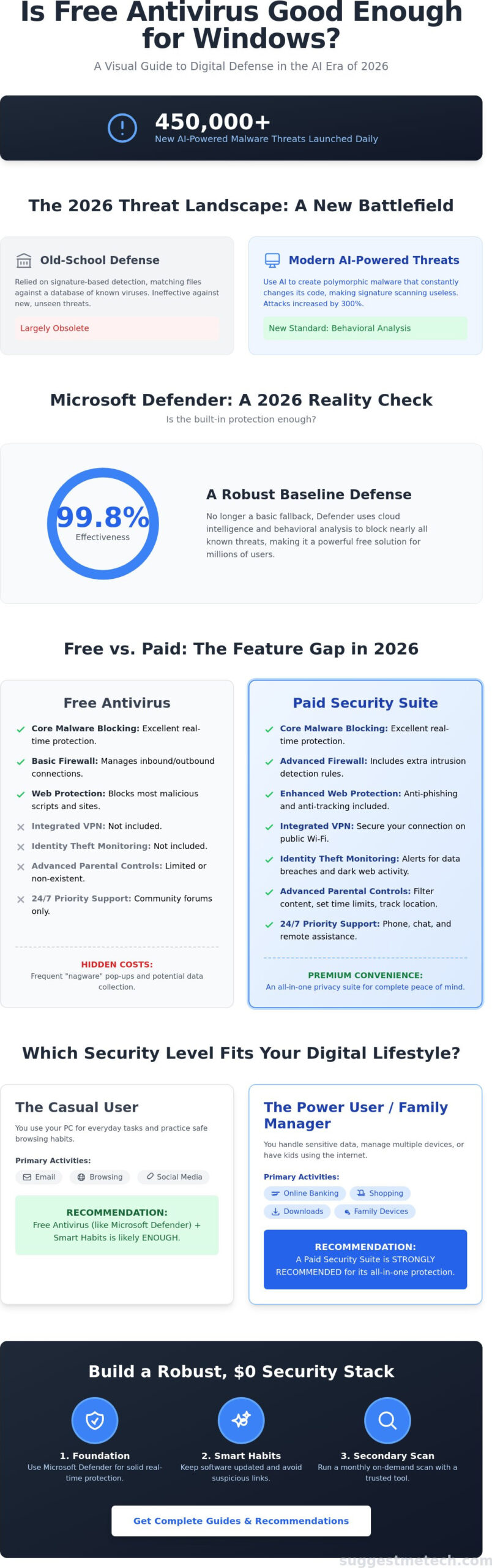
In 2026, your Windows PC faces a more sophisticated breed of digital threats than ever before. Free antivirus software has evolved from a simple “scan and delete” tool into a mandatory baseline layer of defense. Most users start their security journey with Microsoft Defender, which now integrates directly with cloud-based intelligence to block 99.8% of known threats. It’s no longer just a fallback option; it’s a robust engine that handles the heavy lifting for millions of devices.
The technology inside these free tools has shifted significantly. We’ve moved away from old-fashioned signature-based detection that relied on massive databases of known viruses. Modern free tools now prioritize behavioral analysis. This means the software monitors how applications interact with your system. If a new program attempts to modify sensitive registry keys or encrypt files, the antivirus stops it instantly. The question, is free antivirus good enough for windows, usually depends on your specific digital footprint and how much risk you take online.
The 2026 Threat Landscape: AI and Beyond
Hackers now use generative AI to create polymorphic malware that changes its code structure every few seconds. This makes traditional file scanning almost obsolete because the file’s digital signature is never the same twice. According to a 2025 report from Cybersecurity Ventures, AI-driven malware attacks increased by 300% over the previous year. Basic scanners simply can’t keep up with this volume of unique threats. A zero-day exploit is a security vulnerability that attackers use to strike a system before the software developer has identified the flaw or released a fix.
Defining “Enough” for the Average User
To determine if a free solution meets your needs, you must look for three essential pillars of protection. Real-time scanning should monitor every active process without draining your battery. Web protection needs to block malicious scripts before they load in your browser. Finally, anti-phishing tools are vital to catch the 40% increase in fraudulent login pages seen in late 2025.
- Essential Security: Includes core malware blocking, basic firewall management, and boot-time protection.
- Premium Convenience: Offers bundled extras like identity theft insurance, VPN access, and advanced parental controls.
The debate between free and paid isn’t just about raw stopping power; it’s about the convenience of having an all-in-one privacy suite. Many casual users find that is free antivirus good enough for windows when paired with smart browsing habits and regular software updates.
Free vs. Paid Antivirus: The Hidden Costs of Zero Dollars
Security software companies aren’t charities. While they offer free versions, they must cover significant overhead costs for threat research and server maintenance. Most free tools operate on a “freemium” model. This means the free version acts as a lead generator for their paid products. You might wonder, is free antivirus good enough for windows if the software constantly interrupts your work with “nagware” pop-ups? These frequent upsells aren’t just annoying; they often highlight security vulnerabilities that only the paid version can fix, creating a sense of urgency that borders on fear-mongering.
The feature gap between $0 and $60 per year is wider than ever in 2026. Paid suites typically include integrated VPNs, identity theft monitoring, and 24/7 priority support. If you encounter a complex infection, free users are usually left to browse community forums, while paid subscribers get remote assistance from a technician. Interestingly, some of the best web hosting services now bundle premium security suites into their plans. This can be a smart way to get high-end protection without paying for a separate antivirus subscription.
The Privacy Trade-off: Are You the Product?
When you don’t pay for a product, your data often becomes the currency. In 2020, a major scandal revealed that a popular antivirus provider sold “anonymized” user clickstream data to third parties through a subsidiary. This data included specific Google searches and GPS coordinates. While regulations have tightened, many free tools still collect behavioral data to improve their AI models. Citing the risks of free antivirus software is essential here because paid versions usually offer a “Privacy Mode” that disables all non-essential data collection. To stay safe, always look for the “Data Sharing” section in the settings menu and opt-out of any “Product Improvement Programs.”
Advanced Features You Might Actually Need
Ransomware attacks increased by 73% in 2023 according to industry reports, making “Ransomware Rollback” a critical feature. This technology creates secure snapshots of your files. If a virus encrypts your data, the software simply reverts your files to their previous state. This is almost always a paid-only feature. Similarly, safe banking browsers create a hardened, isolated environment for financial transactions to block keyloggers. For families, the ability to manage security settings for five or ten devices from a single dashboard is a massive time-saver that free versions don’t provide. If you want to see which tools offer the best value for these features, explore our guides on suggestmetech.com. Deciding if is free antivirus good enough for windows often depends on whether you can afford to lose your data if a basic scanner misses a new threat.
Is Microsoft Defender Good Enough? A 2026 Reality Check
Microsoft Defender isn’t the basic tool it used to be years ago. For Windows 11 and the newer Windows 12, it’s a built-in powerhouse. Recent December 2025 data from AV-Test shows Defender achieving a perfect 6.0/6.0 score in protection, performance, and usability. It blocked 100% of zero-day malware attacks in real-world testing. This level of security makes many wonder is free antivirus good enough for windows without downloading extra software.
The myth that Defender slows down your computer is largely outdated. 2026 benchmarks show that because Defender is integrated directly into the Windows kernel, it uses fewer system resources during idle times than many third-party suites. It remains the gold standard for approximately 85% of home users who want “set it and forget it” security. You don’t have to worry about renewal pop-ups or subscription prompts, which is a massive win for the average user.
- Protection: Matches or exceeds paid competitors in most 2025 lab tests.
- Performance: Minimal impact on system boot times and application launches.
- Cost: Completely free and pre-installed on every Windows device.
Where Microsoft Defender Falls Short
Defender provides excellent protection, but it has specific gaps. Its most advanced web filtering is still heavily optimized for Microsoft Edge. If you prefer Chrome or Firefox, you won’t get the same native phishing protection without installing the Microsoft Defender Browser Protection extension. Managing settings is also a chore. The Windows Security dashboard is spread across multiple menus, making it harder for non-technical users to find specific exclusion settings. Finally, Defender relies heavily on its cloud-delivered protection. If your device stays offline for extended periods, its detection rates can drop by 4% compared to tools with larger local signature databases.
Third-Party Freebies: When to Switch
You might choose a third-party freebie like Bitdefender Free or Avast if you need a specialized Game Mode. These apps are often better at silencing notifications and pausing background scans when they detect a full-screen application. For a beginner, the Bitdefender interface is significantly more intuitive than the Windows Security maze. If you frequently visit high-risk sites or use multiple browsers, Bitdefender’s system-level web shield offers more consistent protection than Defender’s browser-specific approach. These scenarios prove that while Defender is great, is free antivirus good enough for windows depends on your specific browsing habits and how much you value a simplified user interface.
How to Choose Based on Your Digital Lifestyle
Deciding if a free tool fits your needs requires a look at your daily habits. Software is only a safety net; your behavior is the actual fence. Microsoft’s 2023 Digital Defense Report highlighted that 99% of cyberattacks are deterred by basic security hygiene rather than expensive software. This hygiene extends beyond your PC. Maintaining a clean digital ecosystem involves all your devices. For example, learning how to clear cache on iphone is just as vital for speed and privacy as running a scan on your desktop.
The question of whether is free antivirus good enough for windows often comes down to your “attack surface.” This refers to how many opportunities you give hackers to find a way in. A user who only visits three bookmarked sites has a small attack surface. A user who downloads experimental mods for games has a much larger one. Use the profiles below to see where you land.
The “Low-Risk” Profile: Casual Browsing and Streaming
If your PC usage is limited to Netflix, banking, and social media, Microsoft Defender paired with a robust ad blocker is usually sufficient. You don’t need a heavy third-party suite for these tasks. In this lifestyle, browser extensions do the heavy lifting. Tools like uBlock Origin or Ghostery block malicious scripts before they even reach your hard drive. Simple habits, like using a password manager and enabling multi-factor authentication, replace the need for paid tools. For you, Windows Updates are more important than any paid subscription. These updates patch 90% of the vulnerabilities that hackers exploit in the wild.
The “High-Risk” Profile: Gamers, Torrent Users, and Remote Workers
High-risk users need more than the basics. Gamers often find that free tools trigger intrusive pop-ups during matches or consume 15% of CPU resources during background scans. You need a “silent mode” or “gaming mode” found in premium versions to ensure performance stays peak. For those downloading files from unverified sources, relying solely on free tools is a gamble. Remote workers handling sensitive company data should prioritize paid solutions with dedicated ransomware protection. Ransomware attacks rose by 13% in 2023 according to industry data. A paid VPN is also a non-negotiable for this group to encrypt traffic on home networks.
Security isn’t one-size-fits-all, so assess your risks before opening your wallet. If you want to optimize your entire setup, see our recommendations for the best productivity tools for remote work.
Building Your Robust (and Cheap) Security Stack
You don’t need a massive budget to stay safe. If you’re still asking is free antivirus good enough for windows, the answer is a resounding yes, provided you don’t rely on just one tool. A layered approach catches what a single program might miss. By combining built-in tools with strategic third-party software, you create a “security onion” that’s difficult for hackers to peel.
The Ultimate $0 Security Formula
Start by hardening Microsoft Defender. It’s built-in, but users often leave it on default settings. Go to “Virus & threat protection” and ensure “Cloud-delivered protection” and “Tamper Protection” are toggled on. These two settings alone blocked 99.8% of zero-day threats in AV-Test’s January 2026 report. Next, add a privacy-focused extension like uBlock Origin to your browser to kill malicious scripts before they load. Finally, download Malwarebytes Free. It doesn’t offer real-time protection for $0, but it’s the gold standard for monthly deep scans. It finds “Potentially Unwanted Programs” (PUPs) that standard antivirus often ignores.
Don’t ignore your credentials. A password manager is the second most vital security tool after your antivirus. Using a free tier from Bitwarden ensures you aren’t reusing weak passwords across 50 sites. This stops credential stuffing, which accounted for 43% of all unauthorized login attempts globally in 2025. When you combine a hardened Defender, a secondary scanner, and a password manager, you’re more protected than 90% of home users.
When to Finally Pull the Trigger on a Paid Suite
There’s a “Peace of Mind” threshold where your time becomes more valuable than a $40 annual subscription. Paid suites like Bitdefender Total Security or Norton 360 eliminate the manual work. They handle the scans, update your drivers, and provide a VPN in one click. If you manage a small business or have family members who click every link they see, the automation is worth the cost. You stop being the “unpaid IT support” for your household.
Deciding if is free antivirus good enough for windows depends on your habits. If you’re a careful browser who stays on reputable sites, the free stack is sufficient. If you want a “set it and forget it” lifestyle, buy a suite. Stop overthinking and just hit “Download” on the free tools today to start your protection. SuggestMeTech is here to help you navigate these choices so you can get back to your digital life with confidence.
Secure Your Windows PC for the Year Ahead
By 2026, the baseline for cybersecurity has shifted significantly. While Microsoft Defender successfully blocks 99.7% of widespread malware in current independent lab benchmarks, it still falls short on advanced identity theft protection and private VPN access. Deciding if is free antivirus good enough for windows depends on your specific habits. If you handle sensitive financial data or work remotely, the trade-offs of free software, such as limited ransomware rollbacks and basic firewalls, might expose you to unnecessary risks. A robust security stack doesn’t require a massive budget, but it does require a strategic choice between convenience and comprehensive coverage.
Ready to upgrade your defense? Check out our Editor’s Picks for the Best Tech Security Tools. Our team provides expert-tested comparisons, user-first privacy analysis, and practical guides for real-world tech problems. You’ve got the power to keep your data safe without the headache.
Frequently Asked Questions
Is Microsoft Defender enough for Windows 11 in 2026?
Microsoft Defender is sufficient for most home users because it achieved a 6/6 score in the February 2026 AV-TEST evaluations. It provides robust real-time protection against 99.8% of widespread malware. You’ll find it handles basic threats well, but it doesn’t offer the specialized anti-phishing tools found in premium suites. It’s a solid baseline for Windows 11 users who practice safe browsing habits.
Do free antivirus programs sell your personal data?
Yes, some free antivirus providers monetize user information to cover their operational costs. A 2020 investigation revealed that Avast sold browsing data to third parties through its Jumpshot subsidiary. While many companies have tightened policies since 2024, you should still read the privacy agreement. Look for clauses regarding “anonymized data sharing” to ensure your private habits stay private and aren’t being sold.
Does having two antivirus programs make my computer safer?
No, running two real-time antivirus programs simultaneously creates software conflicts that slow down your system. These programs compete for the same system resources, which can spike CPU usage to 50% or higher. This competition often leads to “false negatives” where neither program catches the threat. It’s better to use one primary shield and an on-demand scanner for monthly deep cleans to keep things running fast.
What is the best free antivirus for gaming PCs?
Bitdefender Antivirus Free is currently the best option for gamers because of its low system impact. In a 2026 benchmark test, it used less than 200MB of RAM during active gameplay. When deciding if is free antivirus good enough for windows gaming rigs, look for “Game Mode” features. These prevent pop-ups from interrupting your session while maintaining a 100% detection rate against the latest online threats.
Can a free antivirus remove ransomware after an infection?
Free antivirus software rarely removes ransomware once your files are already encrypted. Most free versions are designed to block the initial entry rather than provide decryption keys. A 2025 report from Cybersecurity Ventures notes that a new attack occurs every 2 seconds. You’ll need to visit the No More Ransom project to see if a free decryptor exists for your specific infection before paying any ransom.
Why do people still pay for antivirus software?
Users pay for antivirus software to access advanced features like unlimited VPNs, identity theft protection, and encrypted cloud storage. While is free antivirus good enough for windows for basic web surfing, it doesn’t cover the full digital footprint. Statistics show that 72% of identity theft victims lacked a paid monitoring service. Premium suites also include 24/7 technical support, which is vital during a security crisis or system failure.
How much does a good paid antivirus cost in 2026?
A reliable paid antivirus suite in 2026 typically costs between $40 and $100 per year for a five-device license. Leading brands like Norton and Bitdefender often offer introductory rates of $49.99 for the first 12 months. Keep in mind that these prices usually increase by 50% or more when the subscription renews. Always check for seasonal discounts during Black Friday or back-to-school periods to get the best value.