
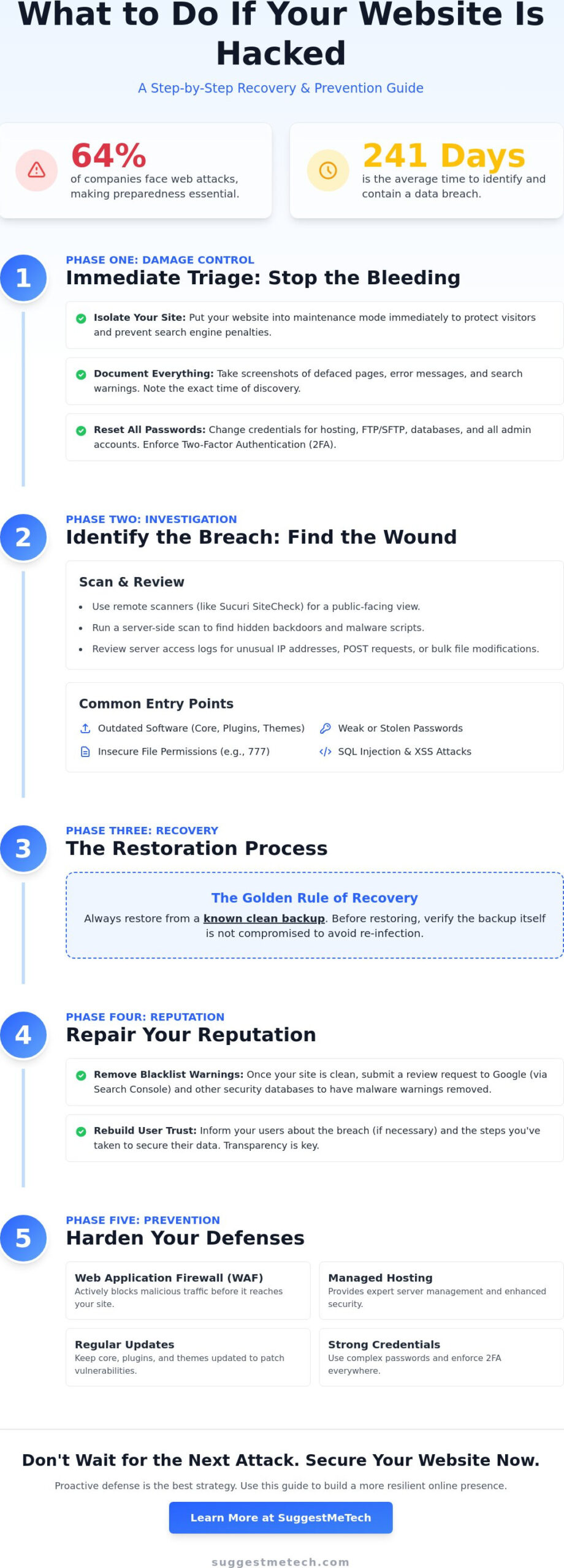
Did you know that 64% of companies are currently facing web attacks, and it takes an average of 241 days to identify and contain a single breach? If you’ve just discovered suspicious code or a Google warning on your dashboard, you’re likely feeling the weight of that statistic. Knowing exactly what to do if your website is hacked is the difference between a minor setback and a total business shutdown. It’s completely normal to feel anxious about your SEO rankings dropping or feel overwhelmed by technical terms like malware scripts and SQL injections.
You’ve worked hard to build your online presence, and we’re here to help you protect it. This guide offers a systematic triage and recovery plan to secure your data and remove malware without the usual technical headaches. We’ll show you how to isolate your site immediately, perform a thorough cleanup, and establish a defense strategy that prevents future breaches. Let’s get your site back online and your reputation restored.
Key Takeaways
- Learn how to immediately isolate your site using maintenance mode to protect your visitors and stop further damage.
- Get a clear, step-by-step checklist on what to do if your website is hacked, starting with identifying common entry points like outdated plugins or weak passwords.
- Discover the “Golden Rule” for restoring your site safely from a clean backup and how to verify that your data isn’t re-infected.
- Find out how to clear your site’s reputation by requesting reviews from Google and security databases to remove “Malware” warnings quickly.
- Implement long-term hardening strategies, such as using a Web Application Firewall (WAF) and managed hosting, to ensure you never have to deal with a breach again.
Immediate Triage: How to Stop the Damage Right Now
Finding out your site is compromised is a gut-punch. Your first instinct might be to start deleting files or frantically clicking around, but that’s a mistake. Knowing what to do if your website is hacked starts with staying calm and moving through a systematic plan. Before you change a single file, document the damage. Take screenshots of defaced pages, weird redirects, or search engine warnings. This evidence is crucial for your records and helps identify the specific strain of malware you’re dealing with.
Next, contact your hosting provider’s support team. They can often tell you if the breach is server-wide or limited to your specific account. Understanding what a data breach is and how it spreads will help you communicate clearly with their support team. They might even have automated tools to help isolate the problem before it spreads further. Be sure to track the following details during your initial assessment:
- Take screenshots of any visible errors or “red screen” warnings.
- Note the exact time you discovered the issue.
- Check your site’s access logs for unusual IP addresses or file modifications.
- Identify if the issue is limited to one site or your whole hosting account.
Isolating the Infection
Stop the bleeding by taking your site offline or putting it into a strict maintenance mode. If you have access to your server, you can use your .htaccess file to block all IP addresses except your own. This is a vital step that many people skip. It protects your visitors from being infected by malware and stops search engines from crawling the compromised content, which helps preserve your SEO reputation. If you run multiple websites on a single hosting account, check every one of them. Hackers often use “cross-site contamination” to jump from a small, forgotten blog to your primary business site. Knowing what to do if your website is hacked means protecting your users first.
The Password Reset Protocol
Assume every single credential you have is now in the wrong hands. You must reset your hosting control panel, FTP/SFTP accounts, and your database passwords immediately. If you change your database password, don’t forget to update your site’s configuration file, such as wp-config.php for WordPress, or your site will break entirely. This is also the time to enforce Two-Factor Authentication (2FA) for every administrative account. It’s a simple, high-impact way to stop attackers from using stolen login details to get back in while you’re still cleaning up the mess. Use a password manager to ensure your new credentials are both complex and unique.
Identifying the Breach: Where Did Hackers Get In?
Once you’ve stopped the bleeding, you need to find the wound. If you don’t know how they got in, they’ll be back within hours. In 2026, the most common entry point remains outdated software. Whether you’re running WordPress 7.0, Joomla 6.1, or Drupal 11; using an old version of core files, plugins, or themes is like leaving your front door wide open. Hackers use automated bots to scan millions of sites for known vulnerabilities in these specific components. Knowing what to do if your website is hacked requires identifying these specific weaknesses before you start the restoration process.
Beyond outdated code, weak administrative passwords and compromised local computers are major risks. A single developer with a malware-infected laptop can inadvertently hand over your site’s keys. You should also check for insecure file permissions. Setting folders to “777” might solve a temporary technical glitch, but it allows anyone on the server to read, write, and execute files. Advanced attackers might use Cross-site scripting (XSS) or SQL injection to bypass your login screens entirely. Reviewing a professional website security checklist can help you understand these technical gaps and how they apply to your current setup.
Scanning for Malware
Start with remote scanners like Sucuri or SiteCheck for a quick surface scan. These tools are excellent for seeing what your visitors see, but they can’t look under the hood. You’ll need a server-side scan from your hosting provider to find backdoors. These are hidden scripts that allow hackers to regain entry even after a password reset. Finding these is a critical part of what to do if your website is hacked, as missing just one script can lead to a reinfection within minutes. Don’t stop at the first file you find; hackers often hide multiple backdoors across different directories.
Reviewing Access Logs
Your server logs act like a security camera for your data. You can find them in your cPanel or hosting dashboard under the Logs or Metrics section. Look for unusual POST requests or bulk file modifications that happened around the time of the breach. If you see a suspicious IP address accessing admin areas or making hundreds of requests in a single minute, you’ve found a lead. Identifying these patterns helps you block the attacker’s IP at the server level. For more detailed evaluations of the latest defensive tools, you can check out our technology reviews and guides to find the right security fit for your stack.
The Restoration Process: Cleaning and Recovering Your Site
Restoration is where the real work begins. You’ve stopped the bleeding and found the entry point; now you need to reclaim your digital territory. The most effective strategy in your plan for what to do if your website is hacked is the ‘Golden Rule’: always restore from a clean backup if you have one. This is faster and more reliable than trying to hunt down every single line of malicious code by hand. To ensure your recovery aligns with professional standards for security, you can reference the FTC’s guide to data breach response for a credible framework on securing your operations during this phase.
Choosing between manual cleaning and automated tools depends on your technical comfort and the depth of the infection. Automated security scanners are excellent for identifying known malware signatures quickly. However, they often miss custom-coded backdoors. If your backup is more than a few days old, you might lose significant content. In that case, re-installing core CMS files is a smart middle ground. By replacing the system folders with fresh copies from the official WordPress or Joomla repositories, you overwrite corrupted system code without touching your unique images or posts.
Restoring from a Clean Backup
Delete everything first. This is the step most people get wrong. If you simply upload your backup over the existing files, the malware scripts often remain untouched in the background. Use FTP or your hosting file manager to wipe the directory completely. Once you’ve uploaded your clean files and imported your database via phpMyAdmin, test everything in a staging environment. This allows you to verify the site is functional and clean before you point your public domain back to it. It’s a critical safety net that prevents you from accidentally re-infecting your visitors.
Manual Malware Removal (For Advanced Users)
Searching for malicious strings like ‘eval’ or ‘base64_decode’ is a standard starting point for manual cleaning. These functions aren’t inherently evil, but hackers frequently use them to hide obfuscated code. Check your .htaccess and index.php files for unauthorized redirects that send your traffic to suspicious domains. Don’t forget your database. Malicious scripts often hide in the ‘options’ or ‘posts’ tables, waiting to re-trigger the infection the moment you go live. If you find a script, remove it and consider changing your database prefix to add an extra layer of difficulty for future attacks. Knowing what to do if your website is hacked means being thorough enough to ensure the intruder has no way back in.
Post-Hack Cleanup: SEO Recovery and User Trust
Cleaning your server is a massive win, but your work isn’t finished until the rest of the internet knows your site is safe. If you’re wondering what to do if your website is hacked and your traffic has vanished, you must focus on reputational repair. Search engines are quick to flag compromised sites to protect users, and these warnings can linger long after you’ve deleted the malicious code. You also need to check your “Blacklist” status on major security databases to ensure your domain isn’t being blocked by third-party antivirus software or email providers.
Monitoring your SEO rankings is vital during this phase. Hackers often inject thousands of “ghost” pages into your site to rank for spammy keywords or pharmaceutical ads. Even after a thorough cleanup, these pages might stay in the search index and tank your authority. Use a “site:yourdomain.com” search in Google to see what is currently indexed. If you see gibberish titles, you’ll need to use the URL Removal tool in Search Console to purge them manually. This proactive approach is the only way to signal to search bots that you’ve regained control.
Removing the Google ‘Red Screen of Death’
Once you’re 100% certain the infection is gone, head to Google Search Console. Under the “Security and Manual Actions” tab, you’ll find the security issues report. Click “Request Review” to start the process. Don’t just say “it’s fixed.” Provide a detailed summary of the specific steps you took, such as “Restored from a clean backup and updated all plugins to the latest 2026 versions.” In 2026, most reviews are processed within 24 to 72 hours, though it can take longer if the infection was widespread across multiple subdomains.
Rebuilding User Trust
Transparency is your best tool for keeping your audience. If user data was involved, you have a legal and ethical obligation to disclose the breach. Check your local regulations, like GDPR or the CCPA, to see if you meet the required reporting windows. Send an honest email to your subscribers explaining what happened and the steps you’ve taken to harden your defenses. Displaying a visible security badge and ensuring all your user-facing forms are secured with modern CAPTCHAs shows your visitors that you take their safety seriously. For more detailed evaluations of the latest defensive software, check out our technology reviews and guides to find the right fit for your site.
Hardening Your Defense: Preventing the Next Attack
Recovery is only half the battle. If you don’t change the conditions that allowed the breach, you’ll likely be back at square one within days. Hardening your site is the final, essential step in what to do if your website is hacked. It’s about moving from a reactive state to a proactive one. Start by implementing a Web Application Firewall (WAF) like Cloudflare or Sucuri. These services act as a digital bouncer, filtering out malicious traffic and bot-driven brute force attacks before they ever reach your server. It’s a simple change that stops the majority of automated threats instantly.
Automating your backup schedule is your non-negotiable “Plan B.” You shouldn’t have to remember to click a button every week. Set up a system that stores encrypted backups in a separate cloud location, such as Amazon S3 or Google Drive. This ensures that even if your hosting account is completely wiped, your data remains safe. You should also adopt the “Least Privilege” principle. Audit every user account on your site and downgrade permissions for anyone who doesn’t need full administrative access. If a team member only writes content, they don’t need the ability to install plugins or edit themes.
Choosing Secure Infrastructure
The foundation of your security is your server environment. Many people realize too late that the best web hosting services include malware scanning and hack-recovery guarantees as part of their standard packages. You shouldn’t have to pay extra for basic protection. Managed hosting providers often handle core updates for WordPress 7.0 or Joomla 6.1 automatically, ensuring you’re always running the latest security patches. This removes the human error factor that accounts for 68% of modern breaches. When you’re evaluating a new host, look for those that offer real-time server-side monitoring and PHP 8.3 support.
Essential Security Tools for 2026
In 2026, standard passwords aren’t enough to stop sophisticated AI-powered attacks. High-value administrative accounts should use hardware security keys, like a YubiKey, to provide unhackable physical authentication. You can also set up real-time file integrity monitoring to alert you the second a core file is modified. Integrating these habits into your how to start a blog checklist ensures you’re building on a safe foundation from day one. By treating security as a continuous process rather than a one-time fix, you protect your SEO rankings and your brand’s future. Knowing what to do if your website is hacked is helpful; making sure it never happens again is better.
Reclaiming Your Website and Protecting Your Future
Recovering from a security breach is a stressful experience, but you now have a clear roadmap to navigate the crisis. By isolating the infection immediately, restoring from verified clean backups, and purging spammy SEO content, you’ve already done the heavy lifting of reclamation. Security isn’t a one-time fix; it’s a continuous commitment to your audience’s safety. Knowing what to do if your website is hacked is an essential skill, but choosing the right infrastructure is what keeps you protected in the long run.
The foundation of a secure site starts with a server environment designed to fight back. To help you find a partner that takes defense seriously, check out our reviews of the most secure web hosting providers of 2026. We’ve expertly tested security features, analyzed real-world performance benchmarks, and compared 24/7 support availability to ensure you get reliable, hands-on recommendations. You’ve survived the breach; now it’s time to build a stronger, more resilient online presence. You’ve got this.
Frequently Asked Questions
How do I know for sure if my website has been hacked?
You’ll often see immediate red flags like Google’s “red screen” warning or browser alerts. Other signs include unexpected redirects to suspicious domains, unauthorized admin users in your dashboard, or a sudden surge in traffic for irrelevant keywords. If your site feels sluggish or shows weird code at the top of the page, use a remote scanner to check for visible malware and verify your site’s status.
Can I fix a hacked website for free without hiring an expert?
You can certainly fix your site for free if you have a clean, recent backup and basic technical skills. By wiping your server files and restoring from that backup, you can remove most infections yourself. However, if the malware has deeply penetrated your database or left hidden backdoors, you might need advanced tools to ensure the site stays clean and doesn’t get re-infected within hours.
How long does it take for Google to remove the malware warning?
Google typically processes security review requests within 24 to 72 hours once you’ve submitted your request through Search Console. Once their bots confirm the site is clean, the warning is removed almost instantly. If the “red screen” persists after three days, check your Search Console messages. It’s possible the bots found a remaining script that you missed during your initial cleanup process.
Will a hack permanently hurt my website’s SEO rankings?
A hack usually won’t cause permanent damage if you resolve the issue quickly and follow the correct steps for what to do if your website is hacked. While your rankings might drop while the site is flagged, they generally bounce back once Google re-indexes your clean content. The biggest risk is leaving “ghost” pages in the index, so be sure to manually request their removal.
My hosting provider suspended my account due to malware. What now?
Contact your host’s support team to request temporary SFTP access for cleaning purposes. Providers suspend accounts to protect other users on the same server from cross-site contamination. Once they grant access, you can follow the plan for what to do if your website is hacked by running a server-side scan and beginning the restoration process. Most hosts will re-enable your site once you show that the malicious files are gone.
Should I tell my customers that my website was compromised?
You should disclose the breach if there’s a risk that user data, like emails or passwords, was accessed. Transparency is often a legal requirement under privacy laws like GDPR or CCPA and helps maintain your brand’s integrity. Send a clear email explaining what happened and what you’ve done to fix it. This proactive approach shows customers that you take their security and privacy seriously.
Can a hacker get into my site through a ‘free’ theme or plugin?
Yes, pirated or “nulled” versions of premium themes are a top entry point for hackers. These files often contain pre-installed malicious code or backdoors designed to give attackers instant access to your server. To keep your site safe, only download themes and plugins from official repositories or trusted developers. Saving a few dollars on a theme isn’t worth the cost of a full security cleanup later.
What is a ‘backdoor’ and why is it dangerous for my site?
A backdoor is a hidden script that allows a hacker to regain access to your site even after you change your passwords. They are dangerous because they are often disguised as legitimate system files, making them hard to find without a deep server-side scan. If you don’t find every backdoor, the attacker can re-infect your site repeatedly. This makes thoroughness the most important part of your recovery plan.

