

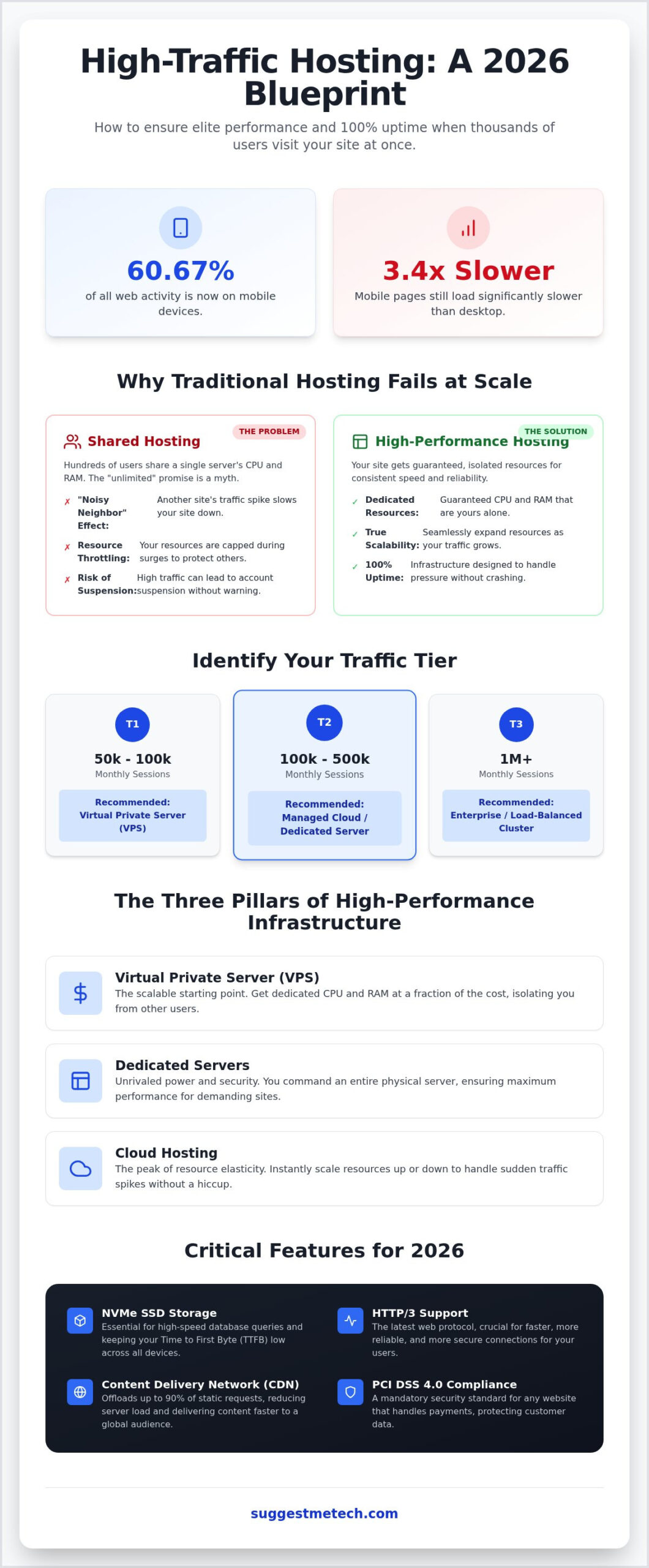
Mobile traffic now accounts for 60.67% of all web activity, yet mobile pages still load 3.4 times slower than desktop versions. For a growing brand, that lag is a silent killer for your conversion rates and search rankings. Finding the best web hosting for high traffic websites isn’t just about avoiding a total crash during a viral moment. It’s about maintaining elite performance and a fast Time to First Byte when thousands of users hit your server simultaneously. You need a setup that handles the pressure without breaking a sweat.
You’ve likely felt the sting of a resource limit warning or watched your site crawl to a halt during a major promotion. It’s frustrating to rely on vague unlimited claims only to face a suspension when you finally get the traffic you’ve worked so hard to attract. I’ll help you identify the infrastructure you need to ensure 100% uptime and seamless scalability. This guide evaluates current 2026 standards, from NVMe SSD storage to mandatory PCI DSS 4.0 compliance, so you can choose a host that grows with your business. We’ll look at how to move from basic plans to enterprise-level reliability without the technical headache.
Key Takeaways
- Identify the specific traffic thresholds that trigger site crashes and learn why “unlimited” shared hosting plans cannot support high-volume growth.
- Compare VPS, dedicated, and cloud environments to choose the best web hosting for high traffic websites that provides the elasticity your business requires.
- Understand why 2026 hardware standards like NVMe storage and HTTP/3 support are essential for keeping your Time to First Byte low across all devices.
- Discover how to use CDNs to handle up to 90% of static requests and optimize your database to survive sudden, massive traffic spikes.
- Access our curated recommendations for top-tier managed WordPress and enterprise hosting providers vetted for maximum reliability under pressure.
Defining “High Traffic” and Why Traditional Hosting Fails at Scale
Most entry-level providers lure you in with promises of “unlimited” bandwidth and storage. It’s a effective marketing tactic, but it’s fundamentally a myth. In a standard shared web hosting service, you’re splitting a single physical server’s CPU and RAM with hundreds of other users. When your site experiences a sudden surge in visitors, the host’s automated systems often throttle your resources or suspend your account to protect the other sites on that machine. This is the “noisy neighbor” effect; your performance is at the mercy of every other site sharing your space. If someone else’s site gets hit with a bot attack or a viral spike, your site pays the price in slow load times or total downtime.
Finding the best web hosting for high traffic websites requires moving beyond these restrictive environments. You need to identify your breaking point before a crash occurs. If your pages consistently take more than three seconds to load or if you’re seeing frequent 503 “Service Unavailable” errors during peak hours, your current infrastructure has already failed. Scaling successfully in 2026 means choosing a platform that offers dedicated resources and the ability to expand those resources on the fly.
The Tiers of Web Traffic Scale
Understanding where you sit on the traffic spectrum helps you avoid overpaying for power you don’t need or under-equipping for a surge. We categorize scale into three primary tiers:
- Tier 1: 50k to 100k monthly sessions. This is the sweet spot for a high-quality Virtual Private Server (VPS). You get isolated resources that aren’t affected by other users.
- Tier 2: 100k to 500k monthly sessions. You’ve moved into managed cloud or dedicated server territory. At this level, you need specialized caching and high-speed NVMe storage to keep up with database queries.
- Tier 3: 1M+ monthly sessions. This requires enterprise-grade infrastructure. You’ll likely need multiple servers working together through load balancing to distribute the weight of your traffic globally.
The Impact of Latency on High-Traffic Conversions
Speed isn’t just a vanity metric; it’s a financial one. Industry data consistently shows that even 100ms of delay can cost high-volume businesses thousands in lost revenue. This latency directly impacts your Google Core Web Vitals, which are the metrics Google uses to judge your site’s user experience. If your server takes too long to respond, your rankings will drop, making it even harder to sustain your traffic levels. Time to First Byte (TTFB) measures the duration from the user’s initial HTTP request to the moment the first byte of data reaches their browser, serving as a primary indicator of server responsiveness and a critical factor for high-traffic SEO. When you’re dealing with thousands of concurrent users, a low TTFB is the difference between a smooth sale and a bounced visitor.
The Three Pillars of High-Performance Infrastructure: VPS, Dedicated, and Cloud
High-performance infrastructure in 2026 has shifted from a focus on raw hardware to a focus on resource elasticity. The best web hosting for high traffic websites isn’t just the one with the most RAM; it’s the one that manages resource allocation efficiently. While shared hosting leaves you vulnerable to other users, private environments ensure your site has a guaranteed slice of the server’s power. Virtualization technology makes this possible by creating a digital wall between accounts, so a traffic surge on a neighbor’s site won’t slow yours down. This isolation is the baseline for any site handling the traffic tiers discussed earlier.
VPS Hosting: The Scalable Starting Point
Virtual Private Servers (VPS) offer a professional middle ground between shared and dedicated setups. You get dedicated CPU and RAM at a fraction of the cost of a full server. For example, managed VPS options can start around $36.00 for the first month, offering a high ROI for growing businesses. You’ll need to choose between managed and unmanaged plans based on your team’s technical expertise. If you’re still weighing your options, you can see how these stack up against entry-level choices in our guide on The Best Web Hosting Services of 2024: Tested and Reviewed.
Dedicated Servers: Unrivaled Power and Security
Dedicated hosting gives you the entire physical machine. This is bare metal power. It is the gold standard for high-security sites or complex databases that require custom configurations. Managed dedicated hosting plans often start around $77.50 per month for the initial term, providing an environment where you have total control over the hardware environment. The main drawback is scalability; you can’t instantly add physical RAM during a viral spike. It’s a powerhouse for steady, massive traffic, but less flexible than virtualized options. If you aren’t sure which hardware specs you need, compare tailored recommendations from our experts to find a perfect fit.
Cloud Hosting: The King of Elasticity
Cloud hosting is built for the unpredictable nature of the modern web. Instead of one server, your site lives on a network of interconnected machines. This enables auto-scaling. When traffic spikes, the system pulls resources from the cluster to keep your site fast. This is the foundation for architecting large-scale systems that require 100% uptime. Most cloud providers use a pay-as-you-go model. You only pay for the extra power you use during a surge. Redundant data centers ensure that if one server fails, another takes its place instantly.
Critical Features Your High-Traffic Host Must Support in 2026
Protocol support is equally critical for a modern audience. With mobile traffic now accounting for 60.67% of all web activity, you can’t afford outdated connection methods. Ensure your host supports HTTP/3 and the QUIC protocol. These technologies reduce latency by streamlining the handshake process between the server and the browser. This is especially beneficial for users on unstable mobile networks, ensuring your site remains snappy even when their connection isn’t.
Security in 2026 requires more than a simple SSL certificate. High-traffic sites are prime targets for DDoS attacks and brute force attempts. Your host must provide a robust Web Application Firewall (WAF) and real-time threat mitigation. Web maintainability involves proactive security layers that stop malicious traffic before it ever reaches your server’s resources. You also need 24/7 access to actual sysadmins. When a surge happens at 3 AM, you don’t want a tier-1 agent reading from a script; you need an expert who can adjust server configurations or mitigate an attack instantly.
Resource Management and Monitoring
High-volume sites often fail because of PHP worker limits. These are the processes that handle non-cached requests, such as checkout pages or user dashboards. If your host limits you to just a few workers, a small traffic spike will queue requests and lead to 504 Gateway Timeout errors. Look for hosts that provide real-time CPU and RAM monitoring alerts so you can react before a crash. Additionally, server-level caching tools like Redis or Memcached are essential. These store database queries in the RAM, which drastically reduces the load on your CPU and keeps the site stable under pressure.
Uptime Guarantees and SLAs
Uptime guarantees are often misunderstood by many business owners. A 99.9% uptime sounds impressive, but it actually allows for nearly 9 hours of downtime every year. In contrast, a 99.99% “four nines” guarantee reduces that window to about 52 minutes. For a business generating $1M in annual revenue, even 0.01% of additional downtime translates to hundreds of dollars in lost opportunities and advertising waste during peak hours. Always review the Service Level Agreement (SLA) to understand what happens when a host fails. Most enterprise-grade providers offer financial credits if they don’t meet their stated uptime marks.
Strategic Optimization: Handling Traffic Spikes Beyond the Server
High traffic isn’t just a server problem; it’s an architectural challenge. Even the best web hosting for high traffic websites reaches a limit if the server has to process every single request from scratch. To maintain 100% uptime during viral moments, you must offload the heavy lifting to external layers. This involves moving static assets away from your core infrastructure and optimizing how your database handles concurrent users. If you are just beginning your journey, our guide on How to Start a Blog in 2026: A Step-by-Step Guide for Beginners provides foundational scaling advice for new creators.
A common mistake is assuming a Content Delivery Network (CDN) is a silver bullet. While a CDN can handle up to 90% of static requests, it cannot fix a poorly optimized backend. When thousands of users attempt to log in or check out simultaneously, those requests bypass the CDN and hit your database directly. This is where the choice between SQL and NoSQL becomes vital. SQL databases are excellent for complex relationships, but NoSQL options often scale more easily for high-concurrency applications. Edge computing further reduces global latency by executing small bits of code at the network edge, closer to your users, which keeps the site responsive even under extreme pressure.
Implementing a Content Delivery Network (CDN)
CDNs use a global network of Points of Presence (PoPs) to store copies of your site’s images, CSS, and JavaScript. By serving these files from a location geographically close to the user, you drastically reduce load times. Some advanced configurations even allow for full-page caching, which stores the entire HTML output of your pages. To better understand how this works, you can read about how to clear cache on iPhone to see how stored data affects speed and performance on the user’s end.
Traffic Management and Load Balancing
Load balancing is the practice of distributing incoming traffic across a cluster of multiple servers. This prevents any single machine from becoming a bottleneck. If one server in the cluster fails, failover mechanisms automatically redirect traffic to the healthy ones, keeping your site live. This setup is essential for surviving massive social media surges or sudden news spikes where traffic can jump from 100 to 10,000 concurrent users in seconds. If you need help determining if your current setup can handle a massive spike, contact our team for a custom infrastructure review.
The Best Web Hosting Providers for High-Traffic Websites in 2026
Best for Managed Scale: Kinsta and WP Engine
For WordPress users, Kinsta and WP Engine remain the gold standard. They utilize the Google Cloud Platform premium tier network, which provides the global reach and low latency required for modern enterprise sites. These providers offer proprietary caching layers that specifically address the PHP worker limits we discussed in previous sections. By offloading much of the processing to their server-level cache, they allow your site to handle significantly more traffic than a standard configuration. Their 2026 enterprise tiers are built for 1M+ sessions, ensuring your infrastructure stays ahead of your growth.
Best for Dedicated Power: Liquid Web
If your site relies on complex databases or high-security requirements, a dedicated environment is often the safest bet. Liquid Web offers some of the most reliable bare metal configurations in the industry. Their managed dedicated hosting starts at $77.50 for the first month, renewing at $155.00. This price point includes white-glove migration services, which is essential for moving complex infrastructures without losing data. They excel at custom server builds, allowing you to specify the exact hardware components your software requires for peak efficiency.
Best for Elastic Cloud: Cloudways and DigitalOcean
Developers and tech startups often need the flexibility of the cloud without the technical overhead of managing raw infrastructure. Cloudways provides a managed interface for providers like DigitalOcean, making it easy to scale resources. Plans for DigitalOcean on Cloudways start as low as $11 per month, offering an incredible cost-to-performance ratio. During a viral peak, you can scale your server’s RAM or CPU with a single click. This pay-as-you-go model ensures you aren’t overpaying for resources during quiet periods while remaining ready for sudden surges.
Finding the right balance between value and performance depends on your specific traffic patterns. If you’re currently facing a bottleneck or aren’t sure which plan fits your 2026 growth goals, let us know. SuggestMeTech is here to help you navigate these complex choices. We invite you to share your specific hosting challenges or troubleshooting questions with our community below so we can find a solution together.
Ready to Scale Your High-Traffic Infrastructure?
Scaling a website to millions of sessions requires a shift from simple hosting to strategic architecture. You’ve seen how “unlimited” shared plans fail under pressure and why isolated resources in VPS or Cloud environments are the only way forward. By prioritizing NVMe storage and modern protocols like HTTP/3, you ensure your site remains fast for the high percentage of users browsing on mobile devices. Remember that the best web hosting for high traffic websites is only half the battle; implementing load balancing and robust CDNs ensures your backend stays stable when a viral surge hits.
Our team has conducted an expert analysis of server architecture and compiled real-world testing data to simplify your search. We focus on user-centric recommendations that match your specific professional requirements. If you’re ready to make a move, find your perfect high-traffic host in our vetted 2026 rankings. You’ve done the hard work of building an audience; now it’s time to give them the reliable experience they deserve. We’re excited to see your site reach new heights without the fear of a crash.
Frequently Asked Questions
How much traffic can shared hosting actually handle before it crashes?
Shared hosting typically struggles once you exceed 10,000 to 15,000 monthly visitors or experience more than 20 concurrent users. While marketing for “unlimited” plans suggests otherwise, CPU throttling will crash your site during even small surges. If you’re consistently hitting these numbers, it’s time to research the best web hosting for high traffic websites to avoid account suspension or lost revenue from downtime.
What is the difference between VPS and Dedicated hosting for high-traffic sites?
A VPS uses virtualization to give you a dedicated slice of a server’s resources, while Dedicated hosting gives you the entire physical machine. VPS is more cost-effective and easier to scale vertically as your traffic grows. Dedicated hosting offers the highest level of security and raw power for massive, complex databases. Choose VPS for flexibility and Dedicated for maximum, unshared performance and total hardware control.
Does a CDN replace the need for a high-performance web host?
No, a CDN does not replace a high-performance host because it only caches static content like images and CSS. Your web host still handles the dynamic “brain” of your site, including database queries and user logins. Even with a premium CDN, a weak backend server will cause your site to fail during checkout or whenever users interact with personalized, non-cached elements of your pages.
How do I know if my website needs a load balancer?
You need a load balancer when your traffic exceeds the capacity of a single high-end server or when you require 100% redundancy. If your server CPU usage consistently peaks above 80% during sales or viral events, a load balancer distributes that weight across multiple server clusters. This prevents a single point of failure and ensures your site remains online even if one server in your network crashes.
Will my SEO suffer if I migrate to a new high-traffic hosting provider?
Your SEO won’t suffer if you migrate correctly; in fact, it usually improves due to faster load times and better Core Web Vitals. Google prioritizes user experience, so moving to the best web hosting for high traffic websites often leads to higher search rankings. Just ensure your new host provides a professional migration service to avoid any temporary downtime or broken links during the transition process.
What are PHP workers and why do they matter for high-traffic WordPress sites?
PHP workers are the background processes that execute the code for every non-cached request on your WordPress site. For example, every time a user adds an item to a cart, a PHP worker is occupied. If you have 50 users doing this simultaneously but only 10 workers available, 40 users will face long delays or timeout errors. High-traffic sites must choose hosts that offer high PHP worker limits.
Can I scale my hosting resources down after a traffic spike ends?
Yes, scaling down is a primary benefit of modern cloud hosting environments. Providers like DigitalOcean or AWS allow you to spin up additional resources during a peak event and then spin them back down once the traffic subsides. This pay-as-you-go approach ensures you aren’t paying for enterprise-level power during your site’s quietest hours, making high-performance infrastructure much more affordable for most growing businesses.
How much should I expect to pay for high-traffic hosting in 2026?
In 2026, expect to pay between $35 and $150 per month for reliable high-traffic infrastructure. Managed VPS plans often start around $36, while enterprise-grade dedicated servers can exceed $140 depending on your RAM and storage needs. Cloud-based solutions offer more entry-level pricing around $11 but can scale quickly based on your bandwidth usage. Always factor in the cost of managed support if you lack an in-house IT team.

