

In 2026, the best WordPress hosting is defined by how much it automates, not just how much it stores. You likely already feel the pressure of site speed killing your SEO rankings or the constant fear of a security vulnerability. Choosing managed wordpress hosting should solve these problems, but hidden renewal costs and technical complexity often get in the way. We believe your hosting should be a silent partner that keeps your site fast and secure while you focus on your business.
This guide promises to help you master the hosting market with our expert evaluation framework and top provider recommendations for 2026. With WordPress now powering 41.2% of the web, standing out requires more than just basic service. We’ll preview the latest benchmarks for PHP 8.5 and show you how to achieve a fast, secure website on autopilot. You’ll learn how to identify true value for your money and lower your maintenance time through modern automation. Let’s find the right setup that puts your technical worries to rest.
Key Takeaways
- Identify why NVMe storage and server-side caching have replaced traditional SSDs as the performance baseline for WordPress sites in 2026.
- Learn how AI-driven security protocols can automate malware removal and shield your site from modern vulnerabilities without manual intervention.
- Determine if your business requires the hands-off convenience of managed wordpress hosting or if a budget-friendly shared plan fits your current growth.
- Apply our 5-step evaluation framework to audit your traffic projections and uncover the true cost of hosting by comparing renewal rates against introductory offers.
- Explore our 2026 provider recommendations to see which hosts offer the best AI management tools and support for your specific team size.
What is WordPress Hosting and Why it Matters in 2026?
To understand the foundation of your digital presence, you should first know what is a web hosting service; however, for WordPress users, a generic server isn’t enough anymore. In 2026, true WordPress hosting refers to a server environment specifically tuned for the unique architecture of the WordPress CMS. Unlike standard storage that simply holds files, these environments prioritize server-side caching. This distinction is vital because generic hosts often struggle with the database-heavy nature of modern sites, leading to sluggish load times that directly damage your SEO rankings.
Google’s Core Web Vitals remain the gold standard for search visibility. A high-quality host ensures your Largest Contentful Paint stays well under the 2.5-second threshold. In 2026, meeting minimum requirements like PHP 8.5 is just the entry fee. Real performance comes from how the server handles requests before they ever reach the user’s browser. If your host isn’t optimized for the latest WordPress 7.1 protocols, you are essentially leaving traffic and revenue on the table.
WordPress Optimized vs. Generic Web Hosting
Generic hosting provides space, but managed wordpress hosting provides a comprehensive service. You get essential tools like one-click staging environments, which allow you to test plugin updates or design changes without any risk to your live site. Performance is significantly boosted through integrated caching layers such as Redis and Object Cache Pro. These tools store frequently accessed database queries in the server’s memory, removing the need for bulky third-party caching plugins that often cause software conflicts.
The Evolution of Hosting: AI and Automation
The most significant shift this year is the standardization of AI agents within top-tier hosting plans. These agents act as proactive site monitors that identify performance bottlenecks and security threats before they impact your users. Manual maintenance is becoming obsolete for modern business owners. Most premium hosts now include these automated features as standard:
- AI-Driven Troubleshooting: Automated scripts that fix common database errors or plugin conflicts.
- Image Optimization: Real-time conversion of images to next-gen formats like AVIF upon upload.
- Code Minification: On-the-fly reduction of CSS and JavaScript bloat to speed up browser rendering.
Essential Features of a Top-Tier WordPress Host
Selecting a host involves more than just checking uptime percentages. In 2026, the gap between a standard server and managed wordpress hosting is defined by specialized infrastructure. While a general overview from a tech leader like IBM explains web hosting as a fundamental cloud resource, your WordPress site needs a stack built for its specific database structure. You need hardware that handles high-concurrency and software that automates your safety.
Speed and Infrastructure in 2026
Performance in 2026 relies on the latest protocols. Your host must support HTTP/3 to ensure faster multiplexing and the latest PHP versions, such as PHP 8.5, for better execution speeds. Edge caching is another non-negotiable feature; it delivers your site content from the node closest to your visitor, slashing latency. NVMe storage in 2026 is no longer a luxury but a baseline for SEO. These drives read and write data significantly faster than traditional SSDs, ensuring your dashboard and front-end remain snappy even under heavy loads.
Security and Peace of Mind
Security shouldn’t be your daily concern. A top-tier host provides a Web Application Firewall (WAF) and robust DDoS protection to filter out malicious traffic before it hits your server. AI-driven threat detection is now standard, blocking brute force attacks by identifying patterns in real-time. You also need the safety net of automatic daily backups with one-click restore functionality. If a plugin update breaks your site, you should be able to revert it in seconds. Free SSL certificates are mandatory for both user trust and search engine rankings.
Beyond the tech, you need access to actual WordPress experts who understand core-specific issues. Generalist support often wastes time on basic troubleshooting that doesn’t solve the root cause. Finally, scalability is crucial for any growing business. Your host should handle sudden traffic spikes through elastic resources that scale up automatically. This prevents downtime during a viral moment or a big sale without requiring you to make manual server adjustments. If you’re unsure which provider hits all these marks for your specific team size, you can evaluate our latest performance reviews to find a match for your current traffic levels.
Shared vs. Managed WordPress Hosting: Which is Best for You?
Choosing between hosting types isn’t just about price; it’s about how much of your own time you’re willing to trade for savings. While shared hosting remains the entry point for many, managed wordpress hosting has become the standard for anyone running a revenue-generating site. The decision usually comes down to your technical comfort level and the value you place on your site’s uptime and security.
When to Choose Shared Hosting
Shared hosting is ideal for personal portfolios, low-traffic hobby blogs, or testing a new idea. You might ask: Shared Hosting: Is It Right for Your First Website? For many beginners, the answer is yes because of the low barrier to entry. Promotional pricing often starts around $2 to $3 per month, making it very accessible. However, you must account for the “noisy neighbor” effect. Since you share server resources with hundreds of other sites, a sudden traffic spike on a neighboring site can throttle your performance. If your site’s availability is critical, this unpredictability is a significant risk.
The Case for Managed WordPress Hosting
Businesses should avoid shared plans for commercial sites. The return on investment for managed wordpress hosting comes from time recovery and risk mitigation. By automating core updates, plugin patches, and daily backups, you can save over 5 hours of manual maintenance every month. More importantly, these providers offer specialized protection against critical security risks that often plague unmanaged environments. When a WordPress expert handles your server configuration, you gain a partner in your site’s growth rather than just a place to store files.
For developers who need granular control over the server OS or specific environment variables, VPS or Cloud hosting remains a viable path. These options offer dedicated resources but require significant technical expertise to manage. In 2026, the real value of managed services is the “autopilot” factor. If your business generates $100 an hour, spending five hours a month on server troubleshooting costs you $500 in lost productivity. A managed plan that starts between $15 and $35 per month suddenly looks like a bargain compared to the alternative. You should consider upgrading if your traffic consistently exceeds 10,000 monthly visitors or if your site generates direct revenue.
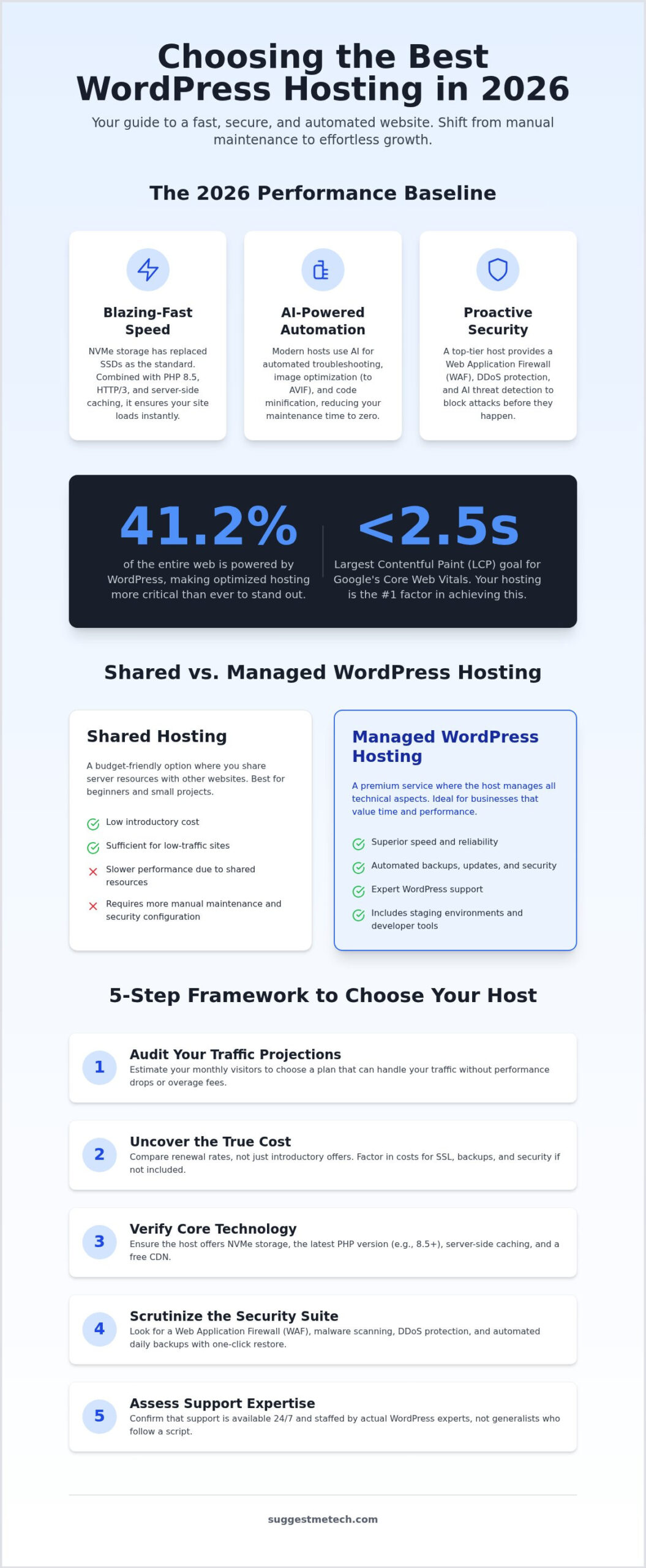
Evaluation Framework: 5 Steps to Choose Your Host
Choosing a provider shouldn’t feel like a guessing game. While previous sections highlighted the technical advantages of managed wordpress hosting, you still need a structured way to compare specific plans. Most users get distracted by flashy marketing and miss the fine print that impacts long-term costs. Follow this five-step framework to ensure your chosen host supports your business goals without surprise fees.
- Step 1: Audit Traffic Projections. Review your analytics and project your growth for the next 12 months. Don’t buy a plan for today’s 1,000 visitors if you expect 50,000 by year-end.
- Step 2: Compare Renewal Rates. Introductory offers are temporary. Always check the price you’ll pay after the first term ends to avoid budget shocks.
- Step 3: Test Support Expertise. Open a support ticket or chat before you sign up. Ask a technical question about PHP 8.5 or object caching to see if you’re talking to an expert or a script-reader.
- Step 4: Verify Migration Costs. Moving an existing site is complex. Look for providers that offer free professional migrations to avoid downtime or data loss.
- Step 5: Check Visitor and Bandwidth Limits. Many hosts cap monthly visitors or disk usage. If you go over these limits, you might face overage fees or site throttling.
Budgeting for the Long Term
The introductory price trap is the most common pitfall in the hosting industry. Many shared hosts offer rates as low as $2 per month, only to hit you with a 300% renewal hike once the first year is up. You should calculate your three-year total cost of ownership rather than just the first month. Look for bundled value that offsets these costs. Many plans include free SSL certificates, business email accounts, and even your first year of registration for your web address. If you’re new to this, learning what is a domain name will help you understand how these bundled services work together.
Migration and Setup Ease
Setting up your environment correctly from day one saves hours of future headaches. If you’re just starting, our guide on how to start a blog in 2026 covers the initial configuration. For established sites, the migration process is the biggest hurdle. Professional migration services ensure your database and files move without corruption. You should also prioritize hosts that offer one-click staging environments. These allow you to redesign your site or test new features in a private area before pushing them live to your visitors. To see how top providers stack up against this framework, read our deep-dive hosting reviews today.
Top WordPress Hosting Recommendations for 2026
Selecting a provider is the final step in securing your digital future. At SuggestMeTech, we’ve assessed several brands using our five-step evaluation framework to ensure they meet the 2026 standards for performance and automation. These recommendations match specific user personas to help you find your ideal hosting partner without the guesswork. Whether you’re launching a new professional blog or migrating a high-traffic store, these picks offer the best balance of technical capability and long-term value.
WP Engine remains the premium choice for anyone seeking managed wordpress hosting at an enterprise level. Their platform is built for high-concurrency and includes advanced developer tools like automated testing environments. For those focused on cloud infrastructure, Kinsta provides a robust alternative powered by the Google Cloud Platform. They prioritize isolated resources, ensuring that your site’s speed never fluctuates due to other users on the network. This isolation is critical for maintaining the Core Web Vitals benchmarks we discussed earlier.
Flywheel stands out as an excellent option for agencies and creative teams. Their collaborative dashboard allows you to manage multiple client sites under one roof with ease. If you’re looking for a provider that balances high-end features with a more accessible interface, DreamHost offers a solid entry point. They provide a stable environment with the essential AI tools required in 2026, making them a reliable choice for those transitioning from basic shared setups to a more professional environment.
Best Value for Beginners
DreamHost is a top pick for budget-conscious users who still want a professional edge. You get a streamlined setup process and a pricing structure that is easier to manage over several years. Their custom dashboard removes the technical friction often found in more complex server environments, allowing you to focus on content creation.
- Pros: AI-driven troubleshooting for instant configuration fixes, intuitive user interface, and solid integration with the latest WordPress 7.1 core updates.
- Cons: You should prepare for renewal rate increases after your initial term ends; however, the baseline performance justifies the investment.
Best for Performance and Support
WP Engine offers a specialized speed-stack that fully utilizes the PHP 8.5 optimizations we’ve highlighted. Their security protocols block threats at the edge, providing peace of mind for business owners who cannot afford downtime. They are a primary partner for those who need managed wordpress hosting with a focus on maximum uptime and expert guidance.
- Pros: Industry-leading support from actual WordPress engineers, advanced security monitoring, and global CDN integration as a standard feature.
- Cons: They have specific storage limits on their mid-tier plans, so you must monitor your media library as your site grows.
Secure Your Site’s Future with the Right Hosting
Choosing a host in 2026 is no longer just about finding a place to store files. It’s about selecting a partner that automates your security and performance. The shift toward NVMe storage and AI-driven troubleshooting has made manual maintenance a thing of the past. By following our five-step evaluation framework, you can avoid hidden renewal costs and ensure your site stays fast as it grows. Investing in managed wordpress hosting is ultimately about buying back your time so you can focus on building your brand. To ensure your digital presence is professionally crafted from the start, experts like עמנואל מליחוב provide custom website building services that help you maximize the potential of your chosen hosting platform while you avoid technical headaches.
Our in-house experts have tested these providers against the latest 2026 technology standards to give you a user-first, practical evaluation framework. We prioritize real-world application to help you make a choice that fits your specific needs. If you’re ready to make a decision, you can view our full list of the Best Web Hosting Services for 2026. We are here to help you navigate these choices with confidence. Your website deserves a foundation that is as ambitious as your goals. Good luck with your launch or migration.
Frequently Asked Questions
Is managed WordPress hosting worth the extra cost in 2026?
Most top-tier providers offer at least one free professional migration for new customers. They use specialized tools or dedicated support teams to move your database and files without causing downtime. If a host doesn’t offer free migration, you can use plugins like All-in-One WP Migration; however, professional help is safer for large sites. Always verify if the migration service includes a post-move audit to check for broken links or configuration errors.
What is the difference between WordPress.com and WordPress.org hosting?
WordPress.com is a service provider that handles hosting and software together, often with restricted plugin access on lower tiers. WordPress.org is the open-source software you install on your own server. When people discuss managed wordpress hosting, they usually refer to specialized services for the self-hosted version. This setup gives you total control over your site’s functionality while the host manages the underlying server performance and security infrastructure.
Does WordPress hosting include a free domain name?
Many entry-level and mid-tier hosting plans include a free domain registration for the first year. This bundle simplifies the setup process for beginners. You should check if the renewal rate for the domain is competitive after the first 12 months. Some premium managed providers don’t include domains because they expect users to have existing registrations. Always confirm if the host provides free WHOIS privacy to keep your personal contact information hidden.
How much traffic can a shared WordPress hosting plan handle?
Shared plans typically handle between 10,000 and 25,000 monthly visitors depending on your site’s complexity. If your pages use many heavy plugins or high-resolution images, this limit might be lower. Performance often drops during peak hours because you share resources with other users. If you expect sudden traffic spikes from social media or advertising, upgrading to a managed environment ensures your site stays online when your audience grows rapidly.
Do I need a special host if I want to run an online store with WooCommerce?
You don’t strictly need a specialized host, but you do need a plan with high memory limits and server-side caching. E-commerce sites are database-intensive because they process real-time transactions and inventory checks. managed wordpress hosting plans often include server-level optimizations specifically for the WooCommerce checkout process. This prevents slow load times that lead to abandoned carts. Look for hosts that offer dedicated resources for your store’s dynamic content.
What happens if my site outgrows my current hosting plan?
Most modern hosts will notify you when you approach your resource limits. They typically offer a seamless upgrade path to a higher tier with more bandwidth or disk space. In some cases, your site might experience temporary slow-downs or overage fees if you exceed your visitor cap. High-quality providers use elastic scaling to handle temporary spikes without crashing your site, giving you time to transition to a more robust plan permanently.
Is security included in WordPress hosting, or do I need extra plugins?
Managed hosts include robust security layers like firewalls and malware scanning, which reduces the need for heavy security plugins. They handle core software updates and patch vulnerabilities at the server level. While these features provide a strong baseline, you should still practice good security hygiene by using strong passwords and two-factor authentication. Most top-tier plans also provide automatic daily backups, allowing you to restore your site quickly if a breach ever occurs.

