

Your WordPress site doesn’t need fifty tools to succeed; it actually needs fewer than ten. Many creators fall into the trap of installing every “must-have” extension they find, only to watch their page speed plummet and their security dashboard light up with warnings. Finding the best wordpress plugins shouldn’t feel like a constant battle against compatibility conflicts or high costs for premium versions. You want a site that just works, stays safe, and ranks well on Google without constant manual tinkering.
At SuggestMeTech, we believe strategy beats quantity every time. This guide reveals a curated list of essential tools to optimize your site for speed, security, and growth in 2026. We’ve hand-picked a lean, high-performance stack that handles everything from automated backups to easy-to-use design tools. You’re about to discover a practical toolkit that slashes your load times and secures your data, giving you more time to focus on your content. Let’s build a faster, more reliable website together.
Key Takeaways
- Learn why a “less is more” strategy is vital for maintaining high speeds and avoiding compatibility conflicts.
- Discover the best wordpress plugins for AI-driven SEO and proactive security to keep your site ranking high and safe from threats.
- Master the “One-In, One-Out” rule to prevent plugin bloat and ensure your website stays lean and efficient.
- Evaluate the trade-offs between heavy page builders and the native block editor to optimize your design workflow.
- Understand how to build a scalable “Golden Stack” that automates backups and growth while minimizing premium costs.
The Role of WordPress Plugins in 2026: Why Strategy Matters
The WordPress directory now hosts more than 60,000 plugins. This massive ecosystem allows you to build almost anything, but it also creates a significant challenge for site owners. You aren’t just looking for features; you’re looking for stability. Selecting the best wordpress plugins for your specific goals requires a strategic mindset rather than a “more is better” attitude.
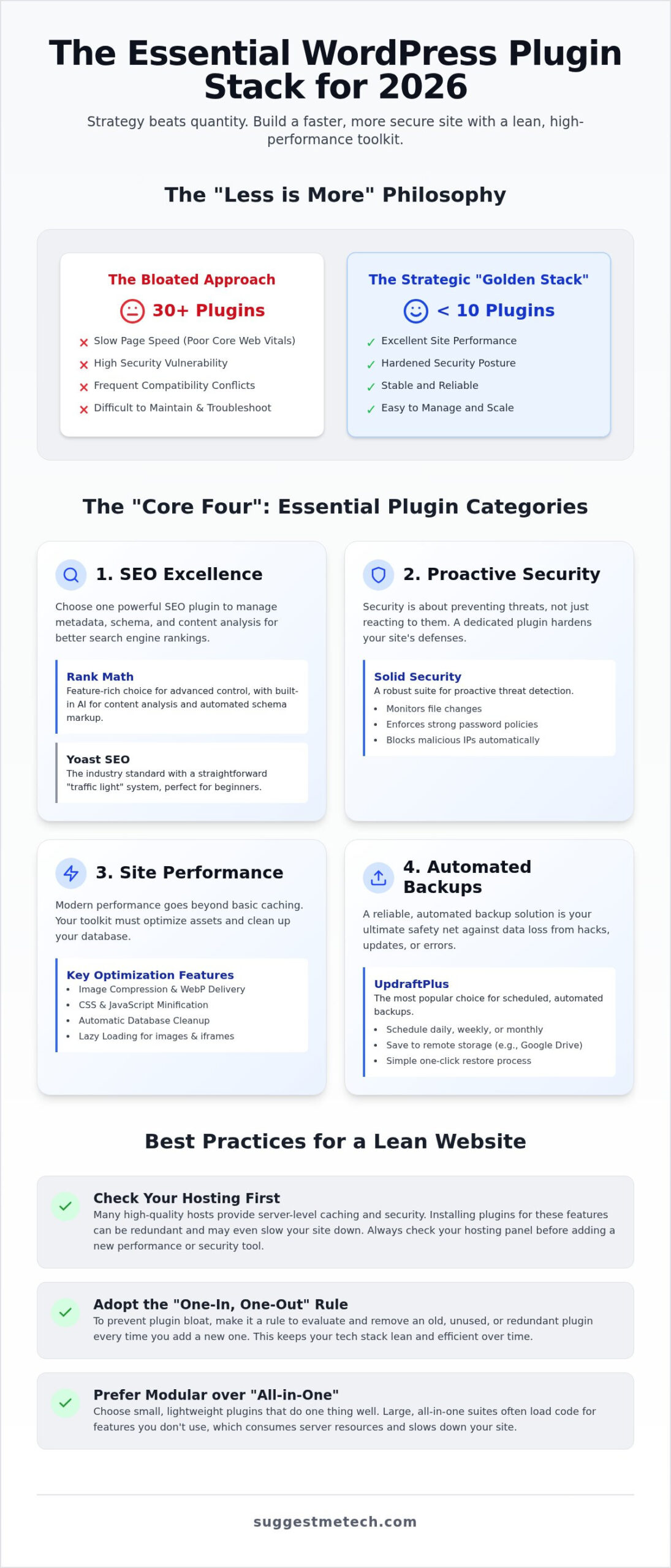
In 2026, the debate between “Modular” and “All-in-One” plugins has reached a tipping point. While all-in-one suites promise convenience, a modular approach often wins for performance. Consider these factors when choosing your strategy:
- Code Efficiency: Modular plugins only load what you need for a specific task.
- Conflict Resolution: It’s easier to troubleshoot one small, focused plugin than a massive suite.
- Resource Management: All-in-one tools often run background processes for features you don’t even use.
By choosing specific, lightweight tools for individual tasks, you avoid the “code bloat” that happens when a single plugin tries to do too much. The golden rule for 2026 is simple: if a plugin doesn’t solve a critical problem or generate revenue, it doesn’t belong on your site.
Understanding Plugin Bloat and Site Performance
Plugin bloat is a silent killer for your search engine rankings. Every time you activate a new tool, you potentially add extra CSS, JavaScript, and database queries. This directly impacts your Core Web Vitals, which Google uses to determine how fast and stable your site feels to users. Finding the best wordpress plugins isn’t about collecting features; it’s about selecting tools that respect your server resources. A lean stack of 10 high-quality, well-coded plugins will almost always outperform a messy collection of 30 mediocre ones. Remember, “free” plugins often come with the hidden cost of unoptimized code or security vulnerabilities that require constant monitoring.
The Relationship Between Hosting and Plugins
Your hosting provider determines how many plugins you actually need. Many site owners make the mistake of installing heavy caching or security plugins when their host already handles those tasks at the server level. Server-side features are faster and more efficient because they run before WordPress even loads. If you’re using high-end infrastructure, you can often skip several categories of plugins entirely. We’ve analyzed how different providers handle these features in our guide on The Best Web Hosting Services of 2024: Tested and Reviewed. Before adding a new tool to your dashboard, check your hosting panel. You might find that the solution is already built-in, saving you from adding another layer of complexity to your site.
The “Core Four”: Essential Plugins Every Site Needs
You don’t need a bloated dashboard to run a professional site. Most high-traffic websites rely on a small, powerful group of tools that handle the heavy lifting without slowing down the user experience. We’ve narrowed the field down to the four essential pillars: SEO, Security, Performance, and Backups. By focusing on these categories, you avoid the analysis paralysis that comes from browsing the thousands of options in the official directory. Choosing from the best wordpress plugins in these core areas creates a stable foundation that scales as your traffic grows.
Performance in 2026 has moved beyond simple file caching. With the widespread adoption of HTTP/3, your site needs to optimize how assets are delivered and prioritized in the browser. Static caching is no longer enough; you need tools that handle image compression, script minification, and database cleanup automatically. If you’re still building your foundation, check out our latest reviews to find the best wordpress plugins for your specific goals.
SEO Excellence: Yoast vs. Rank Math
Search engines have evolved to prioritize structured data and AI-ready content. Yoast SEO remains the industry standard for those who want a straightforward approach. It uses a simple “traffic light” system to guide your optimization, making it perfect for beginners who want to ensure their metadata is correct. Rank Math is the feature-rich alternative for users who want more control. It includes built-in AI tools for schema markup and content analysis that used to require separate, expensive subscriptions. Whether you prefer the simplicity of Yoast or the data depth of Rank Math, having one of these is non-negotiable for ranking in 2026.
Security and Backups: Solid Security and UpdraftPlus
Security is now about proactive threat detection rather than just reacting to attacks. Solid Security provides a robust defense by monitoring file changes, enforcing strong password policies, and blocking brute force attempts before they reach your login page. It’s a comprehensive shield that keeps your data safe from increasingly sophisticated malware. However, even the best security can’t account for every scenario.
Backups are your ultimate insurance policy. UpdraftPlus is the most reliable way to ensure your site can be recovered in minutes. It’s vital to store these backups off-site using services like Google Drive or Dropbox. Storing backups on your own server is a major risk; if the server fails, you lose your site and your backup at the same time. UpdraftPlus makes this process “set it and forget it,” allowing you to restore your entire site with a single click if an update goes wrong or a security breach occurs.
Specialized Plugins: Choosing Tools Based on Your Goals
Once your core foundation is secure, your next steps depend entirely on your site’s purpose. A high-traffic blog has different requirements than a boutique online store. In 2026, the best wordpress plugins for specialized tasks are those that offer deep functionality without sacrificing the performance gains you’ve already made. You don’t need a plugin for every single idea; you need a few that solve your biggest problems. Focus on tools that integrate well with your existing stack rather than adding independent layers of code that might conflict later.
For those selling products, WooCommerce remains the undisputed king. It provides a robust framework for everything from digital downloads to physical inventory management. However, it’s a heavy tool. To keep your site fast, you must pair it with a performance-focused theme and only add extensions that are absolutely necessary for your checkout flow. Similarly, managing community engagement through social sharing and comment moderation requires lightweight tools that encourage participation without adding unnecessary scripts to every page load. The goal is to build a community, not a slow-loading barrier to entry.
Design and Layout: Elementor vs. Spectra
Choosing a design tool is often a choice between total creative freedom and maximum site speed. Elementor is the ultimate visual builder if you need complex, custom designs with pixel-perfect control. It’s ideal for landing pages and sites where the visual impact is the top priority. On the other hand, Spectra is a lightweight alternative built specifically for the native block editor. If you are still learning What is WordPress? and how it functions, sticking to native tools like Spectra ensures your site remains fast and easy to maintain. Use builders like Elementor only when the native tools can’t achieve your vision.
Forms and Conversions: WPForms vs. Fluent Forms
Lead generation is the lifeblood of most websites. You need a way to capture visitor information without creating a bottleneck in your loading speed. WPForms is the best drag-and-drop builder for simple contact pages and basic surveys. It’s incredibly user-friendly and gets the job done quickly. If your business requires advanced logic, multi-step forms, or deep integrations with your email marketing service, Fluent Forms is the better choice. It offers more power for data-hungry users while maintaining a focus on clean code. Both options represent the best wordpress plugins in the conversion category because they prioritize a smooth user experience from the first click to the final submission.
Avoiding Plugin Bloat: Best Practices for Site Maintenance
Installing the best wordpress plugins is only half the battle. Maintaining them is what keeps your site from becoming a slow, buggy mess. A common mistake is treating your plugin list as a permanent collection. Instead, adopt the “One-In, One-Out” rule. If you want to add a new feature, look for an existing plugin you can remove or replace. This keeps your database lean and reduces the surface area for potential security vulnerabilities. At SuggestMeTech, our review process ensures every recommendation meets strict performance standards before making it into our curated toolkit.
Always test new tools on a staging site before letting them touch your live environment. Most quality hosts provide a staging area where you can break things without your visitors ever knowing. After you delete a plugin, your work isn’t done. Many tools leave behind “orphan” data in your database. Use a database optimization tool to scrub these leftovers; this ensures your site remains as fast as the day you launched it.
The 2026 Plugin Maintenance Checklist
Consistency is the secret to a high-performing site. Follow these steps to keep your dashboard under control:
- Audit your active list: Schedule a review once every quarter. If you haven’t used a feature in three months, deactivate and delete the plugin.
- Check for abandoned plugins: If a tool hasn’t been updated in over six months, it’s a security risk. Look for a modern alternative that supports the latest version of WordPress.
- Test performance: Run a speed test before and after every new installation. If your load time drops significantly, the feature might not be worth the performance cost.
Troubleshooting Plugin Conflicts
Even the best wordpress plugins can occasionally clash. When your site breaks, don’t panic. The “Health Check & Troubleshooting” plugin is a lifesaver. It allows you to deactivate all plugins for your user session only, while your visitors still see the live site normally. You can then reactivate them one by one to find the culprit. If a conflict persists between two essential tools, it’s time to check the developer forums or explore our latest tech reviews for a more compatible alternative. DIY fixes work for simple conflicts, but if your database appears corrupted, seek professional help immediately.
Building Your 2026 Tech Stack with SuggestMeTech
Creating a high-performance website isn’t about collecting every feature available; it’s about building a “Golden Stack” where every tool works in harmony. For bloggers and small business owners in 2026, this means prioritizing a lean selection of the best wordpress plugins that focus on core stability. A typical successful stack includes a modern SEO suite, a proactive security shield, automated off-site backups, and a performance optimizer that handles the complexities of HTTP/3. By keeping your active list under ten high-quality tools, you ensure that your site remains fast, secure, and easy to maintain over the long term.
Your software choices should always reflect your foundational setup. Before you start adding specialized tools, it’s vital to have a clear understanding of your site’s architecture. If you’re still in the planning stages, our guide on How to Start a Blog in 2026 offers a step-by-step roadmap for a professional launch. Remember that your plugin needs will also be influenced by your choice of Domain Name and brand goals. A local service business might prioritize lead generation forms, while a global media site will focus more heavily on content delivery networks and advanced caching. Matching your toolkit to your specific professional requirements prevents you from paying for “pro” features you’ll never actually use.
At SuggestMeTech, we believe the best advice comes from real-world application. We’ve shared our top recommendations, but the WordPress ecosystem is constantly evolving based on user needs. We want to hear about your experience. What is the one plugin you can’t live without? Whether it’s a hidden gem for accessibility or a specialized tool for data visualization, your insights help the entire community make better decisions. Join the conversation in the comments and share your “must-have” list with us.
Next Steps for Your WordPress Journey
Optimizing your site is an ongoing process rather than a one-time task. To stay ahead of the curve, sign up for our newsletter to receive monthly plugin audits and exclusive tech deals that help you keep your costs down. You can also download our “Essential Plugin Checklist” PDF, which provides a scannable guide for your quarterly site maintenance. If you’re facing a specific technical hurdle or need a tailored recommendation, join the SuggestMeTech community. It’s a collaborative space where you can ask specific setup questions and get reliable advice from a tech-savvy peer. Building a great website is easier when you have a knowledgeable guide and a supportive community by your side.
Take Control of Your Website Strategy Today
Building a successful site in 2026 requires a shift from collecting features to curating performance. By focusing on the “Core Four” pillars and strictly following the “One-In, One-Out” rule, you protect your site from bloat and security risks. Our expert-tested stacks prioritize site speed and Core Web Vitals, ensuring your visitors enjoy a seamless experience. Choosing the best wordpress plugins is no longer about finding the most popular tool; it’s about finding the specific synergy between your hosting and your software.
We’ve demystified the complex ecosystem to help you make confident decisions. Whether you’re a seasoned developer or a first-time creator, our community-driven recommendations provide a reliable roadmap for growth. Don’t let technical debt slow you down. Start your blog the right way with our 2026 guide and build a foundation that lasts. You’ve got the tools and the strategy; now it’s time to launch with confidence.
Frequently Asked Questions
How many plugins are too many for a WordPress site in 2026?
There is no magic number, but most experts recommend keeping your active list under 20. The performance impact depends on how the code is written rather than the total count. A single poorly coded plugin can cause more damage than ten well-optimized ones. Monitor your site speed and database size regularly to ensure your stack remains efficient and your server can handle the load.
Are free WordPress plugins safe to use?
Free plugins from the official WordPress directory are generally safe because they undergo a basic review process. You should still verify that a plugin has been updated within the last six months and has positive user feedback. Never download “nulled” premium plugins from unofficial sources; these are frequently injected with malicious code that can compromise your entire server and steal sensitive user data.
What is the best SEO plugin for WordPress in 2026?
Rank Math and Yoast SEO remain the top choices for the best wordpress plugins in the SEO category. Rank Math is ideal for users who want built-in AI tools and advanced schema support without extra costs. Yoast is better for beginners who prefer a simple, guided optimization process. Both tools are excellent; your decision should be based on your technical comfort level and specific data needs.
Do plugins slow down my website?
Plugins can definitely slow down your website if they are bulky or poorly optimized. Each tool adds extra CSS, JavaScript, and database queries that the visitor’s browser must load. To maintain high speeds, choose lightweight plugins and avoid those that run heavy background processes. Use a performance tool like GTmetrix to check the impact of every new activation before committing to it long-term.
Can I use two SEO plugins at the same time?
You should never use two SEO plugins at once. Running multiple tools for the same purpose leads to technical conflicts and duplicate meta tags, which can actually hurt your rankings. Choose one comprehensive solution that fits your needs. Ensure all other SEO-related features in your theme or other plugins are disabled to prevent overlap and keep your site’s source code clean for search engine crawlers.
How do I update my WordPress plugins safely?
Safe updates start with a complete site backup using a reliable tool. It’s best to run updates on a staging site first to catch any compatibility issues before they affect your visitors. If you update on a live site, do it during low-traffic hours and check your site’s core functionality immediately after the process finishes. This methodical approach prevents unexpected downtime and keeps your site secure.
What should I do if a plugin breaks my website?
If a plugin breaks your site, you can manually disable it by renaming its folder in the directory via FTP. This forces WordPress to deactivate the tool, allowing you to regain access to your dashboard. After the site is stable, you can investigate the error logs or reach out to the developer for a patch. Always keep a recent backup handy to restore your site quickly if a conflict occurs.
Are paid “Pro” plugins always better than free versions?
Paid versions are not always better, but they often provide the specialized features needed for business growth. Many of the best wordpress plugins offer robust free versions that are perfectly fine for personal blogs. You should only pay for a “Pro” version if you need dedicated support, advanced automation, or specific integrations that will directly increase your site’s revenue or save you significant manual labor.

