

With the global ecommerce market projected to hit a staggering $7.4 trillion in 2026, the margin for error on your digital storefront has never been thinner. You’ve likely felt that spike of anxiety during a big holiday sale, wondering if your site will hold up or if a sudden crash will send customers straight to a competitor. It’s frustrating to navigate confusing PCI compliance rules or get hit by surprise transaction fees when you’re just trying to grow. At SuggestMeTech, we’ve seen these hurdles time and again. We know that finding the best ecommerce hosting is about more than just staying online; it’s about building an infrastructure that automates your security and performance.
We’re here to help you trade technical headaches for sub-second load times and reliable 24/7 support. This guide breaks down the top providers for 2026, comparing managed solutions like WP Engine against the latest plan restructures from platforms like BigCommerce. Whether you’re launching your first store or migrating a high-traffic enterprise site, you’ll discover the specific hosting resources you need to scale with total confidence.
Key Takeaways
- Identify why standard hosting can’t handle complex transactional requests and how to avoid database throttling during peak traffic.
- Use our 2026 decision framework to weigh SaaS convenience against self-hosted flexibility, including recent platform plan restructures.
- Discover the best ecommerce hosting providers of 2026, curated for every business stage from startup to enterprise.
- Learn why automated backups and staging environments are non-negotiable features for protecting your product data and customer trust.
- Follow SuggestMeTech’s actionable roadmap to select the right platform and register your domain name for a professional store launch.
Why Standard Web Hosting Fails for Ecommerce Stores
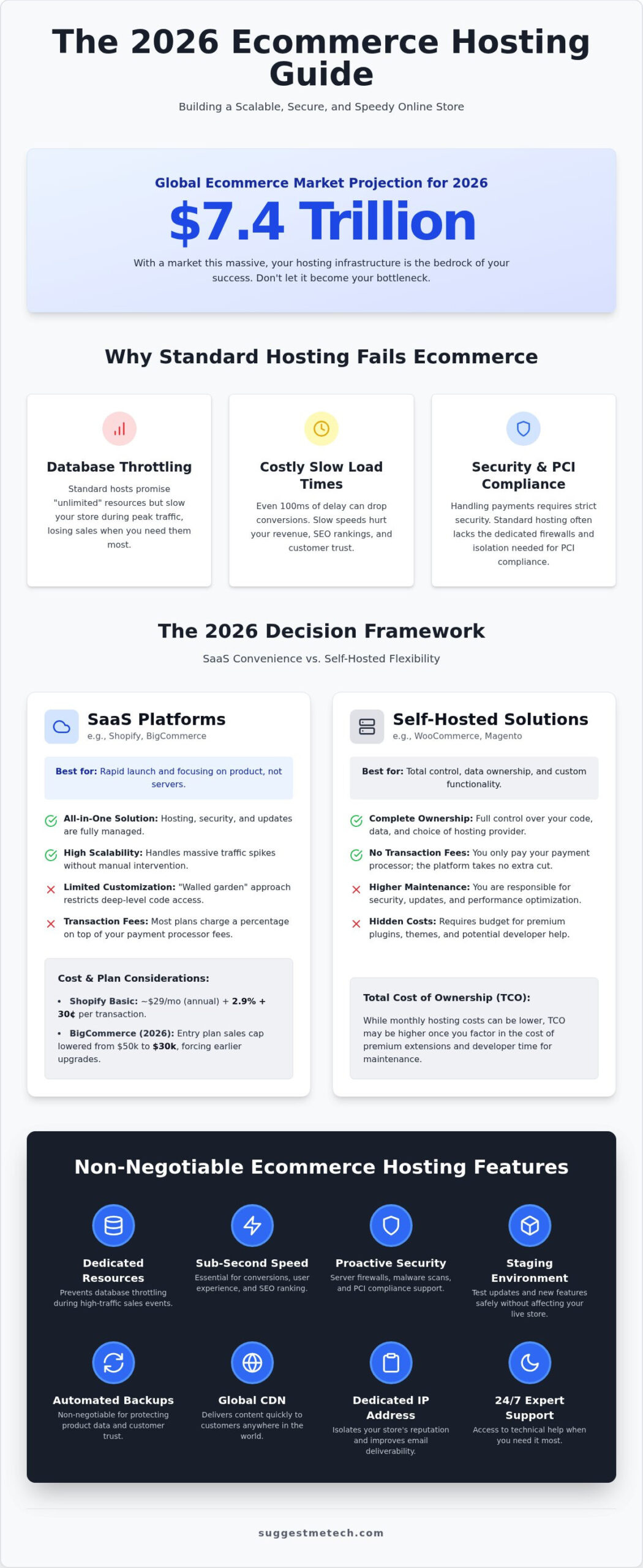
Standard hosting is built to serve static files like images and text. While a basic web hosting service is perfectly fine for a personal blog or a portfolio, it often buckles under the weight of an online store. Ecommerce sites rely heavily on dynamic transactional requests. Every time a customer filters a product list, adds an item to their cart, or enters shipping details, your server has to query a database in real time. If your hosting environment isn’t optimized for these constant database interactions, your site slows down or stops responding entirely during peak shopping hours.
Many entry-level providers promise “unlimited” resources on shared plans. In reality, these hosts often throttle your account the moment your store starts processing multiple checkouts simultaneously. They prioritize stability for the hundreds of other sites on that same server; this means your store loses power exactly when you need it most. Choosing the best ecommerce hosting means finding a provider that offers dedicated resources specifically for your database, ensuring that one customer’s checkout doesn’t stall another’s browsing experience.
The High Cost of Slow Load Times
Speed isn’t just a luxury; it’s a direct driver of your revenue. Research consistently shows that even 100ms of latency can drop conversion rates significantly. Customers expect an instant response. If your checkout page hangs for even a few seconds, the psychological friction increases and they’ll likely abandon their cart. Performance is even more critical now that search engines use mobile-first indexing. If your host can’t deliver sub-second speeds to a smartphone on a 4G connection, your search rankings will suffer. The physical location of your server matters too. If you sell to a global audience, you need a host with a distributed network to keep latency low for every shopper.
Transactional Security and PCI Compliance
Security for an online store goes far beyond a simple SSL certificate. You’re handling sensitive customer data and payment information, which brings PCI DSS compliance into play. This set of standards ensures you’re maintaining a secure environment for credit card transactions. The best ecommerce hosting solutions simplify this by offering server-side firewalls and automated malware scanning. Shared environments can be risky for payment gateways. If another site on your server gets blacklisted or hacked, it could impact your store’s reputation or security. Opting for a dedicated IP address helps isolate your store and ensures your transactional emails actually reach your customers’ inboxes. Look for hosts that offer proactive security measures rather than just reactive fixes.
SaaS Platforms vs. Self-Hosted: The 2026 Decision Framework
Choosing between a SaaS platform and a self-hosted setup is the most significant decision you’ll make for your store’s infrastructure. SaaS platforms like Shopify or BigCommerce operate as an all-in-one ecosystem. They handle the servers, security patches, and core updates in exchange for a monthly subscription. In contrast, self-hosting with tools like WooCommerce or Magento gives you the freedom to pick your own best ecommerce hosting provider. This path offers total ownership of your code and data, but it requires a more hands-on approach to technical maintenance.
The total cost of ownership (TCO) varies significantly between these two models. Shopify’s Basic plan currently sits at $39 per month, or $29 if you pay annually, but you must also factor in transaction fees. For instance, the Basic plan charges 2.9% plus 30¢ per online transaction. BigCommerce recently restructured its plans in June 2026, lowering the annual sales caps for each tier. The entry-level plan’s cap dropped from $50,000 to $30,000, which might force growing stores into higher-priced tiers sooner than expected. Self-hosting often has lower fixed monthly costs, but you’ll need to budget for premium plugins and potential developer hours to handle complex configurations. If you’re feeling stuck on the math, you can compare specific service costs in our detailed guides.
When to Choose a SaaS Platform
SaaS is ideal if you want a rapid launch with zero technical heavy lifting. You don’t have to worry about server-side firewalls because the platform manages the entire environment. It’s a “walled garden” approach. While this limits your ability to tweak deep-level server settings, it ensures your store remains stable whether you’re processing 100 or 10,000 orders a day. Shopify remains a dominant choice for founders who want to focus on product development rather than database management.
When to Choose Self-Hosted Ecommerce Hosting
Self-hosting is the best fit for businesses that require total brand control and unique product configurations. You aren’t tied to a platform’s rigid rules or escalating “success taxes” based on your sales volume. Owning your data is also a major advantage for security. Implementing the FTC’s standards for Cybersecurity for Small Business is more transparent when you have full access to your server logs. For WordPress enthusiasts, specialized WooCommerce hosting provides the flexibility to build a truly bespoke shopping experience without the limitations of a closed ecosystem.
The Best Ecommerce Hosting Providers of 2026
Selecting the best ecommerce hosting involves looking beyond simple uptime percentages. At SuggestMeTech, we function as your knowledgeable peer in this complex space; we have spent months testing these platforms to ensure our recommendations hold up during real-world sales events. We have analyzed Time to First Byte (TTFB) and concurrent request handling across dozens of environments to identify which providers actually deliver on their performance promises. For a store to succeed in 2026, you need a host that balances raw database power with proactive support. If your site hangs during a flash sale, you need a technician who understands ecommerce architecture immediately.
Following the guidelines for Cybersecurity for Small Businesses provided by the FCC, we have prioritized hosts that offer robust, server-side protection. Our evaluation process categorizes winners by business size and technical expertise. This ensures you get a recommendation that matches your operational reality rather than just a list of the most expensive options available today.
Top Picks for Beginners and Small Stores
DreamHost offers incredible value for new merchants who need a reliable start without a massive price tag. Their managed WooCommerce plans include high-performance SSD storage and pre-installed SSL certificates, which are vital for securing the customer journey from day one. For those who want to start a blog to drive organic traffic to their products, A2 Hosting is another excellent choice. Their entry-level tiers are specifically optimized to handle the dynamic requests of a shopping cart while maintaining the fast load times required for content marketing. Both providers offer one-click setups that demystify the technical side of launching a store.
Best Options for Scaling and Enterprise Businesses
WP Engine remains the gold standard for managed WordPress ecommerce at scale. Their infrastructure is built to handle massive traffic spikes without breaking a sweat. WP Engine’s pricing reflects this premium service; the Startup plan begins at $30 per month, while the specialized Core eCommerce plan starts at $500 per month. This tier provides advanced features like elastic scalability and proactive threat detection that are essential for high-volume retailers. For businesses running Magento or extremely high-traffic WooCommerce sites, Nexcess provides specialized hosting with auto-scaling resources that trigger automatically when your traffic surges.
Technical founders who want cloud flexibility without the usual complexity will find Cloudways to be the best ecommerce hosting choice for its choice of providers like DigitalOcean and AWS. Cloudways allows you to pick your server location and resource limits while they handle the server management and security patches. Each of these enterprise options ensures your store stays fast and secure, even when you are processing thousands of orders every single day.
Critical Features to Vet in an Ecommerce Host
Choosing the best ecommerce hosting means looking for features that protect your revenue and your reputation. You need a reliable safety net. Automated daily backups ensure that if a plugin update goes wrong or a database error occurs, you can restore your product and customer data in seconds. Similarly, staging environments allow you to test new features, themes, or design changes on a private copy of your site before pushing them live. This prevents the “white screen of death” from scaring away shoppers during critical hours. Security should be integrated, not an afterthought. Look for one-click SSL certificates and comprehensive security suites that provide server-side protection against brute-force attacks. To reach customers globally, integrated Content Delivery Networks (CDNs) are essential. They store your images and assets on servers worldwide, ensuring fast load times regardless of where your customer is browsing.
Scalability and Resource Management
Your host must handle the unexpected. If a social media post goes viral, auto-scaling resources prevent your site from crashing under the sudden surge of traffic. Check the hardware specs before signing up. NVMe drives are significantly faster than standard SSDs, which is vital for large product catalogs with thousands of high-resolution images. Adequate RAM and CPU allocation are the real heroes of the checkout process; they ensure that database queries remain snappy even when multiple customers are trying to pay at once. Without these dedicated resources, your site will throttle, leading to the cart abandonment issues we discussed earlier.
Ecommerce-Specific Tools and Bonuses
Moving a store is stressful, so look for providers that offer free migrations handled by technical experts. This ensures you don’t lose order history or customer accounts during the move. Professionalism also matters. A domain-based email builds trust with your customers and is far more credible than a generic Gmail address. In 2026, AI performance boosters have become a standard requirement for the best ecommerce hosting plans. These tools use machine learning for automated image optimization and code minification, stripping away unnecessary data to shave milliseconds off your load time. They can even predict traffic patterns to pre-cache popular products. If you’re overwhelmed by these technical requirements, you can read our deep-dive reviews to see how each provider stacks up in real-world testing.
How to Launch Your Store: Next Steps with SuggestMeTech
Launching your online store is an exciting milestone, but it requires a clear roadmap to avoid common technical pitfalls. You’ve already explored the landscape of the best ecommerce hosting; now it’s time to put that knowledge into action. Follow these four steps to move from a concept to a fully functional, high-performance storefront.
First, revisit our decision framework to finalize your platform choice. If you’ve decided on the flexibility of a self-hosted environment, your next priority is to register a professional domain name. This is your digital storefront’s address and a critical part of your brand identity. Once your domain is secure, select a host that specifically addresses the technical complexity of migration. Many top-tier providers offer white-glove migration services for free, which is essential if you’re moving an existing product database without losing order history. Finally, configure your security settings and payment gateways. Don’t leave these for the last minute; ensuring your checkout is functional and secure is the only way to protect your initial sales.
The Pre-Launch Checklist
Before you flip the switch, you must verify that every part of the customer journey is seamless. Mobile commerce sales are projected to reach $2.74 trillion in 2026, so testing your checkout flow on smartphones is just as important as desktop testing. Use this quick checklist to ensure you’re ready:
- Test the checkout flow: Complete a few trial purchases to verify that payment gateways and shipping calculators are working correctly.
- Verify SSL encryption: Ensure the padlock icon appears on every page, not just the checkout, to maintain customer trust.
- Set up automated backups: Confirm that your host’s backup system is active and that you know how to perform a restoration if something breaks.
Join the SuggestMeTech Community
At SuggestMeTech, we don’t just write reviews; we’re your partners in building a successful online business. We’ve tested the options, but your real-world experience is what truly matters to our community. Share your hosting experiences in our comments section to help other entrepreneurs make informed decisions. If you’re still feeling stuck, you can contact our team for personalized hosting recommendations tailored to your specific niche. Subscribe to our newsletter for weekly tech reviews and performance updates to ensure your store stays ahead of the curve with the best ecommerce hosting technology as it evolves throughout 2026.
Build Your Future-Proof Store Today
Choosing the best ecommerce hosting isn’t just about uptime; it’s about finding a partner that automates your growth and protects your customer data. You now understand why transactional requests demand specialized infrastructure and how to weigh the long-term costs of SaaS against the flexibility of self-hosting. By prioritizing features like NVMe drives and AI-driven performance boosters, you’re setting your business up for success in a competitive market. Your digital storefront is your most valuable asset, and it deserves a foundation that can scale with your ambition.
At SuggestMeTech, our independent and unbiased reviews focus on real-world store performance rather than just marketing specs. We’re proud that our guides are used by thousands of entrepreneurs to make confident tech decisions every day. We’ve done the testing so you can focus on building your brand. Take that first step toward a faster, more secure online store today by exploring our latest recommendations. Compare the Best Web Hosting Services of 2026 and launch your business with total confidence.
Frequently Asked Questions
Do I need a dedicated server for my ecommerce store?
You don’t need a dedicated server when you’re just starting out. Most small to medium storefronts thrive on VPS or managed cloud plans that offer dedicated resources without the high cost of a private server. Dedicated hardware is typically reserved for enterprise brands processing thousands of orders simultaneously. For most merchants, the best ecommerce hosting is a scalable plan that grows alongside your traffic volume and product catalog.
What is the difference between web hosting and an ecommerce platform?
Web hosting provides the physical server space and digital infrastructure where your website’s files reside. An ecommerce platform is the specific software or application, like WooCommerce or Magento, that you install on that server to manage your inventory and payments. Think of hosting as the land and the platform as the building you construct on it. You need both to run a functional online store successfully.
Is Shopify considered a web host?
Shopify is a closed SaaS platform that includes hosting as part of its monthly subscription fee. You don’t need to purchase a separate best ecommerce hosting plan because Shopify manages the servers, security, and updates for you. This convenience is a major draw for non-technical founders. However, it means you have less control over server-level configurations compared to a self-hosted setup like WooCommerce on a private host.
How much should I spend on ecommerce hosting as a beginner?
Beginners should budget between $10 and $35 per month for reliable hosting. While you might see “unlimited” plans for $3, these often lack the CPU and RAM needed to process checkouts without lagging. Investing in a mid-tier managed plan ensures your site remains fast and secure from day one. This initial investment prevents the high cost of lost sales caused by slow page loads or frequent site crashes.
Can I change my ecommerce host later without losing my data?
You can absolutely change your host later without losing any of your store’s data. Most high-quality providers offer free migration services where their technical teams handle the transfer of your database, product images, and customer records. If you’re using a self-hosted platform like WordPress, plugins can also automate this process. It’s best to perform migrations during low-traffic periods to ensure a smooth transition for your shoppers.
What is PCI compliance and does my host provide it?
PCI DSS compliance is a set of security standards designed to ensure that all companies processing credit card information maintain a secure environment. While many hosts provide PCI-compliant hardware and firewalls, the final responsibility for software-level compliance often rests with the store owner. SaaS platforms like Shopify handle this automatically. If you’re self-hosting, look for a provider that offers specialized security suites and dedicated IP addresses to simplify the process.
Does hosting affect my stores SEO rankings?
Hosting has a direct impact on your SEO rankings through site speed and server uptime. Search engines like Google prioritize sites that load quickly and provide a stable user experience, especially on mobile devices. If your server is slow or frequently goes offline, your rankings will drop. Choosing a host with a global CDN and optimized server response times is essential for maintaining high visibility in search results.
Why is managed WordPress hosting better for WooCommerce?
Managed WordPress hosting is specifically tuned to handle the heavy database queries that WooCommerce requires. These plans often include object caching and server-side optimizations that standard shared hosting lacks. You’ll also benefit from automated plugin updates and specialized security rules that protect your transactional data. It’s a superior choice for merchants who want the flexibility of WordPress without the technical burden of manual server maintenance and performance tuning.

