

Why would you pay for a dedicated server when shared hosting in 2026 now delivers the same speeds that used to cost hundreds of dollars? It’s a common misconception that entry-level plans are just “cheap” leftovers. In reality, the industry has shifted toward high-performance technologies like NVMe storage and LiteSpeed servers as the baseline. If you’re feeling a bit lost between talk of bandwidth and SSL certificates, you aren’t alone. Most new creators worry that a budget plan will result in a slow site or security risks from “bad neighbors” on the same server. It’s time to clear the air.
We agree that you shouldn’t need a computer science degree just to start a blog or a small business site. This guide promises to help you master the essentials of shared hosting so you can pick a plan that balances cost with enterprise-grade performance. You’ll learn how to spot the difference between a great deal and a “too good to be true” trap. We will explore the must-have features for 2026, explain how modern containerization keeps your site safe, and show you exactly how to get online for as little as $2 to $10 per month.
Key Takeaways
- Understand how modern shared hosting uses an “apartment building” model to provide high-end performance at a fraction of the cost of a dedicated server.
- Identify the non-negotiable features for 2026, including NVMe storage and automated security, to keep your site competitive and safe.
- Learn the technical differences between shared, VPS, and dedicated options so you know exactly when it’s time to upgrade your resources.
- Use our 5-step checklist to evaluate provider uptime guarantees and refund policies, ensuring you avoid common pitfalls of budget plans.
- Discover how new technologies like AI-powered dashboards and account isolation have solved the historical “bad neighbor” performance issues.
Understanding Shared Hosting: Why It Is the Foundation of the Web
At its core, a shared web hosting service is a single powerful server that houses hundreds of different websites simultaneously. It’s the most popular way to get online because it splits the high cost of server hardware and maintenance across a large group of users. For new creators, this means you can launch a professional site without a massive upfront investment. Shared hosting provides a low barrier to entry, making it the default choice for bloggers, freelancers, and small businesses.
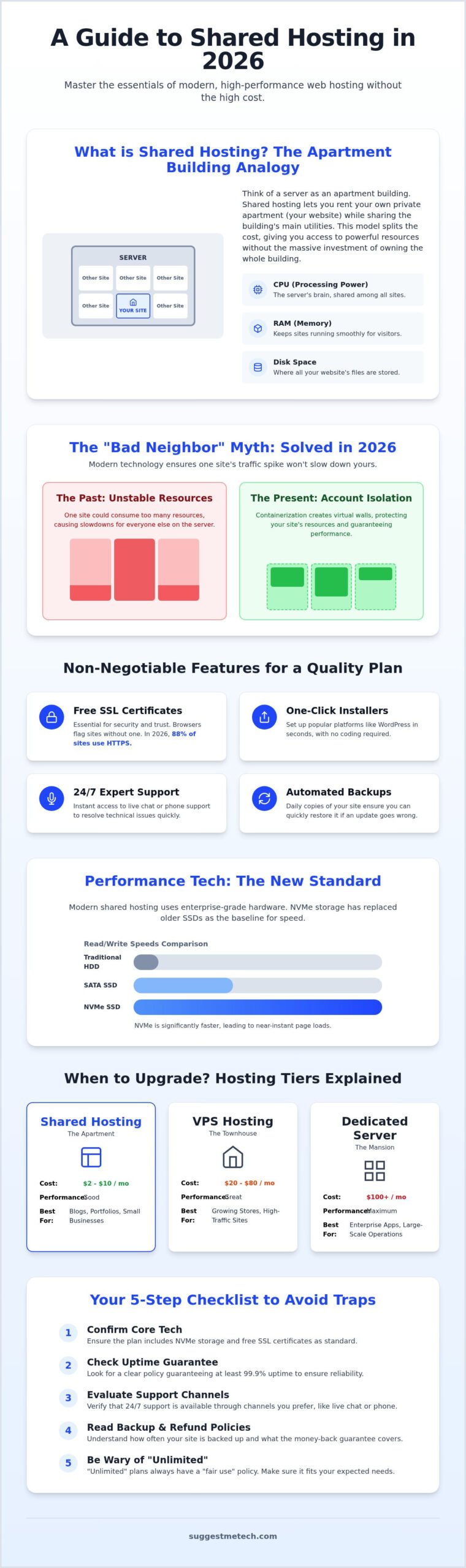
To visualize how this works, think of an apartment building. You rent your own private unit where you keep your belongings, but you share the building’s infrastructure like the lobby, plumbing, and electricity with other tenants. In this scenario, your website is the apartment, and the server’s resources are the shared utilities. This model allows you to enjoy high-end “amenities” like professional security and fast hardware at a fraction of the cost of owning the entire building.
How the Shared Resource Model Works
In a shared environment, every site relies on the same pool of resources. The provider uses a specialized operating system to manage how these are distributed:
- CPU: The central brain that processes your website’s code and requests.
- RAM: The short-term memory that keeps your site running smoothly during visitor interactions.
- Disk Space: The physical storage where your images, text, and databases live.
A common concern for beginners is the “bad neighbor” effect. This happens when one site on the server consumes too many resources, causing others to slow down. In 2026, modern providers have largely solved this. They use account isolation and containerization to ensure that even if your neighbor’s site goes viral, your site remains stable and responsive. This makes shared hosting perfectly suited for portfolios, personal blogs, and informational business sites that don’t yet have massive traffic spikes.
The Evolution of Shared Hosting in 2026
Shared hosting has changed significantly over the last few years. Traditional hard drives have been replaced by high-speed NVMe storage as the industry standard. This technology allows your site to load data almost instantly, which is vital for both user experience and SEO. Additionally, the shift toward cloud-based architectures means your site isn’t tied to a single physical machine that could fail. Instead, your data is distributed across a network, increasing reliability.
You’ll often see plans offering “unlimited” storage or bandwidth. It’s important to understand that this usually refers to unmetered usage within a fair use policy. While you won’t be charged for every megabyte, you’re still expected to stay within the limits of a typical small website. If you plan on hosting thousands of high-resolution videos or massive file downloads, you’ll eventually need to look at more robust options.
Essential Features of a High-Quality Shared Hosting Plan
Choosing a shared hosting plan in 2026 isn’t just about finding the lowest price. It’s about ensuring your provider includes the tools necessary for a fast, secure, and professional presence. Some features that used to be “premium” additions are now standard requirements for any serious website. If a plan lacks these basics, it’s likely outdated and will cause headaches as your traffic grows.
Start your evaluation by looking for these non-negotiable items:
- Free SSL Certificates: Research from 2026 shows that 88% of all websites now use HTTPS by default. Without an SSL, browsers will flag your site as “Not Secure,” which kills your credibility and hurts your SEO rankings.
- One-Click Installers: These tools allow you to set up platforms like WordPress in seconds without touching a single line of code.
- 24/7 Expert Support: As a beginner, you’ll want access to live chat or phone support to resolve technical hiccups instantly.
- Automated Backups: Your host should save copies of your site daily so you can restore it if something goes wrong during an update.
Performance Boosters: NVMe, CDN, and Caching
Speed is non-negotiable. Users expect sites to load in two seconds or less, and search engines prioritize fast-loading pages. To meet this demand, shared hosting has moved away from traditional SSDs. NVMe SSDs are the new performance benchmark, offering read and write speeds significantly faster than older storage tech. This ensures your database-heavy site, like a WordPress blog, remains snappy.
A Content Delivery Network (CDN) is another essential. It stores copies of your site on servers around the world so visitors in London or Tokyo don’t have to wait for data to travel from a server in New York. Pair this with server-side caching, which pre-generates your pages to reduce the processing work your server has to do, and you’ve got a site built for global speed.
AI-Driven Management and Security
The biggest shift in 2026 is the integration of AI. Hosting dashboards now use AI tools to handle automated site backups and proactive malware scanning. Instead of you manually checking for threats, the system identifies and patches vulnerabilities before they become problems. This level of automation is why modern shared hosting is much more reliable than it was a decade ago.
AI website builders have also reduced the time to launch from days to minutes by generating layouts based on your specific goals. Before you dive into these tools, you need to secure your address. Understanding What is a Domain Name? is the essential first step before you commit to a hosting plan. If you’re ready to compare the top-rated providers for these features, you can check our latest tech reviews and guides to see which plans offer the best value for your specific needs.
Shared Hosting vs. The Alternatives: When Should You Upgrade?
While shared hosting is the perfect starting point, it isn’t a “forever” solution for every project. As your site grows, you’ll need to understand the ladder of hosting options to avoid performance bottlenecks. If you remember our apartment analogy, moving to a new tier is like moving from a studio flat to a townhouse or a private estate. You gain more control, more space, and fewer shared walls.
The “Bad Neighbor” effect used to be the biggest downside of shared environments. It happened when one site’s traffic spike drained the server’s resources, slowing down everyone else. In 2026, top-tier providers use containerization to isolate accounts. This means your neighbor’s viral post shouldn’t crash your site, though you’re still sharing the same underlying hardware. If your site needs more than what a standard plan offers, you might consider Managed WordPress hosting. This is a specialized shared tier that includes curated performance tweaks and automated updates specifically for WordPress users.
To help you decide where you fit, use this quick decision matrix:
- Shared Hosting: Best for under 20,000 visitors per month and creators on a budget.
- Managed WordPress: Best for 20,000 to 50,000 visitors and those who want a “hands-off” technical experience.
- VPS Hosting: Best for 50,000+ visitors or sites that require custom server-side software.
Shared vs. VPS: The Performance Gap
The primary difference between these two lies in resource allocation. In a shared environment, you’re using what’s available in the common pool. On a Virtual Private Server (VPS), the provider uses virtualization to give you a dedicated slice of CPU and RAM. This isolation is why a VPS handles traffic spikes much better. You also gain “root access,” which is the ability to install custom server software that shared hosts typically block for security reasons.
Signs It Is Time to Move Beyond Shared Hosting
Don’t wait for your site to crash before you upgrade. If you see consistent “Resource Limit Reached” or “508” errors in your control panel, your host is telling you the site is too heavy for its current home. Similarly, if your load times stay slow even after you’ve optimized your images and used a CDN, the server’s shared CPU is likely struggling. When your business depends on every millisecond of speed to convert customers, the extra cost of a VPS becomes a necessary investment rather than just an expense.
How to Choose Your Shared Hosting Provider: A 5-Step Checklist
Selecting a provider for shared hosting is one of the most important decisions you’ll make for your website’s future. It’s not just about the monthly cost. It’s about finding a partner that keeps your site online and your data safe. Before you enter your credit card details, you need to verify that the host actually delivers on its marketing promises. Use this checklist to filter out unreliable providers and find a plan that fits your long-term goals.
- Audit the Uptime Guarantee: The industry standard is 99.9%. This might sound high, but it still allows for about 9 hours of downtime per year. If a provider doesn’t offer a clear uptime guarantee in their Service Level Agreement (SLA), keep looking.
- Verify the Refund Policy: Most reputable hosts offer a 30-day money-back guarantee. This gives you a risk-free window to test their server speeds and interface.
- Evaluate the Control Panel: Many hosts use the classic cPanel, which is reliable but can feel dated. Others offer proprietary, modern dashboards that are much easier for beginners to navigate. Choose the one that matches your comfort level.
- Check Renewal Rates: It’s common to see introductory rates as low as $2 to $4 per month, but these often jump to $10 or $15 upon renewal. Always check the “regular” price so you aren’t surprised by a 200% price hike next year.
Step 1: Assessing Your Technical Requirements
You need to know exactly what you’re building before you can choose a home for it. If you only plan to launch one site, the cheapest entry-level plan is usually sufficient. However, if you’re a freelancer building a portfolio and a separate personal brand, look for a “Baby” or “Plus” plan that allows for unlimited websites. You should also estimate your storage. While most shared plans offer enough space for thousands of photos, high-resolution video creators will need unmetered storage or a CDN integration. If you’re still in the planning phase, our guide on How to Start a Blog provides niche-specific advice on the resources you’ll actually need.
Step 2: Testing the Support and Community Reputation
Technical issues don’t follow a 9-to-5 schedule. Before buying, open a live chat window and ask a basic question about their migration fees or SSL setup. If it takes 20 minutes to get a response from a human, that’s a major red flag. You should also look for providers with an extensive knowledge base. A good host provides searchable tutorials and videos so you can solve common problems yourself. Don’t rely solely on the star ratings on their own homepage. Check third-party review sites to see how they handle actual customer complaints and server outages.
Ready to see how the top providers stack up? You can find our hands-on evaluations and performance data in our latest tech reviews and guides to help you make an informed choice.
Final Verdict: Is Shared Hosting Right for You in 2026?
Shared hosting isn’t the slow, unreliable option it was a decade ago. In 2026, it serves as a high-performance launchpad for nearly 90% of new websites. With the standard integration of AI-driven security and NVMe storage, you’re getting enterprise-level hardware at a beginner’s price point. It’s the most logical choice for anyone looking to establish an online presence without the technical overhead of managing a private server. You don’t need to pay for a dedicated server until your traffic genuinely demands it.
The SuggestMeTech Recommendation
We recommend shared hosting for bloggers, freelancers, and small business owners who expect fewer than 20,000 monthly visitors. It’s better to start with an affordable, managed plan and scale your resources as your traffic grows. This approach keeps your overhead low while you focus on creating content and building your brand. Many users make the mistake of overbuying hosting they don’t need, which only drains their budget during the critical first year of growth. If you’re ready to see which providers currently lead the market in speed and reliability, check out The Best Web Hosting Services of 2024 for our latest tested and reviewed picks.
We want to hear from you. As you look for a host, which feature is your top priority? Is it the lowest possible renewal rate, lightning-fast NVMe speeds, or having a 24/7 expert available on live chat? Your input helps us refine our testing process. Let us know your thoughts so we can continue to provide the most relevant advice for our community.
Next Steps to Launch Your Website
Getting your site live is a straightforward process when you follow these three steps. First, secure your domain name to lock in your brand’s identity. Second, pick your hosting plan using the checklist we provided to ensure you aren’t hit with hidden fees later. Finally, install your content management system. Most modern hosts offer a one-click WordPress installation that handles the heavy lifting for you.
The tech landscape changes fast. To stay updated on the latest tools and performance benchmarks, sign up for our newsletter. We’ll send the latest tech guides and reviews directly to your inbox so you never have to guess which service is right for your goals. The most important step is simply to start. Don’t let the fear of technical jargon hold you back from launching your project today. You have the tools and the knowledge to get online right now.
Ready to Launch Your 2026 Website?
You now have the framework to select a provider without falling for marketing traps. Remember that shared hosting in 2026 is built on enterprise-grade hardware. This means your first site can load just as fast as a corporate competitor’s. By prioritizing NVMe storage and checking for hidden renewal fees, you’ll avoid the most common beginner mistakes. You don’t need a massive budget or deep technical skills to get started. You just need the right plan for your current traffic.
Our team at SuggestMeTech is here to help you make the final call. We provide expert-tested performance data and real-world application guides to ensure you choose a service that actually works for your goals. If you’re ready to see our community-vetted recommendations and find the perfect fit, you can find the best hosting for your needs on SuggestMeTech. Your online journey starts with a single click. Don’t let indecision hold you back from sharing your project with the world. You’ve got the knowledge; now it’s time to build.
Frequently Asked Questions
What is the main difference between shared hosting and VPS?
Shared hosting involves multiple users splitting the resources of a single physical server, which keeps costs extremely low. In contrast, a VPS uses virtualization to give you a dedicated slice of CPU and RAM. While a shared plan is the most cost-effective entry point for new creators, a VPS offers more stability and control. Think of it as the difference between sharing an apartment and owning a private townhouse.
Can I host multiple websites on a single shared hosting plan?
You can host multiple websites on one account if you choose a plan that specifically supports multiple or “unlimited” domains. Basic starter plans often restrict you to a single site to keep the entry price as low as possible. If you’re a freelancer managing several small portfolios, upgrading to a mid-tier plan is usually the best move. Always check the plan’s specific domain limit before you commit.
Is shared hosting secure enough for a small online store?
Modern shared hosting is secure enough for small stores, provided you use an SSL certificate and a secure payment gateway like Stripe. Providers in 2026 use account isolation to prevent security breaches from spreading between different users on the same server. You should still perform regular updates and use strong passwords. If your store starts processing thousands of daily transactions, moving to a VPS offers more robust security layers.
Will shared hosting affect my website’s SEO performance?
Shared hosting won’t inherently hurt your SEO, but slow server response times can definitely impact your rankings. Google’s Core Web Vitals prioritize fast-loading pages and a stable user experience for visitors. As long as your host uses modern tech like NVMe storage and server-side caching, your site will remain competitive. If your site consistently loads slowly due to server congestion, your search visibility might eventually suffer compared to faster competitors.
What happens if my website gets too much traffic for a shared plan?
If your traffic exceeds your plan’s limits, your provider might throttle your site’s speed or temporarily take it offline to protect other users. Most hosts will send you a notification when you reach 80% of your resource capacity. This is a clear signal that it’s time to upgrade to a VPS or cloud plan. Upgrading is usually a seamless process that your provider’s support team can handle without causing any downtime.
Do I need to know how to code to use shared hosting?
You don’t need any coding knowledge to launch and manage a website on a shared server. Most providers include one-click installers for platforms like WordPress and AI-powered website builders that handle the technical setup for you. You’ll manage your files and email accounts through a visual dashboard. If you ever run into a technical hurdle, live chat support is usually available to guide you through the process step by step.
Is a free domain name usually included with shared hosting?
Many providers include a free domain name for the first year when you sign up for an annual plan. It’s a great way to save on initial startup costs. Just keep in mind that you’ll have to pay the standard registration fee when the domain renews the following year. Always read the fine print to see if the free offer applies to your specific domain extension or if it’s limited to certain ones.
What is cPanel and do I need it for shared hosting?
cPanel is a popular control panel that lets you manage your hosting account through a simple web interface. It handles everything from creating email addresses to managing your site’s databases. While it’s the industry standard for shared hosting, you don’t strictly need it. Some modern hosts offer proprietary dashboards that are even more user-friendly for beginners. The goal is simply to have a visual way to control your server without using command lines.

