

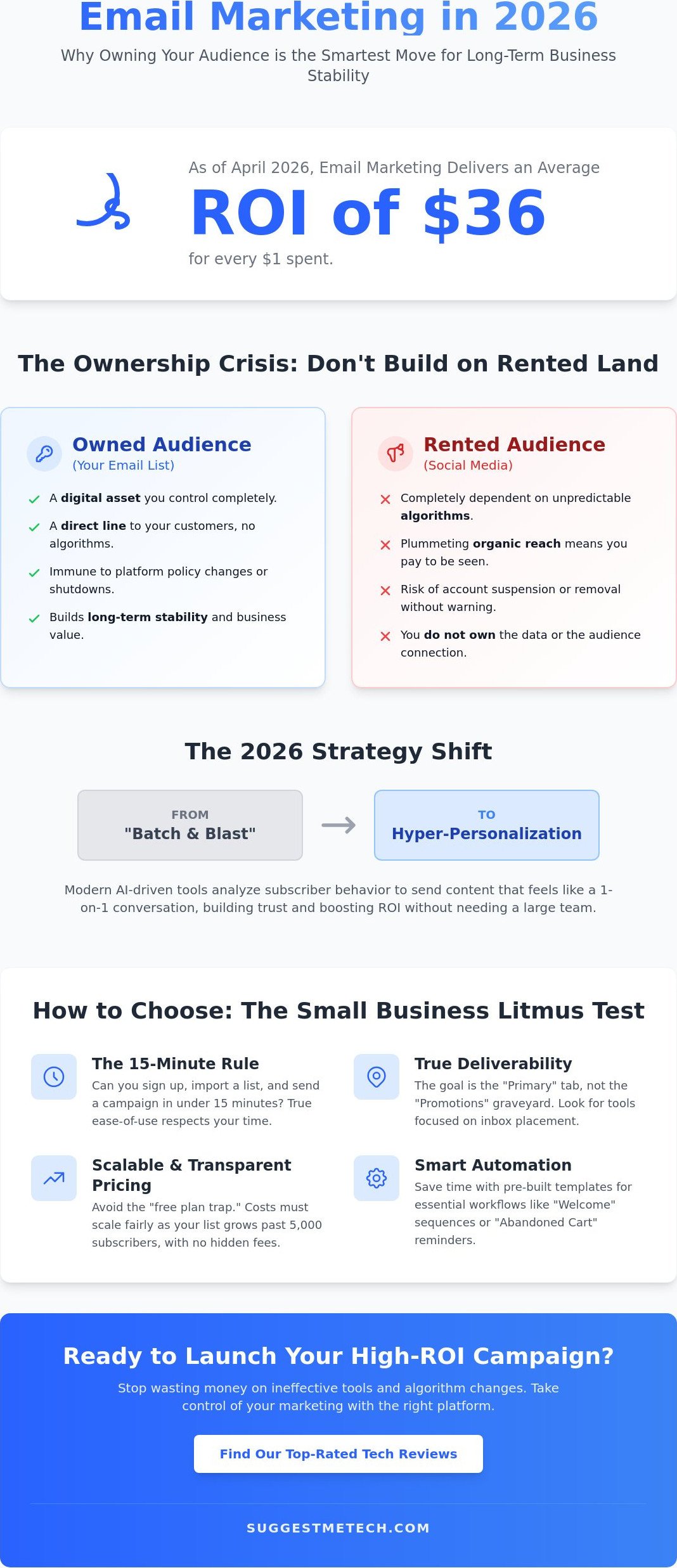
Did you know that email marketing still delivers an average return of $36 for every $1 spent as of April 2026? While that ROI is impressive, many entrepreneurs find that their profits are quickly eaten up by rising subscription fees. Finding the best email marketing software for small business shouldn’t feel like a bait and switch where free plans vanish as soon as you grow. You have likely felt the sting of Mailchimp’s reduced 250 contact limit or Constant Contact’s June 2025 decision to remove free plans entirely.
We agree that you shouldn’t need a technical degree just to send a newsletter or build an automation. This article promises to reveal the most cost effective, user friendly tools that keep your emails out of the spam folder and your ROI high. We are reviewing seven top platforms based on their 2026 features and their “complexity to result” ratio to help you pick the perfect match for your budget and team size.
Key Takeaways
- Learn why prioritizing owned email data over algorithm-dependent social media is the smartest move for long-term business stability in 2026.
- Discover our top-rated picks for the best email marketing software for small business based on the “15-minute rule” for ease of use and high deliverability.
- Identify the hidden “subscriber thresholds” that cause platform costs to skyrocket and how to stop wasting money on inactive “ghost” contacts.
- Compare the leading tools side-by-side to find the best fit for your specific business size, budget, and technical comfort level.
- Get a clear roadmap for launching your first high-deliverability campaign and setting up an automated “Welcome” sequence without technical headaches.
Why Email Marketing Still Offers the Highest ROI for Small Businesses in 2026
Small businesses in 2026 are facing a “rental crisis” on social platforms. Algorithms shift overnight, organic reach continues to plummet, and your access to your followers can be revoked without warning. This is why the best email marketing software for small business is focused on one thing: owned data. Unlike a social media feed where you rent an audience, an email list is a digital asset you control completely. When you own the data, you aren’t at the mercy of a billionaire’s latest platform tweak or a sudden change in community standards.
The financial argument is just as strong. Industry reports from April 2026 show that email marketing generates an average ROI of $36 for every $1 spent. This high return happens because of the “Direct Line” concept. An email lands in a private inbox, not a crowded, algorithm-controlled feed. It’s a focused environment where your message has a much higher chance of being seen and acted upon. Looking back at the history of email marketing, we see it has survived every “death of email” prediction because it remains the most effective way to nurture leads. Much like starting a blog, launching an email list builds long-term authority that social media simply can’t match.
The Shift from Mass Blasts to Hyper-Personalization
The days of “batch and blast” are officially over. In 2026, sending the same generic email to your entire list is a fast track to the spam folder. Small businesses are now using AI-driven tools to achieve hyper-personalization that was once reserved for global corporations. These tools analyze subscriber behavior to send content that feels like a 1-on-1 conversation. You don’t need a huge marketing team to make this work. AI can help one-person operations segment their lists based on purchase history or website clicks. Authentic storytelling is your secret weapon here. While big brands struggle with corporate jargon, you can build trust by being a real person in your subscribers’ inboxes.
Email as a Complement to Your Website and Domain
Your email strategy shouldn’t exist in a vacuum. It needs to be an extension of your digital home. Professionalism starts with your sender address. Sending marketing emails from a generic Gmail or Yahoo account is a major red flag for both subscribers and spam filters. This is why understanding domain names is crucial for building brand trust. Your email software must sync seamlessly with your website and CRM. When a customer signs up for a lead magnet on your site, your email tool should trigger a “Welcome” sequence instantly. This integration ensures a smooth journey for your customers and clear tracking for your business.
Evaluation Criteria: How We Tested the Best Small Business Email Tools
Finding the best email marketing software for small business involves more than just checking a feature list. We focused our testing on the “15-minute rule.” This means a business owner with zero technical background should be able to sign up, import a list, and send their first campaign in under 15 minutes. If a platform requires a coding bootcamp just to change a font, it didn’t make our list. We also analyzed the total cost of ownership as your list grows. Many “free” plans become expensive traps once you hit the 5,000 subscriber mark, so we looked for transparent pricing that scales fairly.
Deliverability was our next priority. Getting into the “Primary” tab is the only metric that truly matters in 2026. A tool with 99 percent deliverability is useless if those emails end up in the “Promotions” graveyard or the spam folder. We also looked for automation breadth. You need pre-built templates for common workflows like “Abandoned Cart” or “New Subscriber Welcome” sequences so you don’t have to build them from scratch. Most guides ignore how email software integrates with other tech like web hosting and domains. We tested each platform’s ability to verify domain ownership quickly. If you’re still building your foundation, you can find our latest tech reviews to see which tools play best together.
The Importance of Drag-and-Drop Simplicity
Modern editors in 2026 have evolved significantly. We looked for intuitive drag-and-drop interfaces that don’t glitch when you add images or buttons. Mobile-responsive templates are now a baseline requirement because over 75 percent of users check email on their phones. We specifically tested AI-assisted design features. These tools help non-designers look professional by automatically matching your brand colors and suggesting high-performing layouts based on your industry. The goal is to spend less time on design and more time on your business.
Deliverability and Technical Support
We verified sender reputations by checking how easily a user can configure SPF, DKIM, and DMARC settings. These technical handshakes are essential for proving to Google and Outlook that you aren’t a spammer. Following Email Marketing Basics for Small Business guidelines, we prioritized platforms that make these settings simple to navigate. Finally, we looked for 24/7 support. Small businesses don’t have IT departments. When a campaign fails at midnight, you need a human expert to help you, not a chatbot that repeats the same three FAQ links.
The 7 Best Email Marketing Software Options for Small Business (2026 Roundup)
Choosing the best email marketing software for small business depends on your specific growth goals. At SuggestMeTech, we have tested these platforms based on their 2026 AI integrations and user interfaces. Our “Editor’s Picks” focus on tools that balance power with a low learning curve, ensuring you spend more time on your business and less time on technical troubleshooting.
MailerLite is our top pick for 2026. It balances power with a clean design. Their new AI content generator, launched in February 2026, suggests subject lines based on real-time open rate data from your specific industry. If you need a unified hub, Brevo is the choice for you. It combines email, SMS, and WhatsApp marketing into one dashboard. Their March 2026 pricing update kept the Starter plan at an affordable $9 per month, making it a great entry point.
ActiveCampaign remains the leader for those who want to master complex sales automations. Its 2026 “Predictive Recipes” use machine learning to tell you exactly when a lead is most likely to buy. For those with rapidly growing lists, Moosend is the budget king. In a year where most platforms increased prices by 15 percent, Moosend kept their entry-level plans affordable while offering robust automation features that competitors often hide behind expensive tiers.
Top Picks for Creators and Solopreneurs
Kit (formerly ConvertKit) is still the gold standard for bloggers. Its 2026 Creator Network helps you find newsletter partners to grow your list faster. beehiiv is the rising star for newsletter-first businesses. It offers advanced referral programs that were previously only available to giant media companies. AWeber is for those who want a human on the phone. While most competitors moved to AI chatbots in 2025, AWeber still offers 24/7 phone support to help you through technical hurdles.
Top Picks for Ecommerce and Service Providers
Omnisend is the clear winner for Shopify and WooCommerce users. Its “smart segments” automatically group customers by their lifetime value. Mailchimp is a household name, but its March 2026 pricing reality makes it a harder sell for small lists. With a limit of 250 contacts on the free plan, it’s less flexible than it used to be. HubSpot is the “all-in-one” powerhouse. If you have the budget for their mandatory $3,000 onboarding fee for Professional plans, as verified in April 2026, the CRM depth is unmatched for scaling teams.
Avoiding the Scaling Trap: Managing Costs as You Grow
Many entrepreneurs find what they think is the best email marketing software for small business early on, only to be shocked by the bill six months later. This is the “Scaling Trap.” Most platforms use tiered pricing that looks affordable at 500 subscribers but becomes a major expense as your list grows. For example, MailerLite offers a robust free plan for up to 500 subscribers, but hitting subscriber 501 triggers a jump to their Growing Business plan. Similarly, Mailchimp reduced its free tier to just 250 contacts in March 2026, making it easier than ever to accidentally trigger a paid subscription.
You are likely paying for “Ghost Subscribers” without realizing it. These are inactive email addresses that haven’t opened a message in months. Since most providers charge based on total contact count, these ghosts are actively draining your budget. To keep your ROI high, follow this 3-step list cleaning process every quarter:
- Segment: Create a list of subscribers who haven’t opened an email in 90 days.
- Re-engage: Send one final “Are you still there?” email with a special offer.
- Purge: Delete anyone who doesn’t click. It feels painful to watch your list size shrink, but your deliverability and bank account will thank you.
Seasonal businesses should consider “Pay-as-you-go” models instead of monthly subscriptions. If you only send emails during the holidays or summer months, paying a monthly fee all year is a waste of capital. Platforms like Brevo offer credit-based systems that allow you to buy a block of emails that never expire.
Understanding Tiered Pricing Models
Pricing tiers are rarely linear. Crossing a threshold, like moving from 2,500 to 2,501 subscribers, can sometimes double your monthly bill. Always project your budget for the next 12 months based on your current growth rate. Watch out for hidden costs verified in April 2026, such as HubSpot’s mandatory $3,000 onboarding fee for higher tiers or Mailchimp’s policy of counting unsubscribed contacts toward your billing limit. If you want to avoid these surprises, check out our comparison tool to see total costs over time.
Migration: When and How to Switch Platforms
If your current software feels too complex or the costs are outstripping your ROI, it is time to move. Migration doesn’t have to be a headache. Export your “clean” list as a CSV and import it into your new tool. To protect your deliverability, don’t blast your entire list from a new provider on day one. Slowly “warm up” the new IP by sending to your most engaged subscribers first. Ensure your web hosting and email capture forms are updated simultaneously to prevent losing new leads during the transition.
Final Verdict: Which Email Software Should You Choose?
Finding the best email marketing software for small business isn’t about picking the tool with the most icons on the dashboard. It’s about finding the one that fits your current workflow and budget without adding a technical headache to your already busy day. As we’ve seen, the landscape in 2026 is shifting toward AI-assisted tools that prioritize owned data. Whether you’re a solopreneur or a scaling ecommerce brand, the right choice is the platform that feels intuitive enough for you to use every single week. A powerful tool that sits empty because it’s too complex is a waste of your capital.
The “complexity-to-result” ratio we mentioned earlier remains the most important metric. If you’re currently overwhelmed, start small. Most of these platforms offer free trials or entry-level tiers that allow you to test the interface before committing to a long-term contract. Don’t let the fear of technical settings stop you from building your list. The ROI is too high to ignore, and the tools have never been more accessible for non-technical users.
The “Right Fit” Cheat Sheet
- Best for $0 budget: Brevo or MailerLite. These remain the most generous options for those just starting out, offering robust features without an upfront cost.
- Best for heavy automation: ActiveCampaign. If your business relies on complex sales funnels and detailed customer behavior tracking, this is the powerhouse you need.
- Best for non-techies: Kit or MailerLite. These platforms prioritize clean interfaces and “15-minute” campaign setups, making them perfect for creators and busy owners.
Implementation Checklist for New Users
Once you’ve made your choice, don’t wait for the “perfect” moment to start. Follow these three steps to get your account running effectively:
- Verify your domain: Complete your SPF, DKIM, and DMARC settings immediately. This is the only way to ensure your emails actually land in the inbox.
- Set up a simple Lead Magnet: Give people a reason to subscribe by offering a discount code, a checklist, or a helpful guide on your website.
- Write your “Welcome” sequence: Draft at least 3 automated emails that introduce your brand and deliver value to new subscribers the moment they join.
The best tool is the one you actually use consistently. If you’re still undecided or need to upgrade other parts of your digital foundation, you can check out our other essential tech reviews to find the perfect stack for your business. Start today, send that first email, and begin building an audience you truly own.
Start Building Your Owned Audience Today
Selecting the best email marketing software for small business is the first step toward true digital independence. Our team at SuggestMeTech tested over 30 platforms to ensure these specific recommendations handle the technical heavy lifting for you. We focused on 2026-ready AI feature analysis and real-world ROI because your time is too valuable to waste on broken automations. By avoiding common scaling traps and keeping your subscriber list clean, you can maintain that impressive $36 return for every dollar spent.
Technology shouldn’t be a barrier to your growth; it should be the engine that drives it. If you’re ready to streamline the rest of your operation with tools that actually work, check out our Editor’s Pick for the Best Small Business Tech. We’ve done the deep-dive testing so you don’t have to guess which hosting, security, or productivity tools to pick. Your future subscribers are waiting for that first welcome message. Take the leap today and start building a community you truly own.
Frequently Asked Questions
What is the best free email marketing software for small business?
Brevo and MailerLite are currently the top choices for free software. Brevo allows you to store up to 100,000 contacts with a 300 email daily sending limit. MailerLite provides a more flexible monthly limit of 12,000 emails for up to 500 subscribers. These plans are ideal for testing features and building your first automation sequences without any financial commitment.
Is Mailchimp still good for small businesses in 2026?
Mailchimp remains a powerful tool, but its value has changed since the March 2026 update. The free plan now only supports 250 contacts and 500 monthly emails, which is quite restrictive for growing brands. It is still a solid choice if you need advanced integrations, but many new users find better price to feature ratios with competitors like MailerLite or Moosend.
How do I avoid my marketing emails going to the spam folder?
You avoid the spam folder by correctly configuring your SPF, DKIM, and DMARC records in your domain settings. These technical handshakes prove your identity to providers like Gmail and Outlook. Additionally, you should regularly purge subscribers who haven’t opened an email in 90 days. High engagement rates signal to filters that your content is wanted, which keeps your deliverability high.
Do I need a custom domain for email marketing?
You absolutely need a custom domain to succeed with the best email marketing software for small business. Sending from a generic address like @gmail.com often triggers spam filters and looks unprofessional to your customers. A custom domain allows you to set up the necessary authentication records that ensure your messages reach the primary inbox rather than the promotions tab or junk folder.
What is the difference between a CRM and email marketing software?
A CRM manages your entire customer relationship, including sales notes and support tickets, while email marketing software focuses on sending and automating messages. Many platforms now blur these lines. For instance, HubSpot is a full CRM with email features, while tools like Brevo offer basic CRM functionality built into their dashboard. Choose based on whether you need a deep sales database or just a communication tool.
Can I do email marketing without a website?
You can definitely start email marketing without a full website by using hosted landing pages provided by your software. Most modern providers like MailerLite or Kit allow you to build simple, one page sites to collect signups. This is an efficient way to validate a business idea or build an audience before investing in a complex web presence. You simply need a digital destination to collect subscriber data.
How much should a small business spend on email marketing?
Most small businesses should budget between $10 and $50 per month for a list under 2,500 subscribers. For example, MailerLite’s paid plans start at $10 monthly, while Constant Contact begins at $12 as of April 2026. As your list scales beyond 5,000 contacts, these costs often double. Always check if a provider counts unsubscribed contacts in your billing total to avoid overpaying for inactive data.

