

Did you know the average professional now receives between 100 and 120 emails every single day? With 376.4 billion messages flooding inboxes daily in 2026, it’s incredibly easy for your important notes to get buried. You’ve likely felt the anxiety of sounding too “stiff” or feared your message was so long that it would simply be ignored. Learning how to write a professional email that actually gets read is no longer just a soft skill; it’s a vital requirement for your career.
We believe business communication should be efficient and clear. You want to hit “send” with total confidence, knowing your tone is perfect and your request is obvious. This guide provides a clear template to help you master the five-sentence rule and boost your response rates. We’ll explore how to use AI drafting tools, which 72% of professionals now use, and identify the sign-offs that work best in 2026. From meeting the new 2 to 4 hour response standard for clients to perfecting your subject lines, you’re about to become the most effective communicator in your network.
Key Takeaways
- Shift your focus from formal fluff to functional clarity to respect the recipient’s time and ensure your message gets a response.
- Identify the five essential components of every message, including how to craft a descriptive subject line that avoids the spam folder.
- Discover how to write a professional email using modern AI tools to refine your tone and polish your grammar before hitting send.
- Implement a goal-first writing strategy that guarantees every email you send has one clear, actionable request.
- Master modern etiquette rules to avoid common privacy blunders with CC and BCC while knowing exactly when to use “Reply All.”
What Makes an Email ‘Professional’ in 2026?
A professional email is a purposeful, clear, and respectful digital message that respects the recipient’s time. In 2026, the workplace has moved away from the stiff, overly formal language of the past. Instead, we prioritize “functional” communication. While instant messaging handles quick updates, email is still the “system of record.” It’s where 4.73 billion global users go to document agreements, share detailed reports, and finalize contracts. Because 58% of users check their email before social media, your message is often the first thing they see. Master this, and you control your professional narrative.
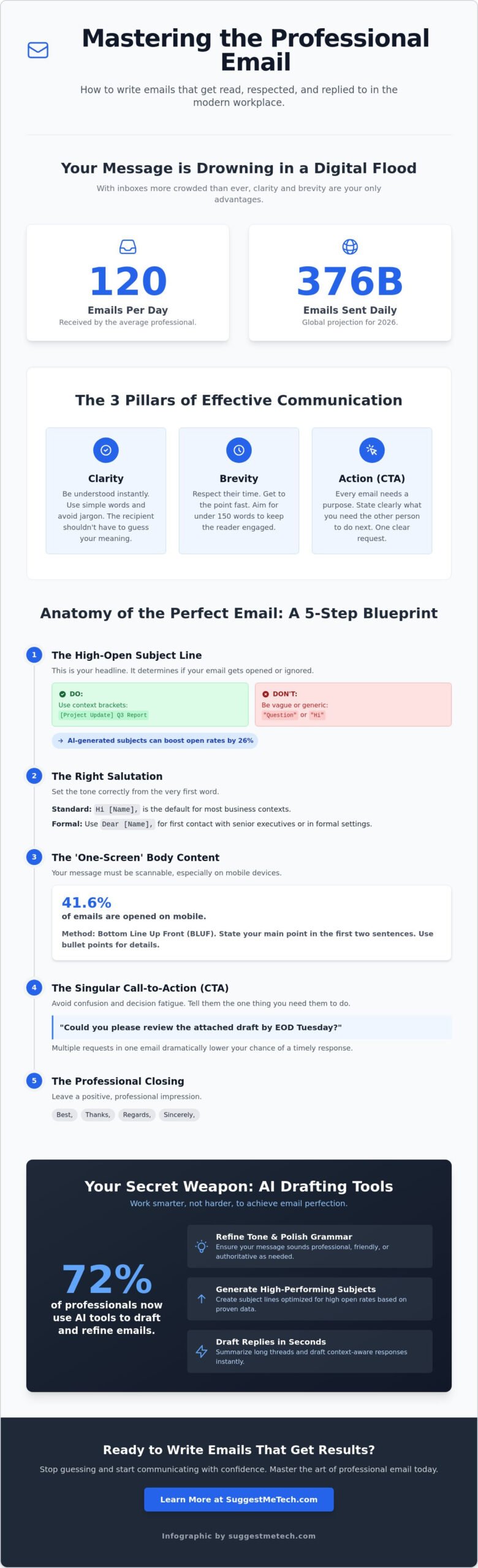
To succeed, your messages must stand on three pillars. First is clarity; the recipient shouldn’t have to guess what you mean. Use simple words and avoid jargon. Second is brevity; with the average person receiving 120 emails daily, you need to get to the point fast. Third is the Call-to-Action (CTA). Every email should clearly state what you need the other person to do. These principles align with the long-standing rules of netiquette, which emphasize respect and efficiency in digital spaces. Following these guidelines ensures your digital footprint remains professional and productive.
The Anatomy of a Professional Email
The structure of your email determines if it gets a reply or gets deleted. Every effective message follows a specific blueprint:
- Subject Line: This is your headline. It dictates the open rate and should be descriptive yet punchy. AI-generated subject lines can outperform human-written ones by 26%, but they must accurately reflect the content.
- Salutation: Use this to set the tone. “Hi [Name]” is the 2026 standard for most business contexts.
- The Body: This is where the core information lives. Aim for under 150 words to keep the reader engaged, especially since mobile devices account for 41.6% of all opens.
- Closing: A simple “Best” or “Thanks” ensures you leave a positive impression without sounding stiff.
Formal vs. Semi-Formal: Choosing Your Register
Choosing the right “register” is a key part of how to write a professional email. Traditional formal language remains the gold standard for legal matters, academic submissions, or your first contact with a senior executive. However, semi-formal communication has become the default for daily work with colleagues and established clients. The tech industry, in particular, favors this direct style. A smart strategy is to mirror the recipient’s tone. If they use your first name or a casual sign-off, it’s a clear signal to follow suit. Just stay organized; a friendly tone never excuses a messy structure.
The 5 Essential Components of Every Email
Writing a great email isn’t magic. It’s a formula. If you want to master how to write a professional email, you must treat every message like a structured product with five distinct parts. Miss just one of these components, and your message likely ends up in the trash or remains unread for days.
Crafting High-Open Subject Lines
The subject line determines if the door even opens. Avoid one-word traps like “Hi” or “Question”. These look like spam or low-priority clutter. Instead, use brackets to provide instant context for the recipient. For a job application, a high-performing subject line hook includes the role, your name, and the date: [Job Application] Marketing Manager – Jane Doe – May 2026. This tells the recruiter exactly what’s inside before they click.
The ‘One-Screen Rule’ for Body Content
Choosing the right greeting is a small but vital step in learning how to write a professional email that builds rapport. For most 2026 business interactions, “Hi [Name]” works perfectly. If you are reaching out to a C-suite executive for the first time, “Dear [Name]” remains the safer bet. You can find more nuance on these conventions in the Purdue OWL guide to email etiquette.
The “One-Screen Rule” is non-negotiable in a mobile-first world. With mobile clients responsible for 41.6% of email opens as of May 2026, your message must be readable without scrolling. Front-load your most important information in the first two sentences. This is called the “Bottom Line Up Front” (BLUF) method. If you have complex details, use bullet points. They break up the wall of text and make the information scannable for busy professionals.
Your Call to Action (CTA) should be a single, clear request. Don’t ask for three things at once. If you need a meeting, ask for the meeting. If you need a file, ask for the file. Multiple requests lead to decision fatigue and significantly lower your response rates. Recipients often delay replying to complex emails because they don’t have time to address every point immediately. A single CTA respects their schedule and gets you an answer faster.
Finally, close with a professional sign-off like “Best” or “Thanks”. Pair this with an automated signature that includes your name, title, and direct contact details. This provides all the necessary info without cluttering the body of your message. For more tips on optimizing your digital workflow, check out our latest tech guides and reviews to find the best communication tools for your team.
Leveraging Tech: AI and Tools for Better Emails
Technology has transformed the daily grind of managing an inbox into a high-speed, automated workflow. By May 2026, statistics confirm that 72% of professionals use AI to assist with drafting or editing their messages. It’s no longer just about catching typos. Modern software helps you navigate the complex social dynamics of the digital office. If you’ve ever struggled with how to write a professional email after a frustrating meeting, AI can act as a buffer. You can feed a blunt, emotional draft into a tool and ask it to “refine for a collaborative and respectful tone.”
Despite these advancements, the human element remains the most important part of the process. You’re still responsible for the final “send.” AI might get the structure right, but it can’t always account for the specific history you have with a colleague. For a reliable look at the core mechanics of effective communication, Boise State University’s Writing Center provides a great baseline for the elements every message needs. Combining these foundational rules with modern tech creates a communication style that is both efficient and authentic.
Using AI to Draft and Refine
Tools like alfred_ ($24.99/month) or Fyxer (starting at $18/month) are perfect for summarizing massive threads. Instead of digging through a dozen replies to find a deadline, you can ask the AI to “extract the key dates and deliverables.” This is a massive time-saver. When learning how to write a professional email in this new era, use these prompts to your advantage:
- “Summarize this thread into three bullet points.”
- “Shorten this draft to under 150 words while keeping the request clear.”
- “Rewrite this for a recipient who prefers direct, semi-formal communication.”
Just remember to always human-edit the output. AI-generated text can sometimes feel sterile or overly repetitive. Adding a quick personal detail ensures your message feels genuine and builds a real connection with the recipient.
Essential Email Extensions for 2026
Extensions give your inbox superpowers. Tracking tools found in Superhuman ($25-$30/month) or MailMaestro ($12/month) show you when a recipient has engaged with your content. This helps you time your follow-ups perfectly. If you see an open but no reply after 4 hours, you know they’re interested but likely busy. Managing email fatigue is also about maintaining your tools. If your mobile mail app is lagging or failing to sync properly, it’s usually a cache problem. You can quickly learn how to clear cache on iPhone to resolve these performance issues. Pair this with scheduling tools like Reclaim AI to ensure your messages land when the recipient is most likely to see them, keeping you ahead of the 120 emails they receive every day.
Step-by-Step: Writing Your Email from Scratch
Before you type a single character, ask yourself if an email is the right tool. In 2026, we use instant messaging for quick “yes” or “no” answers. Email is reserved for detailed requests or when you need a paper trail. If you decide to proceed, your first task is to identify your one specific goal. What is the single outcome you need? Having this clarity prevents you from writing a rambling message that gets ignored. Learning how to write a professional email starts with this mental preparation.
Step 1-3: Preparation and Drafting
When you start drafting, skip the subject line. It’s much easier to summarize a message after you’ve written it. Start with the salutation. While we’ve discussed the shift toward semi-formal tones, “Hi [Name]” remains the safest bet for daily work. Follow this immediately with your reason for writing. Don’t bury the lead under pleasantries. Use the inverted pyramid style by putting the most critical information in the first paragraph. This ensures that even if the recipient only reads the preview on their lock screen, they understand the urgency.
Step 4-5: The Final Polish
Reviewing your work is where you eliminate clutter. Words like “just,” “really,” and “very” weaken your message. Switch passive voice to active voice to sound more confident. Instead of saying “the report was sent by me,” say “I sent the report.” This small change makes you sound more authoritative and direct. It’s a key part of how to write a professional email that commands respect.
The “Out Loud” test is your best defense against sounding rude or stiff. If you read your email aloud and it feels awkward, it will feel awkward to the reader. Next, verify your sender details. Using a professional domain name in your “From” field is essential for credibility. An email from a generic provider often triggers spam filters or looks amateur. Finally, double-check that you’ve attached any mentioned files and spelled the recipient’s name correctly. These small details show you’re a professional who pays attention to detail.
For more advice on building your digital brand, check out our latest business communication guides. Once you hit send, set a reminder to follow up if you don’t hear back within the 24 hour standard window. This ensures your projects stay on track without you appearing impatient.
Professional Email Etiquette and Common Pitfalls
Mastering the mechanics of how to write a professional email is only half the battle. The other half is navigating the unwritten social code of digital communication. Etiquette isn’t about being fancy; it’s about being predictable and respectful. In an era where 99% of users check their inbox daily, your ability to follow these norms determines whether you’re seen as a leader or a nuisance. Misusing a single button, like “Reply All,” can trigger a chain reaction that wastes hours of collective productivity across an entire department.
Response times have also tightened. For internal or non-urgent external messages, the 24-hour rule remains the standard. However, for client-facing roles, expectations in 2026 have shifted toward a 2 to 4 hour window. If you can’t provide a full answer within that time, send a “holding email” to acknowledge receipt. This builds trust and prevents the recipient from sending follow-up pings that further clutter your inbox.
The CC and BCC Decision Matrix
The “CC” field is for visibility, not for performing work. Use it to loop in a manager when a project reaches a milestone or when they specifically requested to stay informed. Be careful not to use it as a passive-aggressive way to “tattle” on a slow colleague; this burns bridges quickly. Use “BCC” for large group announcements to protect the privacy of your recipients. This prevents everyone’s email address from being exposed to the group and stops a “Reply All” apocalypse before it starts. If you need to hand off a conversation, introduce the new person in the “To” field, move the original sender to “CC,” and clearly state that you are stepping out of the thread.
Building Credibility with a Professional Setup
Your “From” field is your first impression. Using a generic @gmail.com or @yahoo.com address for business suggests you’re a hobbyist rather than a professional. It also makes it harder to maintain a spam complaint rate below the 0.3% threshold required by major providers like Google and Microsoft. A custom branded address is a non-negotiable part of your professional identity. It signals that you have a verified, legitimate presence in your industry.
Setting up this infrastructure is easier than it sounds. If you’re just starting out, you can learn the basics of digital presence in our guide on how to start a blog. For those ready to secure a custom address immediately, a GoDaddy email setup through a reliable host is often the fastest path. Once your technical foundation is solid and you’ve mastered how to write a professional email with the right tone, you’ll find that your response rates and professional influence will grow naturally.
Finally, handle “angry emails” with extreme caution. If a message makes your blood boil, use the “Out Loud” test mentioned in the previous section. If it sounds aggressive when spoken, don’t send it. Wait at least one hour before replying. This cooling-off period allows you to pivot from an emotional reaction to a functional, solution-oriented response that protects your reputation.
Take Command of Your Digital Communication
Mastering how to write a professional email is about more than just following a template. It’s about respecting the time of the 4.73 billion email users worldwide. By focusing on the “One-Screen Rule” for mobile users and using AI to refine your tone, you’re already ahead of the curve. Keep your requests singular. Use descriptive subject lines. These small habits maintain the 2 to 4 hour response rates we discussed earlier.
Professionalism also requires the right technical foundation. As a recipient of the Editor’s Pick for small business tech, SuggestMeTech provides practical advice for the 2026 digital economy that helps over 50,000 readers monthly. If you’re ready to upgrade your image, check out our top-rated web hosting picks for 2026 to secure a professional email address. A custom domain is the single most effective way to build instant credibility with clients and colleagues alike.
You now have the framework to hit “send” with total confidence. Start applying these steps to your very next message and watch your professional influence grow.
Frequently Asked Questions
How do I start a professional email if I don’t know the person’s name?
Use a team-based greeting like “Hi [Department] Team” or a simple “Hello.” Avoid the outdated “To Whom It May Concern,” as it feels impersonal in 2026. If you’re applying for a job, try to find the hiring manager’s name on LinkedIn first. Researching the recipient shows you’ve put in the effort. A collective greeting is always better than a stiff, generic phrase.
Is it okay to use emojis in a professional email in 2026?
Use emojis sparingly and only after the other person has used one first. While business culture is more relaxed, emojis can still be misinterpreted in first-time outreach. Stick to the classic smile or a thumbs-up for internal threads with colleagues you know well. Never use them in formal legal or financial correspondence where clarity is the only priority.
What is the best professional sign-off? Is ‘Best’ or ‘Sincerely’ better?
“Best” is the most versatile sign-off for modern business. It strikes the perfect balance between friendly and professional. “Sincerely” is now reserved for highly formal academic or legal documents. If you’ve learned how to write a professional email that builds rapport, a simple “Thanks” or “Best” feels much more natural to the recipient and matches current workplace standards.
How long should a professional email be?
Keep your email under 150 words whenever possible. With 41.6% of emails opened on mobile devices, long paragraphs often go unread. Aim for the “five-sentence rule” to ensure your message fits on one smartphone screen. If you need to share more data, attach a document instead of cluttering the body. Shorter emails see significantly higher response rates than long-form messages.
How do I follow up on a professional email without being annoying?
Wait exactly three business days before sending your first follow-up. Use a new subject line like “Following up on [Topic]” to stay organized. Keep the message brief and reiterate your single Call to Action. This approach shows you’re organized without appearing desperate to a busy recipient who likely receives 120 emails every day. Persistence is good, but respect their schedule.
Should I use ‘Sent from my iPhone’ in my mobile signature?
Delete the “Sent from my iPhone” signature immediately. It suggests you didn’t take the time to set up a proper professional signature. Instead, use a clean, automated signature that includes your name and title. This ensures your how to write a professional email strategy remains consistent across all your devices. A professional signature builds trust and provides necessary contact details automatically.
What should I do if I sent an email with a major typo or the wrong attachment?
Send a brief correction email immediately if the mistake is significant. Don’t over-apologize; just provide the correct information or the right attachment. Use a subject line like “Correction: [Original Subject]” so the recipient sees it right away. Most professionals appreciate the quick fix, especially if it saves them from looking at the wrong data or a broken link.
How do I write a professional email to a professor vs. a hiring manager?
Use formal titles like “Dear Professor [Last Name]” for academic settings. For a hiring manager, “Hi [Name]” is usually appropriate in the tech and startup sectors. Professors often value traditional hierarchy and formal address. Hiring managers prioritize functional clarity and directness. Always match the level of formality found on the organization’s public website or the specific job listing you’re targeting.

