
A smarter home doesn’t start with a cart full of gadgets. It starts with a routine you want to make easier, such as turning off forgotten lights or adjusting the temperature before bed. Building a smart home on a budget can feel confusing when devices use different ecosystems, compatibility standards are unfamiliar, and low upfront prices may hide ongoing costs. A little planning helps you avoid buying gear that doesn’t work together or solve a real need.
This guide will help you choose a useful first device, set a spending limit, and build a setup that can grow with your household. You’ll learn how to compare common starting points, understand how platforms and standards such as Matter fit together, and spot costs that can continue after purchase, including subscriptions. The focus is practical value, not filling every room with connected devices. Start with one everyday problem, then add technology only when it makes the solution more convenient.
Quick Answer
Building a smart home on a budget means starting with one recurring household task, then choosing a compatible device that solves it without unnecessary hubs, accessories, or subscriptions. Set a spending limit, check the device’s ecosystem and network requirements, test the routine, and expand only when another clear need emerges.
Key Takeaways
- Building a smart home on a budget works best when each purchase supports a clear household need.
- Choose a compatible ecosystem early to make future additions simpler and reduce the risk of replacing devices.
- Compare smart bulbs, plugs, sensors, and hubs by usefulness and setup needs, not just upfront cost.
- Set a spending limit before browsing and account for accessories that may be needed to make devices work.
- Keep the system useful over time by maintaining account security and removing automations that no longer serve you.
What Does Building a Smart Home on a Budget Actually Involve?
Building a smart home on a budget means weighing a device’s everyday usefulness against its full cost of ownership. That includes the purchase price as well as any subscription, hub, or connectivity requirement. Planning around a specific task makes it easier to decide which features are worth paying for and which are optional.
Some devices connect directly to a home network, while others need a compatible hub to communicate with the app or platform you use. Certain features, such as saved video, may also require a subscription. The Smart Home Overview provides broader context on connected-home technology and its components.
Start with a recurring household task, because its frequency makes the benefit easier to judge. Consider how often the inconvenience occurs and whether a device would reliably make it easier to manage. This gives you a practical way to assess whether a purchase earns a place in your setup.
Which everyday routines are worth automating first?
Look for repeated tasks that cause friction, then match each one to a simple function:
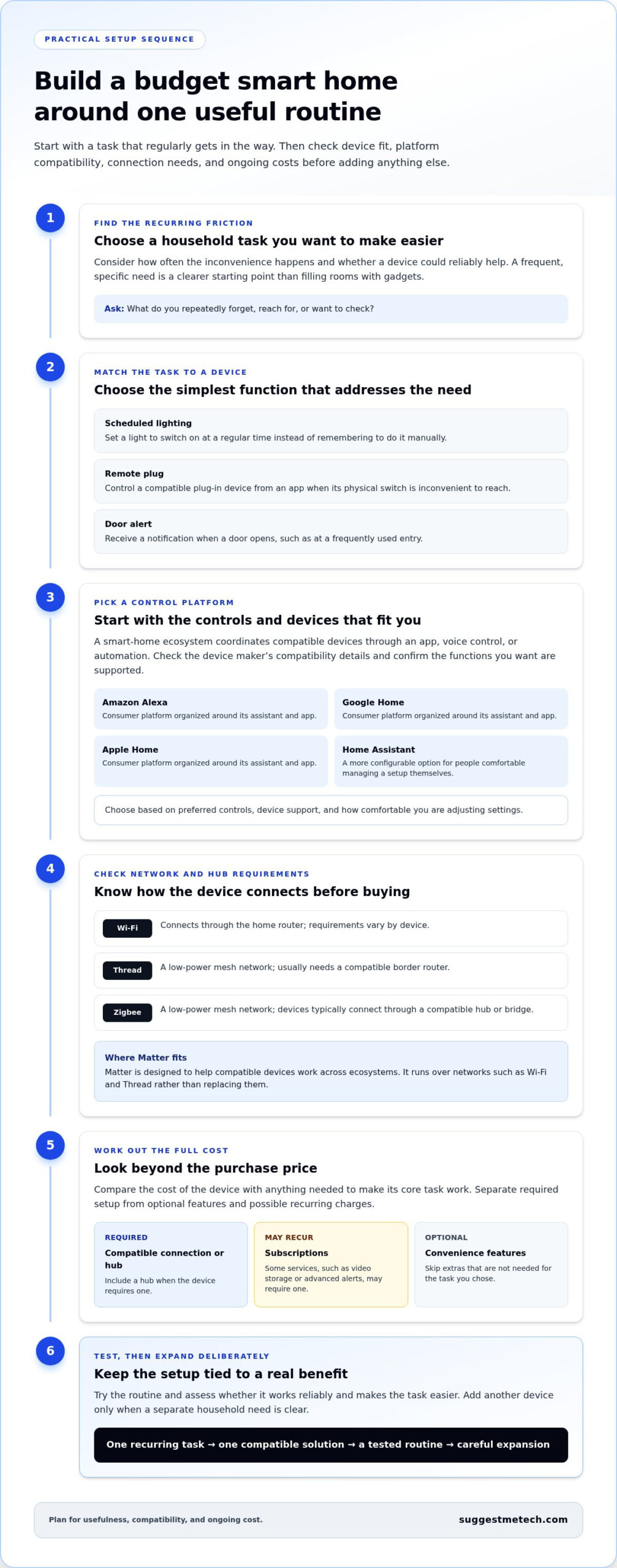
- Scheduled lighting: Set a light to switch on at a regular time, so you don’t have to remember to do it manually.
- Remote plugs: Control a compatible plug-in device from an app when its physical switch is inconvenient to reach.
- Door alerts: Get a notification when a door opens, which can help you notice activity at a frequently used entry.
The right choice depends on your household’s habits. A device that solves a frequent inconvenience may be more useful than several that rarely affect your day.
What can make a low-cost setup more expensive later?
A device may cost more to use if it needs a separate hub, doesn’t work with your existing ecosystem, or relies on a subscription for a feature you want. Replacing an incompatible purchase can also add avoidable expense. Before buying, separate what’s essential for the device’s core task from features that are simply convenient.
- Essential needs: A compatible connection or hub, if the device requires one.
- Possible recurring costs: Subscriptions for services such as video storage or advanced alerts.
- Optional extras: Features that aren’t necessary for the task you’ve chosen.
Review setup requirements and subscription terms before purchase. This helps you compare the likely ongoing costs with the device’s practical benefit.
How Smart-Home Ecosystems and Connectivity Shape Your Choices
A smart-home ecosystem is the platform or assistant that coordinates compatible devices through an app, voice control, or automation. Choosing one gives you a shared way to manage devices, but it doesn’t guarantee that every product will work with it. Check device and controller compatibility before building out your setup.
Connectivity matters too. Wi-Fi, Thread, and Zigbee are different ways devices communicate, and each can affect whether you need extra equipment. Matter is a separate smart-home standard designed to help compatible devices work across ecosystems. It runs over networks such as Wi-Fi and Thread rather than replacing them.
How should beginners compare smart-home ecosystems?
Start with the control method you already prefer, then compare device support and hub requirements. Amazon Alexa, Google Home, and Apple Home offer consumer platforms organized around their respective assistants and apps. Home Assistant is a more configurable option for people comfortable managing a setup themselves. The best fit depends on your preferred controls, devices, and willingness to adjust settings.
Compatibility isn’t universal, even within a familiar brand. Before buying, check the device maker’s current compatibility details and confirm that the model supports the functions you want in your chosen platform.
What do Wi-Fi, Thread, and Zigbee mean at home?
Wi-Fi connects devices through the home router, much like phones and computers. Thread and Zigbee are low-power wireless networks commonly used by smart-home devices. They can pass messages between nearby devices in a mesh, where devices help extend communication through the home. Thread usually needs a compatible border router, while Zigbee devices typically connect through a compatible hub or bridge.
In a small apartment, a Wi-Fi device may be straightforward if it works with your network and preferred app. A Thread sensor could suit someone building around a compatible border router, while Zigbee may make sense for someone who already has a suitable hub. Requirements vary by device and platform.
| Connection | Typical setup needs | Strengths | Suitable for |
|---|---|---|---|
| Wi-Fi | Home router; requirements vary | Uses familiar home networking | People who want to connect devices directly to their existing network |
| Thread | Compatible Thread border router | Low-power mesh networking | People choosing Thread-compatible devices and controllers |
| Zigbee | Usually a compatible hub or bridge | Low-power mesh networking | People whose existing setup already supports Zigbee |
Check compatibility before buying a second device, because the first device’s platform and network requirements can limit what you add next. Matter 1.6, released in June 2026, adds features including Joint Fabric for multi-ecosystem management, but support still depends on each device and controller. When building a smart home on a budget, check the specific model’s current requirements before purchase. Explore smart-home technology guides to compare device types and setup considerations.
Which Smart-Home Devices Offer the Most Value for a Tight Budget?
The best-value smart-home device is the one that fixes a repeat inconvenience without requiring extra equipment you don’t need. Smart bulbs and plugs are common starting points, while sensors and hubs are useful when an automation needs a trigger or a particular connection. Compare the practical benefit, setup effort, compatibility, and added requirements before choosing.
The table summarizes typical trade-offs. Exact features vary by device, so check what each model needs to connect and perform the task you have in mind.
| Device type | Everyday benefit | Setup and possible needs | Best for, or unnecessary when |
|---|---|---|---|
| Smart bulbs | App-based or scheduled control of compatible lights | Install in a compatible fixture; some models need a hub | Best for changing how a specific lamp or room is controlled. Unnecessary if existing switches already meet your needs. |
| Smart plugs | Add remote control or schedules to compatible plug-in devices | Plug in, connect to the network or hub as required, and check device compatibility | Best for a lamp or other suitable device with a physical on-off switch. Unnecessary for appliances that shouldn’t be remotely switched. |
| Sensors | Trigger an alert or action when a condition changes | Pair with a compatible platform; some require a hub or bridge | Best when an event, such as a door opening, should trigger a response. Unnecessary without a clear action to trigger. |
| Central hub | Connects or coordinates certain compatible devices | Requires compatible devices and a suitable connection to the home network | Best for setups that depend on hub-connected devices or shared control. Unnecessary if chosen devices connect directly and work as intended. |
Are smart bulbs or smart plugs a better first purchase?
Choose a smart bulb if you want to control a particular light independently, such as dimming a reading lamp from an app. Check that the bulb fits the fixture and has the features you need. Also consider how the wall switch is used, since switching off a smart bulb at the wall can affect app-based control. A smart plug may suit a plug-in lamp you want to schedule, but it won’t make every appliance suitable for remote switching.
Neither category wins by default. Pick the one that solves the clearest household routine, then confirm its platform and connection requirements before buying.
When do sensors or a hub earn a place in the setup?
A sensor detects a change, such as movement or a door opening, and can prompt a compatible system to send an alert or turn on a light. It adds value when that trigger solves a specific problem. If no useful action follows the detection, the sensor may add setup effort without improving daily use.
A hub earns its place when a device needs one to connect or when you want compatible devices coordinated through it. When building a smart home on a budget, add a sensor or hub only after confirming that the planned routine depends on it.
How to Build a Smart Home on a Budget, Step by Step
A practical smart-home plan turns a household routine into a small, compatible setup that you can test before expanding. Set a spending limit before browsing, include any required hub or accessories in that limit, and add devices only when they improve the task. This staged approach keeps purchases tied to real needs.
- List the routines you want to improve. Write down the task, the action you want a device to take, and the room involved. For example, note that you want a light to switch on at a regular time in the entryway. A clear task makes it easier to compare devices based on usefulness rather than features you may never use.
- Choose an ecosystem. Decide which app or assistant you want to use to control devices. Consider the phones and platforms your household already uses, along with the types of devices you might add later. This gives you a starting point for checking compatibility.
- Check requirements before buying. Confirm that the device works with your chosen ecosystem, network, and phone. Look for any hub, bridge, or accessory it needs, and check whether the routine depends on a subscription. Include necessary extras in your spending limit rather than treating them as afterthoughts.
- Start with one device category. Choose the simplest device that can carry out the task. Avoid buying several items at once. If setup is difficult or the routine doesn’t help, you can adjust your plan before committing to more equipment.
- Test, then review. Use the first routine in everyday conditions. Check whether it works when expected, whether household members can control it easily, and whether it saves effort. Keep what helps; revise or remove what doesn’t before expanding.
How can you plan a compatible starter setup?
Make a short checklist before comparing options: the household task, the desired action, the room, and who needs to use the control. Then compare the device’s ecosystem, network, hub, and phone requirements with your existing setup. Start with one category and give the routine a fair test. This keeps compatibility checks focused on what you intend to do.
How can renters and homeowners adapt the plan?
Renters can prioritize removable devices and setup choices that don’t require permanent changes, while considering any household restrictions that apply. Homeowners can often begin with simple plug-in or app-based devices, but should distinguish those from changes involving fixed wiring or other professional work. Don’t assume permissions, wiring, or local requirements are the same in every home.
Buy for a defined task, not a discount. A low-priced device still adds cost if it doesn’t fit your setup or solve a real problem. For practical technology comparisons, explore SuggestMeTech buying guides before deciding what to add next.
Making a Budget Smart Home Useful, Secure, and Expandable
A smart-home setup stays useful when its routines continue to solve everyday problems, its accounts and devices receive basic care, and new additions work with the system you already have. Review settings occasionally, remove access that’s no longer needed, and expand only when a clear household need points to a practical next step.
What basic security habits should smart-home users follow?
Connected devices rely on accounts, apps, and a home network, so straightforward upkeep matters. Use a unique password for each smart-home account and enable available protections such as multifactor authentication. Keep device software and companion apps updated through the manufacturer’s app or official app store, and review account access when someone no longer needs control.
- Secure accounts: Use unique passwords and turn on additional account protections when available.
- Install updates: Apply software and app updates through official channels to receive current fixes and improvements.
- Review access: Remove old household accounts and check which people or devices can control the system.
- Maintain the network: Use a strong Wi-Fi password, keep router software current when updates are available, and avoid sharing network credentials more widely than necessary.
These habits help keep access manageable without treating ordinary device use as a reason for alarm. They also make it easier to identify which account or device to review if you change phones, update your network, or stop using a product.
How can you expand without replacing your starter setup?
Return to your original task list before considering another device. If a routine still causes friction, decide whether a new device would address it or whether a small setting change would be enough. For example, a lighting schedule that runs at the wrong time may need an adjustment, not another device.
Before adding equipment, check that it works with your existing ecosystem and network, and note any hub or accessory it requires. Add one new device at a time, then test how it behaves alongside the setup you already use. This makes it easier to spot compatibility or setup issues before adding more complexity.
Review automations periodically, too. A sensor alert that was useful during one season may become unnecessary, while a schedule may no longer match the household’s routine. Delete or revise what no longer helps. Building a smart home on a budget is an ongoing process of choosing, testing, and keeping only what earns its place.
For your next step, explore a practical technology guide that answers a specific question, such as how a device category works or which compatibility details to compare. SuggestMeTech publishes technology reviews and guides to help readers compare options and make informed decisions. Choose a guide that relates to the need you’ve identified, then use its advice to make a considered addition rather than expanding just for the sake of it.
Let Your Smart Home Grow With Your Needs
Your first setup doesn’t need to be the final version. Treat it as a starting point: notice what feels easier, what still takes effort, and how your household’s routines change. That record can guide your next decision and help keep building a smart home on a budget focused on real needs rather than unused features.
Before adding anything, identify the next task you want to improve. A useful system grows at a pace that suits your home, comfort with technology, and spending priorities. If your needs change, your setup can change with them.
For your next device decision, use technology reviews and comparisons that focus on practical reader needs. Explore more practical technology guides to find clear information for the question you’re considering now.
Start with what would make daily life a little simpler, and let that guide what comes next.
Frequently Asked Questions
Can you build a smart home on a small budget?
Yes, building a smart home on a small budget is possible if you focus on one or two tasks instead of trying to automate every room. Start by deciding what you want a device to do, then consider whether it requires a controller, accessories, or a paid service. For example, a single scheduled light may be enough to test whether app-based control suits your household before you expand.
What is the cheapest way to start a smart home?
The cheapest approach is usually to begin with one device that works with equipment and controls you already have. Before buying, see whether you can use your existing phone or voice assistant to manage it, and compare the device’s basic functions with any paid features. A smart plug or bulb may be a manageable first step, but only if it suits the task and its connection requirements.
Do all smart-home devices work together?
No, compatibility depends on the device, the control platform, and sometimes the specific features you want. A product may connect to an ecosystem but not support every function through it. For example, basic on-off control might be available while a specialized setting is limited to the manufacturer’s app. Check compatibility information for the exact model and desired features before adding it to your setup.
Is a smart-home hub necessary?
No, a hub isn’t necessary for every smart-home setup. Some devices connect through a home Wi-Fi network and can be controlled directly from an app, while other devices require a compatible hub or bridge. A hub may also be built into equipment you already own. Check each device’s setup requirements so you don’t buy a separate controller that your planned setup doesn’t need.
What should I buy first for a smart home?
Choose a first device based on a task you want to make easier, not on which category seems most advanced. Think about who will use it and how they prefer to control it. If household members mainly use a wall switch, for instance, consider whether app-based control will be convenient for everyone. A device that fits daily habits is more likely to remain useful than one bought for novelty.
Are budget smart-home devices secure?
A low price alone doesn’t determine how secure a device is. Before buying, look for clear information about software updates, account protections, and what data the device collects. For a camera or voice-enabled product, review privacy settings and decide whether its recording or listening features fit your household. Keep apps current, use a distinct password for each account, and remove access for people who no longer need it.

