

Avira Free Security combines antivirus protection with privacy and device tools. Those extras can be useful, but they serve different purposes from malware protection. This avira antivirus review looks beyond the feature list to help you assess Avira’s protection evidence, usability, compatibility, and limitations.
Whether Avira is a good fit depends on your devices and the tools you need. This review separates product features from independent test results and editorial guidance, so you can compare free and paid options without treating a long feature list or a single score as a complete verdict.
Quick Answer: Avira Antivirus Review
Avira is worth considering if you want antivirus protection with optional privacy and device tools. Independent tests report strong protection in some assessments, but performance results vary. Compare the features, support, device coverage, and limits of the specific plan you are considering, especially the free VPN’s monthly data allowance.
Key Takeaways
- This avira antivirus review separates threat protection from privacy and device-maintenance extras, helping you judge which tools you will actually use.
- Independent test results are useful evidence, but compare their dates, platforms, products, and measured categories.
- Compare Avira Free Security with paid options based on your devices and the additional tools you need.
- Consider practical trade-offs, including scan performance, VPN limits, and the support available to free users.
- Use the best-fit guidance to decide whether Avira suits your protection needs and platform.
What Avira Antivirus Protects Against, and What This Review Evaluates
Avira Antivirus is software designed to help detect and block malicious programs and other digital threats on a device. The safeguards available depend on the product, plan, operating system, and software version, so compare the specific offering with the devices you want to protect.
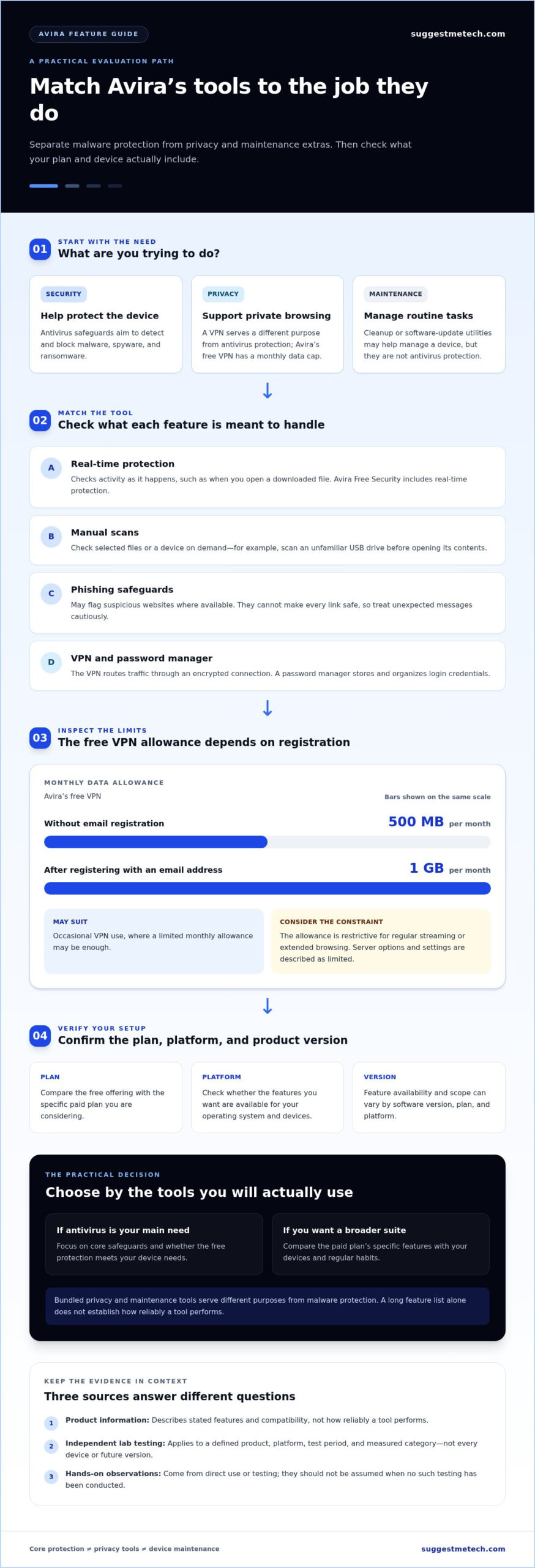
Antivirus protection is one part of Avira’s broader software offering. A VPN is intended to support private browsing, while maintenance utilities help manage a device. These tools serve different purposes and do not replace protection against malware. This review evaluates those extras separately from core security.
What does Avira Antivirus aim to protect against?
Malware is software designed to harm a device, steal information, or gain unauthorized access. Spyware secretly collects information, while ransomware locks or encrypts files and demands payment to restore access. These examples describe the threats antivirus tools aim to address, not a guarantee that every threat will be detected.
- Malware: Harmful software that may damage files or compromise a device.
- Spyware: Software that secretly tracks activity or gathers personal information.
- Ransomware: Malware that blocks access to files, often by encrypting them.
- Phishing: Deceptive messages or websites that try to trick people into sharing passwords or payment details.
Phishing is a type of deception, not a type of malware. A security product may offer web or phishing protection, but you should still treat unexpected links and messages carefully. Avira’s product materials describe real-time protection in its free security offering. Specific functions vary by plan and platform. For background on the company, see the Avira Wikipedia page.
How to read this Avira review
An antivirus review assesses how well a product fits real user needs by considering protection, usability, features, compatibility, and value. This avira antivirus review distinguishes product descriptions from independent test results and hands-on observations, since each type of evidence answers a different question.
- Product information describes features and compatibility stated by Avira. It explains what a tool is meant to do, not how reliably it performs.
- Independent lab testing reports results for a defined product, platform, and test period. Scores apply to those conditions, not every device or future version.
- Hands-on observations come from direct use or testing. They should not be implied when no such testing has been conducted.
Consider whether bundled tools solve a practical need or simply add complexity. Results and features can vary by operating system, subscription plan, product version, and test date. When comparing products, check that the relevant details match your setup.
Avira Features Explained: Which Tools Matter in Everyday Use?
Avira combines antivirus safeguards with optional privacy and device-maintenance utilities. Security tools aim to detect threats, while extras such as a VPN or system cleaner address other needs. Focus on which tools you will use and whether they are included for your plan and device, rather than counting features.
The CISA guide to antivirus software explains how antivirus programs help find and address malicious software. Avira Free Security includes real-time protection and extras with limits. The availability and scope of other tools depend on the plan and platform.
Core protection, scans, and phishing safeguards
Real-time protection checks activity as it happens, such as when you open a downloaded file. A manual scan checks selected files or a device on demand. For example, you might scan an unfamiliar USB drive before opening its contents. Neither function guarantees that every new or disguised threat will be detected.
Phishing safeguards address deceptive websites or messages that attempt to steal login or payment details. Browser protection may flag suspicious destinations where available, but it cannot make every link safe. Treat unexpected messages cautiously, even when security software is installed.
VPN, password manager, and other bundled extras
A VPN routes internet traffic through an encrypted connection and can be useful on public Wi-Fi. Avira’s free VPN has a data limit of 500 MB per month, or 1 GB per month after registering with an email address. That may be enough for occasional use, but it is restrictive for regular streaming or extended browsing. The VPN is also described as basic, with limited server options and settings.
A password manager stores and organizes login credentials, making it easier to use different passwords across accounts. Avira includes a password manager among its free tools, but a bundled tool is not automatically equivalent to a specialist product. Maintenance utilities, such as cleanup or software-update tools, may help if you prefer managing routine tasks in one place. They are not antivirus protection, and specific features vary by plan and platform.
Who benefits most from Avira’s feature mix?
If you mainly want antivirus protection, focus on the core safeguards and avoid paying for extras you will not use. The free offering may suit you if its protection and limited bundled tools meet your needs. If you want a broader suite, compare the specific paid plan’s features with your devices and regular habits.
- Basic needs: Decide whether free protection covers the devices and tasks you want to secure.
- Occasional privacy needs: The capped free VPN may work for brief use, but not continuous traffic.
- One-app convenience: Bundled password and maintenance tools may help if their capabilities fit your routine.
A security-suite extra is valuable when it solves a real need without being mistaken for comprehensive protection. That distinction matters when weighing Avira’s feature mix. For more help comparing software features, explore technology comparison guides.
How Strong Is Avira’s Protection? Reading Tests and Limitations
Avira’s results are encouraging overall, but they vary by assessment and category. Independent laboratory evaluations, controlled product tests, and editorial interpretation answer different questions. Compare the product, operating system, test period, and measured category rather than treating a single score as a universal prediction.
The table distinguishes reported findings from what each result can establish. Tests reflect defined conditions and cannot guarantee the same outcome on every device or against future threats.
What independent antivirus lab results can tell you
Independent security organizations assess protection software using their own methods. Evaluation programs report separate protection, performance, and usability scores. Cited detection and protection metrics measure online security under specific parameters. These measures are not interchangeable: a strong score in one area does not establish strength in another.
| Source and date | Platform and product | Measured area | Caveat |
|---|---|---|---|
| Independent Security Evaluation, June 2026 assessment | Windows 11, Avira | Protection 6/6; performance 4.5/6; usability 6/6 | Performance was lower than the other categories in this assessment. |
| Security Lab Assessment, 2026 assessment reported August 9 | Windows, Avira Internet Security 1.1 | Protection 6/6; performance 6/6; usability 5.5/6 | The report summary does not identify the precise test period. |
| Comparative Antivirus Research, fall 2025 | Platform and product version are not specified in the summary | 98.9% online detection; 99.99% online protection | These measures differ from standard lab scores. Platform and version details matter when comparing results. |
The different scores show why it is useful to look beyond an overall rating. In the June 2026 security assessments, Avira received different scores for protection, performance, and usability. If you are concerned about slowdowns, look at performance testing. If blocking threats is your priority, focus on protection results.
Performance, false positives, and practical limitations
A separate 2026 review reported a 99.96% malware detection rate and 12 false positives, meaning benign files were incorrectly flagged. The summary does not name the product version or platform, so treat the result as a limited snapshot rather than a direct comparison with the lab results above. Another 2026 test reported a 97% detection rate, illustrating how methods and samples can affect outcomes.
Reported resource use also varies by task. One assessment measured about 0.6% CPU use in the background, while other reviews described full scans as slower and more demanding. Hardware, settings, scan type, and software version can all affect an individual experience.
How Avira compares with other antivirus choices
If you are exploring different security solutions, platforms like Alternative Radar can help you discover software choices, but for a fair comparison, use results from the same testing body, period, operating system, and category. The Avira figures here do not establish which product performs better overall, and this SuggestMeTech review does not claim a direct hands-on comparison.
Antivirus test scores describe performance under specific conditions, not a guarantee of protection on every device. Weigh dated test evidence alongside usability and your own platform instead of relying on a single headline score.
Avira Free vs. Paid: Choose by Device, Needs, and Budget
Avira Free Security may suit someone seeking core protection and a small set of included tools. A paid plan may be more relevant if its specific extras fit your needs. Compare each plan with the devices you use and tools you already have rather than assuming that paying automatically means better value.
The table summarizes the available distinctions without assigning features to every paid tier. Product names, inclusions, device limits, and subscription terms can change, so use current plan details when comparing options.
| Option | Verified features or scope | Best suited to | Check before choosing |
|---|---|---|---|
| Avira Free Security | Real-time protection, a limited VPN, and a password manager | Someone who wants basic protection and may use a few included extras | Feature limits, platform availability, and whether the tools meet regular needs |
| Paid Avira plans | Paid offerings include products such as Antivirus Pro, Internet Security, and Prime; features vary by plan | Someone seeking particular additional tools or a broader suite | Exact inclusions, supported devices, renewal terms, and fit for your setup |
When Avira Free may be enough
The free option may be a reasonable starting point if you want real-time antivirus protection and do not need a full collection of paid tools. Its VPN and password manager can add convenience, but the VPN has a data limit, and free features should not be assumed to match paid versions. Free users rely on Avira’s knowledge base and community forums for support, rather than the phone and email support available to paying customers.
Consider how you use your devices. If you already have a password manager you trust and rarely use a VPN, those extras may not affect your choice. Check that Avira’s free protection supports the operating system you want to use.
When a paid Avira plan may make sense
Consider a paid subscription if a specific plan includes tools you will use or covers more of your devices. Compare the device allowance with your computers and phones, then confirm that the features you want are available on those platforms. Do not choose based on a plan name alone.
Review renewal terms and the complete feature list before subscribing. If another security or privacy tool already meets a need, a similar bundled feature may add little practical value. The best fit is the plan that fills a genuine gap, not necessarily the one with the longest feature list.
How Avira fits beside other antivirus options
Compare Avira with Bitdefender using consistent criteria: protection results from comparable tests, performance, usability, supported devices, plan inclusions, and renewal terms. Differences in platform or test date can make headline scores misleading. Read our antivirus software reviews to apply the same criteria to each option.
Use the findings in this avira antivirus review to narrow your choice by your actual needs, whether that is basic protection, particular suite tools, or coverage across devices. Then explore our security software comparisons to assess alternatives using the same priorities.
Avira Antivirus Verdict: Best-Fit Users, Drawbacks, and Next Steps
Avira is worth considering if its protection, tools, and device support fit your needs. Independent testing includes strong protection and usability scores, but results vary by test and category. Choose based on the features and platforms that suit you, not a single score or an extensive feature list.
This avira antivirus review draws on the reported lab results and product details covered above, not an unreported hands-on test. Plan inclusions, compatibility, and performance can vary by operating system, product version, and test date.
Avira may suit users who value these characteristics
Avira may fit people seeking core protection with optional tools in one suite, provided the relevant features are available for their devices and plan. Independent results support considering its protection, but differences across assessments mean they are not a guarantee of future outcomes.
- Basic protection: The free offering may suit users who want real-time protection and can work within the free tools’ limits.
- Bundled tools: Users who value an included VPN or password manager may appreciate having those utilities in the same software environment.
- Usability: AV-TEST reported strong usability scores in the cited Windows assessments. Those results apply to the products and test conditions assessed.
Consider these limitations before deciding
The extra tools are not substitutes for every dedicated privacy or password-management product, and the free VPN has a limited monthly data allowance. Free users also have fewer support channels than paying customers. Performance evidence varies by task and test conditions.
- Check that the features you want are included in your plan and available for your operating system.
- Compare test dates, platforms, and versions before relying on protection or performance results.
- Review current subscription and renewal terms before upgrading.
A practical checklist before installing or upgrading
A compatibility and setup check can help you avoid paying for tools you cannot use or installing overlapping security software. Avira’s listed compatibility includes Windows, macOS, Android, and iOS, but supported versions differ by platform. Match your device’s operating system with the current product requirements before installation.
- Confirm compatibility: Check the operating system and current Avira version for the device you plan to protect.
- Compare plan details: Verify included features, device limits, and renewal terms in the current plan information.
- Avoid overlapping protection: Review existing antivirus software before installing another real-time security product, and follow the products’ removal guidance.
Bottom line: Avira may suit users who want core antivirus protection or convenient bundled extras, as long as the plan and platform match their needs. If the tool limits or device requirements do not fit, compare alternatives using equivalent test evidence and features. Explore more independent technology reviews to weigh your options.
Choose the Protection That Fits Your Next Step
Before installing or upgrading, decide what you need your security software to do, then match that need to your devices and the tools you already use. A clear priority, such as protecting one computer or managing several devices, makes choosing easier than comparing feature lists alone.
This avira antivirus review separates product information from independent testing and editorial judgment, so you can weigh each type of evidence on its own. Product plans and software change, so revisit compatibility and inclusions when you are ready to choose. Any monetized links in the article should clearly disclose affiliate relationships, giving you context for evaluating recommendations.
The right option is the one that fits your setup without adding tools you do not need. If you are comparing options, explore more independent technology reviews and apply the same practical criteria to each one.
Frequently Asked Questions
These answers address common questions about Avira’s safety, coverage, performance, and subscription choices. Check current product details for your device before relying on a particular feature.
Is Avira Antivirus safe to use?
Avira is an established antivirus program, but no security app makes a device risk-free. Download it from Avira’s official website or a trusted app store, keep the software updated, and avoid running multiple real-time antivirus products at once because they can interfere with each other. Safety means assessing intended protections and available evidence, not treating installation as a guarantee against every threat.
Is Avira Free Antivirus enough for everyday protection?
Avira Free Security may be enough if your priority is basic antivirus protection and you are comfortable without some paid features and support channels. For example, someone who mainly browses familiar sites and already uses a separate password manager may not need a larger security suite. Check that the free version supports your operating system and covers the devices you want to protect. Your browsing habits and existing safeguards also affect whether it fits.
Can Avira detect ransomware and phishing attempts?
Avira’s antivirus protection is intended to identify malware, including ransomware, while phishing safeguards can help warn about deceptive websites. Detection depends on the threat, software version, settings, and platform, so neither capability means every attack will be stopped. A convincing fake delivery message, for example, may still persuade someone to enter a password. Avoid opening unexpected attachments, and visit important accounts through their official apps or saved bookmarks.
Does Avira slow down your computer?
Avira can affect performance, but the impact depends on your computer, settings, and the task being performed. Background protection may feel different from a full system scan, which can use more resources or take longer. If a scan coincides with video calls or other demanding work, run it at a less busy time. If slowdowns persist, check whether another security product is running and review Avira’s scan settings.
Is Avira better than Bitdefender?
The evidence here is not enough to declare one universally better. Compare results from the same testing organization, period, operating system, and category, then weigh the features and device coverage you will use. Someone who values bundled tools may prioritize different criteria from someone focused on core antivirus protection. Renewal terms and usability matter too, so decide based on your needs rather than a single score.
Does Avira work on Windows, Mac, Android, and iPhone?
Avira supports Windows, macOS, Android, and iOS, though system requirements and available features differ. The compatibility information for this review lists Windows 7 with Service Pack 1 through Windows 11, macOS 10.15 or later, Android 6.0 or later, and iOS 8 or later. Before installing, check the current requirements for your device and the Avira app you plan to use, since older systems may not support newer releases.
What happens when an Avira subscription expires?
What changes after expiration depends on the plan and its current terms. Do not assume every paid feature will remain available or that all protection will stop. Before the renewal date, review your Avira account or subscription notice for the end date, renewal status, and options. If you do not renew, check the app afterward to see which features remain active, then make sure your device still has suitable security protection.

