

What if a breach notice is genuine, but a follow-up message asking you to “secure” your account is a scam? It can be difficult to tell what was exposed or which warning to trust. Understanding what is a data breach and what to do if you’re in one starts with distinguishing confirmed exposure from a suspicious alert or another kind of cyber incident. A breach means information was accessed or disclosed without permission. A data leak may expose information through a mistake, while a phishing message may be an attempt to steal it.
It’s reasonable to worry about identity theft, financial loss, and what someone might do with your details. The right response depends on what was exposed: a compromised password calls for different steps than exposed payment or identity information. This guide explains how to assess a possible breach, verify a notice safely, and prioritize actions to protect your accounts and identity. You’ll also learn how to report suspected misuse and monitor for signs that your information is being used.
Quick Answer
If you’re affected by a data breach, verify the notice through the organization’s official website or app, then identify which information was exposed. Change affected and reused passwords, review account and payment activity, and follow official guidance for financial or identity information. Keep records, watch for follow-up scams, and report suspected misuse through appropriate official channels.
Key Takeaways
- Learn what is a data breach and what to do if you’re in one by identifying which information may have been exposed.
- Verify breach notices through the organization’s official website or a support channel you find independently.
- Secure the affected account or payment method through official settings and contact channels, not links in unsolicited messages.
- Match protective steps to the exposed data. A leaked password calls for different action than exposed identity or payment details.
- Keep notices and records, report suspected misuse through appropriate official channels, and watch for follow-up scams.
What Is a Data Breach, and What Information Can Be Exposed?
A data breach is an incident in which information held by an organization is exposed, changed, taken, or made unavailable outside its intended controls. It can involve digital records or physical documents and may result from malicious activity, human error, or lost equipment. The records involved, rather than a service outage alone, determine the risk to personal information.
“Breach” describes what happened to information, not necessarily what someone did with it. Personal details might be exposed without evidence of misuse. To understand what is a data breach and what to do if you’re in one, focus on the types of records involved and what the organization has confirmed.
What kinds of personal information might be exposed?
Exposed information can range from basic contact details to records that could help someone access an account or impersonate you. The categories depend on what the organization stored and which records were affected. A notice may identify one category, not an entire file.
- Contact details: Names, email addresses, phone numbers, or mailing addresses.
- Account credentials: Usernames, passwords, or security answers.
- Financial information: Payment card or bank account details.
- Identity information: Government identification numbers or details used to verify identity.
- Other sensitive records: Health, employment, or customer information.
These are possible categories, not an assumption about every incident. One organization might report exposure of email addresses and account credentials; another incident may involve a limited set of customer records. Use the organization’s notice to identify the data types it says were involved, and distinguish confirmed details from what remains unknown.
How is a data breach different from a cyberattack?
A cyberattack is a broad term for malicious activity directed at a computer, network, or online service. A data breach specifically involves information being exposed or affected. An attack can cause a breach, but it may also disrupt a service without revealing records.
For example, an attacker might overwhelm a booking website with traffic, preventing customers from making reservations. If the attack doesn’t expose or alter customer information, the disruption alone isn’t necessarily a data breach. A breach occurs if records are copied or made accessible to someone who shouldn’t have them. This distinction helps explain why an outage and a notice about exposed personal information call for separate assessments.
How to Tell Whether You May Be Affected by a Data Breach
A message claiming your information was exposed can be alarming, but an unexpected email or text isn’t proof of a breach. Separate a confirmed notice from a rumor, phishing attempt, or unusual account activity. Start by checking the claim through a trusted route.
An organization may contact affected people directly, but scammers can imitate those notices. An unfamiliar login or password-reset email may signal a problem without confirming that a company suffered a breach. Treat each clue as a reason to investigate, not as proof on its own.
How can you verify a breach notification?
Check the message for the organization’s name and the account or service it refers to. Don’t click unexpected links, open attachments, or provide passwords, payment details, or verification codes in response. Instead, use contact details or a website address you find independently, such as a saved bookmark or the organization’s official app.
- Navigate to the organization’s website yourself and look for a matching announcement or notice.
- Check the account’s official message center or statements for related communications.
- If the notice gives a phone number, compare it with contact information on the official site before calling.
A genuine organization may send a notice by email or post, but the message alone doesn’t establish that it’s authentic. Independent verification helps prevent you from sharing information with someone impersonating the organization.
What details should you look for in the notice?
Read the notice for what the organization knows, rather than assuming the worst or the best. It may describe when the incident happened, when it was discovered, and which information was involved. Keep a copy and note the organization, the date you received the notice, the stated data types, and any recommended actions.
- Incident timing: Record the exposure period or discovery date, if provided.
- Information involved: Note the categories the organization says may have been affected.
- Recommended steps: Save guidance about accounts, payments, or identity protection.
- Follow-up details: Keep official contact methods and watch for further updates.
If the notice leaves a key question unanswered, use a support channel you find independently to ask what’s known and whether further information will follow. Don’t rely on a forwarded screenshot or social media post as your only source; look for a statement from the organization itself. You can also explore practical technology guides for help evaluating suspicious digital messages.
Unexplained activity deserves attention, but it doesn’t confirm that a breach occurred. An unfamiliar purchase, login alert, or password-reset request could have another cause, or point to access to one account rather than a wider incident. Check the account through its official app or website, review recent activity, and contact the organization through a trusted channel if something looks wrong.
What to Do First After a Data Breach
If an account or payment method may be involved, first focus on limiting access and preventing further misuse. The right immediate steps depend on what the organization says was exposed. Use its official website, app, or independently located contact details, not links in unsolicited messages.
Start with the account or payment method most directly affected, then secure any connected accounts.
- Open the affected account or contact the payment provider. Go directly to the official app or website. If payment details may be involved, use the financial institution’s official contact information for guidance.
- Change exposed passwords. Use a trusted device you control, and choose a password you don’t use for other accounts.
- Update reused credentials. Change the same or similar password anywhere else you used it. Prioritize email and financial accounts that could help someone reset other passwords.
- Review account access. Sign out unfamiliar sessions if the service offers that option. Check that the recovery email address and phone number still belong to you.
- Turn on multifactor authentication. If available, this adds a sign-in check beyond your password. Store recovery codes or other account-recovery details somewhere secure.
Secure affected accounts and reused passwords
Change the password for the account identified in the breach notice, even if you haven’t seen suspicious activity. If you reused it, update it on every other service where it appears. Avoid small variations of the same password: a password exposed on one site may put accounts using similar versions at risk. Secure your email account promptly if its credentials were involved, since email can be used to reset other passwords.
Make these changes through official account settings, not a link in a text or email. Use a device you trust and keep your new credentials private. Multifactor authentication can add protection if someone has your password, but it doesn’t replace changing an exposed credential.
Protect payment methods and active sessions
If the notice names payment card or bank details, contact the relevant financial institution using the number on your card, a statement, or its official website. Review recent transactions and follow the institution’s instructions if you see activity you don’t recognize. The appropriate response depends on the payment method and information exposed, so use the institution’s guidance rather than assuming every card or account needs the same action.
For online accounts, review active sessions and remove devices or sign-ins you don’t recognize. Check recovery details too. An unfamiliar recovery email address or phone number could let someone regain access after you change your password.
Keep immediate security tasks separate from follow-up work. Once the affected account or payment method is secured, save the notice and relevant records. Reporting suspected misuse and monitoring for further activity are important, but they shouldn’t delay urgent changes to exposed credentials or payment access.
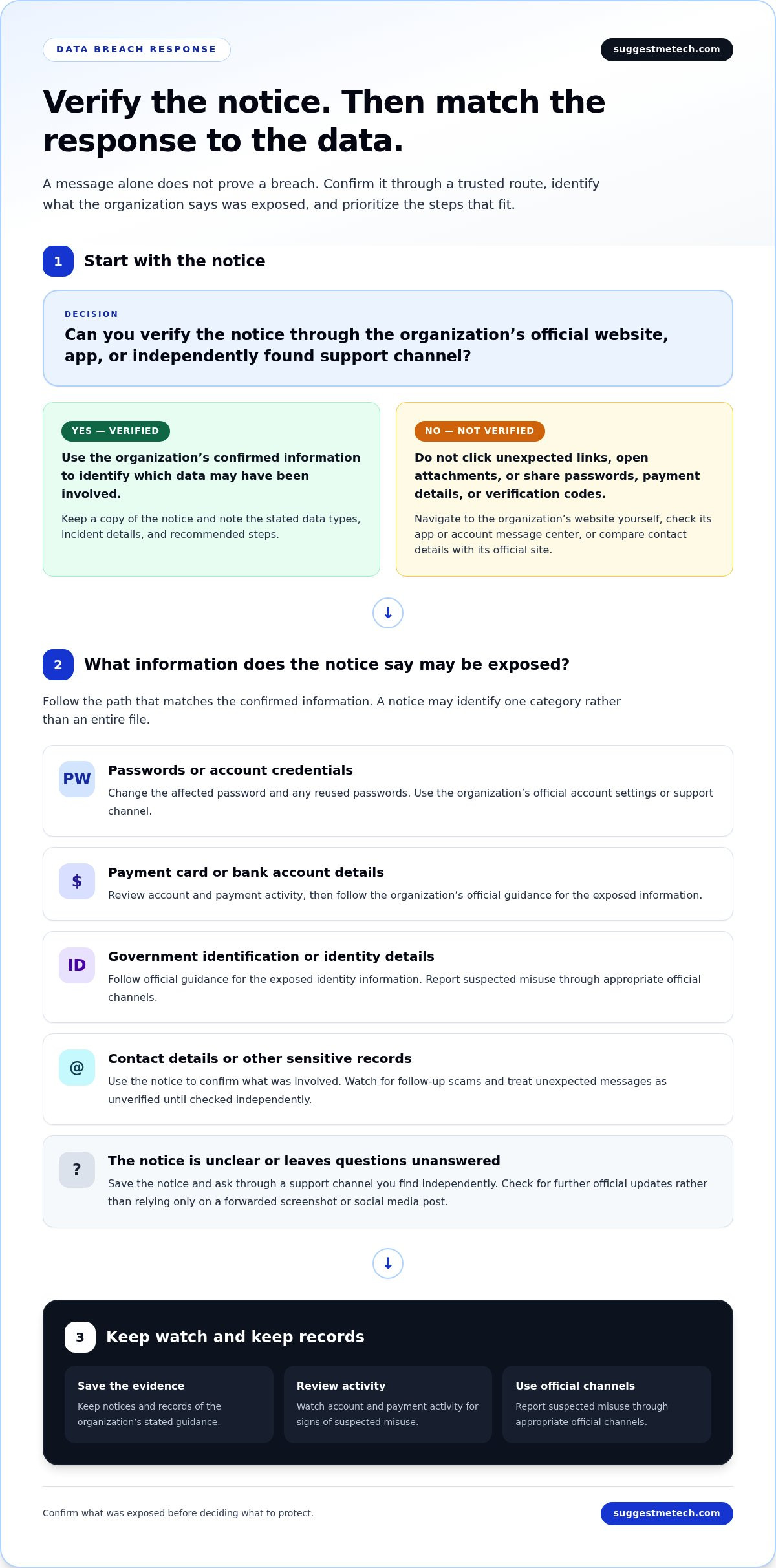
Match Your Next Steps to the Data That Was Exposed
The most useful response depends on which information the organization says may have been involved. Use the notice to choose proportionate steps instead of assuming every safeguard applies to every breach.
The table offers general guidance, not a guarantee against identity theft or future misuse. Follow instructions from the affected organization and any relevant financial institution, and adapt next steps to your circumstances.
| Information that may be exposed | Possible next steps |
|---|---|
| Email address, phone number, or mailing address | Watch for unexpected messages that use familiar details. Verify requests independently before sharing information or following links. |
| Username or password | Change the affected password and update any reused or similar credentials. Review account recovery details and sign-in activity. |
| Payment card or bank details | Check recent account activity and follow the relevant financial institution’s instructions if information may have been exposed or a transaction looks unfamiliar. |
| Government identification or other identity information | Follow the organization’s guidance and consult official local resources for identity-protection steps that apply where you live. |
| Health or other sensitive records | Review the notice for the types of records involved and any specific advice from the organization. Keep a copy for reference. |
If account credentials or contact details were exposed
Credentials can create risks beyond the affected service if you used the same password elsewhere. Update reused passwords, especially on accounts that control email or password recovery, and make sure recovery addresses and phone numbers are still yours. Treat unexpected verification codes and reset messages cautiously. Don’t share a code or follow a link just because a message includes your name or another familiar detail.
Contact details can also make scam messages seem more convincing. A caller or email sender might refer to the organization involved, but that doesn’t prove the request is genuine. Verify it through the organization’s official app or a website you navigate to yourself.
If financial or identity information was exposed
For payment information, follow the affected organization’s guidance and contact the financial institution through its official channels. Review statements or account activity for unfamiliar transactions or changes, and report concerns using the institution’s instructions. If identity information was involved, check official local guidance before taking steps that depend on your location. The right process can vary by jurisdiction and by the information exposed.
Organizations may share more details as an investigation progresses. Save the original notice and review later updates, since new information could change which actions are relevant. For more practical guidance on digital safety, explore our practical technology guides alongside the organization’s incident-specific advice.
Report the Incident, Avoid Follow-Up Scams, and Monitor Recovery
Keep a clear record of what happened and use reporting channels suited to the situation. A breach notice, suspected identity theft, and an unfamiliar transaction may need different responses. Asking the affected organization for clarification is different from reporting confirmed fraud; suspected misuse may need to be reported to a relevant financial institution or official agency.
Responding to a breach also means staying alert after the first account changes. Scammers may exploit concern about an incident by impersonating the affected organization and pressuring people to share credentials, verification codes, or payment information.
When should you report a suspected breach or misuse?
If you’re unsure what a notice means, contact the affected organization through a channel you locate independently and ask what information was involved and whether it has issued updates. If you find an unfamiliar transaction or believe someone is using your identity, contact the relevant financial institution or official reporting agency. The right route depends on your location and the type of incident, so don’t assume one country’s process applies everywhere.
In the United States, the Federal Trade Commission’s IdentityTheft.gov is an official resource for reporting identity theft and getting a personalized recovery plan. If you’re elsewhere, consult official government or consumer-protection resources for your location. Keep any report reference or case details with your records.
How can you reduce risk while the situation develops?
Keep copies of notices and messages, and note dates, account changes, conversations, and suspicious activity. Save transaction records if you’re disputing a payment. A timeline can help you explain what happened when speaking with an organization or reporting agency. Avoid sharing more personal information than needed through an unsolicited message or call.
- Don’t provide passwords or verification codes in response to unexpected requests.
- Be cautious of urgent demands for payment or messages claiming your account will be closed unless you act immediately.
- Check for updates through the organization’s official website, app, or account portal.
- Continue reviewing relevant account activity, and report new suspicious transactions through the appropriate official channel.
A genuine breach can lead to follow-up scams that borrow the organization’s name or details from the notice. Treat unexpected contact as unverified, even if the sender knows which company was involved. Instead of replying or using a message link, return to a trusted channel you already know or find independently.
There may not be a single moment when recovery is finished. Review official updates, keep your records together, and revisit the steps that match the information exposed. If you want to build your broader digital-safety knowledge, explore SuggestMeTech’s practical technology guides. Stay attentive, but let confirmed details and official guidance shape your next steps.
Build Habits That Make Future Incidents Easier to Handle
A breach can be a useful prompt to review how you manage important accounts, even after the immediate concern has passed. Keep recovery information current, use distinct passwords, and check account alerts through official channels. These routines can make it easier to respond calmly if another security notice arrives.
Knowing what is a data breach and what to do if you’re in one is part of making informed technology choices. SuggestMeTech publishes technology reviews, comparisons, and practical guides, with an editorial approach that considers evidence, usability, compatibility, and limitations.
Explore more practical technology guides to keep building your digital know-how. Take the next sensible step, stay attentive to reliable information, and handle the rest using confirmed details and official guidance.
Frequently Asked Questions
These answers address common questions about understanding an incident and deciding what the available information means for you.
What is a data breach in simple terms?
A data breach is an incident in which information is exposed or handled outside the control of the person or organization responsible for keeping it secure. It can happen through intentional theft, an accidental disclosure, or misplaced records. For example, sending a file to the wrong recipient can create a breach even if nobody hacked a computer system. The term describes the information incident, not necessarily its cause.
How do I know if my personal information was exposed in a data breach?
A notice from an organization that holds your information is the most direct source, but its wording matters. It may say data was accessed, could have been accessed, or was exposed only for a defined group of customers. Those statements describe different levels of certainty. If you haven’t received a notice, symptoms alone may not confirm exposure; an account problem can have causes unrelated to a breach.
What should I do first if I receive a data breach notification?
Identify which service, account, or records the notice refers to, then compare that scope with the information you gave the organization. Don’t assume every account or detail you own was involved. Separate what the notice establishes from what remains unclear before deciding which follow-up steps apply.
Should I change my passwords after a data breach?
Change a password if the notice identifies login credentials as exposed or if you have another reason to believe the account was accessed. If the notice names only contact details, a password reset may not be the most relevant response. You generally don’t need to reset every unique password across unrelated accounts solely because one organization reported an incident; focus on credentials connected to the affected service.
Can someone steal my identity with my email address or phone number?
An email address or phone number alone usually doesn’t provide enough information to prove your identity or access every account, but it can help someone connect details from other sources. Risk depends on what else was exposed and how services use contact information for account recovery. For example, a phone number may be relevant to a service that sends account codes by text, while an email address may be used to identify an account.
How long should I monitor my accounts after a data breach?
There isn’t a single monitoring period that applies to every incident. The notice may explain whether the exposed information creates an ongoing concern or whether the organization will provide further updates. Consider what was involved: a payment record points you toward transaction records, while identity details may call for attention to identity-related accounts. Use the relevant organization’s guidance to decide what to review and how long to stay alert.
Where should I report a data breach or identity theft?
Report suspected misuse to the organization responsible for the affected account, and contact a financial institution if a transaction or payment account is involved. For identity theft, use the official government or consumer-protection reporting route for your location. In the United States, IdentityTheft.gov is the Federal Trade Commission’s resource for reporting identity theft. The right place to report depends on whether you’re asking about an exposure or reporting actual misuse.

