

The best hosting for a membership site depends on the experience you’re building, not just the advertised price. A small library of text lessons has different needs from a growing community with frequent logins, interactive courses, and paid access. The right choice meets your launch needs while leaving room to adapt as the site develops.
Hosting plans can be difficult to compare because technical specifications don’t always show how members will experience your site. Focus on the content you’ll publish, the design you want, the maintenance you can handle, and the budget you need to manage. This guide compares hosting approaches using those practical considerations, helping you narrow your options without losing sight of future growth.
Quick Answer: The best hosting for a membership site supports its member experience, content, security needs, and expected growth at a manageable cost. Compare hosting types by flexibility, maintenance demands, and available resources. Then choose based on your current requirements and the changes you expect as the site grows.
Key Takeaways
- Compare storage and bandwidth limits with the kinds of content your members use, so media-heavy lessons or busy login periods don’t catch you off guard.
- Match the hosting setup to your design goals and comfort managing technical tasks, from a simpler launch to more hands-on customization.
- Assess login and checkout security alongside performance features; a low-cost plan is only useful if it supports the experience your members need.
- Plan for ongoing maintenance and future growth, including how easily you can upgrade resources as your audience and content expand.
- Use the comparison criteria to weigh hosting costs against features, then explore SuggestMeTech’s technology reviews and guides for help evaluating your options.
Storage, bandwidth, and view-based pricing limits
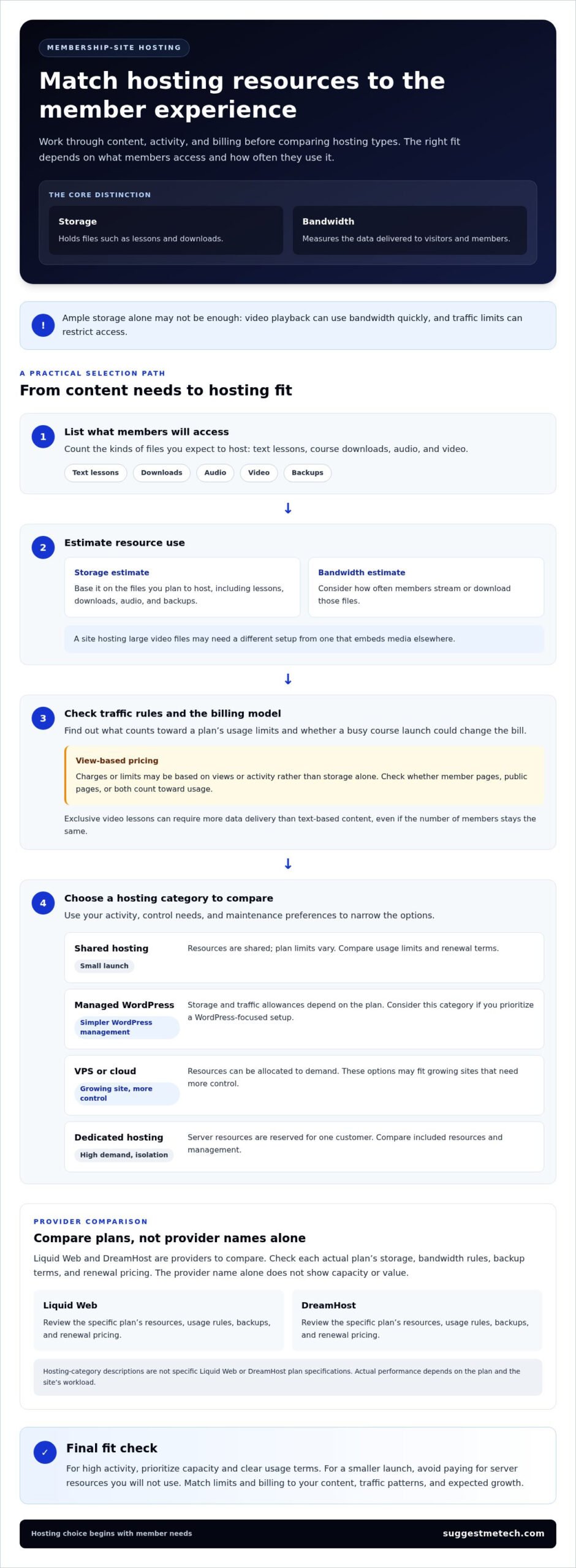
The best hosting for a membership site depends on what members access and how often they log in. Storage holds files such as lessons and downloads; bandwidth measures the data delivered to visitors. A plan with ample storage may still be a poor fit if video playback uses bandwidth quickly or traffic limits restrict access.
In 2026, Liquid Web and DreamHost are providers to compare, alongside managed WordPress, VPS, cloud, and dedicated hosting. For high traffic and logged-in users, VPS, cloud, or dedicated options may offer a better fit when a site needs greater control over resources. Managed WordPress can suit owners prioritizing a WordPress-focused setup. Actual performance depends on each plan and the site’s workload.
View-based pricing sets charges or limits according to views or activity rather than storage alone. Before choosing a subscription, identify what counts toward usage and whether a busy course launch could change the bill. For example, exclusive video lessons can require more data delivery than text-based content, even if the number of members stays the same. A plan’s cost model matters as much as its advertised resources.
| Option | Storage and bandwidth | Typical fit | Pricing comparison |
|---|---|---|---|
| Shared hosting | Shared resources; plan limits vary | Small launch with modest activity | Compare usage limits and renewal terms |
| Managed WordPress | Plan-specific storage and traffic allowances | Owners seeking simpler WordPress management | |
| VPS or cloud | Resources can be allocated to demand | Growing sites needing more control | |
| Dedicated hosting | Server resources reserved for one customer | High-demand sites needing isolation | Compare included resources and management |
Compare Liquid Web and DreamHost by checking the actual plan’s storage, bandwidth rules, backup terms, and renewal pricing. The provider name alone doesn’t indicate capacity or value. The managed, VPS, cloud, and dedicated figures above describe hosting categories, not specific Liquid Web or DreamHost plans. Keeping that distinction in mind helps you spot limits that could matter as member activity increases, even when an introductory offer looks affordable.
Estimate storage based on the files you’ll host, including course downloads, audio, and backups. Estimate bandwidth based on how often members stream or download them. A site hosting large video files may need a different setup from one that embeds media elsewhere. Check whether view-based limits apply to member pages, public pages, or both.
Choose a plan whose resource limits and billing model match your content, traffic patterns, and expected growth. For high activity, prioritize capacity and clear usage terms. For a smaller launch, avoid paying for server resources you won’t use.
Customization and design flexibility
For a WordPress membership site, design flexibility shapes how members find and use content. A theme controls the visual layout, while customization adjusts pages, navigation, and branded elements to support the member journey. A course site, for example, may need a clear path from a public landing page to enrollment and private lessons.
Templates can speed up setup by providing ready-made page layouts. More flexible tools let owners adjust those layouts, but may require additional configuration or technical skills. Compare options using the criteria from the evaluation: ease of use carries a 30% weight, eCommerce features 25%, templates 25%, and pricing 20%. These weights help structure a choice, but your own priorities may differ.
Before choosing a platform, sketch the key screens members will visit: the signup page, account dashboard, payment flow, and content library. Then consider whether the editor lets you make those pages consistent without workarounds. A site with several membership tiers, for instance, may need distinct descriptions and access details for each plan.
- Template-led design: suits owners who want a cohesive layout and a faster setup with fewer design decisions.
- Visual customization: suits creators who need to adjust colors, page sections, and navigation without editing code.
- WordPress flexibility: suits teams that want to combine themes and plugins, while accepting more configuration choices.
- Restricted builders: can make routine editing straightforward, but may limit tailored dashboards or checkout layouts.
Customer support matters when design changes affect member access or payments. Compare each provider’s stated support channels and WordPress troubleshooting resources. A site owner making updates alone may value clear documentation, while a team with a developer may prefer technical help with theme or plugin conflicts. Choose support that matches the skills available to maintain the site.
Consider how design changes fit into your monthly workflow. If you plan regular course launches, check whether you can duplicate landing pages and update enrollment details without rebuilding the site. Test a sample page on mobile and desktop, then follow the path from offer to payment and member access. This practical check can reveal friction that a template preview misses.
Choose a template-led option for speed and simpler editing; prioritize customization when your brand or member journey needs more control. For additional perspective, use technology hosting comparisons to assess design flexibility alongside the platform’s other practical trade-offs.
Dedicated IPs and SSL for secure logins and checkout
Security for a membership site depends on protecting sign-ins, payment steps, and member information. SSL is the familiar term for certificates that enable encrypted HTTPS connections; current hosting comparisons should include TLS 1.2 encryption support, the listed minimum for a WordPress membership site. A dedicated IP is a unique internet address assigned to one hosting account, but it does not replace encryption or secure software.
Common hosting risks include exposed logins, outdated software, bot-driven signup attempts, and traffic overload. Reduce these risks by keeping WordPress and plugins updated, using strong account credentials, and choosing hosting with security controls suited to your site.
For checkout, test the full member journey: open the payment page, complete a test transaction, then sign in and access restricted content. Confirm HTTPS stays active throughout. A community site should also limit administrator access to people who need it and remove unused accounts when responsibilities change.
- Dedicated IP: Consider it when a specific network or application setup requires a unique address. It is not, by itself, proof that a site or checkout is secure.
- TLS encryption: Check that hosting supports TLS 1.2 and that the site uses HTTPS across login and payment pages.
- Bot protection: Look for tools that help identify or limit automated login and registration attempts, then review their effect on real member access.
- Backups and recovery: Understand how the host handles copies of site data and restoration, so a failed update does not leave members locked out.
Security analytics can help distinguish normal activity from unusual patterns. Review login and registration records for repeated failed attempts, unexpected account creation, or traffic changes. Use analytics to support a clear response process, such as investigating an unfamiliar administrator login and changing access credentials when needed.
Hosting controls work alongside membership software, payment processing, and site maintenance. If a plugin update breaks checkout, for example, a staging copy lets an administrator test a fix before applying it to paying members. Review update procedures and recovery options before upgrading, not during an outage.
Choose a dedicated IP only if your setup benefits from a unique address. Prioritize TLS support, account controls, bot protection, and a workable recovery process. These safeguards help keep member logins and checkout dependable as site activity grows.
Launching and maintaining a membership website
WordPress hosts that support membership plugins can also support recurring payments when a plugin connects to a payment processor. Both managed WordPress and shared hosting can suit membership sites, but managed plans typically simplify WordPress maintenance, while shared plans offer a lower-cost entry point with shared resources.
Membership Website Costs
A membership website’s costs go beyond hosting: design, content, membership software, payment processing, and ongoing maintenance all contribute to the total.
Separate one-time setup work from monthly operating expenses. A creator, for example, might launch with a standard theme and a small course library, then add custom member dashboards later. Annual hosting payments may qualify for discounts, so compare the full-term cost with monthly billing before choosing.
Recurring payment costs also depend on the membership software and payment processor, not hosting alone. Review how each platform handles subscription changes, failed payments, refunds, and access removal. These functions affect daily administration, particularly when members change plans or stop paying.
Managed WordPress and Shared Hosting
Managed WordPress hosting is configured for WordPress and often handles some routine maintenance. It can suit site owners who want a WordPress-focused setup with less hands-on server administration.
Shared hosting puts multiple websites on the same server, making it an accessible starting point for a smaller launch. Its limits can become more important as membership activity grows because websites share server resources. Compare WordPress support, backup procedures, and the upgrade path rather than choosing by entry price alone.
For a site using WordPress membership plugins, confirm the hosting environment meets the software requirements. A hosting memory limit of 256 MB is recommended. Managed hosting may simplify upkeep, while shared hosting can fit a simpler site and a tighter budget.
Launch and Maintenance Workflow
Before launch, install WordPress, configure the membership plugin, connect recurring payments, and create a test member account. Follow the journey from registration through checkout and login to course access. This can catch permission errors before paying members encounter them.
After launch, schedule routine checks for WordPress, themes, and plugins. When available, test updates on a staging copy, then verify checkout and restricted pages. Keep backups and know how to restore them. These steps can limit disruption if a plugin update affects registration or member access.
Choose managed WordPress hosting if reducing server administration is a priority. Shared hosting may suit a modest launch with straightforward needs. Either way, match the plan’s resources and maintenance tools to your site’s features and growth plans.
Circle reports that 88% of community builders monetize through paid memberships, underscoring the value of planning member access and ongoing engagement before launch.
Membership-site hosting prices and scaling costs
Hosting is only one part of a membership site’s operating budget. Compare plan charges with storage, bandwidth, backups, payment processing, membership software, and the work involved in maintaining WordPress. A plan that looks affordable at launch may cost more when resource needs increase or add-on services become necessary.
These are broad hosting categories, not a quote for a specific provider or a complete estimate of site costs.
Scaling changes the comparison because member count alone doesn’t describe server demand. A site with 2,000 members who log in occasionally can behave differently from a smaller course community where members stream lessons simultaneously. Assess active usage, content delivery, and the work each request creates before moving to a higher-capacity plan.
Use a practical review process before upgrading:
- Track resource pressure: Review hosting usage and note when slow pages coincide with course releases or member events.
- Identify the cause: Separate traffic increases from plugin issues, large media files, or inefficient site features.
- Compare the next tier: Look at included resources, backup options, support, and any extra services that change the total.
- Plan a test: Evaluate the upgrade on a staging site where possible, then test sign-in and checkout before switching.
A hosting upgrade won’t automatically fix every slowdown. Adding server capacity, for example, may not resolve a poorly optimized course page or a plugin conflict. Diagnose the bottleneck first, then decide whether to optimize the site, adjust content delivery, or move to a plan with more suitable resources.
Add the domain to your renewal calendar alongside hosting and software subscriptions. The domain is the address members use to reach your site. Tracking its renewal separately from hosting helps prevent it being overlooked when you review annual expenses. Annual hosting payments may qualify for discounts, so compare the full-term cost with monthly billing and consider how much flexibility you need.
Before committing, compare your current plan with the likely next step. Shared hosting may suit a small launch; managed WordPress can reduce routine administration, while VPS, dedicated, and cloud hosting offer different approaches to scaling. Match the option to your technical capacity, member activity, and management costs.
Use hosting comparisons and technology guides to evaluate plan features and scaling trade-offs before selecting your next hosting tier.
SuggestMeTech: Technology Reviews and Guides
SuggestMeTech, with the tagline “Trusted Tech Reviews & Comparisons,” helps readers evaluate technology and services through reviews and guides. If you’re weighing hosting plans, use its coverage to compare features, costs, and practical trade-offs against your membership site’s needs. This can help narrow your shortlist before you decide which setup fits your content, member activity, and management preferences.
SuggestMeTech also offers advertising space for businesses seeking to reach readers interested in technology. For readers, the focus is on useful comparisons that support informed decisions, rather than hosting or technical consulting.
Visit suggestmetech.com to explore its technology reviews and guides.
Choose a hosting plan that can grow with your next move
Turn your requirements into a shortlist. Decide which trade-offs matter most now, such as simpler management, room to customize, or capacity for a more active member community. Then assess the best hosting for a membership site against those priorities, rather than choosing on price alone.
Keep your decision practical: select a setup you can maintain, and revisit it when your content, membership experience, or workload changes. A successful launch is a starting point, not a reason to keep the same configuration indefinitely. If you’re comparing options, explore SuggestMeTech’s technology reviews and guides for further reading.
Take the next step by clarifying your priorities, then choose a hosting setup that supports the membership experience you want to build.
Frequently Asked Questions
How much does membership site hosting cost per month?
Treat these as hosting costs, not the full operating budget. Membership software, payment processing, domains, and content delivery may add expenses. A video course community, for example, may need more delivery capacity than a text-based member library.
What hosting features are essential for a membership site, such as SSL, backups, and staging?
Prioritize encrypted connections, restorable backups, and a staging environment for testing changes. For WordPress membership sites, hosting should support TLS 1.2, the minimum listed requirement. Staging lets you test a plugin or theme update away from the live site. For example, test a new registration flow before members use it, then confirm that account access and payment steps still work.
Which hosting providers offer the best security for member data and payments?
No provider is automatically the best choice for every membership site. Compare Liquid Web, DreamHost, and other hosting options by the security controls included in each plan, such as encrypted connections, account protections, backups, and recovery tools. Also consider how the hosting environment works with your membership software and payment processor. A secure host supports the broader setup, but site updates and access management still matter.
What are the bandwidth, storage, and visitor limits of popular membership site hosting plans?
Limits depend on the plan, and visitor counts alone don’t show how much capacity a membership site needs. A site serving large course videos uses more bandwidth than one delivering text lessons. Compare storage for media and backups, bandwidth rules, and any visitor or view-based thresholds. Then estimate usage based on member activity, content size, and simultaneous access during a live session or course launch.
How do hosting providers handle uptime, support, and automatic backups?
Hosting providers manage these areas through service monitoring, support channels, and backup systems, but the details vary by plan. Uptime describes whether a site is reachable; support helps resolve issues, while backups preserve copies for recovery. Automatic backups run without manual file copying, but their schedule and retention determine which restore points are available. For example, a recent backup can help recover a site after a faulty update.

