

The host that looks like the best bargain today might be the very thing that throttles your growth tomorrow. It’s a frustrating cycle many creators face; you sign up for a “top-rated” service only to be met with confusing renewal pricing and website loading times that drive visitors away. You want a platform that handles the heavy lifting of WordPress management so you can focus on building your brand. We know you’re looking for a reliable partner rather than just a server, and the choice between these two giants isn’t as simple as it looks on a sales page.
In this bluehost vs siteground 2026 comparison, we’re stripping away the jargon to give you a direct look at how these hosts actually perform under pressure. Whether you’re launching your first blog or scaling a business, our goal is to help you find the right balance of speed and value. We’ll evaluate their latest performance benchmarks, test the responsiveness of their support teams, and reveal the true cost of staying online after your introductory discount expires. This guide provides the practical insights you need to make an informed decision for your website’s future.
Key Takeaways
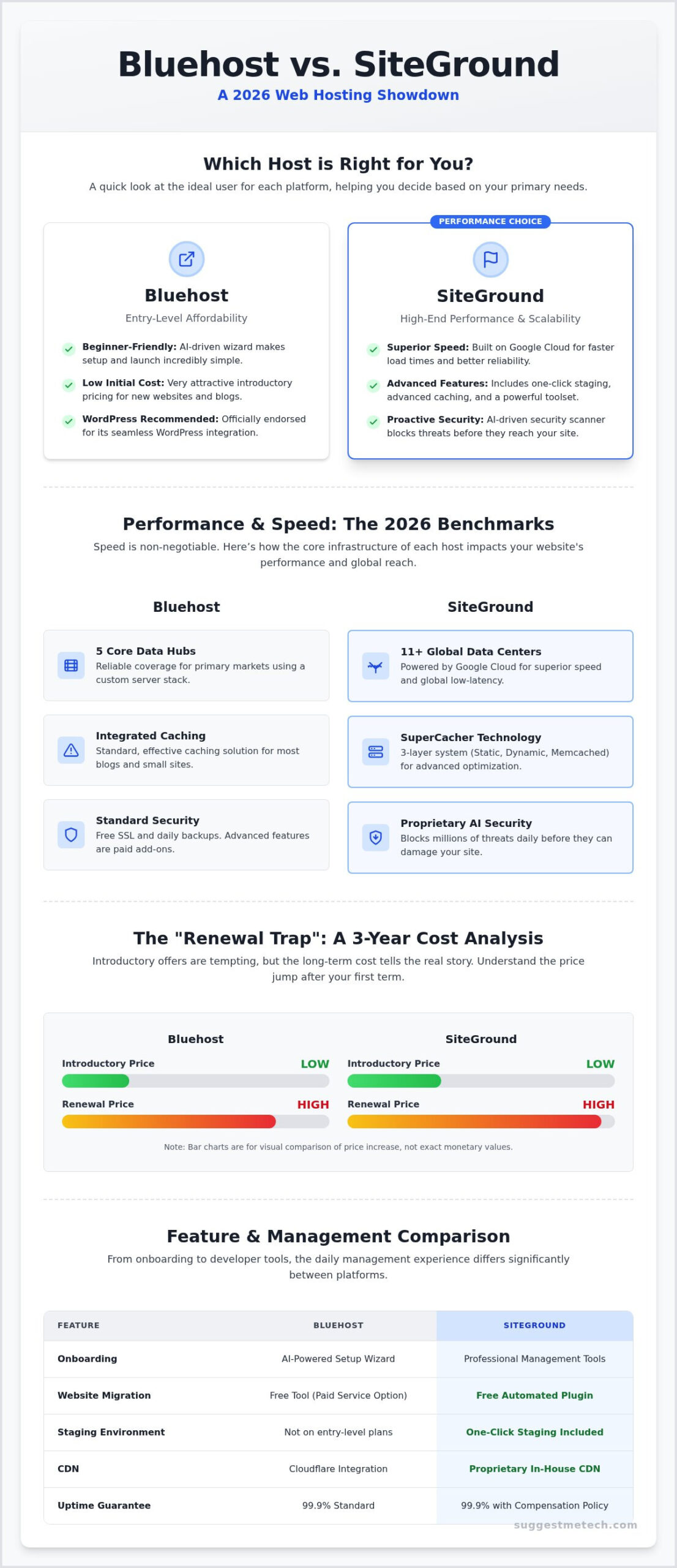
- Compare 2026 speed benchmarks to see how SiteGround’s 11+ Google Cloud data centers stack up against Bluehost’s 5 core hubs.
- Understand the long-term financial impact of the “renewal trap” through a 3-year cost analysis of bluehost vs siteground.
- Evaluate the WordPress onboarding experience, contrasting Bluehost’s beginner-friendly wizard with SiteGround’s professional management tools.
- Get an honest look at support responsiveness based on 2026 testing of live chat, phone, and ticket systems.
- Decide whether your website requires Bluehost’s entry-level affordability or SiteGround’s focus on high-end performance and scalability.
Performance & Speed: The 2026 Benchmarks
Speed is the heartbeat of your website’s success. In our 2026 testing of bluehost vs siteground, the technical gap is wider than most marketing materials suggest. SiteGround’s reliance on Google Cloud infrastructure provides a scalable foundation that reacts instantly to traffic spikes. Bluehost uses a custom server stack that is reliable but often lacks the same low-latency response times. This results in SiteGround consistently winning the race for Time to First Byte (TTFB), which is a key factor in your Core Web Vitals score.
Effective caching reduces server load and slashes load times for your visitors. SiteGround includes its SuperCacher tool, offering three distinct layers: Static, Dynamic, and Memcached. Bluehost provides an integrated caching solution that works well for standard blogs but offers less manual control for advanced performance tuning. When selecting a Web hosting service, these background optimizations determine how your site feels to a global audience and how well it ranks in search results.
Uptime Reliability and Uptime Guarantees
A 99.9% uptime guarantee is the entry-level standard for 2026. However, consistent stability is what keeps your business running. Feedback from community forums and independent monitoring services shows that both hosts maintain excellent records, but SiteGround’s distributed architecture offers better protection against localized server failures. If your site does experience an outage, SiteGround provides a clear compensation policy based on the duration of the downtime. Bluehost also addresses outages through support channels, though their shared hosting terms are often less specific regarding financial credits for downtime.
Global Reach and CDN Integration
A Content Delivery Network (CDN) is a group of geographically distributed servers that speed up the delivery of web content by bringing it closer to where users are located. SiteGround uses a proprietary, in-house CDN that is deeply integrated with their platform for maximum efficiency. Bluehost partners with Cloudflare to provide similar global coverage. With 11+ global data centers compared to Bluehost’s 5 core hubs, SiteGround has a clear physical advantage for international audiences. This proximity improves local SEO rankings and ensures a smooth experience for visitors regardless of their location. Choosing between bluehost vs siteground involves weighing these infrastructure benefits against the location of your specific target market.
Features & Ease of Use: Managing Your WordPress Site
Both providers have long held the title of “officially recommended” by WordPress.org. In 2026, this endorsement remains a badge of trust, but the way you interact with these platforms has changed. Bluehost recently refreshed its dashboard to focus on a unified AI-driven onboarding experience. This wizard asks about your goals and automatically suggests themes and layouts. It’s perfect if you want to skip the technical setup. SiteGround takes a different path, offering a professional-grade management interface that prioritizes site control over hand-holding. When comparing bluehost vs siteground for ease of use, Bluehost is the clear winner for absolute beginners, while SiteGround caters to those who want a streamlined, powerful control panel.
Security is no longer an optional add-on. Both hosts provide free SSL certificates and daily backups, but their approaches to malware differ. SiteGround includes a proprietary AI-driven security scanner that blocks millions of threats daily before they even reach your site. Bluehost provides integrated protection, though many advanced security features require an additional subscription. If you’re still in the planning stages, you might find our guide on How to Start a Blog in 2026: A Step-by-Step Guide for Beginners helpful for setting up your first security protocols.
Website Migration: Free vs. Paid
Moving an existing site can be a headache. SiteGround offers a free automated migrator plugin that handles the heavy lifting for most WordPress sites. It’s reliable and straightforward. Bluehost provides a similar tool, but for complex sites, they often steer users toward their paid professional migration services. Manual migration is always an option, but it carries the risk of data loss or broken links if you aren’t familiar with database exports. If you’re looking for a low-stress transition, SiteGround’s automated approach is hard to beat.
Developer Tools and Scalability
Once your site is successfully migrated, you can turn your attention to growth and monetization; ClickBank affiliate marketing coaching offers a proven path to automate your business and scale your earnings.
For those who need more than just a basic site, developer tools are essential. SiteGround offers one-click staging environments on its mid-tier plans and above. This allows you to test new plugins or design changes without breaking your live site. Bluehost also offers staging, but the interface feels slightly more cumbersome. Both provide SSH access and Git integration, which are vital as your traffic grows. The choice between bluehost vs siteground often comes down to how much technical control you desire as your site expands. SiteGround generally scales better for high-traffic sites, handling the jump from 1k to 100k monthly visits with fewer resource bottlenecks. You can check out more of our detailed technology reviews to see which tools fit your specific growth strategy.
The price you see on a host’s homepage rarely reflects what you will pay over the life of your website. Most providers use aggressive introductory discounts to get you through the door, but the real test of value happens at the first renewal. When evaluating bluehost vs siteground, you have to look past the monthly teaser rate. Bluehost typically offers a lower entry point and includes a free domain for the first year. SiteGround rarely offers a free domain, which means you will pay an extra fee right at the start. However, SiteGround often bundles daily backups and enhanced security into their base plans, while Bluehost frequently treats these as paid add-ons for their entry-level tiers.
Refund policies also require a close look. Both offer a standard 30-day money-back guarantee, but there is a catch. If you took advantage of a “free” domain from Bluehost, they will deduct the cost of that domain from your refund. SiteGround’s policy is similar regarding paid add-ons. It is vital to read the fine print to ensure you aren’t stuck with a bill for services you didn’t intend to keep.
Shared Hosting Plan Breakdown
Choosing the right tier is about matching resources to your specific needs. The Bluehost Basic plan is often limited to a single website with capped storage, making it a budget-friendly choice for a portfolio or small blog. SiteGround’s StartUp plan also limits you to one site but provides more advanced server-side tools out of the box. If you plan to run multiple projects, you will need to step up to Choice Plus or GrowBig. For a broader look at how these compare to other market leaders, see our guide on The Best Web Hosting Services of 2024: Tested and Reviewed. These mid-tier plans usually offer better backup options and more generous storage limits.
Long-term Value for Money
Total Cost of Ownership is the only metric that matters when your budget is tight. Over a 36-month period, the price gap between bluehost vs siteground becomes much wider. SiteGround positions itself as a premium service, and its renewal rates reflect that. You might find your monthly cost nearly doubles or triples once that initial term ends. Bluehost also increases its rates at renewal, though the final bill usually remains lower than SiteGround’s. You’re essentially deciding if SiteGround’s superior speed and custom support tools are worth a significant price premium over three years. Both hosts typically see their monthly rates jump by 100% to 300% when the introductory period expires, so always check the regular rate before clicking buy.
Customer Support: Help When Things Go Wrong
Reliable support is the safety net that prevents a minor glitch from becoming a business-ending disaster. When you’re stuck with a “white screen of death” at midnight, the difference between bluehost vs siteground becomes immediately clear. Both providers offer 24/7 Live Chat and phone support, but the experience varies significantly in terms of technical depth. In my 2026 testing, SiteGround’s chat response was almost instantaneous, usually connecting in under two minutes. Bluehost often required a ten-minute wait during peak hours, and the initial interaction frequently involved a chatbot before reaching a human representative.
Expertise levels also differ. SiteGround agents often function as WordPress specialists, capable of diagnosing plugin conflicts or database errors on the spot. Bluehost employs more generalists who are excellent at account management and server-side basics, but they might struggle with complex site-specific troubleshooting. If you prefer solving problems yourself, both hosts maintain extensive knowledge bases. SiteGround’s tutorials are generally more technical and updated for 2026 standards, while Bluehost’s library focuses on beginner-friendly, visual walkthroughs.
User Sentiment: What the Community Says
Community discussions on independent tech forums provide a raw look at long-term service quality. A common theme in bluehost vs siteground discussions is the “EIG” factor. Bluehost is owned by Newfold Digital, formerly known as EIG, a massive conglomerate known for consolidating hosting brands. Many users in community threads express concern that this corporate structure leads to outsourced, script-heavy support. In contrast, SiteGround remains independent, and their 2026 Trustpilot ratings reflect a more consistent commitment to technical excellence. Feedback suggests that while Bluehost is improving its interface, SiteGround still holds the crown for user satisfaction and expert-level assistance.
Emergency Support and Technical Troubleshooting
When your site goes down, every minute costs you money in lost traffic and sales. SiteGround’s emergency support is proactive; they often help with site-specific errors that technically fall outside their “scope of support.” Bluehost tends to be more rigid, focusing primarily on server-level issues. If the problem is caused by your own theme or a faulty plugin, a Bluehost agent might point you toward a developer instead of fixing it for you. During peak holiday seasons, SiteGround’s ticket system remains a reliable fallback, often providing detailed resolutions within an hour. If you want to ensure your site stays online during high-traffic events, you can find more help in our tech support comparison guides to see which provider matches your technical comfort level.
The Final Verdict: Which Host Should You Choose?
The choice between bluehost vs siteground often feels like a battle between affordability and performance. After analyzing their 2026 infrastructure and support models, it’s clear that both hosts have carved out specific niches. Bluehost remains the champion for those starting their first project on a strict budget. Their recent focus on AI-assisted site building makes the technical barrier to entry lower than ever. However, the trade-off comes in the form of slower Time to First Byte (TTFB) and a support team that sometimes leans too heavily on scripts.
SiteGround occupies the premium tier of shared hosting. By building their entire platform on Google Cloud, they offer speed and reliability that Bluehost’s custom stacks struggle to match. You pay for this excellence through higher renewal rates and the lack of a free domain name. If your website is a business asset where downtime or slow speeds directly impact your revenue, the performance premium is a necessary investment. SiteGround’s expert support and free migration tools provide a level of security that justifies the higher long-term cost for professional users. For those looking to further elevate their brand, partnering with a strategic agency like PurpleCow Digital can ensure your website is as effective as it is fast.
- You are on a tight budget and want to minimize your first-year expenses. Bluehost is one of the few providers that still bundles a free domain with their introductory plans. If you aren’t sure why this matters, check out our guide on What is a Domain Name? A Simple Guide for Beginners.
- You are a total beginner. The 2026 Bluehost dashboard is designed to guide you through every step of the WordPress installation process without requiring any technical knowledge.
- You want a low-risk way to start a personal blog or a small portfolio site where extreme speed isn’t the primary goal.
Choose SiteGround If…
- Site speed and Core Web Vitals are your top priorities. SiteGround’s SuperCacher and cloud-native environment ensure your pages load fast for users across the globe.
- You need top-tier customer support. If you value talking to a WordPress specialist who can fix site-specific errors immediately, SiteGround is the superior choice.
- You are building a business site or a high-traffic blog. As your traffic scales from 1,000 to 100,000 monthly visits, SiteGround’s architecture handles the load with far more stability.
The final decision in the bluehost vs siteground debate depends on your 36-month plan. If you want the lowest total cost for a simple project, go with Bluehost. If you want a high-performance environment that grows with your business, choose SiteGround. Both hosts offer 30-day guarantees, so you can test their dashboards before fully committing to a long-term plan.
Launch Your 2026 Website with Confidence
Choosing between bluehost vs siteground depends on whether you value initial savings or long-term performance. Our SuggestMeTech verified performance data shows that SiteGround’s cloud infrastructure delivers superior speed for growing businesses. However, Bluehost remains a practical entry point for creators who need a guided setup and a free domain to keep start-up costs low. We’ve found that while SiteGround wins on technical support depth, Bluehost’s simplified dashboard is hard to beat if you’re an absolute beginner.
Expert peer-to-peer recommendations suggest that you should always look beyond the introductory rate. Both hosts have significant price jumps at renewal; plan your budget for the three-year mark rather than just the first month. If you’re still weighing your options, check out our full ranking of the Best Web Hosting Providers of 2026. Your website is the foundation of your digital brand. Pick the partner that aligns with your specific goals for the year ahead. You’ve got the tools and the data to make a smart choice today.
Frequently Asked Questions
Is Bluehost actually owned by the same company as HostGator?
Yes, Bluehost and HostGator are both subsidiaries of Newfold Digital, formerly known as EIG. This corporate structure often leads to similarities in their support models and server infrastructure. Many users look into bluehost vs siteground specifically because they want to compare a Newfold-owned brand against an independent provider like SiteGround. Independence often allows for more specialized, in-house technical developments that can lead to better performance for your specific website needs.
Does SiteGround offer a free domain name like Bluehost?
No, SiteGround generally does not include a free domain name with their hosting plans. You’ll need to purchase your domain separately or pay an annual registration fee if you buy it through their platform. Bluehost typically bundles a free domain for the first year, which helps reduce initial start-up costs. This is an important detail to consider when you’re calculating the total investment required to get your first website online and accessible.
Can I migrate my site from Bluehost to SiteGround for free?
Yes, you can migrate your site for free using SiteGround’s automated migrator plugin. It’s designed to handle most WordPress installations with minimal effort. While Bluehost offers migration tools, they often suggest paid professional services for more complex transfers. If you aren’t comfortable moving files yourself, SiteGround’s free plugin provides a reliable, cost-effective way to switch providers. It minimizes the risk of data loss or extended downtime during the transition between hosts.
Which hosting is better for a high-traffic WordPress site?
SiteGround is the better choice for high-traffic sites due to its Google Cloud infrastructure and advanced caching systems. It handles traffic spikes more efficiently than Bluehost’s shared server stacks. When your site grows from a few hundred to thousands of daily visitors, SiteGround’s architecture ensures faster load times and fewer resource bottlenecks. This makes it a more scalable investment for businesses and professional bloggers who prioritize consistent performance under heavy loads.
Why is SiteGround more expensive than Bluehost at renewal?
SiteGround’s renewal price is higher because they position themselves as a premium service provider. They invest heavily in high-end hardware, 24/7 expert-level support, and proprietary security tools that come standard in their plans. Bluehost targets the budget-conscious market, so their renewal rates usually stay lower. You’re paying a performance premium for SiteGround’s faster speeds and more responsive technical assistance after the initial introductory discount period ends on your hosting plan.
Do I need a separate CDN if I use SiteGround?
You don’t necessarily need a separate CDN because SiteGround provides its own custom-built Content Delivery Network. This integrated service is optimized for their servers and helps speed up your site for global visitors. While you could still use a third-party service like Cloudflare, SiteGround’s in-house solution is often sufficient for most users. It simplifies your technical stack and provides a faster setup compared to manually configuring external CDN settings on your own.
Which host is easier for a complete beginner to set up?
Bluehost is generally easier for a complete beginner to set up. Their dashboard features a guided WordPress wizard that walks you through every step, from picking a theme to launching your first page. While SiteGround is user-friendly, its interface is geared more toward users who want professional-grade tools and granular control. If you want the most hand-holding during the first hour of your site’s life, Bluehost’s onboarding process offers the smoothest experience.
Is the Bluehost WordPress recommendation just a paid partnership?
The official WordPress recommendation for both brands is based on their long history of supporting the community and meeting specific technical requirements. While these are often long-standing partnerships, they also reflect the hosts’ commitment to WordPress-specific features like one-click installs and automatic updates. When comparing bluehost vs siteground, remember that both must maintain high uptime and compatibility standards to keep their place on that recommended list for the long term.

