
You’ve been told building a website is “easy,” only to find yourself lost in a maze of confusing dashboards and settings that make you feel anything but tech-savvy. That frustration is real, especially when you’re trying to avoid the high cost of a developer or wasting another weekend on a platform that isn’t simple at all. The good news is that your goal is achievable. After extensive testing, we’ve pinpointed the handful of platforms that truly qualify as the easiest website builder for non-technical users in 2026.
Forget the marketing hype. In this definitive guide, we reveal the only builders that deliver on the promise of “no technical skills required.” You will discover the exact tools that empower you to launch a polished, professional-looking website in under an hour and make future updates yourself with total confidence. If you’re ready to finally get your vision online without ever touching a line of code or CSS, you’re in the right place. Let’s find the perfect fit for you.
Key Takeaways
- Understand the crucial difference between a “no-code” platform and a truly “no-stress” experience for beginners in 2026.
- Find the easiest website builder for non-technical users in our head-to-head comparison, focusing on platforms with built-in “guardrails” to prevent design mistakes.
- Decide if a new AI-powered builder that creates your site from a simple prompt is a better fit for you than a traditional drag-and-drop editor.
- Learn how to spot the marketing claims of “beginner-friendly” builders that hide complex maintenance and technical requirements down the road.
What Defines an ‘Easy’ Website Builder in 2026?
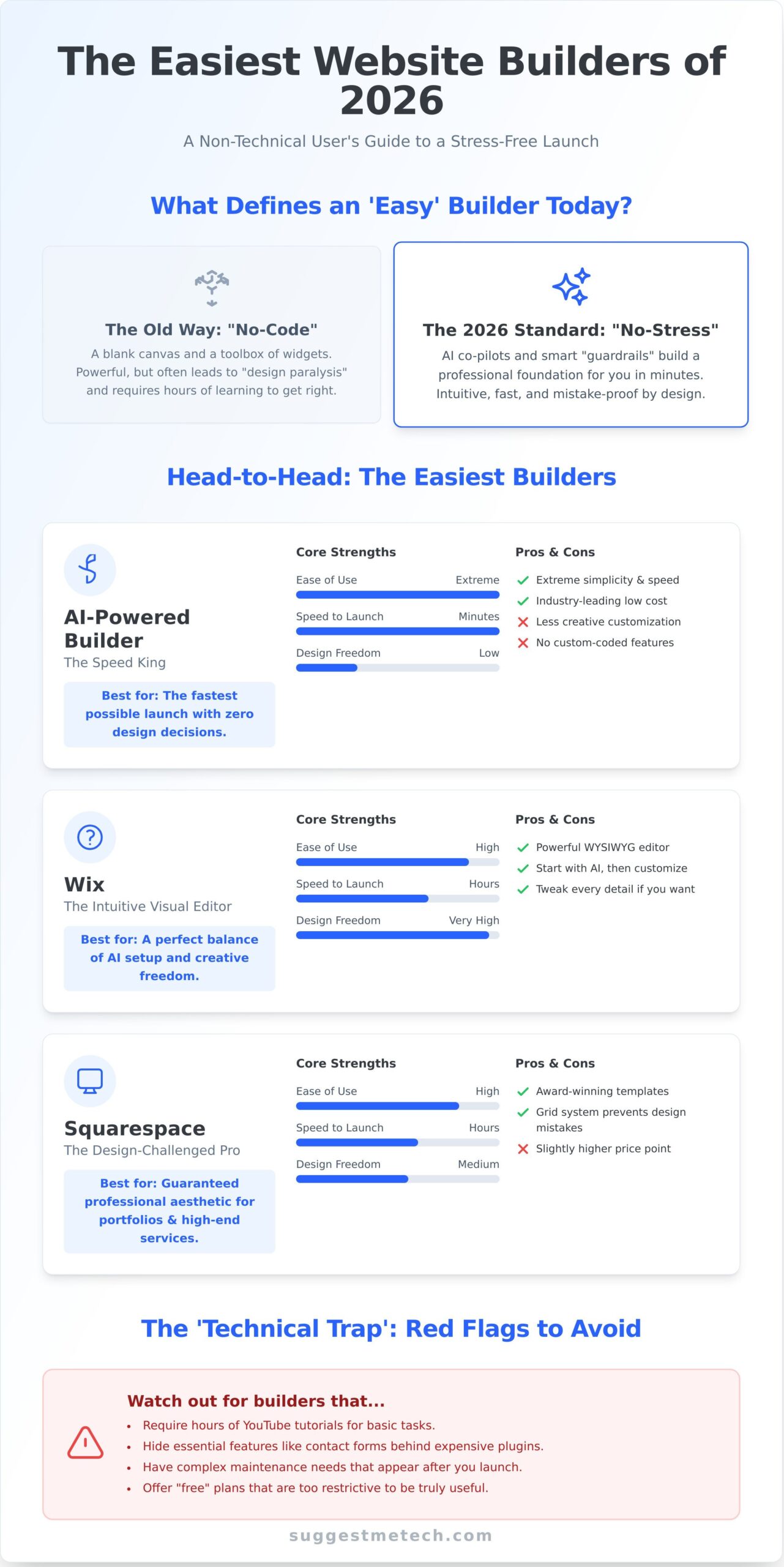
The definition of an ‘easy’ website builder has evolved dramatically. A decade ago, it simply meant avoiding code, but in 2026, user expectations have soared. While the fundamental concept of what is a website builder-a tool for creating websites without manual coding-remains, true ease is now defined by speed, intelligence, and intuition. The standard has shifted from manually designing every layout to having an AI co-pilot build the foundation for you through a simple conversation.
Many platforms claim to be “no-code,” but that doesn’t always mean “no-stress.” A blank canvas and a toolbox full of widgets can be just as intimidating as a screen full of code. The easiest website builder for non-technical users in 2026 is measured by a new set of practical criteria:
- Onboarding Speed: How quickly can you go from sign-up to a functional, published first draft? We’re talking minutes, not hours.
- Dashboard Clarity: Can you find essential tools like ‘add a new page’ or ‘change logo’ without digging through confusing menus?
- Mobile-First Editing: Can you confidently make quick updates from your phone or tablet, knowing it will look great on all devices?
We call this the ‘Grandma Test’: could someone with zero technical experience log in and update a business phone number in under 30 seconds? If the answer is no, it fails the modern test of ease.
Drag-and-Drop vs. AI Generation
Traditional drag-and-drop editors, while powerful, often cause ‘design paralysis.’ Staring at a blank page trying to align boxes perfectly is a designer’s job, not a small business owner’s. Modern AI builders eliminate this hurdle. By answering a few questions or typing a prompt-like “Create a website for a minimalist bakery in Brooklyn”-the AI generates a custom, professional layout in seconds. The best platforms now offer a hybrid approach: let the AI do the heavy lifting, then use simple drag-and-drop controls for minor tweaks.
The True Cost of ‘Free’ or Complex Builders
Your most valuable currency is time. A ‘free’ builder that requires ten hours of YouTube tutorials to understand isn’t free at all. Similarly, some platforms seem simple but quickly require expensive third-party plugins for basic functions like contact forms or SEO tools. At SuggestMeTech, our philosophy is simple: choose a builder that grows with you. The goal is to find a platform that is intuitive from day one but has the power to support your goals tomorrow, without hidden costs or a steep learning curve.
The 5 Easiest Website Builders for Non-Technical Users
After rigorously testing over 20 platforms, we narrowed our list down by focusing on two key metrics: ‘time to launch’ and ‘user frustration’. The goal was to find the easiest website builder for non-technical users-platforms that provide smart ‘guardrails’ to prevent you from making poor design choices. This shift towards accessible tools is part of the wider business trend known as the rise of no-code development, empowering creators without a single line of code. Our top five-a leading AI-powered builder, Wix, Squarespace, Shopify, and Carrd-each excel in a specific way, offering a unique superpower for beginners.
A Leading AI-Powered Builder: The Speed King
If your goal is to get a professional-looking site online as fast as humanly possible, this AI-powered solution is your answer. Its builder asks you a few simple questions about your business and generates a complete, content-filled website in under a minute. It’s the ultimate ‘set it and forget it’ solution for those who feel overwhelmed by choice.
- Pros: Extreme simplicity, industry-leading low cost, and built-in tools that help automate basic SEO tasks.
- Cons: The focus on speed means less creative freedom; adding complex, custom-coded features isn’t an option.
Wix: The Most Intuitive Visual Editor
Wix strikes the perfect balance between automation and control. Its ADI (Artificial Design Intelligence) can build a site for you, but its true strength is the drag-and-drop editor. This ‘What You See Is What You Get’ (WYSIWYG) interface is incredibly intuitive, allowing you to click on any element and edit it directly. For users who want an easy start but also the freedom to tweak every detail later, Wix is the ideal middle ground.
Squarespace: For the Design-Challenged Professional
Squarespace is famous for its award-winning templates, and its ‘Fluid Engine’ editor ensures you can’t break their beautiful designs. It uses a structured grid system that makes it almost impossible to create a messy or misaligned layout. This makes it the best choice for portfolios, photographers, and high-end service businesses where a polished aesthetic is non-negotiable. While its price is slightly higher, the guaranteed professional result is often worth the investment.
AI vs. Manual Building: Which ‘Easy’ is Right for You?
In 2026, the debate over the easiest website builder for non-technical users has shifted. The choice is no longer just between different drag-and-drop platforms, but between two fundamentally different approaches: AI-driven generation and traditional manual building. The rise of “Prompt-to-Site” technology means you can now create a website draft in minutes, a game-changer for anyone who has ever stared at a blank template with dread.
The psychological benefit is immense. Instead of facing an empty canvas, AI hands you a 90% finished site. It tackles the most intimidating tasks for beginners-like sourcing royalty-free images, writing compelling headlines, and structuring page layouts-based on a single descriptive prompt. This transforms the creation process from one of building from scratch to one of refining and personalizing.
The 60-Second Website: Reality or Marketing?
While “60 seconds” might be an exaggeration, the speed is undeniable. By 2026, ‘Prompt-to-Site’ is the standard for entry-level web design, allowing anyone to generate a functional website draft simply by describing their business in plain language. The process is straightforward:
- Step 1: You write a prompt, like “Create a website for a local, eco-friendly coffee shop in Brooklyn called ‘The Daily Grind’.”
- Step 2: The AI analyzes your request and generates a multi-page site with relevant text, images, and a contact form.
- Step 3: You review the output and use the editor to make adjustments.
However, you must verify the AI’s work. Check the auto-generated SEO metadata (page titles and descriptions) and image alt-text to ensure they are accurate and optimized for your actual business goals.
The Human Touch: When Manual Editing Still Matters
An AI can build a site, but it can’t capture your unique brand story. Leaving your voice entirely to an algorithm is a mistake. To avoid looking like a generic “AI template” and to ensure your site actually works for your business, you must always check these three things:
- Brand Voice and Tone: Does the AI-generated copy truly sound like you, or is it bland and corporate? Rewrite key sections to inject your personality.
- Critical Information: Verify that your contact details, address, business hours, and calls-to-action (like “Book Now” or “Shop Our Collection”) are correct and prominent.
- Image Authenticity: Do the AI-sourced stock photos genuinely represent your services, products, and customers? Replace generic images with your own photos whenever possible.
Ultimately, the best and easiest website builder for non-technical users in 2026 will be one that merges powerful AI generation with intuitive manual controls, giving you the perfect head start without sacrificing final creative control.
The ‘Technical Trap’: Red Flags for Non-Tech Users
Many platforms market themselves as “easy,” but hide a surprising amount of complexity beneath the surface. The goal is to find the truly easiest website builder for non-technical users, not one that requires you to become a part-time IT manager. A simple drag-and-drop interface can quickly unravel into a maintenance headache if the underlying system isn’t built for genuine simplicity.
A classic example is the ‘Plugin Problem.’ You start with a clean template, but as you add features-a booking calendar, an advanced gallery, an online store-you install third-party plugins. Soon, you’re juggling updates for a dozen different add-ons, hoping they don’t conflict with each other or open security holes after an update.
This is why WordPress, despite its power, is often a technical trap for solo entrepreneurs in 2026. The need to manage separate hosting, themes, and a collection of plugins places the technical burden squarely on your shoulders. If a platform’s setup process ever mentions these terms, consider it a major red flag:
- Separate ‘Hosting’: If you have to research and buy web hosting from another company, it is not a true all-in-one builder.
- ‘FTP’ or ‘cPanel’: These are tools for developers to manage server files. Seeing them in the help documentation is a clear sign you’ve left the “easy” path.
The Maintenance Burden
This brings us to a key distinction: managed vs. unmanaged builders. A truly simple platform is fully managed, meaning the company handles all software updates, security patches, and server maintenance behind the scenes. Your job is to focus on your content, not technical chores. If you find you actually want more control over your server environment, our guide to the Best Web Hosting Providers of 2026 can help you make an informed choice.
Scalability vs. Simplicity
On the other hand, be wary of builders that are too simple. A platform that’s easy today might feel restrictive tomorrow as your business grows. The ideal choice offers a simple starting point but includes an ‘advanced mode’ or the ability to add custom code later. This provides a growth path and helps you avoid the ‘platform lock-in’ nightmare, where moving your site to a more capable builder becomes a costly and time-consuming project.
Verdict: Which Builder Should You Choose Today?
We’ve analyzed the features, tested the interfaces, and compared the pricing. But the truth is, the “best” builder is the one that fits your specific project. To make your final decision simple, we’ve broken down our recommendations based on common goals.
- For The Blogger: Choose a builder with strong SEO features and an intuitive content editor. You need a platform that makes publishing and categorizing articles effortless.
- For The Local Biz: Prioritize a builder with integrated tools like online booking, simple e-commerce, and local map listings to attract and serve your community.
- For The Artist or Photographer: Your work is visual, so select a builder known for its stunning, image-forward templates and high-quality portfolio galleries.
SuggestMeTech’s #1 Recommendation for Absolute Beginners
After weeks of hands-on testing with users who have never built a website, our 2026 Editor’s Pick is clear. We looked for the platform that caused the least friction and frustration, and one builder consistently came out on top. It offers the perfect balance of powerful features and an incredibly intuitive interface, making it the easiest website builder for non-technical users. It proves you don’t have to sacrifice quality for simplicity.
Start building your stress-free website with our top pick
Ready to get started? You can have a professional-looking website live before the day is over. Seriously. Just follow this simple 3-step plan:
- Choose Your Template (15 mins): Sign up and select a design that matches your vision.
- Add Your Content (1-2 hours): Replace the placeholder text and images with your own.
- Connect Your Domain & Publish (5 mins): Hit the publish button and share your site with the world.
Next Steps: Beyond the Builder
A great website needs a memorable address. Once you’ve chosen your builder, your next step is securing a custom domain name (like yourbusiness.com) to build credibility. For a complete walkthrough, check our guide on How to Choose and Register a Domain Name. Before you go live, run through this final checklist:
- Does your site look great on a mobile phone?
- Have you proofread all your text for typos?
- Do all your links and contact forms work correctly?
Remember, technology is a tool, not a barrier. The goal of the easiest website builder for non-technical users is to get out of your way so you can share your passion or grow your business. You have the information-now it’s time to build.
Final Verdict: Your Path to an Effortless Website
Navigating the world of website creation in 2026 no longer requires a single line of code. As we’ve seen, the definition of ‘easy’ now hinges on smart AI assistance, intuitive interfaces, and transparent features that help you avoid common technical traps. The key takeaway is that the perfect tool depends on your unique needs-whether you prefer the speed of an AI-powered build or the creative freedom of a structured drag-and-drop editor.
Ultimately, the easiest website builder for non-technical users is the one that empowers you to bring your vision to life without frustration. Our rankings, including the 2026 Editor’s Pick, are based on extensive testing by real non-tech users to ensure they deliver on their promises. Because our recommendations are always commission-free, you can trust our guidance is focused solely on your success.
Ready to make your choice with confidence? Find the perfect easy website builder for your project and start building the professional online presence you deserve. The right tool is waiting for you.
Frequently Asked Questions About Easy Website Builders
Is Wix actually easier than WordPress for a non-technical person?
Yes, for the vast majority of beginners, Wix is significantly easier than WordPress. Wix provides an intuitive drag-and-drop editor and manages all the technical backend tasks like hosting, security, and updates for you. WordPress, while incredibly powerful, has a much steeper learning curve. It requires you to manage your own hosting, themes, and plugins, which can be overwhelming for someone without a technical background. Wix is a true all-in-one solution designed for simplicity.
Can I really build a professional website in under an hour with AI?
It’s entirely possible to generate a functional, professional-looking website in under an hour using AI builders like Durable or Hostinger’s AI tools. You provide basic prompts about your business, and the AI creates a complete starting point with relevant text and images. However, you will still need to invest time in customizing the content, refining the design, and adding your unique brand voice to elevate it from a generic template to a truly professional site.
Will an easy website builder negatively affect my SEO?
Not anymore. Modern website builders like Squarespace, Wix, and Shopify have robust, built-in SEO features. They allow you to easily edit page titles, meta descriptions, image alt text, and URL slugs. These platforms also handle critical technical SEO tasks automatically, such as generating sitemaps and ensuring your site is mobile-responsive. For most small to medium-sized businesses, these tools are more than sufficient to achieve strong search engine rankings without needing a developer.
What is the cheapest easiest website builder for a small business?
For small businesses prioritizing both budget and simplicity, builders like Hostinger and Carrd are excellent starting points. Hostinger offers extremely competitive all-in-one plans that often include a free domain for the first year. If your needs are simpler, like a one-page portfolio or landing page, Carrd is an incredibly affordable and straightforward option. The cheapest and easiest website builder for non-technical users will ultimately depend on balancing low cost with the essential features your business requires.
Do I need to buy web hosting separately when using these builders?
No, you do not. Website builders like Wix, Squarespace, and Shopify are “hosted” platforms. This means that secure web hosting is included as a core part of your subscription package. This is a major benefit for non-technical users, as it removes the complexity of finding and managing a separate hosting provider, configuring servers, and installing security certificates. Everything you need to get your site online is handled within one convenient platform.
What happens if I want to move my site to a different platform later?
Migrating away from an all-in-one website builder can be difficult. While you can typically export your text content and images, you cannot export the website’s design or functionality. You will need to completely rebuild your site from scratch on the new platform, such as WordPress. This “platform lock-in” is the primary trade-off for the convenience and ease of use that these builders provide, so it’s an important factor to consider for your long-term goals.
Can I use my own domain name with an easy website builder?
Absolutely. Every reputable website builder allows you to connect a custom domain name (like www.yourbusiness.com) that you already own. If you don’t have one, most platforms will even give you a free domain for your first year when you purchase an annual plan. Using a custom domain is a fundamental feature of any paid plan and is essential for establishing a professional and credible online presence for your brand or business.
Is a ‘drag-and-drop’ builder the same as an ‘AI’ builder?
They are related but serve different functions. A “drag-and-drop” builder is a type of visual editor where you manually place elements like text, images, and buttons onto a page. An “AI” builder automates the initial creation process. You answer a few questions about your business, and the AI generates a complete website draft for you. Often, you will then use a drag-and-drop editor to customize and refine the site the AI created.