

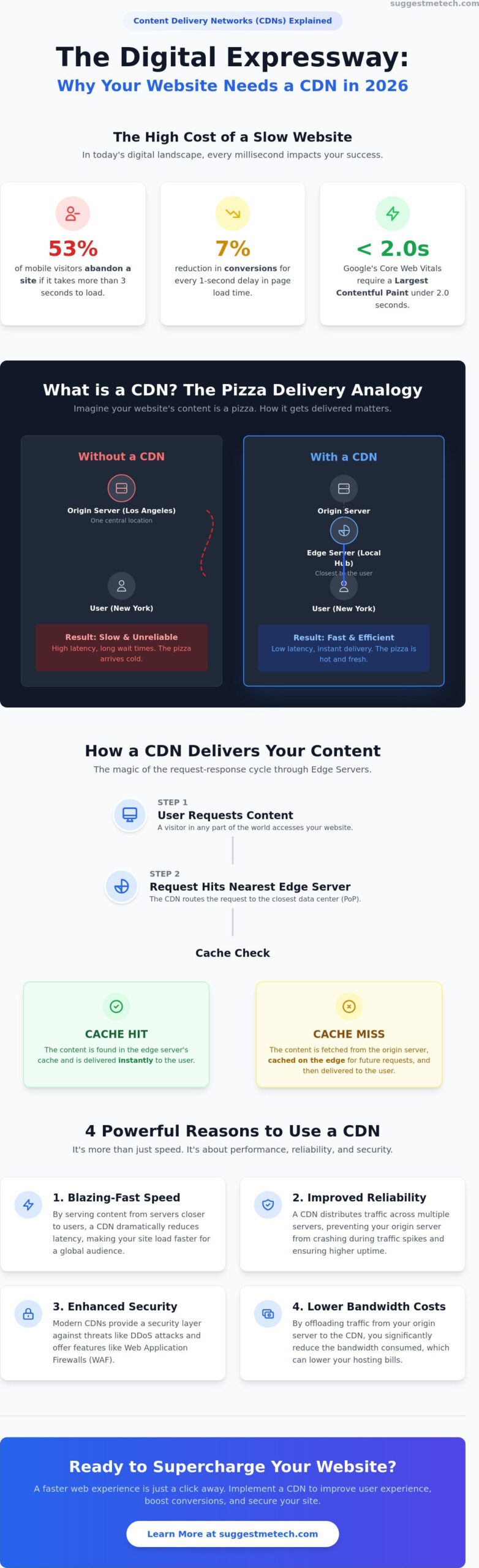
Did you know that 53% of mobile visitors will abandon your website if it takes longer than three seconds to load? In 2026, with Google’s Core Web Vitals now requiring a Largest Contentful Paint of under 2.0 seconds, every millisecond counts toward your bottom line. Even a one-second delay can lead to a 7% reduction in conversions, making speed your most valuable asset.
You’ve likely felt the frustration of a slow site or worried about a sudden traffic spike crashing your server. It’s easy to get lost in technical jargon like “latency” or “edge servers” while just trying to keep your business online. That’s why understanding what is a CDN and why you need one is no longer optional for modern site owners. By the end of this guide, you’ll see how to unlock faster loading speeds and better security by making a Content Delivery Network work for you.
We’ll break down exactly how this technology functions, help you decide if your specific project requires it, and provide actionable steps to implement the right solution today. Whether you’re running a personal blog or a high-traffic store, this is your roadmap to a faster web experience.
Key Takeaways
- Understand how distributed networks reduce physical distance to deliver content faster to your global users.
- Learn the mechanics of edge servers and how they shield your origin server from sudden traffic spikes and crashes.
- Discover exactly what is a CDN and why you need one to protect your site from viral traffic surges and unexpected popularity.
- Evaluate your specific website needs based on your audience’s location and the type of media assets you host.
- Get actionable steps for choosing between integrated hosting solutions and standalone providers like Cloudflare.
Demystifying the Content Delivery Network: What is a CDN?
At its core, a Content Delivery Network (CDN) is a group of geographically distributed servers that work together to provide fast delivery of Internet content. Instead of every visitor requesting data from one central server, they receive it from the node physically closest to them. The primary mission of this technology is to reduce the physical distance between the visitor and the data. This minimizes latency, which is the annoying delay you experience when a webpage takes too long to respond to a click.
By 2026, the internet has shifted entirely toward a “distributed web” model. It’s no longer a luxury reserved for massive corporations; it’s a standard requirement for any site owner who wants to remain competitive. You might hear people use the terms “content delivery network” and “content distribution network” interchangeably. While they describe the same basic infrastructure, the word “delivery” emphasizes the active optimization of the final hop to the user’s device. Understanding what is a CDN and why you need one starts with realizing that your website’s performance shouldn’t be limited by the location of your primary server.
The Pizza Delivery Analogy: Understanding CDN Logic
Think about ordering a pizza. If you live in New York and order from a world-famous shop that only has one location in Los Angeles, that pizza has to travel thousands of miles. By the time it arrives, it’s cold, soggy, and the delivery fee is outrageous. This is exactly how a website works without a CDN. Every request has to travel all the way back to the “Origin Server,” no matter where the user is located on the map.
Now, imagine that same Los Angeles pizza shop opens small hubs in every major neighborhood. When you order, the local branch makes the pizza using the exact same recipe and delivers it in minutes. In this scenario, those hubs are “Edge Servers” acting as your local delivery points. A CDN is a local cache for global data.
CDN vs. Web Hosting: Do You Need Both?
A common point of confusion is whether a CDN replaces your hosting. It doesn’t. Your web hosting is where your website “lives” and where your original files are stored. A CDN is how that content “travels” to reach a wider audience efficiently. You still need the best web hosting to serve as your origin server, providing the authoritative source of truth for your data.
The synergy between the two is straightforward:
- Origin Server: Your central hub (hosting) that stores the master version of your site.
- Edge Nodes: The distributed servers (CDN) that store temporary copies of your content to serve local users.
Using both ensures that your site remains stable at its core while staying lightning-fast at the edges. This combination is the most effective way to handle massive traffic spikes without your main server breaking a sweat.
How a CDN Actually Works: The Magic of Edge Servers
To truly grasp what is a CDN and why you need one, you have to look at the relationship between your origin server and the edge. Your origin server is the “source of truth.” It’s the central computer where your master website files live. Without a network in place, every visitor across the globe has to request data from this single location. This creates a bottleneck that slows down your site for anyone living far away.
Content Delivery Networks solve this by using Points of Presence (PoPs). These are strategically located data centers that house edge servers. When you implement a CDN, your website’s content is distributed across these PoPs. Understanding how a CDN works means seeing how these edge servers act as intermediaries, intercepting user requests before they ever reach your main server.
The Request-Response Cycle Explained
When a user clicks your URL, the process happens in milliseconds. First, the network uses Anycast routing to direct the request to the closest PoP. Think of Anycast as a single phone number that automatically rings the office nearest to the caller. Once the request hits the edge server, it checks its local storage for a copy of your site files. This is where caching comes into play.
- Cache Hit: The edge server already has the requested file. It serves it to the user immediately without bothering your origin server.
- Cache Miss: The file isn’t in the local cache. The edge server fetches it from your origin, saves a copy for the next visitor, and then delivers it to the user.
This cycle ensures that the next person in that same region gets a lightning-fast “Cache Hit” experience. If you’re comparing different performance tools for your site, our technology reviews and guides can help you find the best fit for your setup.
Static vs. Dynamic Content Delivery
Static content like high-res images, CSS, and JavaScript files are the bread and butter of CDN caching. They don’t change often, so they can sit on an edge server for long periods. However, the tech landscape in 2026 has evolved. Modern CDNs now handle dynamic content, such as personalized shopping carts or real-time data, with incredible efficiency.
Through edge computing, CDNs can now run small pieces of code directly at the PoP. This means database queries or user-specific logic don’t always have to travel back to the origin server. It reduces the “round-trip time” for data, making complex web applications feel as snappy as a basic landing page. This evolution is a primary reason why distributed networks have become essential for modern web development.
4 Powerful Reasons Why You Need a CDN in 2026
Speed is the primary currency of the modern web. In 2026, the performance gap between websites has widened, making a distributed network essential for survival. Understanding what is a CDN and why you need one starts with recognizing that speed isn’t just a convenience; it’s a direct driver of revenue. When your files are served from an edge node, you eliminate the massive delays caused by physical distance. This ensures that a visitor in Tokyo experiences your site just as quickly as someone in New York.
Beyond raw speed, a CDN acts as a vital insurance policy against sudden viral popularity. This occurs when a massive surge of unexpected traffic overwhelms your origin server, potentially causing it to crash. Since the CDN offloads the vast majority of requests to its global network, your primary host stays online even during these intense spikes. This offloading also provides a financial benefit. By serving content from the edge, you significantly reduce the bandwidth consumed by your host, which often leads to lower monthly bills. To dive deeper into the technical infrastructure, you can explore this guide on What is a Content Delivery Network (CDN) from an industry leader.
The Speed-SEO Connection
Google’s algorithm in 2026 is more aggressive than ever regarding Core Web Vitals. The requirement for Largest Contentful Paint (LCP) has tightened to under 2.0 seconds. If your site fails this benchmark, your search rankings will suffer. Millisecond delays lead to massive bounce rate increases, as 53% of mobile site visitors leave a page that takes longer than three seconds to load. When you’re testing these speeds on your own device, it’s helpful to know how to clear cache on iPhone to ensure you’re seeing the most accurate, live version of your site performance.
Security and DDoS Mitigation
A CDN serves as your website’s first line of defense. It sits in front of your origin server, acting as a shield that filters out malicious traffic before it can reach your core infrastructure. Most modern networks include a Web Application Firewall (WAF) that identifies and blocks common bot attacks and SQL injections. This distributed approach also handles SSL/TLS encryption more efficiently. By managing the “handshake” at the edge, the CDN reduces the computational load on your origin server, keeping your site both secure and responsive.
Identifying if Your Website Truly Needs a CDN Solution
Not every website requires a complex global infrastructure. While understanding what is a CDN and why you need one is helpful, you must first evaluate your specific traffic patterns. If your business only serves a single city and your server is located in that same city, the performance gains might be negligible. However, for most digital projects in 2026, the decision comes down to audience location and content complexity.
The “Global Audience” Test
Check your analytics data today. If more than 20% of your visitors are coming from a different continent than your origin server, you’re likely losing revenue to latency. Users in distant regions will experience the slow, laggy response times that drive up bounce rates. You can use tools like Google Search Console to see exactly where your users are lagging. If you notice high bounce rates in specific geographic zones, a CDN is the immediate fix. Local businesses might get by with a “lite” version or a basic integrated tool, but anyone reaching for a broader market needs a dedicated solution.
Content-Heavy Sites and Performance
Your site’s weight is the next major factor. Photographers, videographers, and e-commerce stores with high-resolution galleries shouldn’t even consider running without a CDN. Large files put immense pressure on your hosting environment. Without a distributed network, you risk “Origin Server Exhaustion.” This happens when your primary server runs out of resources trying to serve huge files to multiple people at once. If you start a blog that suddenly goes viral, that surge of traffic could knock your site offline in minutes without an edge network to absorb the blow.
Budget is often the final hurdle, but the ROI is usually clear. When you factor in reduced bandwidth costs and the potential for higher conversions through better Core Web Vitals, the service often pays for itself. If you’re still unsure which path to take, our technology reviews and guides offer deep dives into the most cost-effective tools available this year. Evaluating your uptime history is also crucial. If your site has suffered from frequent “504 Gateway Timeout” errors during peak hours, it’s a loud signal that your origin server is struggling and needs a distributed shield.
Getting Started: How to Choose and Implement a CDN
Once you’ve determined that your traffic patterns and content weight justify the investment, the next step is execution. Understanding what is a CDN and why you need one is only half the battle; choosing the right partner ensures you don’t overpay for features you won’t use. In 2026, many hosting providers include integrated CDN options in their dashboard. These “one-click” solutions are excellent for beginners because they handle the technical handshakes behind the scenes, though they might lack the granular control of a standalone provider.
If your host doesn’t offer a built-in tool, you’ll need to choose a third-party service. Cloudflare remains the industry standard for beginners due to its robust free tier, which provides essential security and speed optimization at no cost. For those with higher volume needs, Bunny.net offers incredibly competitive pay-as-you-go rates, often ranging from $0.005 to $0.010 per GB. If you’re looking for enterprise-grade performance with advanced edge computing, Fastly is a top-tier choice, though its pricing model is better suited for established businesses.
Top CDN Providers for Beginners
Cloudflare is often the first stop for most site owners because it’s easy to scale. Their Pro plan currently sits at $20 per month, offering enhanced image optimization and mobile acceleration. However, the landscape has changed. Many domain registrars now offer built-in CDN toggles directly within your domain management panel. This integration simplifies the process by keeping your DNS and delivery network under one roof, which is a major win for simplicity.
Implementation Checklist
The actual setup usually takes less than five minutes. Most providers require you to change your Nameservers at your registrar to point toward their network. This allows the CDN to sit in front of your site and filter traffic. Follow these steps for a smooth rollout:
- Step 1: Sign up for your chosen provider and add your site URL.
- Step 2: Update your DNS records or Nameservers as instructed.
- Step 3: Purge your old cache to ensure the edge servers grab the most recent version of your files.
Watch out for common pitfalls like “Redirect Loops.” This often happens if your CDN is trying to enforce HTTPS while your origin server is also trying to do the same in a different way. Always check that your SSL certificate is working correctly at the edge before walking away. Once active, use tools like PageSpeed Insights to verify your results. You should see an immediate improvement in your Largest Contentful Paint (LCP) scores, helping you meet the strict 2.0-second benchmark required for 2026 search rankings.
Take Control of Your Website’s Performance Today
You now have a clear roadmap for navigating the web in 2026. Speed isn’t just about user experience anymore; it’s a critical ranking factor that impacts your bottom line. By leveraging edge servers and intelligent caching, you ensure your site remains resilient against traffic spikes and secure against malicious bot attacks. Understanding what is a CDN and why you need one is the first step toward building a more professional and reliable online presence.
Many modern providers make this transition seamless by offering integrated tools. To simplify your decision, you can find the best hosting with built-in CDN support in our 2026 reviews. Our team has conducted expert comparisons of 20+ hosting providers and performed real-world speed tests from global locations. These community-driven tech recommendations are designed to help you bypass the jargon and find a solution that actually works for your specific needs. Don’t let technical hurdles hold your project back. The right infrastructure is ready to help you scale your site to a global audience with confidence.
Frequently Asked Questions
Does a CDN replace my web hosting service?
A CDN does not replace your web hosting service. Your host remains the central location where your master files live, while the CDN acts as a delivery system that distributes copies to edge servers. Think of your host as the main warehouse and the CDN as a fleet of local delivery vans. You need both to ensure your site is stored securely and delivered quickly to a global audience.
Will a CDN make my website more secure against hackers?
Yes, a CDN provides a significant layer of security against common cyber threats. By sitting in front of your origin server, it filters out malicious traffic and mitigates Distributed Denial of Service (DDoS) attacks. Many providers include a Web Application Firewall (WAF) that blocks bot attacks before they ever reach your hosting environment. This makes understanding what is a CDN and why you need one essential for modern site security.
Are there any disadvantages or risks to using a CDN?
The primary risks include technical configuration errors, such as redirect loops or SSL certificate mismatches. You might also encounter “stale content” issues where visitors see an old version of your site because the cache hasn’t been purged. While these are manageable, they require you to monitor your settings during updates. Additionally, pay-as-you-go costs can scale quickly if you experience unexpected, massive traffic surges without a price cap.
How much does a typical CDN cost for a small business in 2026?
For a small business in 2026, costs range from entirely free to roughly $20 per month for a standard professional plan. Many entry-level users stick with free tiers from major providers that cover basic speed and security needs. If you have high traffic, pay-as-you-go rates often start around $0.005 per GB. This flexibility makes it easy to find a solution that fits your specific monthly budget without a large upfront investment.
Can I use a CDN if I use WordPress or a site builder?
Absolutely, most WordPress sites and modern site builders are designed to work seamlessly with CDNs. WordPress users can install dedicated plugins that handle the connection automatically, while builders like Squarespace often have these networks built into their infrastructure. If you’re using a custom setup, you’ll simply update your DNS records at your registrar to activate the service. This ensures your site stays fast regardless of the platform you choose.
What is the difference between a CDN and a VPN?
A CDN and a VPN serve completely different purposes. A CDN is designed to make a website faster and more accessible for all visitors by distributing content globally. In contrast, a VPN is a tool used by individual users to encrypt their personal internet connection and hide their location. One optimizes the server side for the public, while the other protects the user side for private browsing.
How do I test if my CDN is actually working?
You can verify your setup by checking the response headers in your browser’s developer tools. Look for a tag like “x-cache” or “cf-cache-status” that says “HIT,” which confirms the content came from an edge server. Alternatively, use a global speed test tool to compare loading times from different countries. If the speeds are consistent worldwide, it’s a clear sign that your distributed network is functioning as intended.
Is a CDN necessary for a website with only local traffic?
If your traffic is 100% local, a CDN is not strictly necessary for speed, but it still offers practical value. it provides a security shield against attacks and reduces the computational load on your primary server by offloading static images and videos. Even for a strictly local business, knowing what is a CDN and why you need one helps you prepare for future growth or sudden viral interest from outside your region.

