
Congratulations, you’ve just purchased your own piece of the internet. But now comes the part that can feel overwhelming. If you’re staring at a ‘parked’ page full of ads and wondering what to do after buying a domain name, you’re not alone. The path from a simple web address to a live website is often filled with technical terms like DNS, hosting, and SSL that can seem intimidating, leaving many new owners unsure of the next step.
This guide removes the guesswork. We’ll provide a clear, step-by-step roadmap to navigate the technical setup, from choosing the right web hosting and connecting it to your domain to setting up a professional email address. By the end, you’ll have transformed your new domain from a simple purchase into a secure, fully functional, and professional online presence for your brand or project.
Key Takeaways
- Immediately secure your new domain by enabling WHOIS privacy to shield your personal contact information from public databases.
- Learn what to do after buying a domain name by connecting it to a web host and creating a professional email address to build brand credibility.
- Decide on the right platform for your project by comparing the flexibility of a CMS like WordPress against the simplicity of drag-and-drop website builders.
- Lay the groundwork for long-term growth by connecting your site to essential tools like Google Search Console and Analytics to monitor performance.
Securing Your Digital Asset: Immediate First Steps
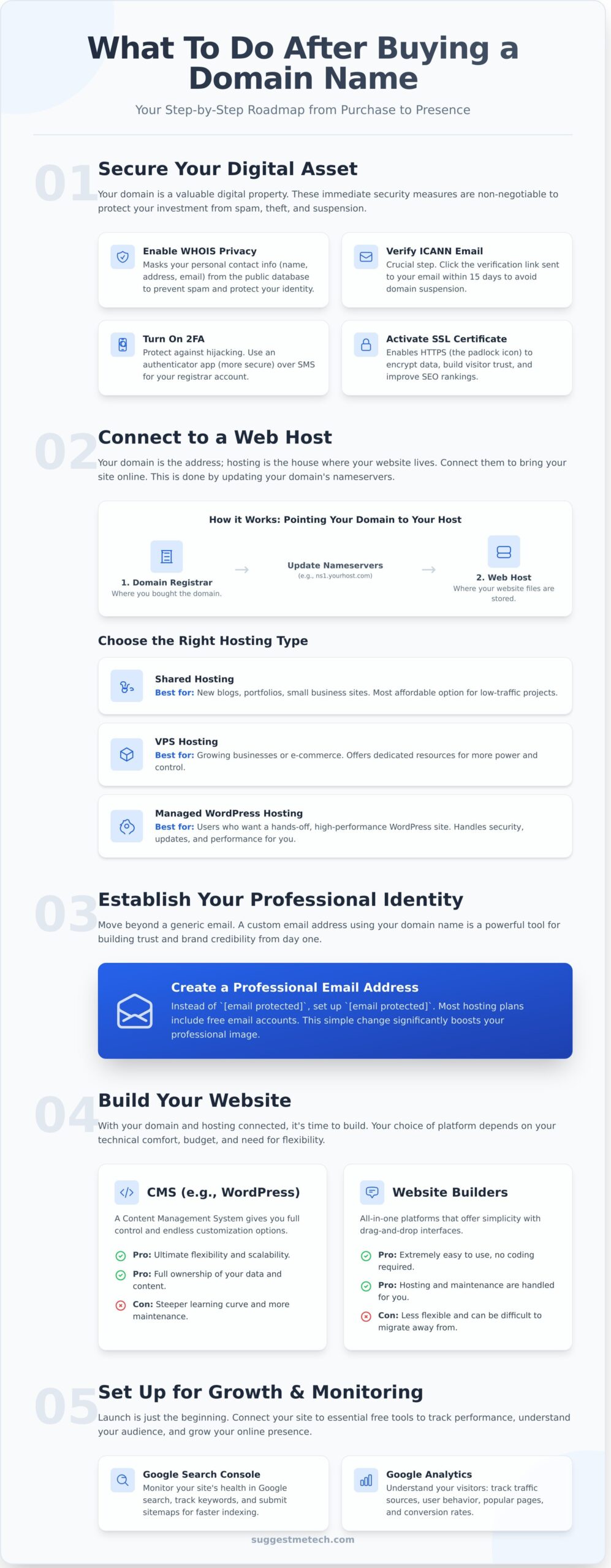
Congratulations on your new domain! This is the first step in building your online identity. But before you focus on web design or email, the most critical answer to what to do after buying a domain name involves securing your new digital asset immediately.
Think of your domain name like a deed to a digital property. You need to protect it from theft and ensure your ownership is properly registered. These first few steps are non-negotiable for protecting your investment and your future brand.
Understanding WHOIS Privacy and ICANN Verification
Every domain registration is recorded in a public database called WHOIS. By default, this record includes your name, address, and email. To prevent spam and protect your identity, your first action should be to enable WHOIS Privacy Protection, a service most registrars offer that masks your personal data.
At the same time, you must verify your contact information with ICANN (Internet Corporation for Assigned Names and Numbers), the organization that governs domains. Failing to click the verification link sent to your email can result in your domain being suspended and lost within 15 days.
Account Security and 2FA
Domain hijacking is a rising threat, and by 2026, it’s projected to be one of the most common forms of digital asset theft. An attacker who gains access to your registrar account can transfer your domain or alter its Domain Name System (DNS) records to redirect your visitors to a malicious site.
To prevent this, immediately turn on Two-Factor Authentication (2FA) on your registrar account. We strongly recommend using an authenticator app (like Google Authenticator or Authy) over SMS, as app-based codes are more secure against SIM-swapping attacks.
For high-value domains, ask your registrar about enabling a “Registry Lock.” This is a premium security feature that prevents any unauthorized changes to your domain at the registry level, effectively locking it down from malicious transfers.
Finally, check if your domain purchase included a free SSL certificate. This certificate enables the “HTTPS” protocol, which encrypts data between your website and its visitors. Having it active from day one is crucial for building user trust and improving your search engine rankings. If not included, you’ll need to get one when you set up web hosting.
Choosing and Connecting a Web Hosting Provider
You’ve secured your digital address, a critical step to protect your brand presence online. But an address is just a location; you still need a house. This is where web hosting comes in. Think of your domain registrar as the landlord who owns the plot of land (your domain), and your web host as the company that builds and maintains the house (your website) on that land.
Finding the right hosting is one of the most important answers to what to do after buying a domain name. Your host stores your website’s files and makes them accessible to visitors around the world. The performance, security, and reliability of your site depend heavily on this choice.
Matching Hosting to Your Website Goals
Not all hosting is created equal. The right choice depends entirely on your project’s needs, budget, and technical skill. For most new projects, there are three primary types to consider:
- Shared Hosting: The most affordable option, perfect for new blogs, portfolios, or small business sites. You share server resources with other websites, making it ideal for low-traffic projects.
- VPS (Virtual Private Server) Hosting: A step up from shared hosting, offering dedicated resources within a shared environment. This is a great fit for growing businesses or e-commerce stores that need more power and control.
- Managed WordPress Hosting: A specialized service optimized for WordPress sites. It handles security, updates, and performance tuning for you, making it an excellent choice for users who want a hands-off, high-performance experience.
When comparing providers, beginners should prioritize features like “One-Click Installs” for platforms like WordPress and reliable 24/7 customer support. Pay close attention to performance metrics like uptime guarantees (aim for 99.9% or higher) and TTFB (Time to First Byte), which measures server responsiveness. For our complete breakdown, see our guide to the Best Web Hosting Providers of 2026.
The Technical Handshake: Nameservers and DNS
Once you’ve chosen a host, you must connect your domain to it. This is done through the DNS (Domain Name System), which acts as the phonebook of the internet. It translates your human-friendly domain name (like YourSite.com) into a computer-friendly IP address (like 192.0.2.1).
Your new web host will provide you with at least two nameservers (e.g., ns1.yourhost.com and ns2.yourhost.com). You’ll simply log in to your domain registrar, find the DNS or nameserver settings for your domain, and replace the existing entries with the new ones from your host. This action tells the internet to look at your new host’s servers for your website’s content.
After updating your nameservers, be patient. The changes need to “propagate” across the internet, which can take anywhere from a few hours to 48 hours. During this time, your website might be intermittently available as servers worldwide update their records with your new address.
Establishing Your Professional Brand Identity
Your new domain name is more than just a web address-it’s the foundation of your online brand. One of the most important things what to do after buying a domain name is to use it to build a consistent and trustworthy presence across the internet. Taking these steps immediately establishes credibility and protects your brand from impersonators.
From a professional email to social media handles, every element should align with your domain. This consistency signals to customers and search engines that you are a legitimate and serious entity, laying the groundwork for future growth.
Custom Email vs. Generic Gmail
Nothing undermines credibility faster than a generic email address. Studies show that nearly 75% of customers are more likely to trust a business with a professional email address (like hello@yourdomain.com) than one using a free service (like yourbusiness@gmail.com).
You have several options for setting up a custom email:
- Google Workspace: Ideal for teams that rely on Gmail, Drive, and other Google apps for collaboration.
- Microsoft 365: The best choice for businesses integrated into the Microsoft ecosystem, using Outlook, Teams, and Office.
- Host-Provided Webmail: Most web hosting plans include basic email hosting, offering a simple, low-cost solution for getting started.
As a temporary or free alternative, you can set up email forwarding. This lets you create a professional address that automatically forwards all incoming messages to your personal Gmail or Outlook account.
Social Media and Brand Protection
Securing social media handles that match your domain is crucial for brand consistency. Use a tool like Namechk to instantly see if your desired username is available across major platforms like X (Twitter), Instagram, LinkedIn, and TikTok.
Even if you don’t plan to use a specific platform right away, register the handle. This prevents others from claiming it, protecting your brand from squatters or confusion down the line. This proactive approach is a fundamental part of good domain management and securing your digital assets. For ultimate long-term protection, you may also consider trademarking your brand name.
Create a “Coming Soon” Page
Before your full website is ready, publish a simple “Coming Soon” or “Under Construction” page. This isn’t just a placeholder; it signals to search engines that your domain is active. Google can begin indexing your URL, giving you a head start on SEO before you even launch.
Register Your Google Business Profile
If your business serves a specific geographic area, creating a Google Business Profile is essential. Linking it to your new domain allows your business to appear in local search results and on Google Maps. This is a powerful, free tool for building local authority and attracting nearby customers.
Building Your Website: CMS vs. Website Builders
Once your domain and hosting are connected, the central question of what to do after buying a domain name is deciding how you will build your website. This choice typically comes down to two paths: using a flexible Content Management System (CMS) or a streamlined, all-in-one website builder.
A CMS is software that helps you create and manage digital content without needing to code everything from scratch. Your decision here will impact your site’s flexibility, cost, and long-term potential.
WordPress: The Industry Standard
WordPress is an open-source CMS that powers over 40% of the entire web. Its main advantage is ultimate flexibility-you have full control over design, features, and data. For a smoother start, we recommend choosing a “Managed WordPress” host, as they handle technical maintenance like security updates and backups for you.
To extend your site’s functionality, you will use plugins. Every new WordPress site should start with these essentials:
- SEO: A plugin like Rank Math or Yoast SEO to help your content get found on search engines.
- Security: Tools like Wordfence or Sucuri to protect your site from malicious attacks.
- Backups: An automated solution like UpdraftPlus to save copies of your site in case anything goes wrong.
Website Builders: Speed and Simplicity
Platforms like Wix, Squarespace, and Shopify are perfect if your priority is getting a professional-looking site online quickly. These builders offer drag-and-drop interfaces and pre-made templates, bundling hosting and support into one monthly fee.
However, this convenience comes with trade-offs. You give up a degree of control and ownership. Customization is limited to what the platform allows, and moving your website to a different host later (a process called migration) is often extremely difficult or impossible. They are best for simple portfolios, local business sites, or anyone who values ease of use above all else.
After choosing your platform, your next action is to select a theme or template. Always prioritize a lightweight, mobile-responsive design to ensure your site loads fast on every device. Finally, create the essential pages every site needs to build trust and provide key information:
- Home Page: Your digital front door. It should clearly state what you do and guide visitors to other important sections.
- About Page: Tell your story. Explain who you are, what your mission is, and why visitors should trust you.
- Contact Page: Make it easy for people to get in touch. Include a contact form, email address, and any relevant social media links.
Growth, Monitoring, and Long-Term Management
Once your website is launched, your focus shifts from setup to sustained growth and maintenance. Addressing these long-term tasks is a critical part of what to do after buying a domain name to ensure your initial investment pays off for years to come.
These final steps protect your digital asset, help you understand your audience, and prepare you for future growth.
Search Engine Indexing and Analytics
To grow, you first need to be found. Connecting your site to Google Search Console is a non-negotiable first step. This free tool shows you how your site performs in search results and alerts you to technical issues that could harm your ranking.
Inside Search Console, you can submit a sitemap-a file that lists all your site’s pages-to help Google discover and index your content more efficiently. This is the foundation for attracting organic traffic: visitors who find you through unpaid search results. Building this traffic is a sustainable strategy for long-term success, far beyond 2026.
Next, install Google Analytics 4 (GA4) to understand how visitors interact with your site. Finally, set up basic uptime monitoring. A free tool can alert you the moment your site goes down, allowing you to fix issues before they impact your audience.
The Importance of Auto-Renewal
Letting your domain expire accidentally can be a costly and stressful mistake. Most registrars offer a “Redemption Period,” a grace window to reclaim an expired domain, but the recovery fees are often ten times the normal renewal cost.
The simplest prevention is to enable “Auto-Renew” in your registrar’s dashboard. It is essential to keep your payment method on file updated to avoid failed transactions that could lead to expiration.
This also protects you from domain squatting, which is the practice of registering an expired domain name with the intent of profiting from the original owner’s brand recognition.
Finally, establish a regular backup schedule. Your website is made of files and a database, and both need to be saved securely and frequently. While many hosts offer backups, having your own independent copy ensures you can quickly restore your site after a technical failure or security breach, safeguarding your hard work.
Transforming Your Domain Name into a Digital Asset
Securing your domain name is an exciting first step, but it’s the strategic actions that follow which truly build your online presence. From setting up professional email to choosing your website platform, each decision lays another foundational block for your digital brand.
Among the most critical choices for what to do after buying a domain name is selecting the right web hosting provider. The performance, security, and reliability of your website depend almost entirely on this decision, making it essential to choose a partner that aligns with your goals and budget.
To help you make an informed choice, we’ve done the heavy lifting. Check out our expert picks for the Best Web Hosting Providers of 2026. Our guide features detailed comparisons of speed, uptime, and support, along with editor-tested solutions and community-driven reviews to find the perfect fit for your project.
You’ve claimed your corner of the internet. Now, with the right tools and a clear strategy, you’re ready to build something remarkable.
Frequently Asked Questions
Does buying a domain name automatically give me an email address?
No, and this is a common point of confusion when figuring out what to do after buying a domain name. A domain is just the address (e.g., yourbusiness.com). Email is a separate service that uses that address. You’ll need to purchase an email hosting plan to create professional addresses like contact@yourbusiness.com.
Many domain registrars and web hosting companies offer email hosting as an add-on service. You can also use dedicated providers like Google Workspace or Microsoft 365.
How long does it take for my domain to start working after I buy it?
After you purchase and set up your domain, it enters a process called DNS propagation. This is when servers across the globe update their records with your domain’s new information. While it can sometimes be active within an hour, this process can take up to 48 hours to complete worldwide.
During this time, your domain might work for some visitors but not for others, depending on their location and internet service provider.
Can I move my domain to a different registrar later?
Yes, you can transfer your domain from one registrar to another at almost any time. The main exception is a 60-day lock imposed by ICANN (the organization that governs domains) after a new registration or a previous transfer. This is a standard security measure to prevent unauthorized transfers.
The transfer process is straightforward and involves unlocking your domain and getting an authorization code from your current registrar.
Do I need to buy a domain and hosting from the same company?
No, you are not required to purchase them together. Bundling them can be convenient, as it simplifies billing and management under one account. However, keeping them separate gives you more flexibility. For example, you can choose a specialized hosting provider known for performance while keeping your domain with a registrar you prefer for its pricing or management tools.
What happens if I forget to renew my domain name?
If your domain expires, it enters a grace period, typically lasting 30-40 days, where you can renew it at the standard price. After that, it moves into a “redemption period” for about 30 days, where you can still get it back but for a significantly higher fee. If you don’t renew it then, the domain is released and becomes available for anyone to register. We strongly recommend enabling auto-renewal.
Is an SSL certificate mandatory for my new domain?
While not technically mandatory to own the domain itself, an SSL certificate is essential for any modern website. It enables HTTPS, encrypting the connection between your site and its visitors. Without it, web browsers like Chrome will display a “Not Secure” warning, which deters visitors and negatively impacts your search engine rankings. Most web hosts offer free SSL certificates.
Can I hide my personal information from the public domain registry?
Yes, you can. This feature is called domain privacy or WHOIS protection. When you register a domain, your personal contact details are listed in the public WHOIS database. Domain privacy services replace your information with the generic contact details of your registrar, protecting you from spammers, marketers, and potential identity theft. Many registrars now include this for free.
What is the difference between a domain name and a URL?
A domain name is the memorable address of your website, such as `yourwebsite.com`. A URL (Uniform Resource Locator) is the full web address of a specific page on your site. For example, `https://www.yourwebsite.com/about-us` is a URL. Think of the domain name as the building’s street address and the URL as the specific apartment number within that building.