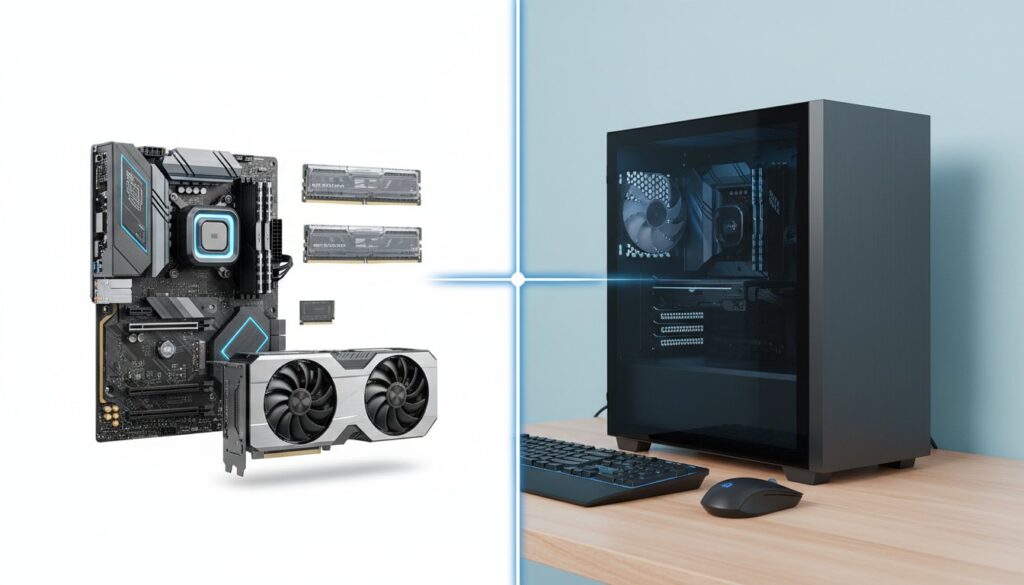
The decades-old advice that building a PC is always the most cost-effective path has officially expired in the 2026 hardware market. You’ve probably noticed that prices aren’t what they used to be. With AI server demand driving up consumer RAM and SSD costs by 18% over the last twelve months, the math on whether is it cheaper to build or buy a pc in 2026 has changed significantly. It’s stressful to balance the desire for high-quality parts against the fear of overpaying for a pre-built system filled with generic, low-tier components.
You want the best value for your hard-earned money without sacrificing long-term reliability. This article provides a direct cost comparison between DIY builds and major pre-built brands to find the real winner for your budget. We’ll examine component quality trade-offs and the hidden value of your assembly time so you can make your final purchase with total confidence. Whether you’re a hardcore gamer or a creative professional, it’s time to see which option actually keeps more money in your pocket.
Key Takeaways
- Understand how AI-driven demand for RAM and VRAM has shifted component pricing, making it essential to re-evaluate whether is it cheaper to build or buy a pc in 2026.
- Discover why entry-level buyers in the $500–$800 range often get better value from pre-built systems due to corporate discounts and bundled peripherals.
- Learn to identify the “Quality Tax” of DIY building and how to account for hidden costs like OS licenses and specialized assembly tools.
- Identify the current mid-range “Sweet Spot” where building your own PC still offers the best balance of high-quality components and performance.
- Use our step-by-step 2026 buyer’s checklist to compare real-time market prices and choose the most cost-effective path for your specific needs.
The 2026 PC Market: Why the Old Rules No Longer Apply
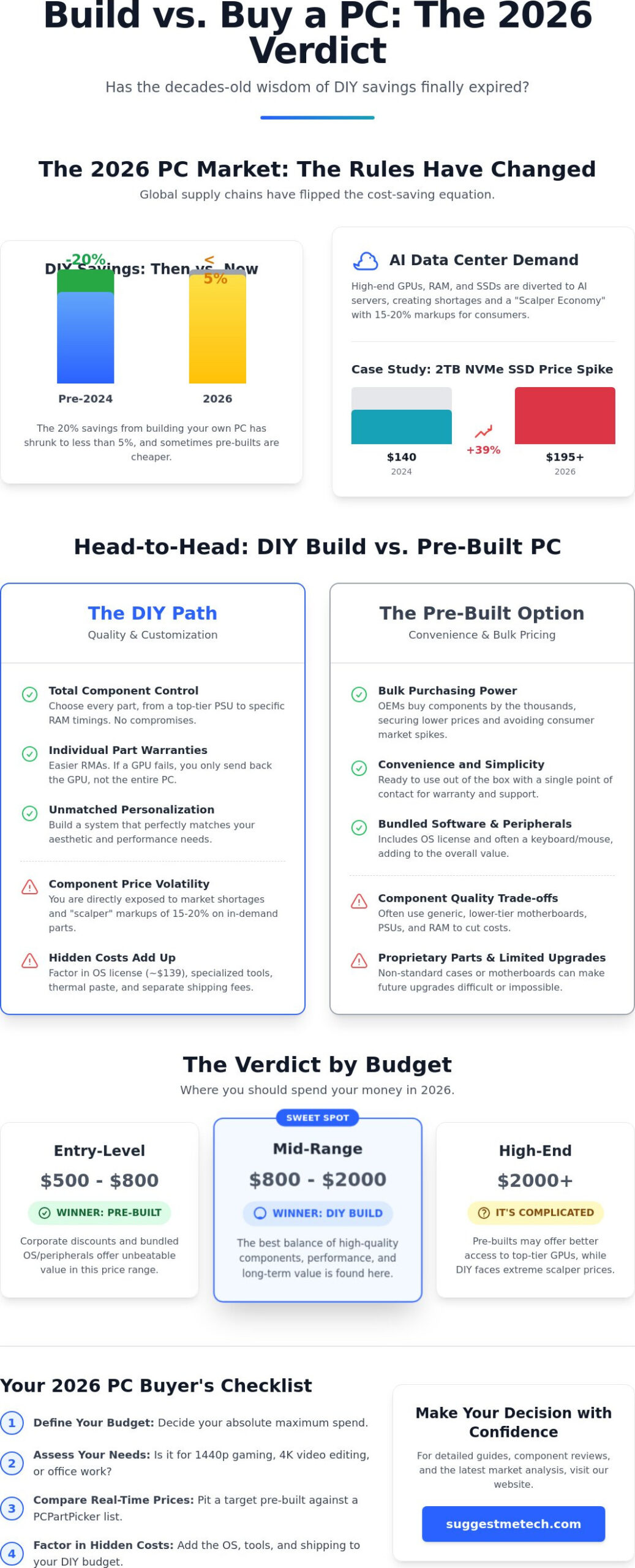
For decades, the mantra was simple: build it yourself to save 20%. By mid-2026, that math has completely flipped. The price gap between a custom rig and a pre-built machine has shrunk to less than 5% in most cases. Sometimes, buying a pre-assembled unit is actually the more affordable path. This shift happens because individual component prices are no longer tied to consumer demand alone. Understanding is it cheaper to build or buy a pc in 2026 requires looking at the global supply chain rather than just retail stickers.
High-end GPUs and memory modules are now heavily diverted to AI data centers. This creates a “Scalper Economy” where individual buyers face 15% to 20% markups on retail sites. While you search for a single card, massive AI firms buy thousands at a time directly from the source. This makes the question of whether is it cheaper to build or buy a pc in 2026 more complex than looking at a standard part list. If you’re hunting for specific high-performance parts, you’re competing with billion-dollar corporations for the same silicon.
The Rise of AI Data Centers and Your SSD
In 2024, a high-quality 2TB NVMe Gen4 drive cost roughly $140. By 2026, those same drives often retail for $195 or more. This 39% increase stems from the massive demand for NAND flash and DRAM in AI training servers. Enterprise buyers prioritize speed and reliability, which forces manufacturers to shift production away from consumer-grade storage. Pre-built manufacturers like Dell or HP avoid these specific spikes because they sign multi-year supply contracts that lock in lower rates, protecting their customers from the volatility of the open market.
Bulk Purchasing Power vs. The DIY Builder
OEMs (Original Equipment Manufacturers) operate on a different scale than local tech shops. When you look at Building Your Own PC: The Cost of Quality and Customization, you see the value of choice, but you also see the premium of retail pricing. Large brands utilize an “Inventory Buffer” to keep prices stable. If a global shortage hits in March 2026, a DIY builder sees immediate price hikes. A mass-producer likely has six months of components already sitting in a warehouse at last year’s prices. This means:
- Pre-builts offer more stable pricing during mid-year supply shocks.
- OEMs get priority shipping for the latest RTX or RX series cards.
- Individual buyers pay a “convenience tax” on every single component, from the power supply to the case fans.
Your local tech shop simply can’t match the price of a mass-produced desktop when the manufacturer is buying 500,000 motherboards at once. The DIY route still offers unmatched personalization, but the financial “win” is harder to find in the current market climate.
Building Your Own PC: The Cost of Quality and Customization
Building a computer often feels like a premium experience because you control every screw and circuit. While asking is it cheaper to build or buy a pc in 2026, you have to look past the initial sticker price. DIY enthusiasts often pay what experts call a “quality tax.” This isn’t a literal tax, but a conscious choice to invest in high-tier Power Supply Units (PSUs) and motherboards that pre-built manufacturers often overlook. Many off-the-shelf systems use “Gold” rated PSUs that barely meet efficiency standards. In contrast, a DIY builder might opt for a Titanium-rated unit with a 10-year warranty, ensuring the system remains stable for a decade.
Individual part warranties provide a massive safety net that a single system warranty cannot match. If your graphics card fails in a DIY build, you ship just that specific component to the manufacturer for a replacement. In a pre-built scenario, you often have to ship the entire 30-pound tower back to the factory, risking shipping damage and weeks of downtime. The 2026 PC Market: Why the Old Rules No Longer Apply highlights how component pricing volatility makes these individual warranties more valuable than a standard one-year system coverage. A $1,200 DIY build might cost more upfront, but it often outlasts a $1,000 pre-built because it lacks the “planned obsolescence” of proprietary parts.
The Hidden Costs of Building
Budgeting for a DIY project requires accounting for items that pre-builts include for “free.” A retail Windows 11 or 12 license can cost $139, whereas large manufacturers pay a fraction of that price for OEM versions. You also need to buy thermal paste, cable ties, and perhaps a specialized magnetic screwdriver set if you don’t own one. Shipping costs from four different retailers can easily add $40 to your total. For a DIY builder, the Total Cost of Ownership is the sum of all components, software licenses, assembly tools, and the projected maintenance costs over the next five years.
Control Over Component Longevity
By 2027, your DIY PC will likely be easier to repair than a budget pre-built. Many mass-market brands use proprietary motherboard shapes or non-standard power connectors that make upgrades impossible. DIY builds use standardized ATX or ITX parts, meaning if a part breaks three years from now, you can buy a replacement from any brand. If the complexity of building seems too high for your current schedule, you might find that The Best Laptops of 2026 offer a more streamlined path to high-performance computing without the assembly stress. If you’re unsure which path to take, you can always check our latest component reviews to see which parts offer the best value this quarter.
- Standardized parts: Easier to swap and upgrade as technology evolves.
- Better Cooling: DIY cases often feature superior airflow compared to cramped office-style pre-built chassis.
- No Bloatware: Your DIY OS installation won’t come with pre-installed trial software that slows down your boot times.
Buying Pre-built: Convenience and Corporate Discounts
Time is a currency many builders forget to calculate. When you ask is it cheaper to build or buy a pc in 2026, you must account for the 4 to 8 hours required for assembly, cable management, and software installation. A pre-built machine arrives ready to run. You skip the tedious BIOS updates and the anxiety of seated components not posting on the first try. Large manufacturers like HP, Dell, and Lenovo leverage massive bulk-buying power to secure components. They purchase thousands of GPUs directly from suppliers, often paying 15% to 20% less than the retail prices found on consumer sites.
Pre-built deals often include bundled value that a custom build lacks. You will frequently find these items included at no extra cost:
- Peripherals: A basic keyboard and mouse are standard inclusions, saving you roughly $30 to $50.
- Software: Many systems come with a 3-month or 6-month subscription to services like Xbox Game Pass or specialized creative suites.
- Operating System: Windows 11 or 12 licenses are integrated into the price; builders often pay $100 or more for a retail key.
The single point of contact is the strongest argument for the pre-built route. If a custom PC fails, you must diagnose which of the seven different parts is broken and deal with that specific manufacturer. With a pre-built, one warranty covers every screw and circuit. This is essential for non-technical users who don’t want to spend their Saturday troubleshooting voltage regulators.
The Convenience Factor
Professional assembly offers more than just a working computer. Major brands perform 24-hour stress tests to ensure the hardware doesn’t fail under load. They handle the professional cable management that keeps your airflow optimal without you touching a single zip tie. You get instant gratification. Instead of waiting for seven different packages to arrive from various retailers, you get one box. This reliability is why beginners should prioritize a system-wide warranty over the slight performance gains of a custom rig.
Identifying “The Catch” in Pre-built Deals
Manufacturers often hide cost-cutting measures in places you won’t look. Many budget units use single-channel RAM. Using one 16GB stick instead of two 8GB sticks can cause a 10% to 12% drop in frame rates during gaming. You might also find “ketchup and mustard” cables; these are the ugly, multicolored wires that clutter the interior of cheaper cases.
Bloatware remains the hidden cost of these machines. Manufacturers accept subsidies to pre-install trial software, which can consume up to 15% of your system resources on the first boot. To decide if it cheaper to build or buy a pc in 2026 for your specific needs, always check the SSD specs. Brands often use slow DRAM-less drives that stutter during large file transfers. Read the spec sheet for specific model numbers rather than generic terms like “1TB SSD” or “16GB RAM.”
The Verdict by Budget: Where Should You Spend Your Money?
Deciding is it cheaper to build or buy a pc in 2026 depends heavily on your specific financial bracket. While the DIY market used to be the default choice for saving money across the board, the rise of specialized manufacturing has shifted the landscape. Your choice should align with your performance goals and how much you value your time versus custom control.
Entry-Level: The OEM Stronghold
For budgets between $500 and $800, buying a pre-built system almost always wins. Large manufacturers like Dell, HP, and Lenovo purchase components in massive quantities, allowing them to sell a complete tower for less than the retail cost of individual parts. You can’t easily build a PC for $500 that beats a mass-produced office tower in 2026. This is largely due to the advancement of Integrated Graphics (APUs). Modern APUs now deliver enough power for 1080p gaming and office tasks without needing a dedicated graphics card.
If you’re looking at this budget because you’re trying to save every penny, you might consider optimizing your current devices first. For instance, learning how to clear cache on iPhone can help you squeeze more life out of your existing tech while you save for a better machine. At the low end, the convenience and warranty of a pre-built outweigh the negligible savings of building it yourself.
The Mid-Range Sweet Spot
The $1,200 to $1,800 range is where the DIY market shines. This is where is it cheaper to build or buy a pc in 2026 starts to favor the builder. Pre-built companies often cut costs in this bracket by using “no-name” power supplies, slower RAM, or basic motherboards. When you build your own, you can ensure every dollar goes into high-quality components that last longer. You get to choose a specific SSD with high endurance or a motherboard with better VRMs for future upgrades.
High-End: The DIY Advantage
When your budget exceeds $2,500, building becomes a requirement for enthusiasts and professionals. Pre-built systems at the top tier often suffer from thermal issues because they use standardized cases that aren’t designed for high-wattage components. Custom cooling and aesthetics are the primary drivers here. Modern 50-series GPUs generate significant heat, and a DIY build allows you to choose a high-airflow case that prevents thermal throttling.
If you’re building a high-end gaming or audio production rig, your peripherals need to match the quality of your tower. Check out our headphones guide to find a pair that can keep up with your new system’s output. DIY builders in this category can also prioritize silent operation, something mass-market “gaming” PCs rarely achieve.
The Creator Caveat
Content creators face a unique situation. Video editing and 3D rendering require specific hardware balances, such as 128GB of RAM or multiple NVMe scratch disks. Pre-built machines are usually balanced for gaming, not professional creativity. By building your own, you can skip the expensive RGB lighting and put that money into a higher core-count CPU. This specialized approach ensures you aren’t paying for “gamer” features you don’t need.
Ready to start your next project? See our latest hardware recommendations to find the best parts for your budget.
Final Decision: A 2026 PC Buyer’s Checklist
Deciding is it cheaper to build or buy a pc in 2026 requires more than just looking at a price tag. You need a systematic approach to ensure you don’t overspend or end up with a machine that fails your needs. Follow these four steps before you click “buy” or “checkout.”
- Step 1: Define your primary use case. If you need a machine for high-end 4K gaming or local AI development, building is almost always better. You can prioritize a high-wattage power supply and superior cooling. For basic office tasks or student work, high-volume manufacturers often secure Windows licenses and cases at prices individuals can’t match.
- Step 2: Run a live price comparison. Use PCPartPicker to build your “dream” list with current 2026 components. Compare that total against a pre-built from a reputable brand like Lenovo or CyberPowerPC. In the current market, pre-builts are frequently within 7% of the cost of individual parts because of OEM bulk discounts.
- Step 3: Be honest about your troubleshooting patience. Building a PC takes roughly 4 hours for a beginner. If the system doesn’t post, you’re the tech support. Pre-builts come with a single warranty for the whole machine, which saves days of frustration if a component fails.
- Step 4: Factor in peripherals. A $1,200 PC isn’t $1,200 if you also need a $200 monitor and $100 for a mouse and keyboard. Pre-builts sometimes include basic peripherals, saving you an extra $80 to $120 upfront.
The 30-Minute Research Rule
Before buying a pre-built, spend 30 minutes looking at the internal photos. Many “big box” brands use proprietary power connectors and non-standard motherboard shapes. This makes future upgrades nearly impossible. If you want a machine that lasts until 2030, ensure it uses standard ATX or ITX parts. If your goal is to use this power for a new career, check out our guide on How to Start a Blog to see how a reliable PC can fuel your content creation journey.
When to Wait: Seasonal Sales and New Releases
Timing is everything. The “Back to School” sales in August 2026 typically offer the best deals on pre-built systems for students. However, Black Friday 2026 remains the king for component builders, specifically for SSDs and RAM. Watch the market closely; GPU prices spiked 18% in the first quarter of 2026 due to renewed AI demand, so buying during a mid-year dip is often the smartest move. Ultimately, determining is it cheaper to build or buy a pc in 2026 depends on whether you value your time or your total control over every internal component.
Make Your Move in the 2026 Tech Market
Navigating the hardware landscape requires a sharp eye for value. The question of is it cheaper to build or buy a pc in 2026 often comes down to current supply chain shifts. Our data shows that while individual part prices have leveled off since the 2025 manufacturing recovery, pre-built manufacturers still leverage 15% bulk discounts that are hard for solo builders to beat. Custom building remains the king of personalization, but the gap in total cost has narrowed significantly this year.
At SuggestMeTech, we cut through the noise with Editor’s Pick certified reviews and an expert comparison of 50+ hosting and hardware providers. We prioritize community-driven tech testing to give you real-world results you can trust. Your choice depends on whether you value immediate convenience or the granular control of a bespoke machine.
Got a Suggestion of Your Own? Tell us which 2026 builds you want to see reviewed!
Your next setup is a major investment and we’re excited to see what you create.
Frequently Asked Questions
Is it still cheaper to build a PC in 2026?
Building your own machine is usually 15% cheaper than buying a pre-assembled unit with identical specifications. When asking is it cheaper to build or buy a pc in 2026, the answer remains yes for users who want to avoid the $150 to $300 assembly markup. You also get better quality components like power supplies for the same price point.
Do pre-built PCs last as long as custom-built ones?
Custom-built PCs often last 2 to 3 years longer than mass-produced pre-builts because you select every individual component for quality. Major retail brands frequently cut costs on motherboards and cooling systems, which are often the first parts to fail. High-quality retail parts from brands like Noctua or SeaSonic often offer 10-year warranties that pre-builts can’t match.
Can I upgrade a pre-built PC later?
You can upgrade most pre-built PCs, but boutique builders make it much easier than office-focused brands. About 80% of systems from companies like CyberPowerPC or Skytech use standard ATX parts that are easy to swap. If you buy a compact office PC from a brand like Dell, you might find proprietary power connectors that prevent simple graphics card upgrades.
How much money do you actually save by building a PC?
You typically save an average of $250 by sourcing your own parts and assembling the machine yourself. This margin increases for high-end workstations where the luxury tax on pre-builts can exceed $500. By watching for sales on platforms like Newegg or Micro Center, you can often fit a higher-tier graphics card into your budget for the same total cost.
Is it hard to build a PC for a beginner in 2026?
Building a PC is very accessible for beginners in 2026 because components are more plug-and-play than ever before. Roughly 95% of modern parts use standardized slots that only fit in one direction. Most new cases include pre-routed cables and tool-less drive bays, so you don’t need to be an engineer to get a functional setup running in under two hours.
Does a pre-built PC come with Windows installed?
Yes, almost 100% of pre-built PCs come with Windows 11 or the latest operating system already installed and activated on the drive. If you build your own, you’ll need to create a bootable USB drive and purchase a license key separately. This adds about $100 to your DIY budget unless you already own a transferable retail license from a previous build.
What are the risks of building your own PC?
The biggest risk is accidental hardware damage, such as bending the 1,700+ pins on a modern CPU socket during installation. While only about 1 in 50 builders encounter a faulty part, troubleshooting which component is broken can be difficult without spare parts. You also lose the convenience of a single point of contact for technical support and whole-system warranties.
Why are PC parts so expensive right now?
Component prices reflect the 2025 increase in manufacturing costs for advanced 3nm chips and specialized hardware. High demand for AI processing power has also pushed up the price of high-bandwidth memory by 12% over the last 12 months. These global supply chain factors mean you’ll pay a premium for the latest generation of graphics cards and high-capacity power supplies.