

Your workstation is currently accumulating “tech-debt” that your body will eventually have to pay back with interest. If you spend eight hours a day at a desk, your keyboard and mouse are your most used tools, yet they’re often the primary cause of persistent wrist strain and shoulder tension. Understanding the real ergonomic keyboard and mouse benefits is no longer a luxury; it’s a form of biological insurance for the modern professional. With 42% of companies now formalizing work-from-home policies as of 2026, the way you interact with your computer has a direct impact on your career longevity and daily comfort.
You likely already suspect that a flat laptop keyboard or a standard mouse is slowing you down and causing that familiar afternoon ache. We agree that working shouldn’t hurt. This guide will show you how the right peripherals can eliminate physical discomfort and help you maintain high productivity levels without the burnout. We’ll explore the latest industry standards, including the ANSI/BIFMA x10.1-2024 updates, and evaluate high-end gear like the Logitech MX Vertical to see if it truly delivers on the promise of pain-free work. It’s time to future-proof your body and transform your desk into a high-performance workspace.
Key Takeaways
- Understand how matching your peripherals to your body’s natural alignment prevents Repetitive Strain Injuries (RSI) in modern hybrid work environments.
- Learn how to maximize ergonomic keyboard and mouse benefits by adopting split layouts and angled frames that eliminate ulnar deviation and forearm fatigue.
- Discover the “handshake” position offered by vertical mice and how it prevents painful forearm twisting and finger cramping during long sessions.
- Create a “Neutral Zone” workspace using compact keyboards to reduce overreaching and protect your shoulders from persistent tension.
- Master the 14-day transition period to successfully navigate the learning curve of new ergonomic hardware without sacrificing your daily productivity.
What is Ergonomics and Why Does Your Desk Setup Matter in 2026?
Computer ergonomics is the science of matching the machine to the human body, rather than forcing the body to adapt to the machine. At its core, an ergonomic keyboard or mouse is designed to support your natural posture and reduce the mechanical stress on your joints. In 2026, this has become a critical health issue. With 42% of the workforce now operating in permanent hybrid models, we are seeing a significant rise in musculoskeletal disorders. Many home offices lack the specialized equipment needed to prevent injury, leading to a surge in Repetitive Strain Injury (RSI) cases.
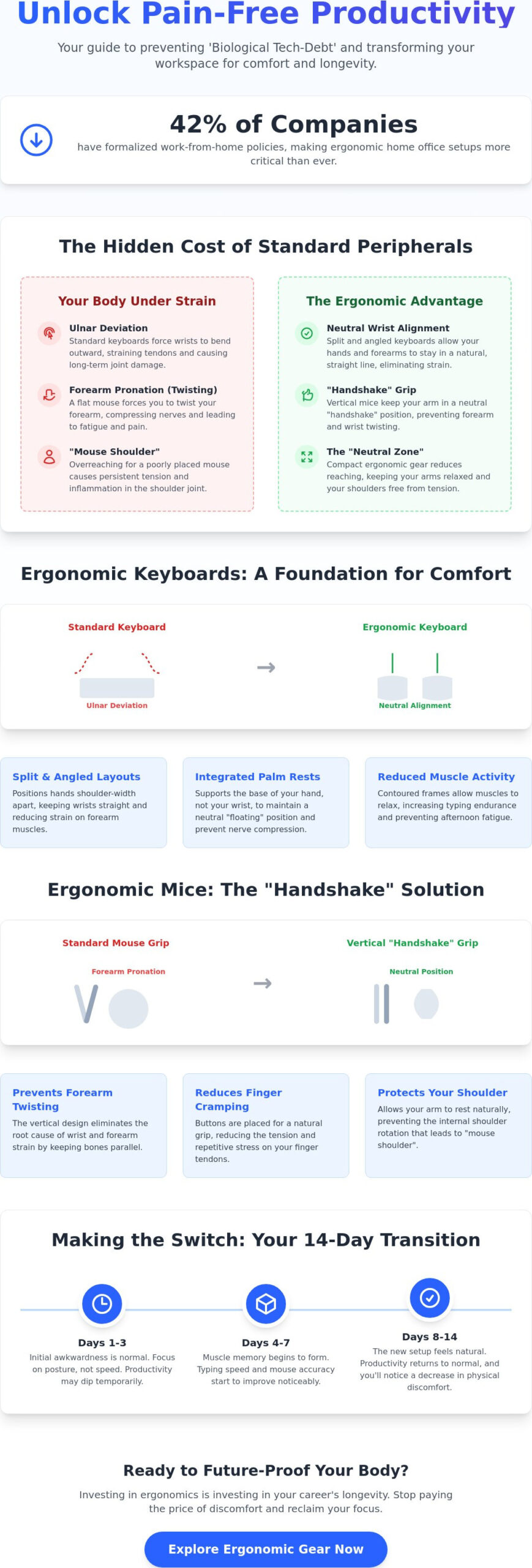
We often talk about “Biological Tech-Debt.” This is the cumulative physical damage caused by small, daily strains that eventually lead to chronic pain. Standard flat keyboards and mice are fundamentally anatomically incorrect for human use. They force your forearms to twist into a flat position and your wrists to bend at awkward angles. Over time, these positions compress nerves and inflame tendons. Understanding the ergonomic keyboard and mouse benefits is the first step toward stopping this damage before it requires medical intervention.
Common Repetitive Strain Injuries (RSIs) Explained
- Carpal Tunnel Syndrome: This occurs when the median nerve is squeezed at the wrist. Constant wrist extension on flat surfaces is a primary culprit.
- Ulnar Deviation: This is the outward bending of the wrists. It happens because standard keyboards are too narrow, forcing your hands to angle away from your arms.
- Tendonitis and “Mouse Shoulder”: These conditions result from the repetitive clicking and constant reaching associated with poorly placed, traditional mice.
The ROI of Comfort: Productivity Meets Health
Core Benefits of Ergonomic Keyboards: Beyond the Split Layout
Understanding ergonomic keyboard and mouse benefits starts with recognizing how a standard layout works against your anatomy. Traditional keyboards force your hands to flatten and your wrists to bend outward toward your pinky fingers. This position, known as ulnar deviation, creates significant pressure on your joints. Ergonomic keyboards solve this by angling the keys so your hands remain in a straight line with your forearms. This small shift eliminates the constant “micro-tension” that leads to long-term injury.
Angled keyframes do more than just fix your wrist angle; they actively reduce muscle activity in your forearms. When you type on a flat surface, your muscles are constantly engaged to maintain that unnatural position. By using a contoured or angled frame, your muscles can remain in a more relaxed state. This doesn’t just prevent pain. It also increases your typing endurance. When your fingers follow their natural arc instead of reaching across a flat plane, you can maintain high speeds for longer periods without feeling the heavy “lead-arm” sensation that often hits by mid-afternoon.
Integrated palm rests are another essential feature that many users overlook. It’s a common mistake to rest your wrists directly on a hard desk or a thin pad. This puts direct pressure on the carpal tunnel. High-quality ergonomic keyboards feature elevated palm rests that support the fleshy base of your hand. This elevation ensures your wrist stays in a neutral, “floating” position, which is the secret to avoiding nerve compression. If you’re looking to upgrade your setup, check our latest hardware comparisons to see which models offer the best integrated support for your specific desk height.
Split and Curved Designs: The Posture Correctors
Fixed-split keyboards, like the Logitech Ergo K860 priced at $129.99 as of June 2026, provide a reliable, one-piece solution for most users. However, if you have broader shoulders, a fully-split keyboard allows you to place the two halves as far apart as you need. This opens up your chest and prevents the “hunching” posture common among office workers. For those who find a full split too intimidating, a “Wave” design offers a gentle curve that provides many ergonomic keyboard and mouse benefits without a steep learning curve. Curved keybeds also reduce the physical distance your fingers must travel to reach the top-row numbers, saving your tendons from thousands of daily micro-stretches.
Tenting and Negative Tilt: Fighting Gravity
Tenting refers to raising the middle part of the keyboard so the thumb-side is higher than the pinky-side. This prevents forearm pronation, which is the act of twisting your arm to be palm-down. A tented position feels more like a natural handshake, which is much easier on your bones and muscles. Negative tilt is equally important. Unlike the “feet” on old keyboards that tilted the keys toward you, a negative tilt slopes the keyboard away. This ensures your wrists don’t bend upward, keeping the carpal tunnel open and clear. Whether you prefer the tactile click of a mechanical keyboard like the Razer Pro Type Ergo ($189.99) or a quiet membrane model, ensuring it supports these tilt options is vital for your 2026 health strategy.
The Ergonomic Mouse: Solving the Shoulder and Wrist Puzzle
While keyboards handle the bulk of your data entry, the mouse is often the silent culprit behind upper-body tension. Most standard mice require you to turn your palm face-down, a movement that crosses the two bones in your forearm and puts constant pressure on your nerves. This posture is a major contributor to the cumulative physical damage we often see in office environments. By switching to a design that respects your natural anatomy, you can unlock the full range of ergonomic keyboard and mouse benefits, specifically targeting the neck and shoulder pain that traditional setups ignore.
Reducing “Grip Force” is another critical advantage of specialized mice. Standard, small mice often force your hand into a “claw” position, requiring your fingers to stay in a state of constant tension just to move the cursor. Larger, contoured mice allow your hand to rest fully on the device. This support prevents finger cramping and allows you to move the mouse using your larger arm muscles rather than the delicate tendons in your wrist. Bringing the mouse closer to your body’s core is also essential. When you reach far to the right to grab a mouse, you create a “lever” effect that strains your rotator cuff. A properly sized mouse encourages you to keep your elbow tucked in, protecting your shoulder health over long shifts.
Vertical Mice: The Anatomy of the Handshake
Vertical mice are designed to keep your hand in a neutral “handshake” position. Industry leaders have identified a 57-degree angle as the “sweet spot” for most users, as seen in popular models like the Logitech MX Vertical, which was priced between $75 and $79.99 in early 2026. This orientation completely eliminates forearm twisting and lifts the carpal tunnel area off the desk surface. By removing this direct pressure, you reduce the risk of nerve compression during movement. If you’re currently working from a portable setup, see how this compares to our list of the best laptops of 2026 to ensure your mobile workstation remains comfortable.
Trackballs and Precision Peripherals
For those already suffering from “Mouse Shoulder,” a trackball might be the superior choice. These devices keep your arm entirely stationary, using only your thumb or fingers to move the cursor. This effectively eliminates the repetitive “sweeping” motions that cause inflammation in the shoulder joint. Modern trackballs also include several features to streamline your work:
- Stationary Operation: You don’t need a large desk area to move the cursor, which is ideal for compact or cluttered hybrid workspaces.
- Programmable Buttons: You can assign common tasks like “Copy” or “Paste” to specific buttons on the mouse. This reduces the number of repetitive clicks and keyboard reaches you perform every hour.
- High Precision: Trackballs offer excellent control for detailed tasks like photo editing or spreadsheet management without the physical strain of moving a traditional mouse.
Synergy: How a Keyboard and Mouse Combo Transforms Your Workflow
Buying a specialized keyboard or a vertical mouse in isolation is a great start, but the real ergonomic keyboard and mouse benefits appear when you treat them as a unified system. The goal is to create a “Neutral Zone” in your workspace. This is a specific area where your tools are positioned so that your hands, wrists, and arms stay in their most natural, relaxed state. When your peripherals work in harmony, you eliminate the constant reaching and stretching that leads to the “tech-debt” we discussed earlier. A well-coordinated setup ensures that your body doesn’t have to compensate for your equipment’s limitations.
One of the most effective ways to achieve this synergy is by using a compact or tenkeyless (TKL) keyboard. Standard keyboards include a number pad on the right side, which forces your mouse further away from your body’s center. This increased distance puts unnecessary strain on your rotator cuff because you’re constantly reaching outward. By removing the number pad, you can bring your mouse closer to your core, keeping your arm in a safer, more vertical alignment. This reduction in “travel distance” between your keys and your mouse might seem small, but over thousands of daily movements, it significantly boosts your efficiency and reduces muscle fatigue.
This synergy isn’t just for office work. In 2026, we’re seeing these principles transform the gaming industry. Gamers are now adopting physically adaptive features like adjustable actuation force and biometric feedback to monitor their posture during long sessions. Whether you’re grinding through a spreadsheet or a competitive match, the combination of a split keyboard and a vertical mouse provides the structural support needed to maintain high performance without the risk of occupational injury.
Optimizing Your Workspace Layout
To get the most out of your gear, follow the 90-90-90 rule. Your elbows, hips, and knees should all be bent at approximately 90-degree angles for total body alignment. Place your mouse directly in line with your shoulder. This prevents the “winging” motion that causes neck and upper back pain. If you’re setting up a new home office to launch a side project, Learn how to start a blog in 2026 to ensure your digital space is as optimized as your physical one.
Smart Peripherals in 2026
The latest hardware now includes AI-driven posture sensors that provide real-time habit-learning. These devices can detect when you start to slouch or when your typing pressure becomes too aggressive, sending subtle haptic feedback alerts to your wrist. This “over-use” warning system is the new frontier of injury prevention. Wireless ecosystems also play a role by removing cable drag, which can subtly pull on your mouse and increase the force needed for cursor movement. To find the right combination for your specific needs, explore our comprehensive tech guides and discover how to build a workstation that protects your health.
Making the Switch: How to Choose and Transition to Your Next Setup
Choosing the right gear starts with a focused self-audit. If you feel a sharp pinch in your wrist, your priority should be a vertical mouse. If your shoulder blades feel like they’re on fire by mid-afternoon, a split keyboard is likely the solution. By tailoring your choices to your specific ergonomic keyboard and mouse benefits, you avoid wasting money on features that don’t address your personal “tech-debt.” At SuggestMeTech, our reviews focus on real-world application. We don’t just look at technical specifications; we test how these devices handle eight-hour shifts in varied hybrid work environments to ensure they deliver on their promises.
Budgeting for these tools requires a shift in mindset. Many professionals spend $500 on a secondary monitor but use a $20 keyboard. In 2026, your peripherals are your most important health investment. A high-quality setup, such as a Logitech Ergo K860 ($129.99) or a Razer Pro Type Ergo ($189.99), should be viewed as biological insurance. These tools protect your body while the ergonomic keyboard market continues its projected 7% growth through 2033. Investing in your tools now prevents the long-term costs of physical therapy or lost productivity later.
Buying Guide: Features to Look For
- Adjustability: Look for gear that allows you to change the tenting angle or the split width to match your shoulder size.
- Portability: If you’re a digital nomad, prioritize lightweight, wireless models that fit easily into a laptop bag.
- Sustainability: In 2026, more brands are using post-consumer recycled plastics and modular designs for easier repair.
While you’re optimizing your physical workspace for comfort, don’t forget about your audio environment. Pair your new setup with the best headphones of 2026 to create a truly immersive and comfortable workstation.
Tips for a Smooth Transition
We recommend the “Gradual Integration” method. Switch to your new ergonomic gear for just one hour each morning when your brain is fresh. Increase this time by 30 minutes every day. You can also use online typing tutors to rebuild your speed on a split layout. This prevents the urge to revert to your old, painful habits during high-stress deadlines. If you have questions about a specific model or need a tailored recommendation, Ask our community or contact our experts!
Future-Proof Your Body for the Digital Era
Protecting your health in a hybrid world requires moving beyond standard peripherals that compromise your anatomy. By embracing a setup that promotes neutral wrist alignment and the natural “handshake” mouse position, you stop accumulating the daily physical strain that leads to chronic injury. It’s helpful to remember that the initial learning curve is simply a brief investment in your long-term career endurance and comfort.
Maximizing the ergonomic keyboard and mouse benefits isn’t just about comfort; it’s about maintaining high productivity without the threat of physical burnout. At SuggestMeTech, we provide the expert comparative analysis you need to make an informed choice. Our user-centric testing protocols ensure every recommendation is based on real-world application, helping you find the specific tools that fit your unique workspace and pain points.
Ready to transform your desk into a high-performance zone? Explore our curated reviews of the best ergonomic keyboards and mice for 2026 and take the first step toward a pain-free workday. Your future self will thank you for making the switch today.
Frequently Asked Questions
Are ergonomic keyboards really worth the high price tag?
Yes, they’re a critical investment in your career longevity. While the upfront cost is higher than standard peripherals, you’re paying for specialized engineering that prevents chronic injury. Avoiding just one round of physical therapy often covers the entire price of a high-end setup. Think of it as a tool for professional endurance rather than just another office accessory.
Do ergonomic keyboards actually help with carpal tunnel syndrome?
Yes, they’re specifically designed to alleviate the pressure that causes carpal tunnel symptoms. By promoting a neutral wrist angle, these devices keep the carpal tunnel open and reduce median nerve compression. Understanding ergonomic keyboard and mouse benefits is vital for anyone already experiencing tingling or numbness during the workday. They address the root cause of the strain rather than just masking the pain.
How long does it take to get used to a split ergonomic keyboard?
Most users require between 10 and 14 days to regain their original typing speed. The first few days are the most challenging as your brain adjusts to the new key placement. If you use a typing tutor for 15 minutes a day during this period, you’ll likely find the transition much smoother. Consistency is key to rebuilding that muscle memory quickly.
Can an ergonomic mouse help with shoulder and neck pain?
Absolutely. Most shoulder and neck pain stems from “reaching” for a mouse that is placed too far to the side. An ergonomic mouse encourages a closer, more centered arm position. This alignment keeps your rotator cuff relaxed and prevents the upper back tension that leads to tension headaches. It solves the “puzzle” by fixing your entire upper body posture.
What is the best ergonomic keyboard for someone with small hands?
Look for compact, tenkeyless (TKL) models with a smaller footprint. These designs reduce the distance between keys and keep the mouse closer to your body. Keyboards with low-profile, short-travel switches are also excellent. They require less finger extension and force to actuate, which prevents the hand fatigue often caused by stretching across larger, standard layouts.
Should I choose a vertical mouse or a trackball for wrist pain?
Choose a vertical mouse if you want to eliminate forearm twisting while maintaining traditional movement. It’s the most natural transition for most users. If any arm movement at all causes sharp pain, a trackball is the better solution. Trackballs allow you to control the cursor with just your thumb or fingers, keeping your wrist and arm completely stationary on the desk.
Do I need to change my desk height when switching to ergonomic gear?
You should check your desk height to ensure your forearms remain parallel to the floor. Because some ergonomic keyboards are thicker or have built-in tenting, you might need to lower your chair or desk slightly. The goal is to maintain the 90-degree elbow angle without shrugging your shoulders. Small adjustments to your furniture can significantly amplify your ergonomic keyboard and mouse benefits.
Can I use an ergonomic keyboard for gaming?
You can certainly use them for gaming, and many professional players now prefer them for long practice sessions. Modern ergonomic keyboards often feature mechanical switches and high polling rates that match gaming-grade hardware. They provide the same response speed while protecting your hands during intense, repetitive matches. It’s a smart way to enjoy your hobby without risking long-term physical damage.

