

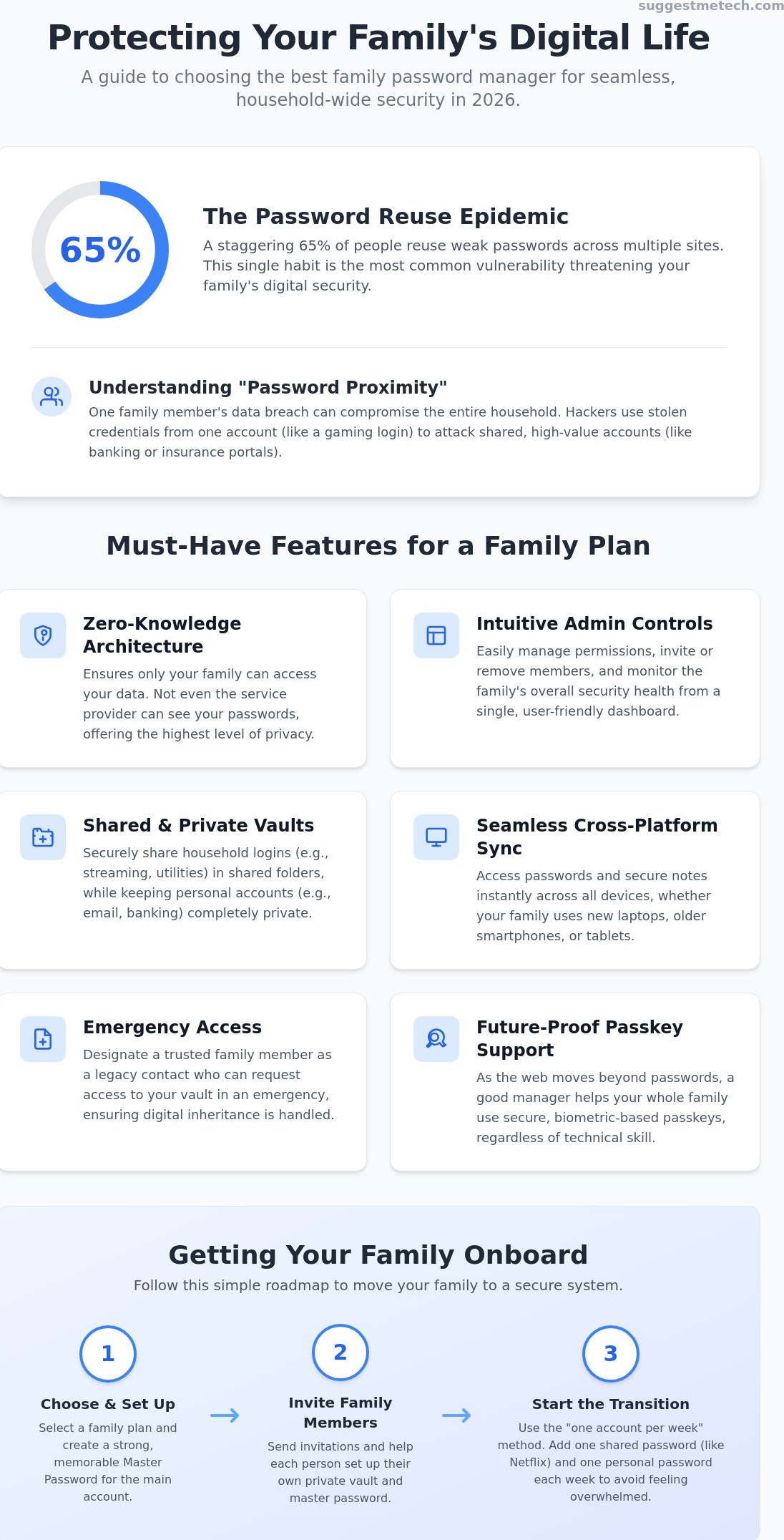
Did you know that 65% of people still reuse the same weak passwords across multiple websites? This single habit puts your entire household at risk, yet most of us keep doing it because managing dozens of unique logins feels like a full-time job. Finding the best password manager for families is the only way to close these security gaps without causing a technical headache for your kids or parents.
You likely already feel the stress of managing “digital inheritance” or worrying about how your family would access vital accounts in an emergency. It is frustrating to pay for several individual subscriptions when a single family plan could secure everyone for a better price. We believe that protecting your household should be a seamless experience, not a source of daily friction or confusion.
This guide will help you discover the most secure and intuitive tools to protect your family. You’ll learn how to set up a single dashboard to manage everyone’s security and share passwords for streaming services or utilities with ease. We have tested and compared the top five picks for 2026 to ensure you get the peace of mind you deserve.
Key Takeaways
- Understand the risk of “password proximity” and how one family member’s data breach can compromise the entire household’s security.
- Identify the must-have features for shared security, including zero-knowledge encryption and intuitive dashboards that allow you to manage permissions without technical stress.
- Compare the top-rated picks to find the best password manager for families based on your specific needs for user experience, budget, and device compatibility.
- Learn practical strategies to get skeptical family members on board, from choosing memorable master passwords to the “one account per week” transition method.
- Follow a clear 30-day roadmap to move your family away from risky browser-based storage and into a secure, centralized management system.
Why Your Household Needs a Family Password Manager in 2026
Your home security is only as strong as its weakest link. In 2026, that link isn’t your front door lock; it is likely your teenager’s gaming login or your partner’s reused streaming password. This is a concept known as “password proximity.” When one person in your house suffers a data breach, the entire household is at risk because hackers use those stolen credentials to test other accounts you might share. Choosing the best password manager for families is no longer a luxury; it’s a fundamental part of modern home maintenance.
The “shared economy” has changed how we live. We don’t just share a roof; we share Netflix profiles, insurance portals, and utility dashboards. If you are still texting these passwords or writing them on a sticky note under the keyboard, you are leaving a digital trail for criminals. A dedicated tool helps you understand what a password manager is and how it creates a secure, encrypted environment for these shared assets. By 2026, the shift toward passkeys has also made these tools essential. Passkeys offer a more secure, biometric-based alternative to traditional strings of text, and a family plan ensures every member can use this technology regardless of their technical skill level.
The Risk of Shared Family Logins
Many families fall into the trap of using one “master” password for everything from Disney+ to the family bank account. This makes you a prime target for credential stuffing. If a hacker gets hold of a single compromised streaming account, they will immediately try those same details on high-value sites. The best password manager for families solves this by using “Shared Vaults.” These are encrypted folders where you can store the electric bill login or the Wi-Fi password. Everyone gets access, but no one has to see or remember the actual password, keeping the data hidden from prying eyes and unsecured chat apps.
Digital Parenting: Securing Your Kids Online
Children in 2026 are required to manage an overwhelming number of educational portals, social media profiles, and gaming accounts. Using a password manager is an excellent way to teach them digital hygiene early. You can set clear boundaries by choosing what they can see and what remains hidden. For example, you might share the login for their school portal but keep the payment details for their gaming console in a private, parent-only vault. This setup protects them from making unauthorized purchases while ensuring they can always get their homework done without asking you for a password every ten minutes.
Once their digital schedule is secured, you can spend that extra time finding healthy ways to keep them active; for example, you can learn more about booking sports classes and cricket coaching to balance their screen time with physical play.
Key Features Every Family Plan Must Have
Choosing the best password manager for families involves more than just checking for high-grade encryption. While individual plans focus on one person’s habits, a family plan must bridge the gap between a tech-savvy parent and a grandparent who might struggle with complex logins. The most critical feature is Zero-Knowledge Architecture. This ensures that only your family holds the keys to your data; not even the service provider can see your entries. This level of privacy is foundational to modern digital safety.
Administrative control is another pillar of a functional family setup. You should be able to manage permissions from an intuitive dashboard without needing a computer science degree. This includes the ability to invite or remove members, reset access for a child who forgot their key, and monitor the overall security health of the household. These tools must also offer seamless cross-platform sync. Whether your family uses the best laptops of 2026 or a mix of older smartphones, the data must be available everywhere instantly. Following password security best practices is much simpler when your credentials follow you from the desk to the couch.
Finally, look for robust Emergency Access features. This “ICE” (In Case of Emergency) toolkit allows you to designate a legacy contact who can request access to your vault after a specific waiting period. it provides peace of mind for digital inheritance, ensuring that vital financial or sentimental accounts aren’t lost forever if something happens to the primary account holder.
Shared vs. Private Vaults
A top-tier family plan creates a clear distinction between personal secrets and household information. Private vaults are for individual items like personal emails or work logins. Shared vaults, however, use a “one-click” mechanism to give everyone access to the Wi-Fi password, streaming services, or insurance portals. It’s best to keep any account tied to family finances or shared entertainment in a common vault, while keeping personal social media and private banking in your individual space.
Biometric Login and Passkey Support
By 2026, the industry has shifted heavily toward passkeys, which replace traditional passwords with biometric authentication. This is a game-changer for non-techy users and children. Instead of typing a 20-character string, they can use FaceID or a fingerprint to log in. This significantly reduces the friction of “forgotten master passwords” and makes the best password manager for families feel like a natural part of the device rather than a separate chore. If you want to stay ahead of these security trends, you might enjoy exploring our expert technology reviews to see which devices support these features best.
The Best Password Managers for Families: 2026 Roundup
Choosing the best password manager for families requires balancing ease of use with robust security. Every household has different needs. Some families prioritize a simple interface for children, while others want a suite of extra security tools like VPNs. We have tested the top contenders to help you decide which service fits your lifestyle. It’s about finding the right tool to implement NIST password guidelines across every device in your home.
1Password Families: Best Overall UX
1Password remains the gold standard for polished family security. Its “Family Organizer” role is the standout feature; it allows one or two adults to manage permissions and recover accounts for others. This is a lifesaver when a child or senior family member forgets their credentials. Security is bolstered by a unique “Secret Key” that works alongside your master password. 1Password’s intuitive design makes it the best password manager for families who want a premium, friction-free experience for every generation.
Bitwarden: The Powerful Budget Alternative
If your household is tech-savvy and values transparency, Bitwarden is an excellent choice. As an open-source platform, its code is constantly audited by the security community. While Bitwarden offers a “Free Forever” tier for two users, the family upgrade is incredibly affordable at $3.99 per month for up to six people. It provides all the essential premium features, including encrypted file storage and health reports. The initial setup has a slightly higher learning curve, but it offers unmatched value for the price.
Dashlane: The Feature-Packed Security Suite
Dashlane positions itself as a comprehensive security app rather than just a vault. The family plan supports up to 10 members, which is the most generous limit in our roundup. It includes a “Password Changer” tool that can update weak passwords in bulk on supported sites. Families who travel or use public Wi-Fi frequently will appreciate the integrated VPN. Dashlane is the right pick if you want dark web monitoring and identity protection tools bundled into one subscription.
Proton Pass: Privacy-First Protection
Proton Pass is the ideal solution for households already using the Proton ecosystem for mail or calendar services. Based in Switzerland, Proton benefits from some of the world’s strongest privacy laws. The family plan integrates seamlessly with their other encrypted services, providing a unified experience. It is a no-nonsense tool that focuses heavily on data sovereignty and simple, effective sharing between family members.
Overcoming the Adoption Barrier: Getting Your Family Onboard
The biggest hurdle to household security isn’t the technology; it’s the people. Even the best password manager for families is useless if your spouse or kids refuse to use it. Instead of forcing a massive migration overnight, try the “One Account Per Week” strategy. Start with something low-stakes like the Netflix or Disney+ login. Once they see how easy it is to log in without asking you for a code, they will be more open to moving their banking or email accounts.
Before you start the installation process, it’s a good idea to tidy up your devices. A cluttered browser can lead to autofill errors that frustrate new users. You should clear cache on iPhone or your desktop browser to ensure a clean slate. This small step prevents old, incorrect passwords from popping up and confusing the process. Host a “Master Password” workshop for the household. Help everyone create a passphrase that is long but memorable. A short sentence like “I love eating 4 green apples!” is much stronger and easier to remember than a random string of symbols.
Onboarding Seniors and Kids
For kids, you can gamify the experience. Many managers have a “Strength Meter” that turns green when a password is secure. Challenge them to get all their accounts to 100% health. For seniors, focus on accessibility. Use FaceID or fingerprint sensors so they never have to type a complex string. You can also set up “Read-Only” access for elderly parents. This allows them to use shared family accounts for utilities or insurance without the risk of accidentally deleting a vital entry.
Digital Legacy: Planning for the Unthinkable
This is perhaps the most overlooked benefit of a family plan. We often don’t think about what happens to our digital lives after we’re gone. Individual plans make digital inheritance nearly impossible without sharing your master key, which is a major security risk. The best password manager for families includes a dedicated “Emergency Access” feature to solve this problem.
You can designate a “digital heir” who can request access to your vault. To protect your privacy while you’re alive, these systems use a waiting period mechanism. If you don’t deny the request within a set time, such as 48 hours or 7 days, access is granted. It’s a compassionate way to ensure your family can access financial records, photos, and legal documents during a crisis. If you’re looking for more ways to simplify your digital life, explore our other tech guides for expert advice.
Final Verdict: Which Family Password Manager Should You Choose?
Your search for the best password manager for families ends with understanding your household’s specific rhythm. While browser-based managers are convenient for individuals, they fail families because they don’t allow for secure sharing or robust emergency access. Relying on Chrome or Safari means you are still stuck texting passwords or sharing logins via insecure notes. Transitioning to a dedicated service is the only way to ensure every member, from the kids to the grandparents, stays protected by a unified security standard.
We recommend a 30-day transition plan to make the switch feel effortless. During the first week, focus on choosing your platform and setting up your master vault. In the second week, import your existing data and delete saved passwords from your browser to prevent autofill confusion. By the third week, invite your family members and share your first “Family Vault” for a common service like Netflix. Finally, use the fourth week to review security health reports and identify any remaining weak passwords that need updating.
Decision Matrix: Find Your Match
- 1Password: Choose this if you want the most polished user experience and the easiest setup for non-techy relatives.
- Bitwarden: This is your best bet if you are on a budget but still want powerful, open-source security for up to six people.
- Dashlane: Pick this if you want a complete security suite that includes a VPN and dark web monitoring for a larger household.
Before you commit, check how the app interacts with your daily hardware. Many of these services send 2FA prompts to your smart devices or even your headphones if they have integrated voice assistants. Ensuring your chosen tool works with your existing ecosystem makes the daily experience much smoother. It’s time to take action. Most of these providers offer a 14-day or 30-day trial, so you can test the features without any financial risk today.
What has been your biggest challenge in getting your family to care about security? We would love to hear your onboarding stories or any tips you have found helpful. Share your experience in the comments below so we can keep this guide updated with real-world advice from our community.
Secure Your Family’s Digital Future Today
Protecting your household in 2026 requires more than just strong individual habits; it requires a system that works for every person under your roof. You now know that the best password manager for families is the one that balances advanced zero-knowledge security with a simple interface for children and seniors alike. By utilizing features like emergency access and shared vaults, you ensure that vital information is never lost and always protected against the growing threat of credential stuffing.
Our team of cybersecurity experts has done the heavy lifting to ensure these recommendations meet 2026 tech standards and real-world usability needs. We focus on tools that actually solve the friction of daily logins while keeping your private data truly private. If you are ready to deep dive into the specifics of each provider, check out our full reviews of the best security tools at SuggestMeTech. It’s a small investment of time that pays off in permanent peace of mind for your entire home.
Frequently Asked Questions
Is a family password manager safer than just using Google Chrome or Apple Keychain?
Yes, dedicated family password managers are significantly safer because they offer zero-knowledge encryption and work across all devices. Browser tools like Chrome or Keychain often lock you into one ecosystem and lack the advanced sharing controls needed for a household. A standalone manager ensures that your data is encrypted locally before it ever reaches the server, providing a higher level of privacy that browser-based storage simply cannot match.
Can my children see my bank passwords if we are on the same family plan?
No, your children cannot see your private passwords unless you choose to share them. Family plans are built around the concept of private and shared vaults. Your bank logins stay in your personal vault, which is invisible to everyone else. You only place items like the Netflix login or the Wi-Fi password into a shared vault where other members have permission to view or use them.
What happens if the family organizer loses their master password?
Recovery depends on the specific service, but most allow a second “Family Organizer” to reset permissions for other members. If the sole organizer loses their key, they must use a physical recovery kit or “Secret Key” provided during setup. It is vital to store this document in a safe place, as the zero-knowledge nature of these tools means the provider cannot reset the master password for you.
How many family members can I typically add to a single family plan?
Most standard plans allow for 5 or 6 users per subscription. For example, 1Password and Bitwarden both support up to 6 members, while Dashlane offers a limit of 10. This flexibility makes a dedicated service the best password manager for families who need to secure accounts for children, parents, and even grandparents under a single, cost-effective monthly or annual payment plan.
Do family password managers work on both iPhones and Android devices?
Yes, these tools are built to be platform-agnostic and work seamlessly on both iPhones and Android devices. You can even mix and match hardware within your household. One person can use a Mac while another uses a Chromebook, and all your shared passwords will stay in sync. This cross-platform support is a major advantage over ecosystem-locked tools like Apple’s Keychain or Samsung’s Pass.
Is it worth paying for a family plan if only two people are using it?
Yes, the convenience of a shared vault and emergency access makes the slight price increase worth it for two people. Instead of managing two separate billing cycles, you get a single dashboard to handle household security. It also ensures that if something happens to one person, the other can legally and securely access vital financial or medical accounts without needing to guess a master password.
What is emergency access and how does it actually work?
Emergency access allows you to designate a “digital heir” who can request access to your vault in a crisis. You set a waiting period, such as 48 hours or seven days. If you don’t manually deny the request during that window, the system automatically grants the heir access. It is a secure way to manage digital inheritance without giving away your master password while you are active.
Can I import my existing passwords from my browser into a family manager?
Yes, you can easily import your existing data using a CSV file or a direct browser extension. Most services guide you through a simple three-step process to move your logins from Chrome, Safari, or Edge. This is a critical step when setting up the best password manager for families, as it ensures you don’t have to manually type in every account during the initial 30-day transition.

