

Did you know that nearly half of the 6 million internet-facing FTP servers active in 2026 are still sending data in plaintext? It’s a staggering risk when you consider how easy it is for hackers to intercept passwords. If you’re feeling overwhelmed by the choice between sftp vs ftp, you aren’t alone. It’s frustrating to stare at port numbers like 21 and 22 while wondering if your hosting provider even supports the secure option. You just want to upload your website files without handing your login credentials to a digital thief on a silver platter.
We understand that you need a reliable way to manage your site without a degree in cybersecurity. This guide clears up the confusion by breaking down exactly how these protocols differ in the real world. You’ll learn why SFTP has become the non-negotiable standard for any SuggestMeTech approved host and how to spot the security red flags that could compromise your data. We’ll give you a clear recommendation and a simple path forward, so you can set up your first file transfer with total confidence.
Key Takeaways
- Learn why SFTP is the modern standard built on SSH, while FTP remains a legacy protocol dating back to 1971.
- Understand the technical shift from dual-channel communication to the streamlined, single-port security found on port 22.
- Discover the real-world dangers of packet sniffing and how FTP’s lack of encryption exposes your credentials to hackers.
- Master the 99% Rule to settle the sftp vs ftp debate for your specific web hosting needs.
- Get a practical overview of connecting securely using top-rated clients like Cyberduck or WinSCP.
Understanding the Basics: What are FTP and SFTP?
At their core, both FTP and SFTP serve the exact same purpose: they move files from your computer to a web server. Whether you’re uploading a new WordPress theme or backing up your database, these protocols are the workhorses behind the scenes. However, choosing between sftp vs ftp in 2026 is no longer a matter of preference; it’s a matter of basic website safety.
FTP, which stands for File Transfer Protocol, is the “grandfather” of internet file movement. It was first documented in 1971, long before the modern web even existed. In contrast, the SSH File Transfer Protocol (SFTP) is a modern, secure alternative built on the Secure Shell (SSH) protocol. That single letter “S” represents a massive shift in how your data is handled during the journey across the web.
The History and Evolution of File Transfer
FTP was built for an era when the internet was a “trusted” neighborhood. In 1971, the network was small, and users were generally known to one another. Security wasn’t a priority because nobody imagined people would try to steal data in transit. As the internet grew into a global marketplace, this lack of protection became a liability. Cyber threats like packet sniffing and man-in-the-middle attacks made FTP’s plaintext transmissions incredibly dangerous.
SFTP was developed as a direct response to these vulnerabilities. It doesn’t just send files; it creates a secure, encrypted tunnel for them to travel through. Despite these clear advantages, FTP is still around today. Many legacy systems and older hosting providers continue to support it because it’s familiar and requires less processing power than encrypted alternatives. At SuggestMeTech, we’ve tested dozens of providers and believe that SFTP support is a standard feature of any modern, high-quality host.
A Simple Analogy for Beginners
If the technical jargon feels heavy, think of it this way:
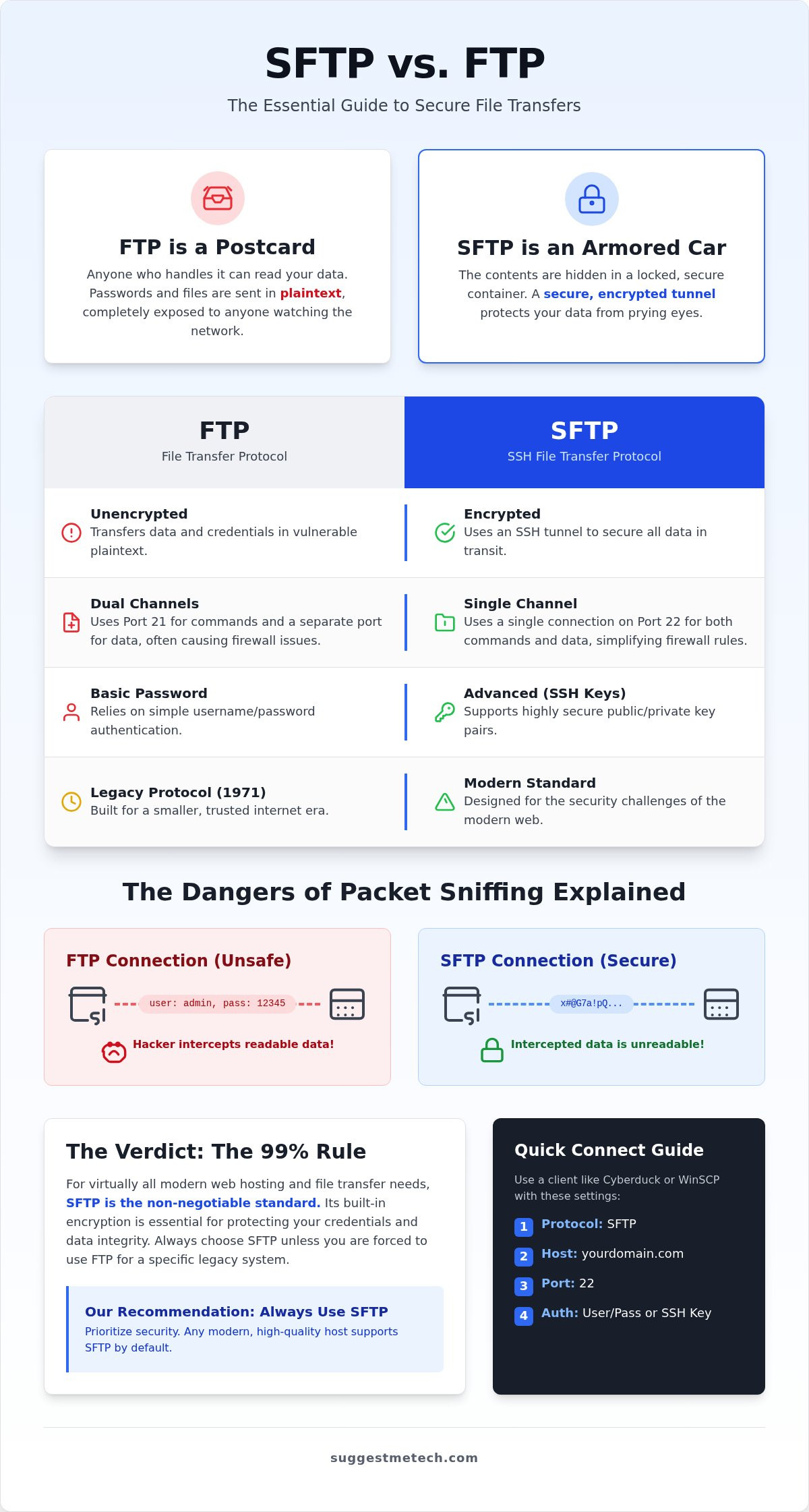
- FTP is like sending a postcard. Anyone who handles that postcard between your house and its destination can read exactly what you wrote. Your passwords and files are visible to anyone watching the network.
- SFTP is like sending a locked armored car. The contents are hidden from view. Only you and the receiver have the keys to open the door and see what’s inside.
When you evaluate sftp vs ftp, you’re deciding whether your website’s sensitive database files and admin passwords should be public knowledge or kept under lock and key. For most users, the armored car is the only choice that makes sense.
Key Technical Differences: Security, Ports, and Speed
Understanding the technical mechanics of sftp vs ftp helps you troubleshoot connection issues and secure your server properly. While both protocols transfer data, they do so through entirely different architectural designs. These differences determine how easily you can connect through a firewall and how likely it is that an attacker could intercept your traffic.
FTP relies on a dual-channel model. It uses one channel for commands on Port 21 and a separate channel for the actual data transfer. This split approach often creates headaches for firewalls, as they must manage multiple open connections simultaneously to let the data through. SFTP simplifies this by using a single, encrypted channel on Port 22. By bundling commands and data into one stream, SFTP is much easier to navigate through a firewall and significantly more secure.
Ports and Firewalls: Why 22 is the Magic Number
Port 21 is a frequent target for automated bots looking for easy entry points. If you’re having trouble connecting to your server, it’s often because your local network or your host has blocked these specific ports. You can find deeper insights into FTP vs SFTP security considerations to see how these port choices impact overall network safety. SFTP’s use of Port 22 is more than just a number; it’s a gateway to a protocol that prioritizes encryption from the very first handshake.
Encryption and Data Integrity
SFTP uses AES encryption to scramble your files, making them unreadable to anyone without the correct key. This protection is critical because FTP sends everything in “plaintext.” Hackers love plaintext because it allows them to “sniff” passwords and sensitive data with minimal effort. Data integrity is the assurance that files remain unchanged during transit. This ensures that a malicious actor hasn’t swapped your files or injected code into your scripts while they were moving between your computer and the server.
Authentication is another area where the two protocols diverge. FTP generally relies on simple passwords. If someone intercepts your connection, they can see your credentials immediately. SFTP supports SSH keys, which use public and private key pairs. Your private key stays on your computer, while the public key resides on the server. This method is much harder to crack because it doesn’t require sending a password over the network at all.
Choosing a provider that prioritizes these secure standards is vital for your site’s longevity. You should review our latest hosting guides to find providers that offer SFTP as a standard, built-in feature.
Why Security Matters: The Risks of Using Standard FTP
The statistics for 2026 are sobering. As of April this year, there are roughly 6 million internet-facing FTP servers active, but nearly 2.45 million of them show no evidence of encryption. This means millions of users are still exposing their credentials to anyone with basic hacking tools. When you compare sftp vs ftp, the choice isn’t just about technical specs; it’s about whether you want to keep control of your website or hand the keys to a stranger.
Standard FTP transmits your username and password in plaintext. If you’re using a public network at a coffee shop or airport, a hacker using a “packet sniffer” can grab your login details in seconds. Once they have that access, they can inject malicious code, delete your entire database, or steal your customer list. We’ve seen too many site owners lose years of hard work because they didn’t realize how exposed they were on an open connection.
Man-in-the-Middle (MitM) Attacks Explained
In a MitM attack, a hacker positions themselves between your computer and the server. They essentially trick your computer into thinking the hacker’s machine is the legitimate server, allowing them to record every file you upload. The FTP handshake process is particularly vulnerable because it lacks a way to verify that you’re talking to the intended destination. SFTP prevents this through host key verification. This process ensures your computer recognizes the server’s unique digital fingerprint before a single bit of data is sent, making it nearly impossible for an intruder to sit in the middle of your session.
Compliance and Professional Standards in 2026
Modern data regulations like GDPR and PCI-DSS have made unencrypted transfers a significant legal liability. If you handle any form of customer data or payment information, using standard FTP could result in massive fines and mandatory disclosure of a breach. Beyond the law, there’s the issue of brand authority. A single hacked site can destroy years of trust with your audience in a single afternoon.
If you’re just starting a blog, you need a secure foundation from day one. Don’t let a poor choice in the sftp vs ftp debate lead to a compromised WordPress site before you’ve even gained your first hundred readers. Professionalism starts with choosing a hosting provider that enforces secure standards by default, ensuring your data remains private and your reputation stays intact.
Practical Usage: How to Connect via SFTP
Connecting to your server shouldn’t be a guessing game. While the technical debate over sftp vs ftp is complex, the actual process of logging in is nearly identical. You just need the right credentials and a modern client to bridge the gap between your local computer and your web server.
To get started, follow these four essential steps:
- Step 1: Log into your hosting dashboard and find your SFTP details. You’ll need the Host (usually your domain or server IP), your Username, and your Password.
- Step 2: Download a reliable client. We recommend FileZilla, Cyberduck (latest version 9.4.1), or WinSCP (updated as recently as June 17, 2026).
- Step 3: Open your client and enter your details. Ensure you set the Port to 22. If you leave it at 21, the connection will likely fail.
- Step 4: Click connect. You’ll see a popup asking to trust the “host key.” This is a security feature that verifies the server’s identity. Click “Always trust” to proceed.
If you see a “Connection Refused” error, don’t panic. This usually happens because you’re trying to use Port 21 with an SFTP connection or vice versa. Double-check your settings to ensure you’ve selected the correct protocol in your client’s dropdown menu rather than the legacy default.
Setting Up FileZilla for SFTP
FileZilla is a favorite for many beginners because of its Site Manager feature. Instead of typing your password every time, you can save your site as a permanent entry. In the Site Manager, change the Protocol to “SFTP – SSH File Transfer Protocol.” You can choose between “Ask for Password” for better security or “Key File” if your host uses SSH keys. Once connected, look for the padlock icon in the status bar to verify that your session is fully encrypted.
Finding Your Credentials in Modern Hosting
Most dashboards like cPanel or hPanel have a dedicated section for “FTP Accounts” or “SSH Access.” Many top web hosting providers now disable standard FTP by default. They do this to protect you from the security risks that expose your site to hackers. If you’re working with a developer, it’s best to create a dedicated SFTP user rather than sharing your main admin login. This gives you better control and allows you to revoke access once the work is finished.
Ready to upgrade your site’s security? You can check our hosting recommendations to see which providers make SFTP setup easy for beginners.
The Verdict: Choosing the Right Protocol for Your Needs
After weighing the technical details of sftp vs ftp, the conclusion for 2026 is definitive. You should use SFTP every single time you connect to a server over the internet. We call this the 99% Rule. Unless you are working on a legacy local network that is completely air-gapped from the outside world, there is no justifiable reason to risk your credentials with an unencrypted FTP connection.
The numbers back this up. Since 2024, the number of internet-facing FTP hosts has plummeted by 40%, dropping from 10.1 million to roughly 5.94 million. The world is moving toward encryption by default. If your current hosting provider only offers standard FTP, it’s a sign that their infrastructure is dangerously out of date. At SuggestMeTech, we consider SFTP support a non-negotiable requirement for any modern web service.
Is FTP Ever Faster Than SFTP?
A common myth suggests that FTP is superior because it lacks the “overhead” of encryption. While it’s true that scrambling data takes a tiny amount of processing power, modern CPUs and high-speed fiber connections have made this point irrelevant. For 99% of website owners, the speed difference is measured in milliseconds. You’ll never notice the delay while uploading a few images or updating a plugin. Choosing a 1% gain in upload speed over the total security of your server is a trade-off that simply doesn’t make sense in today’s threat environment.
Summary of Recommendations
Your specific role determines how you should implement these protocols, but the core advice remains the same: stay secure.
- For Bloggers: Use SFTP exclusively to protect your domain and website files. A single compromised password can lead to your site being blacklisted by search engines.
- For Small Businesses: Stick to SFTP to maintain compliance with GDPR and PCI-DSS standards. Protecting customer trust is worth far more than the convenience of a legacy protocol.
- For Developers: Leverage SFTP with SSH keys. This removes the need for passwords entirely, providing the highest level of security for automated deployments and team environments.
Before you hit the “Connect” button in your client, run through this final checklist. Ensure your port is set to 22, verify your host key on the first connection, and always use a dedicated user account rather than your main root login. By following these steps, you can manage your files with the confidence that your data remains private and your server stays secure.
Secure Your Digital Assets Today
Choosing between sftp vs ftp isn’t just a technical preference; it’s a vital decision for protecting your online presence. You now understand that SFTP provides the encrypted tunnel necessary to keep your passwords and files safe from modern interceptors. While FTP served its purpose in the early days of the web, it’s now a legacy liability that exposes your most sensitive credentials to anyone watching the network.
By switching to Port 22 and using modern clients, you’re taking a major step toward professional site management. At SuggestMeTech, we’ve done the heavy lifting by conducting an expert comparison of security features across the industry. We’ve tested dozens of platforms for SFTP compatibility and speed to ensure you get the best performance possible.
If you’re ready to move your site to a platform that prioritizes your safety, check out our top-rated web hosting providers for 2026. Establishing your first secure connection is a milestone in your journey as a site owner. You’ve got the tools and the knowledge to do it right, so go ahead and hit connect with confidence.
Frequently Asked Questions
Is SFTP the same as FTPS?
No, they are fundamentally different protocols. SFTP (SSH File Transfer Protocol) is built on top of the Secure Shell (SSH) protocol, using a single channel for all communication. FTPS is the traditional FTP protocol wrapped in a layer of SSL or TLS encryption. While both provide security, SFTP is generally easier to configure through firewalls and is the standard recommendation for modern web hosting environments.
Do I need special software to use SFTP?
You need a compatible file transfer client to establish a secure connection. Popular options include FileZilla, Cyberduck, or WinSCP, all of which support the sftp vs ftp choice within their connection settings. Most modern operating systems also allow you to use the command line for SFTP transfers. However, a dedicated graphical client is usually the most practical choice for bloggers and small business owners who need to manage website files efficiently.
Why is SFTP slower than FTP?
The perceived speed difference comes from the encryption process. SFTP must scramble every packet of data before it leaves your computer and decrypt it upon arrival at the server. This adds a tiny amount of computational overhead. In 2026, with high-speed fiber internet and modern processors, this delay is usually negligible. For most users, the security benefits far outweigh a millisecond difference in transfer times that you likely won’t even notice.
Can I use SFTP on Port 21?
No, SFTP typically operates on Port 22. Port 21 is the default for standard FTP and its encrypted cousin, FTPS. If you try to force an SFTP connection through Port 21, the server will likely reject the request because it doesn’t recognize the SSH handshake on that specific channel. Always ensure your client is set to Port 22 when using SFTP to avoid the common connection errors that frustrate many beginners.
What happens if I use FTP on public Wi-Fi?
Using standard FTP on public Wi-Fi is extremely risky because your login credentials are sent in plaintext. Anyone else on that same network can use a packet sniffer to intercept your username and password. Once they have this information, they can gain full access to your web server. This is a primary reason why we emphasize the sftp vs ftp debate; choosing the secure option is the only way to protect your data in public spaces.
Is SFTP more secure than a VPN?
They are different tools that provide different types of protection. A VPN secures your entire internet connection by creating an encrypted tunnel for all your traffic. SFTP specifically secures the transfer of files between your computer and a server. While a VPN adds a layer of privacy, it doesn’t replace the need for an encrypted file protocol. For maximum security, you can use SFTP while connected to a VPN to ensure multi-layered protection.
How do I generate an SSH key for SFTP?
You can generate an SSH key pair using tools like PuTTYgen on Windows or the ssh-keygen command in a terminal on macOS and Linux. This process creates a public key, which you upload to your server, and a private key, which stays on your computer. Using keys instead of passwords significantly reduces the risk of brute-force attacks. Most SuggestMeTech approved hosting providers offer simple interfaces within their control panels to help you manage these keys.
Does WordPress require SFTP for updates?
WordPress doesn’t strictly require SFTP for its internal automatic updates; it usually handles those through its own filesystem methods. However, if your server permissions are restrictive, WordPress might ask for your credentials to perform updates. In those cases, you should always provide SFTP details if your host supports them. For manual updates, plugin uploads, or theme edits, using SFTP is the safest way to ensure your site’s core files aren’t intercepted during the process.

