

Norton isn’t just an antivirus anymore; it has evolved into a comprehensive digital bodyguard that sometimes forgets its manners. If you’re looking for a norton antivirus review that cuts through the marketing hype, you’re likely asking if this legacy software is still the gold standard or just overpriced bloatware. It’s frustrating when the very tool meant to protect you ends up slowing down your PC or interrupting your work with constant upsell notifications.
At SuggestMeTech, we believe your security suite should be invisible until it’s actually needed. We’ve performance-tested Norton 360 against the 2026 threat landscape to see if it can provide bulletproof malware protection without the system lag. This review offers a transparent look at the features that matter, from identity monitoring to public Wi-Fi security, while exposing the pricing traps that often catch users off guard after the first year.
We’ll break down the latest independent security certifications and help you decide if the LifeLock integration justifies the higher renewal costs for your specific needs. By the end of this guide, you’ll know exactly how to configure Norton to stay in the background so you can focus on gaming or working in peace.
Key Takeaways
- Discover why Norton’s evolution into an “Identity Command Center” makes it a top choice for users who prioritize personal data safety over raw processing speed.
- See our 2026 performance benchmarks to find out if “Silent Mode” actually prevents lag during intense gaming or high-stakes work projects.
- Navigate the complex subscription tiers and learn how to avoid the “renewal trap” price hikes highlighted in this norton antivirus review.
- Evaluate whether the premium Dark Web Monitoring and LifeLock features provide enough real-world value to justify the software’s system footprint.
- Get a definitive verdict on whether Norton 360 is the right “set-and-forget” solution for your home, business, or student needs.
Why Norton 360 Remains a Powerhouse in 2026
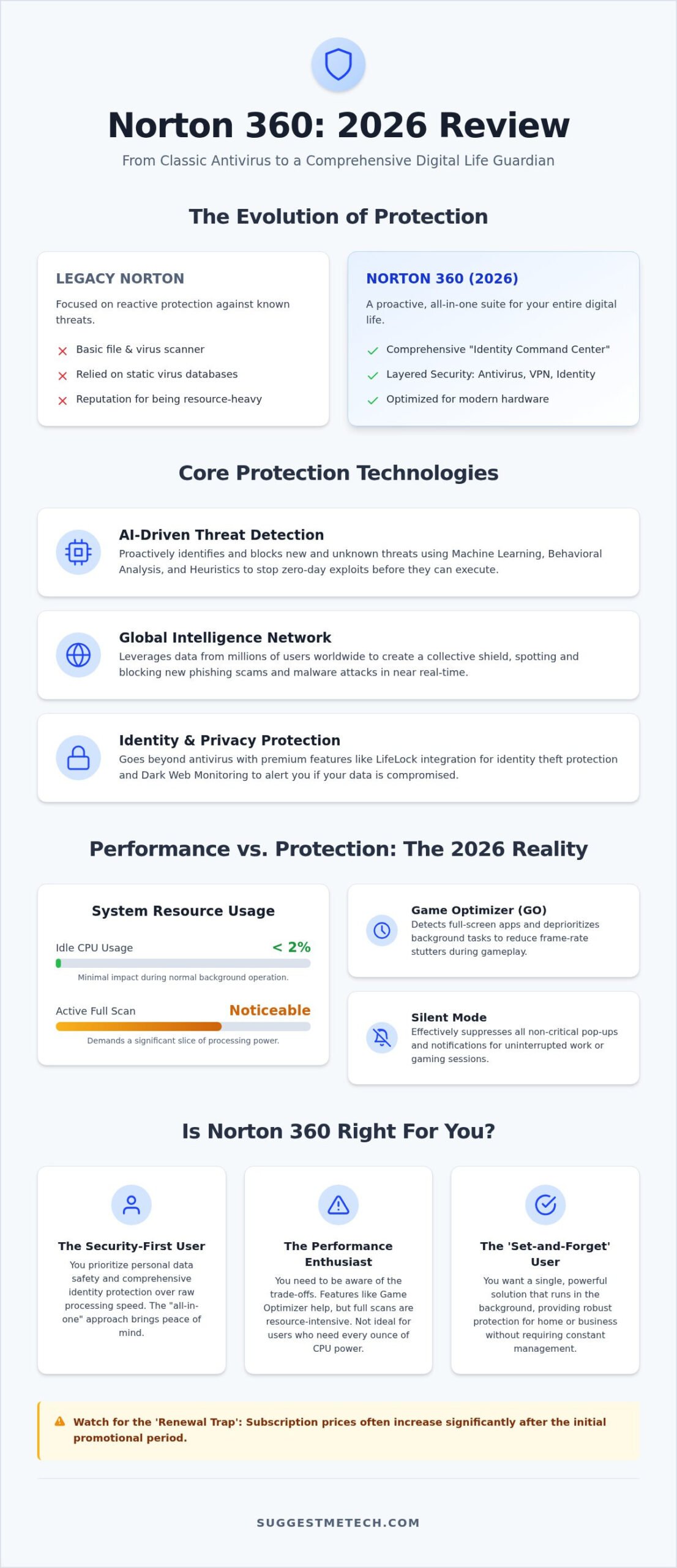
Norton has traveled a long way from the basic file scanner many of us remember from the early 2000s. Examining the history of Norton 360 shows a clear pivot from reactive protection to a proactive “Digital Life” suite. This norton antivirus review finds that the core philosophy in 2026 centers on layered security. It’s no longer enough to just check for viruses; you need a shield that covers your identity, your connection, and your files simultaneously. The 2026 ecosystem is built as an all-in-one command center that integrates antivirus, a secure VPN, and sophisticated identity protection tools into a single dashboard.
Many users still associate the brand with the “bloatware” stigma of a decade ago. While it’s true that a full suite uses more resources than a bare-bones scanner, the 2026 version is significantly more optimized for modern processors. It’s a trade-off. You’re giving up a small slice of system memory for a comprehensive safety net that stays out of your way until a real threat appears. For most people, the peace of mind provided by this “set-and-forget” safety outweighs the minimal impact on system speed.
AI-Driven Threat Detection in 2026
In the current threat environment, static virus databases are obsolete. Norton now relies heavily on machine learning to identify zero-day exploits before they can execute on your machine. Behavioral analysis plays a vital role here by monitoring how programs act in real-time. If a file suddenly starts encrypting your documents, Norton kills the process instantly. Heuristic analysis is a security technique that detects malware by identifying suspicious code structures and patterns instead of relying on a list of known signatures. This proactive approach is exactly what keeps your data safe from sophisticated ransomware that hasn’t been discovered by the industry yet.
The Global Intelligence Network
Protection is only as good as the data behind it. Norton leverages a massive Global Intelligence Network that pools data from millions of active users to spot emerging phishing sites in seconds. This means if a new scam site targets someone in London, your system in New York is updated to block it within the hour. These real-time updates are essential for maintaining your privacy, especially when you’re managing sensitive data on the best web hosting platforms for your personal or professional projects. This norton antivirus review confirms that this network effect creates a collective shield that individual, disconnected tools simply can’t match. It’s a community-driven defense that makes the entire ecosystem stronger for everyone involved.
Performance & Gaming Impact: Can Your PC Handle It?
The most common question in any norton antivirus review is whether the software will turn a high-end machine into a sluggish paperweight. Historically, Norton earned a reputation for being resource-heavy, but our recent testing shows a more nuanced reality for 2026. When we benchmarked the suite on the best laptops of 2026, we found that idle CPU usage stayed below 2 percent, though active full scans still demand a noticeable slice of your processing power. While performance is a valid concern, following consumer protection advice from the California DOJ reminds us that maintaining active security is a critical trade-off for staying safe online.
For gamers, the “Game Optimizer” (Norton GO) isn’t just marketing fluff. It works by detecting full-screen applications and deprioritizing non-essential background processes to reduce frame-rate stutters. It won’t magically turn a budget laptop into a gaming rig, but it does prevent the antivirus from starting a heavy update right as you’re entering a competitive match. Similarly, the “Silent Mode” feature effectively suppresses all non-critical notifications. This ensures your workflow or gaming session remains uninterrupted by pop-ups about subscription status or minor tracking cookies. If you’re worried about your hardware keeping up, check out our latest tech comparison guides to see how other suites stack up.
Optimizing for Modern Hardware
Norton 360 has been rebuilt to take advantage of the Neural Processing Units (NPUs) found in 2026 “AI PCs.” By offloading complex heuristic scans to the NPU, the software reduces the load on the main CPU, allowing for smoother multitasking during deep security checks. This architectural shift is particularly beneficial for battery life on ARM-based laptops, where traditional x86 emulation often drains power quickly. Smart Scan prioritizes active directories and recently modified files to ensure protection without scanning every dormant document on your drive. This targeted approach significantly cuts down on scan times for daily users.
Addressing the Bloatware Concerns
You can reclaim system speed by diving into the settings and disabling features you don’t use, such as the automated backup or the crypto-mining module if it’s still present in your region. The truth about Norton’s notification frequency in 2026 is that it’s much improved, provided you take five minutes to toggle off the “Special Offer” alerts in the administrative settings. For those looking for total system health across all devices, you might also want to see how to clear cache on iPhone to keep your mobile experience just as snappy. Reducing background clutter on every device in your ecosystem is the best way to ensure your security suite stays helpful rather than intrusive.
Beyond Antivirus: LifeLock and Identity Protection
In 2026, catching a traditional virus is often less of a threat than having your personal credentials sold on a hacker forum. This norton antivirus review finds that the suite’s real value now lies in its ability to act as an early warning system for your identity. Dark Web Monitoring goes far beyond simple email checks. It actively scans for leaked driver’s license numbers, bank account details, and even gamer tags across hidden marketplaces. If your information surfaces in a data breach, you receive an alert immediately, often before the affected company has even notified the public.
The Million Dollar Protection Package serves as a financial safety net for subscribers. It covers various out-of-pocket expenses and legal fees if you need to fight identity theft while using the service. Social Media Monitoring is another modern addition that watches for account takeovers on platforms like Instagram or LinkedIn. This is a vital tool for anyone who relies on their digital presence for work, as it flags suspicious link postings or profile changes that could indicate a hack.
LifeLock Integration Tiers
The Secure VPN and Password Manager
The integrated VPN has seen major speed improvements. It’s now fast enough to stream 4K content without the frustrating buffering issues that plagued earlier versions. It effectively masks your browsing history and blocks intrusive trackers that follow you across the web. The built-in password manager is a reliable tool for generating and storing complex credentials. While power users might still prefer standalone apps like 1Password, this norton antivirus review confirms that the integrated version is more than sufficient for the average household. It syncs perfectly between your desktop and mobile devices, ensuring your logins are always accessible and encrypted.
Norton 360 Pricing: Navigating the Plans and the ‘Renewal Trap’
Most users start their norton antivirus review by looking at the low introductory price. It’s a tempting entry point that offers full access to the suite’s premium features. However, the biggest shock often comes in year two when the “Standard Price” kicks in. These renewal rates can be significantly higher than the initial cost, sometimes doubling or tripling depending on the specific plan you chose. To avoid this, we recommend turning off the auto-renewal feature immediately after your purchase is confirmed. This simple step gives you the leverage to negotiate a better rate with support or switch providers before the higher fee hits your credit card.
Choosing between Norton Antivirus Plus and Norton 360 Deluxe depends on your total hardware count. Plus is strictly for a single PC or Mac, making it a niche choice for desktop-only users. Deluxe is generally the sweet spot for families or power users, covering up to five devices across Windows, macOS, Android, and iOS. This multi-device value is a major advantage, as it allows you to protect your laptop, smartphone, and tablet under one management dashboard. Our norton antivirus review benchmarks show that managing multiple licenses this way is far more cost-effective than buying individual subscriptions for each device.
Plan Comparison Matrix
Device limits are the main differentiator, but cloud backup storage is a close second. The basic plans often start with just 2GB of storage, which is barely enough for a few critical documents. If you’re looking to back up photos or important work files, the 50GB or 250GB options in the higher tiers are much more practical. If you find the software isn’t a fit for your workflow, Norton offers a 60-day money-back guarantee on annual subscriptions. To claim it, you’ll need to contact their support chat directly. It’s a manual process that requires a bit of patience, but they generally honor the refund without too much friction.
Norton for Small Business
For growing teams, scaling protection is straightforward. The business-focused plans allow you to manage all seats from a centralized dashboard. This is essential for remote workers who may not be on your local network. You can push updates and monitor security status for every employee’s device without needing physical access to their hardware. This cost-per-device analysis makes it a viable choice for startups that need enterprise-grade security without a massive IT department. If you’re still undecided on which security suite fits your budget, check out our latest tech comparison guides for a side-by-side look at the competition.
The SuggestMeTech Verdict: Who Should Buy Norton in 2026?
After our hands-on testing, our norton antivirus review concludes that Norton 360 is a heavy-duty security solution that pays for itself in peace of mind. We give it high marks for security effectiveness and feature depth, while its value score remains dependent on your ability to manage the renewal pricing. If you want a “set-and-forget” shield that handles everything from malware to identity theft, it’s hard to beat. However, if you’re a power user who prioritizes raw system speed above all else, you might find Bitdefender a slightly leaner alternative. While Bitdefender offers excellent protection, it lacks the deep LifeLock integration that makes Norton a true “Identity Command Center.”
Many users ask if Windows Defender is enough on its own. While Microsoft’s built-in tool has improved, it still lacks the proactive Dark Web monitoring and comprehensive VPN features found in this suite. In 2026, staying safe isn’t just about blocking a file; it’s about monitoring your entire digital footprint. Norton fills the gaps that free tools leave wide open. It provides a layered defense that simple scanners just can’t match.
Persona Recommendations
- Best for Families: The ‘Deluxe’ plan is our top recommendation here. Its robust parental controls and five-device limit make it perfect for managing a household of tablets, phones, and laptops.
- Best for Seniors: We suggest the ‘Ultimate Plus’ plan for those who want maximum identity safety. The specialized restoration support and million-dollar protection package provide an essential safety net against modern scams.
- Best for Minimalists: If you find Norton too feature-heavy, look at Avira. It offers a more streamlined experience for users who only want the essentials without the extra identity tools.
Installation Tips & Community Feedback
To get the best performance, always use the “Clean Install” method. This means using a dedicated removal tool to wipe out any traces of old security software before installing your new suite. Conflicts between different antivirus engines are the leading cause of system lag. Once installed, your first priority should be configuring your Dark Web scan profile. Enter your primary emails and phone numbers to start the monitoring process immediately. This ensures the service begins scanning hacker forums for your data right away.
Your experience matters to our community. Have you noticed any “Norton lag” on your specific hardware, or has the NPU optimization we discussed earlier kept your system snappy? Share your 2026 results in the comments below! We use your feedback to keep this norton antivirus review as accurate and helpful as possible for the SuggestMeTech audience.
Secure Your Digital Future with Confidence
Norton has successfully transitioned from a simple scanner to a robust identity command center. This norton antivirus review highlights that while the suite demands a bit more from your system, the layered protection against 2026 threats is virtually unmatched. You’re getting more than just malware blocking; you’re investing in Dark Web monitoring and identity restoration that free tools simply can’t provide.
With over 80 million users protected globally, the platform remains a titan in the industry for a reason. Every Norton 360 plan includes 24/7 live support to help you navigate technical hurdles or security alerts. If you’re still on the fence about the performance impact or the renewal costs, remember that you can test the service risk-free thanks to their 60-day money-back guarantee.
Ready to lock down your devices and personal data? Check current Norton 360 deals on SuggestMeTech to find the right plan for your household. Taking proactive steps today ensures your digital life stays private and protected for years to come.
Frequently Asked Questions
Is Norton better than Windows Defender in 2026?
Yes, Norton provides significantly more comprehensive protection than Windows Defender by including identity theft insurance, a VPN, and dark web monitoring. While Defender is a solid baseline for malware, it doesn’t offer the proactive data security or the “set-and-forget” convenience found in a full norton antivirus review. For users managing sensitive financial data or professional projects, the extra layers are a necessary upgrade.
Does Norton Antivirus still include a crypto miner?
The Norton Crypto feature is largely inactive or strictly opt-in for most users in 2026. After significant community pushback, the company moved away from including it as a default background process. If you’re concerned about it, you can verify its status in the settings menu. It’s no longer a primary focus of the software’s architecture.
Will Norton 360 slow down my gaming PC or laptop?
Norton 360 won’t noticeably slow down modern gaming rigs, especially those equipped with Neural Processing Units that handle background scans. The Game Optimizer feature specifically detects when you’re in a full-screen application and suspends non-critical tasks. This ensures your CPU and RAM are dedicated to your frame rate rather than security updates.
What is the difference between Norton Antivirus Plus and Norton 360 Deluxe?
The primary difference is the device limit and the inclusion of parental controls. Antivirus Plus is restricted to a single PC or Mac and offers minimal cloud backup. Deluxe expands this to five devices and adds the full suite of LifeLock identity features and parental monitoring. This makes Deluxe the practical choice for households with multiple smartphones and laptops.
How much does Norton cost after the first year renewal?
Renewal costs for Norton are significantly higher than the initial introductory rates, often doubling in price. You should check your account dashboard for the “Standard Price” associated with your specific plan. Turning off auto-renewal is the most effective way to manage these costs and avoid unexpected charges on your credit card.
Is LifeLock included for free with all Norton plans?
No, LifeLock features are not included in the basic Antivirus Plus plan. You’ll need to step up to at least the Norton 360 Select or Deluxe tiers to access identity monitoring and restoration services. The level of reimbursement and the depth of credit monitoring also increase as you move into the Ultimate Plus category.
Can I use Norton on my iPhone and Mac simultaneously?
You can use Norton on your iPhone and Mac simultaneously if you have a multi-device subscription like the Deluxe or Select plans. Simply download the app on each device and log in with your primary credentials. The software syncs your security status and password manager across both platforms for a seamless experience.
How do I turn off Norton’s intrusive pop-up notifications?
You can disable most pop-ups by navigating to the “Administrative Settings” menu within the Norton dashboard. Look for “Special Offer Notifications” and toggle it to the off position. This stops the software from interrupting your work with marketing messages about other products or service upgrades. This norton antivirus review confirms that taking a moment to adjust these settings creates a much quieter user experience.

