

Choosing the most famous name in web hosting could be the very thing holding your website back from the front page of Google. In the current hostinger vs bluehost showdown, the “safe” legacy pick is facing a serious challenge from AI-driven speed and aggressive server-side optimization. You want a provider that helps you grow, not one that traps you with technical jargon and slow response times.
Most website owners are tired of unexpected renewal price hikes and loading speeds that kill their SEO rankings. You’ve probably felt the headache of a dashboard that feels like it was built for engineers rather than creators. This guide provides a definitive, hands-on comparison of performance, AI features, and the total cost of ownership to help you secure a site that loads in under two seconds.
We will look at how Hostinger’s LiteSpeed infrastructure and Kodee AI stack up against Bluehost’s 24/7 phone support and legacy WordPress status. You will get a clear picture of which host delivers the best balance of budget and performance for your specific needs in 2026.
Key Takeaways
- Discover why LiteSpeed technology gives one provider a clear edge in page load times and SEO performance.
- See how the 2026 hostinger vs bluehost landscape has shifted, revealing which service offers the best long-term value after introductory rates expire.
- Evaluate the official WordPress recommendation against modern AI-driven features like the Kodee assistant to see what actually helps you launch faster.
- Learn to navigate the dashboard debate between the custom hPanel and traditional cPanel to find the most intuitive setup for your skill level.
- Get a clear breakdown of hidden costs, including backup fees and renewal jumps, so you can plan a predictable budget for your website’s future.
Hostinger vs Bluehost in 2026: The Battle for Value and Performance
The hosting market in 2026 is brutal. Merely offering a low introductory rate doesn’t cut it anymore because users now demand integrated AI tools and sub-second load times. A modern web hosting service must act as a performance engine rather than just a digital storage locker. In this environment, the hostinger vs bluehost debate has shifted from “who is cheaper” to “who provides a more complete ecosystem.”
For the modern creator, value is no longer just the monthly bill. It is the intersection of speed, support, and AI efficiency. If a host saves you three dollars a month but costs you ten hours in technical troubleshooting, it’s a net loss. We look for a platform that balances these three pillars to ensure your website isn’t just online, but actually performing. Hostinger has spent the last few years shedding its reputation as just a budget provider by investing in proprietary tech. Meanwhile, Bluehost has leaned into its legacy as the gold standard for WordPress while launching modernization efforts to stay competitive.
Hostinger: The AI-First Challenger
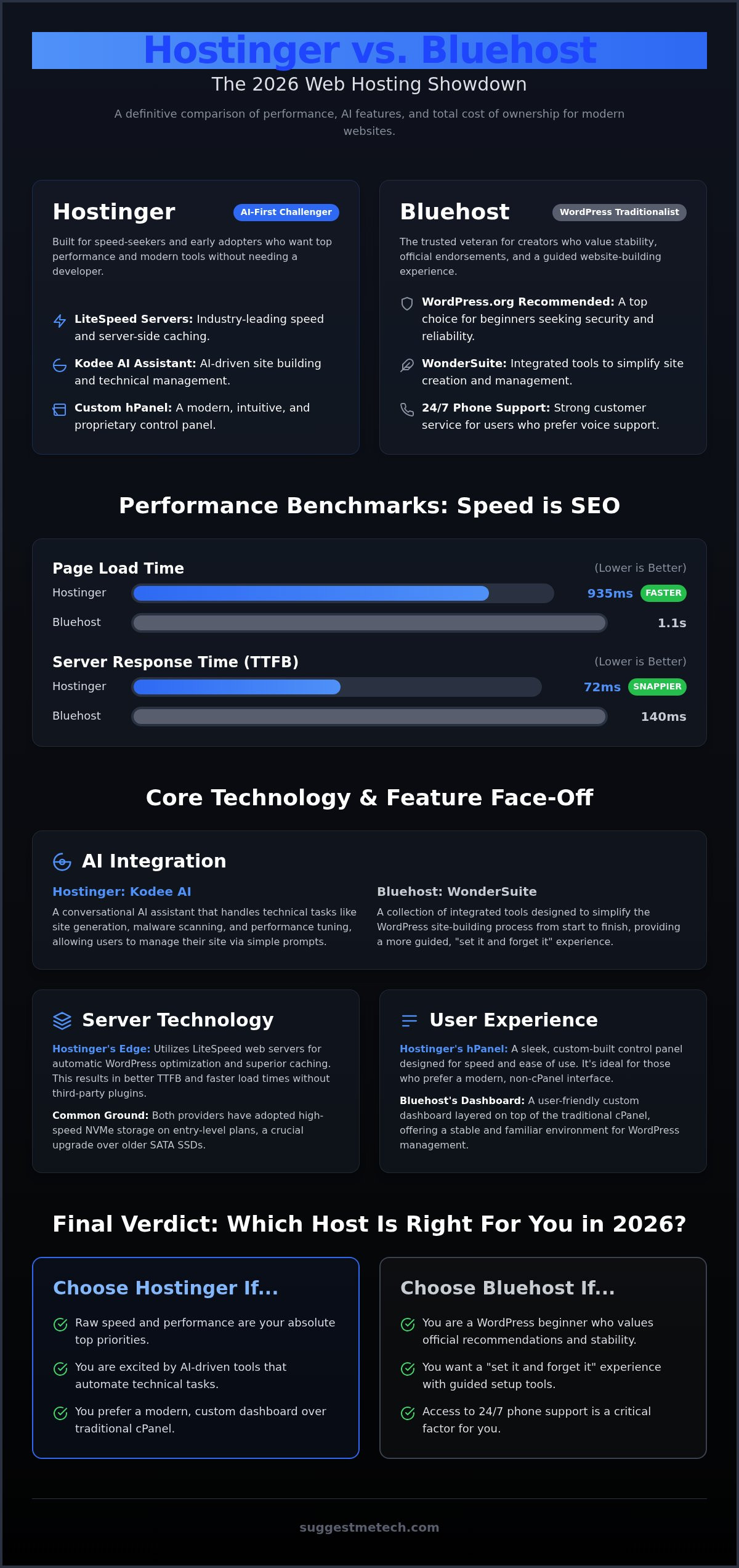
Hostinger’s identity revolves around its proprietary hPanel. Unlike the generic control panels of the past, hPanel is built by their Lithuanian-based engineering team to prioritize LiteSpeed web server optimization. This setup is perfect for speed-seekers who want their site to fly without manual server tuning. In 2026, they’ve doubled down on AI, integrating the Kodee assistant to handle everything from site generation to real-time troubleshooting. If you’re an early adopter who values performance and modern interfaces over legacy brand names, this is your territory. It’s lean, fast, and designed for those who want to manage their site without a developer on speed-dial.
Bluehost: The WordPress Traditionalist
Bluehost remains the heavy hitter for those who value stability and official endorsements. They still hold a rare recommendation from WordPress.org, which provides a massive sense of security for new creators. To combat the “old-school” label, Bluehost introduced WonderSuite, a collection of tools designed to simplify the entire site-building process. It’s a “set it and forget it” experience. The hostinger vs bluehost choice often comes down to this: do you want the cutting-edge speed of an independent challenger, or the reliable, high-trust environment of an industry veteran? If you want a predictable environment where the technical heavy lifting is handled behind the scenes, Bluehost’s 2026 updates make it a reliable option.
Performance Benchmarks: LiteSpeed, NVMe, and AI-Driven Efficiency
Speed is no longer a luxury; it’s a core requirement for search engine visibility. In our latest 2026 comparisons, the hostinger vs bluehost performance gap has become more defined by infrastructure choices. Recent tests showed Hostinger delivering a page load time of 935ms with a response time of 72ms. In contrast, Bluehost clocked in at 1.1s with a response time of 140ms. While both are fast, Hostinger’s reliance on LiteSpeed web servers provides a snappier feel for end users.
Reliability remains high for both providers. Our 30-day monitoring test recorded zero downtime for Hostinger, while Bluehost maintained its reputation for rock-solid uptime. Both services back this with a 99.9% guarantee, but the real differentiator is how they handle traffic spikes. For creators looking to build a robust performance measurement program, these server-side metrics are the starting point for long-term growth.
Server Technology and Storage
NVMe storage is essential in 2026 because it offers significantly faster data transfer rates than traditional SATA SSDs, directly reducing the time it takes to serve complex database queries. Hostinger uses LiteSpeed technologies to offer automatic WordPress optimization, which handles server-side caching without requiring third-party plugins. Bluehost has integrated NVMe storage into its entry-level plans, offering 10 GB of high-speed space. While Bluehost’s infrastructure is reliable, Hostinger’s LiteSpeed edge often results in better TTFB (Time to First Byte) scores across global data centers.
The 2026 AI Experience
Hostinger’s AI Website Builder has evolved into a fully conversational experience. You can go from a single prompt to a live, functional site in minutes. The standout feature is Kodee, an AI assistant that manages technical tasks like malware scanning and performance tuning so you don’t have to. Bluehost competes with WonderSuite, which focuses on simplifying the design workflow rather than full automation. When it comes to troubleshooting, Kodee provides instant, data-driven answers within the hPanel. Bluehost still leans heavily on its 24/7 phone support, which is better for those who prefer talking to a human over an AI interface. If you’re still weighing your options, checking out our full hosting comparison guides can help clarify your priorities.
User Experience and Interface: hPanel vs. the Bluehost Dashboard
Getting your site online shouldn’t require a degree in computer science. In the hostinger vs bluehost matchup, the interface is where you’ll spend most of your administrative time. While web hosting market share data shows both are incredibly popular, their approaches to user management are very different. Hostinger has moved away from industry-standard tools to create hPanel, a custom-built environment that feels more like a modern smartphone app than a server manager. Bluehost has refined its dashboard to act as a bridge between classic power and WordPress simplicity.
First impressions matter. When you first log in, both providers guide you through a setup wizard to claim your domain and activate your SSL certificate. Hostinger’s hPanel is particularly impressive in 2026 for its clean layout. Everything is icon-based and easy to find. Bluehost’s dashboard is more focused on the WordPress ecosystem, making it a natural fit for those who plan to live inside the WordPress editor. Migration is equally streamlined. Hostinger offers an automated migration form in hPanel, while Bluehost uses a dedicated plugin to move your existing site without the typical technical headaches.
The Setup Workflow
The “Buy to Live” timeline is remarkably short for both. You can usually have a basic site skeleton ready in about 10 to 15 minutes. If you are just starting out, our guide on How to Start a Blog in 2026: A Step-by-Step Guide for Beginners walks you through this initial phase. Managing multiple domains is where the hostinger vs bluehost choice becomes clearer. Hostinger’s hPanel uses a vertical sidebar that makes switching between different websites feel seamless. Bluehost’s interface is excellent for a single-site setup but can feel slightly more cluttered as you add more projects to your account.
WordPress Integration and Tools
Both hosts offer one-click installs and automatic updates, keeping your site secure without manual intervention. Staging environments are a standout feature for both. These allow you to test design changes on a private copy of your site before they go live. If you’re still confused about the technical basics, it helps to understand What is a Domain Name? A Simple Guide for Beginners before diving into the dashboard. Bluehost’s WonderSuite provides a very guided WordPress experience, while Hostinger’s tools are built for speed and efficiency, appealing to those who want to get things done and move on.
The Cost of Ownership: Analyzing Introductory Rates and Renewal Realities
The most attractive feature of any hosting plan is usually the low introductory price, but this can be a double-edged sword. In the hostinger vs bluehost comparison, the headline rates you see today are often tied to long-term commitments of 36 or 48 months. If you choose a shorter term, like 12 months, your monthly cost will rise significantly. It’s also vital to look ahead to 2027 and beyond, as renewal rates can catch you off guard. Hostinger’s Premium plan jumps from $2.99 to $7.99 upon renewal, while Bluehost’s Basic plan typically moves from $2.95 to $10.99.
Both providers include essential freebies to sweeten the deal. You will get a free domain for the first year and an SSL certificate at no extra cost. However, the true value lies in the recurring features. Hostinger provides free weekly or daily backups depending on your plan, whereas Bluehost often requires a paid add-on like CodeGuard for automated daily backups, which can cost roughly $2.99 per month. If you’re not satisfied, both services offer a 30-day money-back guarantee, though you should remember that domain registration fees are usually non-refundable.
Hostinger Pricing Breakdown
Hostinger’s tiers are split between the Premium and Business plans. The Business plan is often the better choice for serious projects because it includes daily backups and increased storage. While the Premium plan starts at $2.99, it lacks the daily security snapshots that professional sites need. Choosing the 48-month plan allows you to lock in the lowest rate for four years, effectively saving you hundreds of dollars compared to the $11.99 monthly rate and its $4.99 setup fee. You can find more detailed evaluations in our guide to the best tech for creators.
Bluehost Pricing Breakdown
Bluehost’s Choice Plus plan is a popular middle ground because it includes domain privacy and automated backups for the first year. This is a significant step up from the Basic plan, which offers only 10 GB of storage. While the introductory investment is higher, the built-in security features make it a strong contender for those who don’t want to manage separate security plugins. For a broader look at how these compare to other industry leaders, check out The Best Web Hosting Services of 2024: Tested and Reviewed. Bluehost’s official WordPress endorsement remains a key part of its value, especially for beginners who want a guaranteed compatibility layer.
Final Verdict: Which Host Should You Choose for Your 2026 Project?
The final decision in the hostinger vs bluehost comparison depends on whether you value technical speed or human support. We’ve analyzed the benchmarks and the dashboards; now it’s time to map those features to your specific goals. While both services dominate the entry-level market, they serve very different types of creators. If your traffic grows beyond the limits of shared resources, you should eventually look toward VPS solutions, but for now, these providers offer the most accessible entry point.
The Winner for Bloggers and Portfolios
The Winner for Small Business and E-commerce
If you’re looking to complement your technical setup with a bespoke, high-converting website, you can learn more about Summer St. Studio to see how their independent design services can help your brand stand out.
Bluehost is the preferred choice for businesses that need a high-trust environment. Their official WordPress endorsement and 24/7 phone support provide a safety net that pays for itself when you’re managing a professional storefront. If you want a stable foundation with a human expert just a phone call away, this is the right move for your brand. Start your website today with our recommended AI-powered hosting to ensure you get the best performance for your 2026 project.
Ready to Launch Your 2026 Website?
Choosing between hostinger vs bluehost is no longer just about the monthly bill. It’s a strategic choice between Hostinger’s cutting-edge LiteSpeed-powered performance and Bluehost’s reliable, high-touch support system. Hostinger is the ideal partner for those who prioritize AI-driven efficiency and sub-second load times. Meanwhile, Bluehost offers a stable, familiar environment for those who value an official WordPress recommendation and 24/7 phone access. Both services provide a 30-day money-back guarantee, along with a free domain and SSL to help you get started without immediate extra costs.
Your website is the foundation of your digital presence. Whether you choose the speed of hPanel or the stability of Bluehost, the most important step is simply to begin. If you’re still undecided, our team at SuggestMeTech is here to help you navigate the technical details. Start your website today with Hostinger’s AI-powered hosting and experience the difference that modern infrastructure makes for your growth. We’re excited to see what you build this year.
Frequently Asked Questions
Is Hostinger fast enough for a WordPress site in 2026?
Yes, Hostinger is exceptionally fast for WordPress sites in 2026 due to its LiteSpeed server infrastructure. Our tests showed a median load time of 935ms, which is well below the 2-second threshold required for good SEO. This speed is a major factor when comparing hostinger vs bluehost for performance-heavy blogs. You don’t need manual server tuning because the system automatically optimizes your database and images for quicker delivery to global visitors.
Does Hostinger offer a free domain name with all plans?
Hostinger offers a free domain for the first year on most plans, but not the entry-level Single tier. To get the free registration, you’ll need to choose at least the Premium or Business plan with a 12-month commitment or longer. This is a common industry practice. If you already have a domain, you can point it to their servers at no extra cost, regardless of which hosting package you select.
How does Hostinger’s AI Website Builder compare to Wix or Squarespace?
Hostinger’s AI Website Builder is a more budget-friendly and performance-focused alternative to Wix or Squarespace. While Wix offers more design templates, Hostinger’s tool generates a functional site from a single prompt and prioritizes fast loading speeds. The integrated Kodee AI assistant handles technical tasks like SEO metadata and image generation. It’s a great choice for creators who want to own their hosting environment rather than paying high subscription fees for a closed platform.
Can I migrate my existing website to Hostinger for free?
You can migrate your existing website to Hostinger for free using their automated migration tool in hPanel. Their technical team also provides assistance if you run into issues during the transfer of your WordPress files and databases. This process is designed to be seamless and typically results in zero downtime for your visitors. Most users find that moving away from slower providers leads to immediate improvements in their site’s core web vitals.
Is Hostinger’s customer support available via phone?
No, Hostinger does not offer phone support, as they focus entirely on 24/7 live chat and email communication. Their support team is highly responsive and uses a modern ticketing system to resolve technical issues quickly. If you prefer speaking to a human over the phone, Bluehost might be a better fit for your needs. However, Hostinger’s extensive documentation and AI-driven troubleshooting tools often resolve common problems faster than a traditional phone call.
What happens if I am not satisfied with Hostinger hosting?
If you aren’t satisfied with the service, you can take advantage of Hostinger’s 30-day money-back guarantee. This policy allows you to request a full refund for your hosting fees within the first month of your purchase. It’s important to remember that domain registration fees are generally non-refundable because they are paid directly to the registry. This guarantee provides a risk-free way to test the platform’s speed and user interface before committing long-term.
Is the Business plan worth the extra cost over the Premium plan?
The Business plan is definitely worth the extra cost if you require daily backups and increased storage capacity. While the Premium plan only offers weekly backups, the Business tier ensures your data is saved every 24 hours, which is critical for e-commerce or high-traffic sites. In the hostinger vs bluehost value analysis, the 200 GB of NVMe storage in the Business plan provides a significant performance boost for large media libraries and complex plugins.
Can I host multiple websites on a single Hostinger account?
Yes, you can host up to 100 websites on a single Hostinger Premium or Business account. This makes it an excellent choice for developers or entrepreneurs who manage multiple niche blogs or portfolio sites. Each website has its own dedicated folder and can be managed through the central hPanel dashboard. This scalability is a key advantage for users who plan to expand their online presence without paying for separate hosting accounts for every new domain.

