

Cybersecurity often makes more sense when you compare it to locking your front door. Learning how to explain cybersecurity to non-tech-savvy people starts with familiar situations, not a list of technical terms. Security advice can sound confusing or alarming when it focuses on risks without explaining what to do next.
Connect online safety to everyday choices. A password is like a key, and a suspicious message is like a stranger asking you to hand one over. This guide explains how to describe common risks in plain language, share practical steps people can remember, and make room for questions without turning the conversation into a lecture.
Quick Answer
To explain cybersecurity to non-tech-savvy people, describe it as protecting devices, accounts, and information from online misuse. Use familiar examples to make risks clear, then suggest one practical action at a time, such as checking an unexpected message or using unique passwords. Invite questions and keep the conversation focused on choices people can use every day.
Key Takeaways
- Start with the person’s everyday online activities to make security advice relevant and easier to follow.
- Describe common risks, such as phishing and reused passwords, in plain language.
- When explaining cybersecurity to someone who is not tech-savvy, focus on one clear action at a time.
- Teach practical habits such as pausing before clicking links, choosing unique passwords, and enabling multifactor authentication where available.
- Keep conversations open and blame-free so people feel comfortable asking questions and reporting mistakes.
What Does Cybersecurity Mean in Everyday Life?
Cybersecurity means protecting devices, accounts, information, and online activity from people who might access or misuse them. It includes everyday choices that help keep personal details private, prevent others from taking over accounts, and make it easier to regain access if something goes wrong. It is practical protection, not a promise that every risk can be eliminated.
People rely on cybersecurity when they message a friend, shop online, or sign in to email. A helpful way to explain the topic is to start with these familiar activities, then describe how small habits can make them safer. No one needs to become a technical expert to understand the basics.
How to Describe Cybersecurity Without Jargon
Choose words that name the action: protect an account, verify who sent a message, or recover access after a problem. If a technical term helps, define it in one short sentence. For example, a data breach is when information is accessed by someone who should not have it.
A home-security comparison can help: locking a door makes it harder for someone to enter, though it cannot guarantee that nobody will get in. Online protections work similarly. A screen lock helps protect a phone, while checking who sent a message can help you avoid acting on a fake request. For a broader foundation, see what computer security is.
Why Everyday Cybersecurity Matters to Everyone
Personal accounts hold pieces of daily life, including messages, saved addresses, photos, purchase details, and access to other services. If someone takes over an email account, for instance, they might use it to impersonate its owner, contact people in their address book, or try to access accounts connected to that email. The concern is not only private information, but also disruption and loss of access.
These risks are not limited to wealthy, famous, or business users. Anyone who messages, shops, or signs in online has accounts worth protecting. Keep the explanation grounded in what the listener actually uses, rather than making cybersecurity sound like a distant concern reserved for major companies.
- Messaging: Protect conversations and be cautious about unexpected requests.
- Shopping: Keep account and payment details from being exposed or misused.
- Signing in: Make it harder for someone else to enter an account or lock its owner out.
How to Explain Common Cybersecurity Risks With Familiar Examples
Common cybersecurity risks include messages that trick people into acting, passwords that are easy to guess or reused, and harmful software that disrupts a device or account. Explain each risk through what a person might see and what they can do next. That makes the conversation useful without implying that every unfamiliar message or file is dangerous.
For a clear starting point, the official definition of cybersecurity can support a plain-language conversation. Then connect the idea to examples the listener might recognize.
How to Explain Phishing and Social Engineering
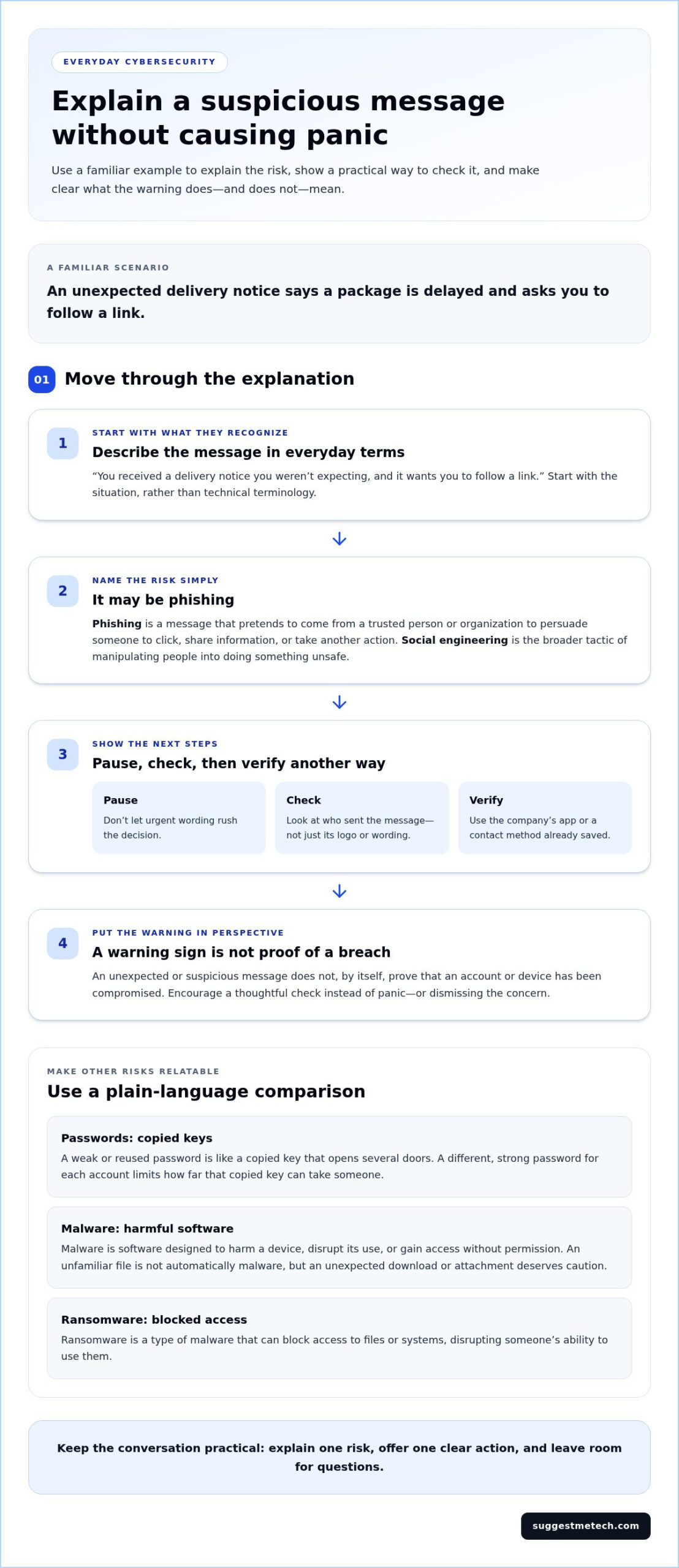
Phishing is a message that pretends to come from a trusted person or organization to persuade someone to click, share information, or take another action. Social engineering is the broader tactic of manipulating people into revealing information or doing something unsafe.
For example, an unexpected delivery notice might say a package is delayed and ask the recipient to follow a link. Instead of relying on the logo or urgent wording, encourage them to pause, check the sender, and verify the notice through a trusted route, such as the delivery company’s app or a contact method they already have saved.
A suspicious message is a warning sign, not proof that an account or device has been compromised. This distinction helps people respond thoughtfully instead of panicking or dismissing the concern.
How to Explain Passwords, Malware, and Ransomware
A weak or reused password is like a copied key that opens several doors. If someone gets that key from one account, they may try it on other accounts that use the same password. A different, strong password for each account limits how far that copied key can take them.
Malware is software designed to harm a device, disrupt its use, or gain access without permission. An unfamiliar file is not automatically malware, but an unexpected download or attachment deserves caution. Ransomware is a type of malware that can block access to files or systems, disrupting someone’s ability to use them.
Keep the advice specific: do not open unexpected attachments, and use unique passwords. A password manager can help create and store them, but it does not prevent every kind of attack. For more practical security topics, explore cybersecurity guides and reviews.
How to Make Cybersecurity Explanations Clear Without Oversimplifying
Begin with what the listener already does online, then explain the security choice connected to that activity. This makes the explanation less about memorizing technical terms and more about understanding why a practical action matters.
Plain language does not mean inaccurate language. A useful explanation keeps the core idea and next step intact while removing jargon that does not help the listener act. The U.S. government’s practical guidance on protecting yourself against cyberattacks offers examples of everyday steps that can help ground these conversations.
| Jargon-heavy explanation | Plain-language explanation |
|---|---|
| “Verify the sender before responding to a potentially fraudulent communication.” | “Check who sent the message before you reply or follow its instructions.” |
| “Use distinct credentials across accounts.” | “Give each account its own password, so one exposed password will not unlock others.” |
Choose Examples That Fit the Listener
Ask what devices, accounts, and services the person actually uses before choosing an example. With a family member, discuss protecting a shopping account or checking an unexpected message. With a coworker, focus on shared files, work accounts, or a routine approval request. Relevant examples show where a security habit fits into someone’s day, rather than treating it as a separate technical subject.
Use Analogies Carefully and Check Accuracy
A password can be compared to a key because it helps control access to an account. But unlike a physical key, a password can be copied, guessed, or reused across many accounts, so explain that limitation. Avoid comparisons that make ordinary online activity sound inherently dangerous. Before sharing an explanation, check that it preserves the real idea and gives a sensible next step.
There is no need to choose between a technical lecture and a misleading simplification. Introduce a term only when it helps, define it briefly, and connect it to an action. For example, rather than describing a complex security process, explain what the person should check before approving a request and why that check matters. The aim is understanding, not a vocabulary test.
How to Teach Cybersecurity Habits Step by Step
Teach one behavior at a time, demonstrate it in a familiar situation, and give the listener a chance to try it. This turns general advice into something they can repeat during an actual sign-in, message, or software update.
One clear, repeatable habit is easier to remember than an overwhelming list. Start with actions that protect common points of access, then add another habit once the first feels manageable.
- Pause before following a link. For an unexpected message, show how to check who sent it and where the link leads without opening it. If the request seems important, go to the service’s app or website directly instead of using the message link.
- Use a different password for each account. A password manager can create and store unique passwords, so the person does not have to memorize each one. Explain that it helps organize passwords but does not prevent every security risk.
- Add another sign-in check. Multifactor authentication, often shortened to MFA, asks for additional proof of identity beyond a password. That might be an approval prompt on a device. Turn it on for an account when the option is available.
- Keep software up to date. Updates can include fixes for security problems. Enabling automatic updates, where available, helps devices and apps receive those fixes without relying on someone to remember each time.
Turn Security Advice Into Small, Repeatable Actions
Show the action, not just the instruction. With a message, talk through checking its sender and opening the relevant service separately. With passwords, demonstrate how a password manager can generate and save a unique one. For MFA, explain what an extra sign-in prompt is asking the person to do, and remind them to approve only sign-ins they recognize.
Check Understanding Without Making the Listener Feel Tested
Invite the person to explain the next step in their own words: “If you get an unexpected sign-in request, what would you do?” Or offer a neutral scenario, such as a message asking them to review a shared file. Let them talk through their response. If something is unclear, correct it calmly and restate the action in plain language. The goal is shared understanding, not a quiz.
For more practical technology guidance, explore cybersecurity guides on SuggestMeTech.
How to Keep Cybersecurity Conversations Useful and Ongoing
Cybersecurity advice is easier to remember when it comes up during real decisions, such as reviewing an account alert or deciding whether to approve a sign-in. Short conversations leave room for questions and follow-up. They also make it easier to revisit a habit without turning security into one long, stressful lecture.
When explaining cybersecurity to someone who is not tech-savvy, make uncertainty acceptable. People should feel comfortable saying “I’m not sure” or reporting a mistake promptly. A calm response keeps the focus on what to do next, rather than on blame.
Respond Calmly When Someone Makes a Security Mistake
If someone clicked a suspicious link, start by asking what happened and whether they entered information, downloaded a file, or approved a sign-in. Do not assume the account or device has been compromised, but do not dismiss the concern either. Focus on a safe next action based on what they did.
- If they entered a password, change it through the service’s official app or website, not through the message link.
- If they shared payment or personal information, contact the relevant bank or service using a trusted contact method.
- If they downloaded or opened a file, or approved a sign-in they do not recognize, follow the appropriate support or reporting process.
- At work, report the incident through the organization’s established process, even if the person is unsure whether anything harmful happened.
Avoid shaming language. A simple “Thanks for telling me. Let’s work out the next step” encourages people to speak up quickly if another concern arises.
Build on the Conversation With Further Learning
Keep later discussions tied to the person’s questions, rather than trying to cover every security topic at once. Ask what feels unclear, then address that point in plain language. If they want to compare security software, the Bitdefender Antivirus Review can help them explore one product, while the Avira Antivirus guide offers another product-focused reference. These guides are useful for readers exploring security software, while the focus here remains on communicating everyday cybersecurity clearly.
The approach is straightforward: connect advice to a real decision, explain one useful action, and make questions welcome. Explore related practical technology guides to keep learning at a pace that works for you.
Make Cybersecurity Easier to Talk About
Clear cybersecurity conversations do not require technical expertise. Start with the online activities someone already understands, use familiar examples to explain risks, and translate each recommendation into one practical action. A password can be compared to a key, for instance, while clarifying that online passwords can be copied or reused in ways physical keys usually cannot.
The most useful approach is to keep explanations accurate, manageable, and open to questions. Teach habits in small steps, such as pausing before following an unexpected link or adding another sign-in check where available. If someone reports a mistake, focus on what happened and the safest next step rather than assigning blame.
Keep learning connected to everyday decisions, not fear or product promotion. Each clear conversation can make the next security choice easier to understand and discuss. Explore more practical technology guides to build on what you have learned and keep your online safety conversations moving forward.
Frequently Asked Questions
These answers offer concise ways to explain online safety, respond to common concerns, and check that practical advice is clear.
What is the simplest way to explain cybersecurity?
Cybersecurity is the practice of protecting devices, accounts, and information from online misuse. Explain it as keeping control of the things someone uses online, while recognizing that no habit can remove every risk. For example, if an account alert arrives unexpectedly, check it through the service’s app or website instead of following its link. The goal is sensible, repeatable choices, not specialist knowledge.
How do you explain phishing to someone who is not tech-savvy?
Phishing is a fake or misleading message designed to get someone to click a link, share information, or take another risky action. You might compare it to an unexpected delivery notice asking for a fee or an account alert urging immediate action. Advise the person to pause and verify the request through a trusted route, such as the service’s official app, rather than using contact details included in the message.
Can you explain cybersecurity without using technical terms?
Yes. Start with a familiar activity, such as checking email or shopping online, and explain one way to protect it. Replace jargon with short, accurate phrases and define necessary terms when they first appear. An analogy can clarify one part of an idea, but explain where the comparison stops matching real online risks.
How do you explain passwords and multifactor authentication simply?
A password is one way to show that you own an account. Multifactor authentication adds another identity check, such as an approval prompt on a device. Using a different password for each account helps limit the impact if one password is exposed. These extra protections can make unauthorized access harder, but they do not guarantee that an account can never be compromised. Explain what each check does and when to use it.
What should you do if someone clicks a suspicious link?
Stay calm, ask what happened, and avoid blaming the person. The next step depends on whether they entered a password or other information, downloaded a file, or approved a sign-in. Do not assume an attack succeeded, but do not dismiss the concern either. If a work account or device is involved, follow the organization’s incident-reporting process and seek appropriate support. Focus first on what happened and the safest next action.
How can you tell whether someone understands cybersecurity advice?
Ask the person to describe the next action in their own words or talk through a neutral example, such as receiving an unexpected account alert. Listen for the decision they would make, not whether they remember technical terms. If they are unsure, clarify one point with a practical example, then invite them to explain the action again. Keep the exchange relaxed so checking understanding feels like a conversation, not a test.
Is it better to use analogies when explaining cybersecurity?
Analogies can make an unfamiliar idea easier to picture. For example, comparing a password to a key can help explain how it controls access to an account. But the comparison is not exact: online passwords can be copied, guessed, or reused across accounts. Follow an analogy with a short explanation of the actual security idea and a practical next step. Avoid comparisons that make ordinary online activity sound inherently frightening.

