

There’s nothing more frustrating than watching your website crumble under the weight of success. You’ve launched a killer campaign, your content is going viral, and then-the dreaded 503 error appears. Your shared hosting just couldn’t keep up, and now you’re losing visitors and sales with every passing second. This all-too-common scenario is exactly why finding the right web hosting for high traffic sites is non-negotiable for any growing business. It’s the difference between capitalizing on momentum and watching it slip away.
But navigating the upgrade path can be confusing. What’s the real difference between VPS, Cloud, and Dedicated hosting, and which one is right for you? In this guide, we cut through the technical jargon to give you clear, practical answers. We’ll compare the top providers for 2026 based on speed, reliability, and scalability, providing a trusted shortlist to choose from. Stop worrying about downtime and start preparing for growth with confidence.
Key Takeaways
- Shared hosting often fails under pressure because you’re competing for limited resources. Understand the clear signs that you’ve outgrown your plan and need an upgrade.
- Choosing between VPS, Cloud, and Dedicated hosting is simpler than it sounds. We break down which option is the right fit for your specific traffic patterns and technical skill.
- The best web hosting for high traffic sites isn’t just about power-it’s about essential features like auto-scaling and a global CDN. Discover the non-negotiables before you buy.
- Decide whether Managed or Unmanaged hosting fits your team’s expertise and budget. This single choice determines your level of control and day-to-day responsibility.
Why Your Shared Hosting Fails Under High Traffic
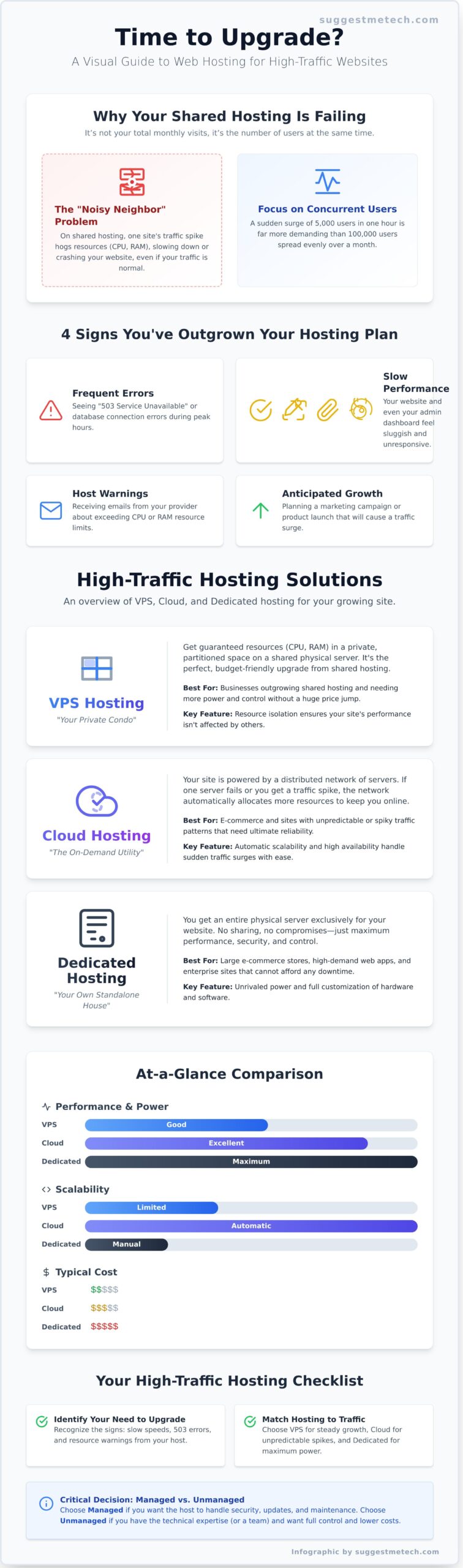
When your website starts gaining traction, the cheap shared hosting plan that served you well initially can quickly become your biggest bottleneck. But what exactly is “high traffic”? It’s less about your total monthly visits and more about concurrent users-the number of people actively browsing your site at the same moment. A site with 100,000 monthly visits spread evenly is very different from one that gets 5,000 visitors in a single hour after a successful marketing push. Shared hosting simply isn’t built for those sudden spikes.
As your audience grows, your hosting foundation must grow with it. Recognizing the limitations of your current plan is the first step toward finding a reliable web hosting for high traffic sites that can support your success without crashing.
The Shared Hosting Resource Problem
Think of shared hosting as a large apartment building where all tenants share the same utilities. While affordable, if one resident hosts a massive party (a traffic spike), it can drain the water pressure and electricity for everyone else. On a server, the shared resources are CPU, RAM, and I/O (input/output speeds). Understanding the core differences between web hosting service types reveals why this model breaks down under pressure. One “noisy neighbor” site consuming too many resources can slow your site to a crawl, even if your own traffic is normal.
When to Know It’s Time to Upgrade
Outgrowing your hosting plan is a good problem to have, but ignoring the warning signs can lead to a poor user experience and lost revenue. Watch for these clear indicators that you need to move on from shared hosting:
- Frequent Errors: You or your users start seeing errors like
503 Service UnavailableorError Establishing a Database Connection, especially during peak traffic times. - Slow Performance: Your site becomes noticeably sluggish, and your WordPress admin panel feels slow and unresponsive.
- Host Warnings: You receive emails from your provider about exceeding your CPU or RAM limits. These are often the final warning before they suspend your account.
- Anticipated Growth: You are planning a major product launch, a viral marketing campaign, or expect a seasonal traffic surge. Upgrading proactively prevents a crash on your most important day.
Hosting Types for High Traffic: VPS, Cloud, and Dedicated Explained
Once your website starts attracting serious visitor numbers, standard shared hosting can’t keep up. Your site slows down, crashes, and you risk losing potential customers. To solve this, you need to upgrade to a plan designed for performance. Understanding the main types of web hosting for high traffic sites-VPS, Cloud, and Dedicated-is the first step to making a smart choice.
VPS (Virtual Private Server) Hosting
Think of VPS hosting as owning a condo in a larger building. You share the building (a physical server) with others, but you have your own private, partitioned space. This guarantees you a specific amount of resources like CPU and RAM, so another site’s traffic spike won’t affect your performance. It’s the perfect, budget-friendly upgrade for businesses that have outgrown shared hosting and need more power and control.
Cloud Hosting
Cloud hosting operates like a utility service that scales with demand. Instead of relying on a single server, your site is powered by a distributed network of servers that work together. This model offers incredible reliability and flexibility. If you experience a sudden surge in visitors from a viral post, the network automatically allocates more resources to handle it. This architecture provides the essential scalability and security features that modern high-demand websites require, making it ideal for sites with unpredictable traffic.
Dedicated Server Hosting
A dedicated server is like owning your own standalone house. You get an entire physical server exclusively for your website-no sharing, no compromises. This option delivers the absolute maximum in performance, security, and control. You can customize the software and hardware to your exact specifications, making it the top choice for large e-commerce stores, high-demand web applications, and enterprise-level sites that cannot afford any downtime.
To help you decide, here’s a quick comparison of the three main options for high-traffic hosting:
| Feature | VPS Hosting | Cloud Hosting | Dedicated Hosting |
|---|---|---|---|
| Best For | Growing sites on a budget | Sites with traffic spikes | Large, mission-critical sites |
| Performance | Good & consistent | Excellent & reliable | Maximum power |
| Scalability | Good (manual upgrades) | Excellent (automatic) | Limited (hardware-based) |
| Cost | $$ | $$-$$$ (Pay-as-you-go) | $$$$ |
5 Essential Features Your High Traffic Host Must Have
While choosing the right type of hosting is a great start, the specific features a provider offers are what truly separate a high-performance host from one that will crumble under pressure. Think of this as your non-negotiable checklist. Evaluating a provider based on these five pillars is the most effective way to prevent downtime and ensure your site remains fast and responsive, no matter how popular it gets.
Scalability and Sufficient Resources (CPU & RAM)
Your traffic won’t be static, so your hosting resources shouldn’t be either. A key feature of premium web hosting for high traffic sites is the ability to scale your resources-like CPU cores and RAM-with a few clicks. This elasticity is a primary reason many growing sites find that VPS hosting for high-traffic websites offers the perfect balance of power and flexibility. Also, insist on NVMe SSD storage over older SSDs or hard drives for significantly faster file access and database queries. Finally, look for providers with clear, transparent resource limits so you know exactly when you’ll need to upgrade.
Advanced Caching and a Global CDN
Speed is everything, and caching is your secret weapon. Your host should offer server-level caching solutions like Varnish, NGINX FastCGI, or Redis. These tools store pre-built versions of your pages in memory, allowing them to be served to visitors almost instantly without needing to run slow scripts every time. Paired with a Content Delivery Network (CDN), this becomes even more powerful. A CDN distributes copies of your site’s assets (images, CSS, JavaScript) to servers around the globe, ensuring a visitor from Sydney loads your site from a local Australian server, not one in Texas. This dramatically reduces latency and improves the user experience for a global audience.
Robust Security and Proactive Monitoring
A high-traffic website is a much bigger target for malicious attacks. Basic security is not enough. Your host must provide a multi-layered defense system to protect your site and your users’ data. Essential security features include:
- DDoS Mitigation: To absorb and deflect massive floods of malicious traffic designed to take your site offline.
- Web Application Firewall (WAF): To filter out and block common threats like SQL injections and cross-site scripting before they reach your website.
- Proactive Malware Scanning: Automated, regular scans to detect and remove malicious code, often before you even know it’s there.
Uptime Guarantees and Expert Support
Every minute of downtime costs you revenue and reputation. Don’t settle for anything less than a 99.9% uptime Service Level Agreement (SLA). This written guarantee holds your provider accountable for reliability. But when an issue inevitably arises, the quality of support is what matters most. You need 24/7 access to expert technicians who can diagnose and resolve complex server issues, not just a script-reading call center. Pro Tip: Before you commit, test their support. Send a technical pre-sales question via live chat or ticket and see how quickly-and how competently-they respond.
Managed vs. Unmanaged Hosting: A Critical Decision
When selecting web hosting for high traffic sites, one of the first and most important forks in the road is the choice between managed and unmanaged services. This decision isn’t just about technical features; it’s a fundamental choice about where you invest your time, budget, and expertise. The right path depends entirely on your team’s technical skills and how hands-on you want to be with server administration.
In simple terms, the difference comes down to responsibility. With managed hosting, your provider acts as your dedicated server administrator, handling security, updates, and performance tuning. With unmanaged hosting, the provider gives you the server and an internet connection-the rest is up to you.
Who Should Choose Managed Hosting?
Managed hosting is the “peace of mind” option, designed for business owners, agencies, and creators who want to focus on growth, not server maintenance. It’s the perfect fit if you value your time and prefer to have an expert team managing the technical backend of your website.
- You prioritize your business: You’d rather spend your hours on content, marketing, and customers than on patching software or troubleshooting server errors.
- Security is non-negotiable: The host proactively monitors for threats, applies security patches, and often includes firewalls and malware scanning.
- You need expert support: You have a team of specialists on call to optimize your server for speed and reliability, ensuring your site handles traffic spikes flawlessly.
If this sounds like you, your best bet is a service that handles the heavy lifting. See our top picks for managed hosting solutions.
Who Should Choose Unmanaged Hosting?
Unmanaged hosting offers ultimate control and flexibility, making it the preferred choice for developers, system administrators, or businesses with a dedicated IT department. This path provides a blank slate to build a completely custom environment tailored to your specific application needs.
- You are technically proficient: You or your team are comfortable working in a command-line interface (SSH) and managing every aspect of a server.
- You require full control: You need root access to install custom software, tweak server settings, or configure a unique software stack that a managed host wouldn’t allow.
- Budget is a primary factor: Unmanaged plans are often cheaper upfront, but remember to factor in the cost of your own time or the salary of a system administrator.
Our Top 5 Web Hosting Picks for High Traffic Sites
After extensive testing and analysis, we’ve identified the providers that consistently deliver the speed, reliability, and scalability your growing website needs. We’ve categorized each host by its core strength to help you find the perfect match. This curated list represents the best web hosting for high traffic sites, whether you’re running a booming e-commerce store or a viral blog.
Our Pick: Best Overall Managed Performance
For a balanced blend of speed, reliability, and user-friendliness, this category represents our top all-around recommendation. These providers typically leverage premium cloud platforms for incredible performance, especially for WordPress and WooCommerce. Key features include robust in-house caching and optimization tools, coupled with 24/7 expert support.
- Pros: Excellent uptime, top-tier customer support, powerful and easy-to-use performance tools.
- Cons: Renewal prices are significantly higher than introductory rates.
Discover Our Top Overall Pick »
Liquid Web: Best for Managed VPS & Dedicated Servers
When your business can’t afford a single second of downtime, Liquid Web is the answer. They specialize in fully managed VPS and dedicated server hosting with an ironclad 100% uptime Service Level Agreement (SLA). Their proactive support team handles all server management, making it ideal for mission-critical applications and large e-commerce platforms.
- Pros: Industry-leading 100% uptime guarantee, fully managed “Heroic Support,” highly secure.
- Cons:s Premium pricing makes it less suitable for sites on a tight budget.
Cloudways: Best for Flexibility and Choice
Cloudways offers a unique and powerful approach to hosting. Instead of using their own servers, they provide a managed platform on top of leading cloud providers like AWS, Google Cloud, and DigitalOcean. This gives you incredible flexibility and pay-as-you-go scalability, striking a perfect balance between raw power, ease of use, and affordability.
- Pros: Choose your cloud provider, easily scalable resources, excellent performance for the price.
- Cons: Support for applications beyond the server stack is limited.
Kinsta: Best Premium Managed WordPress Hosting
Kinsta is an enterprise-grade solution built exclusively for WordPress. Powered by Google Cloud’s C2 machines, their infrastructure is designed for speed and auto-scales to handle sudden traffic spikes effortlessly. Every plan includes a premium CDN, daily backups, and advanced security features like a firewall and DDoS protection, making it a truly hands-off solution.
- Pros: Blazing-fast performance, automatic scaling for viral traffic, exceptional security.
- Cons: One of the more expensive options, strictly for WordPress sites.
WP Engine: Best for Scalable WordPress Solutions
A pioneer in the managed WordPress space, WP Engine provides a robust platform trusted by major brands. They offer a suite of developer-friendly tools, enterprise-grade security, and their proprietary EverCache technology for incredible speed. Their global CDN and scalable architecture ensure your site is fast for every visitor, no matter where they are.
- Pros: Excellent developer tools, award-winning support, highly scalable and secure platform.
- Cons: Plan limits (like monthly visits) can be strict.
Choosing the Right Host to Handle Your Success
As your audience grows, the limitations of basic shared hosting become undeniable. Making the strategic leap to a powerful VPS, a scalable Cloud solution, or a robust Dedicated server is essential for maintaining speed and reliability under pressure. Finding the perfect web hosting for high traffic sites isn’t just about raw power; it’s about securing non-negotiable features like guaranteed uptime, dedicated resources, and proactive security to protect your hard-earned traffic and deliver a seamless user experience.
While our top 5 picks provide an excellent starting point, the ideal choice depends entirely on your specific needs. To help you decide with complete confidence, we’ve put every major provider through rigorous, hands-on testing. See our full list of the Best Web Hosting Providers for 2026 for our expert-tested reviews, in-depth performance comparisons, and top recommendations tailored to every budget and business size.
Your website is poised for its next stage of growth-investing in the right foundation ensures you’re ready for it.
Frequently Asked Questions
How much traffic can a VPS or Cloud server actually handle?
There’s no single number, as capacity depends entirely on your server’s resources (CPU, RAM) and website optimization. A well-built site on a mid-tier VPS with 2 vCPUs and 4GB of RAM might handle 50,000-100,000 monthly visits. However, a resource-heavy e-commerce store might struggle with that same traffic. The key to effective web hosting for high traffic sites is monitoring your resource usage and choosing a plan you can easily scale up as needed.
What is the difference between cloud hosting and VPS hosting?
Think of a VPS (Virtual Private Server) as a dedicated apartment in a single building-you get a fixed slice of resources from one physical server. Cloud hosting is more like a flexible utility grid; your site pulls resources from a vast network of connected servers. This makes cloud hosting highly scalable and more resilient to hardware failure, as your site can simply draw power from another part of the network if one server goes down.
How do I migrate my existing website to a new high-traffic host?
The easiest option is to use your new host’s migration service, which is often free or available for a small fee. Their expert team handles the entire transfer, ensuring minimal downtime. Alternatively, you can perform a manual migration by backing up your files and database, then uploading them to the new server. For WordPress users, plugins like Duplicator or All-in-One WP Migration can automate this process for you. Always create a full backup before you begin.
Do I really need a CDN for my website?
For a high-traffic website, a CDN (Content Delivery Network) is practically essential. It stores copies of your site’s static assets (like images and scripts) on servers around the world. This allows visitors to load your site from a server geographically closer to them, which dramatically improves page speed. A CDN also reduces the strain on your primary hosting server, helping it handle more simultaneous users without slowing down. Many top hosts include a CDN with their plans.
Is dedicated hosting better than cloud hosting for performance?
Not necessarily-it depends on your traffic patterns. A dedicated server offers raw, uncontested power, which is ideal for predictable, sustained high traffic. However, cloud hosting provides superior flexibility and instant scalability. If your traffic is prone to sudden spikes, the cloud allows you to add resources on-demand. For most businesses, the scalability and redundancy of cloud hosting provide a more reliable and cost-effective solution for handling unpredictable traffic loads.
How much should I expect to pay for high-traffic web hosting?
You should expect a significant step up from shared hosting prices. A capable VPS plan suitable for growing traffic typically starts around $20-$60 per month. For more robust managed cloud hosting or an entry-level dedicated server, you should budget anywhere from $80 to $300+ per month. The final cost will depend on the amount of CPU cores, RAM, storage, and the level of management support you require for your website’s specific needs.

