

Your most expensive graduation gift shouldn’t be a laptop that chokes on your specific major’s software requirements by junior year. Finding the best laptops for students in 2026 means looking past the marketing hype and focusing on real-world utility. You likely already know that a computer science major needs different specs than a nursing or graphic design student. It’s frustrating to face high upfront costs while feeling overwhelmed by technical terms like NPU, M5, and VRAM. SuggestMeTech is here to act as your knowledgeable guide through these complex choices.
We understand that you need a machine that doesn’t just look good; it has to survive a full day of lectures without a charger and handle the latest AI-integrated learning tools. This guide provides a research-backed ranking and a student-first buying framework to help you choose with confidence. We’ll show you exactly which devices offer the best durability for your backpack and the processing power required for your specific field of study. By the end of this article, you’ll have a clear recommendation that fits both your academic needs and your budget.
Key Takeaways
- Learn how to match your degree to the right hardware using our Major vs. Machine framework to avoid overspending on features you don’t need.
- Identify the best laptops for students by understanding why NPU performance and AI-readiness are now more important than raw CPU speed.
- Get a detailed breakdown of the top 2026 contenders, including the MacBook Neo for value and the Dell XPS 13 for premium portability.
- Determine which physical features actually matter in a dorm room, including the necessity of Thunderbolt 5 and keyboards designed for silent all-nighters.
- Master the “July vs. November” buying strategy and learn how to use student ID verification to unlock the deepest discounts.
Why Your Student Laptop Choice in 2026 Matters More Than Ever
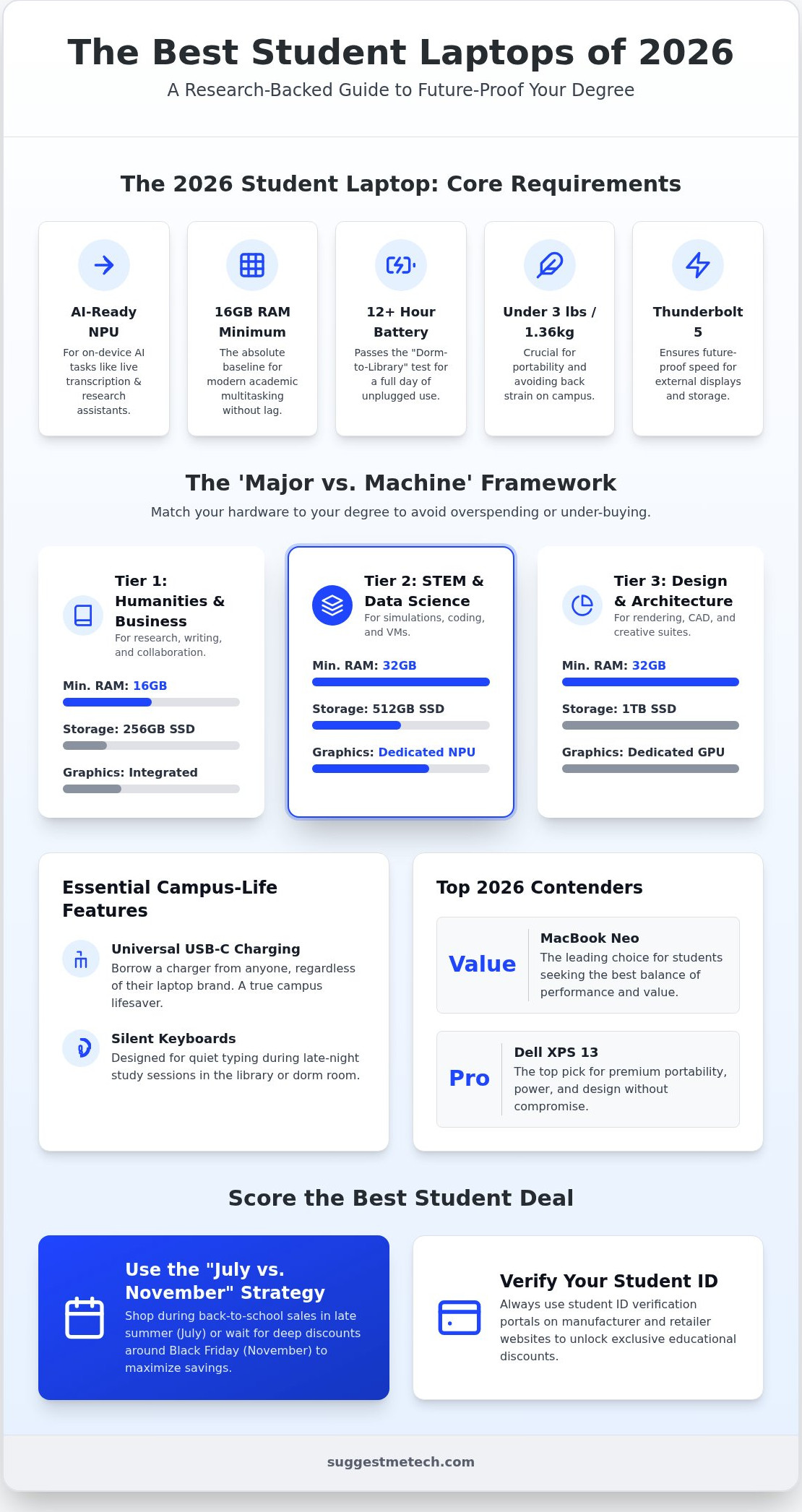
Higher education hardware requirements have shifted significantly. In 2026, the best laptops for students are no longer just about having a fast processor and a thin frame. The new standard demands a machine that is AI-ready, features Thunderbolt 5 connectivity, and provides genuine all-day battery life. If you buy a device that lacks these core components, you risk it becoming obsolete before you finish your sophomore year.
Future-proofing your purchase ensures your investment lasts through your entire four-year degree cycle without requiring a costly mid-degree upgrade. We’ve set 16GB of RAM as the absolute baseline for 2026 academic multitasking. Between running AI-driven study aids and dozens of browser tabs for research, 8GB simply won’t cut it anymore. A machine with 16GB ensures you don’t experience system lag or crashes when you’re working on a high-stakes project or a final exam.
The Rise of the AI PC in Education
An AI PC is a computer equipped with a specialized processor called a Neural Processing Unit (NPU) that handles artificial intelligence tasks directly on your device rather than over the internet. This hardware shift is vital because 2026 academic software uses local processing for live lecture transcription and real-time research assistants. By handling these tasks on the NPU, your laptop stays cool and preserves battery life for other essential apps. If you are researching what to know about modern laptops, you’ll find that the focus has moved from pure CPU clock speeds to how efficiently a machine handles machine learning models. Local processing also means your AI tools work during a commute or in a lecture hall with weak Wi-Fi.
Battery Life vs. Portability: The Campus Balance
Your device must pass the “Dorm-to-Library” test, which requires at least 12 hours of real-world battery life. Many older models fail here because they don’t account for the power draw of modern AI tools running in the background. We prioritize machines that balance this endurance with extreme portability to make your daily commute easier. Keeping your laptop under 3 lbs (1.36kg) is essential for long days spent walking across campus; a heavy machine leads to back strain and often ends up staying in the dorm room rather than going to class. We also look for these specific 2026 connectivity standards:
- Universal USB-C Charging: You should be able to borrow a charger from a friend regardless of their laptop brand.
- Thunderbolt 5: This ensures your ports are fast enough for the next generation of external storage and high-resolution monitors.
Finding Your Perfect Match: The ‘Major vs. Machine’ Framework
Choosing a computer based solely on your budget is a common mistake that leads to frustration by sophomore year. Your field of study is the most important factor in determining which hardware you actually need. We use the “Performance Floor” concept to help you identify the minimum specs required to run your major’s specific software without system crashes. By matching your machine to your degree, you avoid overpaying for power you won’t use or underbuying a device that can’t handle your workload. The best laptops for students are those that align perfectly with their daily academic tasks.
| Major Category | Min. RAM | Storage | Graphics (GPU) |
|---|---|---|---|
| Humanities & Business | 16GB | 256GB SSD | Integrated |
| STEM & Data Science | 32GB | 512GB SSD | Dedicated NPU |
| Design & Architecture | 32GB | 1TB SSD | Dedicated GPU |
Tier 1: Humanities, Business, and Social Sciences
If your day consists of research, writing, and video seminars, your priorities are keyboard tactile feel and webcam clarity. You don’t need a heavy workstation; you need a reliable machine with a great battery. Chromebook Plus models have become the budget-heroes of 2026 for these majors. They offer 16GB of RAM and enough local processing to handle dozens of research tabs and remote collaboration tools with ease. You can find more tailored advice in our tech reviews and guides to see which thin-and-light models lead the pack.
Tier 2: STEM, Engineering, and Data Science
Technical degrees require multi-core processing power and high-speed RAM to run simulations, virtual machines, and complex IDEs. We recommend a baseline of 32GB of RAM to ensure your coding environment doesn’t lag when you have local databases running. While many computer science students prefer the customizability of Linux, Windows remains the standard for engineering majors due to its compatibility with specialized software like AutoCAD. A dedicated NPU is non-negotiable here for running the local AI data models that are now standard in 2026 curricula.
Tier 3: Design, Film, and Architecture
Creative majors face the highest hardware demands because of rendering and color-grading requirements. You need a color-accurate OLED display with at least 500 nits of brightness so you can work accurately in varied campus lighting, from dim studios to bright outdoor quads. High-tier machines with dedicated GPUs, such as the RTX 50-series or the Apple M5 Pro, are essential for 3D modeling and 4K video editing. A 1TB SSD is the minimum for these fields to store large project files locally without constantly relying on external drives.
The Top Contenders: 2026 Student Laptop Reviews
Selecting the best laptops for students involves balancing raw power with daily convenience. We’ve assessed the current market to find devices that survive both a crowded lecture hall and a late-night study session. Whether you need a machine for writing essays or rendering 3D models, these models represent the peak of 2026 hardware efficiency.
The Apple MacBook Neo is the standout value king for this year. It offers a streamlined experience for those who don’t need the pro-level features of the Air or Pro lines but still want the reliability of macOS. For Windows enthusiasts, the Dell XPS 13 (DX13260) remains the gold standard for portability. Its premium build and ultra-thin chassis make it a favorite for students who are constantly on the move between campus buildings.
If your major involves math, chemistry, or physics, the Lenovo Yoga 7i 2-in-1 (2026) is a game-changer. The integrated stylus allows for precise digital note-taking and sketching complex diagrams directly on the touch screen. For those on a strict sub-$500 budget, the Asus Chromebook Plus CX34 delivers surprising performance. It handles essential cloud-based academic tools with ease, providing a reliable alternative to more expensive workstations.
Apple’s 2026 Lineup: MacBook Neo vs. MacBook Air M5
The Neo is built for value. The Air M5 is built for power. While the entry-level Neo targets the budget-conscious student, the MacBook Air M5 serves those needing pro-sumer performance for creative tasks. A major advantage for Apple is its unified memory architecture. This system allows the M5 chip to handle 16GB of RAM more efficiently than many Windows rivals, making it ideal for heavy multitasking. You can explore a broader range of options in our guide to The Best Laptops of 2026: Our Top Picks for Every Need and Budget.
Windows AI PCs: Dell vs. Lenovo vs. Acer
The Dell XPS 13 features a bezel-less display that maximizes your screen real estate. This is a massive boost for productivity when you’re comparing two documents side-by-side or researching for a thesis. Lenovo’s Yoga 7i excels in thermal management; its cooling system ensures the machine stays quiet even in a silent library during finals week. If you’re looking for a capable Windows machine for a high schooler or an early college student, the Acer Aspire Go 16 is a solid choice. It provides the essential local AI processing we’ve highlighted as a 2026 standard without a high price tag.
Essential Student Specs: What Actually Matters in a Dorm Room?
Technical specs like RAM and NPUs are vital, but the physical reality of student life happens in cramped dorm rooms and crowded libraries. You need a machine that survives more than just software updates. The best laptops for students in 2026 must withstand backpack drops and coffee spills while providing the connectivity required for modern campus life. We look for MIL-STD-810H ratings, which is a military-grade durability standard that ensures your laptop can handle vibration, shock, and extreme temperatures without a hardware failure.
Connectivity is another non-negotiable factor. You need at least two USB-C or Thunderbolt ports. If your laptop only has one, and you’re using it to charge, you’ve lost the ability to plug in a second monitor or an external drive without a bulky adapter. We also prioritize 1080p webcams and high-fidelity microphones. Hybrid learning is the standard in 2026, and a grainy 720p image makes you look unprofessional during remote seminars or group project calls. Finally, your keyboard needs to be comfortable for 3,000-word essays, featuring silent-click switches so you don’t keep your roommate awake during an all-nighter.
The Display: Beyond Resolution
Resolution is just one part of the story. For long study sessions, an IPS panel is often better for reducing eye strain compared to some OLED screens that use pulse-width modulation (PWM) to control brightness. However, OLED provides the color accuracy needed for design work. Regardless of the panel type, aim for 400 nits of brightness or higher. This allows you to read your screen clearly while working outdoors on a sunny campus quad. We also recommend a 16:10 aspect ratio. This taller screen format lets you see more lines of a research paper or a Canvas module at once, reducing the amount of scrolling you do during deep research.
Storage and Cloud Integration
While cloud services like Google Drive and OneDrive are essential, local storage still matters. A 256GB drive is risky in 2026 because the operating system and essential apps already take up a significant chunk of that space. If you plan on creating content or learning how to start a blog in 2026: a step-by-step guide for beginners, you’ll find that high-resolution images and videos eat through 256GB almost instantly. An internal 512GB SSD is the sweet spot for most majors. If you’re on a budget, it’s often cheaper to buy a base-model laptop and supplement it with a fast external SSD for large project archives. If you’re still unsure which physical features fit your lifestyle, check out our latest technology reviews and guides for a deeper look at the best laptops for students.
Making the Final Call: How to Score the Best Student Deal
Finding the best laptops for students involves more than just picking a brand. You need to know when to buy and how to leverage your student status to save hundreds. Many people wait for Black Friday in November, but July and August are often the superior months for college shoppers. While November features deep price cuts, the “Back to School” season typically includes valuable bundles, such as gift cards or high-end headphones, that aren’t available later in the year. These extras often provide better total value than a standard percentage-based discount.
Refurbished units are another effective way to stretch your budget. Stick to manufacturer-certified refurbished machines, which come with the same warranty as new devices but at a lower cost. These aren’t just “used” computers; they’re inspected and tested to meet original factory standards. If you don’t have a car on campus, consider paying the extra $50 for on-site repair coverage. Having a technician come to your dorm is much easier than figuring out how to mail a heavy box to a service center during midterms. It’s a small price to pay for the peace of mind that your studies won’t be derailed by a hardware failure.
The Student Discount Checklist
Before you swipe your card, verify your .edu email address through platforms like UNiDAYS and StudentBeans. These services provide instant discount codes for major retailers like Apple, Dell, and Best Buy. You should also check your university’s internal IT portal. Many schools provide Office 365 or Adobe Creative Cloud for free, so you don’t need to pay for those subscriptions yourself. Always check for “hidden” departmental requirements before finalizing your purchase. For example, an architecture program might mandate a specific GPU that isn’t on the general campus list. Taking ten minutes to verify these details can save you from a very expensive mistake.
SuggestMeTech’s Final Verdict
Our research leads to a few clear winners for the 2026 academic year. The MacBook Neo is the best all-around choice for humanities and business majors who need reliability. STEM students should prioritize the Lenovo Yoga 7i for its note-taking versatility, while the Dell XPS 13 remains the premium choice for build quality and Windows performance. If you’re on a strict budget, the Asus Chromebook Plus CX34 is our top recommendation for essential tasks. You can find more detailed comparisons in our guide to The Best Laptops of 2026: Our Top Picks for Every Need and Budget. We want to hear from you, so join our community and share which setup you chose for your 2026 semester.
Ready Your Tech for a Successful 2026 Semester
Choosing the right computer is no longer about finding the cheapest deal; it’s about aligning your hardware with your specific academic path. By using our “Major vs. Machine” framework, you can avoid the common mistake of underbuying for a technical degree or overspending on features your major doesn’t require. We’ve highlighted how AI-ready NPUs and durable MIL-STD-810H builds are now the standard for campus life. Our team at SuggestMeTech has invested over 500 hours of 2026 hardware testing to ensure these recommendations stand up to real-world dorm and lecture hall use. We rely on independent, affiliate-supported research and a major-specific recommendation engine to identify the best laptops for students today.
You now have the tools to navigate technical jargon and score the best possible price through student verification and strategic timing. Don’t let technical jargon stop you from getting the machine you need for the next four years. If you’re ready to see the specific models that topped our testing charts, you can find your perfect student laptop in our full 2026 review gallery. We’re excited to see which setup helps you reach your academic goals this year.
Frequently Asked Questions
Is 8GB of RAM enough for a college student in 2026?
No, 8GB of RAM is no longer sufficient for most college students in 2026. While it might handle basic word processing, it’ll struggle with the multitasking demands of modern research and AI-integrated study tools. We recommend 16GB as the absolute minimum to ensure your system remains responsive when running multiple browser tabs and background applications. Choosing 16GB helps future-proof your device for your entire four-year degree cycle.
Do I really need a MacBook, or will a Windows laptop work for my degree?
Your choice between a MacBook and a Windows laptop should be dictated by your specific major’s software requirements. Creative and humanities students often prefer macOS for its reliability and color-accurate displays. However, engineering and some STEM fields still rely on Windows-only software like AutoCAD or specialized data modeling tools. Always check your department’s specific hardware list before deciding, as many degrees are perfectly compatible with either operating system.
What is the best laptop for a computer science major?
The best laptop for a computer science major in 2026 is one with at least 32GB of RAM and a dedicated NPU for local AI development. Coding environments, virtual machines, and local databases are memory-intensive and require high-speed processing. We suggest a high-performance Windows machine like the Dell XPS 13 or a MacBook Pro with the M5 chip to ensure you can compile code and run simulations without hardware bottlenecks.
Can I use a Chromebook for my college courses?
You can use a Chromebook for your college courses if your major is primarily focused on writing, research, and cloud-based collaboration. Humanities and social science students find the Asus Chromebook Plus CX34 to be an excellent, budget-friendly option. However, if your degree requires specialized local software like Adobe Creative Cloud or engineering tools, a Chromebook won’t be compatible. It’s a great choice for web-centric workflows and standard essay writing.
How much should a student spend on a laptop in 2026?
Most students should expect to spend between $500 and $1,500 on a reliable laptop in 2026. Entry-level Chromebooks start near the lower end, while high-performance workstations for engineering or film majors often reach the higher limit. Investing in the best laptops for students usually means spending enough to get 16GB of RAM and a modern NPU, which prevents the need for a costly upgrade before your graduation date.
What is an NPU and why does my student laptop need one?
An NPU, or Neural Processing Unit, is a specialized processor designed to handle artificial intelligence tasks directly on your device. Your student laptop needs one in 2026 to run local AI tools like live lecture transcription and real-time research assistants without draining your battery. By offloading these tasks from the main CPU, the NPU keeps your machine running cool and fast during long study sessions in the campus library.
Is it better to buy a laptop from the university bookstore or online?
It’s generally better to buy your laptop online from major retailers or directly from manufacturers like Apple or Dell. Online stores offer a wider selection and more competitive pricing than most university bookstores. However, check if your bookstore offers specific bundles that include on-site campus support or university-specific software pre-installed. These perks can sometimes outweigh the slight price increase found at physical campus locations during move-in week.
How long should a student laptop last?
A well-chosen student laptop should last at least four years, covering your entire undergraduate degree. To reach this lifespan, you must prioritize durable build quality and internal specs that won’t become obsolete quickly. Choosing a machine with 16GB of RAM, an NPU, and Thunderbolt 5 connectivity ensures your device remains compatible with the best laptops for students standards throughout your academic career. Proper care and a protective sleeve also help.

