
Did you know that 70% of professionals identify email as their primary source of stress in the workplace? With 4.7 billion global users sending 376 billion messages every single day in 2026, your digital presence is often the only impression you make. It’s easy to feel buried when the average office worker receives over 117 emails daily. Most of us spend 2.5 hours every day reading and writing messages, yet many of those efforts backfire because of common email etiquette mistakes that damage our credibility.
You likely agree that nothing is more frustrating than having an important message ignored or seeing a simple update turn into a heated misunderstanding. It’s time to stop feeling anxious before you hit “Send.” This guide will help you master digital communication by showing you how to respect your recipient’s digital bandwidth and cognitive load. You’ll learn how to improve your professional authority and get faster response rates. We’re breaking down the 21 subtle blunders you must avoid to keep your inbox organized, accessible, and high-performing.
Key Takeaways
- Craft subject lines that act as headlines and format your messages to ensure your main point isn’t buried in a “wall of text.”
- Navigate the “Reply-All” trap and learn why the “Sarcasm Gap” makes humor a risky choice for professional digital threads.
- Identify and fix common email etiquette mistakes involving visibility, such as the strategic use of BCC and automated fixes for forgotten attachments.
- Boost your authority by debunking the “Instant Response” myth and setting healthy boundaries for after-hours communication.
- Implement a 2026 pre-send checklist to verify your recipients and ensure your message respects the reader’s digital bandwidth.
The Foundation: Structural Mistakes That Kill Clarity
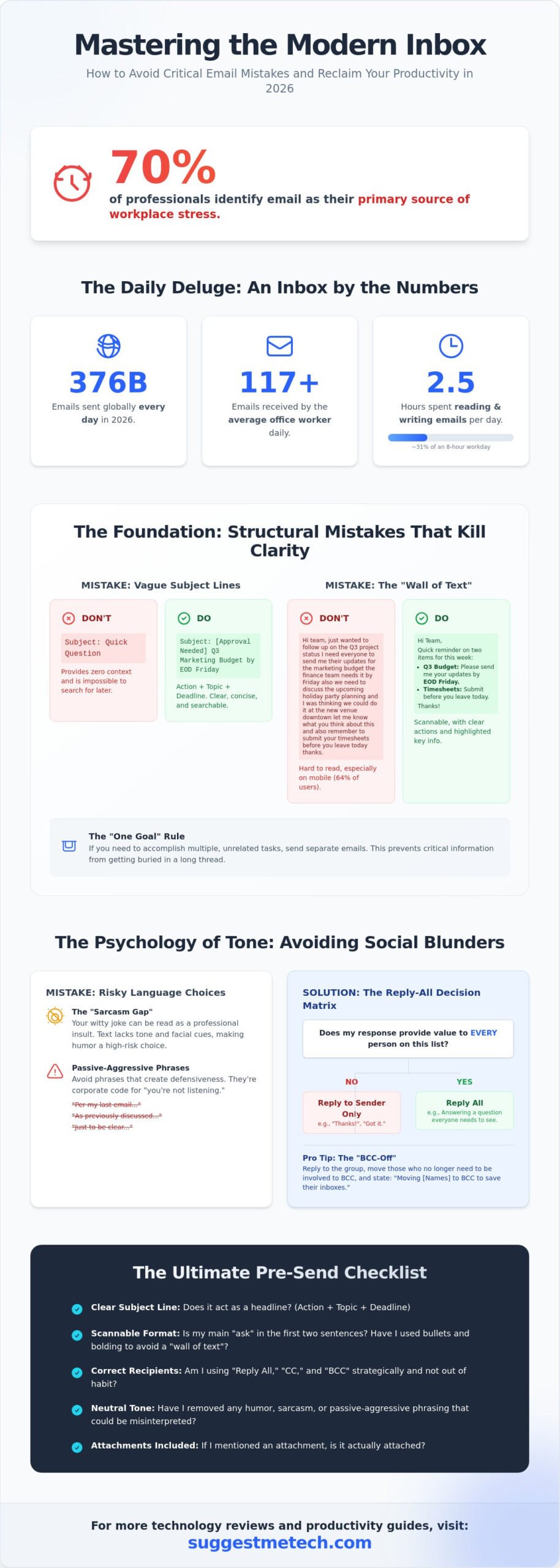
With 376 billion emails flying around daily as of May 2026, your message has only seconds to prove its worth. Many professionals fail before the recipient even opens the message because of poor structural choices. One of the most fundamental rules of netiquette is respecting the reader’s time through clarity. Start with a professional salutation. Skipping a greeting or using “Hey!” for a senior executive can alienate them immediately. Similarly, trying to accomplish five different tasks in one message is a recipe for failure. Stick to the “One Goal” rule. If you need three different approvals, send three separate, concise emails. This ensures nothing gets lost in a long thread.
Mastering the Subject Line Formula
Your subject line is a headline. Vague titles like “Hi” or “Quick Question” are among the most frequent common email etiquette mistakes because they provide zero context. In 2026, high-conversion subject lines follow a specific formula: [Action Required] + [Topic] + [Deadline]. For example, use “[Approval Needed] Q3 Marketing Budget by Friday” instead of just “Budget.” This makes your email searchable for later reference. If a conversation shifts from the budget to a holiday party, update the subject line. This prevents your team from digging through 121 daily messages to find one specific detail. A high-conversion subject line in 2026 must be a front-loaded, descriptive summary that allows the recipient to prioritize their workload without opening the message.
Formatting for the Scannable Inbox
Nobody wants to read a “Wall of Text.” If your email looks like a dense essay, it’ll likely be ignored or flagged for “later,” which often means never. Use bullet points and bold text to highlight key takeaways. Research from ZeroBounce in early 2026 shows that 64% of people check email primarily on mobile devices. This makes scannability vital. Put your “Ask” in the first two sentences. Don’t make the recipient hunt for the point of the message at the bottom of a 300-word paragraph. Use short paragraphs of two or three sentences. This layout respects the digital bandwidth of your colleagues and ensures your message is readable on a five-inch screen.
- Use Bold Text: Highlight deadlines or specific names for accountability.
- Bullet Points: Break down complex lists or multiple steps.
- White Space: Leave room between paragraphs to reduce cognitive load.
These structural choices don’t just make you look professional; they ensure your message gets a faster response. When you make it easy for someone to read your email, they’re much more likely to help you reach your goal.
The Psychology of Tone: Avoiding Emotional and Social Blunders
Tone is the invisible layer of your digital identity. It’s also where the most damaging common email etiquette mistakes occur because text lacks the facial cues and vocal inflections of a real conversation. When you write “Let’s talk,” you might mean you’re excited to collaborate, but your recipient might read it as an ominous summons to the principal’s office. This “Sarcasm Gap” is a primary reason why humor rarely translates well in an inbox. What feels like a witty jab to you can feel like a professional insult to a colleague who is already part of the 70% of professionals identifying email as their top workplace stressor.
Passive-aggressive phrasing is another silent killer of team morale. Phrases like “Per my last email” or “As previously discussed” are often interpreted as corporate code for “You aren’t listening.” These linguistic triggers create defensiveness and slow down projects. Instead of using these sharp rebukes, try a more human approach. If you need clarity, ask for it directly. If you’re looking for better ways to manage your professional workflow, you can explore our technology reviews and guides to find tools that streamline communication.
The Reply-All Decision Matrix
The “Reply-All” button is a productivity killer when used carelessly. Before you click it, ask if your response provides value to every person on the list. If you’re simply saying “Thanks!” or “Got it,” send that only to the sender. To save your team from notification fatigue, use the “BCC-off” strategy. Reply to the group, move the people who no longer need to be involved to the BCC field, and state in the first line: “Moving [Names] to BCC to save their inboxes.” This small act of digital mercy shows high professional authority and respect for your colleagues’ time.
Navigating Emotional Triggers
Professionals spend about 28% of their workweek reading and writing emails. When a message triggers frustration, the “Draft and Wait” strategy is your best defense. Write your honest, unfiltered response in a separate document; never in the actual email client; and wait at least two hours before revisiting it. When you do reply, replace “You” statements with “I” statements. Saying “I am concerned about the project timeline” is far more effective than “You are late with the deliverables.” This shift reduces conflict and keeps the focus on the solution rather than the blame. Proper punctuation also plays a role here. In a hybrid world, a single period at the end of a one-word reply like “Fine.” can seem cold or angry, while over-using exclamation points can make you appear less authoritative.
Technical and Security Fails: Attachments, CCs, and AI
Technical slip-ups are often the most visible common email etiquette mistakes because they stop the professional workflow entirely. We’ve all sent the “forgotten attachment” follow-up, which contributes to the staggering 376 billion emails sent daily as of May 2026. To automate the fix, most modern clients now offer a prompt if you use words like “attached” or “enclosed” without an actual file. Beyond simple files, security is now a non-negotiable part of netiquette. Sending Personally Identifiable Information (PII) or passwords through unencrypted threads is a major breach of professional trust. With GDPR fines reaching up to €20 million as of January 2026, protecting recipient data isn’t just polite; it’s a legal necessity. Use BCC when emailing large groups of people who don’t know each other to prevent exposing their contact information to strangers. This practice also helps you stay below the 0.3% spam complaint threshold required by major providers to keep your domain from being blacklisted.
The New Ethics of AI-Assisted Email
In 2026, AI-powered tools are everywhere. However, sending unedited AI-generated emails is a massive blunder that makes you look insincere. These messages often feel robotic and lack your specific personal voice. While AI is excellent for outlining or summarizing, you must review every word before sending. “AI Hallucinations” are a real risk where the software might invent facts or dates in professional reports. For standard business emails, you don’t necessarily need to label AI use, but the content must be accurate. Use AI for the heavy lifting of structure, then add your own “human” touch to ensure the message resonates with the recipient’s actual needs.
Attachment and Link Etiquette
The way you share files says a lot about your technical proficiency. Sending a 25MB attachment is a mistake when 64% of people check mail primarily on mobile devices. Use cloud links like Google Drive or OneDrive instead. The most frequent “Oops” email in 2026 is sending a link without setting the correct permissions. Always check that the recipient has “View” or “Edit” access before hitting send. Avoiding these common email etiquette mistakes regarding file sharing will instantly set you apart as a savvy communicator. Your file naming also matters. A file named “Draft_v1.pdf” is vague and unprofessional. Use a clear structure like “2026-05-20_ProjectAlpha_Proposal.pdf” so the recipient can identify the file at a glance in their downloads folder. This simple habit improves your professional authority and saves everyone time.
Timing and Frequency: Respecting Digital Boundaries
The urge to reply to every notification immediately is a trap. While it feels productive, the “Instant Response” myth often results in shallow work and avoidable errors. In 2026, professional authority is built on thoughtful, accurate communication, not just speed. Replying too fast can signal that you aren’t giving the topic the attention it deserves. It also sets an unsustainable expectation that you’re available 24/7. Speed isn’t quality. High-stakes decisions require reflection, and a rushed email can lead to the very misunderstandings that damage your reputation.
One of the most disruptive common email etiquette mistakes is using your inbox for real-time problem-solving. If a situation requires a back-and-forth conversation or an immediate fix, move it to a chat platform like Slack or Microsoft Teams. Email should be reserved for formal requests, long-form updates, and items that need a paper trail. Using the wrong channel creates digital clutter and forces colleagues to hunt through threads for urgent info. Context matters. Don’t force a long-form tool to do a short-form job.
Respecting the “After-Hours” boundary is critical for team mental health. Sending an email at 11 PM might feel like you’re staying ahead, but it often pressures recipients to check their phones during personal time. Use the “Schedule Send” feature to ensure your message arrives during standard business hours. This small adjustment shows you value the recipient’s personal life as much as their professional input. It’s about respecting the digital bandwidth of your entire organization.
The 24-Hour Rule and Follow-up Cycles
A 24-hour response window is the gold standard for internal communication. For external stakeholders, 48 hours is acceptable. If you can’t provide a full answer yet, send a brief note: “I’ve received this and will have a detailed update for you by Wednesday.” This prevents the “ignored” feeling that leads to workplace anxiety. Wait at least three business days before sending a “polite nudge.” If the third follow-up goes unanswered, it’s time to pick up the phone. A quick call often resolves what five emails couldn’t.
Out-of-Office (OOO) and Availability
Vague OOO messages are a major hurdle for collaborative teams. Your auto-reply should clearly state your return date and provide a specific point of contact for emergencies. You can also use your signature to signal “Deep Work” blocks. For example, “I check email at 10 AM and 4 PM to focus on project delivery.” This manages expectations without appearing rude.
Being productive while remote requires the right setup. If you need a machine that can handle heavy multitasking during your travel or remote blocks, see the best laptops of 2026. Having reliable tech ensures you can maintain these boundaries without missing a beat. For more ways to optimize your workflow, check out our full range of technology reviews and guides.
The Ultimate Pre-Send Checklist for 2026
You’ve navigated the complexities of digital tone and technical security. Now, you need a repeatable system to catch errors before they leave your outbox. A final review is your best defense against common email etiquette mistakes that slip through when you’re rushing between meetings. This isn’t just about proofreading for typos; it’s about ensuring your message aligns with professional standards, from scannable formatting to respectful timing. By following a structured workflow, you can eliminate blunders before they reach your recipient’s crowded inbox.
The most effective workflow starts with the “Recipient Last” rule. Never add the email address to the “To” field until the message is completely finished. This simple habit prevents the dreaded accidental send. Once the body is ready, perform these three critical checks:
- The Attachment & Link Test: Click every link in your draft to verify that permissions are set to “View” or “Edit” for the recipient. Check that your file names are descriptive and professional.
- The Tone Read-Aloud: Read your email out loud. Your ears will catch hidden aggression, passive-aggressive phrasing, or robotic AI “hallucinations” that your eyes might miss on a screen.
- The Recipient-First Audit: Verify the “To” and “CC” fields. Ensure you aren’t accidentally including a competitor or a colleague who shouldn’t be on the thread.
5 Seconds to Professionalism
Speed up your final review with three specific checkpoints. First, verify the subject line follows the [Action Required] + [Topic] + [Deadline] formula we established earlier. Second, double-check the spelling of the recipient’s name. Misspelling a name is one of the most frequent insults in digital communication and can derail a relationship before they read the first sentence. Third, ensure your Call to Action is singular. If you’re asking for more than one thing, your response rate will likely drop as the recipient’s cognitive load increases.
Leveraging Professional Tools
Technology can act as a safety net for your reputation. These tools are designed to catch common email etiquette mistakes before they become permanent records. Both Gmail and Outlook allow you to set an “Undo Send” window of up to 30 seconds. This brief delay is a lifesaver when you realize you forgot an attachment the moment you clicked send. You should also take a moment to audit your digital identity. Use these email etiquette rules to ensure your signature is clean, accessible, and professional.
If you’re looking to upgrade your professional image, your email address itself matters. Sending business proposals from a generic personal account is a mistake that damages your authority. Check out our hosting guides if you need to set up a dedicated, professional business email address. Combining these tools with a disciplined pre-send checklist ensures you communicate with the clarity required in 2026.
Master the Art of the Inbox in 2026
Mastering digital communication is no longer just about politeness; it’s about efficiency and respect for others’ time. By applying the 2026 standards for subject lines and scannable formatting, you reclaim hours for deep work. Professionals who actively avoid common email etiquette mistakes see faster response rates and stronger authority in their field. You’ve learned how to bridge the sarcasm gap and why scheduling your 11 PM thoughts for a 9 AM delivery protects team morale. These small shifts in habit distinguish the experts from the amateurs in a crowded digital landscape.
Your digital identity is an ongoing project that requires practical, fluff-free advice to stay ahead. If you’re ready to expand your influence beyond the inbox, take the next step in your professional journey. Build your professional presence with our guide on how to start a blog in 2026. Our expert-vetted communication strategies are updated for 2026 digital standards to help you succeed. You now have the tools to turn every email into a professional win. Go hit “Send” with total confidence.
Frequently Asked Questions
What is the most common email etiquette mistake?
The most frequent error is sending a message with a vague subject line or a dense “Wall of Text.” According to workplace studies in early 2026, 70% of professionals cite email overload as their main stressor. When you fail to provide a clear [Action Required] headline, your message is often buried under the 121 emails the average office worker receives daily.
Is it rude to use emojis in professional emails in 2026?
Using emojis isn’t inherently rude in 2026, but it requires cultural and professional awareness. While 64% of people check email on mobile devices where emojis are standard, they can undermine your authority in formal reports or first-time introductions. Stick to one or two symbols to clarify tone with colleagues you know well, rather than using them to replace professional language.
How many times should I follow up if I don’t get a response?
You should follow up no more than two times before picking up the phone or using a chat platform. Wait at least three business days between each “nudge” to avoid appearing demanding. If your second follow-up goes unanswered after a week, it’s a clear signal that email isn’t the right channel for that specific recipient or topic.
Should I always use a formal salutation like ‘Dear’?
You don’t always need to use “Dear” unless the context is highly formal, such as a legal or academic inquiry. “Hi [Name]” or “Hello [Name]” is now the accepted standard for 85% of business communications. However, skipping the salutation entirely is one of the common email etiquette mistakes that can make your message feel like a cold, impersonal demand.
What is the ‘Reply All’ rule for large groups?
The rule is to use “Reply All” only when everyone needs the information to complete their tasks. If you’re just saying “Thanks” or “Got it,” reply only to the sender. To protect your colleagues from notification fatigue, move unnecessary recipients to the BCC field and state that you’re saving their digital bandwidth in the first line.
Is it okay to use AI to write my professional emails?
It’s acceptable to use AI for structure and drafting, but sending unedited AI text is a major blunder. AI-generated content often contains “hallucinations” or robotic phrasing that lacks your unique voice. Always review the final draft to ensure it meets the 2026 accessibility standards and reflects your actual professional authority.
How do I apologize for a major email blunder?
Address the error immediately with a short, sincere message. Say, “I apologize for the incorrect data in my previous email; please use this updated version instead.” Avoid long explanations that waste more of the recipient’s time. Taking quick ownership of common email etiquette mistakes actually helps rebuild the professional trust that the initial error may have damaged.
What should I do if I sent an email to the wrong person?
Use the “Undo Send” or “Recall” feature within your 30-second window if possible. If the email has already been delivered, send a brief note asking the recipient to delete the message. If the email contained sensitive data, you must report the incident to your security team to comply with GDPR regulations, which as of January 2026 can result in fines of up to €20 million.

