

The most feature-heavy software on the market is often the quickest way to kill a small team’s momentum. While the project management industry is set to reach $9.81 billion by the end of 2026, many project management tools for small teams actually create more work than they solve. You likely feel the weight of tool fatigue from platforms built for thousands of employees rather than a nimble, tight-knit group. It’s exhausting to watch high per-user costs eat into your margins while your team still wastes hours on manual status updates.
We agree that you shouldn’t need a full-time administrator just to manage your task list. This guide helps you find a platform that balances powerful automation with the simplicity required to stay productive and organized. We’ll compare the 2026 landscape, including the mandatory ClickUp 4.0 interface and Asana’s latest AI Teammates, to ensure you get clear visibility and reduced meeting times. From Trello’s updated security to Monday.com’s Sidekick assistant, here is how to pick the right tech for your specific workflow without the enterprise-level headache.
Key Takeaways
- Avoid the “Enterprise Trap” by identifying software built specifically for nimble groups rather than complex, 500-person corporations.
- Discover which project management tools for small teams pass the 10-minute learning curve test for effortless new hire onboarding.
- Compare 2026’s top performers to see why Monday.com is the best all-rounder and why Trello is the ideal choice for freelancers hiring their first assistant.
- Follow a proven two-phase migration strategy to move your workflow without transferring old organizational clutter into your new platform.
The ‘Enterprise Trap’: Why Bigger Isn’t Better for Small Teams
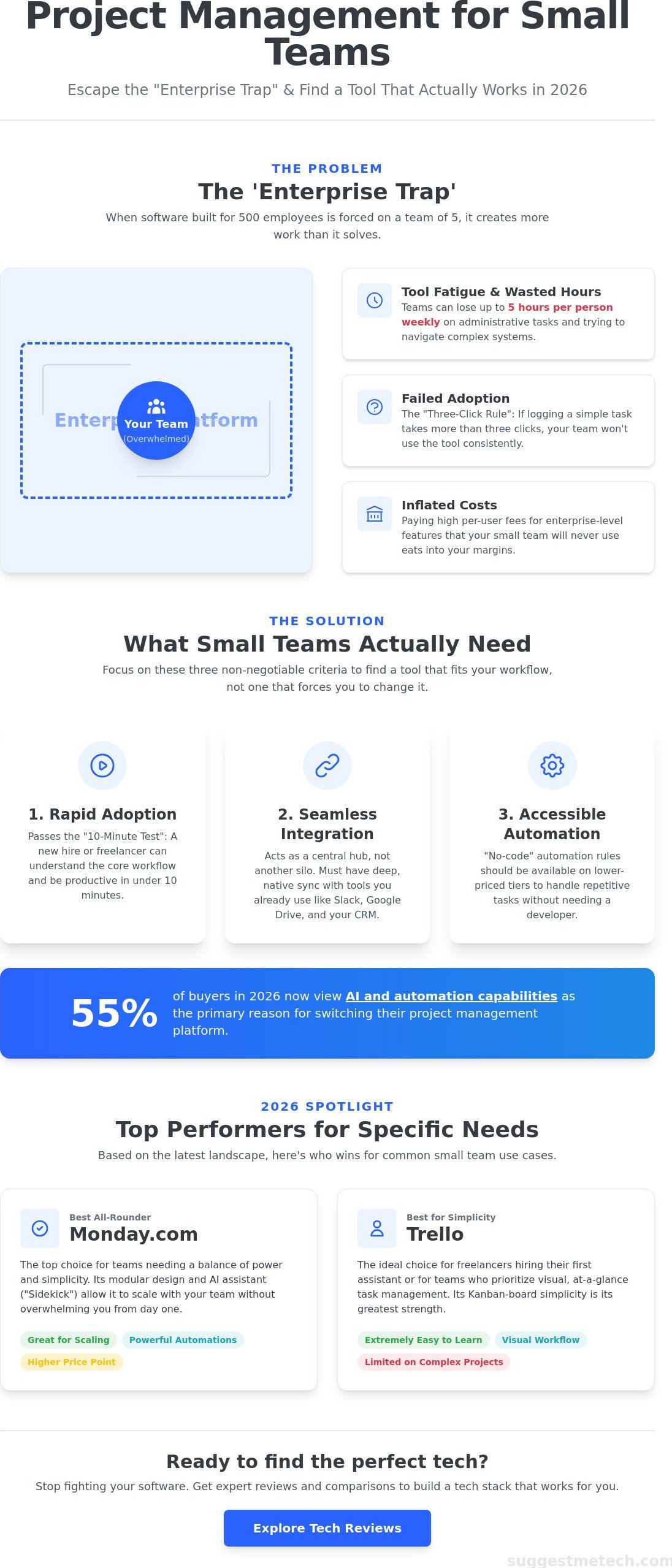
The Enterprise Trap happens when a team of five installs software built for five hundred. These massive platforms come with complex hierarchy levels and permission settings that feel like a burden rather than a benefit. Instead of speeding up your production, your team spends more time managing the tool than doing the actual work. You need a solid digital foundation. Just as you need a domain to launch a website, you need the right project management tools for small teams to build a functional workflow. Without this infrastructure, teams suffer from tool fatigue. This leads to “shadow IT” where employees abandon the platform and revert to messy email chains or private Slack messages. The goal is to find the sweet spot; software that provides 80% of the power found in enterprise suites but requires only 20% of the configuration time. If you spend your whole Monday morning just setting up your dashboard, you’ve already lost the week.
The True Cost of Complexity
Complexity isn’t free. Research from early 2026 suggests that teams using overly complex systems can lose up to five hours per week per person on administrative maintenance. This includes updating statuses across multiple dashboards or troubleshooting permission errors. We use the “three click rule” as a benchmark for our reviews here at SuggestMeTech. If a team member has to click more than three times to log a simple task, adoption will fail. High-end software might be feature-rich, but it often isn’t workflow-aligned for a small group. You want a tool that mirrors how you actually talk and work, not one that forces you to learn a new language. When you choose a tool that’s too big, you’re essentially paying a complexity tax that drains your team’s creative energy and slows down your response time to clients.
Scalability vs. Simplicity: Finding the Balance
Many founders fall into the trap of future-proofing. They pick a tool they might need when they have 100 employees, even though they only have three today. It’s better to start with a system that is intuitive right now. Modern 2026 platforms are modular; they allow you to turn on advanced features like AI-driven predictive analytics or complex Gantt charts only when you’re ready. For those who want to see the full technical landscape, this comprehensive comparison of project management tools provides a deep dive into every possible feature. For a small team, modularity is king. You want a tool that grows with you, not one that requires a total data migration every time you hire a new person. Choosing a tool that balances these needs ensures your project management tools for small teams remain an asset rather than a technical debt.
Critical Evaluation Criteria: What Small Teams Actually Need
Picking the right project management tools for small teams requires looking past flashy marketing pages and focusing on adoption friction. If a new designer or writer can’t understand your project board in under 10 minutes, the tool is a failure. Small businesses thrive on speed. You shouldn’t waste billable hours teaching someone how to leave a comment or attach a file. When evaluating your options, look for these specific indicators of a healthy platform:
- Adoption Speed: Can a freelancer understand the workflow in under 10 minutes?
- Integration Depth: Does it sync natively with Slack, Google Drive, and your CRM?
- Automation Access: Are no-code rules available on the lower-priced tiers?
Connectivity is another non-negotiable factor. Your software must act as a central nervous system that talks to the rest of your tech stack. Industry reports from early 2026 indicate that 55% of buyers now view AI and automation capabilities as the primary reason for switching platforms. Look for “no-code” automation rules. These features handle the boring stuff, like moving a task to “Review” when a file is uploaded, without requiring a developer to write a single line of code.
Your team’s physical setup also influences your software choice. While many of us rely on the best laptops of the year as our primary work hubs, mobile-first workflows are essential for teams on the go. Whether you’re checking a status from a phone in a coffee shop or a tablet at a client site, the mobile app shouldn’t be a stripped-down afterthought. If you’re looking for more ways to optimize your workflow, check out our technology reviews and guides for the latest advice.
The ‘Cost Per Seat’ Reality Check
Pricing in 2026 has shifted significantly. While many tools offer a free tier for up to two users, small teams often hit a paywall as soon as they hire their third employee. Pay close attention to the “unlimited guests” feature. For small agencies that work with freelancers, being able to invite a contractor to a specific board without paying for an extra seat is a massive cost saver. Watch out for hidden costs in “Pro” tiers. Some platforms lock essential features like Gantt charts or time tracking behind expensive upgrades that small margins can’t always support.
User Interface (UI) vs. User Experience (UX)
Don’t be fooled by a pretty interface. A tool can have a beautiful UI but a terrible UX. In the context of project management tools for small teams, UX is the speed from “thought” to “task entry”. If it takes too many clicks to get an idea out of your head and onto the board, you’ll lose focus. High-quality 2026 tools also prioritize health features like Dark Mode and customizable dashboards. These aren’t just aesthetic choices; they reduce eye strain during long sessions and allow you to hide unnecessary data that causes mental clutter.
2026 Roundup: Top 5 Project Management Tools for Small Teams
The 2026 market for project management tools for small teams is dominated by platforms that prioritize automation over manual entry. It’s no longer enough to just have a digital to-do list; you need a system that anticipates your next move. Based on our latest tests, these five platforms offer the best balance of power and usability for tight-knit groups.
- Monday.com (Editor’s Pick): This remains the best all-rounder. Its new “Sidekick” AI assistant acts as an account-wide helper that can trigger agents within your automations, making it ideal for visual teams.
- Trello: Still the king of simplicity. The February 2026 update refreshed the card detail screen, making it even easier for creative teams to manage visual assets without clutter.
- Asana: Best for those who need rigid structure. The “AI Teammates” feature introduced in the Winter 2026 release helps optimize workflows by writing campaign briefs automatically.
- Taskade: Our top AI challenger. It uses generative AI to build entire project plans from a single prompt, which is perfect for teams that struggle with the “blank page” problem.
- ClickUp: The budget choice. With the mandatory rollout of ClickUp 4.0 in March 2026, users get a converged workspace for docs, chat, and tasks at a lower per-user cost than most competitors.
Monday.com vs. Asana: The Battle for the Mid-Size Small Team
Monday.com uses a highly flexible table view that feels like a supercharged spreadsheet. Asana leans into its classic list view, which provides a cleaner vertical hierarchy. If you’re managing dependencies in a marketing project, Asana’s structured custom fields are superior. However, Monday.com’s multi-level subitems, which now support up to four levels deep, offer better visibility for complex construction tasks. Just as you’d start a blog with a rigid content calendar, Asana requires you to commit to a specific setup from day one. Monday.com is more forgiving if you need to change your mind mid-project.
Notion and the Rise of the ‘Knowledge Base’ PM
Notion has moved beyond being a simple note-taking app. Small teams are increasingly using it as a unified workspace, proving that the best project management tools for small teams are often the ones that consolidate your entire tech stack. The 2026 AI updates allow Notion to summarize long meeting threads and turn them into actionable tasks automatically. While the “blank canvas” approach can be intimidating for non-technical teams, the ability to centralize your wiki and your project tracker in one place is a massive time saver. It eliminates the need to jump between tabs, which is a primary cause of tool fatigue.
Step-by-Step: Moving Your Small Team to a New PM Platform
Transitioning to new project management tools for small teams shouldn’t happen overnight. A chaotic rollout often leads to high abandonment rates, where employees revert to old habits within the first 30 days. Instead, follow this structured four-phase approach to ensure your team actually adopts the platform you’ve selected.
- Phase 1: The Pilot. Choose one or two power users to build out the initial boards. Let them stress-test the workflow for a full week before inviting the rest of the group.
- Phase 2: The Data Clean-up. Avoid the urge to import every historical task from your old system. Moving a mess into a new tool just creates a high-tech mess. Only migrate active projects.
- Phase 3: The Launch Day. Set a firm date when the old system becomes “read-only.” Clear expectations are vital for a clean break.
- Phase 4: The Audit. Check in after 30 days. Identify which columns or features are being ignored and remove them to keep the interface clean and fast.
Overcoming Team Resistance
Change is hard. Frame the new tool as a way to win back time rather than an extra burden. Implement the “One Source of Truth” rule immediately. This means all project-related communication happens inside the tool; if a request isn’t in the PM platform, it doesn’t exist. You can even use small rewards, like a team lunch, for the person who logs the most tasks correctly in the first week. If you need more advice on optimizing your team’s digital environment, read our latest technology reviews and guides.
Integrating with Your Existing Tech Stack
Your PM tool should be the central hub for your business. Connect it to your email and calendar to ensure deadlines appear across all your devices. If your team works on the move, remind them to keep their primary tools optimized. For instance, knowing how to clear cache on iPhone can prevent mobile app lag during busy workdays. Turn off 90% of your notifications. Small teams need deep work time, not a constant stream of pings for every minor comment. Integration is the bridge between ‘planning’ and ‘doing’.
Final Verdict: Which Tool Wins for Your Specific Use Case?
Choosing the right software is about matching the tool to your team’s unique DNA. After testing dozens of project management tools for small teams throughout early 2026, we’ve identified clear winners for different scenarios. The best platform isn’t necessarily the one with the most icons; it’s the one your team actually enjoys opening every morning.
Monday.com remains the SuggestMeTech Editor’s Pick for 2026. It’s the best all-rounder because it adapts to almost any workflow without requiring deep technical knowledge. Its Sidekick AI and multi-level subitems provide a level of visibility that competitors struggle to match. If you’re a freelancer hiring your first assistant, Trello is your best bet. Its Kanban-first approach is incredibly intuitive for someone moving from a solo operation to a collaborative one. For those managing intricate projects with strict dependencies, Asana is the superior choice. Its rigid structure prevents tasks from falling through the cracks during complex marketing launches or product developments.
Before you hit ‘Subscribe’ on a paid plan, ask yourself these three questions:
- Does the tool integrate natively with our current 2026 communication apps?
- Is the per-user cost sustainable if we hire two more people by December 2026?
- Can my least tech-savvy team member update a task status in under 60 seconds?
Making the Final Decision
Don’t commit to a yearly contract immediately. Use the 14-day free trial as a high-intensity test period. Assign one real, active project to the tool and see how it handles actual data under pressure. A common mistake is trying to master every feature at once. We recommend ignoring 50% of the advanced features during your first month. Focus on the core task management and communication tools first. At SuggestMeTech, we’ve found that the specific tool matters less than the consistency of the team. Even the most advanced AI assistant won’t help if your team doesn’t log their progress daily.
Next Steps for Your Business
The 2026 digital environment moves fast, and staying organized is just the first step toward scaling your operations. Once your internal workflow is settled, you need to ensure your external presence is just as polished. Check out our latest hosting reviews to power your team’s online presence with the best speed and security available. Stay updated by joining our community and reading our regular tech guides. We’re here to help you navigate these choices so you can focus on growing your business and hitting your next milestone.
Ready to Streamline Your 2026 Workflow?
Choosing the right software is a critical investment in your team’s sanity. You’ve learned how to avoid the “Enterprise Trap” and why the three-click rule is essential for maintaining momentum. Whether you choose our Editor’s Pick, Monday.com, or the simplified Trello interface, the goal is to reduce manual status updates and eliminate tool fatigue. These project management tools for small teams are only effective if they’re used consistently across your entire group. Consistency matters more than having every possible feature enabled at once.
Our 2026 reviews are tested by small business experts who understand that you don’t have time for dense technical jargon. We focus on practical, solution-oriented advice to help you make confident decisions. If you’re still weighing your options, you can find the perfect tech for your team at SuggestMeTech. We’ve analyzed the latest May 2026 updates to ensure your choice remains relevant as your business grows. Take that first step toward a more organized, productive future today. Your team’s next big win starts with a clear, shared vision and the right digital infrastructure to support it.
Frequently Asked Questions
What is the best free project management tool for a team of 3?
Trello is the best free option for a team of three because it doesn’t limit the number of users on its basic plan. While Asana limits its free tier to two users, Trello allows your entire small group to collaborate on up to 10 boards. It includes unlimited storage for files under 10MB and the ability to use various Power-Ups. This makes it the most accessible starting point for groups that don’t have a software budget yet.
Is Trello still relevant for small teams in 2026?
Trello remains a top contender in 2026 due to its recent security upgrades and interface refinements. The February 2026 update introduced an improved card detail screen and OAuth 2.0 for better data protection. It’s still the preferred choice for teams that want a visual Kanban board without the complexity of modern AI-heavy platforms. Its simplicity ensures that everyone on the team actually uses the tool daily.
How do I choose between Monday.com and Asana?
Choose Monday.com if you prefer a highly flexible, spreadsheet-style interface with powerful built-in AI agents. It’s better for teams that need to customize every column and automate complex multi-step workflows. Pick Asana if you need a structured, list-based system that excels at managing task dependencies. Asana’s Winter 2026 release of AI Teammates makes it particularly strong for marketing teams that need help drafting briefs and optimizing schedules.
Can Notion replace a dedicated project management tool?
Notion can replace dedicated project management tools for small teams if your group needs to centralize documentation alongside tasks. Its 2026 AI updates allow you to summarize meeting notes and instantly turn them into actionable database items. However, it lacks the specialized reporting and advanced dependency tracking found in tools like Monday.com. It’s the ideal “all-in-one” choice for teams that are tired of switching between separate docs and trackers.
What features should a small team prioritize in a PM tool?
You should prioritize adoption speed and native integration with your existing communication apps. The most effective project management tools for small teams are those that a new employee can master in under 10 minutes. Look for no-code automation features that handle repetitive tasks like status updates or deadline reminders. Connectivity to Slack and Google Workspace is also vital to ensure your team’s data remains synchronized across all platforms.
How much should a small team expect to pay for project management software?
Small teams should budget between $5 and $13 per user per month for a professional-grade plan. As of May 2026, Trello Standard costs $5 per user when billed annually, while Asana Starter is priced at $10.99. Be aware that many providers require a minimum of two or three seats for their paid tiers. Always check if the “Pro” features you need are locked behind a more expensive monthly subscription before you commit.
Is AI actually useful in project management for small businesses?
AI is a practical time-saver that acts as an extra administrative assistant for your team. Statistics from 2026 show that 55% of software buyers prioritize AI capabilities to automate task generation and summarize long conversation threads. Features like ClickUp Brain or Monday’s Sidekick can draft entire project plans from a single prompt. This technology allows small teams to focus on creative work rather than spending hours on manual data entry.
How do I migrate my tasks from Excel to a project management tool?
Use the built-in CSV import tool found in the settings of your new platform to map your Excel columns to task fields. Most 2026 tools allow you to instantly sync task names, due dates, and assignees from a spreadsheet. It’s important to perform a data clean-up before you start the import process. Delete any completed or duplicate tasks in your Excel file so you don’t clutter your new workspace with unnecessary historical data.

