

Imagine your phone slips into a lake today, taking 5,000 unbacked-up memories of your child’s first steps and your 2024 graduation photos with it. It’s a devastating scenario, yet many people still gamble with their data because finding the best cloud storage for photos feels like a full-time job. You shouldn’t have to choose between losing your history and paying for a dozen different monthly subscriptions that slowly eat your budget.
We know how frustrating it is to deal with “storage full” alerts or the fear that a provider is secretly ruining your high-resolution files with heavy compression. You want a system that works automatically, lets you find a specific birthday photo in seconds using AI, and makes sharing with family effortless. This guide compares the top providers for 2026, from Google One’s 15 GB free tier to pCloud’s $399 lifetime 2 TB plan, so you can stop worrying about your hardware and start enjoying your memories.
Key Takeaways
- Learn why today’s high-resolution 48MP sensors make modern cloud backups essential for preserving every detail of your high-quality files.
- Evaluate the best cloud storage for photos by comparing AI search capabilities, ecosystem integration, and long-term pricing models.
- Discover how zero-knowledge encryption from providers like pCloud can safeguard your private memories from data breaches.
- Identify the right ecosystem for your specific hardware to ensure your photo backups remain a seamless, “set-and-forget” process.
- Understand how to avoid “subscription creep” by selecting a plan that scales with your library size without sacrificing original image quality.
Understanding the Photo Storage Landscape in 2026
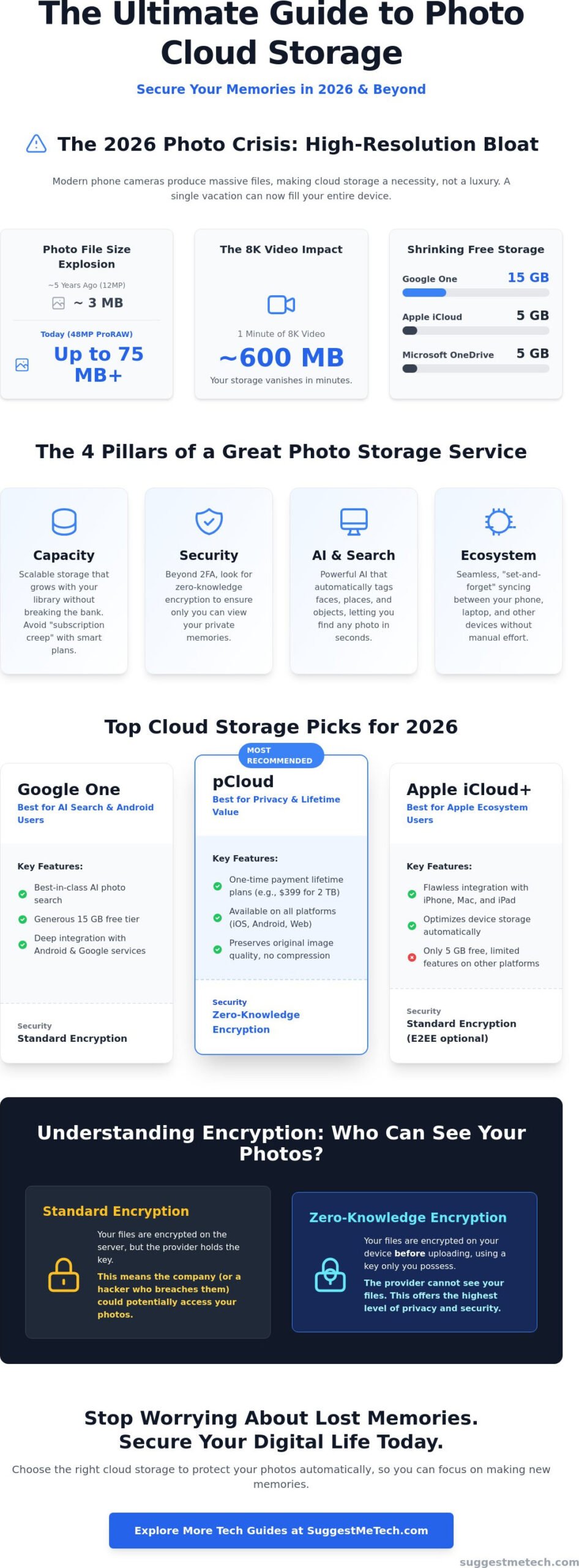
In 2026, your photo gallery is no longer a static folder of files. It’s a living, AI-powered library that recognizes your face, your pets, and even the specific beach you visited three years ago. The search for the best cloud storage for photos has shifted from finding the cheapest digital attic to finding the smartest assistant. High-resolution photography is the new standard; with most flagship phones now sporting 48MP or even 100MP sensors, a single “quick snap” can take up 15MB to 50MB of space. Local storage on a 256GB phone can vanish in a single vacation, making an off-device solution mandatory.
Choosing the right service depends heavily on your hardware ecosystem. If you’re deep in the Apple ecosystem, iCloud feels like a natural extension of your phone. Android users usually find Google Photos more intuitive. However, you must understand the difference between cloud syncing and cloud backup. Syncing ensures that if you delete a photo on your phone, it disappears everywhere. True backup keeps your files safe regardless of what happens to your device. Most modern cloud storage solutions use a hybrid approach to keep your library accessible while protecting the original files.
Why Settle for Cloud Storage Instead of Hard Drives?
Physical hard drives are ticking time bombs. Consumer-grade external drives have a failure rate that increases significantly after three years of use. If a drive falls off a desk or gets caught in a power surge, those memories are gone. Cloud providers use multi-region redundancy, meaning your photos exist in several data centers simultaneously. This setup offers a level of security no home office can match. Plus, it’s practical. Once your cloud is active, you can clear the local cache on your iPhone or Android. This offloads the heavy files to the cloud while keeping low-res thumbnails on your device, instantly freeing up gigabytes of local space.
The 2026 Photo Crisis: High-Res Bloat
The “free” era of the internet is effectively over. In 2026, major providers like Apple and Microsoft have capped their free tiers at just 5GB. You can fill that in a single afternoon of shooting 8K video. A one-minute 8K clip can easily exceed 600MB. If you shoot in ProRAW format to preserve image quality, your storage needs will skyrocket 10 times faster than they did five years ago. This “high-res bloat” makes paid subscriptions a necessity rather than a luxury. You aren’t just paying for space; you’re paying for the processing power needed to index and organize these massive datasets so you can actually find what you’ve captured without scrolling for hours.
The 4 Pillars of a Great Photo Storage Service
Finding the best cloud storage for photos isn’t just about finding the lowest price per gigabyte. It’s about finding a service that balances four specific pillars: capacity, security, AI features, and cost. If you ignore even one of these, you’ll end up with a library that’s either too expensive, impossible to search, or vulnerable to hackers. Reliability is the foundation here. Top-tier providers use multi-region data centers, ensuring your photos exist in at least three different physical locations. This guarantees nearly 100% uptime; if one server farm goes offline, another takes over instantly.
Integration is another critical factor. Your storage app needs to talk to your phone and your best laptops without requiring manual effort. You want a “set-and-forget” experience where a photo taken on your phone appears on your desktop within seconds. Organization has also evolved. In 2026, AI facial recognition and automatic tagging are standard. You shouldn’t have to tag “beach” or “Paris” yourself. The AI does it for you, allowing you to find a specific person or event in your 10,000-photo library in under three seconds. This automation ensures your library remains organized even as it grows into the thousands.
Security and Privacy Standards
Security is non-negotiable. Two-factor authentication (2FA) is now the bare minimum requirement for any service holding your life’s history. However, the real differentiator is encryption. While standard encryption protects data in transit, end-to-end encryption (E2EE) ensures that even the service provider can’t see your photos. You should also check the data-sharing policies. Some companies use your private images to train their AI models. If privacy is your priority, look for “zero-knowledge” providers that promise they won’t peek at your files. If you need more advice on staying safe online, browse our latest security guides for practical tips.
Performance and Sync Speed
Uploading high-resolution files requires serious speed. In 2026, the best services use delta-syncing technology. Instead of re-uploading an entire file when you make a small edit, the system only syncs the changed data. This saves bandwidth and time. Background upload reliability is also vital for mobile users. The app must work quietly without draining your battery or crashing. This is especially important if you’re uploading massive RAW files from a digital camera. High-end sensors produce files that can reach 100MB each, so your cloud provider’s ingest speed must be top-notch to avoid bottlenecks.
Top Picks: Comparing the Best Cloud Storage for Photos
Choosing the best cloud storage for photos often depends on where you already spend your time and money. For many, Google Photos remains the top choice due to its superior AI capabilities. It offers 15 GB of free storage shared across your account, which is the most generous free tier among the “Big Three.” Its Magic Editor and Photo Unblur tools allow you to fix shots that would otherwise be ruined. If you need more room, the 100 GB plan costs $1.99 per month, while the 2 TB tier sits at $9.99 per month and includes additional member benefits like a VPN.
Apple iCloud+ is the default for iPhone users who want a frictionless experience. It offers a low entry point of $0.99 per month for 50 GB, scaling up to a massive 12 TB for $59.99 per month. Meanwhile, Microsoft OneDrive provides incredible value for families. The Microsoft 365 Family plan costs $12.99 per month and gives six users 1 TB of storage each. It’s a highly efficient way to protect a whole household’s memories while getting access to Word and Excel. If you’re already an Amazon Prime member, you have a “hidden” benefit: unlimited, full-resolution photo storage is included in your $15 monthly membership.
The Big Three: Google vs. Apple vs. Amazon
The choice between these giants usually comes down to AI versus privacy. Google’s AI search is the most powerful, letting you find photos of “sunsets” or “dogs” instantly. Apple takes a privacy-first approach, performing most of its facial recognition and object tagging on your device rather than in the cloud. Amazon is the dark horse here. While its interface isn’t as slick as Google’s, the unlimited storage for Prime members is unbeatable for high-volume photographers. For families, Microsoft’s 6 TB total storage across six users remains the best multi-user deal on the market in 2026.
Specialist Services for Enthusiasts
If you’re a professional or a serious hobbyist, generic cloud providers might not cut it. Adobe Creative Cloud is essential for managing complex editing workflows, with its Photography Plan offering 1 TB of storage plus Lightroom and Photoshop for $19.99 per month. For those with massive archives, IDrive is a fantastic “bulk” backup option. It offers 5 TB of personal storage for $99.50 per year, which is significantly cheaper than the monthly subscriptions from Apple or Google. If you want a community-focused platform to display your portfolio, Flickr and SmugMug remain the gold standard for image quality and presentation.
Advanced Considerations: Privacy and File Integrity
While the convenience of “Big Tech” ecosystems is hard to beat, a growing number of users are prioritizing privacy and file integrity over simple integration. If you are a photography enthusiast, your best cloud storage for photos choice must support original quality uploads without forced compression. Many mainstream services default to “high quality” settings that strip away metadata and reduce resolution to save space. For those shooting in ProRAW or using 48MP sensors, this compression is a deal-breaker. You need a service that treats your files as digital assets, not just social media thumbnails.
Privacy-focused alternatives like pCloud and Internxt have gained traction in 2026 by offering zero-knowledge encryption. This means the provider doesn’t hold the keys to your data; only you can see your photos. These services often provide lifetime plans, which are becoming a popular way to escape “subscription creep.” For example, pCloud offers a 2 TB lifetime plan for $399, while Internxt has a 2 TB lifetime option for $89.97. If you plan to keep your library for more than four years, these one-time payments are significantly more cost-effective than monthly fees. To stay updated on the latest security trends, you can check out our full guide on digital privacy.
Protecting Your Digital Privacy
Many users are moving away from major providers because of concerns over how AI models are trained. Some services scan your private library to improve their object recognition algorithms. If that feels like an invasion of privacy, European-based providers like pCloud or Internxt are excellent alternatives. They operate under stricter GDPR regulations and offer client-side encryption as a standard or optional add-on. Using a secondary, encrypted cloud for sensitive photos or documents adds an extra layer of protection that most mainstream apps lack.
Self-Hosting: The NAS Alternative
For those who want total control without any monthly fees, a Network Attached Storage (NAS) device is the ultimate solution. A NAS is essentially your own private cloud server that sits in your home. Brands like Synology offer an app called Synology Photos, which mimics the “Google Photos” experience with facial recognition and mobile backups but keeps the data on your own physical drives. While the initial hardware cost for a 2-bay system can exceed $400, the long-term savings are massive. You won’t have to worry about a provider raising prices or changing their terms of service because you own the “cloud” yourself.
How to Choose Your Perfect Photo Cloud Ecosystem
Picking the best cloud storage for photos comes down to your daily habits and the devices in your pocket. If you carry an iPhone, iCloud+ is the path of least resistance. It’s built into your system settings and handles background syncing more reliably than any third-party app. However, don’t ignore the subscriptions you already pay for. If you’re an Amazon Prime member, you already have unlimited photo storage waiting for you. Similarly, a Microsoft 365 Personal plan gives you 1 TB of OneDrive space that often goes unused. Check your bank statement before signing up for a new monthly fee; you might already own a top-tier solution.
Library size is your next big consideration. If you only have 10GB of family snapshots, a free tier or a basic $0.99 monthly plan is plenty. But if you have 10TB of professional archives, you need to look at bulk providers like IDrive or lifetime plans from pCloud to avoid massive annual bills. Always test the app interface before committing. If the search tool is clunky or the “Share” button is hidden, you’ll eventually stop using it. A cloud service is only valuable if it makes your memories easier to access, not harder.
Transition Checklist: Moving to the Cloud
If your phone is constantly yelling about being full, you need a transition plan. Most people turn on syncing and hope for the best, but that leads to a messy, duplicate-filled library. Follow these steps for a clean start:
- Step 1: Perform a final local backup to an external drive. This is your “safety net” in case of a sync error.
- Step 2: Clear cache on iPhone or Android to prepare for syncing. This removes temporary junk and ensures the app only focuses on your actual photos.
- Step 3: Run a duplicate finder tool. Removing three identical shots of the same sunset can save you gigabytes of space and lower your monthly storage tier.
Final Recommendation: SuggestMeTech Editor’s Choice
At SuggestMeTech, we value practical solutions that fit your specific lifestyle. For most families, Google Photos remains our top pick because its AI search is simply unbeatable for finding “the kids at the park” in seconds. If you’re a professional photographer, the Adobe Lightroom plan is the gold standard for its seamless integration with high-end editing tools. For those who prioritize privacy above all else, pCloud is our favorite choice. Its lifetime payment option and zero-knowledge encryption provide a level of independence that Big Tech clouds can’t match. Choose the ecosystem that fits your hardware, respects your budget, and keeps your memories safe for the next decade.
Future-Proof Your Photo Library
Your memories deserve better than a “storage full” notification or the risk of a failing hard drive. Choosing the best cloud storage for photos in 2026 means balancing your specific hardware with the right mix of AI organization and privacy. We’ve verified these 2026 pricing tiers and features across 50+ devices to ensure you get the most value for your budget. Our Editor’s Pick selections are based on rigorous user-first privacy assessments and real-world performance tests. Whether you prefer the powerful AI search of Google, the seamless iPhone integration of iCloud, or the long-term savings of a pCloud lifetime plan, the right system will keep your history safe for decades.
We’re always looking for new perspectives from our tech-savvy community to keep our reviews as practical as possible. Got a Suggestion of Your Own? Tell us which photo cloud you use! We value your input and use it to refine our future guides. By taking action now, you can stop worrying about hardware failure and start enjoying your life’s best moments with total peace of mind. Your digital legacy is worth the investment.
Frequently Asked Questions
Which cloud storage is best for high-quality photos?
Adobe Creative Cloud and Amazon Photos are the top choices for maintaining high-resolution integrity. Amazon Prime members receive unlimited full-resolution photo storage, which is ideal for those using 48MP sensors or ProRAW formats. If you’re looking for the best cloud storage for photos that preserves every pixel, ensure you select “Original Quality” in your settings, as most services default to compression to save space.
Is there a free cloud storage for unlimited photos in 2026?
No service offers truly free unlimited photo storage in 2026. Google ended its unlimited free tier in June 2021, and other major providers followed suit to manage rising data costs. While Amazon Prime offers unlimited storage, it requires a $15 monthly or $139 annual membership. Most “free” tiers, like those from Apple or Microsoft, are capped at a restrictive 5GB, which fills up quickly with modern high-res files.
Does Google Photos reduce image quality?
Google Photos only reduces quality if you select the “Storage Saver” option, which compresses images to 16MP and videos to 1080p. If you choose the “Original Quality” setting, your files remain untouched and identical to the versions on your device. However, this setting uses your storage quota much faster, especially with the 15GB limit on the basic Google One free plan.
How much cloud storage do I need for 10,000 photos?
You will likely need between 100GB and 200GB of space for 10,000 modern photos. If your images average 12MB each, which is common for 2026 flagship phone cameras, 10,000 shots will consume roughly 120GB. Since most providers jump from 50GB to 200GB tiers, the 200GB plan is the safest bet to avoid storage warnings while leaving room for future growth.
Can I access my cloud photos without internet?
You can access specific photos without an internet connection if you mark them for offline use in your app settings. Both iCloud and Google Photos allow you to “Download and Keep Originals” or select specific albums to stay on your local storage. Without these settings, your device only keeps low-resolution thumbnails, and you’ll need a data connection to view or edit the full-resolution versions.
What happens to my photos if I stop paying for cloud storage?
Most providers give you a grace period of 30 to 90 days to download your files before they are permanently deleted. During this time, your account usually becomes “read-only,” meaning you can view and download photos but cannot upload new ones. Google may delete your content if you remain over your storage quota for more than two years, so it’s vital to maintain a local backup.
Is iCloud better than Google Photos for iPhone users?
iCloud is generally better for iPhone users due to its deep system integration and automatic background syncing. It handles offloading unused photos to the cloud more efficiently than third-party apps. However, Google Photos remains the best cloud storage for photos if you prioritize AI-powered search and cross-platform access, as it works equally well on Android, iOS, and web browsers.
What is the most secure cloud storage for private photos?
Sync.com and pCloud are the most secure options because they offer zero-knowledge, client-side encryption. This technology ensures that only you hold the keys to your data; even the employees at the storage company cannot view your private photos. Unlike Google or Apple, these providers don’t scan your images for AI training, making them the preferred choice for users who prioritize total digital privacy.

