

A virtual meeting rarely goes off track because someone can’t find the mute button. More often, the purpose is unclear, the conversation drifts, or a few voices take over. Knowing how to host a virtual meeting effectively starts before anyone joins: decide whether a live call is needed, define the outcome, and give participants a clear agenda.
If you’ve left a meeting unsure what was decided or who’s doing what, better facilitation can help. This guide covers how to prepare, lead an inclusive discussion, handle common audio and etiquette issues, and close with clear owners and next steps. It also explains when an email, shared document, or recorded update may serve the goal better than a video call.
Quick Answer
To host a virtual meeting effectively, define a specific outcome, invite only the people needed, and share an agenda with realistic time allowances. Choose a live or asynchronous format that fits the task, test your meeting setup, and guide participation. Before ending, recap decisions, open questions, action owners, and next steps.
Key Takeaways
- To learn how to host a virtual meeting effectively, begin by defining the outcome and inviting only the people needed to reach it.
- Make each agenda item purposeful by assigning a discussion lead and a realistic time estimate.
- Choose a format that fits the task, from a live video discussion to an asynchronous update.
- Prepare the meeting space and technology before participants arrive, then guide the conversation through a clear run-of-show.
- Close with a concise record of decisions, open questions, action owners, and next steps.
How to host a virtual meeting effectively starts with a clear purpose
An effective virtual meeting brings the right people together to achieve a defined outcome. It is more than a call with clear audio and a stable connection: participants should leave with a decision, shared understanding, or completed work that would have been harder to achieve another way.
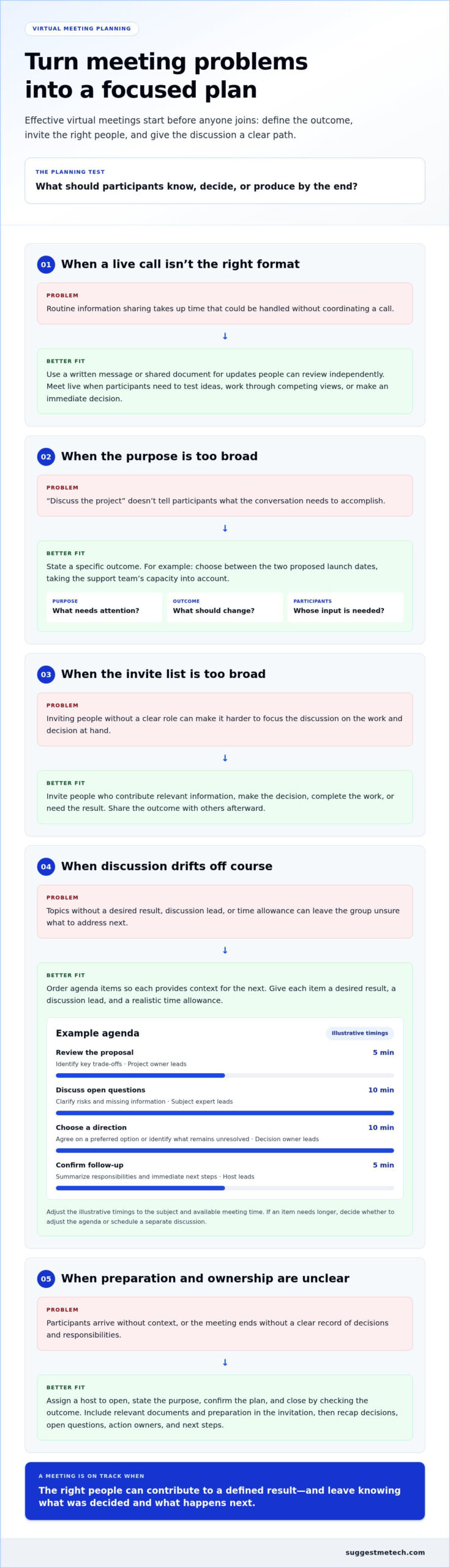
Before sending an invitation, state why the group needs to meet, what should be different by the end, and whose input is needed. “Discuss the project” is too broad to guide a useful conversation. A clearer purpose is “choose between the two proposed launch dates, taking the support team’s capacity into account.”
- Purpose: What question, task, or decision needs attention?
- Outcome: What should participants know, decide, or produce by the end?
- Participants: Who has relevant information, responsibility, or decision-making input?
These answers also clarify the format. A routine progress update can usually go in a written message or collaborative document for people to review when available. A complicated choice involving trade-offs may benefit from real-time questions and shared problem-solving. This purpose-first test is central to how to host a virtual meeting effectively: the call should serve the work, not simply fill a calendar slot.
What makes a virtual meeting effective?
A meeting is effective when it reaches its stated outcome and gives relevant participants a meaningful chance to contribute. A smooth connection helps people take part, but it isn’t the result itself. A call can run without technical problems and still fail if the group leaves without a decision, useful understanding, or progress on the task.
Virtual meetings bring people together in real time, while virtual events can take different forms and serve different purposes. The Virtual Event overview offers broader context. For a team meeting, define success in practical terms: agree on an approach, identify missing information, or complete a review together.
When is a live meeting worth scheduling?
Schedule a call when timing and interaction matter: participants need to test ideas together, work through competing views, or make an immediate decision. Use a written update when people only need information they can read independently. For instance, share routine project progress in a document, but meet to resolve a complex decision that affects several teams.
Consider time zones and participant availability before choosing a meeting time. If key contributors can’t attend, the group may lack the context or authority to reach its intended outcome. When live discussion isn’t essential, an asynchronous update lets people review the information and respond without coordinating a call.
Plan the virtual meeting with an agenda, roles, and realistic timing
A useful plan turns the intended outcome into a sequence participants can follow. Before sending an invitation, decide what needs to happen, who needs to be involved, and what preparation will help the discussion move forward. This keeps the meeting focused and gives invitees a clear reason to attend.
Use this planning sequence as a checklist. Adapt it to the decision, task, and people involved rather than treating it as a fixed formula.
- Confirm the outcome. Describe what the group should decide, understand, or produce by the end.
- Select attendees. Invite people who contribute relevant information, make a decision, complete the work, or need the result. Share the outcome with others afterward.
- Build the agenda. Arrange topics in a useful order and give each one a desired result, discussion lead, and approximate time allowance.
- Assign roles. Decide who will host, guide participation if needed, and record decisions or actions.
- Send the invitation. Include the purpose, intended outcome, agenda, relevant documents, and any preparation participants should complete.
- Prepare the materials. Make shared documents or discussion prompts accessible to the people who need them.
How do you write an agenda that keeps discussion focused?
Start with the decision or result, then order agenda items so each one provides context for the next. Give every item an owner and a realistic time allowance, and leave room for questions. State the intended outcome in the invitation so participants can prepare relevant information and understand what the discussion needs to resolve.
Adaptable example agenda: The timings below are illustrative. Adjust them to the subject and available meeting time.
- Review the proposal: Identify the key trade-offs; discussion lead: project owner; approximate time: 5 minutes.
- Discuss open questions: Clarify risks and missing information; discussion lead: relevant subject expert; approximate time: 10 minutes.
- Choose a direction: Agree on a preferred option or identify what remains unresolved; discussion lead: decision owner; approximate time: 10 minutes.
- Confirm follow-up: Summarize responsibilities and immediate next steps; discussion lead: host; approximate time: 5 minutes.
If an item needs more time than expected, help the group decide whether to adjust the agenda or schedule a separate discussion.
Which roles should the host assign?
The host opens the call, states its purpose, confirms the plan, and closes by checking that the intended outcome is clear. For a discussion with several contributors, a facilitator or moderator can guide participation and keep topics within their time allowances. When decisions or follow-up matter, assign a note-taker to capture them instead of relying on memory.
One person can cover more than one role if the meeting is straightforward. For a complex discussion, separating facilitation from note-taking helps the host stay attentive to the group. Clear responsibilities are a practical part of how to host a virtual meeting effectively, because they help prevent agenda items and follow-up details from being overlooked.
When choosing collaboration tools, consider participants’ access and document-sharing needs. SuggestMeTech publishes practical technology guides to help readers compare technology products and services.
Choose the right virtual meeting format instead of defaulting to video
Choose a format based on the work participants need to do, not on the assumption that a live video call is always the most collaborative option. Visual cues can help with a nuanced discussion, but they aren’t necessary for every update or exchange. The right choice balances interaction, convenience, and the information people need to share.
Use the comparison below as a starting point, and consider each format’s limitations. A webinar may allow questions without open discussion, while an asynchronous message can’t resolve disagreement immediately.
When should you choose video, audio, or a webinar?
Video suits conversations where seeing facial expressions, demonstrating something on screen, or building rapport adds value. Audio-only can work for a focused conversation when visual context and screen sharing aren’t needed. A webinar is presenter-led, making it useful for sharing information with an audience; audience interaction depends on how the session is set up.
| Format | Best fit | Participant interaction | Practical limitation |
|---|---|---|---|
| Video call | Collaborative discussion, visual demonstrations, or topics where face-to-face cues help | Direct conversation, with participants able to respond in real time | Requires a live meeting and suitable audio and video access; cameras don’t automatically make a discussion productive |
| Audio-only call | Conversation that needs immediate exchange but not visuals or screen sharing | Live verbal discussion | Participants can’t see visual material or non-verbal cues |
| Webinar | Presenter-led instruction, briefings, or demonstrations for an audience | Can range from limited questions to more active audience participation, depending on the format | May offer less open discussion than a group call |
| Asynchronous update | Routine information people can read or watch at a time that suits them | Responses happen later, often in writing | Questions and disagreement aren’t resolved immediately |
When can an asynchronous update replace a meeting?
Send a written or recorded update when people need information but don’t need to work through it together in real time. For example, share a completed project status report for independent review. Invite follow-up questions in the usual collaboration channel, then schedule a live discussion only if responses reveal disagreement, unanswered questions, or a decision that needs immediate exchange.
Don’t add cameras simply to signal engagement. A clear document with a way to respond may be more useful than asking everyone to join a call to hear the same update. Conversely, a complex issue can be harder to resolve through a long message thread if participants need to test ideas together.
Quick choice: Video suits visual, collaborative discussion; audio suits live conversation without visual needs; webinars suit presenter-led sessions; asynchronous updates suit information people can review independently. Hosting well means choosing a format that fits the task, not just running a call smoothly. For broader guidance on technology choices, explore technology reviews and comparisons.
Host the virtual meeting with a simple, inclusive run-of-show
A clear run-of-show gives the host a practical sequence to follow without making the conversation feel scripted. It also helps participants understand when to contribute, how the discussion is progressing, and what the group has settled.
Before attendees arrive, test the connection, microphone, camera, screen sharing, and meeting access. Open the meeting space early enough to resolve issues, and have another way to share essential material if screen sharing fails.
How should a host open and guide the discussion?
Start by restating the purpose, intended outcome, and agenda. Explain how participants can contribute, such as speaking in turn or adding questions in chat. Then guide the discussion through a simple sequence:
- Open with the purpose. Say why the group is meeting and what it needs to accomplish.
- Confirm the plan. Review the agenda and invite brief additions that are relevant to the outcome.
- Facilitate each topic. Use clear transitions, name the current question, and give a time check when an item is nearing its limit.
- Make progress visible. Summarize agreements and unresolved questions before moving to the next topic.
- Close the discussion. Check that the intended result is clear and leave space for final clarification.
Balance contributions actively. If a few people are speaking at length, acknowledge their points and invite others in with a focused prompt, such as, “We’ve heard two views. What are we missing?” Quiet participants may prefer to speak after a pause, respond in chat, or be invited by name without pressure. Offer more than one way to contribute when the meeting setup allows it.
A meeting host should make participation and decisions visible. Show how the group is weighing input, what it has agreed, and what remains open, rather than letting important points disappear into a fast-moving conversation.
How can you reduce technical friction and support participation?
Test the tools you plan to use before the meeting starts. Check that you can join, hear and be heard, turn on the camera if needed, and share the relevant screen or document. A short test is especially useful if you’re presenting unfamiliar material or joining from a different location.
- Reduce avoidable noise. Choose a quieter space where possible, mute when you aren’t speaking, and silence notifications that could interrupt the discussion.
- Make turn-taking clear. Pause between speakers, use a hand-raise option if available, or invite people to take turns on a specific question.
- Support different participation needs. Use chat, captions, or other accessible options when the platform supports them and they suit the group.
Effective virtual meeting hosting depends on facilitation as much as the call setup. Explore practical technology guides to compare digital tools and assess which features fit the way your team works.
End the virtual meeting with decisions, owners, and useful follow-up
A virtual meeting isn’t finished when the call ends. It’s finished when participants understand what was decided, what remains open, and who will take each agreed action. State those points aloud, then share concise notes in the team’s usual collaboration channel so work can continue without relying on memory.
Keep the record practical. Capture what people need to act, not a transcript of every comment. This final step turns discussion into follow-through and gives the group a clear way to check whether the meeting achieved its purpose.
What should meeting notes and action items include?
Separate decisions from unresolved questions so readers can distinguish conclusions from topics that still need attention. Record each action with a named owner and a clear next step. Share the notes in the channel participants already use, with enough context for someone who missed the call to understand the outcome and continue the work.
- Decisions: Record the agreed conclusion and any important reason behind it.
- Open questions: Note what remains undecided and what information is needed.
- Actions: Name the owner and describe the next step clearly.
- Follow-up: Include any agreed check-in or point at which the group will revisit the issue.
For example, “Review the proposal” is difficult to act on. “Maya will compare the two delivery options and share a recommendation in the project channel” makes the responsibility and next step clear. Keep notes concise and leave out background details that don’t help participants proceed.
How can you tell whether the meeting worked?
Compare what happened with the purpose and intended outcome stated in the invitation. If the group set out to choose a direction, did it make that choice, or identify exactly what information is missing? A useful review considers both the result and how the conversation reached it.
After the call, consider whether the meeting stayed on track and gave the right people a chance to contribute. Recurring problems can point to a planning or facilitation change:
- Frequent overruns may mean the agenda is too full or time allowances need adjusting.
- Unclear decisions may call for a more explicit decision owner or a sharper discussion question.
- Missing voices may signal that the invitee list or participation approach needs reconsidering.
- Avoidable follow-up calls may suggest that the original format or preparation didn’t support the task.
Use these observations to adjust the format, agenda, or participants next time. If a call repeatedly ends without progress, consider whether the work would be better handled in a shared document or a more focused discussion. Hosting effectively includes reviewing the result, not just following the agenda. A small change can make the purpose and follow-through of your next meeting clearer.
Make your next meeting a small improvement
Use your next virtual meeting to test one deliberate change. Ask participants afterward whether the discussion helped them make progress, or replace a routine live update with a written one and see whether the team still has the context it needs. Small adjustments help build meeting habits that fit the work rather than follow a fixed formula.
The same practical approach is useful when choosing meeting technology. SuggestMeTech publishes technology reviews and comparisons, with attention to practical trade-offs and best-fit guidance instead of blanket recommendations. Apply that thinking to meeting practices: consider what people need to do, then choose an approach that supports it.
As you refine how to host a virtual meeting effectively, notice what helps your team participate and move work forward. Explore SuggestMeTech’s technology reviews and guides to make informed choices about the tools you use.
Frequently Asked Questions
Small practical choices can make a virtual meeting easier to join and manage when plans change. These answers cover common situations that benefit from a clear, considerate response.
How long should a virtual meeting last?
Set the length according to the complexity of the task, not a default calendar slot. A brief status check may need only a short window, while comparing proposals may require more time to examine trade-offs. For a longer session, build in a pause or split distinct topics into separate meetings. Treat the scheduled end time as a boundary, not a target to fill.
Should everyone turn on their camera during a virtual meeting?
No. Ask participants to use cameras only when seeing one another adds value, such as during introductions or a visual demonstration. A camera-free option can make it easier to join from a low-bandwidth connection or a shared space. If one person is presenting, they can keep video off while sharing material. Set expectations in advance so nobody feels that camera use is an unspoken test of attention.
What should a host do if someone joins a virtual meeting late?
Welcome the person without stopping the group for a full recap. If they need context to take part, give a brief update at a natural pause or point them to the relevant document. Avoid asking them to explain their lateness in front of the group. If the meeting is near a decision that depends on their input, pause that decision long enough to bring them up to speed.
How can you handle interruptions during a virtual meeting?
Step in neutrally and name whose turn it is: “Let’s finish this point, then we’ll hear your response.” If interruptions continue, establish a simple speaking order for the next question or ask participants to hold comments until the current speaker finishes. For a repeated issue, address the pattern privately after the meeting. This keeps the discussion respectful without turning the interruption itself into a prolonged debate.
What should you do if your internet connection fails during a meeting?
If you lose connection, try rejoining once. If that doesn’t work, use a backup route agreed in advance, such as calling in by phone or sending a message through the team’s usual channel. A co-host can continue in your absence, especially if they have the agenda and shared materials. If you’re the only person able to make a required decision, let attendees know whether to pause or reschedule.
How do you make a virtual meeting accessible to participants?
Prepare materials so people can navigate them without relying on visual layout alone. Use descriptive titles for shared files and links, expand unfamiliar abbreviations, and pause after asking a question so participants have time to respond. Avoid rapid switching between documents or slides. These details can help people using assistive technology or processing information at a different pace follow the meeting more comfortably.
Is it better to record a virtual meeting or take notes?
Choose based on what participants will need afterward and how sensitive the discussion may be. A recording can help someone revisit a detailed demonstration, but it may capture more personal or confidential conversation than a concise written record. Before recording, explain its purpose and who will be able to access it. Notes are often more suitable when the team needs a brief reference to outcomes without preserving the entire conversation.

