

What is a VPS and what is it used for? A VPS, or virtual private server, is a virtualized server environment with allocated resources that runs on shared physical hardware. It can host websites, applications, and other server software. Compared with shared hosting, it generally offers more configuration control, but also requires more management than a basic hosting plan.
That control can be useful, but it comes with setup and maintenance responsibilities. This guide explains common VPS uses, compares hosting types, and helps you decide whether a VPS fits your project or a simpler option would be more practical.
Quick Answer
A VPS is a virtual server with allocated resources and its own software environment, running on physical hardware shared with other virtual servers. It can host websites, applications, development environments, and other server software. People choose one when they need more configuration control than basic hosting provides and can manage the added upkeep.
Key Takeaways
- Understand how virtualization creates separate environments on shared physical hardware.
- Consider a VPS for practical workloads such as hosting an application, running a game server, or learning server administration.
- Compare VPS hosting with shared, cloud, and dedicated options by looking at resource arrangements, control, and management demands.
- Decide whether greater configuration control justifies the added software maintenance and administration your project may require.
- Choose a hosting category based on your workload and capacity to manage a server, rather than assuming every growing website needs a VPS.
What Is a VPS? A Simple Explanation of Virtual Private Servers
A virtual private server (VPS) is a virtual machine hosted on a physical server that also runs other virtual machines. Software called a hypervisor divides the physical server into separate environments, each with allocated resources such as CPU, memory, and storage. A VPS provides a distinct server environment without requiring a separate physical machine.
In short, a VPS is virtually separate, not physically exclusive. The physical computer and its hardware are shared, but each virtual server operates as its own environment. This arrangement gives a project allocated resources and more configuration options than a basic shared hosting account may provide, without requiring ownership of an entire server.
How virtualization creates a virtual private server
Virtualization uses software to create separate computing environments on one physical machine. A hypervisor is the software layer that creates and manages these virtual machines, allocating parts of the server’s resources to each environment. For a foundational explanation of the technology, see What is a Virtual Private Server?
Think of the physical server as an apartment building. Each VPS is like an apartment with its own space and utilities, while the building’s structure and infrastructure are shared. The analogy helps explain separation, but it has limits: a VPS isn’t a physical apartment, and its resources still come from the same computer hardware as other virtual servers.
In practical terms, a VPS plan allocates virtual CPU capacity for processing tasks, memory for active programs and data, and storage for files, databases, and software. These resources help determine what the server can support, but they don’t make it a separate physical machine. For example, a website and its database can run inside the same VPS environment, using its allocated resources.
What ‘private’ means in VPS hosting
“Private” refers to logical separation. The VPS runs in its own virtual environment, apart from other virtual servers on the host machine. Its files, operating system, and installed applications are organized within that environment, so another VPS user doesn’t simply access them as if they were part of the same account.
That separation isn’t the same as exclusive ownership. Other customers’ virtual servers may run on the same physical machine, and the host’s hardware and virtualization layer remain shared. You receive allocated virtual resources, not a dedicated physical processor, memory modules, or storage device.
Isolation doesn’t remove every security or performance risk. The VPS still needs suitable configuration and maintenance, and its performance depends partly on the underlying host and how resources are managed. A VPS is a separate, configurable server environment built from shared hardware, useful when a project needs more independence than an ordinary shared account provides.
What Is a VPS Used For? Common Website and Application Examples
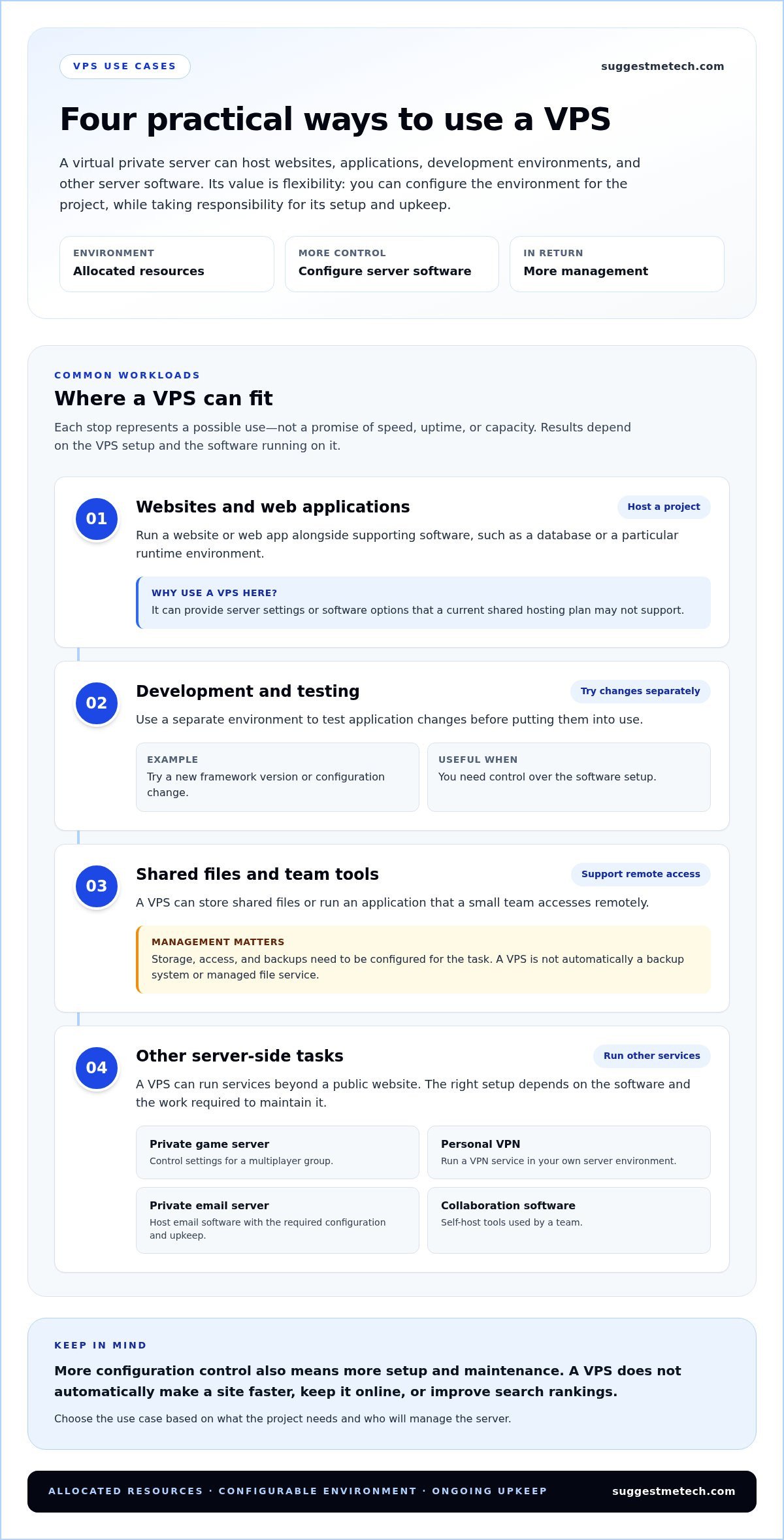
A VPS can host websites, web applications, development environments, and other software that needs to run on a server. People use one when they need more control over server configuration than a standard hosting setup allows. Whether it fits depends on the workload, its resource needs, and who will manage the system.
Think of a VPS as a flexible environment for running online projects and supporting tools. The examples below describe possible uses, not guarantees of speed, uptime, or capacity. Results depend on the VPS setup and how the software is configured.
Websites, web applications, and online services
A VPS can run a website or web application alongside supporting software, such as a database or a particular runtime environment. That control can help when a growing site needs settings or software that its current shared hosting plan doesn’t support.
For example, a small business might need to install a specific application component or adjust server settings to match how its site operates. A VPS can provide room to make those choices, but it won’t automatically make pages load faster, keep a site online, or improve search rankings. Those outcomes depend on factors such as the application, configuration, and workload.
Development, testing, and file storage
Developers can use a VPS as a separate environment to test application changes before putting them into use. For instance, they might install a new version of a framework, try a configuration change, or check how an update behaves without changing the live site. This can be useful when the team needs control over the software setup.
A VPS can also hold shared files or run an application that a small team accesses remotely. It isn’t automatically a backup system or managed file service. Users need to configure storage, access, and backups for the task, and consider whether maintaining those systems is practical.
Other server-side tasks
Some people use a VPS to run services beyond a public website. Examples include a private game server, a personal VPN, a private email server, or self-hosted collaboration software. These tasks can require different software, configuration, and upkeep, so an example that works for one project may not suit another.
- Host a game: Run a multiplayer server for a group that wants control over its settings.
- Run an application: Keep a web app and its supporting software in an environment the administrator can configure.
- Learn server administration: Practice installing software and managing a server without changing a live production system.
The common thread is control over what runs on the server. Consider a VPS when a specific workload calls for that control and someone can handle setup and upkeep. For more practical context, explore SuggestMeTech’s web-hosting guides.
VPS vs Shared, Cloud, and Dedicated Hosting: What Changes?
Shared hosting places multiple customers in a common hosting environment, while a VPS gives each customer a separate virtual environment on shared physical hardware. Dedicated hosting allocates a physical server to one customer. Cloud hosting describes how computing resources are delivered, so it can overlap with VPS hosting rather than represent a separate, competing server type.
The practical differences are how resources are arranged, how much configuration control you get, and what management work falls to you. No category is automatically faster, safer, or better for every project.
| Hosting type | Resource arrangement | Control | Management demands | Likely fit |
|---|---|---|---|---|
| Shared | Customers use a shared hosting environment. | Usually less direct server configuration. | Often lower for the customer, depending on the service. | Sites with straightforward needs and little desire to manage server settings. |
| VPS | Separate virtual environments use the same physical hardware. | More control over the virtual server’s software and configuration. | Can be substantial on an unmanaged plan; managed plans shift some work to the provider. | Projects that need specific settings or software and have a plan for server upkeep. |
| Dedicated | A physical server is allocated to one customer. | Greater control over that server’s configuration. | Depends on the service and how much management is included. | Workloads that need a whole server allocated to one customer. |
| Cloud | Computing resources are delivered over a network; the underlying setup varies. | Varies by service and configuration. | Varies by service and management model. | Projects whose needs match the cloud service’s resource and operating model. |
How VPS hosting differs from shared and dedicated hosting
With shared hosting, customers use a common hosting environment, which can limit how much they can change about the server setup. A VPS gives a customer a distinct virtual environment while still relying on shared physical hardware. Dedicated hosting instead allocates a physical server to one customer. That allocation alone doesn’t guarantee a particular level of speed or reliability.
Where cloud hosting fits into the comparison
Cloud computing means accessing computing resources over a network rather than relying only on equipment managed on-site. A cloud service may provide virtual servers, including VPS-style environments, so “cloud” and “VPS” aren’t always mutually exclusive labels. Compare the actual resource arrangement, configuration options, management responsibilities, and service terms. The label alone won’t tell you how the setup fits your workload.
When comparing a VPS with other hosting choices, start with the project’s requirements rather than broad claims about a hosting category. A simple site may not need extensive server control; an application with specific software requirements may. Make the comparison based on both the technical setup and the work you’re prepared to manage.
When Is a VPS Worth Considering, and When Is It Too Much?
A VPS may be worth considering when a project needs server settings, software, or a separate environment that its current hosting can’t provide, and someone can manage the added responsibilities. It may be more than a small, straightforward website needs. Base the decision on project requirements, not an assumed progression from shared hosting.
Signs a VPS may fit your project
Start with the specific limitation you’re trying to solve. If your current hosting prevents you from installing required software, changing server settings, or creating a controlled development environment, a VPS may offer useful flexibility. The key question is whether that control supports a real task, rather than simply sounding like a more advanced option.
- Custom application setup: Your application depends on software or configuration that isn’t available in your current environment.
- Development and testing: You want a separate server environment to try changes without altering a live site.
- Growing operational needs: You need to configure how several connected services run together, and have someone able to maintain them.
For example, a developer building a web application might need to install a specific runtime and test updates in a separate environment. A VPS could suit that work if the developer is comfortable managing the setup. Before moving from shared hosting, identify what the existing plan can’t do and whether a VPS addresses that limitation.
When simpler hosting may be enough
A small website with standard requirements may work well without server-level control. If you mainly publish pages and don’t need custom software or configuration, a VPS’s extra flexibility may bring little practical value. The right fit depends on what the site needs to run, not simply how important or established it is.
There’s also an ongoing workload to consider. An unmanaged VPS can require you to handle server software, security updates, and troubleshooting. That may suit a technically confident owner, but it can be a poor fit if you don’t have the time or skills to take responsibility for those tasks. A managed plan can shift some maintenance to the hosting company, though you may still need to make decisions about your setup.
If your site is new and relatively simple, weigh whether shared hosting can meet its needs before choosing a VPS. Focus the comparison on the actual service and its management responsibilities. The goal isn’t to choose the most configurable option; it’s to select a setup that meets your needs without adding unnecessary work.
To assess whether a VPS suits your case, write down the software and settings your project requires, then consider who will maintain them. Explore our practical web-hosting guides to compare hosting choices.
How to Decide Whether a VPS Fits Your Website or Project
A VPS may fit when your website or application needs specific software, configuration options, or a separate server environment that your current hosting can’t provide. Before switching, compare those technical requirements with your current setup, then decide whether you or someone on your team can manage server setup, updates, monitoring, and troubleshooting.
A practical VPS decision checklist
Work through these steps in order. They help separate project requirements from preferences such as convenience or more room to customize.
- Define the workload. List what you need to run, such as a website, database, web application, or testing environment. Note how the parts work together and what the project needs to do day to day.
- Identify technical requirements. Write down any required software, operating system, configuration options, and resource needs. Separate necessities, such as a specific runtime, from preferences, such as having more control over settings.
- Review your current hosting. Identify which requirements your existing setup already meets and where it falls short. A limitation that affects a real task may justify considering a VPS; moving simply because a site has grown isn’t enough by itself.
- Assess who will manage the server. Decide who is responsible for initial setup, software updates, monitoring, security maintenance, and troubleshooting. If no one has the time or technical confidence to handle this work, factor that into the choice, including whether a managed option would suit your needs.
The deciding trade-off is control versus administration: a VPS can offer more configuration choices, but those choices may bring more responsibility for running and maintaining the server. Apply that trade-off to your project by starting with the job the server needs to do, not the hosting label.
Next steps for researching hosting options
Once you know what your project requires, compare services by their actual resource arrangements, management responsibilities, and included capabilities. SuggestMeTech’s The Best Web Hosting Services of 2024: Tested and Reviewed has a year-specific title, so treat it as a dated guide and review its relevance before relying on it for a current decision.
If you’re planning a new blog, How to Start a Blog in 2026 may help with broader setup decisions. If you’re still sorting out the website’s address, What Is a Domain Name? A Simple Guide for Beginners explains that separate piece of the project. A domain name is the human-readable address people use to reach a website; it isn’t the server itself.
Use these resources to clarify your requirements, not to assume that one hosting type suits every project. For more neutral explanations and comparisons, explore SuggestMeTech’s technology guides.
Turn Your Hosting Research Into a Clear Next Step
Turn your research into a brief for your project. Write down the essential software, configuration needs, and who would take responsibility for ongoing server tasks. Keep must-haves separate from preferences. That makes it easier to compare hosting options based on fit, rather than choosing by label or assuming every project needs an upgrade.
You don’t need to settle every technical detail at once. A useful next step might be clarifying your application’s requirements, learning more about server management, or comparing hosting approaches. As you research, focus on practical trade-offs and what each option asks you to manage.
SuggestMeTech publishes technology reviews, comparisons, and editorial guidance to help readers assess trade-offs and find a suitable fit. Explore SuggestMeTech’s technology guides to continue your research with a clearer sense of what matters to your project.
A considered choice starts with your needs, and you’re now better equipped to make one.
Frequently Asked Questions
These practical details can help you evaluate a VPS setup and understand what to plan for before choosing one.
Can a VPS host more than one website?
Yes, a VPS can be configured to host multiple websites, such as a portfolio and a small business site on the same server. How many sites it can support depends on the applications, their combined resource use, and the server configuration. Hosting several sites doesn’t guarantee they’ll all perform well. You’ll also need to account for how each site is configured and secured.
Does every VPS include a dedicated IP address?
No, don’t assume every VPS plan includes a dedicated IP address. A dedicated IP is an internet address assigned for the exclusive use of a particular account or service rather than shared with other customers. Network arrangements vary by service and plan, so review the plan details if an application requires one. A dedicated IP by itself doesn’t guarantee stronger security or better performance.
What happens if a VPS runs out of resources?
If a VPS lacks resources for its current workload, applications may respond slowly, stop completing tasks, or encounter errors. The impact depends on which resource is under pressure and how the server and software are configured. A temporary increase in demand may pass, while persistent pressure can signal a mismatch between capacity and workload. Monitor usage over time and review the setup to identify what is contributing to the strain.
Can I move a website from shared hosting to a VPS?
Yes, a website can be moved from shared hosting to a VPS, but the work depends on its software, files, data, and configuration. A migration plan typically accounts for transferring files and databases, recreating settings, testing the site in its new environment, and updating DNS records so the domain points to the new setup. Plan for possible disruption, and don’t assume the move alone will improve the site.
Is a VPS the same thing as a VPN?
No. A VPS is a virtual server used to run software or host services. A VPN, or virtual private network, creates an encrypted connection between a user or device and another network endpoint. For example, a developer might run an application on a VPS and separately use a VPN to connect securely to a network. The abbreviations sound similar, but the technologies serve different purposes, and one doesn’t automatically include the other.
Can I use a VPS without managing the server myself?
Yes, some VPS services include management that reduces how much direct server administration you handle. The practical distinction is which layer the service covers: the underlying server, your operating system, or the application you install. For example, a managed server arrangement may still leave you responsible for configuring your website’s content management system. Read the service description to understand where provider support ends and your project responsibilities begin.

