

Choosing among the best podcast hosting services starts with understanding what your show needs, not counting features. The right platform should fit your format, publishing routine, and goals for reaching an audience.
A free or low-cost plan can help you test a workflow, but plan limits may affect what you can do later. This guide compares services by use case and practical trade-offs, so you can build a shortlist around your priorities.
Quick Answer
The best podcast hosting services are the ones that match your show’s format, release schedule, audience goals, and budget. Compare publishing tools, feed management, analytics, distribution, monetization, and support, then check current plan limits for uploads, storage, downloads, and episode availability before choosing.
Key Takeaways
- Compare the best podcast hosting services by fit for your format, publishing routine, and audience goals, not by feature count alone.
- Check how each platform handles publishing, analytics, distribution, monetization, and support before narrowing your shortlist.
- Match a host’s audience model and trade-offs to your show, and separate essential capabilities from convenient extras.
- Review current plan terms for storage, bandwidth, episode limits, and publishing formats, since these can affect your options as your show grows.
- Set up your show profile and feed before submitting it to directories, which have their own submission processes.
What Are Podcast Hosting Services and What Do They Do?
A podcast hosting service is the publishing back end that connects a show’s episode files with the information listening directories use to present it. It gives creators a place to manage releases and maintain the show’s feed. Hosting is separate from recording or editing software and from listening apps where audiences find episodes.
Think of the host as the show’s publishing control point. A creator uploads an episode, adds its details, and publishes it through the show’s feed. Directories such as Apple Podcasts and Spotify can then read that information and list the episode. Some hosts offer additional tools, but those are separate from the basic hosting role.
- Production prepares the episode, from recording through editing and final file export.
- Hosting manages published media and the show information attached to it.
- Directory access lets listeners browse or play episodes through services such as Apple Podcasts and Spotify.
- Audience measurement provides reports about activity, with the level of detail depending on the host.
A podcast host manages episode files and show details, then makes them available through the feed that listening directories use. This distinction helps clarify what to assess: first, whether a host supports your publishing needs, then whether its additional tools are useful. The best podcast hosting services can differ in their extras even when they perform the same basic role.
How a podcast host and RSS feed work together
An RSS feed is a structured file containing show and episode details, including links to published episodes. When a creator publishes a release through the host, the feed updates. A directory can read it to display the episode title, description, and other available information.
For example, after publishing an interview through the host, the creator can submit the show’s feed to a directory. The directory reads the updated episode information and can make the release available to listeners. Publishing through the host and getting listed in a directory are separate steps.
When does a podcaster need a dedicated hosting service?
A dedicated service can simplify publishing by keeping episode management and feed updates together. Managing media files on a personal website means maintaining both the files and their episode information yourself. That may be manageable for a one-off release, but repeated publishing adds work and creates more opportunities for details or links to become outdated.
A regular series benefits from a repeatable process, especially as its archive grows or more people contribute. A host can provide that central workflow, but its additional capabilities vary. Treat recording, directory submission, video publishing, and audience reports as separate features to evaluate rather than assuming they come with every service.
Which Features Matter When Comparing Podcast Hosting Services?
The right podcast host combines the tools a show needs to publish consistently with plan terms that suit its output. Compare publishing workflow, analytics, distribution, monetization, and support against your actual goals. The right feature set depends on your show and audience, not on the length of a provider’s feature list.
Start with the core tasks: uploading episodes, managing show details, and maintaining a usable feed. Then assess optional tools based on how you reach listeners, collaborate, and plan to develop the show.
| Area | What to compare | Most useful for |
|---|---|---|
| Publishing workflow | Upload steps, scheduling, episode editing, and show management | Creators who want a repeatable release routine |
| Analytics | Available audience metrics, reporting clarity, and measurement standards | Shows tracking listener activity or evaluating promotion |
| Distribution | Feed management and support for publishing to listening platforms | Creators seeking a simpler route to directory availability |
| Monetization | Available advertising, subscription, or other revenue tools | Shows with a defined plan to earn from their audience |
| Support | Help resources and access to assistance with publishing issues | Creators who need guidance suited to their experience level |
Check plan details alongside the feature list. Storage is the space available for media; bandwidth is the data delivered as listeners stream or download it. Upload or episode limits, supported formats, and other terms vary by service and plan. Verify current details if your episodes are long, frequent, or include video.
A website, video hosting, subscriptions, transcripts, and promotional tools can be useful, but they aren’t core requirements for every show. A weekly audio interview may prioritize dependable uploads and a clear feed, while a video-led show may need compatible video publishing. Treat optional features as requirements only when they solve a real workflow need.
Which hosting features are essential for a new podcast?
For a new show, prioritize episode publishing, RSS feed management, and clear controls for organizing show and episode details. Basic analytics can help you see whether audience activity changes after a release or promotion. A built-in website, transcripts, or promotional tools may save time, but they’re optional and depend on your needs.
Which capabilities matter as a podcast grows?
Growth can bring new needs, such as managing multiple shows, adding contributors, monetizing, or reviewing more detailed audience reports. Consider export and migration options before committing, so show information and media can be moved if your requirements change. A solo hobby show may not need team permissions or subscriptions, while a growing network might. Choose for a likely workflow, not a hypothetical one.
Compare practical trade-offs rather than relying on a single rating. SuggestMeTech’s technology reviews and comparisons offer editorial guidance focused on usability, evidence, and best fit.
Best Podcast Hosting Services Compared by Creator and Use Case
These third-party services suit different publishing routines, audience sizes, and growth plans. The comparison below reflects provider details available as of October 2026. Plan terms and features can change, so treat the date as a snapshot, not a promise of future availability.
There isn’t one universal winner. A first-time creator testing a short audio series may value a different setup from a network managing multiple shows or a publisher adding video. These are editorial comparisons, not SuggestMeTech products.
| Provider | Best-fit audience | Notable strengths | Trade-offs | Verification date |
|---|---|---|---|---|
| Buzzsprout | New creators who want a guided publishing routine | Free plan allows two upload hours monthly; paid audio plans use monthly upload hours. | Free episodes are removed after 90 days, so it’s better for testing than long-term archiving. | October 2026 |
| Captivate | Shows planning for audience growth and monetization | Plans include unlimited podcasts, dynamic ad insertion, and advanced analytics. | Monthly download limits distinguish plans, so a show’s audience size affects plan fit. | October 2026 |
| Podbean | Audio-first creators wanting room to build an archive | Its unlimited audio plan includes unlimited storage and unmetered bandwidth; video hosting is available on a higher plan. | The free plan has five hours of total storage; video hosting requires a different plan. | October 2026 |
| Spreaker | Solo creators testing publishing or exploring monetization | Free Speech allows unlimited episodes for one podcast; paid tiers add options including private podcasts and ad-campaign tools. | Free-plan statistics are basic; network-focused tools are on the higher Publisher plan. | October 2026 |
Apple’s provider directory can help identify whether a service supports particular features, such as subscriptions or video. Use it as a feature reference, not a complete buying verdict. A capability matters only if it fits your audience, workflow, and plan requirements.
Which platforms suit independent creators and first-time podcasters?
Buzzsprout’s upload-hour model may suit a new creator who values a straightforward publishing routine and can work within the monthly allowance. Its free plan is a free tier, not a trial, but episode removal after 90 days makes it unsuitable as a permanent archive. Podbean’s free plan is also limited, with a total storage cap rather than a temporary trial period.
Which platforms suit networks, monetization, or video workflows?
Captivate may suit creators who want monetization and analytics tools included while choosing a plan around monthly downloads. Podbean is worth considering for audio-first publishing that may later add video. Spreaker’s paid options may fit shows exploring private subscriptions or network advertising. These capabilities aren’t essential for every show; choose them when they support a defined publishing or revenue goal.
How to Choose a Podcast Host for Your Show
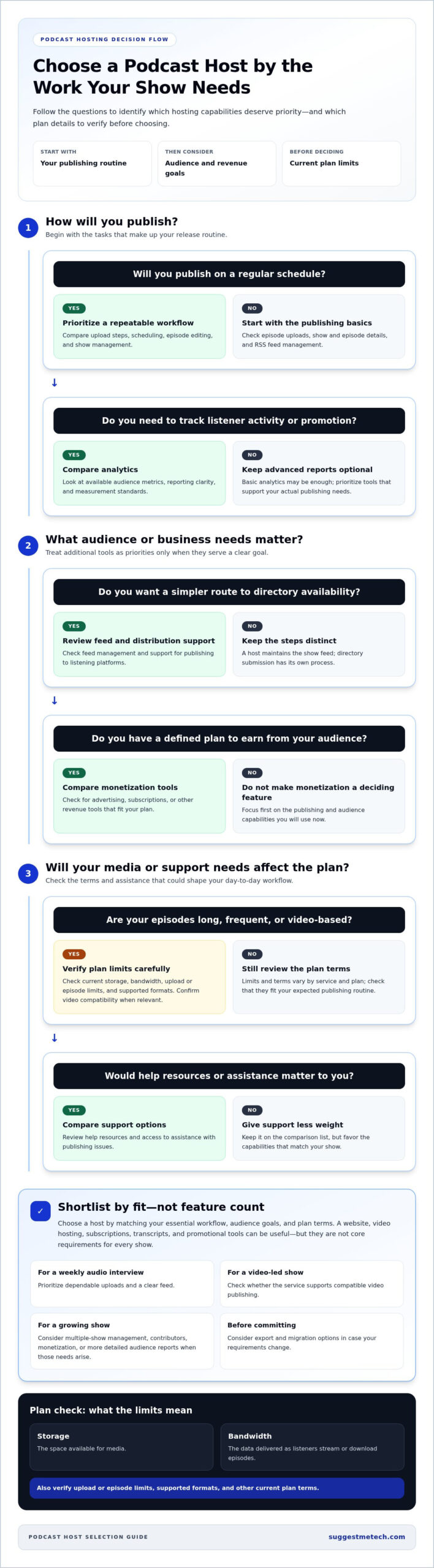
Choose a podcast host by matching its capabilities and plan terms to your format, publishing routine, and audience goals. Start with must-haves, such as suitable media support and a workable publishing process. Then compare optional tools and flexibility. This makes it easier to identify the best podcast hosting services for your needs without treating every feature as essential.
First, define your show’s format and workflow: what you publish, how often you release episodes, and who helps manage them.
- Define the format. Decide whether your show is audio-only, includes video, or will offer paid subscriptions or advertising. These choices shape what the host needs to support.
- Map the publishing routine. Note your release cadence, episode length, and who prepares and uploads each episode. A weekly solo show may need a simple repeatable workflow; a network may need coordination across shows and contributors.
- Separate requirements from extras. Write down must-haves first, such as media formats, show management, or team access. List convenient features, such as a built-in website or promotional tools, separately.
- Compare plan limits and fit. Check how the service handles your expected uploads, storage, audience activity, and number of shows. Compare the relevant plan terms, not just the headline features.
- Consider future changes. Review documentation for exporting show data, moving media, and redirecting a feed before committing. Procedures differ by provider, so don’t assume a switch will be seamless.
This matrix connects common creator profiles with the capabilities worth prioritizing. Use it as a starting point, then compare providers against your own requirements.
| Show type | Prioritize | Potentially convenient |
|---|---|---|
| Solo show | Easy episode publishing, clear show management, and a plan suited to release cadence | Built-in website or promotional tools |
| Team or network | Multi-show organization, contributor workflow, and suitable access controls | Shared reporting or coordinated publishing tools |
| Monetized show | Relevant advertising or subscription options and useful audience reporting | Additional promotional features that support a defined revenue plan |
Match your show format to the platform’s capabilities
Start with what listeners will receive: audio, video, or a paid offering. Then consider whether one show or several need to share a workspace. A solo weekly interview may need a straightforward upload and scheduling routine, while a network may need clearer separation between shows and coordinated roles. Avoid paying for complexity that doesn’t support how you publish.
Balance starting needs with switching flexibility
Even a well-matched host may not fit forever. Before choosing, look for provider documentation on exporting episode details, moving media, and redirecting an existing feed. These steps can affect how listeners reach a show after a move. Check what the provider’s process covers and what remains your responsibility. Migration procedures vary, so don’t assume continuity.
Use this checklist to compare services against your workflow. For more editorial guidance on evaluating technology, explore SuggestMeTech’s technology reviews.
How to Start Publishing With a Podcast Hosting Service
A host’s setup process usually starts with show details and ends with a published episode and a feed ready for directory submission. Treat these as separate stages: publishing through a host doesn’t necessarily submit your show to every listening directory. Setup screens and submission steps vary by provider and directory.
Prepare your show information first, then follow the provider’s current instructions. A careful setup also makes future account changes easier to manage.
- Create the show profile. Add the show title, description, artwork, and other requested details. Keep this information consistent with how you want the podcast presented to listeners.
- Configure the feed details. Review the show information associated with the RSS feed, including its title, description, and category. Directories use the feed to read show and episode details.
- Prepare and upload an episode. Add its title, description, and other episode information, then upload the finished media in a format the host accepts.
- Publish and review. Check the episode information and media before publishing. Confirm that the episode appears correctly in the host’s feed.
- Submit the show to directories. Use each directory’s submission process to connect the feed. The process differs by platform, and directory listing is distinct from publishing through the host.
What information should you prepare before publishing?
Before creating the show profile, gather a title, concise description, artwork, category, and details for your first episode. These items help present the show consistently across the host and listening directories. For example, prepare the episode title and description alongside the finished audio rather than writing them during upload.
Accepted media formats, artwork rules, and other requirements can differ between hosts and directories. Follow the current instructions for the service you choose rather than relying on assumptions from another platform. If you plan to publish video or additional episode materials, confirm the workflow supports those needs before building your process around them.
How should you review a host before choosing?
Compare current provider documentation with your show’s requirements: format, publishing routine, team needs, and future plans. Look for recent update dates on plan details and setup guidance. A listed feature describes what a provider says it supports; it isn’t the same as an independent assessment of usability or performance.
Plan for a possible move, too. Before committing, understand how to access the feed, export episode information, and manage account access. Keep control of account credentials and record where essential show details are stored. Feed redirects and migration procedures vary by provider, so review the relevant documentation instead of assuming a move will preserve every setting automatically.
The best podcast hosting services for your show meet your must-haves and fit a publishing process you can maintain. Compare provider details against your shortlist, including accepted formats, plan terms, and directory steps. For more evaluation guidance, explore more independent technology reviews and comparisons.
Turn Your Shortlist Into a Confident Choice
Use your shortlist to make a decision you can explain, not just one that looks impressive on paper. Set a few practical priorities for your show, then weigh how well each service fits them. The best podcast hosting services for you should support your publishing routine without making optional features feel essential.
As you compare options, separate a provider’s description of a feature from independent observations about usability and limitations. SuggestMeTech’s editorial approach considers practical trade-offs and focuses on best-fit guidance rather than relying on a single score. That gives you a clearer basis for deciding what matters to your show.
Keep your notes as your needs change. A concise comparison can help you revisit your decision if your publishing plans or audience goals shift. Compare SuggestMeTech’s independent technology reviews and guides to support your next choice.
Frequently Asked Questions
These answers cover practical questions that come up when planning a podcast launch or reviewing a hosting setup. Use them to clarify which details matter for your show.
What is a podcast hosting service?
A podcast hosting service manages a show’s media files and publishing records. After editing an interview, for example, a creator uploads the finished file and adds episode details to the host. The service then makes the episode available through the show’s feed. Recording, editing, and listening are separate activities that may use different tools.
Do I need a podcast host to publish on Spotify or Apple Podcasts?
Usually, you need a host or publishing service that manages episode files and the feed used for directory access. A directory is where listeners find or play a show; it isn’t necessarily where the original media file is stored. Some publishing setups combine hosting and distribution tools. Before submitting, identify which service supplies the feed and follow the directory’s current instructions.
Can I switch podcast hosting services without losing my episodes?
A move can preserve access to past episodes if you keep the old account active while transferring files and setting up the new feed. Export or download episode media and show details first, then follow both providers’ migration instructions. A feed redirect can help guide directories to the new feed, but steps vary. Don’t close the old account until you’ve checked the new setup and listener pathways.
Is free podcast hosting good enough for a new podcast?
It can be enough to test your recording and release routine, especially if you’re publishing a short pilot series. Before relying on a free plan, check whether episodes stay available, how much media you can store or upload, and what happens if you stop publishing. A free tier with temporary episode availability may work for experimentation but not for preserving a growing back catalogue.
How much does podcast hosting cost?
Prices depend on the provider’s billing model and plan. As of October 2026, examples include Podbean’s audio plan at $9 per month when billed yearly, Buzzsprout’s audio plan at $15 per month billed yearly or $18 billed monthly, and Captivate’s Personal plan at $19 per month. Compare what each plan measures, such as upload hours or downloads, and verify current terms before subscribing.
Can one podcast hosting platform support multiple shows?
Some platforms offer accounts or plans designed to manage more than one show, but limits and resource-sharing rules differ. Check whether each show gets a separate feed, whether collaborators can be assigned across shows, and whether upload or download allowances apply per show or across the account. This matters if a network has different release schedules or needs separate reporting for each show.
Do I need a website if I already use a podcast host?
No, a separate website isn’t required to publish episodes through a host and make them available in directories. A website can still give a show a public home for episode notes, contact details, or related resources. If your host provides a show page, decide whether it covers those needs before building another site. Choose based on how listeners find and interact with your content.
Which podcast hosting service is best for beginners?
There isn’t one best choice for every beginner. The best podcast hosting services for a new creator fit the show’s format, release pace, and budget without adding tools the workflow won’t use. Shortlist services with clear publishing steps, then compare current limits and how long episodes remain available. A solo audio show and a video-led project may need different starting points.

