
Did you know that 99% of American consumers now check online reviews before they even think about making a purchase? It’s a staggering number that proves social proof is no longer a “nice to have” feature; it’s the foundation of your digital storefront. You likely understand that high ratings are essential, yet the process of actually getting them often feels like a chore. Many business owners struggle with manual outreach that takes up hours of their week, or they avoid asking altogether because they don’t want to seem pushy. Finding the best review management software is about more than just collecting stars; it’s about building a system that protects your reputation while you sleep.
We’ve all felt that pang of anxiety when a notification pops up, fearing a negative comment might go viral. This guide is designed to replace that stress with a set-it-and-forget-it automation system. You’ll learn to master the art of requesting feedback using the best review management software and proven strategies to automate your social proof. We’ll compare the top tools for 2026, show you how to secure higher ratings on Google and Trustpilot, and help you implement professional-looking widgets. By the end, you’ll have a clear roadmap to a five-star reputation without the manual headache.
Key Takeaways
- Understand why Google now prioritizes review velocity over total volume to help you bridge the 2026 Trust Gap.
- Identify the best review management software for your needs, from SMS-heavy tools for local shops to high-conversion widgets for contractors.
- Learn how to automate your feedback requests by syncing your CRM with specific triggers like order fulfillment rather than just payment.
- Compare the benefits of email versus SMS outreach to ensure your requests reach customers where they are most likely to respond.
- Master a professional protocol for managing negative feedback that turns public complaints into private resolutions and updated ratings.
Why Review Management is Your Strongest Competitive Moat in 2026
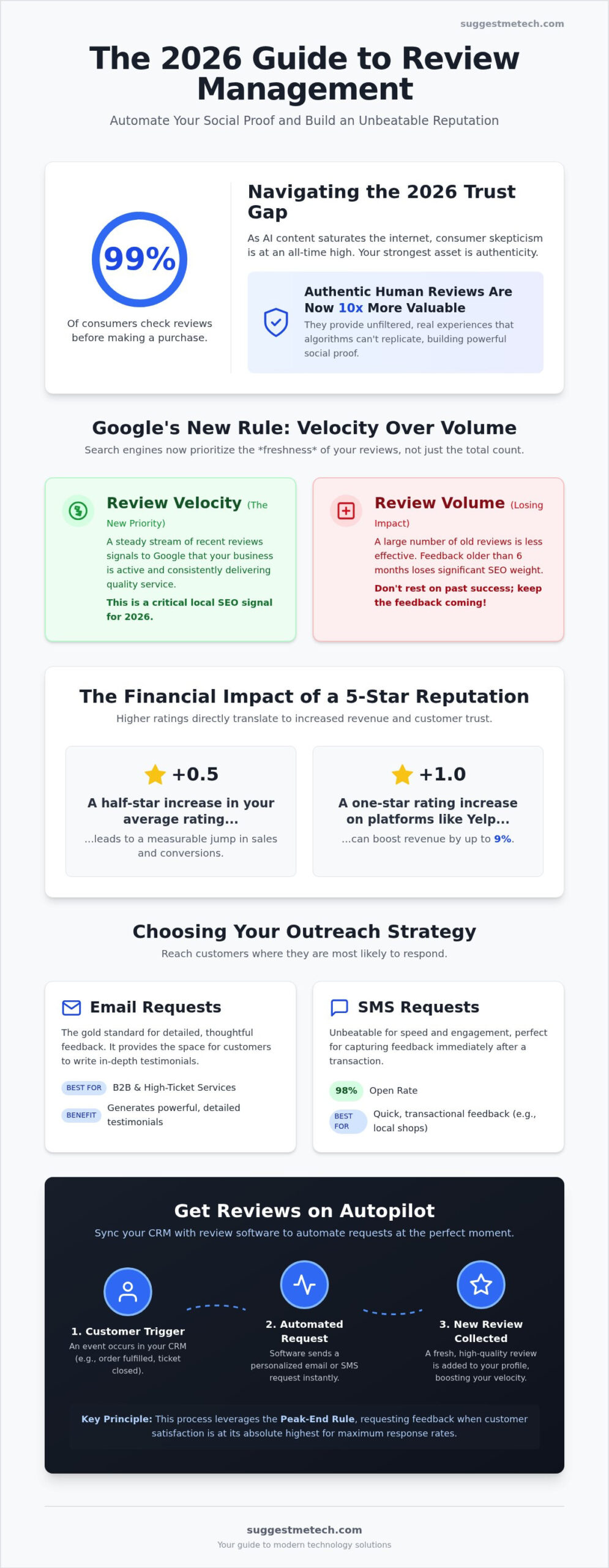
Google’s search algorithms have shifted focus from total review volume to review velocity. While having 500 five-star ratings is impressive, those reviews lose their SEO weight if they are over six months old. Search engines prioritize fresh feedback to confirm your business is still active and providing high-quality service right now. These reviews act as critical local search signals for your domain, helping you outrank competitors who are resting on their past successes.
The financial impact of these ratings is undeniable. Data from 2026 shows that even a 0.5-star increase in your average rating can significantly boost your bottom line. For example, a one-star increase on platforms like Yelp has been shown to increase revenue by up to 9%. Improving your rating by just half a star can lead to a measurable jump in sales by making your business the obvious choice in a crowded search result.
The Psychology of Social Proof
Reviews as a Technical Asset
Reviews do more than just look good; they serve as a goldmine for long-tail keywords. Customers naturally use the specific phrases and terms that other searchers use, which helps your business show up for niche queries you might have missed in your standard SEO strategy. This technical edge protects your brand against occasional negative outliers by burying them under a mountain of recent, positive content. Integrating this reputation strategy with a successful blog allows you to build a comprehensive authority platform that is difficult for competitors to replicate.
Choosing Your Strategy: Where and How to Ask for Feedback
Selecting the right channel for your request is just as important as the request itself. The best review management software allows you to diversify your outreach based on your specific business model. For B2B firms or high-ticket service providers, email remains the gold standard. It provides the space needed for customers to leave detailed, thoughtful testimonials that carry significant weight with future clients. In contrast, SMS requests boast a massive 98% open rate, making them the superior choice for quick, transactional feedback. Using the best review management software ensures these messages are delivered instantly while the experience is still fresh.
Physical businesses can bridge the gap between in-person service and digital proof using QR codes or NFC tags. Placing these at a checkout counter or on a service technician’s vehicle allows customers to leave a rating in seconds; using high-quality signage and custom decals from Signarama ensures these physical prompts look integrated and professional. If you run a digital platform, in-app prompts are your secret weapon. By triggering a request during an ‘Aha! Moment’, such as right after a user completes a successful task, you capture their highest level of satisfaction without forcing them to leave your ecosystem. This immediate capture is vital for maintaining a high review velocity.
The ‘Anti-Cringe’ Framework for Asking
Many small business owners hesitate to ask for reviews because they don’t want to feel pushy. You can overcome this by using the ‘Help Us Grow’ script, which leans into the community-focused nature of small business. Tell your customers that their feedback directly helps you compete with larger corporations. Alternatively, the ‘Expert Opinion’ script positions the customer as a valued consultant whose insight is necessary for your brand’s evolution. When sending these via email, following professional email etiquette ensures your messages feel personal and respectful rather than like automated spam.
Timing the Request for Maximum Impact
The ‘Golden Window’ for review requests typically falls between 24 and 72 hours after the product is delivered or the service is completed. Asking too early can feel aggressive, especially if the customer hasn’t had time to fully experience the value of their purchase. Conversely, waiting longer than three days makes the request feel irrelevant as the initial excitement fades. If you don’t get a response, use the ‘Double-Tap’ method. This involves sending a single, gentle follow-up three days after the initial request. If they don’t respond then, move on; being persistent beyond two touches can damage your brand reputation. For more practical advice on scaling your business reputation, you can always consult SuggestMeTech for the latest software evaluations.
Best Review Management Software of 2026: Top Recommendations
Selecting the best review management software depends heavily on your industry and how you interact with your customers. In 2026, the market is segmented into specialized tools designed for specific business sizes. NiceJob stands out as the premier choice for small businesses and contractors, starting at $75 per month. It focuses on high-converting widgets that turn your website into a social proof powerhouse. For local businesses that rely on direct communication, Podium offers a robust platform starting between $400 and $600 per month. Its strength lies in SMS-based lead conversion and managing customer interactions through a unified inbox.
If your goal is global brand authority in e-commerce, Trustpilot remains the gold standard. It provides a level of third-party credibility that few other platforms can match. For agencies or multi-location enterprises, Birdeye is the powerhouse option, starting at $299 per month for a single location. It offers deep analytics and scaled management features. Finally, tech companies must prioritize specialized platforms like G2 and Capterra, where B2B buyers go specifically to compare software specs and long-term performance.
- NiceJob: Best for contractors needing high-conversion website widgets.
- Podium: Best for local businesses prioritizing SMS and lead management.
- Trustpilot: Best for global e-commerce and high-level brand authority.
- Birdeye: Best for multi-location businesses and marketing agencies.
- G2 & Capterra: Essential for B2B software and tech service providers.
Features to Look for in 2026
Modern platforms have moved beyond simple collection. AI Review Summaries are now a standard feature, helping potential customers see the ‘gist’ of hundreds of reviews in a single paragraph. Multi-channel aggregation is also vital; the best review management software will pull feedback from Google, Facebook, and niche industry sites into one dashboard. Look for tools that offer automated response drafting. These use AI to suggest replies to common feedback patterns, allowing you to maintain a high response rate without spending hours on manual typing.
Budget vs. Enterprise: Finding Your Fit
You must decide between low-cost ‘Review Collectors’ and full-scale ‘Reputation Management’ suites. A collector might just send emails, while a suite handles everything from SEO grid tracking to video testimonials. Remember that your web hosting speed directly impacts how well your review landing pages convert. If a page takes too long to load on a mobile device, a customer will likely abandon the request. Be mindful of hidden costs like SMS credits or seat-based pricing that can quickly inflate a seemingly affordable monthly plan.
Automation Workflows: Getting Reviews on Autopilot
Manual review requests usually fail to scale. While sending individual texts might work for your first five clients, the process quickly becomes a bottleneck as your business grows. The best review management software solves this by integrating directly with your CRM or Point of Sale (POS) system through tools like Zapier. This connection allows you to build a hands-off system that triggers a request every time a specific action occurs in your business. By removing the “human friction” from the process, you ensure that every satisfied customer receives an invitation to share their experience without you lifting a finger.
Choosing the right trigger is the most important part of your automation logic. Many businesses mistakenly set their trigger to “Payment Received,” but this often sends the request before the customer has actually used the product. Setting your trigger to “Order Fulfilled” or “Service Completed” is far more effective. This ensures the request arrives after the customer has experienced the value of your work. You can further refine this by segmenting your list; use an internal survey to identify “Promoters” first, then automatically send only those happy customers the link to your public Google or Trustpilot profiles. This keeps your public ratings high while funneling constructive criticism into a private channel for resolution.
The Technical Blueprint for Automation
Building your workflow requires three distinct steps to maximize conversion rates. First, connect your e-commerce or booking tool to your chosen review platform using a webhook or a pre-built Zapier integration. Second, implement a delay timer. As discussed in the “Golden Window” strategy, you want a 24 to 72-hour pause to allow for product usage. Finally, A/B test your subject lines. Small changes in wording can lead to a 10% or 20% difference in open rates. Test a “Question” format against a “Gratitude” format to see which resonates more with your specific audience.
Monitoring Your Reputation in Real-Time
Automation isn’t just about sending requests; it’s about managing the results. The best review management software provides real-time alerts via Slack or email the moment a new rating is posted. This allows your team to maintain a 24-hour response time, which is a key signal for local SEO. You should also set up “Negative Sentiment” triggers. If a review includes words like “disappointed” or “broken,” the system can immediately alert a senior manager to intervene. Once a 5-star review is confirmed, use your automation to “push” that testimonial directly to your social media feeds, turning a single review into a recurring marketing asset. To find the right tools for these advanced workflows, check out the latest guides at SuggestMeTech.
Handling the Results: Responding and Showcasing
Collecting feedback is only half the battle. The real growth happens when you engage with those reviews and turn them into active marketing assets. The best review management software makes this process efficient by centralizing all your responses into one dashboard, ensuring no customer is left unheard. When you receive a glowing 5-star rating, don’t just leave a generic “Thank you.” Use the customer’s name and mention the specific service they enjoyed. This personalized touch turns a happy customer into a brand advocate and adds more contextually relevant keywords to your profile for search engines to crawl.
Managing negative feedback requires a disciplined protocol. Always respond publicly with empathy first to show potential leads that you take accountability. Once you’ve acknowledged the issue publicly, move the conversation to a private channel like email or phone to reach a resolution. After the problem is solved, it’s perfectly acceptable to ask the customer for a “Review Update.” Most customers are willing to change their rating if they feel their concerns were handled professionally. This transition from a 1-star to a 5-star experience is often more persuasive to new buyers than a profile with only perfect scores.
Your reviews shouldn’t stay buried on a third-party site. Use “Wall of Love” widgets to embed social proof directly on your landing pages. This provides immediate credibility at the exact moment a visitor is deciding whether to trust your brand. You can also repurpose text-based feedback into high-converting social media graphics. A simple screenshot of a heartfelt review, styled with your brand colors, often outperforms polished ad creative on platforms like Instagram and LinkedIn.
Turning a Crisis into a Win
The “Public Empathy” strategy is your best defense against unfair feedback. Even if a reviewer is being unreasonable, your calm and helpful response tells a better story to future customers than the original complaint did. If you suspect a review is fraudulent, the best review management software often includes tools to help you identify “Fake” reviews. These platforms guide you through the technical steps to report them to Google or Yelp, protecting your rating from malicious actors or competitors.
Maximizing the Value of Every Review
Technical implementation is key to visibility. Use Schema Markup on your website to ensure those “Gold Stars” appear directly in Google search results. These stars significantly improve your click-through rate compared to plain text links. Beyond SEO, place reviews as “Trust Signals” on your checkout and pricing pages to reduce friction during the final stages of a purchase. Finally, create a “Feedback Loop” by sharing recurring themes from reviews with your team. If multiple customers mention the same pain point, use that data to inform your next product update or service improvement.
Scaling Your Reputation for the Years Ahead
Building a bulletproof reputation in 2026 requires moving beyond manual outreach and embracing technical systems. You’ve seen how the Trust Gap makes authentic human feedback more valuable than ever before. By selecting the best review management software for your specific business size, you transform a tedious chore into a scalable asset. Remember to trigger your requests based on fulfillment rather than payment to ensure your customers have actually experienced your value.
Responding to every review and showcasing them through professional widgets bridges the gap between a lead’s curiosity and a final purchase. These trust signals are essential for maintaining your search visibility and conversion rates. Whether you’re a local contractor or a global e-commerce brand, your reputation is your most powerful competitive moat. To see how reputation management fits into a comprehensive growth plan, learn more about Tools N Tactics | Local SEO & Digital Marketing Solutions and their strategies for securing the first page of Google. It is the one asset that an algorithm cannot fake.
For more expert technology reviews and practical business growth guides, you can find the best tools and tech guides at SuggestMeTech. Our community-driven insights help you navigate complex tech choices with confidence. You have the strategies and the tools; now it’s time to put your reputation on autopilot and watch your business grow.
Frequently Asked Questions
Is it legal to offer a discount or gift card in exchange for a review in 2026?
No, offering incentives violates major platform terms and 2026 FTC guidelines. You can’t legally buy positive feedback with gift cards or discounts. This practice often leads to account suspension or permanent banning from search results. It’s far better to rely on organic sentiment. Focus on the quality of your service to ensure your ratings remain authentic and compliant with current consumer protection laws.
How long should I wait after a customer purchase before sending the review request?
You should typically wait between 24 and 72 hours after delivery. This allows the customer enough time to use the product without the initial excitement fading away. If you send the request too early, they won’t have an informed opinion. If you wait longer than three days, the transaction is no longer top-of-mind. This timing helps maintain a steady review velocity for your profile.
What is the best review management platform for a small service-based business?
NiceJob is often cited as a top choice for service businesses due to its high-converting widgets. It starts at $75 per month and automates the follow-up process effectively. If you prefer a platform that handles both reviews and lead generation through SMS, Podium is a powerful alternative. Choosing the best review management software for your specific workflow ensures you don’t waste money on unused enterprise features.
How do I handle a fake or malicious negative review that I know is from a competitor?
You should flag the review for a “Conflict of Interest” through the platform’s reporting dashboard. Provide any evidence that the reviewer was never a customer, such as a lack of matching CRM records. While you wait for a moderator’s decision, post a professional public response. State clearly that you have no record of their service. This signals to other potential customers that the claim is likely fraudulent.
Can I legally use a review from Google on my own website or marketing materials?
You can display reviews on your site using official APIs or approved widgets. These tools ensure you’re following the platform’s developer terms. For use in physical ads or social media graphics, it’s best to get explicit permission from the reviewer. Since they own the text, a quick message to the customer protects you from potential copyright issues. The best review management software usually includes built-in tools for these permissions.
Should I respond to every single review, or only the negative ones?
You should aim to respond to every review you receive. Replying to positive feedback builds loyalty and shows that you value your customers. For negative feedback, your response serves as a public demonstration of your problem-solving skills. Statistics from 2026 indicate that 80% of shoppers prefer businesses that engage with all their reviewers. It’s a simple way to prove your brand is active and attentive.
How do I ask for a review on Google specifically without a direct link?
You can guide customers to find your Business Profile on Google and select the “Write a review” option manually. To make this easier, many businesses print QR codes on receipts or business cards. These codes can link directly to your profile’s feedback section. This reduces the friction for the customer and significantly increases the likelihood that they will actually leave a rating while they are still on-site.
What if a customer ignores my automated review request. Should I ask again?
You should send one gentle follow-up reminder three days after the first request. If they don’t respond to that second message, it’s time to stop. Pestering a customer multiple times can lead to a negative experience and might even prompt a “complaint review” about your aggressive marketing. Respecting their time is a core part of maintaining a professional reputation. One follow-up is helpful; two is often annoying.

