

What if the best tech for improving productivity is the tool you don’t add? When apps, alerts, and subscriptions pile up, another platform can create more work instead of solving it. Start by identifying the task that’s slowing you down, then look for technology that removes friction without adding unnecessary setup.
This practical guide compares productivity software, automation, AI tools, and hardware by usefulness, ease of use, and total effort. You’ll learn which options fit common tasks and team needs, what limitations to consider, and how to weigh costs before committing. The goal isn’t to build the biggest tech stack. It’s to choose a manageable set of tools, test whether they improve your workflow, and keep only what earns its place.
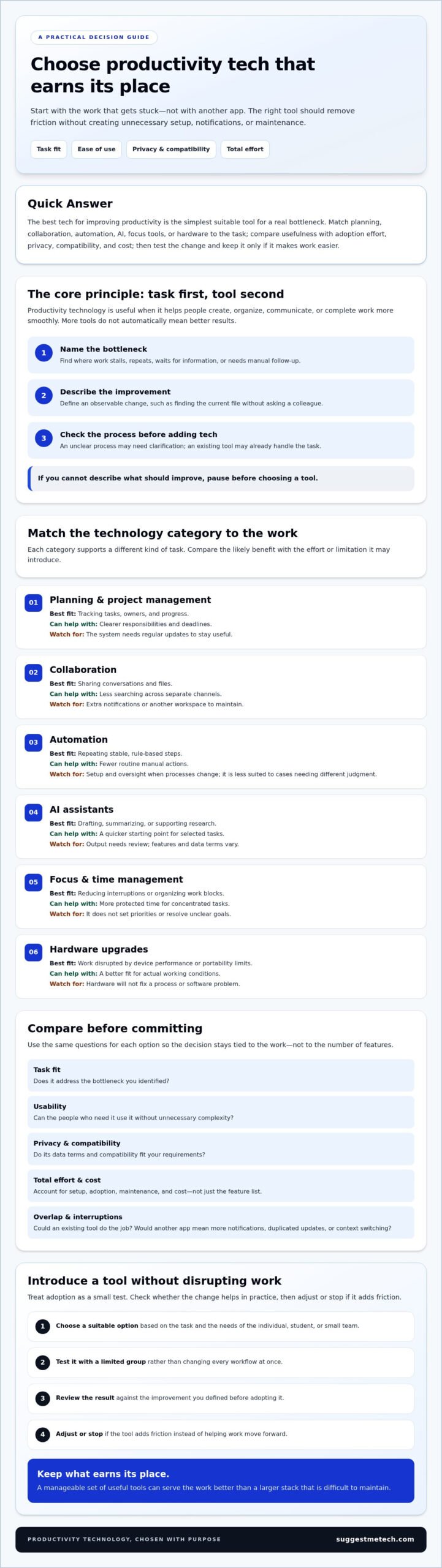
- Identify a recurring task or bottleneck before choosing technology, and define what a useful improvement would look like.
- Match planning, collaboration, automation, AI, focus, or hardware options to the work they’re meant to support.
- Compare tools by task fit, usability, privacy, compatibility, and the effort required to adopt and maintain them.
- Test a suitable option with a limited group, review the results, and adjust or stop if it adds friction.
- Choose the best tech for improving productivity based on your needs as an individual, student, or small team.
What does the best tech for improving productivity actually solve?
Productivity technology includes software and hardware that help people create, organize, communicate, and complete work. It ranges from office tools and shared workspaces to devices that support focused tasks. Productivity software supports common work such as writing, planning, and handling information, but its value depends on whether it helps a real task get done.
The useful measure isn’t how many tools you use. It’s whether work moves forward with less friction or gets completed more reliably. For example, a shared source of project information may reduce repeated handoffs and help teammates find the latest brief without asking several people. If the process is already simple, adding an app may not improve it.
How to recognize a productivity bottleneck
Look for the point where work regularly stalls, repeats, or needs manual follow-up. A crowded inbox may be a symptom; the root problem could be that requests arrive through several channels and no one owns the next step.
- Note where a task waits for information, approval, or a handoff.
- Check whether the same details are copied between tools or entered more than once.
- Describe the improvement in observable terms, such as finding the current file without asking a colleague.
This makes it easier to tell whether technology could help or whether a clearer process would solve the issue on its own.
Why adding more apps can make work harder
Every additional app can bring setup, account management, and another place to check. Context switching is the effort involved in moving between tasks or tools; repeated switches can interrupt the flow of work. Overlapping features and duplicated notifications may add noise rather than remove it.
Before adopting something new, check whether an existing tool can handle the task or whether an old process can be replaced. For instance, a team that tracks assignments in one place may not need a second task list that requires manual updates. The best tech for improving productivity should simplify the workflow it enters, not create another layer to maintain.
Use a simple test: name the task, identify where it gets stuck, and decide what a visible improvement would look like. If you can’t describe the change, pause before choosing a tool. This keeps the decision grounded in the work itself and helps distinguish a genuine technology need from a process that needs clarification.
Which productivity technology categories help with different tasks?
Productivity tools fall into distinct categories, each suited to particular work. Planning software tracks tasks and progress, collaboration platforms bring conversations and files together, and automation handles repeatable steps. AI assistants, focus tools, and hardware address other needs. Compare them by the task they support, the benefit you expect, and the effort or limitation they introduce.
New technology can reshape how work gets done, but a useful change starts with a specific need. Harvard Business School Online explains the idea of disruptive technology; for everyday productivity, the practical question is whether a category fits your work better than your current approach.
| Category | Best-fit task | Likely benefit | Trade-off |
|---|---|---|---|
| Planning and project management | Tracking tasks, owners, and progress | Clearer responsibilities and deadlines | Needs regular updates to stay useful |
| Collaboration | Sharing conversations and files | Less searching across separate channels | Can add notifications and another workspace |
| Automation | Repeating stable, rule-based steps | Fewer routine manual actions | Requires setup and oversight when processes change |
| AI assistants | Drafting, summarizing, or supporting research | A quicker starting point for selected tasks | Output needs review; features and data terms vary |
| Focus and time management | Reducing interruptions or organizing work blocks | More protected time for concentrated tasks | Doesn’t set priorities or resolve unclear goals |
| Hardware upgrades | Work disrupted by device performance or portability limits | A better fit for the actual working conditions | Won’t fix a process or software problem |
Software for planning, collaboration, and automation
Project-management tools organize tasks, owners, and progress, making them useful when work has several steps or contributors. Collaboration software provides a shared space for messages and files, which can help teams coordinate around current information. Automation uses rules to complete routine actions, such as moving a submitted form into a tracking workflow. It works best when the steps are stable and predictable, not when each case requires a different judgment. For specialized industrial environments managing end-to-end engineering lifecycles, firms like PLM-Sme FZC focus on connecting product data and digital infrastructure before layering in advanced automation and AI.
AI assistants, focus tools, and hardware
The best tech for improving productivity depends on the work in front of you, not a universal list of features. For category-focused comparisons, explore technology guides and reviews and assess each option against the task it needs to support.
How should you compare productivity tools before choosing one?
Compare productivity tools by how well they support a specific task, how easily people can use them, and how much effort they take to adopt and maintain. Check privacy, accessibility, integrations, and data export alongside features. A short trial or small pilot can reveal practical fit before you commit to wider use.
Apply the same criteria to each option. This keeps the decision focused on everyday work instead of feature counts or polished demos.
- Task fit: Does the tool address the recurring job or obstacle you identified?
- Usability: Can intended users understand and use it consistently?
- Adoption effort: What setup, training, migration, and ongoing maintenance will it require?
- Compatibility: Does it work with the tools and devices people already rely on?
- Control: Can you manage access, understand data handling, and export information if you leave?
Match features to the job you need done
More features aren’t automatically better. Each one can add choices, configuration, or training. Compare the core workflow in each candidate, and check whether added capabilities solve a real need rather than a hypothetical one.
Assess usability, privacy, and ongoing effort
Consider who will use the tool and whether they can learn it without disrupting routine work. Check accessibility needs, permission settings, data handling terms, and any organizational requirements before entering work information. Confirm that integrations reduce duplicate effort and that export options would let you retrieve important data if your needs change.
Free plans can be useful for testing or simpler needs, while paid plans may offer capabilities or controls a team requires. Features and plan limits change, so verify current details directly before deciding. Look beyond the subscription: configuration, training, maintenance, and moving existing information are practical costs too.
Whenever possible, test with a trial or limited pilot. Have intended users complete the actual task, then note where the tool saves effort and where it creates extra steps. That small test gives a stronger basis for choosing the best tech for improving productivity than relying on a feature list alone.
How can you introduce productivity technology without disrupting work?
Introduce productivity technology through a small, measured pilot rather than a full rollout. Start with one repeated task and a limited group of users, record how the task works now, and test one tool against a clear success measure. Review the results and feedback before deciding to expand, adjust, or stop.
- Baseline: Write down the current steps and identify the most visible delay or repeated effort. For example, note how often someone manually transfers information between a form and a tracker.
- Select: Choose a tool that addresses that specific friction. Keep the pilot focused on one task, not every possible feature.
- Test: Ask a limited group of people who do the work to use the tool in their normal workflow. Provide concise guidance and keep the setup narrow.
- Review: Compare the process with your baseline and gather feedback from users. Look for a relevant change, such as fewer handoffs, less manual entry, or easier access to needed information.
- Adjust: Keep, simplify, replace, or stop using the tool based on what the test shows. Don’t expand a process that still creates more work than it removes.
Run a small pilot with a clear success measure
Choose one indicator that reflects the task, not a general impression that the tool feels useful. If the problem is repeated handoffs, track whether the task needs fewer transfers between people. If staff re-enter the same details, check whether the new process reduces that manual step.
Agree on a review point before the pilot begins. Ask participants what worked, what slowed them down, and whether the new workflow created extra steps. Their experience can reveal friction that a simple count won’t capture.
Build habits and review the results
Keep instructions short and explain the intended workflow, including where work should happen and who is responsible for updates. During the test, review actual use rather than assuming that access means adoption. Note unexpected obstacles, duplicate work, and any maintenance the tool requires.
If the tool is difficult to use consistently, first simplify the setup or clarify the process. Stop or replace it if the core task remains harder or users must maintain parallel systems. The best tech for improving productivity should earn a place through observable improvement, not just added capability.
For help comparing options against your workflow, explore productivity technology reviews and guides.
Which productivity technology should you choose for your situation?
The right productivity technology depends on your work style, the tasks you need to manage, and the limits you’re working within. A solo user may value simplicity, while a student may need reliable access to notes across devices. A small team may prioritize shared visibility and clear permissions. There’s no single overall winner.
Use these common needs as a starting point, then compare suitable categories against your essential requirements.
| Situation | Technology to consider | Best suited to | Trade-off to check |
|---|---|---|---|
| Solo work | Simple planning and focus tools | Managing personal tasks and protecting time for concentrated work | Extra features may mean more upkeep than a simple list or calendar |
| Student workflow | Note organization, planning, and collaboration tools | Keeping course notes, deadlines, and shared assignments accessible | Check device compatibility and whether group work is easy to coordinate |
| Small-team coordination | Project-management and collaboration tools | Making responsibilities, progress, and shared information visible | Setup, permissions, integrations, and onboarding take ongoing effort |
| Repeated routine task | Automation | Reducing manual steps in a stable, repeatable process | Changing or exceptional cases may still need human review |
Choose by work style, team size, and constraints
For solo work, favor low-maintenance planning and focus features you’ll use regularly. Students should check how easily a tool organizes notes and deadlines, supports collaboration, and works across the devices they use. Small teams should look for shared views of tasks and progress, plus suitable permissions and integrations. If onboarding would take more effort than the coordination problem warrants, consider a simpler approach.
Make a shortlist and decide what to test
First, rule out options that don’t meet essential workflow, privacy, accessibility, or compatibility needs. Then compare a small shortlist using the same task for each candidate, such as planning a week of assignments or coordinating a shared project. Assess how easy each option is to learn, maintain, and fit into existing habits.
The best tech for improving productivity is the option that addresses your actual need without adding unnecessary work. Check current features and terms before adopting a tool, and use reviews as one input alongside a practical test. Explore SuggestMeTech’s technology reviews and practical guides to inform your comparison.
Choose technology that earns its place in your workflow
The best tech for improving productivity isn’t a longer list of apps. It’s a considered choice that addresses a real task, fits the way you work, and doesn’t create more effort than it saves. Planning, collaboration, automation, AI, focus tools, and hardware each serve different needs, so start with the bottleneck rather than a feature list.
Compare options using consistent criteria: task fit, usability, privacy, compatibility, and the effort required to adopt them. A small pilot can help you see whether a tool improves the work in practice. Keep it if the benefit is clear, adjust it if the workflow needs refinement, and move on if it adds friction.
SuggestMeTech publishes technology reviews and comparisons organized around practical categories and user needs. Explore SuggestMeTech’s technology reviews and practical guides to support your shortlist and next steps. Choose one workflow to improve, test thoughtfully, and build a toolset that works for you.

